Google Flow + Gemini Omni: First Impressions for Video Generation
By Fabio Douek
Jump to section
Explain (TLDR) like I am...
Imagine your robot friend can draw a tiny cartoon of you playing a sport, with all the right sounds, just by you telling it what you want. Tennis, pickleball, padel: it makes three little movies, and you do not have to pick up a pencil.
The fun part is that you can tell it after, "make the ball go faster" or "put the kid in red shoes", and the robot redraws the right bit. The tricky part is that the robot has not played every sport, so sometimes it mixes up the little details, and a grown-up has to spot that.
Treat Google Flow on Gemini Omni as bringing a new vendor into the content pipeline. The relevant questions are model output rights, training-data exposure, and what AI content disclosure obligations the team inherits the moment these clips ship to social, advertising, or customer-facing channels.
Flow now runs on Gemini Omni for video, Veo 3.1 for expanded creative controls, and Nano Banana for stills, sold through a tiered credit subscription rather than per-clip. Read the license on output ownership, confirm which model produced each render, and treat anything destined for paid media as material requiring the same provenance controls as any other AI-generated asset.
Think of this as a targeted treatment for the problem of producing short, scene-driven video content without a film crew. The mechanism is a multimodal model that takes text, photos, and short clips as inputs and returns roughly ten seconds of video with synchronized audio, plus multi-turn natural-language edits on top.
Side effects to monitor are confidently wrong details on niche subject matter and the usual realism gaps on fast motion. Good candidates are marketing, prototyping, and internal explainers. Poor candidates are anything sold as factual reference, where small visual errors mislead the audience.
Notice what changes for a creator when a ten-second visual idea stops costing a half-day shoot. The relief is real, and it tends to show up as people willing to try the goofy concept they would have quietly killed in a planning meeting, because the cost of finding out is now a coffee break.
The new friction lands elsewhere. The work becomes directing rather than doing: writing the storyboard, naming the small details, deciding which take of the model is honest enough to publish. Teams that thrive will be the ones that agree out loud about what is good enough, because the model will happily produce more than the team has taste for.
Treat Flow as a small studio with a tireless session player. Storyboard Studio is the chart, Scenebuilder is the arrangement, and Gemini Omni is the player who can read either, or just vibe off a hummed line. The tempo of an idea-to-clip lap is a few minutes, which quietly changes how often you bother trying.
The catch is feel. The player is great inside ten seconds and gets a little wandery past that, so you compose in short phrases and chain them rather than asking for a long solo. Once you get the hang of writing in eight-bar moves and editing in the next pass, the ensemble holds together and the song lands.
The story here is time-to-value for video. A short concept that used to need a brief, a storyboard, a shoot, and a cut now lands as a publishable ten-second clip in one afternoon with one creator. The before-and-after is concrete enough to put in a deck without much editing.
The positioning is not "replace your video team", it is "finally let the team prototype out loud". Lead with Storyboard Studio for marketers who already think in scenes, native audio for social-first teams, and the unified credits model for finance owners who hate per-clip pricing surprises.
Overview
Google announced Gemini Omni at Google I/O ‘26 (May 19–20, 2026) as the new omni model behind video generation and editing across Gemini and Google Flow. The Flow homepage now lists Gemini Omni alongside Veo 3.1 and Nano Banana as the model layer behind the creative studio, with Omni described as Google’s “latest video editing and generation model” that “will replace Veo in the Gemini app.”
Flow itself is Google’s “AI creative studio built with Google’s advanced generative models”, with two named composition tools sitting above the model layer: Storyboard Studio (“write a script, create the cast, and visualize a storyboard”) and Scenebuilder for scene-by-scene composition. The shift from Veo 3.1 to Omni matters because Omni is the first Google video model that takes text, photos, and short video as a blended input on the same prompt, instead of treating them as separate modes.
For a real test, I asked Flow to produce a satirical explainer of the three sports, focused on the technical differences (rackets, balls, walls, the pickleball “Kitchen”, and serve mechanics), with a hyper-energetic sports commentator and a Pixar-style 3D look. The pitch was deliberately silly on purpose: Brazilian players against Irish players, with named characters, on-screen labels, and exaggerated sound design. The catch is that a single Gemini Omni render caps at ten seconds, so to land a forty-second piece I had to generate four separate clips and stitch them together inside Flow’s Scenebuilder. Below is what happened.
Key Features
The pieces I actually used in this session, plus the ones worth knowing about even if I did not lean on them:
- Ten-second clips with native audio. Gemini Omni Flash generates “10-second videos” with “native audio generation” by default, instead of muxing audio in as a second pass.
- Multi-modal inputs on one prompt. “Turn any combination of text, photos or video into video.” Photos can be combined “up to five” per generation, which is the lever for the storyboard-style continuity I cared about across three scenes.
- Multi-turn editing. Marked “New” on the Gemini overview page. You keep the clip on screen and refine it in plain language (“make the ball move faster”, “darken the padel walls”), instead of re-rendering from scratch each time.
- Storyboard Studio. A scripted, cast-aware planning surface that turns a written outline into a visual storyboard. This is the layer where I locked the three sports as three scenes with a consistent character.
- Scenebuilder. Scene-by-scene composition that spreads visual prompts across the storyboard so each scene can carry its own setting and motion notes while sharing the same cast.
- Model picker is still useful. Veo 3.1 stays in Flow for “expanded creative controls and native audio support”, and Nano Banana handles image generation and editing inside the same canvas. Omni is the default for new video, but you are not stuck with it.
- Ten-second ceiling and the Scenebuilder workaround. A single Omni Flash render caps at ten seconds, full stop. To make anything longer you compose multiple renders inside Scenebuilder, which stitches them into a single timeline with the same cast and a shared look. Worth knowing before you promise anyone a thirty-second piece.
Pricing
Flow shifted to a unified Google AI credits model. Credits are consumed by any generative action across video, image, and editing rather than priced per clip type, which is the change finance owners will care about more than anything else in the spec sheet.
| Plan | Price | Credits |
|---|---|---|
| Free | $0 | 50 daily Flow credits |
| Google AI Plus | $7.99/month | 200 monthly credits |
| Google AI Pro | $19.99/month | 1,000 monthly credits |
| Google AI Ultra | $99.99–$199.99/month | 10,000–25,000 monthly credits |
Source: labs.google/flow.
Two notes worth flagging. First, in my session each ten-second Gemini Omni render cost 30 credits, which works out to roughly 33 ten-second clips per month on the Google AI Pro tier (1,000 credits / 30). That is the back-of-envelope number to budget against; the Free tier’s 50 daily credits gets you one or two Omni clips a day before you start paying. Second, the Ultra range covers two sub-tiers ($99.99 and $199.99) rather than a single price; pick whichever credit budget matches the actual monthly volume rather than defaulting to the top.
Per-clip API pricing for the Gemini Omni model itself (via the Gemini API and Agent Platform API) was not live at the time of writing; Omni Flash rollout to developers is the “coming weeks” item from the I/O ‘26 keynote.
The Storyboards
The session began as a conversation, not a prompt. I opened a new project called Racket Sports Comparison Video and typed one sentence: “i want to create a video explaining the difference between padel, tennis and pickleball. it must be a bit funny and with a narrator.” Flow came back with three follow-up questions about the narrator’s vibe, the kind of humor, and the visual style. I answered in one line: “hyper energetic. it can be satirical. brazilian players against irish players. 3d animation.”
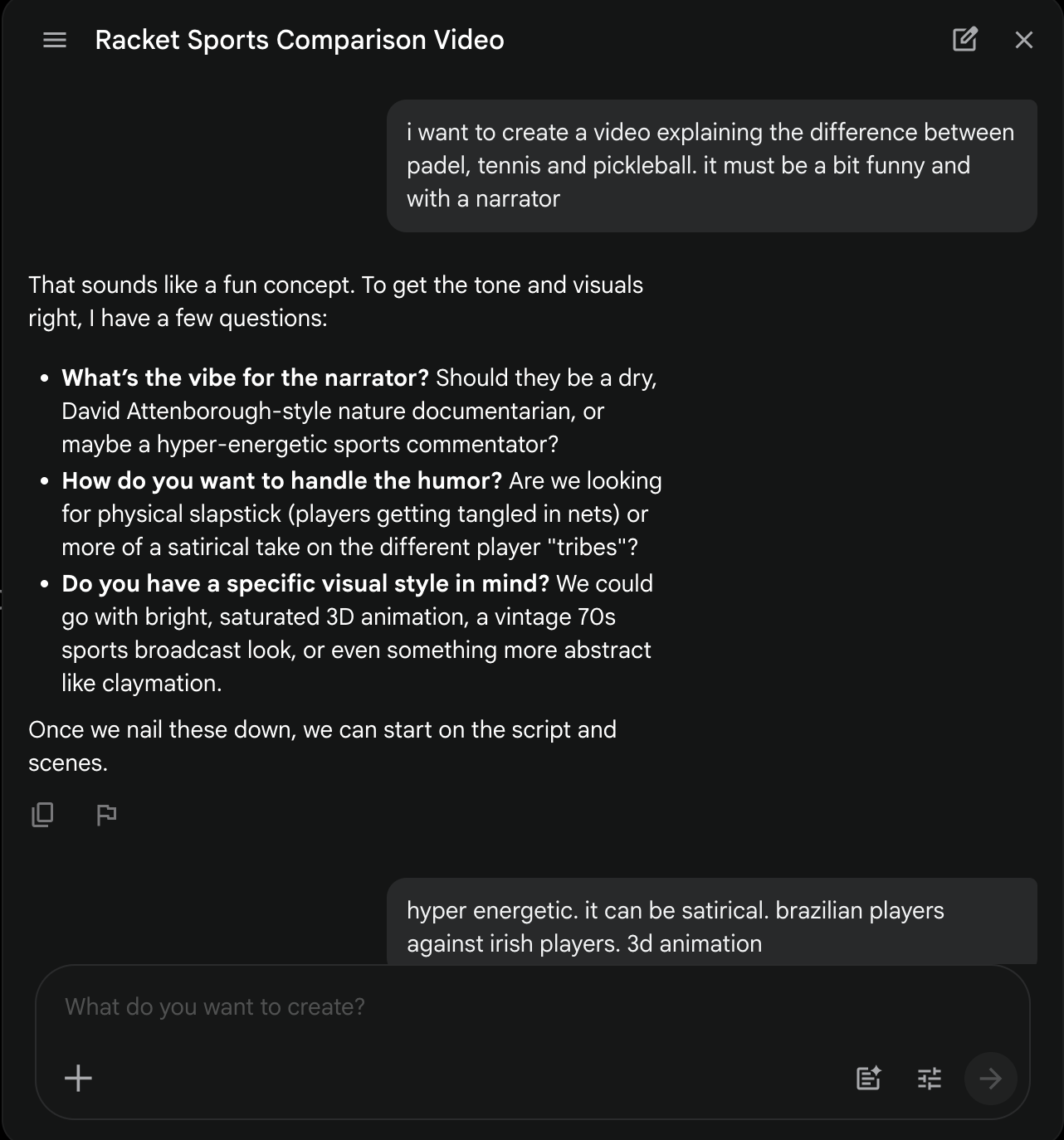
That answer was the entire creative brief. Flow turned it into a working concept, generated a first storyboard, and then waited for feedback. A short back-and-forth was enough to sharpen the angle (lean into the technical differences instead of pure slapstick) and lock the cast, with Flow regenerating the storyboard each time without losing the running context.
The output is a nine-frame storyboard. Six narrative frames cover the gear and rules (rackets, balls, the glass walls of padel, the pickleball Kitchen, the contrasting serves, and a summary cast lineup with “STRINGS / HOLES / PLASTIC” labels), followed by three “Technical Appendices” with court-dimension diagrams for each sport. That last bit is the move that sold me on Storyboard Studio: I never asked for the court dimensions; the model decided that an explainer about racket sports should probably include the actual court sizes, and added them.
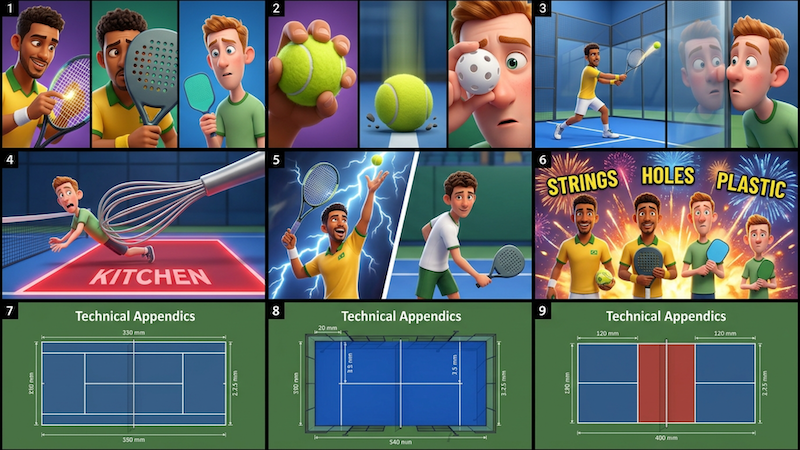
The cast persists across every frame without me having to redescribe a single character, which is the whole point of Storyboard Studio compared to free-form prompting. Scenebuilder spreads the scene-level visual prompts (red clay vs Saturday-morning hard court vs neon padel cage) across the storyboard, so each segment can carry its own setting while sharing the same cast and tone.
The Demo: Tennis vs Pickleball vs Padel
The forty-second cut above is four ten-second Omni Flash renders combined inside Flow’s Scenebuilder. I asked Omni to “extend to thirty seconds” and the chat replied, politely, that ten seconds is the hard cap for a single Omni Flash generation and proposed exactly this workflow: generate one ten-second segment at a time, then stitch them in Scenebuilder. It is the right answer; it is also a real constraint and worth knowing about up front.
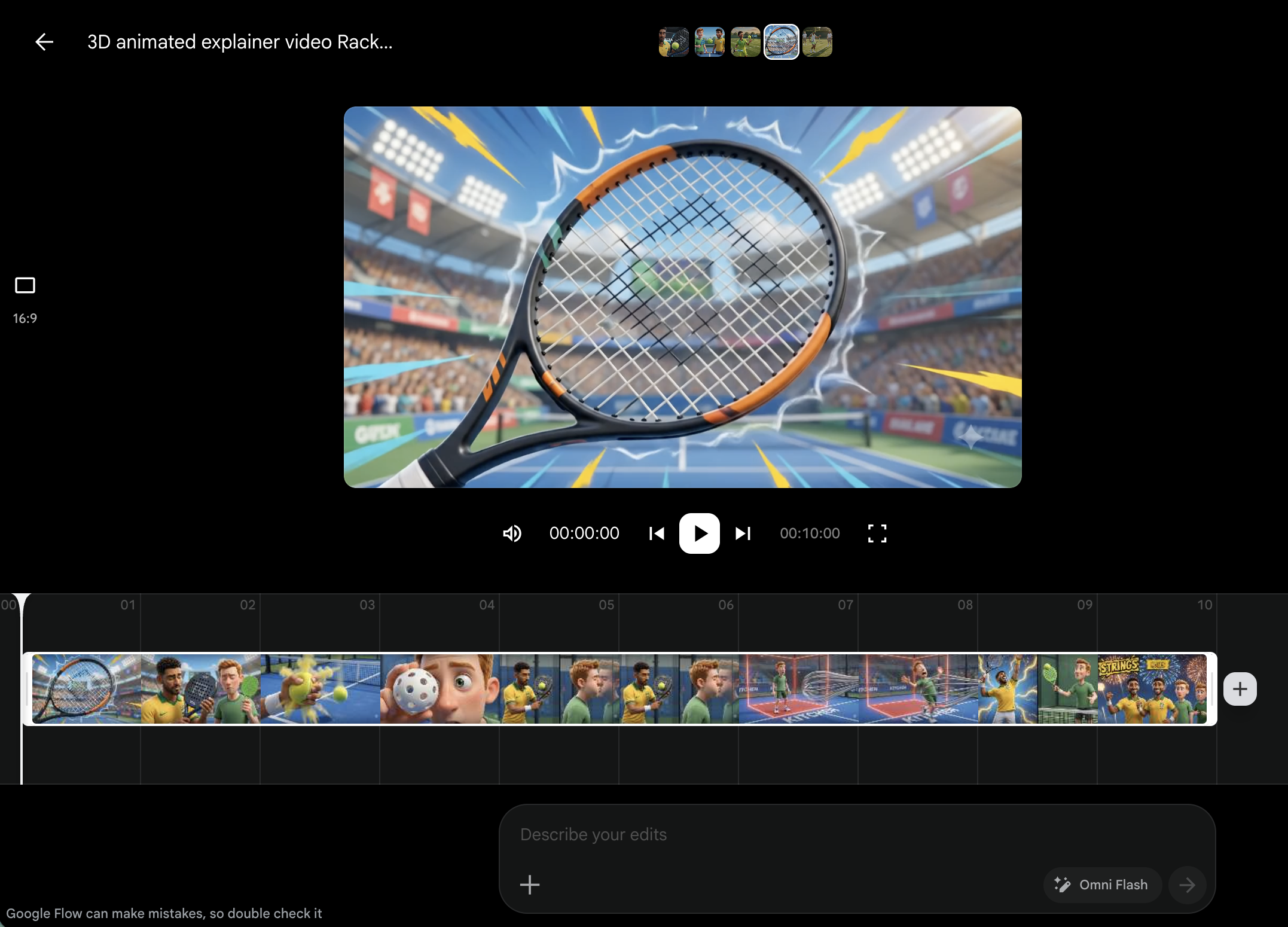
Scenebuilder itself is the unexpectedly useful part. The four clips sit on a single timeline, you scrub between them, and the “Describe your edits” prompt at the bottom routes natural-language edit requests back through Omni Flash on whichever segment you have selected. There is no separate edit mode and no need to leave the chat metaphor; the same conversational loop that wrote the storyboard also rewrites the cuts.
For range, here is a second clip from the same model on the opposite end of the aesthetic spectrum: close to live-action realism rather than the Pixar-style stylization above. Same Flow workflow, same ten-second-per-render cap, very different look.
What Omni nailed:
- Cast continuity across four separate renders. Thiago looks like Thiago in tennis and pickleball; Liam’s beard and unimpressed face survive into the padel segment. This is the bit free-form prompting cannot do, and it is the single biggest argument for using Storyboard Studio over a raw text prompt.
- The Pixar look. Saturation, lighting, and character rigging stay consistent across segments even though the palette shifts (golden hour for tennis, bright cartoon for pickleball, neon arena for padel).
- Sound design. Native audio carries a satirical sports-commentator voice over a samba undertone in the Brazilian beats, with twang / plink / thud foley on the gear. The audio is not muxed in after the fact; it is generated with the frame.
Where it stumbled:
- Failed generations. Two of my renders came back as
Failed(the first tennis take and the first padel take) and had to be re-rolled. Across six or so attempts that is annoying but not blocking; worth budgeting an extra render or two when planning a project. - The ten-second ceiling is real. Without Scenebuilder you would be stuck. With it, the constraint is workable, but it does force you to compose in short phrases and decide cuts up front, which is a different muscle than long-form prompting.
The honest read is that Omni is good at the broad shape of a sport, the tone of the comedy, and cross-segment continuity, and weaker on the small sport-specific details that distinguish similar disciplines. For a satirical thirty-second explainer that gap is funny rather than fatal; for a coaching video it would not be.
Verdict
For short, scene-driven video where the cost of being wrong on a detail is “another edit pass”, Flow on Gemini Omni is genuinely useful today. Storyboard Studio plus Scenebuilder is the part I would not give back: it turns “I have an idea” into a structured plan the model can actually follow, instead of a wall of prompt text. Equally important is the iterate-with-the-chatbot loop that turned a one-sentence brief (“Brazilian players against Irish players, 3d animation”) into a nine-frame storyboard with named cast and technical court diagrams; that conversational layer is most of what makes Flow feel different from a pure prompt-to-video tool. And Scenebuilder is what makes the ten-second per-render cap workable in practice; without it, the per-render ceiling would be a much bigger limitation than the spec sheet suggests.