Claude Managed Agents integrated with Cloudflare Sandboxes
By Fabio Douek
Jump to section
- Overview
- Architecture
- Setup
- Prerequisites
- Step 1: Cloudflare Pre-requisites
- Step 2: Anthropic Pre-requisites
- Step 3: Deploy the template
- Step 4: Wire up the Anthropic side
- Step 5: Push the Anthropic secrets to the Worker
- Step 6: R2 snapshot credentials
- Step 7: Build the PDF-summarizer custom tools
- Step 8: Secure the dashboard
- Testing
- Test 1: MicroVM round-trip
- Test 2: Isolate cold start
- Test 3: The PDF-summarizer custom tool
- Cleanup
- Why this pattern matters
Explain (TLDR) like I am...
Imagine your robot helper has a clever brain that lives at the toy store, and two little hands you can keep in your own toy box. The brain stays where it lives and tells the hands what to do, but the hands play with your toys, in your room, where your rules apply.
The new thing is that you get to pick where the hands live. Some kids park theirs at a big warehouse; I tried mine on a fast little network of houses called Cloudflare. The hands can grab stuff from my own boxes (pictures, lists, notes) without asking the toy store first, which is the part the grown-ups care about.
Treat this as a partial split of the processing surface. Anthropic remains the controller for the agent loop, session log, and skill distribution, while the customer becomes the operator of the tool execution sandbox and its egress path. Material gain: outbound data, secrets, and intermediate artifacts can stay inside the customer perimeter, with the customer choosing the egress policy.
Material caveats: Memory is not supported on self-hosted sandboxes, so durable agent context still lives only in the Anthropic-managed path. The feature is not yet available on Claude Platform on AWS, so AWS-resident customers cannot adopt it today. Webhook integrity relies on a shared signing key, and the default Cloudflare template ships with two open security reports worth tracking before production rollout.
The symptom this treats is the production agent stuck in legal review because tool execution touches data the security team will not let leave the perimeter. The intervention moves the sandbox into customer infrastructure while keeping the model harness on Anthropic, so the agent loop and the credentials it touches no longer share a process.
The evidence base is one day old in public, so adopt with caution. Side effects to monitor: a fail-open dashboard auth path in the reference template, plaintext secrets in policy fingerprints, and the absence of Memory on this code path. Good candidates are teams that already host data on Cloudflare. Poor candidates are AWS-only shops, since Claude Platform on AWS does not yet support this mode.
Notice what shifts when the team can finally answer the security question with a real architecture diagram. The slow background anxiety of "where exactly is our data going while the agent runs" eases, because tool execution now lives inside the perimeter the team already trusts, with the egress controls they already use.
The friction does not disappear, it just moves. The agent loop is still hosted somewhere else, so the conversations about ownership keep going. Teams that hoped self-hosted meant fully on-premises have to talk through the gap honestly. The work is naming what moved, what did not, and what changes about who has to sign off.
Picture the band's brain staying at the studio while the rhythm section moves onto your stage. The model harness keeps time over the wire, you decide which room the bass and drums set up in, and your local crew handles the cabling, the in-ear mix, and who is allowed past the door.
The new instrument in this kit is the custom tool, and on Cloudflare it plugs straight into your existing rig: storage, AI, private services, all reachable as bindings, not network calls. Once the band locks in, the tempo of build days picks up, because fewer hours go to glue code and more go to the parts the audience actually hears.
The story here is enterprise readiness for the team that was almost-but-not-quite ready to ship an agent. Tool execution moves inside the customer perimeter, the security review gets a real architecture diagram, and the time-to-first-useful-agent measured by the launch partner Amplitude was two days from a standing start.
The positioning is not "replace the team", it is "unblock the project that was sitting in compliance for a month." That framing travels well with buyers who already trust Cloudflare for the data plane, and it pairs cleanly with a hands-on demo where the agent reads its inputs from the customer's own bucket and answers using the customer's own AI binding.
 See the source code here: claude-managed-agents-self-hosted-sandboxes
Overview
On 2026-05-19 Anthropic announced two additions to Claude Managed Agents: self-hosted sandboxes (public beta) and MCP tunnels (research preview). The first one is the load-bearing piece. Until this week, every Managed Agents session ran inside an Anthropic-managed cloud container. From this week, you can keep the agent loop on Anthropic and move tool execution into infrastructure you control. Four launch partners are supported out of the gate: Cloudflare, Daytona, Modal, and Vercel.
Anthropic’s own framing is the line you will see everywhere: “the agent loop that handles orchestration, context management, and error recovery stays on Anthropic’s infrastructure, while tool execution moves to your own configured environment.” The shorter way to say it: the brain stays on Anthropic, the hands move into your account. The result is a split control plane: Anthropic owns the model harness and the session log, the customer owns the sandbox and the egress.
I picked Cloudflare for this hands-on because it is the only one of the four backends that exposes platform primitives (R2, D1, KV, Vectorize, Workers AI, Email Routing) as inline bindings to your custom tool code. On Daytona, Modal, and Vercel a tool that reads from object storage makes a network call. On Cloudflare it is a function argument. I deploy the cloudflare/claude-managed-agents template, run a session on both backends it ships with, and then add a cf_list_pdfs / cf_read_pdf tool pair to drive a small PDF-summarizer agent against R2.
A few caveats up front so they do not surprise you in Setup. Memory is not supported on self-hosted sandboxes as of the launch; if your agent needs durable context across sessions, you stay on the Anthropic-managed sandbox for now. The Cloudflare template requires a Workers Paid plan because Containers and Worker Loader bindings gate to it.
Architecture
Here is how the pieces fit together:
The five numbered arrows trace one session through the system:
- Webhook. Anthropic POSTs a
session.status_run_startedevent to/webhookson the Worker, signed withWEBHOOK_SECRET. It is just the doorbell; no tool calls travel on this hop. - Drain. The Worker (
claude-managed-agents-control-plane) responds by callingwork.poller({ drain: true })against/v1/environments/<id>/workto pull queued work items. The queue is the contract; the webhook is just the trigger. - Dispatch. The Worker reads each agent’s chosen backend from D1 and routes the session into one of two backends. Either one runs the standard toolset (
bash,read,write,edit,glob,grep) in-sandbox.- Sandbox (MicroVM): a
standard-1Container Durable Object runningant beta:worker run --workdir /workspace, with/workspacesnapshotted to R2 on idle. - IsolateRunner: a V8 isolate spun up via Worker Loader and backed by the
@cloudflare/shellSQLite filesystem (state persists through the Durable Object’s SQLite storage automatically).
- Sandbox (MicroVM): a
- Callback. When a custom tool fires, the sandbox dispatches it back to the Worker’s tool runtime, not to anything inside the sandbox. Custom tool code therefore executes in the Worker’s V8 isolate. The sandbox is for code the agent itself writes and runs; custom tools are first-class glue between the agent and your platform.
- Bindings. With the tool now executing in the Worker,
env.PDFS.get(key),env.AI.run(...),env.DB.prepare(...)and friends are first-class function arguments, not HTTPS endpoints with credentials and round-trips. R2, KV, D1, Vectorize, Workers AI, VPC/Mesh and Email all reach the agent the same way.
Setup
Prerequisites
- A Cloudflare account on the Workers Paid plan ($5/month minimum). Containers and Worker Loader bindings gate to paid; the free plan will not deploy this template.
- An Anthropic workspace with Managed Agents enabled (Step 2 mints the API key the Worker will use).
- Docker running locally for the first container image build. (Subsequent deploys cache.)
wrangler4.76 or later, Node 22 or later. The template installs the rest.
Step 1: Cloudflare Pre-requisites
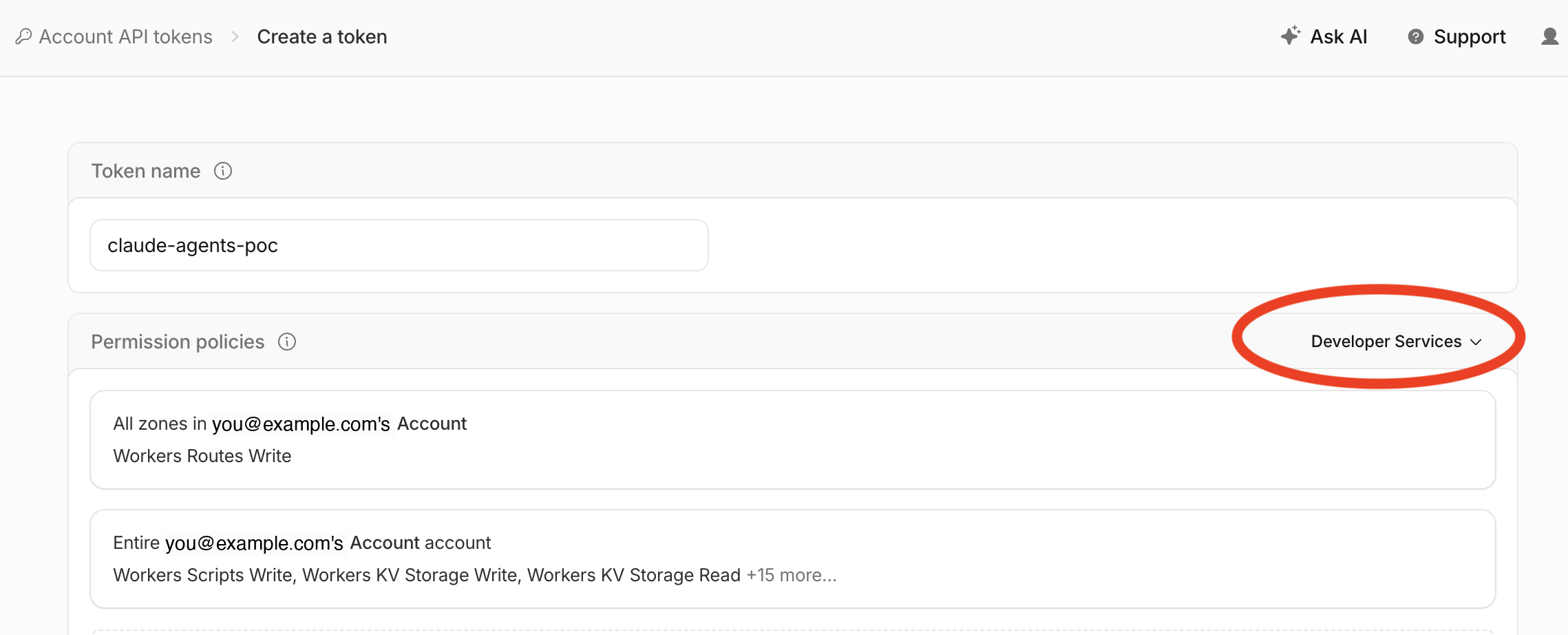
A small bit of Cloudflare-side prep before you touch any code. The goal of this step is to mint an account-scoped API token the template will use for Browser Rendering REST calls and other dashboard-driven actions. R2 access keys come from a different page later in Step 6.
- Open the Cloudflare dashboard’s API tokens page: https://dash.cloudflare.com/?to=/:account/api-tokens. The
:accountsegment is a Cloudflare deeplink placeholder that resolves to whichever account you have selected. - Click Create Token. Give it a recognisable name (I used
claude-agents-poc). - Under Permission policies, pick the Developer Services template. This preset bundles the Workers, KV, R2, D1, and account-scoped permissions the control-plane Worker needs without you having to assemble them by hand.
-
Click Create Token, then copy the value and keep it somewhere safe. You will push it as the
CLOUDFLARE_API_TOKENsecret later if you enable Browser Rendering REST tools. Cloudflare only shows the token once. -
Grab your Account ID while you are in the dashboard. It is on the account home page (or the right-hand sidebar of any zone) labelled
Account ID. The template uses it later in Step 6 for the R2 snapshot path. -
Export both values in the terminal you will use for the rest of Setup, so the
wranglercommands further down can pick them up automatically:export CLOUDFLARE_ACCOUNT_ID=<your-account-id> export CLOUDFLARE_API_TOKEN=<the-token-you-just-created>
Step 2: Anthropic Pre-requisites
A short detour onto the Anthropic side before the deploy. The control-plane Worker needs an organization-scoped Claude Platform API key (the sk-ant-... token, not the environment key from Step 4) to call Anthropic’s monitoring endpoints. Mint it now so you have it ready when secrets get pushed in Step 5.
-
Open the Claude Platform Console and navigate to Organization Settings → API Keys.
-
Click Create Key. Pick the workspace (I used
Default), give it a recognisable name (I usedcloudflare-worker), and click Add.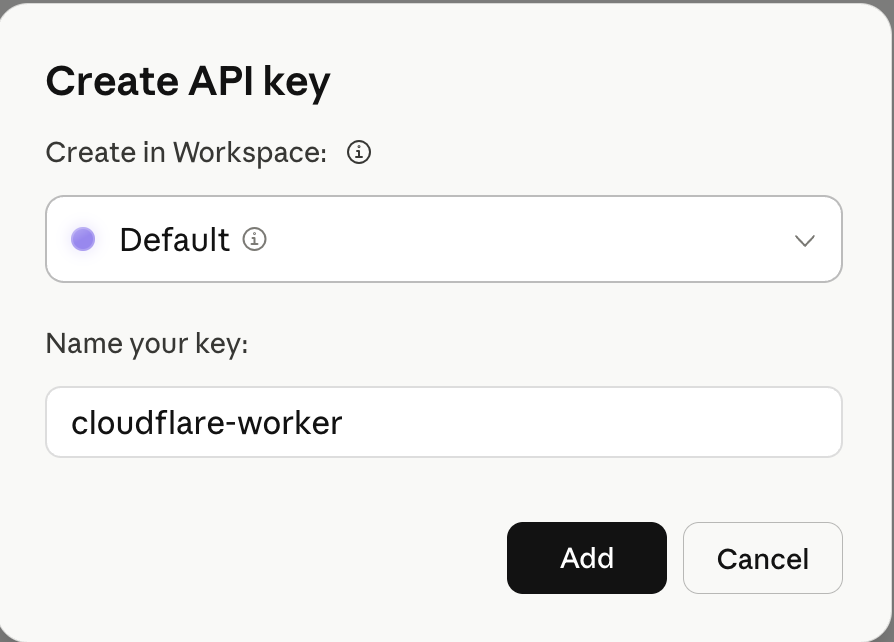
-
Copy the key value when it is shown. Anthropic only displays the full value once.
You will push it as the ANTHROPIC_API_KEY secret in Step 5. Keep it on the Worker side only; it is an organization-scoped credential and must not be exposed to sandbox code.
Step 3: Deploy the template
There are two paths: the Deploy to Cloudflare button (forks the repo into your account and provisions resources via the Cloudflare dashboard) or the terminal. I used the terminal because I wanted to read what was happening.
git clone https://github.com/cloudflare/claude-managed-agents
cd claude-managed-agents
npm install
Two patches the upstream template currently needs
As of 2026-05-26 the upstream cloudflare/claude-managed-agents template ships with two bugs that prevent the demo agent from completing a single tool round-trip end-to-end. I hit both on my first deploy and want to flag them honestly. Apply the patches below in the freshly-cloned claude-managed-agents directory before running npm run deploy.
Patch A: bump the sandbox base image to a Python-enabled variant. The default Dockerfile pins to cloudflare/sandbox:0.10.1, which does not ship Python. Test 1’s prompt asks the agent to run a Python script; the bash tool fails with python3: command not found and the agent burns turns trying apt-get install python3 instead of just running the file. The fix is a one-line bump to the -python variant:
# Before (Dockerfile:4)
FROM docker.io/cloudflare/sandbox:0.10.1

# After
FROM docker.io/cloudflare/sandbox:0.10.2-python
Patch B: trust the egress-proxy CA on every dispatch. The base image mounts the Cloudflare egress-proxy CA at /etc/cloudflare/certs/cloudflare-containers-ca.crt but never adds it to the system trust store. Outbound HTTPS from the container fails with self-signed certificate in certificate chain, ant can’t reach api.anthropic.com, and every session stalls at requires_action after the first tool call. An ENTRYPOINT wrapper does not help: Cloudflare’s container runtime overrides ENTRYPOINT at boot. Run the trust step from the Worker instead: open src/microvm/sandbox.ts and insert the block below right after the setEnvVars try/catch (around line 416):
// Trust the Cloudflare egress-proxy CA the platform mounts at
// /etc/cloudflare/certs/cloudflare-containers-ca.crt. The base image
// docs claim the runtime auto-trusts it on startup; in 0.10.2-python
// it does not, and outbound HTTPS from the container fails with
// `self-signed certificate in certificate chain` until the cert is
// added to the system trust store. Without this every session stalls
// at `requires_action` after the first tool_use.
try {
  const trustResult = await this.exec(
    "if [ -f /etc/cloudflare/certs/cloudflare-containers-ca.crt ] && [ ! -f /usr/local/share/ca-certificates/cloudflare-containers-ca.crt ]; then cp /etc/cloudflare/certs/cloudflare-containers-ca.crt /usr/local/share/ca-certificates/ && update-ca-certificates >/dev/null 2>&1; fi",
    { timeout: 15000 },
  );
  if (trustResult.exitCode !== 0) {
    console.warn(
      `[sandbox] CA trust step exited ${trustResult.exitCode} for ${opts.sessionId}: ${trustResult.stderr || trustResult.stdout}`,
    );
  }
} catch (error) {
  console.warn(
    `[sandbox] CA trust step threw for ${opts.sessionId}: ${toErrorMessage(error)}`,
  );
}
With both patches in place, deploy:
npm run deploynpm run deploy fails at the very end with error saving credentials ... User interaction is not allowed. (-25308) (after the Worker upload and Container image build have both succeeded), that is the macOS login keychain refusing to store the Cloudflare container-registry credential without a GUI prompt. Unlock it in the same shell with security unlock-keychain ~/Library/Keychains/login.keychain-db and re-run npm run deploy. The Worker step is idempotent and the image build hits the Docker layer cache, so the retry is cheap.
The first npm run deploy does a lot:
- Runs the
prebuildstep (scripts/ensure-kv.mjs,ensure-d1.mjs,sync-vpc-bindings.mjs,copy-redoc.mjs), which provisions or looks up your KV namespaces and D1 database, then patches their IDs into a working copy ofwrangler.jsonc. - Builds the Vite frontend.
- Builds the Container image from the local
Dockerfile. This is the slow step, 2-3 minutes the first time. - Deploys via Wrangler.
Successful deploy output (push, container app create, worker deploy, D1 migration)
Login Succeeded
no such manifest: registry.cloudflare.com/<account-id>/claude-managed-agents-sandbox@sha256:<digest>
Image does not exist remotely, pushing: registry.cloudflare.com/<account-id>/claude-managed-agents-sandbox:<image-tag>
The push refers to repository [registry.cloudflare.com/<account-id>/claude-managed-agents-sandbox]
<layer-id>: Pushed
<layer-id>: Pushed
... (17 layers pushed total)
<image-tag>: digest: sha256:<digest> size: 4035
╭ Deploy a container application deploy changes to your application
│
│ Container application changes
│
├ NEW claude-managed-agents-sandbox
│
│   {
│     "containers": [
│       {
│         "name": "claude-managed-agents-sandbox",
│         "scheduling_policy": "default",
│         "configuration": {
│           "image": "registry.cloudflare.com/<account-id>/claude-managed-agents-sandbox:<image-tag>",
│           "instance_type": "standard-1",
│           "observability": { "logs": { "enabled": true } }
│         },
│         "instances": 0,
│         "max_instances": 100,
│         "constraints": { "tiers": [1, 2] },
│         "durable_objects": { "namespace_id": "<do-namespace-id>" },
│         "rollout_active_grace_period": 1800
│       }
│     ]
│   }
│
│  SUCCESS  Created application claude-managed-agents-sandbox (Application ID: <application-id>)
│
╰ Applied changes

Deployed claude-managed-agents-control-plane triggers (2.66 sec)
  https://claude-managed-agents-control-plane.<account>.workers.dev
  schedule: 0 4 * * *
Current Version ID: <version-id>

> npm run db:migrate:remote
> wrangler d1 migrations apply DB --remote

Migrations to be applied:
┌───────────────┐
│ name          │
├───────────────┤
│ 0001_init.sql │
└───────────────┘
🌀 Executing on remote database DB (<d1-db-id>)
🚣 Executed 16 commands in 1.97ms
┌───────────────┬────────┐
│ name          │ status │
├───────────────┼────────┤
│ 0001_init.sql │ ✅     │
└───────────────┴────────┘
A few things worth flagging from that output:
- Container application defaults:
instances: 0withmax_instances: 100. The control plane scales sandboxes up on demand, nothing runs idle. - Rollout grace period:
rollout_active_grace_period: 1800, which is 30 minutes for in-flight sessions to complete during a rollout before they get cut over. - D1 migration runs automatically: the
postdeployhook applieswrangler d1 migrations apply DB --remoteagainst your production database without prompting. Fine for first deploy; worth knowing for subsequent ones. - Two Wrangler warnings:
workers_devandpreview_urlsaren’t explicitly set inwrangler.jsonc, so both default to enabled. That is fine for the dashboard, but setpreview_urls = falsein the Wrangler config before pointing real traffic at this Worker.
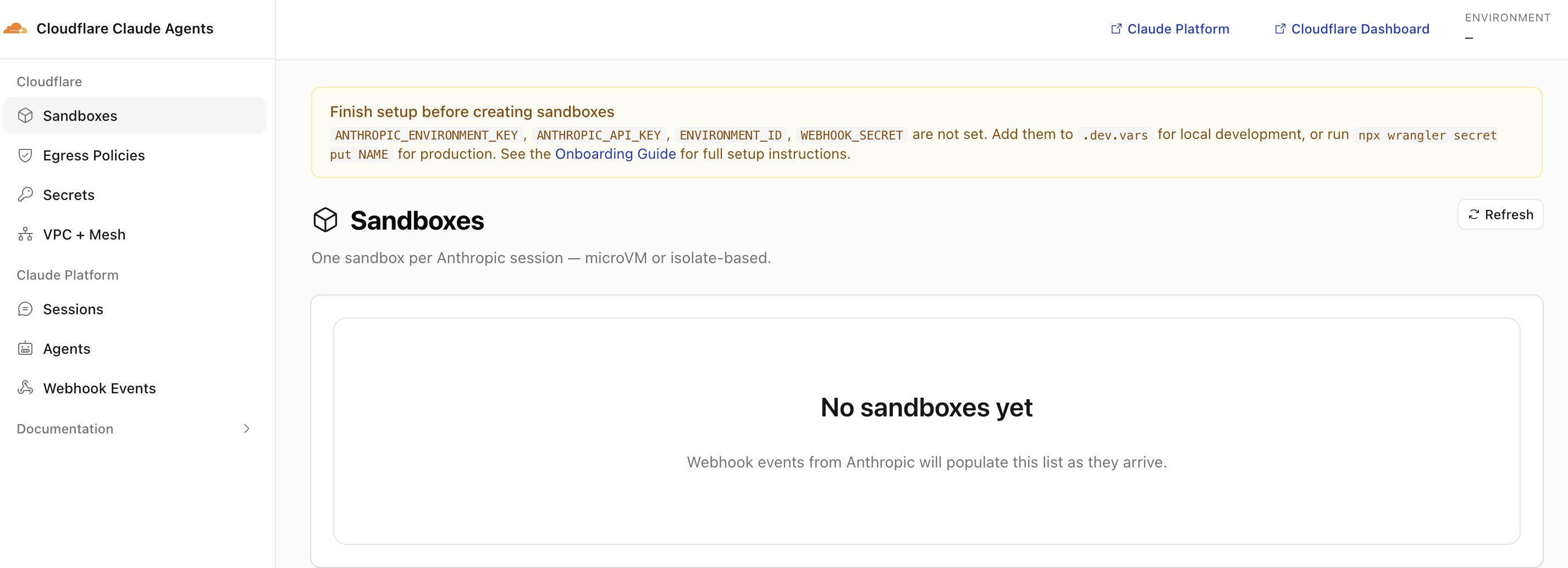
Visit the deployed Worker URL now and you should see the control-plane dashboard with a yellow “Finish setup before creating sandboxes” banner. This is expected: the Worker is healthy, but the four Anthropic secrets (ANTHROPIC_ENVIRONMENT_KEY, ANTHROPIC_API_KEY, ENVIRONMENT_ID, WEBHOOK_SECRET) have not been pushed yet. Steps 4 and 5 close that gap.
Step 4: Wire up the Anthropic side
In the Claude Platform Console I created a self-hosted environment and a webhook:
-
Workspaces → Environments → Add environment. Give it a name (I used
cloudflare-sandbox) and set Hosting type to Self-hosted. The hosting type cannot be changed after creation, so pick it now. Submit. This gives you theENVIRONMENT_ID.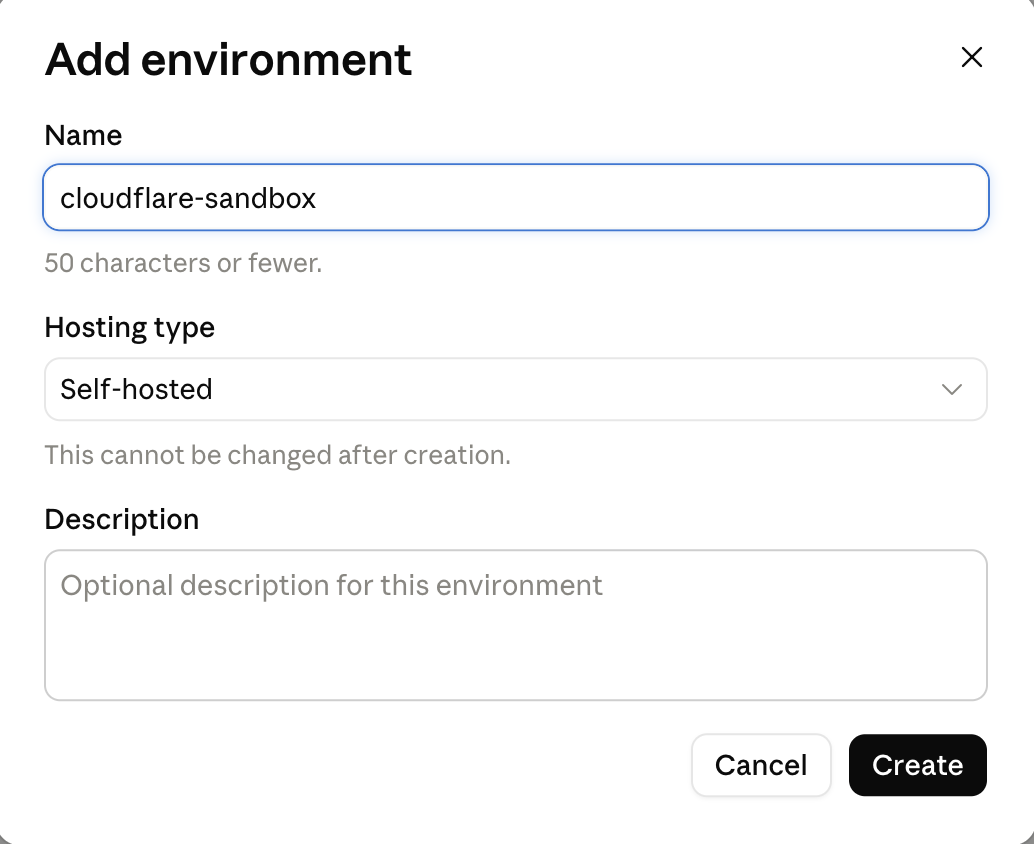
-
Inside the new environment, click Generate Environment Key. Give the key a name (I used
cloudflare-dev) and click Create. Anthropic then reveals theANTHROPIC_ENVIRONMENT_KEYvalue in thesk-ant-oat01-...format. Copy it now; this is the only time the full value is shown.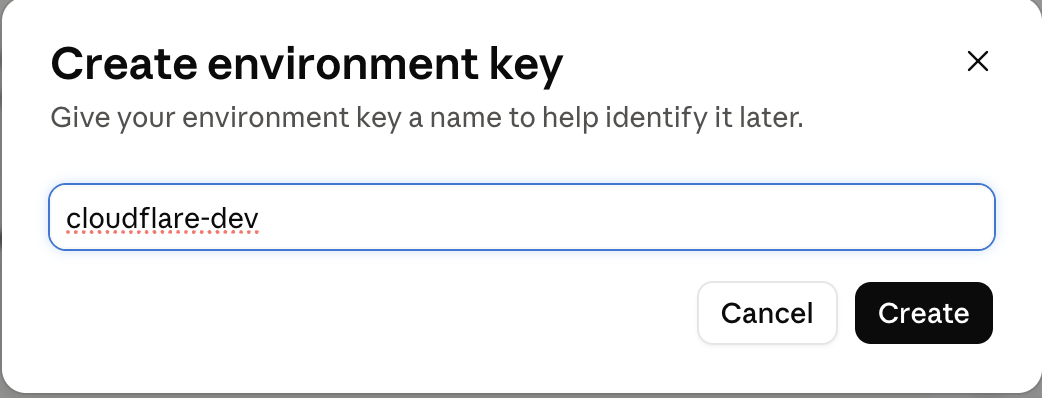
-
Manage → Webhooks, point at
https://<your-worker>.<account>.workers.dev/webhooks. The console returns aWEBHOOK_SECRET(Standard Webhooks HMAC).
requires_action forever, the dashboard never advances, and wrangler tail shows no incoming POST /webhooks, your webhook subscription is probably in Anthropic's "active but not delivering" stuck state. I hit this and confirmed via Cloudflare edge analytics that zero attempts ever reached the Worker. The Console disable + re-enable toggle does not clear it. Only a full delete and recreate of the subscription forces Anthropic to provision a fresh delivery state. Anthropic exposes no API to inspect or diagnose this from outside the Console; deletion and recreation is the only known fix.
Step 5: Push the Anthropic secrets to the Worker
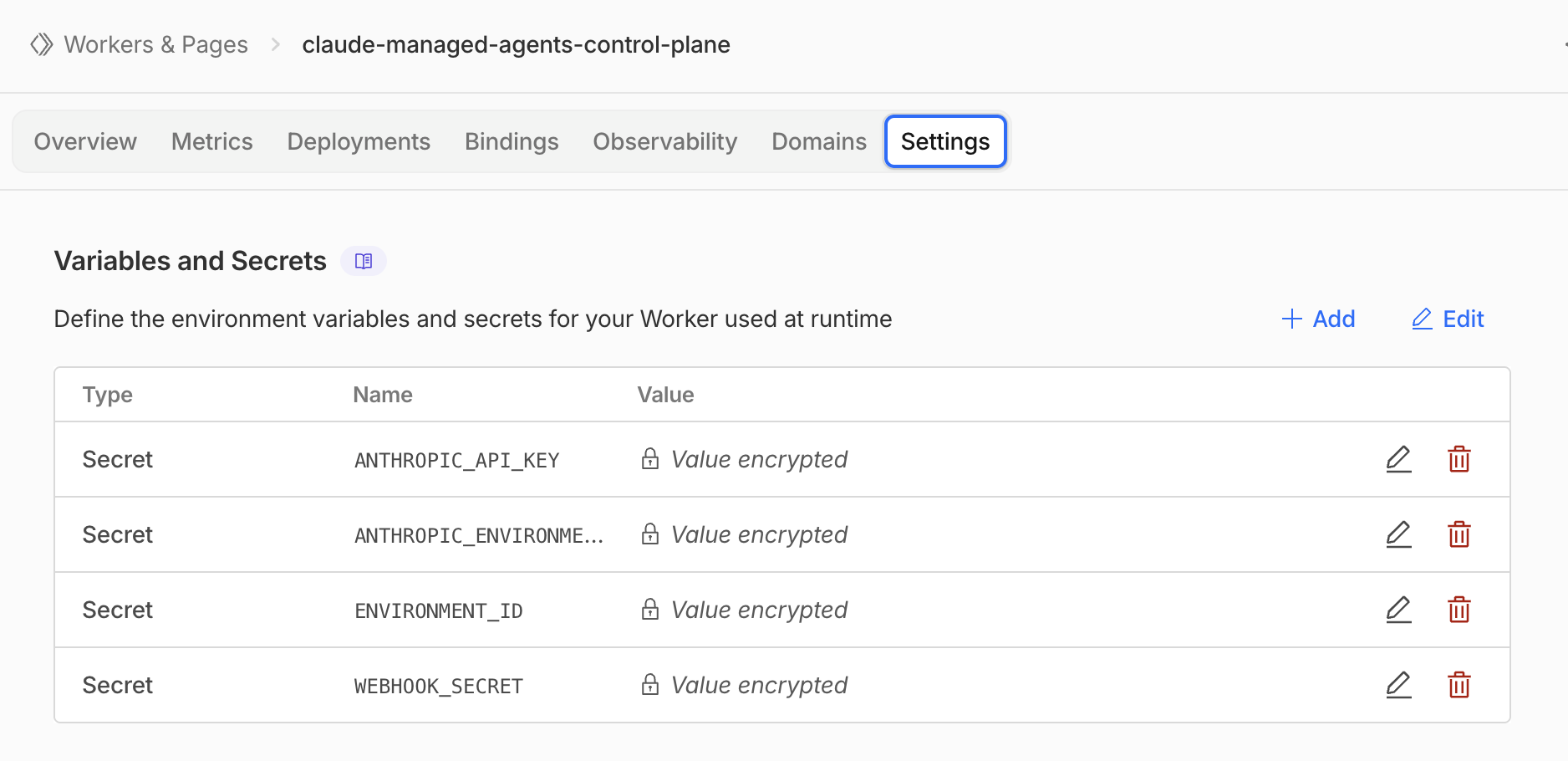
Steps 2 and 4 produced four values (ANTHROPIC_API_KEY, ENVIRONMENT_ID, ANTHROPIC_ENVIRONMENT_KEY, WEBHOOK_SECRET) that need to land in the Worker as secrets before it can drain work or verify webhooks. Keep ANTHROPIC_API_KEY on the Worker only; it is organization-scoped and must not leak into the sandbox env.
npx wrangler secret put ENVIRONMENT_ID            --name claude-managed-agents-control-plane
npx wrangler secret put ANTHROPIC_ENVIRONMENT_KEY --name claude-managed-agents-control-plane
npx wrangler secret put ANTHROPIC_API_KEY         --name claude-managed-agents-control-plane
npx wrangler secret put WEBHOOK_SECRET            --name claude-managed-agents-control-plane
The --name claude-managed-agents-control-plane flag pins each secret put to the deployed Worker by name. It makes the command directory-independent (you can run it from anywhere) and avoids the failure mode where Wrangler picks up the wrong wrangler.jsonc from your shell’s cwd.
After all four secrets are pushed, reload the dashboard. The yellow “Finish setup” banner should be gone and you can start creating agents. You can also verify the secrets landed from the Cloudflare dashboard side: navigate to Workers & Pages → claude-managed-agents-control-plane → Settings → Variables and Secrets, where the four entries should be listed with their values shown as Value encrypted.
Step 6: R2 snapshot credentials
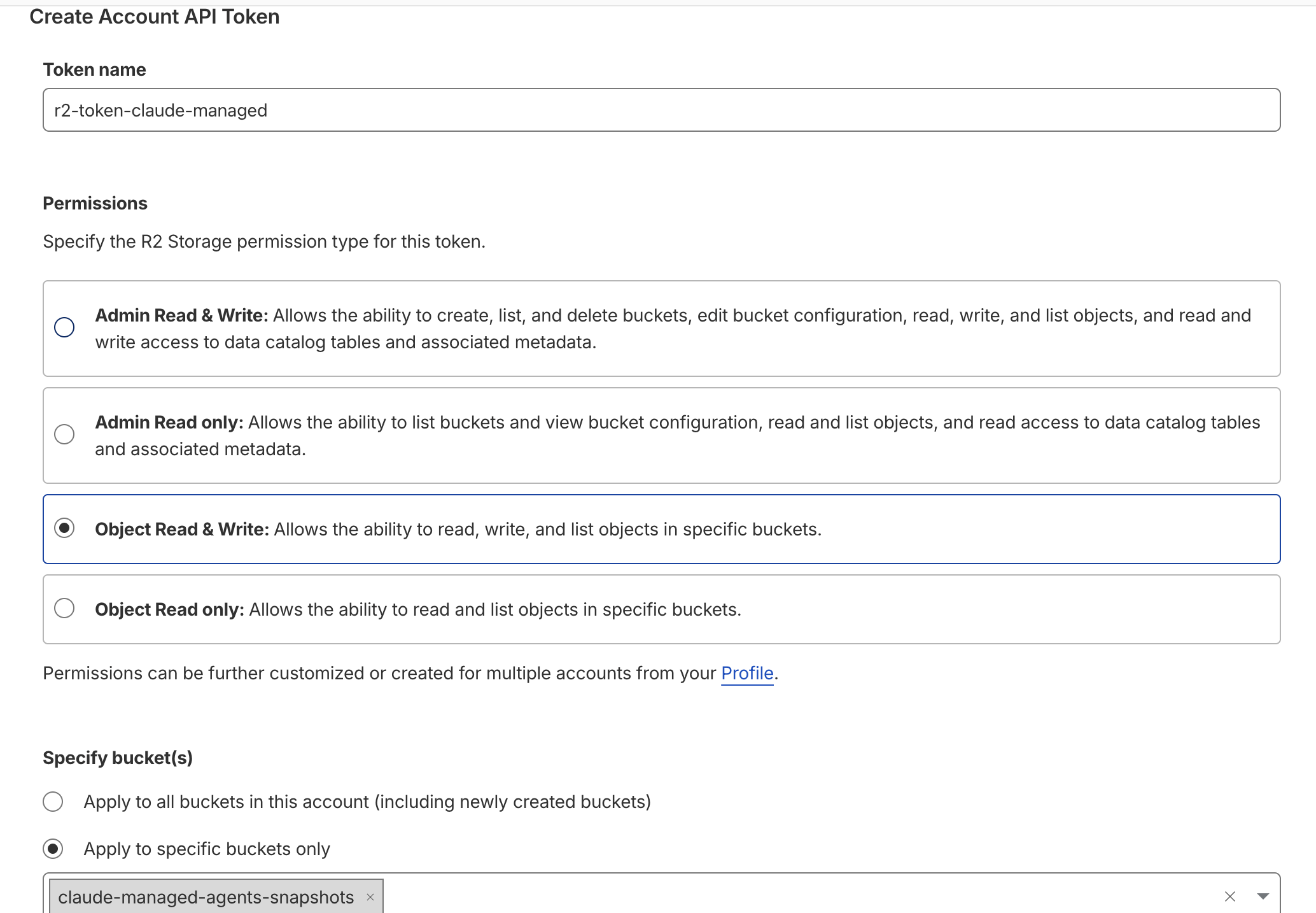
The MicroVM backend snapshots /workspace to R2 when a session goes idle. Mint an R2 access key scoped to the claude-managed-agents-snapshots bucket (the template creates the bucket on first deploy).
- Open the Cloudflare R2 API tokens page and click Create Account API Token.
- Give the token a recognisable name (I used
r2-token-claude-managed). - Under Permissions, pick Object Read & Write.
- Under Specify bucket(s), choose Apply to specific buckets only and select
claude-managed-agents-snapshots. - Submit. Cloudflare will reveal the access key ID and secret access key once; copy both immediately.
Then push the four R2-related secrets:
npx wrangler secret put R2_ACCESS_KEY_ID     --name claude-managed-agents-control-plane
npx wrangler secret put R2_SECRET_ACCESS_KEY --name claude-managed-agents-control-plane
npx wrangler secret put BACKUP_BUCKET_NAME   --name claude-managed-agents-control-plane   # value: claude-managed-agents-snapshots
npx wrangler secret put CLOUDFLARE_ACCOUNT_ID --name claude-managed-agents-control-plane
If you are running Isolate-only, you can skip this step; Durable Object SQLite handles state. I kept it because I wanted to test both backends.
Step 7: Build the PDF-summarizer custom tools
Two custom tools, cf_list_pdfs and cf_read_pdf, that read PDFs straight out of an R2 bucket. The agent uses them in Test 3. All work happens inside the claude-managed-agents clone from Step 3; the companion repo ships the finished files if you want to copy rather than type.
Custom tools live in src/tools/custom-tools.ts. Each one is a typed function the agent can call by name; the body runs inside the Worker with direct access to every binding you’ve declared in wrangler.jsonc (R2, KV, D1, Workers AI, VPC services, Email Routing). The two examples below read PDF objects out of R2 and return their extracted text.
7.1 Add the PDFS R2 binding
Open wrangler.jsonc and add a PDFS binding to the existing r2_buckets array (the array already contains BACKUP_BUCKET from the snapshot path; add PDFS alongside):
"r2_buckets": [
  {
    "binding": "BACKUP_BUCKET",
    "bucket_name": "claude-managed-agents-snapshots"
    // ... (existing fields)
  },
  {
    "binding": "PDFS",
    "bucket_name": "claude-managed-agents-pdfs",
    "preview_bucket_name": "claude-managed-agents-pdfs-preview"
  }
]
7.2 Create the bucket
npx wrangler r2 bucket create claude-managed-agents-pdfs(The preview_bucket_name above is optional and only needed if you run wrangler dev locally; you can create it with npx wrangler r2 bucket create claude-managed-agents-pdfs-preview if you want it.)
7.3 Write the two custom tools
Replace the contents of src/tools/custom-tools.ts with:
import { z } from "zod";
import { defineTool, type CustomTool } from "./custom-tools-runtime";
import { extractPdfText } from "./pdf-text";

export const CUSTOM_TOOLS: CustomTool[] = [
  defineTool({
    name: "cf_list_pdfs",
    description:
      "List PDF objects in the configured R2 bucket. Returns key and size in bytes (tab-separated) for each object.",
    inputSchema: z.object({
      prefix: z.string().optional().describe("Optional R2 key prefix to filter by, e.g. 'pdfs/'"),
    }),
    requires: (env) => Boolean((env as unknown as { PDFS?: unknown }).PDFS),
    run: async ({ prefix }, { env }) => {
      const pdfs = (env as unknown as { PDFS: R2Bucket }).PDFS;
      const listed = await pdfs.list({ prefix });
      const rows = listed.objects.map((o) => `${o.key}\t${o.size}`);
      return rows.length ? rows.join("\n") : "(no objects found)";
    },
  }),

  defineTool({
    name: "cf_read_pdf",
    description:
      "Fetch a PDF from R2 by key and return its extracted text. Call cf_list_pdfs first to discover keys.",
    inputSchema: z.object({
      key: z.string().describe("R2 object key, e.g. pdfs/q1-2026.pdf"),
    }),
    requires: (env) => Boolean((env as unknown as { PDFS?: unknown }).PDFS),
    run: async ({ key }, { env }) => {
      const pdfs = (env as unknown as { PDFS: R2Bucket }).PDFS;
      const obj = await pdfs.get(key);
      if (!obj) return `error: no object at key ${key}`;
      const buffer = await obj.arrayBuffer();
      const text = await extractPdfText(buffer);
      return text || "(no extractable text)";
    },
  }),
];
Why this matters: pdfs.list() and pdfs.get() are bindings on the Worker, not network calls. No HTTP, no auth handshake, no egress policy to apply. The agent calls the tool, the Worker calls the binding, and R2 answers in a single function call.
7.4 Drop in the PDF text extractor
Copy src/tools/pdf-text.ts from the companion repo into the same path in your clone. It is a ~140-line pure-JS extractor that handles text-based PDFs (reports, articles, slide exports). Image-only or scanned PDFs return (no extractable text).
7.5 Upload sample PDFs
The companion repo ships three public-domain US Government Accountability Office (GAO) Highlights reports in samples/. They have the exact “scope / headline number / risks” structure the demo prompt asks for. Grab them from the companion repo’s samples/ directory (or substitute any text-based PDFs of your own) and upload to the pdfs/ prefix:
npx wrangler r2 object put claude-managed-agents-pdfs/pdfs/gao-cybersecurity.pdf --file ./samples/gao-cybersecurity.pdf
npx wrangler r2 object put claude-managed-agents-pdfs/pdfs/gao-dod-readiness.pdf --file ./samples/gao-dod-readiness.pdf
npx wrangler r2 object put claude-managed-agents-pdfs/pdfs/gao-supply-chain.pdf  --file ./samples/gao-supply-chain.pdf
7.6 Redeploy
From the claude-managed-agents clone you created in Step 3 (not the companion repo; the companion is reference-only for the source files you copied across):
cd ~/path/to/claude-managed-agents   # the cloudflare/claude-managed-agents clone
npm run deploy
The prebuild script preserves your existing KV / D1 ID patches, and Wrangler will diff the new PDFS binding into the deployed Worker. Secrets that were pushed in Steps 5 and 6 persist; you do not re-push them.
That’s the whole demo built. The Testing section below walks through enabling the new tools on a specific agent and running the prompt.
Step 8: Secure the dashboard
The template’s dashboard is not authenticated at the Worker level. There is an open issue (#7) flagging the fail-open behaviour and a corresponding PR (#8) that adds JWT validation inside the Worker; both were open and unmerged as of 2026-05-26. Until that PR lands, wrap the Worker behind Cloudflare Access. Cloudflare Access can protect a Worker directly by name, so every route gets the same login gate without per-route wiring.
8.1 Prerequisites
If you have never used Cloudflare’s Zero Trust suite, set up two things first (Cloudflare’s intro walks through both):
- A Zero Trust organization under your account (pick a team name when prompted; this becomes part of your
https://<team-name>.cloudflareaccess.comlogin URL). - At least one identity provider configured. One-Time PIN is the fastest option (no external IdP needed; Access emails the user a code). For team use you’ll probably want Google, GitHub, Okta, Entra ID, or whichever SSO you already run.
The Zero Trust plan has a free tier that covers up to 50 users, enough for almost any team’s internal dashboard.
8.2 Create a self-hosted Access application protecting the Worker
-
Open the Cloudflare dashboard and go to Zero Trust → Access controls → Applications.
-
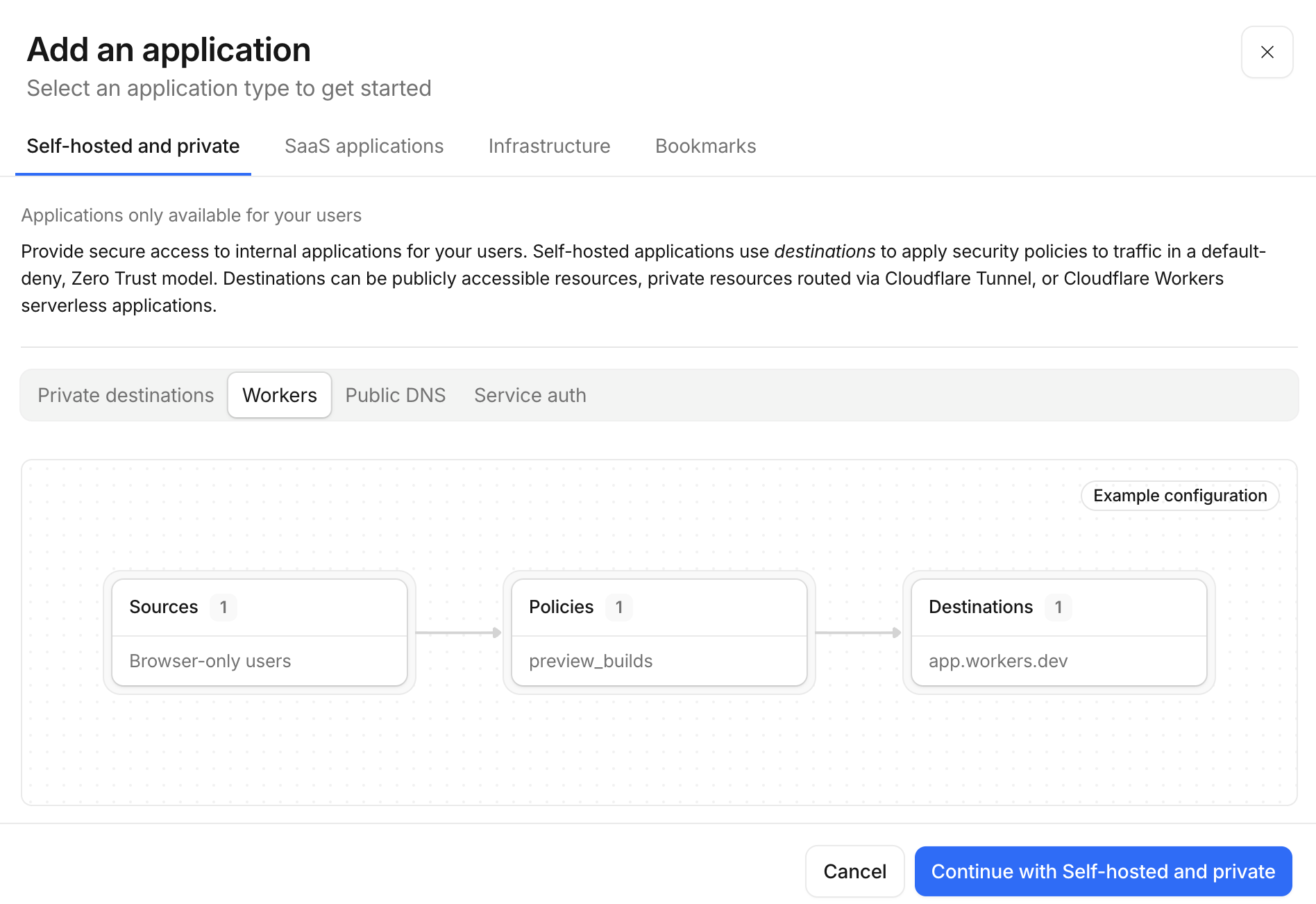
Click Add an application.
-
Select Self-hosted and private.
-
For the destination, choose Add a Cloudflare Worker (rather than “Add public hostname”). Pick
claude-managed-agents-control-planefrom the dropdown. This is the path Cloudflare recommends for Workers because every request to the Worker (on any route, including preview deployments) passes through Access first, with no per-route changes in your code. -
Give the application a recognisable name, for example
claude-managed-agents-dashboard. A 24-hour session duration is a reasonable default; shorten it if the dashboard sits inside a regulated workflow.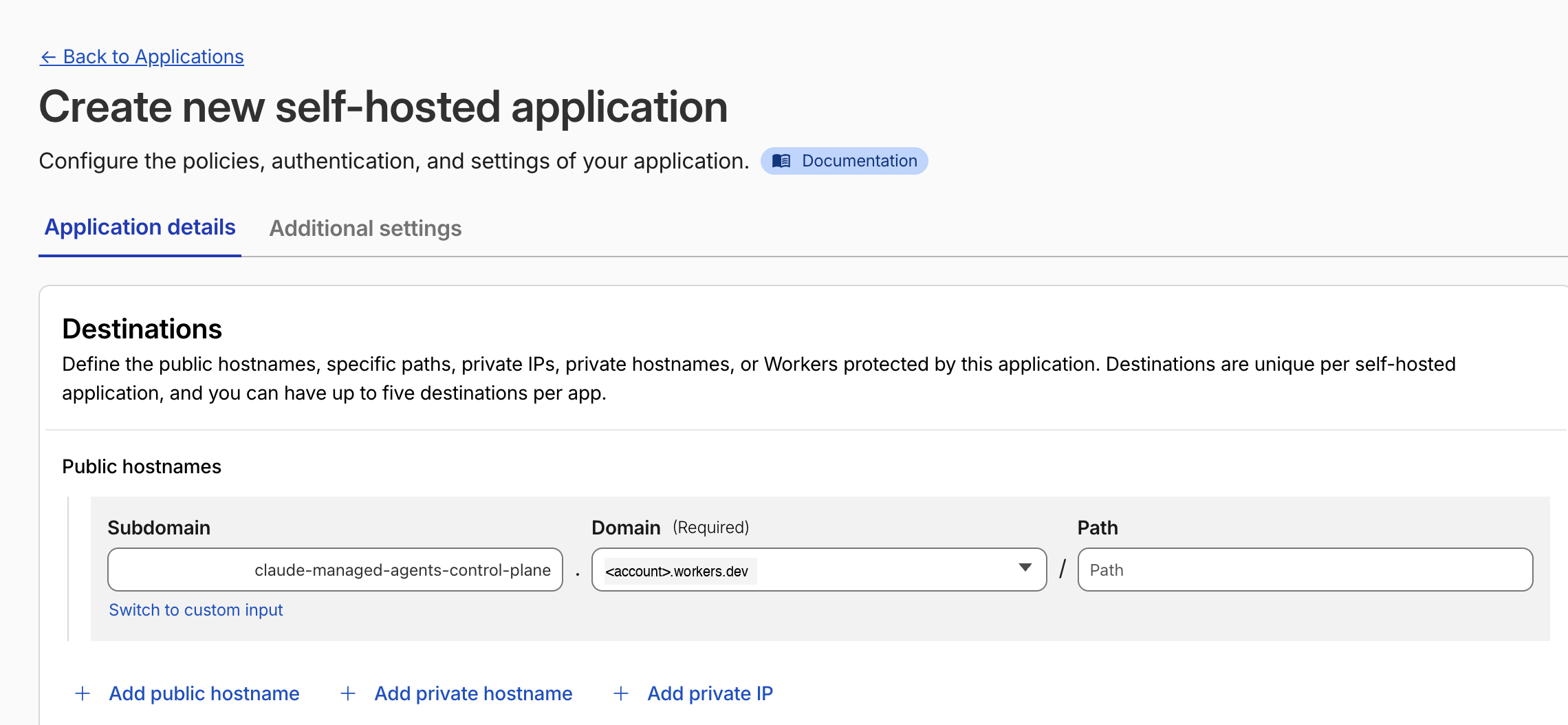
8.3 Add an Access policy
Still in the application creation flow:
-
Select Create new policy.
-
Action:
Allow. -
Include: pick whichever identity check matches your team. Common patterns:
Emails ending in→@yourcompany.com(everyone with a company email).Emails→ explicit list of addresses (small operator team).Identity provider group→ your SSO group (best for larger orgs).
-
Save the policy and attach it to the application.
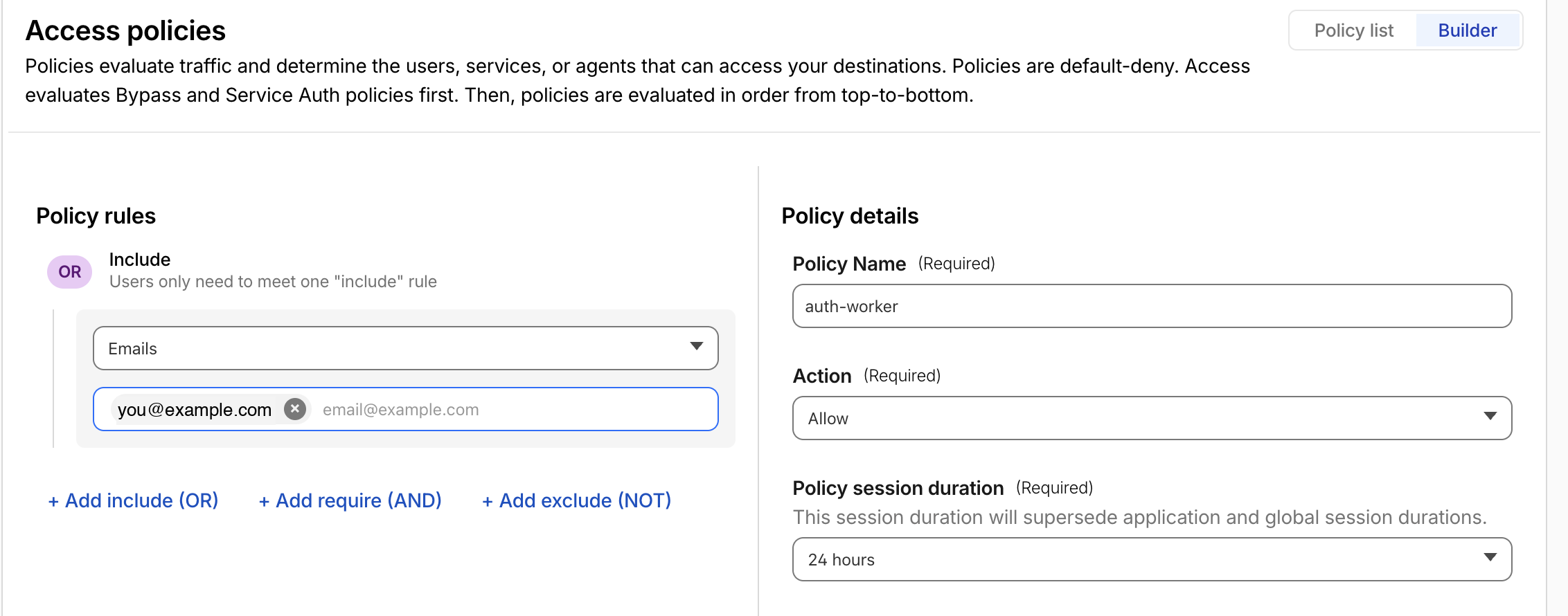
If you want a second factor inside Access, add a Require block (Action: Require) for MFA, country, or Cloudflare One Client posture checks. For a hands-on demo, one Allow policy is enough.
8.4 Pick identity providers
In the Authentication step, tick whichever IdPs you configured in 8.1. If you picked only one and want to skip Cloudflare’s IdP-picker landing page, toggle Apply instant authentication so users go straight to the SSO login flow.
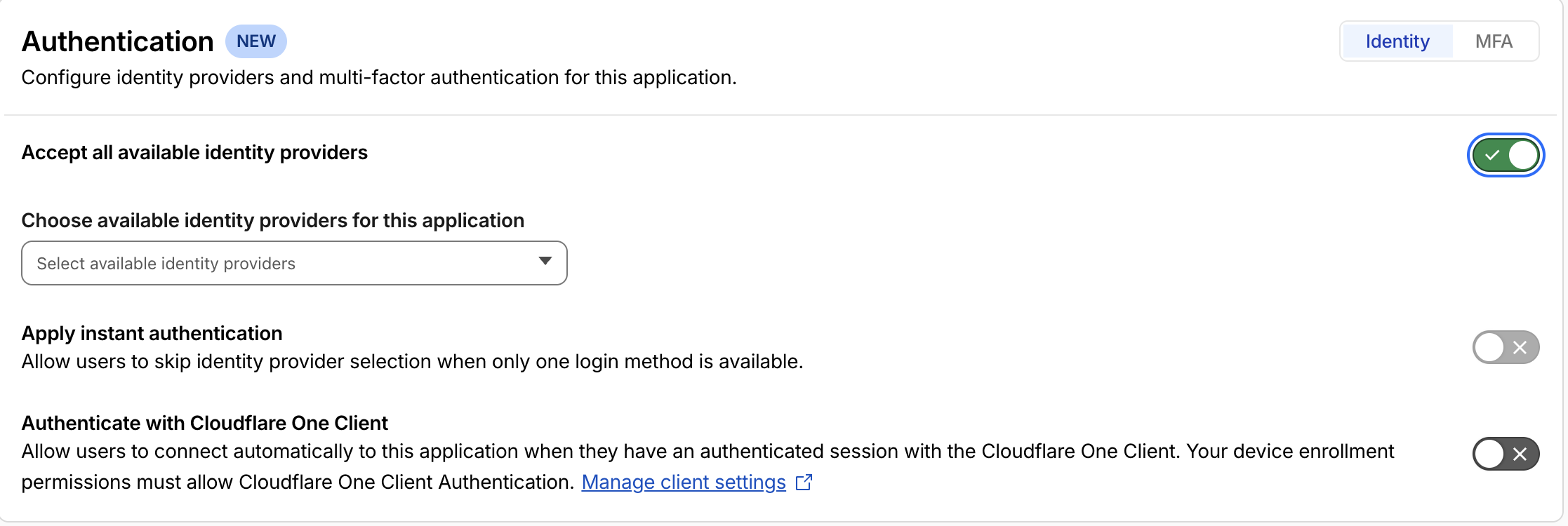
Click Save and finish at the bottom of the page to publish the application.
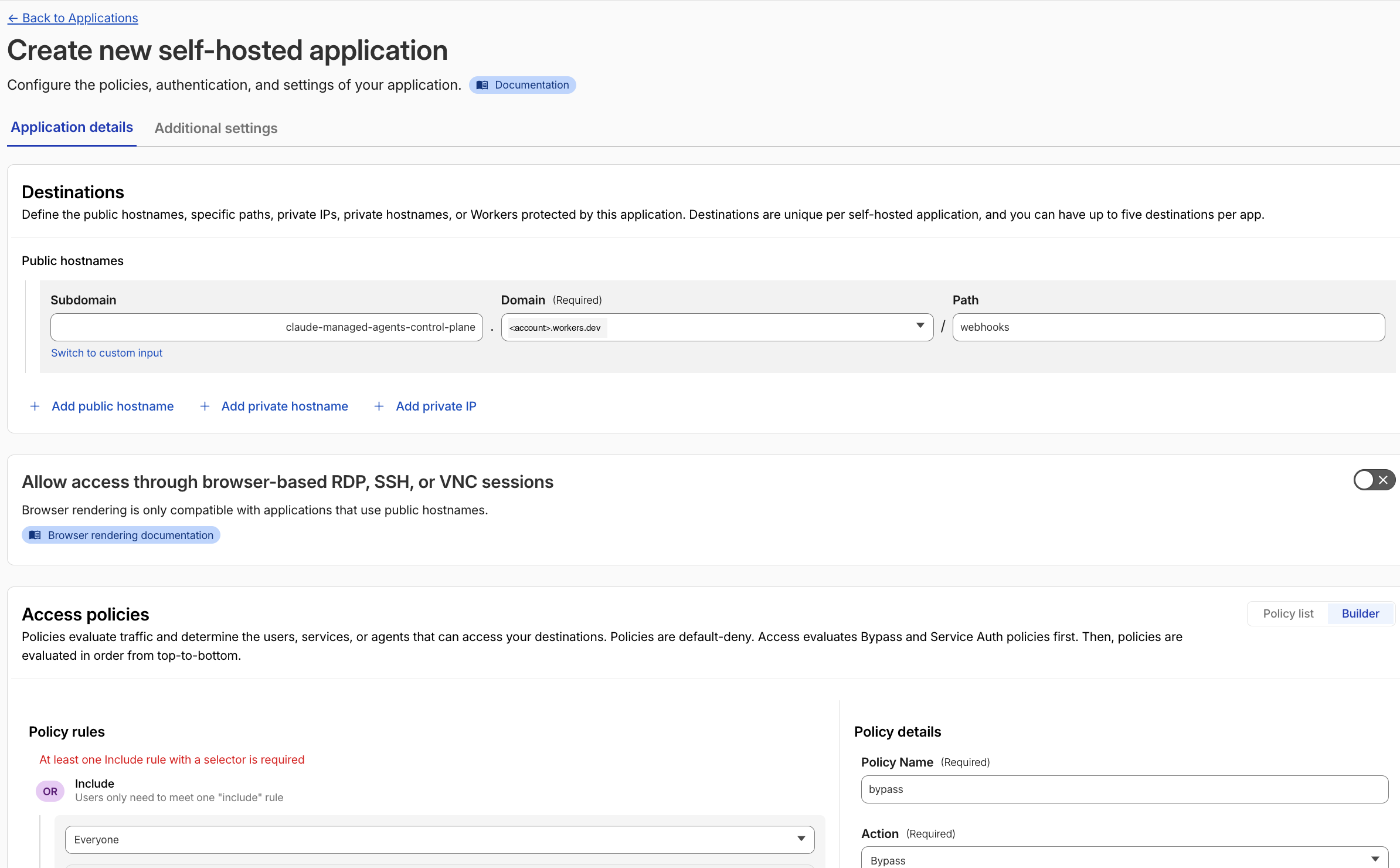
8.5 Bypass /webhooks for Anthropic
The application from 8.2 covers every route on the Worker, including /webhooks. Anthropic’s webhook deliveries don’t carry an Access cookie or any CF-Access-* header, so without an exception they would all 302 to the login page and the dispatch loop would silently break. The fix is a second Access application, scoped to just the /webhooks path, with a Bypass policy. Cloudflare evaluates the more specific (path-scoped) application first, so the bypass wins on that one route while the Worker-name app still gates everything else. The Worker’s own HMAC verification against WEBHOOK_SECRET keeps the route gated by signature even though it bypasses Access.
- Back in Zero Trust → Access controls → Applications, click Add an application again.
- Select Self-hosted and private (same type as the dashboard app).
- For the destination, choose Add public hostname this time, not “Add a Cloudflare Worker”:
- Subdomain:
<your-worker>(e.g.claude-managed-agents-control-plane) - Domain:
<account>.workers.dev - Path:
webhooks
- Subdomain:
- Name the app
claude-managed-agents-webhook-bypass. - In the policy step, create one policy with Action:
Bypassand Include:Everyone. - Skip the Authentication step (Bypass needs no IdPs) and click Save and finish.
8.6 Verify
Open https://<your-worker>.<account>.workers.dev/ in a new private/incognito window. You should be redirected to the Cloudflare Access login page (or, with instant authentication on, straight to your SSO).
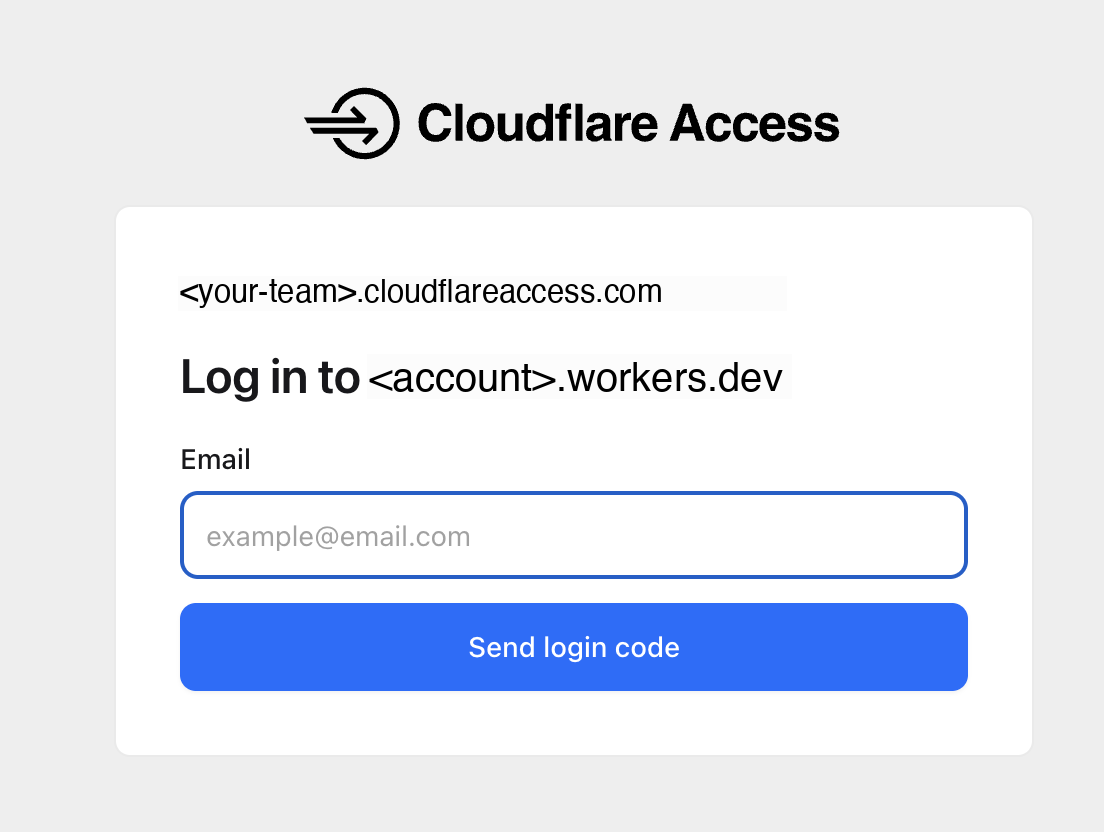
If you chose One-Time PIN as the identity provider, Cloudflare emails a six-digit code and shows the code-entry screen:
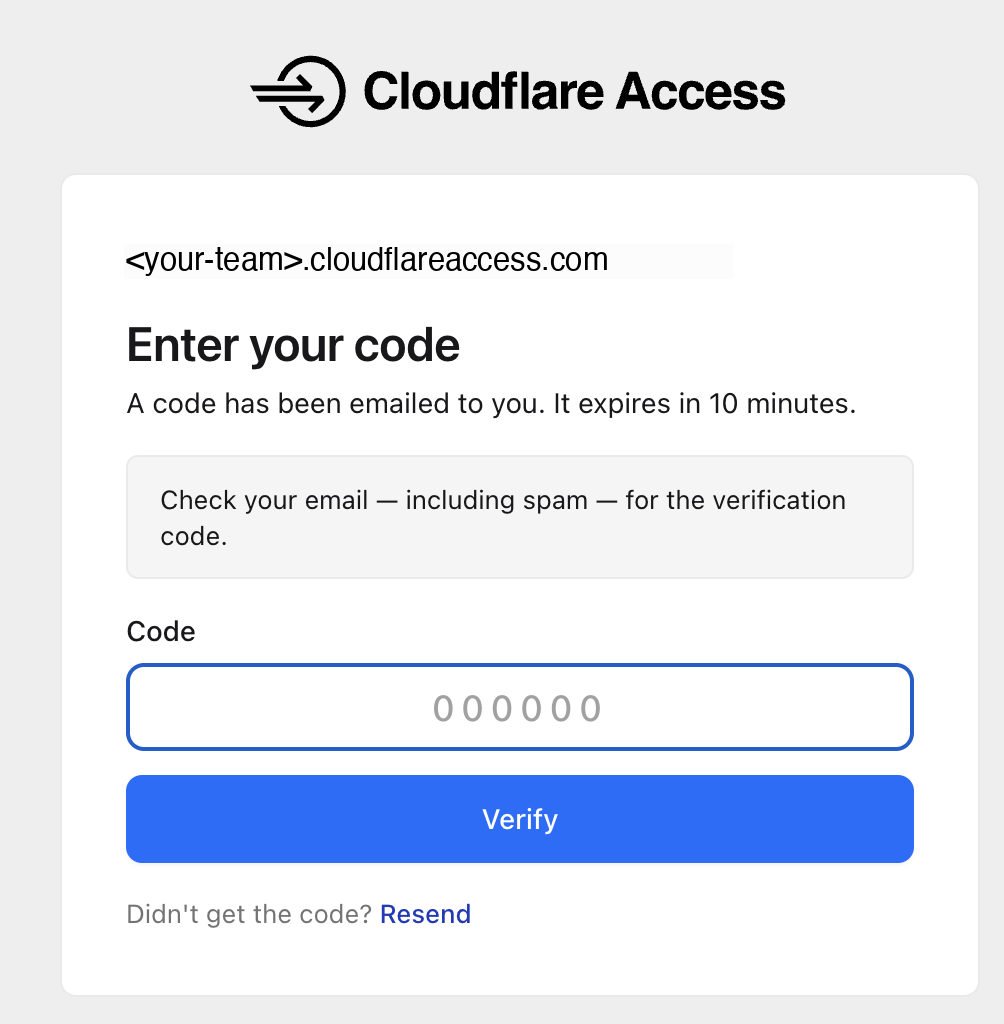
After authenticating, the dashboard loads. Cloudflare sets a CF_Authorization cookie for session continuity and forwards a Cf-Access-Jwt-Assertion header on every request. That is the JWT the future PR #8 will validate inside the Worker once it merges.
To confirm the bypass from 8.5 is in front of /webhooks, run a quick curl:
curl -i -X POST https://<your-worker>.<account>.workers.dev/webhooksA 401 response from the Worker (rejecting the missing Standard Webhooks signature) means Access stepped aside and the route is gated by signature, as intended. A 302 redirect to the Access login page means the bypass isn’t in front of the route yet; double-check the path on the bypass app.
Once Access is active, the deployment is no longer fail-open. The PR #8 fix becomes additional defence-in-depth rather than the only protection, but until it merges, do not expose this Worker publicly without the Access wrap.
Testing
I ran three scenarios. The first two test the two backends with an out-of-the-box agent. The third exercises the inline-bindings differentiator with the PDF custom tools built in Step 7. All three start from the deployed dashboard at https://<your-worker>.<account>.workers.dev/.
Test 1: MicroVM round-trip
Setup
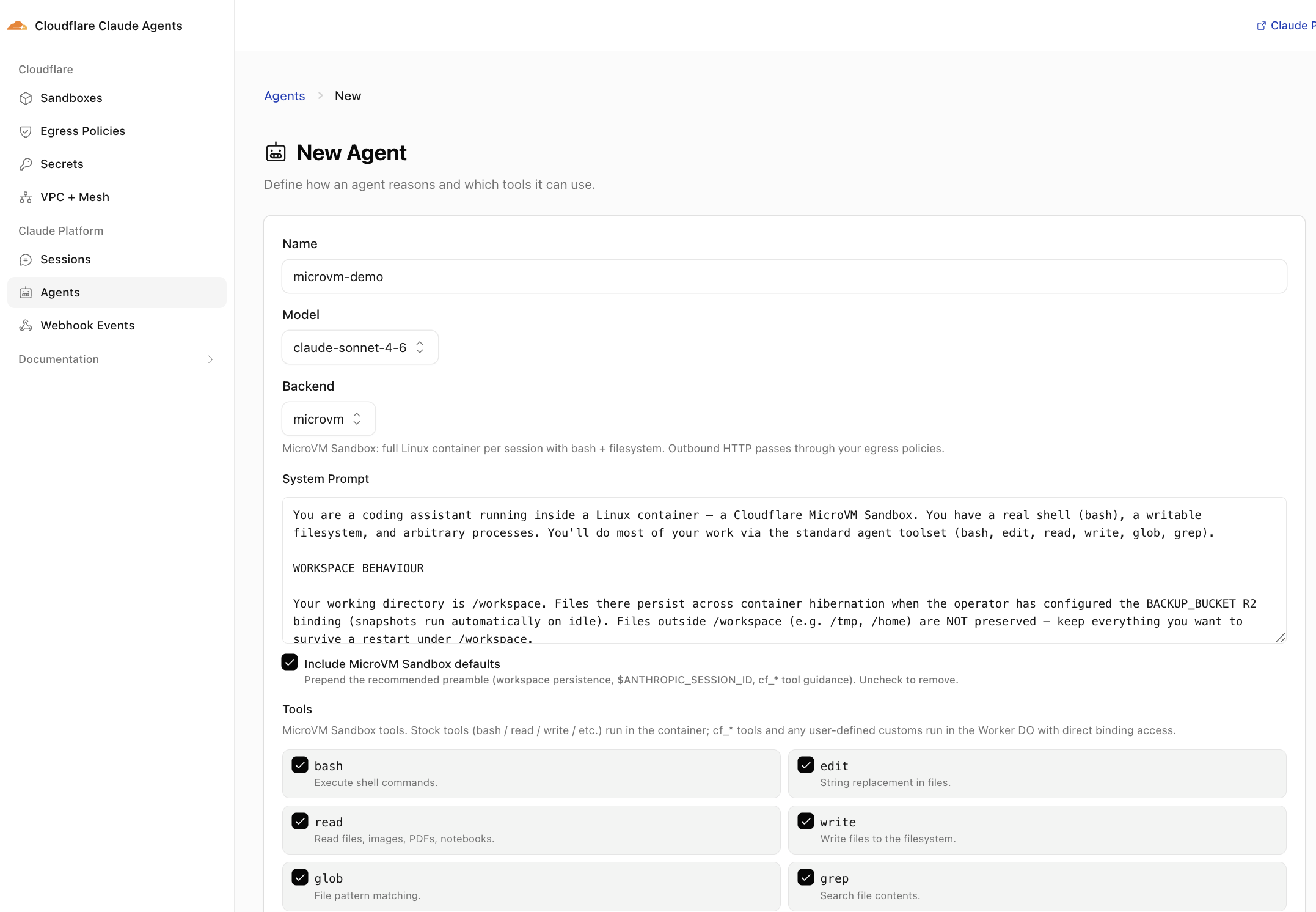
- Open the dashboard, navigate to Agents, and click New Agent.
- Name the agent
microvm-demo. - Backend: pick microvm. The form helper text confirms what you get: “full Linux container per session with bash + filesystem. Outbound HTTP passes through your egress policies.”
- Model:
claude-sonnet-4-6. - System Prompt: leave the default MicroVM Sandbox prompt the dashboard pre-fills (it briefs the agent on
/workspacesemantics andBACKUP_BUCKETsnapshot behaviour). Keep Include MicroVM Sandbox defaults checked. - Tools: leave the default Anthropic toolset enabled (
bash,read,write,edit,glob,grep). Do not enable any custom tools; this test is the vanilla path. - Save. The dashboard registers the agent with Anthropic; you’ll see it in the agent list.
- Click on the agent and then click + New Session.
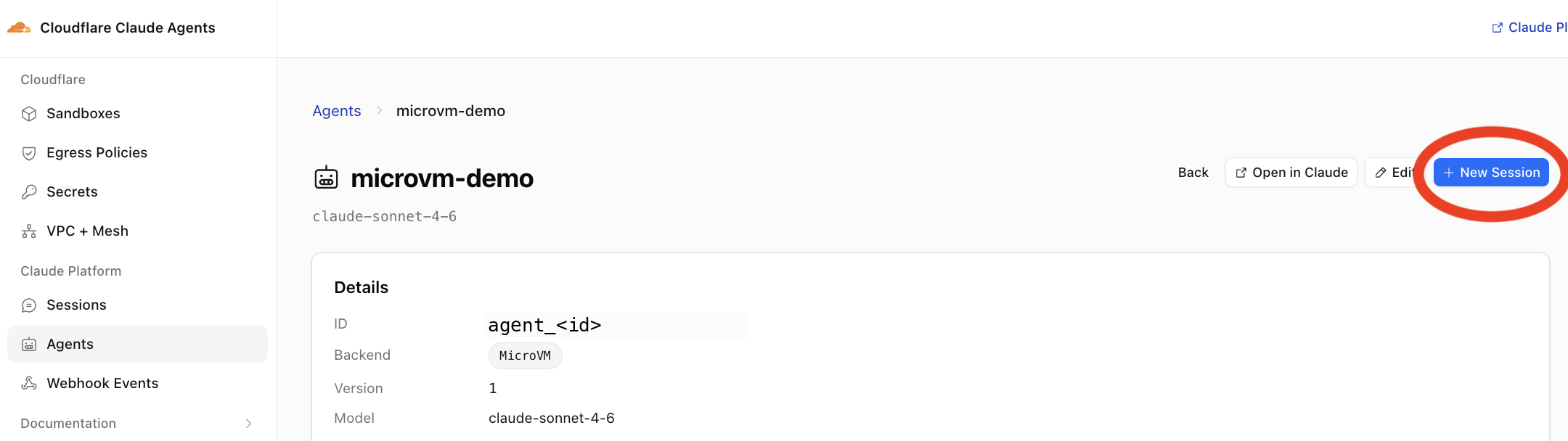
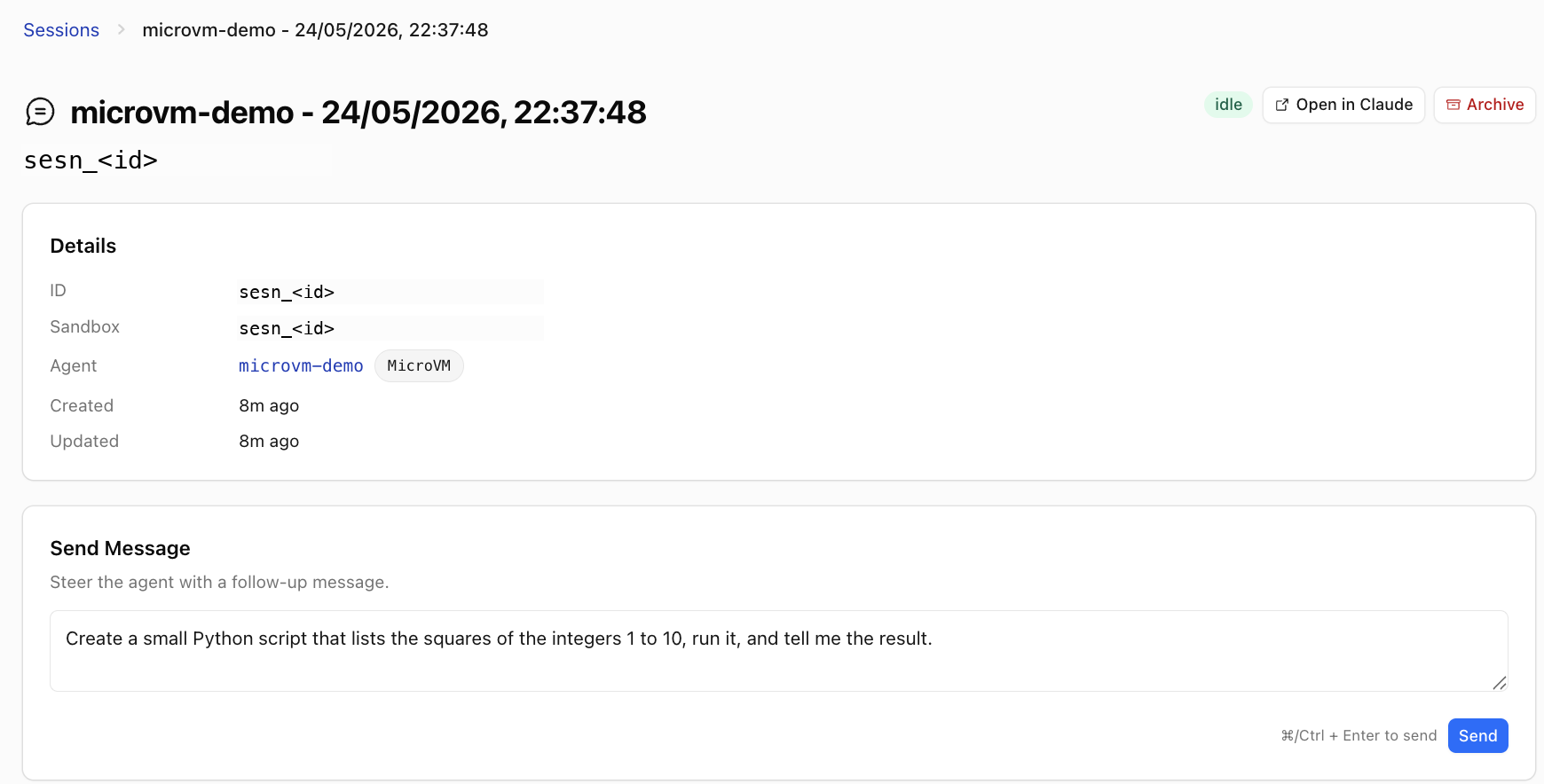
Prompt
Create a small Python script that lists the squares of the integers 1 to 10, run it, and tell me the result.
Result
The agent wrote squares.py to /workspace, ran python3 squares.py, and returned the answer. From the dashboard I could SSH into the live MicroVM via the terminal pane and confirm /workspace/squares.py was sitting where the agent left it. The first session paid a Container cold start, call it a few seconds in my measurement, which lines up with Cloudflare’s “boot in a few milliseconds” marketing line being for isolates, not MicroVMs.
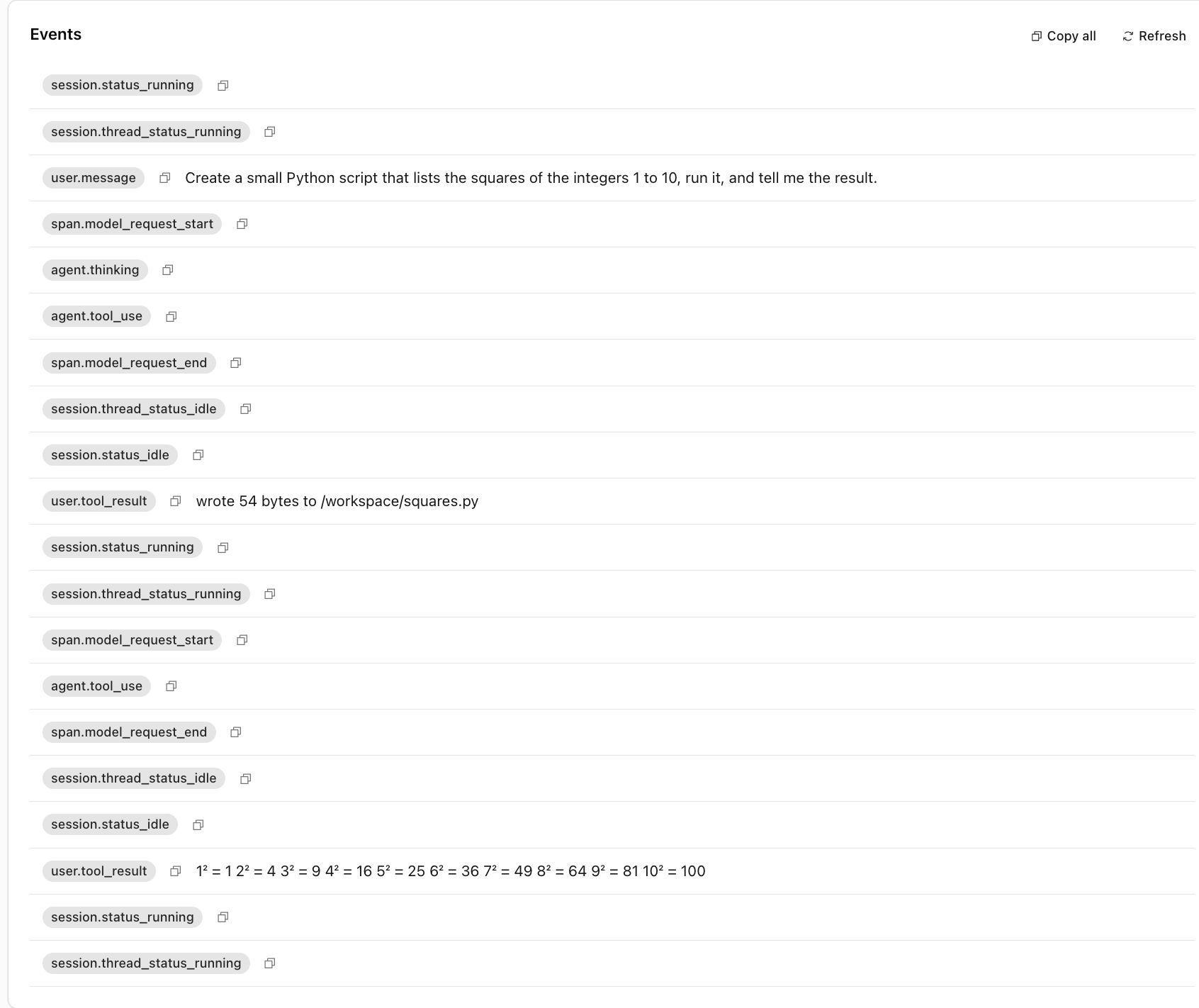
Subsequent sessions on the same agent were warm and quick. The agent’s /workspace snapshotted to R2 the moment it went idle, and the next session restored it.
Test 2: Isolate cold start
Setup
Identical to Test 1 but on the Isolate backend.
- In the dashboard, go to Agents and click New Agent.
- Name the agent
isolate-demo. - Backend: pick Isolate (this is the only meaningful difference from Test 1).
- Model:
claude-sonnet-4-6. - Tools: same default Anthropic toolset, no custom tools.
- Save and Start session.
Prompt
Same as Test 1, to keep the comparison apples-to-apples:
Create a small Python script that lists the squares of the integers 1 to 10, run it, and tell me the result.
Result
The Isolate path was visibly snappier on the first run. The boot story is structural: a Workers isolate is a V8 context the Worker Loader binding spins up at request time, not a Linux microVM warming a kernel. Cloudflare’s blog calls these “a few milliseconds” qualitatively, and that is consistent with what I saw.
Then the runtime asymmetry showed up. The Isolate backend ships no Python runtime: the @cloudflare/shell SQLite-backed environment isn’t a real Linux container, so the same python3 squares.py invocation that worked verbatim on MicroVM fails here. The agent’s reaction is interesting: it acknowledged the constraint and rewrote the script in JavaScript on the fly to execute it via the codemode runtime instead. The event log captures the pivot. An agent.message says “Now let’s run it (simulated via JavaScript, since this sandbox has no Python runtime).”, followed by an agent.custom_tool_use invoking the in-isolate JS executor, which returns the same 1, 4, 9, … 100 result. The model finishes with a brief summary.
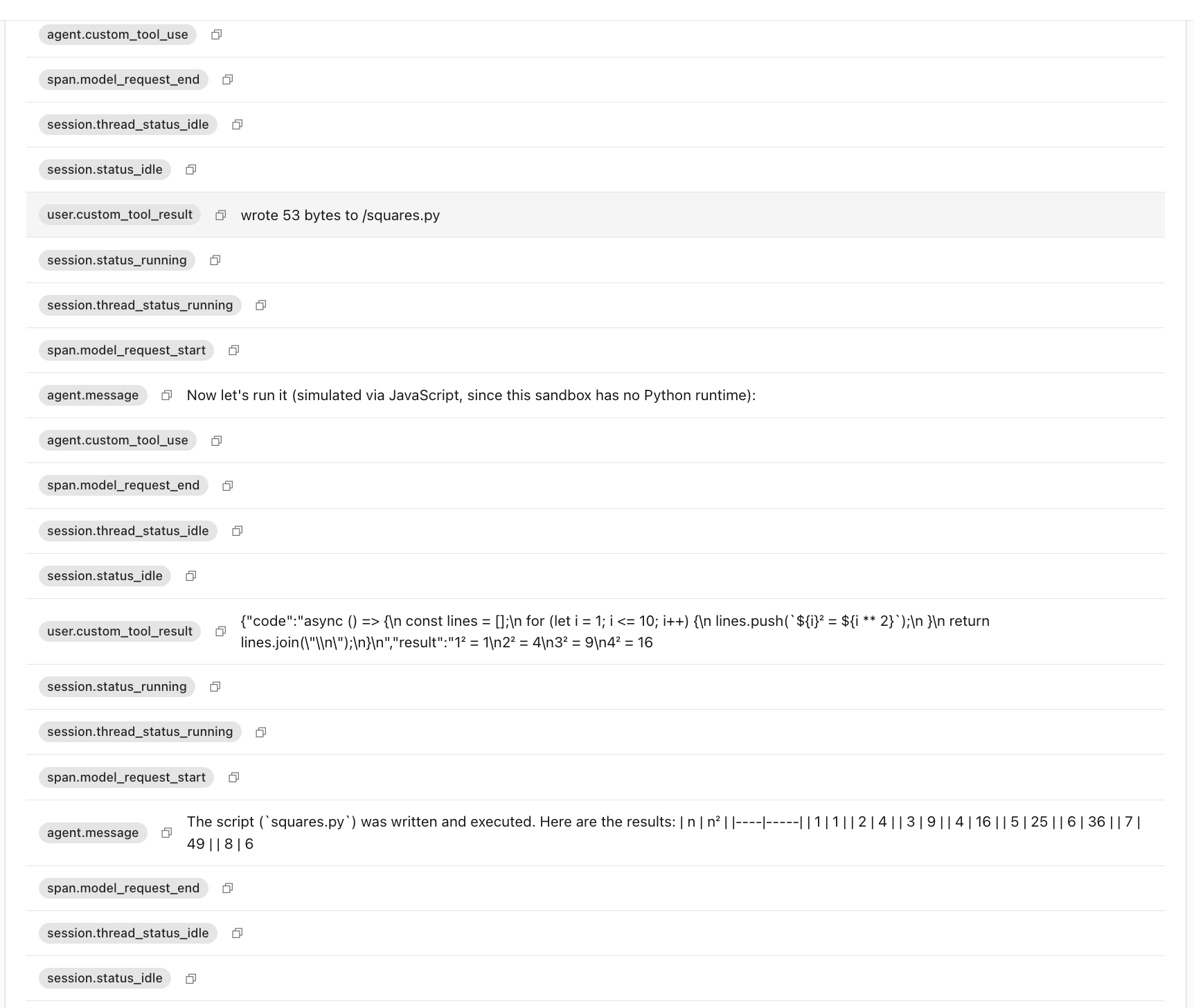
That pivot is a feature of the Isolate backend, not a bug: the model is briefed in its system prompt about which toolset is available (the Isolate-side custom tools include a code-execution path; the MicroVM-side path uses bash + filesystem). On Isolate, “compile this Rust crate” or “install pandas and run a notebook” are not options, but anything the agent can express in JavaScript (or via the bundled Worker bindings) runs fine. The trade-off is structural: Isolate = millisecond cold start + V8/JS-only runtime; MicroVM = full Linux with arbitrary processes, slower cold start.
Test 3: The PDF-summarizer custom tool
This is where Step 7’s work pays off. Prerequisites: you completed Step 7 (added the PDFS binding, copied the two custom tools and pdf-text.ts into your clone, uploaded the three GAO PDFs, and redeployed). If you skipped Step 7, the cf_list_pdfs and cf_read_pdf toggles will not appear in the Tools step below.
Setup
- Open the dashboard, navigate to Agents, and click New Agent.
- Name the agent
pdf-summarizer. - Backend: either MicroVM or Isolate. Both work, since custom tools run in the Worker, not in the sandbox. I tested on Isolate for the snappier cold start.
- Model:
claude-sonnet-4-6. - Tools: scroll the per-agent tool toggle list and tick
cf_list_pdfsandcf_read_pdf. These appear under “Custom tools” once Step 7’s redeploy lands. The standard Anthropic toolset is optional for this prompt; leave it on if you want the agent to be able to write notes back into the workspace. - Save. The dashboard re-registers the agent with Anthropic, so the next session will see both custom tools in its catalog.
- Click the agent and Start session.
Prompt
Summarize the three PDFs in the
pdfs/prefix of the R2 bucket. For each one, give me three bullet points covering scope, headline number, and risks.
Result
The agent called cf_list_pdfs once, then called cf_read_pdf three times (one per object), and produced a clean three-section summary. Watching the dashboard’s session log, the tool calls round-tripped in under a second each because, and this is the whole point, pdfs.list() and pdfs.get() are not network calls from the agent’s perspective. They are bindings on the Worker that the custom-tool dispatcher runs inside. No HTTP, no auth, no egress policy to apply.
I ran the same demo against an external API as a control: a custom tool that fetched the PDFs from an HTTPS URL instead of from R2. The functional outcome was identical, but each fetch added round-trip latency and the agent now needed credentials to authenticate. The inline-binding model collapses both of those.
Full session output (truncated)
[session-start] sandbox=isolate agent=pdf-summarizer
[tool_use] cf_list_pdfs(prefix="pdfs/")
[tool_result] pdfs/gao-cybersecurity.pdf  3040706
              pdfs/gao-dod-readiness.pdf  302538
              pdfs/gao-supply-chain.pdf   174946
[tool_use] cf_read_pdf(key="pdfs/gao-cybersecurity.pdf")
[tool_result] (... extracted text, ~7200 chars ...)
[tool_use] cf_read_pdf(key="pdfs/gao-dod-readiness.pdf")
[tool_result] (... extracted text, ~2400 chars ...)
[tool_use] cf_read_pdf(key="pdfs/gao-supply-chain.pdf")
[tool_result] (... extracted text, ~2100 chars ...)
[assistant] Here is a summary of the three documents:

Q1 report:
- Scope: ...
- Headline number: ...
- Risks: ...

(... etc ...)
[session-end] duration=42s tools_called=4
Cleanup
The template provisions enough billable resources that you want to be explicit about tearing them down. The order matters because dependencies:
# 1. Revoke the Anthropic webhook (Claude Platform Console → Settings → Webhooks → delete).
# 2. Delete the self-managed environment (Console → Environments → delete).

# 3. Tear down the Cloudflare Worker.
npx wrangler delete

# 4. Drop the R2 snapshot bucket (this also removes any unsnapshot data).
npx wrangler r2 bucket delete claude-managed-agents-snapshots

# 5. Drop the D1 database.
npx wrangler d1 delete claude-managed-agents-db

# 6. Drop the KV namespaces (look up IDs with `wrangler kv namespace list`).
npx wrangler kv namespace delete --namespace-id <SECRETS_ID>
npx wrangler kv namespace delete --namespace-id <EGRESS_POLICIES_ID>
If you provisioned VPC services or any optional bindings, drop those too. Cloudflare bills Containers and R2 storage continuously, so leaving the deploy idle still costs.
Why this pattern matters
The architectural move underneath all of this is small but consequential: the model loop stays managed by Anthropic, and tool execution moves into infrastructure the customer already controls. That split is what makes Claude Managed Agents usable for workloads that were previously stuck in security review. The sandbox sits next to the data it needs (object stores, internal databases, private APIs, identity services), uses the customer’s existing egress controls, and produces an audit trail that ops already knows how to read.
On Cloudflare the integration story is the tightest of the four launch partners: custom tools become Worker bindings, so an R2 read or a Workers AI inference call is a function argument rather than a network round trip. The same pattern fits other shapes too. Daytona will run the same template on customer-operated, on-premises infrastructure for teams whose regulator wants an OSS data plane; Vercel and Modal cover BYO-cloud and GPU-heavy workloads. The cloud is interchangeable; the architectural property is what counts.
The teams that get the most out of this are the ones whose agent tools are already shaped like their existing platform: documents in their object store, search in their vector database, business logic behind their internal HTTP services. For them, the pattern collapses two of the harder questions in agent deployment (where the data goes and who holds the credentials) into a configuration step. The brain stays Anthropic’s; the hands are finally yours.