OpenSandbox on Amazon EKS: Hands-On with a Self-Hosted Install
By Fabio Douek
Jump to section
- Overview
- Architecture
- What EKS needs that the defaults don’t
- Setup
- Step 1: Tools and the companion code
- Step 2: The cluster
- Step 3: The images
- Step 4: The charts and their values
- Testing
- Test 1: Does the cluster meet the bar?
- Test 2: Kata on nested virtualization (the gate)
- Test 3: Nine images into ECR
- Test 4: Base, controller and server, and the empty API key
- Test 5: The ingress gateway behind an NLB
- Test 6: The developer console
- Test 7: A first sandbox on EKS
- Results summary
- Pricing
- Cleanup
- Verdict
- What you sign up for
- Who should run this
Explain (TLDR) like I am...
Imagine building a playground for robot helpers inside a big rented park. The rule book was written for a different park, so I checked every gate and swing myself and fixed the ones that did not fit, like the sign that sent everyone to fetch toys from a shop very far away.
In the end a robot got its own little room, and I could talk to it through a gate that only opens for my house. A robot can even get a room with real walls of its own. Keeping the park open costs money every hour, so I close it when nobody is playing.
This post documents a self-hosted installation of OpenSandbox 1.2.0, an Apache 2.0 project of the Agentic AI Foundation, on Amazon EKS 1.37. That version is outside the project's stated support range, which ends at Kubernetes 1.34, so the operator carries the compatibility risk.
The diligence points are control and exposure. Images sit in the organization's own registry, the API and the console are reachable only through an authenticated tunnel, and the server refuses to start without a key. Two gaps remain: sandbox traffic crosses the internet in cleartext, limited only by source address, and the charts grant broad cluster-wide permissions.
The presenting question was whether OpenSandbox runs on Amazon EKS 1.37 when the project tests only up to Kubernetes 1.34. The workup was a full install, from an empty account to a first sandbox, recorded run by run, with every failure noted next to the fix that resolved it.
Findings: none of the failures I could diagnose traced to 1.37, though one slow node drain remains unexplained. Most came from defaults, from images in a distant registry to a server that exits without a key. Standard runc sandboxes started in about two and a half seconds, and Kata virtual machines ran on ordinary instances.
There is a particular tiredness in installing something whose instructions were written for another place. Each default that does not fit is small, but they add up, and it helps to name them one at a time instead of carrying a vague sense that the whole thing is fragile.
That is most of this post: each mismatch, what broke, and what fixed it. None that I could diagnose came from running a newer Kubernetes than the project tests, and every install script can run twice without harm. What stays on the mind is cost and exposure: about a dollar an hour while idle, and a gateway guarded only by an address.
Setting up OpenSandbox on EKS felt like tuning a borrowed rig before a gig. The charts arrived set for another room: cables to a supplier across the world, a server that would not start without its key, and amps turned up far past what a small stage needs.
Once each knob was set, the run-through kept steady time. Every install script played the same take twice without a wrong note, a runc sandbox came in about two and a half seconds after the count, and the Kata virtual machines found their cue on ordinary instances rather than dedicated hardware.
The story is a self-hosted agent sandbox platform in your own AWS account, on Amazon EKS 1.37, with every step scripted and every number measured. OpenSandbox 1.2.0, now an Agentic AI Foundation project, goes from an empty account to a first sandbox in about half an hour of script time.
The honest positioning: this is for platform teams who are happy to own a cluster. Many defaults needed changing, the gateway needs hardening before real use, and the cluster costs about a dollar an hour while idle. The payoff is sandboxes, Kata virtual machines included, under your own control.
 See the source code here: opensandbox-eks
Overview
OpenSandbox has been a project of the Agentic AI Foundation, a directed fund of the Linux Foundation, since the announcement on October 22, 2026; part 1 covers that move and how the pieces fit together.
This post, part 2 of 6, installs OpenSandbox 1.2.0 on Amazon EKS and records everything that didn’t work out of the box. First, the version question: the 1.2.0 release BOM lists Kubernetes support from v1.21 to v1.34, and the project’s CI runs on kind clusters only. I ran it on EKS 1.37, three minor versions past that range. 1.37 is the newest version in EKS standard support, and 1.34’s standard support ends on December 2, 2026, so I wouldn’t start a new cluster on 1.34.
The companion code goes from an empty AWS account to a first sandbox: a VPC and an EKS 1.37 cluster in Terraform, with two m7i.2xlarge nodes that have EC2 nested virtualization turned on; Kata Containers through kata-deploy 3.32.0, the last 3.x release; the eight core 1.2.0 images and the Python sandbox image copied into ECR; the base, controller and server charts, rendered from the release-1.2.0 git tag with a values file per component; the ingress gateway behind a Network Load Balancer that accepts one IP address; the developer console, built from source; and a first sandbox, reached through the server and through the gateway. The server API and the console never get a public endpoint, only kubectl port-forward. Sandboxes run under runc here; part 3 switches the server to Kata.
The EKS material I found covers less: an AWS China blog post from July 15, 2026 runs the OpenSandbox controller alone on EKS 1.34 with bare-metal c5.metal nodes, and a community fork’s EKS guides date from March and April 2026, before 1.1.0, the first release under the project’s single version line.
Part 3 covers the sandbox lifecycle, pools and isolation, part 4 the egress sidecar and Credential Vault, part 5 AWS credentials signed at the egress, and part 6 stress-tests the same two nodes, all on the cluster built here. Every number below comes from my runs on October 31 and November 1, 2026 (UTC), from an Apple Silicon Mac; I say when a run isn’t in the recordings.
Architecture
Three namespaces hold everything. opensandbox-system has what the OpenSandbox charts install (controller, server, gateway) plus the console. opensandbox is where sandboxes run, and no chart creates it. kube-system has the AWS pieces and kata-deploy. (The base chart also creates an empty opensandbox-dataplane namespace.) All of it shares the same two nodes.
opensandbox-system holds the server (SQLite on an encrypted 1 GiB gp3 volume), the console's web and BFF, the controller, which turns BatchSandbox objects into pods, and the gateway. opensandbox holds the sandbox pods: the execd-installer init container, the sandbox, and an egress sidecar only when there is a network policy. kube-system holds the AWS Load Balancer Controller, the EKS Pod Identity agent, kata-deploy (RuntimeClasses kata-qemu and kata-clh) and the add-ons. All of it runs on two m7i.2xlarge nodes, one per zone, with nested virtualization (/dev/kvm) and IMDSv2 at a hop limit of 1; they pull images from ECR.What EKS needs that the defaults don’t
Each row is something that happened in a run (recorded, unless the row says otherwise), or a default I changed before the first run because I expected it to break (up front; each was checked on the cluster afterwards). Scope says whether it’s specific to EKS or AWS; most rows would hit any cluster. The tests below hold the evidence; this is the list to work from.
The cluster (Terraform and AWS)
| What happened | Why | Fix that worked | Scope |
|---|---|---|---|
| Nothing failed, but the Terraform AWS provider docs (6.71.0) say nested virtualization is for 8th-generation Intel only | EC2 added M7i, C7i and R7i on June 18, 2026; the docs lag | cpu_options.nested_virtualization = "enabled"; EC2 accepted it on m7i.2xlarge | AWS |
| The recommended AL2023 AMI moved from v20261026 to v20261031 on build day | The EKS module picks the newest AMI and add-on builds on every plan, so the next apply would roll the nodes | Pin the AMI release and the five add-on versions | EKS |
A probe volume on the default StorageClass came out Encrypted: False | The add-on’s default class sets no parameters, and EBS encryption by default is off | A gp3-encrypted StorageClass for the server | EKS |
| In a dev run, health checks through the API server’s service proxy hung for about 2 minutes each | The node security group admits the control plane only on 443, 4443, 6443, 8443, 9443, 10250 and 10251 | Probe from inside the pod with kubectl exec | EKS |
| Up front: cross-node pod traffic below port 1025 would fail | The module opens only 53 and 1025 to 65535 between nodes | An all-ports node-to-node rule | EKS |
| Up front: the LB Controller can’t read its region and VPC, and each upgrade would replace its webhook certificate | IMDS hop limit 1; keepTLSSecret defaults to false | region, vpcId and keepTLSSecret=true in its values | EKS |
| Up front: repositories created on push can’t be tagged or scanned through the creation template alone | Tagging needs a role of its own; scan on push is a registry-wide rule | A custom_role_arn for opensandbox-eks/*, and a registry rule the script won’t apply over an existing configuration | AWS |
Kata Containers
| What happened | Why | Fix that worked | Scope |
|---|---|---|---|
Up front: the chart installs every shim, the nydus snapshotter, and kubectl:latest for its uninstall hook | Chart defaults | Only the QEMU and Cloud Hypervisor shims, no snapshotter, kubectl pinned to v1.37.1 (a tag the project rebuilds weekly) | General |
kata-deploy edited /etc/containerd/config.toml and restarted containerd on both nodes within a second | AL2023’s config has no imports line; the DaemonSet installs everywhere at once | Nothing needed. On a bigger cluster, canary one node with the chart’s nodeSelector | EKS (AL2023) |
OpenSandbox images and charts
| What happened | Why | Fix that worked | Scope |
|---|---|---|---|
Seven image references in the rendered charts point at sandbox-registry.cn-zhangjiakou.cr.aliyuncs.com | Chart defaults; the release BOM names docker.io/opensandbox/*:release-1.2.0 | Copy the images into ECR and point every reference there, including two inside the server’s TOML | General |
Docker Hub answered 429 Too Many Requests on the fourth image of the first copy | Docker documents 100 anonymous pulls per 6 hours per IPv4 address or IPv6 /64; the headers I got said 100;w=3600, one hour | Capped backoff, a re-run that copies only what’s missing, Python from ECR Public | General |
The server crash-looped with Startup blocked: server.api_key is empty in non-interactive mode, while Helm said STATUS: deployed | The chart renders api_key = "" | The key from a Secret, as OPENSANDBOX_SERVER_API_KEY | General |
| The server requested 1 CPU and 4 GiB (limits 2 and 8 GiB) | Chart defaults | 250m and 512Mi, from the release’s own Helm smoke test | General |
The base chart failed: Namespace "opensandbox-system" ... exists and cannot be imported into the current release | It renders a namespace that already existed without Helm’s labels | fastSandbox.namespaces.createSystem: false; my manifest owns it | General |
git clone --branch release-1.2.0 printed a harmless but confusing warning, ... is not a commit! | The charts aren’t published, and the tag is annotated | Fetch the tag into a fresh repository and check out its commit | General |
Up front: no chart creates the sandbox namespace opensandbox | The server just uses it | A manifest at Pod Security privileged (the egress sidecar adds NET_ADMIN) | General |
| Up front: the SQLite database would live in the container | The server chart has no volume | A 1 GiB PVC on gp3-encrypted at /data | General |
| Up front: every sandbox pod would tolerate every taint | The default BatchSandbox template has tolerations: [{operator: Exists}] | My own template without it | General |
Did not happen: the -containerd-socket-path crash-loop the AWS China team hit on EKS 1.34 | 1.2.0 defines the flag, and the chart passes none | Nothing | General |
The ingress gateway
| What happened | Why | Fix that worked | Scope |
|---|---|---|---|
| Up front: the gateway isn’t installed, though the docs call it required | The umbrella chart disables it | Its chart as a release of its own | General |
| Up front: its image comes from the registry in China, each replica requests 1 CPU and 4 GiB, and it runs as root | Chart defaults | ECR image; 100m and 128Mi; non-root with a read-only root filesystem and no capabilities | General |
| Up front: the chart’s Service can’t be made internet-facing, IP-targeted or limited by source range | The chart has no value for Service annotations | A second Service for the same pods, with the NLB annotations and an explicit loadBalancerClass: service.k8s.aws/nlb, so it doesn’t depend on the LB Controller’s default-on Service webhook | EKS |
| Up front: the PTY’s WebSocket upgrade must reach the gateway as HTTP/1.1 | The gateway speaks cleartext HTTP/1.1 only | An NLB TCP listener; the upgrade returned HTTP 101 | AWS |
| Up front: the server can’t announce the gateway before the NLB exists | server.gateway.host is the NLB’s DNS name | Two passes: wait for the NLB, write a values file, upgrade the server | General |
An interrupted run (not recorded) left the NLB up and the server still in direct mode | The server upgrade comes after the NLB wait | Not tested: a re-run should converge, since it waits for the existing NLB and writes the missing values file. I deleted the NLB and started over instead | General |
The console
| What happened | Why | Fix that worked | Scope |
|---|---|---|---|
| Up front: there are no console images to pull | The release ships its source and example manifests only | Build the web and BFF images from the tag for linux/amd64, push them to ECR, deploy them by digest | General |
| The example BFF calls the server on port 8090; the server chart’s Service listens on 80 | The example manifests and docs disagree with the chart | LIFECYCLE_API_BASE=http://opensandbox-server.opensandbox-system.svc/v1 | General |
| Up front: the example keeps the tenant key in a ConfigMap | Example manifest | A Secret, mounted at mode 0400 | General |
| Up front: the example’s Secure session cookie, over an http port-forward | Safari drops Secure cookies over http | BFF_COOKIE_SECURE=false (still HttpOnly and SameSite=Lax), CORS for localhost:5173 | General |
| In a dev run, a re-run rebuilt both images with new digests and replaced both pods | Build timestamps and provenance end up in the image | Reproducible builds (SOURCE_DATE_EPOCH, rewritten timestamps, no provenance). The BFF’s digest still changes on a build without the cache, because its requirements use >= | General |
The first sandbox and day two
| What happened | Why | Fix that worked | Scope |
|---|---|---|---|
The first cold-create run failed: crictl not found on the node | The EKS AL2023 AMI has ctr, not crictl | ctr -n k8s.io images rm --sync through a privileged debug pod | EKS (AL2023) |
| Scaling to zero nodes took 17 minutes, with a node billing until the end | One node went within 3 minutes; the second’s drain stalled until EKS’s 15-minute eviction limit (I didn’t find which pod held it) | A 30-minute wait in the script, and planning for it | EKS |
| Not hit: a scale-up could put both nodes in us-east-1b and leave the server Pending | Its EBS volume is in us-east-1a | None yet; three scale-ups put one node in each zone | EKS |
Nothing in this list that I could diagnose traces back to Kubernetes 1.37 itself; the drain stall’s cause is unknown. No sandbox create came near the server’s 60-second timeout.
Setup
Step 1: Tools and the companion code
You need an AWS account that can create VPC, EKS, IAM, EC2 and ECR resources, plus:
- Terraform 1.9 or newer (I used 1.14.8), the AWS CLI (2.34.29),
kubectlwithin one minor version of 1.37 (1.37.2) and Helm 4 (4.3.1) - Docker with
buildx, for the image copy and the console build jq,git,curl,opensslandenvsubst(from gettext; on a Mac it comes with Homebrew’sgettext)uvfor the Python scripts
git clone https://github.com/fabiodouek/my2centsai-blog-samples.git
cd my2centsai-blog-samples/opensandbox-eks| File | What it does |
|---|---|
terraform/ | VPC, EKS 1.37, the node group, Pod Identity roles, the LB Controller’s IAM policy, the ECR creation template and scanning rule |
01_cluster.sh | terraform apply, writes env.sh, sets up the kubectl context, installs the AWS Load Balancer Controller, then checks the cluster |
02_kata.sh | Installs kata-deploy, starts the same pod under kata-qemu, kata-clh and runc, and checks that the Kata pods run in their own VM |
03_images.sh, images.txt | Copies the nine images into ECR and checks every digest against its source |
04_install.sh | Namespaces, storage, the API key Secret and the BatchSandbox template, then the base, controller and server charts |
05_gateway.sh | The ingress gateway behind an NLB that accepts only your IP, and the server’s gateway settings |
06_console.sh | Builds the console’s two images from the tag and pushes them to ECR (build), then deploys them by digest (deploy) |
07_first_sandbox.py | Cold and warm creates, then a command and a file round trip through the server proxy and through the gateway |
08_scale.sh | down and up scale the node group to zero and back, with checks; nodes-only brings the nodes back without them |
98_delete_sandboxes.py | Deletes every sandbox the server lists, past the first page |
99_teardown.sh | Removes everything, including what Terraform doesn’t own, and checks for leftovers |
common.py, pyproject.toml | The Python scripts’ connection helpers; opensandbox==1.2.0 and opensandbox-cli==1.2.0 |
values/, manifests/ | One values file per chart, and the Kubernetes objects the charts don’t create |
01_cluster.sh writes env.sh (gitignored) from the Terraform outputs, and every later script sources it. Every kubectl and helm call in the scripts names the context osb-eks, so a different current context can’t send them to the wrong cluster. The server’s API key and the console’s two secrets live in .env (gitignored, mode 600); the scripts generate whatever is missing and never print it.
Step 2: The cluster
terraform/ uses the community EKS (21.29.0) and VPC (6.7.3) modules, with every provider pinned exactly. It creates 64 resources:
- Network: a VPC (10.60.0.0/16) over us-east-1a and us-east-1b, private subnets for nodes and pods, public subnets for the NAT gateway and the NLB, one NAT gateway, and a free S3 gateway endpoint so ECR layer downloads skip NAT processing.
- EKS 1.37: access entries only, a public API endpoint open to one /32 (your IP, from
checkip.amazonaws.com) plus private access for the nodes. No customer-managed KMS key (EKS already envelope-encrypts API data, and a customer key would outlive a teardown by 7 to 30 days), no control-plane logs, no IRSA. - Add-ons, pinned: VPC CNI, CoreDNS, kube-proxy, the EKS Pod Identity agent and the EBS CSI driver, plus two Pod Identity roles (EBS CSI driver, LB Controller), each trusted only for its own service account, namespace and cluster.
- ECR: a creation template for
opensandbox-eks/*(tags, AES256, untagged images expire after 7 days) and a scan-on-push rule.
The node group is the part that matters for this series (trimmed and reformatted):
eks_managed_node_groups = {
  nodes = {
    name                           = local.nodegroup_name   # "osb-nodes"
    ami_type                       = "AL2023_x86_64_STANDARD"
    ami_release_version            = var.ami_release_version   # "1.37.1-20261031"
    use_latest_ami_release_version = false
    instance_types                 = [var.instance_type]   # m7i.2xlarge

    min_size     = 0
    max_size     = 2
    desired_size = 2

    # Exposes VT-x to the node, so the kvm module loads and /dev/kvm exists.
    cpu_options = {
      nested_virtualization = "enabled"
    }

    # IMDSv2 only, with a hop limit of 1: the token response can't make the extra hop
    # into a pod's network namespace, so pods can't get the node role's credentials.
    metadata_options = {
      http_endpoint               = "enabled"
      http_tokens                 = "required"
      http_put_response_hop_limit = 1
    }

    # The AMI's 20 GiB root volume fills up with images, Kata assets and sandbox layers.
    block_device_mappings = {
      root = {
        device_name = "/dev/xvda"
        ebs = { volume_size = 100, volume_type = "gp3", encrypted = true, delete_on_termination = true }
      }
    }
  }
}
Nested virtualization costs nothing extra on EC2. It’s what lets Kata run on a $0.4032/h m7i.2xlarge instead of a bare-metal node (m7i.metal-24xl is $4.8384/h).
./01_cluster.shThree things to know before you run it:
- ECR scanning is set for the whole registry. The Terraform owns the registry’s scanning configuration. If yours already has rules, the script stops:
ALLOW_ECR_SCAN_OVERWRITE=1replaces them,MANAGE_ECR_SCAN_ON_PUSH=falseleaves them alone. The teardown resets the registry to basic scanning with no rules. - Tags reach every resource Terraform creates,
project=opensandbox-eks, but not the network interfaces AWS services create on their own. - Two IAM grants are broader than least privilege. The LB Controller’s policy is the upstream
iam_policy.jsonfor v3.6.2, verbatim, and a few of its statements (ec2:CreateSecurityGroup,AuthorizeSecurityGroupIngress,RevokeSecurityGroupIngress) cover every security group in the account. The node role’sAmazonEC2ContainerRegistryReadOnlyreads every repository in the account; the hop limit keeps sandboxes away from it.
Step 3: The images
images.txt lists the nine images the series needs: the eight core OpenSandbox images from the release BOM (it also lists six fsb-* Fast Sandbox images this series doesn’t use), and the Python image the sandboxes use.
docker.io/opensandbox/server:release-1.2.0
docker.io/opensandbox/execd:release-1.2.0
docker.io/opensandbox/ingress:release-1.2.0
docker.io/opensandbox/egress:release-1.2.0
docker.io/opensandbox/image-committer:release-1.2.0
docker.io/opensandbox/controller:release-1.2.0
docker.io/opensandbox/task-executor:release-1.2.0
docker.io/opensandbox/nodeagent:release-1.2.0
public.ecr.aws/docker/library/python:3.12-slim
03_images.sh copies each one registry to registry with docker buildx imagetools create --tag <ecr> <source>, which keeps the multi-arch index and its digest, and skips any image whose digest already matches. It logs in to ECR through a throwaway Docker config, so your own Docker logins and keychain are never read.
./03_images.shStep 4: The charts and their values
OpenSandbox doesn’t publish its Helm charts, so 04_install.sh fetches the release-1.2.0 tag (commit 62a64f0b48cd) into .src/OpenSandbox and installs three charts from it: opensandbox-base (the CRDs and their RBAC), opensandbox-controller and opensandbox-server, all in opensandbox-system. The values files hold ${ECR_REGISTRY} and ${ECR_PREFIX}; the script fills them in from env.sh into a temporary directory, so no account ID is stored in the repository.
The server’s values carry most of the fixes (trimmed and reformatted):
server:
  image:
    repository: ${ECR_REGISTRY}/${ECR_PREFIX}/server
    tag: release-1.2.0

  resources:
    requests: { cpu: 250m, memory: 512Mi }
    limits:   { cpu: "1", memory: 2Gi }

  env:
    - name: OPENSANDBOX_SERVER_API_KEY
      valueFrom:
        secretKeyRef: { name: opensandbox-server-auth, key: api-key }

  volumes:
    - name: data
      persistentVolumeClaim: { claimName: opensandbox-server-data }
    - name: batchsandbox-template
      configMap: { name: opensandbox-batchsandbox-template }
  volumeMounts:
    - { name: data, mountPath: /data }
    - { name: batchsandbox-template, mountPath: /etc/opensandbox-custom, readOnly: true }

# The server's config.toml. The chart renders it into a ConfigMap and appends [ingress].
configToml: |
  [server]
  host = "0.0.0.0"
  port = 80

  [runtime]
  type = "kubernetes"
  execd_image = "${ECR_REGISTRY}/${ECR_PREFIX}/execd:release-1.2.0"

  [kubernetes]
  namespace = "opensandbox"
  workload_provider = "batchsandbox"
  batchsandbox_template_file = "/etc/opensandbox-custom/batchsandbox-template.yaml"

  [egress]
  image = "${ECR_REGISTRY}/${ECR_PREFIX}/egress:release-1.2.0"
  mode = "dns+nft"

  [store]
  type = "sqlite"
  path = "/data/opensandbox.db"
The key comes from the environment, so the TOML has no api_key line. mode = "dns+nft" enforces packet rules as well as names, which part 4’s Credential Vault requires. With no [secure_runtime] section, sandboxes run under runc.
The base chart’s values turn off the namespace it would otherwise render (comment mine):
fastSandbox:
  namespaces:
    createSystem: false   # manifests/namespace-opensandbox.yaml owns opensandbox-system
The controller’s values point its two images at ECR and keep every other default. controller.snapshot.containerdSocketPath is empty in the 1.2.0 chart, so no socket flag is passed (comments trimmed):
controller:
  image:
    repository: ${ECR_REGISTRY}/${ECR_PREFIX}/controller
    tag: release-1.2.0
  snapshot:
    imageCommitterImage: ${ECR_REGISTRY}/${ECR_PREFIX}/image-committer:release-1.2.0
Before the charts, the script applies the objects they don’t create: both namespaces (the sandbox one at Pod Security privileged), the gp3-encrypted StorageClass and the server’s 1 GiB PVC, the API key Secret, and the BatchSandbox template. The template is the release’s example without its toleration of every taint (comments trimmed):
data:
  batchsandbox-template.yaml: |
    metadata:
    spec:
      replicas: 1
      template:
        spec:
          restartPolicy: Never
Without the toleration, sandbox pods get Kubernetes’ default 300-second tolerations for not-ready and unreachable, so they’re evicted from a failed node instead of staying bound to it.
./04_install.shTwo things the charts install that I left alone, and that matter before you run this anywhere real:
- The RBAC is cluster-wide. The server’s ClusterRole can create, update and delete pods, ConfigMaps and Services and create, read and delete Secrets in every namespace. The controller’s can create and delete pods and read Secrets everywhere. The base chart adds two fast-sandbox ClusterRoles (pods, nodes, ConfigMaps and Secrets cluster-wide, plus Roles and RoleBindings) for a component this install doesn’t use. The gateway (Test 5) and the console (Test 6) read pods and more across the cluster too.
- The server runs with no security context. It’s the most privileged workload here, yet its container has no
securityContext, while the controller runs as non-root with every capability dropped andRuntimeDefaultseccomp. The chart exposesserver.podSecurityContextandserver.containerSecurityContext; I haven’t tested a hardened server.
Testing
Test 1: Does the cluster meet the bar?
runc sandboxes need little from the cluster. The series needs more: /dev/kvm on every node for Kata, IMDS closed to pods, the Pod Identity agent for part 5, and the LB Controller for the gateway. 01_cluster.sh checks all of it after terraform apply; the /dev/kvm check runs a debug pod on each node with the node’s filesystem at /host (simplified):
kubectl debug -n default "node/$node" --quiet --profile=general --image="$DEBUG_IMAGE" -- \
  sh -c 'ls -l /host/dev/kvm 2>&1; echo "vmx: $(grep "^flags" /proc/cpuinfo | grep -cw vmx)"'
The first run took 13 minutes 50 seconds: terraform apply 13m 07s (the EKS control plane alone 9m 50s, the NAT gateway 2m 6s alongside it, the node group 1m 48s), the LB Controller 25 seconds and the checks 16 seconds. A second run found no changes and finished in 36 seconds. The checks from that re-run:
== terraform apply
EKS API endpoint open to 203.0.113.10/32 only (full output: logs/terraform-apply.log)
ECR scanning: already managed by this Terraform
No changes. Your infrastructure matches the configuration.
Apply complete! Resources: 0 added, 0 changed, 0 destroyed.
   took 9s
...
== AWS Load Balancer Controller
chart 3.6.2 upgraded to revision 3: manifests identical to revision 2
   took 9s

== checks
  ok    Kubernetes v1.37.1-eks-577a51e
NODE                           TYPE          KUBELET               KERNEL                            RUNTIME
ip-10-60-10-104.ec2.internal   m7i.2xlarge   v1.37.1-eks-6e7947a   6.18.56-125.164.amzn2023.x86_64   containerd://2.3.7+unknown
ip-10-60-61-61.ec2.internal    m7i.2xlarge   v1.37.1-eks-6e7947a   6.18.56-125.164.amzn2023.x86_64   containerd://2.3.7+unknown
  ok    2 nodes Ready, both m7i.2xlarge
  ok    ip-10-60-10-104.ec2.internal: crw-rw-rw-. 1 root 36 10, 232 Oct 31 21:00 /host/dev/kvm (vmx on 8 vCPUs)
  ok    ip-10-60-61-61.ec2.internal: crw-rw-rw-. 1 root 36 10, 232 Oct 31 21:00 /host/dev/kvm (vmx on 8 vCPUs)
  ok    i-0de57b72d1ca37655 (m7i.2xlarge): HttpTokens required, HttpPutResponseHopLimit 1, NestedVirtualization enabled
  ok    i-0b539e448c1d539c2 (m7i.2xlarge): HttpTokens required, HttpPutResponseHopLimit 1, NestedVirtualization enabled
  ok    eks-pod-identity-agent DaemonSet 2/2 ready
  ok    aws-load-balancer-controller 2/2 ready, credentials from EKS Pod Identity
  ok    default StorageClass ebs-csi-default-sc (ebs.csi.aws.com, type not set: the driver default)
   took 16s
The first run's terraform apply, trimmed to the slow resources
== terraform apply
EKS API endpoint open to 203.0.113.10/32 only (full output: logs/terraform-apply.log)
Plan: 64 to add, 0 to change, 0 to destroy.
module.vpc.aws_nat_gateway.this[0]: Creation complete after 2m6s
module.eks.aws_eks_cluster.this[0]: Creation complete after 9m50s
module.eks.aws_eks_addon.before_compute["kube-proxy"]: Creation complete after 9s
module.eks.aws_eks_addon.before_compute["vpc-cni"]: Creation complete after 15s
module.eks.aws_eks_addon.before_compute["eks-pod-identity-agent"]: Creation complete after 25s
module.eks.time_sleep.this[0]: Creation complete after 30s
module.eks.module.eks_managed_node_group["nodes"].aws_launch_template.this[0]: Creation complete after 6s
module.eks.module.eks_managed_node_group["nodes"].aws_eks_node_group.this[0]: Creation complete after 1m48s
module.eks.aws_eks_addon.this["coredns"]: Creation complete after 26s
module.eks.aws_eks_addon.this["aws-ebs-csi-driver"]: Creation complete after 36s
Apply complete! Resources: 64 added, 0 changed, 0 destroyed.
   took 13m 07s
...
== Timings
  terraform apply                  13m 07s
  env.sh                                0s
  kubeconfig                            2s
  AWS Load Balancer Controller         25s
  checks                               16s
  total                            13m 50s
Everything passed. /dev/kvm is a character device on both nodes, and all 8 vCPUs carry the vmx flag (gid 36 is kvm on the node; the debug image just has no name for it). The first run printed “vmx on 16 vCPUs”: the kernel prints a separate vmx flags line per CPU (since Linux 5.6), so counting vmx across all of /proc/cpuinfo doubles the number. The fixed check counts only the flags lines.
The hop limit works: in an ad hoc check outside the script, an IMDSv2 token request from an ordinary pod timed out after 5 seconds (curl exit 28). Pods on hostNetwork can still reach IMDS, since they share the node’s network namespace. The last line is the unencrypted default StorageClass from the table above.
Test 2: Kata on nested virtualization (the gate)
I tested this first, because it decides parts 3 and 6. The server rejects gVisor together with an egress policy (HTTP 400), so for container sandboxes with egress the choice is runc or Kata, the only VM isolation of the two, and Kata needs KVM. Without KVM on nested virtualization, the series would need a bare-metal node.
I used kata-deploy 3.32.0, the last 3.x release (June 22, 2026). Kata Containers 4.x is out (4.3.1 on October 21, 2026), and 4.0 made the Rust runtime the default; I stayed on the 3.x line that OpenSandbox’s secure container guide is written for (it pins 3.27.0). The 3.x line is deprecated, not abandoned: 4.0’s notes promise critical and CVE fixes for the Go runtime during the deprecation period. The install, with the script’s variables filled in:
helm upgrade --install kata-deploy oci://ghcr.io/kata-containers/kata-deploy-charts/kata-deploy \
  --version 3.32.0 --namespace kube-system \
  --set shims.disableAll=true \
  --set shims.qemu.enabled=true \
  --set shims.clh.enabled=true \
  --set 'snapshotter.setup={}' \
  --set kubectlImage.tag=v1.37.1
kata-deploy is a privileged DaemonSet. On each node it copies the Kata binaries, guest kernel and guest image to /opt/kata, writes a containerd drop-in with one runtime per shim and imports it from /etc/containerd/config.toml, restarts containerd, and labels the node katacontainers.io/kata-runtime=true for the RuntimeClasses to select on.
On fresh nodes, the kata-deploy phase took 1 minute 4 seconds (the whole run, test pods included, 1m 34s). That run used an earlier version of the script, which labelled the install line differently and missed the RuntimeClass table; the timing code is the same:
== kata-deploy 3.32.0
chart 3.32.0 installed (revision 1); waiting for the DaemonSet on every node
       +6s  kata-deploy 0/2 ready   nodes Ready 2/2
      +56s  kata-deploy 2/2 ready   nodes Ready 2/2
  ip-10-60-10-104.ec2.internal   pull 33.66s (1.6 GB)   install 16s   containerd restart 20:49:09, back in 0.4s
  ip-10-60-61-61.ec2.internal    pull 33.884s (1.6 GB)   install 16s   containerd restart 20:49:10, back in 0.5s
   took 1m 04s
Most of that is the 1.6 GB kata-deploy image (1,599,460,395 bytes, as the kubelet reported it), pulled on both nodes in parallel in about 34 seconds. Of the 16-second install, 12 seconds is kata-deploy checking that its node label sticks (six checks, two seconds apart, per its log). Note the timestamps: the first install restarts containerd on every node at once, one second apart here.
Then the gate: the same pod spec (amazonlinux:2023, printing uname -r and how many CPUs carry the hypervisor flag) under kata-qemu, kata-clh and runc. The run with the shipped script had the kata-deploy image already on the nodes, after an uninstall and reinstall (gate section, trimmed):
== Kata gate (test pods)
  RUNTIME    NODE                          KERNEL (uname -r)                HYPERVISOR FLAG  CREATED TO RUNNING
  kata-qemu  ip-10-60-10-104.ec2.internal  6.18.35                          on 1 CPU         3s (sandbox ready at 2s)
  kata-clh   ip-10-60-61-61.ec2.internal   6.18.35                          on 1 CPU         2s (sandbox ready at 2s)
  runc       ip-10-60-61-61.ec2.internal   6.18.56-125.164.amzn2023.x86_64  on 8 CPUs        1s (sandbox ready at 0s)

  The VM behind each Kata pod, read on its node by a privileged debug pod (kubectl debug --profile=sysadmin):
  kata-test      qemu-system-x86_64  RSS  272 MiB   -machine q35,accel=kvm,nvdimm=on   KVM fds: 1 VM, 1 vCPU
  kata-clh-test  cloud-hypervisor    RSS  153 MiB   KVM fds: 1 VM, 1 vCPU
  On the nodes: Kata 3.32.0, QEMU 11.0.1, Cloud Hypervisor 51.1, guest kernel 6.18.35-197

  PASS  kata-qemu
          ok   kata-test Running on ip-10-60-10-104.ec2.internal after 3s (limit 5m 00s)
          ok   guest kernel 6.18.35 is not the node's kernel (6.18.56-125.164.amzn2023.x86_64)
          ok   qemu-system-x86_64 runs the guest under KVM
  PASS  kata-clh
          ok   kata-clh-test Running on ip-10-60-61-61.ec2.internal after 2s (limit 5m 00s)
          ok   guest kernel 6.18.35 is not the node's kernel (6.18.56-125.164.amzn2023.x86_64)
          ok   cloud-hypervisor runs the guest under KVM
  ok    Kata gate passed on kata-qemu; kata-clh passed too
The rest of that run: install, RuntimeClasses and cluster health
$ ./02_kata.sh

== kata-deploy 3.32.0
chart 3.32.0 installed (revision 1); waiting for the DaemonSet on every node
       +6s  kata-deploy 0/2 ready   nodes Ready 2/2
      +28s  kata-deploy 2/2 ready   nodes Ready 2/2
  ip-10-60-10-104.ec2.internal   image already on the node   ready after 20s  containerd restart 21:49:59, back in 0.4s
  ip-10-60-61-61.ec2.internal    image already on the node   ready after 20s  containerd restart 21:49:59, back in 0.4s
   took 35s

== RuntimeClasses
  NAME        HANDLER     CPU OVERHEAD  MEMORY OVERHEAD  NODE SELECTOR                         KATA
  kata-clh    kata-clh    250m          130Mi            katacontainers.io/kata-runtime=true   3.32.0
  kata-qemu   kata-qemu   250m          160Mi            katacontainers.io/kata-runtime=true   3.32.0
  ok    RuntimeClass kata-qemu
  ok    RuntimeClass kata-clh
  ok    2 of 2 nodes labelled katacontainers.io/kata-runtime=true
   took 2s
...
== cluster health
  ok    ip-10-60-10-104.ec2.internal stayed Ready throughout (Ready since 2026-10-31T20:21:43Z)
  ok    ip-10-60-61-61.ec2.internal stayed Ready throughout (Ready since 2026-10-31T20:21:42Z)
  ok    aws-load-balancer-controller 2/2 ready
  ok    eks-pod-identity-agent 2/2 ready
  ok    kata-deploy 2/2 ready
  ok    every namespace (6 DaemonSets, 3 Deployments, 16 Pods): nothing that was ready before this run is not ready now
  ok    no container restarted in any namespace during this run
   took 6s

== Timings
  kata-deploy 3.32.0                   35s
  RuntimeClasses                        2s
  Kata gate (test pods)                28s
  cluster health                        6s
  total                             1m 15s
Kata gate passed on kata-qemu; kata-clh works too, and both run pods in their own VMs on these nodes
The gate passed on the first try. A hypervisor flag alone proves nothing on EC2, because the node is itself a VM and runc sees the flag on all 8 vCPUs. What does prove it:
- A different kernel. Each Kata pod boots its own guest kernel, 6.18.35, while runc reports the node’s 6.18.56: same series, different build.
- Its own vCPUs. The Kata guest has one vCPU (Kata’s default) against the node’s eight.
- A real VMM under KVM. The process behind each Kata pod is
qemu-system-x86_64with-machine q35,accel=kvm, orcloud-hypervisor, each holding one KVM VM and one vCPU descriptor. QEMU uses KVM inside the EC2 instance, not software emulation.
A Kata pod went from created to Running in 1 to 3 seconds across the three recorded runs (2 s in the cold-install run, 3 s and 1 s in the later ones), against 0 to 1 seconds for runc. API timestamps have 1-second resolution, so don’t read more into them; the project’s own estimate for QEMU is about 500 ms, which I haven’t measured. For part 6: QEMU’s resident memory was 272 MiB and Cloud Hypervisor’s 153 MiB in both recorded runs with the shipped script, against RuntimeClass overheads of 160Mi and 130Mi per pod (one idle sample each).
The re-run converged in 51 seconds with identical manifests and unchanged DaemonSet pods. helm uninstall kata-deploy -n kube-system --wait took 12 to 14 seconds and left only a harmless empty imports = [] line in config.toml. The server keeps using runc until part 3 sets [secure_runtime] type = "kata" and k8s_runtime_class = "kata-qemu".
Test 3: Nine images into ECR
The first copy didn’t go cleanly, which makes it the most useful run to show. It used an earlier version of the script, which still pulled Python from Docker Hub:
The first copy: eight of nine images, then Docker Hub's rate limit
$ ./03_images.sh

== ECR login
  ok    logged in to 123456789012.dkr.ecr.us-east-1.amazonaws.com (token valid for 12 hours, kept in a throwaway Docker config)
   took 1s

== copy 9 images to ECR
  copy  opensandbox-eks/server:release-1.2.0           from docker.io/opensandbox/server:release-1.2.0  27s
  copy  opensandbox-eks/execd:release-1.2.0            from docker.io/opensandbox/execd:release-1.2.0  22s
  copy  opensandbox-eks/ingress:release-1.2.0          from docker.io/opensandbox/ingress:release-1.2.0  21s
        rate limited (HTTP 429); waiting 15s before attempt 2 of 5
        rate limited (HTTP 429); waiting 30s before attempt 3 of 5
        rate limited (HTTP 429); waiting 60s before attempt 4 of 5
        rate limited (HTTP 429); waiting 120s before attempt 5 of 5
  skip  opensandbox-eks/egress:release-1.2.0           cannot read source docker.io/opensandbox/egress:release-1.2.0: unexpected status from HEAD request to https://registry-1.docker.io/v2/opensandbox/egress/manifests/release-1.2.0: 429 Too Many Requests
        rate limited (HTTP 429); waiting 15s before attempt 2 of 5
        rate limited (HTTP 429); waiting 30s before attempt 3 of 5
        rate limited (HTTP 429); waiting 60s before attempt 4 of 5
        rate limited (HTTP 429); waiting 120s before attempt 5 of 5
  copy  opensandbox-eks/image-committer:release-1.2.0  from docker.io/opensandbox/image-committer:release-1.2.0  4m 24s
  copy  opensandbox-eks/controller:release-1.2.0       from docker.io/opensandbox/controller:release-1.2.0  42s
  copy  opensandbox-eks/task-executor:release-1.2.0    from docker.io/opensandbox/task-executor:release-1.2.0  27s
  copy  opensandbox-eks/nodeagent:release-1.2.0        from docker.io/opensandbox/nodeagent:release-1.2.0  26s
  copy  opensandbox-eks/python:3.12-slim               from docker.io/library/python:3.12-slim  54s
   copied 8, already in ECR 0
   took 11m 54s
...
== Timings
  ECR login                             1s
  copy 9 images to ECR             11m 54s
  verify ECR against source            17s
  total                            12m 12s
Rate limited 9 time(s) (HTTP 429); waited 7m 30s in all
1 of 9 images are not in ECR as they should be:
  opensandbox-eks/egress:release-1.2.0
Run ./03_images.sh to copy them (details: logs/03-images.log)
The script exited 1 and named the missing image. Running it again copied only egress (30 seconds), 1 minute 20 seconds in all. Docker documents 100 pulls per 6 hours for anonymous users, per IPv4 address or IPv6 /64; the headers I got said ratelimit-limit: 100;w=3600, a one-hour window, for an IPv6 /64. Every manifest GET counts, including digest reads and each architecture of a copy (HEAD checks don’t, per Docker’s docs), and my debugging of an early script version had spent part of the budget. The shipped script hashes each source’s raw index (one request per image), caps the backoff at 15 minutes per run, and stops asking a registry that still answers 429 after an image’s four retries. Without throttling, the nine copies took about 4 minutes 48 seconds, 21 to 54 seconds each, Mac to ECR.
Python now comes from ECR Public, with the same index digest as Docker Hub’s (sha256:aa943ce411423c7582288f18707ff66eddcbaeb510502d747a72aeb34f30d159). 3.12-slim is a moving tag, so a later re-run copies a newer image; keep that in mind when comparing numbers across parts. The project’s own mirror on Alibaba Cloud serves the same execd digest, but docker buildx imagetools gets insufficient_scope from it.
A missing image is the failure that hurts later: ImagePullBackOff and a sandbox create that times out with no hint why. So the script ends by checking every digest in ECR. I deleted one tag and ran the check alone (trimmed):
$ aws ecr batch-delete-image --repository-name opensandbox-eks/nodeagent --image-ids imageTag=release-1.2.0
$ ./03_images.sh --verify-only
...
  FAIL  opensandbox-eks/nodeagent:release-1.2.0        missing from ECR (source sha256:e1d0adbd58b9)
  ok    opensandbox-eks/python:3.12-slim               sha256:aa943ce41142
...
1 of 9 images are missing from ECR or could not be checked:
  opensandbox-eks/nodeagent:release-1.2.0
Run ./03_images.sh again to copy them (details: logs/03-images.log)
It exited 1 after 14 seconds. A normal run then restored the image in 4 seconds (the platform manifests were still in the repository, so only the index was pushed) and finished in 23 seconds with all nine ok. A run with nothing to copy takes 21 seconds. The nine repositories hold 1.51 GiB, an upper bound because shared layers are billed once. If you check scanning per repository, describe-repositories shows scanOnPush: False everywhere, because the rule lives at the registry level; the server image’s amd64 scan did complete, with 4 high, 9 medium and 3 low findings.
Test 4: Base, controller and server, and the empty API key
First, the charts as they come. I rendered them and installed the server chart with its defaults, except the image, which I pointed at ECR so the failure would be the configuration and not an image pull (output trimmed):
$ for c in controller server ingress-gateway node-agent; do helm template demo .src/OpenSandbox/manifests/charts/$c; done | grep -oE "[a-z0-9.-]+aliyuncs\.com/[^\" ]+" | sort -u
sandbox-registry.cn-zhangjiakou.cr.aliyuncs.com/opensandbox/controller:release-1.2.0
sandbox-registry.cn-zhangjiakou.cr.aliyuncs.com/opensandbox/egress:release-1.2.0
sandbox-registry.cn-zhangjiakou.cr.aliyuncs.com/opensandbox/execd:release-1.2.0
sandbox-registry.cn-zhangjiakou.cr.aliyuncs.com/opensandbox/image-committer:release-1.2.0
sandbox-registry.cn-zhangjiakou.cr.aliyuncs.com/opensandbox/ingress:release-1.2.0
sandbox-registry.cn-zhangjiakou.cr.aliyuncs.com/opensandbox/nodeagent:release-1.2.0
sandbox-registry.cn-zhangjiakou.cr.aliyuncs.com/opensandbox/server:release-1.2.0

$ helm install opensandbox-server .src/OpenSandbox/manifests/charts/server -n opensandbox-system --create-namespace --hide-notes --set server.image.repository=$ECR_REGISTRY/opensandbox-eks/server
NAME: opensandbox-server
STATUS: deployed
REVISION: 1

$ kubectl -n opensandbox-system get deploy opensandbox-server -o jsonpath="{.spec.template.spec.containers[0].resources}{\"\n\"}"
{"limits":{"cpu":"2","memory":"8Gi"},"requests":{"cpu":"1","memory":"4Gi"}}

$ kubectl -n opensandbox-system get pods
NAME                                  READY   STATUS    RESTARTS      AGE
opensandbox-server-6c4c5557df-5l2fv   0/1     Running   2 (14s ago)   24s

$ kubectl -n opensandbox-system logs deploy/opensandbox-server --previous | tail -n 4
INFO:     2026-10-31 23:02:24+0000 [-] uvicorn.error: Started server process [1]
INFO:     2026-10-31 23:02:24+0000 [-] uvicorn.error: Waiting for application startup.
ERROR:    2026-10-31 23:02:24+0000 [-] opensandbox_server.main: API key startup confirmation failed: Startup blocked: server.api_key is empty in non-interactive mode. Set OPENSANDBOX_INSECURE_SERVER=YES to acknowledge the risk. Strongly recommend setting server.api_key. See: https://github.com/opensandbox-group/OpenSandbox/issues/750

$ helm install opensandbox-base .src/OpenSandbox/manifests/charts/base -n opensandbox-system
Error: INSTALLATION FAILED: unable to continue with install: Namespace "opensandbox-system" in namespace "" exists and cannot be imported into the current release: invalid ownership metadata; label validation error: missing key "app.kubernetes.io/managed-by": must be set to "Helm"; ...
Four table rows in one screen. The server’s refusal is the right default: without a key, it starts only if a person types YES at a terminal or you set OPENSANDBOX_INSECURE_SERVER=YES, and an unauthenticated lifecycle API can create pods in your cluster. The namespace clash has a nuance: on Helm 4.3.1, --create-namespace into a namespace that doesn’t exist yet works. It fails here because the Secret, the PVC and the template must exist before the server chart, so the namespace is already there.
Then the install with the values files, from nothing:
$ ./04_install.sh

== OpenSandbox release-1.2.0 source
  fetched https://github.com/opensandbox-group/OpenSandbox.git at release-1.2.0 (62a64f0b48cd) into .src/OpenSandbox
  charts base, controller and server: version 1.2.0
   took 4s

== namespaces, storage, API key
  namespace/opensandbox-system created
  namespace/opensandbox created
  storageclass.storage.k8s.io/gp3-encrypted created
  persistentvolumeclaim/opensandbox-server-data created
  configmap/opensandbox-batchsandbox-template created
  API key: none in .env, generated a random one and saved it there as OSB_API_KEY (mode 600)
  secret/opensandbox-server-auth created
   took 8s
...
== checks
  ok    opensandbox-controller-manager-bfb67cd44-hw2qk Running and ready, 0 restarts, on ip-10-60-10-104.ec2.internal (us-east-1a)
  ok    opensandbox-server-64bd45d9-dnwll Running and ready, 0 restarts, on ip-10-60-10-104.ec2.internal (us-east-1a)
  ok    server /health: {"status":"healthy"}
  ok    server /version: 1.2.0
  ok    all 5 images come from ECR (opensandbox-eks/): controller:release-1.2.0 egress:release-1.2.0 execd:release-1.2.0 image-committer:release-1.2.0 server:release-1.2.0
  ok    PVC opensandbox-server-data Bound to EBS vol-05ae2ed39c1246004: 1 GiB gp3, encrypted, us-east-1a
  ok    /data/opensandbox.db on the PVC: 28672 bytes, modified 2026-10-31 23:33:20
  ok    CRDs: 3 sandbox.opensandbox.io (BatchSandbox, Pool, SandboxSnapshot), 4 sandbox.fast.io
  ok    sandbox namespace opensandbox (Pod Security: privileged)
  opensandbox-controller-manager: requests 10m CPU / 64Mi, limits 500m / 128Mi
  opensandbox-server: requests 250m CPU / 512Mi, limits 1 / 2Gi
  config.toml: runtime kubernetes, sandboxes in namespace opensandbox, template /etc/opensandbox-custom/batchsandbox-template.yaml
               store sqlite at /data/opensandbox.db, egress dns+nft, ingress direct
   took 13s

== Timings
  OpenSandbox release-1.2.0 source        4s
  namespaces, storage, API key          8s
  base chart                           10s
  controller                           21s
  server                               24s
  checks                               13s
  total                             1m 20s
One minute 20 seconds, first try, no restarts. The key reaches the Secret through stdin with a server-side apply, so it never appears in a process’s arguments or a last-applied-configuration annotation, and the script never prints it. The server’s 24 seconds include provisioning and attaching its EBS volume (about 3 seconds each). Pulls from ECR were quick: 2.57 seconds for the controller’s 103 MB, and 1.86 seconds for the server’s 70 MB in the defaults run. The /health and /version checks run inside the pod with kubectl exec; anything that relies on the API server proxying to a pod, or on a webhook served on another port, hits the security group row in the table.
Then the checks a reader would do by hand: the API through a port-forward, with and without the key, and a server restart to prove the database is on the volume (trimmed; OSB_API_KEY is read from .env first; this recorded run used local port 8080, and the scripts default to 18080):
$ kubectl -n opensandbox-system port-forward svc/opensandbox-server 8080:80 >/dev/null & sleep 3
$ curl -s http://127.0.0.1:8080/version; echo
{"version":"1.2.0"}
$ curl -s -o /dev/null -w "%{http_code}\n" -H "OPEN-SANDBOX-API-KEY: $OSB_API_KEY" http://127.0.0.1:8080/v1/sandboxes
200
$ curl -s -o /dev/null -w "%{http_code}\n" http://127.0.0.1:8080/v1/sandboxes
401
$ curl -s -H "OPEN-SANDBOX-API-KEY: $OSB_API_KEY" http://127.0.0.1:8080/v1/sandboxes; echo
{"items":[],"pagination":{"page":1,"pageSize":20,"totalItems":0,"totalPages":0,"hasNextPage":false}}

$ kubectl -n opensandbox-system exec deploy/opensandbox-server -- stat -c "%n  %s bytes  created %w" /data/opensandbox.db
/data/opensandbox.db  28672 bytes  created 2026-10-31 23:33:20.534560790 +0000
$ kubectl -n opensandbox-system delete pod -l app.kubernetes.io/name=opensandbox-server
pod "opensandbox-server-64bd45d9-rpjw5" deleted from opensandbox-system namespace
$ kubectl -n opensandbox-system wait pod -l app.kubernetes.io/name=opensandbox-server --for=condition=Ready --timeout=120s
pod/opensandbox-server-64bd45d9-wmr2p condition met
$ kubectl -n opensandbox-system exec deploy/opensandbox-server -- stat -c "%n  %s bytes  created %w" /data/opensandbox.db
/data/opensandbox.db  28672 bytes  created 2026-10-31 23:33:20.534560790 +0000
The server creates its database at startup, so the file existing proves nothing; the unchanged birth time does: same file, same EBS volume. The new pod was Ready 11.5 seconds after the delete. The volume sits in us-east-1a, so the server can only run on that zone’s node, which suits the chart’s single replica and Recreate strategy.
Running ./04_install.sh again took 58 seconds and changed nothing: each release got a new revision with identical manifests, and both pods stayed unchanged with zero restarts. The base chart is the slow step (18 seconds for identical manifests), most likely Helm re-applying the seven CRDs. In an unrecorded dev run I broke the server’s image tag on purpose: the install failed after 101 seconds and printed the pod’s ImagePullBackOff events, and once the tag was fixed, the next run replaced the pod and exited 0.
Test 5: The ingress gateway behind an NLB
Sandbox pods have only private VPC addresses, so commands, files and the PTY need a way in from outside the cluster. OpenSandbox’s answer is the ingress gateway, a reverse proxy that routes each request to a sandbox. 05_gateway.sh installs its chart, puts an NLB in front of it, and tells the server to hand out gateway endpoints. The server API itself never goes through the NLB.
The gateway’s values (trimmed and reformatted):
gateway:
  image:
    repository: ${ECR_REGISTRY}/${ECR_PREFIX}/ingress
    tag: release-1.2.0
  replicaCount: 2              # spread across the two zones: a healthy NLB target in each
  gatewayRouteMode: header     # route on OpenSandbox-Ingress-To: <sandbox-id>-<port>
  resources:
    requests: { cpu: 100m, memory: 128Mi }
    limits:   { cpu: "1", memory: 512Mi }
  podSecurityContext:
    runAsNonRoot: true
    runAsUser: 65532
    runAsGroup: 65532
    seccompProfile: { type: RuntimeDefault }
  containerSecurityContext:
    allowPrivilegeEscalation: false
    readOnlyRootFilesystem: true
    capabilities: { drop: [ALL] }
The NLB comes from a second Service that selects the gateway’s pods (trimmed; comments mine):
apiVersion: v1
kind: Service
metadata:
  name: opensandbox-gateway-nlb
  namespace: opensandbox-system
  annotations:
    service.beta.kubernetes.io/aws-load-balancer-scheme: internet-facing
    service.beta.kubernetes.io/aws-load-balancer-nlb-target-type: ip   # straight to the pod IPs
    service.beta.kubernetes.io/aws-load-balancer-healthcheck-protocol: http
    service.beta.kubernetes.io/aws-load-balancer-healthcheck-path: /status.ok
    service.beta.kubernetes.io/aws-load-balancer-attributes: load_balancing.cross_zone.enabled=true
spec:
  type: LoadBalancer
  loadBalancerClass: service.k8s.aws/nlb    # the LB Controller; immutable once created
  allocateLoadBalancerNodePorts: false
  loadBalancerSourceRanges:
    - "${MY_IP}/32"                          # filled in on every run
  selector:
    app.kubernetes.io/name: opensandbox-ingress-gateway
    app.kubernetes.io/instance: opensandbox-ingress-gateway
  ports:
    - name: http
      port: 80
      targetPort: http   # the gateway's 28888
      protocol: TCP
${MY_IP} is my public address from checkip.amazonaws.com, looked up on every run; MY_IP= overrides it. The listener is plain TCP, so the NLB passes the gateway’s cleartext HTTP/1.1, WebSocket upgrades included, through untouched. The server needs the NLB’s DNS name as its gateway host, which exists only once the NLB does, so the script waits for it, writes a gitignored values file, and runs 04_install.sh, which adds the file to the server release on this and every later run (the NLB name is the placeholder):
# Written by 05_gateway.sh, read by 04_install.sh. Gitignored: it holds this cluster's NLB
# DNS name. Run ./05_gateway.sh again instead of editing it.
server:
  gateway:
    enabled: true
    host: osb-gateway-0123456789abcdef.elb.us-east-1.amazonaws.com
    gatewayRouteMode: header
The chart renders that as [ingress] mode = "gateway" in the server’s TOML.
./05_gateway.shThe first run started from no gateway and no NLB. The script times each NLB milestone from the kubectl apply:
== network load balancer
  service/opensandbox-gateway-nlb created
  DNS name in the Service status                     after 10s
    osb-gateway-0123456789abcdef.elb.us-east-1.amazonaws.com
  security group: tcp/80 from 203.0.113.10/32 only   after 12s
  NLB active                                         after 2m 24s
  gateway pods healthy in the target group           after 2m 26s
  gateway answers from here                          after 2m 28s
   took 2m 29s
The whole first run: gateway, NLB, server upgrade and checks
$ ./05_gateway.sh

== your public IP
  the NLB will accept 203.0.113.10/32 only (from checkip.amazonaws.com)
   took 0s

== ingress gateway
  opensandbox-ingress-gateway: installed, revision 1
  pods started: opensandbox-ingress-gateway-6ff9ff8ddb-5t2mb opensandbox-ingress-gateway-6ff9ff8ddb-sd6p8
   took 18s
...
== server
  values/server-gateway.yaml written: gateway.enabled true, host osb-gateway-0123456789abcdef.elb.us-east-1.amazonaws.com, route mode header
  upgrading the server with ./04_install.sh (full output in logs/04_install.log)
  04_install.sh: with values/server-gateway.yaml (the ingress gateway, from ./05_gateway.sh)
  04_install.sh: opensandbox-server: revision 9, manifests changed since revision 8
  04_install.sh: pod opensandbox-server-775f8ddf57-kt4qd replaced opensandbox-server-64bd45d9-4v665
   took 1m 11s

== checks
  ok    release opensandbox-ingress-gateway deployed (revision 1)
  ok    opensandbox-ingress-gateway-6ff9ff8ddb-5t2mb ready, 0 restarts, 10.60.8.79 on ip-10-60-10-104.ec2.internal (us-east-1a)
  ok    opensandbox-ingress-gateway-6ff9ff8ddb-sd6p8 ready, 0 restarts, 10.60.40.29 on ip-10-60-61-61.ec2.internal (us-east-1b)
  ok    image from ECR: opensandbox-eks/ingress:release-1.2.0
  ok    service/opensandbox-gateway-nlb loadBalancerSourceRanges ["203.0.113.10/32"]
  ok    NLB internet-facing, active, listener TCP:80, zones us-east-1a,us-east-1b
  ok    NLB security group: tcp/80 from 203.0.113.10/32 (no other rules)
  ok    NLB targets: 10.60.40.29:28888 healthy, 10.60.8.79:28888 healthy
  ok    http://osb-gateway-0123456789abcdef.elb.us-east-1.amazonaws.com/status.ok from here: 200 in 224 ms
  ok    OpenSandbox-Ingress-To: no-such-sandbox-44772 -> 404 OpenSandbox Ingress: sandbox not found: no-such-sandbox
  ok    server config.toml [ingress]: mode=gateway gateway.address=osb-gateway-0123456789abcdef.elb.us-east-1.amazonaws.com gateway.route.mode=header
  ok    server pod ready
   took 11s

== Timings
  your public IP                        0s
  ingress gateway                      18s
    NLB: DNS name                      10s
    NLB: security group                12s
    NLB: active                     2m 24s
    NLB: targets healthy            2m 26s
    NLB: answers from here          2m 28s
  network load balancer             2m 29s
  server                            1m 11s
  checks                               11s
  total                             4m 09s
The NLB took two and a half of the four minutes; an earlier first run, with a previous version of the script, reached active after 2m 31s and answered after 2m 51s. The server phase (1m 11s) is 04_install.sh replacing the server pod with the new config. A request for a sandbox that doesn’t exist gets the gateway’s 404, not a timeout.
Then a sandbox through it. A short Python script creates one through a port-forward to the server (local port 18080), then reaches it only through the endpoint the server returns (trimmed):
$ python gateway_check.py
created sandbox 7c4d8746-f764-4630-9599-bbec2d9fd6ba from opensandbox-eks/python:3.12-slim (ECR) in 1.9 s
(the SDK's readiness check already went through the endpoint below)

execd endpoint (port 44772) from the server: osb-gateway-0123456789abcdef.elb.us-east-1.amazonaws.com
  headers: {'OpenSandbox-Ingress-To': '7c4d8746-f764-4630-9599-bbec2d9fd6ba-44772'}
  same host: yes
  resolves to 2 public NLB addresses, not the pod's 10.60.x.x

$ GET http://osb-gateway-0123456789abcdef.elb.us-east-1.amazonaws.com/ping  with and without the routing header
  with OpenSandbox-Ingress-To: 200 (execd)
  without:                     400 OpenSandbox Ingress: invalid ingress route

commands.run through the gateway:
$ hostname; hostname -i; python3 --version
7c4d8746-f764-4630-9599-bbec2d9fd6ba-0
10.60.50.158
Python 3.12.16
exit code: 0

PTY over a WebSocket through the gateway:
  WebSocket upgrade: HTTP 101
  | bash-5.2# bash-5.2# tty; echo "6 x 7 = $((6*7))"; exit 3
  | /dev/pts/0
  | 6 x 7 = 42
  | exit
  shell exit code: 3

killed 7c4d8746-f764-4630-9599-bbec2d9fd6ba
sandboxes listed 3 s later: 0
The server answered with the NLB’s name plus a routing header, and everything after that, the SDK’s readiness check, a command and an interactive shell, went through the NLB to a pod with a private address. The PTY’s WebSocket upgrade returned HTTP 101 and the shell’s exit code came back (the doubled prompt is a redraw after the terminal resize). Without the header, the gateway answers 400.
OpenSandbox-Ingress-To header, readable by anything on the path. The /32 source range is the only control, and it lets in everyone behind the same public address, such as an office NAT or a VPN exit. OpenSandbox has signed routes for the gateway (secureAccess in the server and gateway charts), which I haven't configured. That's acceptable for this lab, whose sandboxes hold no real credentials, and for little else.
When my address changes, a re-run moves the /32. To test that, I passed another documentation address (trimmed):
$ MY_IP=203.0.113.7 ./05_gateway.sh
  the NLB will accept 203.0.113.7/32 only (from MY_IP)
  WARN  this machine's public address is 203.0.113.10, not 203.0.113.7: it will be shut out of the gateway
...
  loadBalancerSourceRanges: ["203.0.113.10/32"] -> ["203.0.113.7/32"]
  security group: tcp/80 from 203.0.113.7/32 only    after 4s
...
  the server release already announces the gateway: ./04_install.sh not needed
...
  ok    this machine (203.0.113.10) gets no answer within 5 s: only 203.0.113.7/32 gets through
  total                                32s
This machine is shut out: run ./05_gateway.sh without MY_IP to let it back in.
The LB Controller rewrote the NLB’s security group 4 seconds after the Service changed, and the server wasn’t touched. A plain run let me back in: security group after 4 seconds, the gateway answering after 7, 30 seconds in all. One more run with nothing to change took 29 seconds and reported every step already or unchanged. If your address changes, the EKS API endpoint refuses you too, so run ./01_cluster.sh first.
Test 6: The developer console
OpenSandbox 1.2.0 ships its web console as source and example manifests, not images. ./06_console.sh build builds both halves, an nginx-served web app and a BFF (backend for frontend) in Python, from the release-1.2.0 source for linux/amd64, with base images from ECR Public, and pushes them to ECR: 1 minute 9 seconds without a build cache (web 37 s, BFF 32 s). deploy applies the edited example manifests with the images pinned by digest, so a node can never run a stale image cached under the same tag.
The console’s docs suggest mounting the same tenants file in the server and the BFF, which would put the server in multi-tenant mode. It doesn’t need to be. The BFF logs developers in against its own tenants.toml, then forwards the tenant’s key to the server as a plain OPEN-SANDBOX-API-KEY. One tenant whose key is the server’s own API key is enough, so the server release didn’t change. The tenants file, as the Secret holds it (mounted into the BFF at mode 0400):
[[tenants]]
name = "default"
namespace = "opensandbox"
api_keys = ["${OSB_API_KEY}"]
The other edits to the example BFF Deployment (an excerpt, flattened; comments mine):
image: ${ECR_REGISTRY}/${ECR_PREFIX}/console-bff@${BFF_DIGEST}
env:
  - name: LIFECYCLE_API_BASE
    value: "http://opensandbox-server.opensandbox-system.svc/v1"   # the example has :8090
  - name: BFF_COOKIE_SECURE
    value: "false"     # an http port-forward; the cookie stays HttpOnly and SameSite=Lax
  - name: BFF_CORS_ORIGINS
    value: "http://127.0.0.1:5173,http://localhost:5173"
The deploy worked on the first try, in 25 seconds (trimmed):
$ ./06_console.sh deploy
...
== checks
  ok    BFF /health: {"status":"ok"}
  ok    web /health (nginx to the BFF Service): {"status":"ok"}
  ok    tenant login through the BFF: login 200 default; sandboxes 200 0 (through to the lifecycle server)
   took 5s
...
  total                                25s
The console is running. Open it with:
  kubectl --context osb-eks -n opensandbox-system port-forward svc/opensandbox-console-web 5173:80
then http://127.0.0.1:5173/login: sign in with OSB_API_KEY, or BFF_ADMIN_TOKEN as admin (both in .env)
A re-run took 13 seconds and left every object unchanged. Through the port-forward, I signed in with the API key while a sandbox was running:
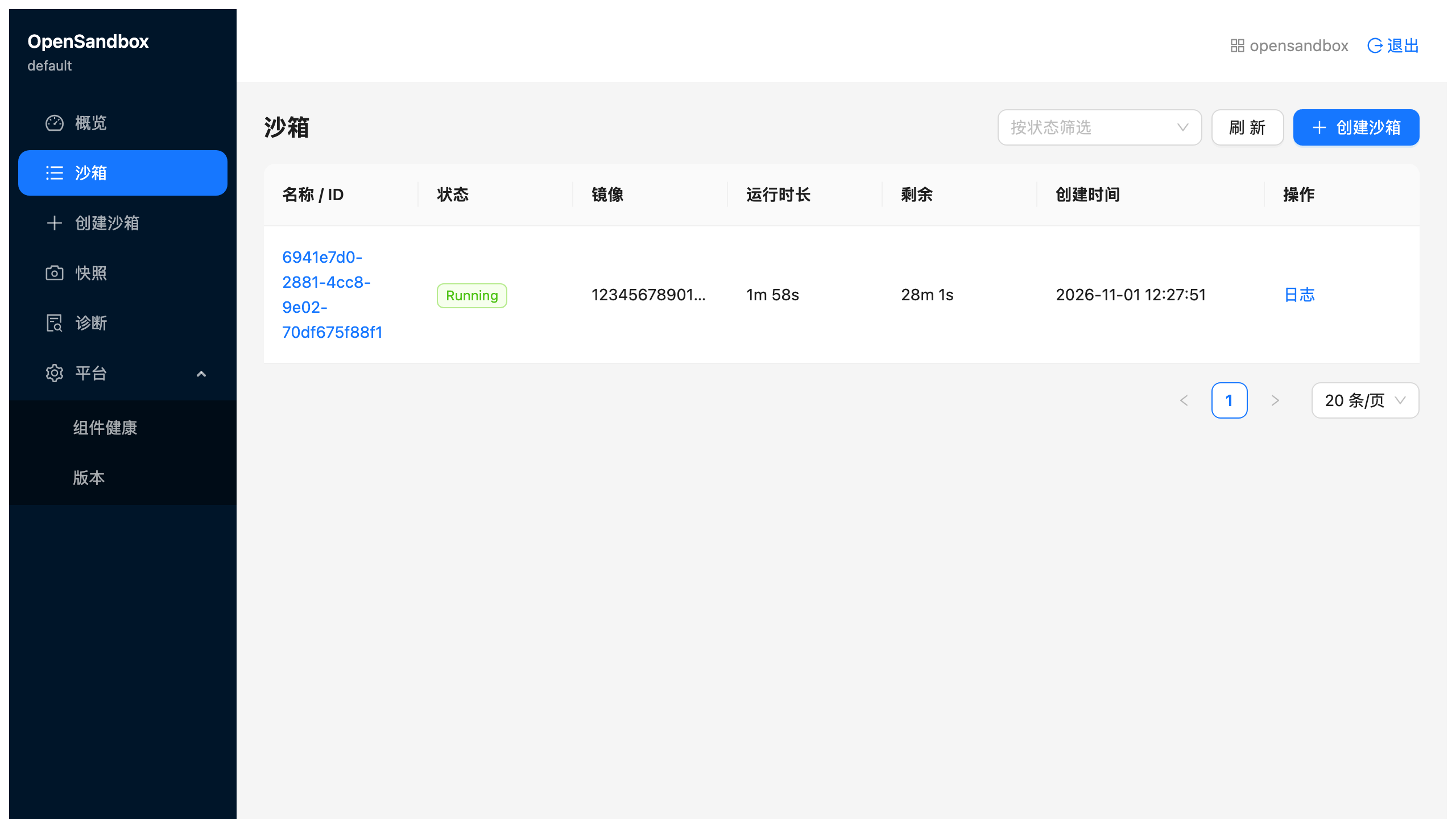
The 1.2.0 console is Chinese-only: the sidebar reads Overview, Sandboxes, Create sandbox, Snapshots, Diagnostics and Platform, and there’s no English locale. It also shows times in China Standard Time: the 1.2.0 web app hard-codes Asia/Shanghai, so the screenshot’s 12:27:51 is 04:27:51 UTC. Sign-in lands on an overview with the sandbox counts. A few things to know before relying on it:
- The BFF runs as root. The upstream image has no
USER; mounting the tenants file at mode 0400 works only because of that. - The BFF reads across the cluster. Its ServiceAccount can read pods, events and Deployments in every namespace, for the platform pages.
- The session cookie isn’t Secure, because the console is reached over an http port-forward (Safari would drop it otherwise). Behind HTTPS, set
BFF_COOKIE_SECURE=true. There is no ingress. - The digests aren’t fixed. A build without the cache gives the BFF a new digest, because its Python requirements use
>=pins.
Test 7: A first sandbox on EKS
07_first_sandbox.py uses the Python SDK through a port-forward to the server on local port 18080, because another local service now holds 8080 on my Mac and answers 404, which looks like a broken server. Its helper checks the /health body, not just that something answered. The script removes the Python image’s reference from both nodes, times a create, then five warm ones, then runs a command and a file round trip on one sandbox through the server’s proxy and through the gateway (trimmed). In its output, “cold” means the image’s record was deleted from containerd while its unpacked layers stayed on the node, so it isn’t a cold pull:
$ uv run python 07_first_sandbox.py
image   123456789012.dkr.ecr.us-east-1.amazonaws.com/opensandbox-eks/python:3.12-slim
server  127.0.0.1:18080 (port-forward), sandboxes tagged run=76f813213a95

== 1. cold create: the image is on no node
  ip-10-60-10-104.ec2.internal: image removed (5 s), debug pod deleted
  ip-10-60-61-61.ec2.internal: image removed (5 s), debug pod deleted
  cold                      2.5 s   node ip-10-60-61-61.ec2.internal   kubelet pulled the image in 90ms (43 MB)
...
== 3. command and file round trip, through the server proxy and through the gateway
  sandbox e41a7281-dc2c-436f-8123-e8eb1267f031
  server proxy: endpoint 127.0.0.1:18080/v1/sandboxes/e41a7281-dc2c-436f-8123-e8eb1267f031/proxy/44772
  server proxy: command -> hello from e41a7281-dc2c-436f-8123-e8eb1267f031-0 | Python 3.12.16
  server proxy: file round trip ok
  gateway: endpoint osb-gateway-0123456789abcdef.elb.us-east-1.amazonaws.com
  gateway: command -> hello from e41a7281-dc2c-436f-8123-e8eb1267f031-0 | Python 3.12.16
  gateway: file round trip ok
...
== Timing table
  case                     create   node                              note
  cold                       2.5s   ip-10-60-61-61.ec2.internal       kubelet pulled the image in 90ms (43 MB)
  cold, 2nd node             2.3s   ip-10-60-10-104.ec2.internal      kubelet pulled the image in 100ms (43 MB)
  warm 1                     2.2s   ip-10-60-10-104.ec2.internal      image already on the node
  warm 2                     2.7s   ip-10-60-10-104.ec2.internal      image already on the node
  warm 3                     2.6s   ip-10-60-10-104.ec2.internal      image already on the node
  warm 4                     2.3s   ip-10-60-10-104.ec2.internal      image already on the node
  warm 5                     2.5s   ip-10-60-10-104.ec2.internal      image already on the node

  warm median of 5: 2.5 s   (min 2.2, max 2.7)
  no create took longer than the server's 60 s sandbox_create_timeout_seconds
  total 46 s

all steps passed
The “cold” rows aren’t a cold pull, and I wouldn’t read a cold-start figure from them. The script removes the image with ctr images rm, which drops the image’s name, but on these AL2023 nodes the unpacked layers stay. During the clean install in Test 4, after the server image’s references had been removed from both nodes with the same ctr -n k8s.io images rm --sync, the server’s pull took 94 ms and, per containerd’s log, read 0 bytes. So the kubelet’s 90 to 100 ms is containerd finding the layers already there, and 43 MB is the image’s size, not what was downloaded (that would be about 480 MB/s, against the 40 MB/s of the controller’s genuine pull in Test 4). What the table does measure is runc sandbox startup with the image on the node: 2.2 to 2.7 seconds for scheduling, the execd init container and the readiness check, with a 2.5-second median. A genuinely cold pull would add the download on top; at Test 4’s rate, about another second for this image, which I haven’t measured. The scheduler put the first “warm” create on the other node, so the script counted it as a second cold one. Across all my runs, the slowest create was 5.2 seconds, far from the server’s 60-second limit.
Both paths reached the same sandbox. Through the server proxy, the SDK calls /v1/sandboxes/<id>/proxy/44772 on the port-forward and the server relays to execd; through the gateway, it gets the NLB’s name from the server and goes there directly. osb sandbox list showed the sandbox Running, and the script deleted only the sandboxes it had created, using a run value it attaches as metadata (which becomes a pod label).
For the leftovers of a crashed run, 98_delete_sandboxes.py deletes everything the server lists, page by page. With three sandboxes and a page size of 2, it printed deleted 3, and osb sandbox list then answered No sandboxes found.
Results summary
| Step | Recorded run | Other runs | Notes |
|---|---|---|---|
01_cluster.sh (64 resources) | 13m 50s; apply 13m 07s | 36 s, no changes | EKS control plane 9m 50s |
02_kata.sh | 1m 34s cold; kata-deploy phase 1m 04s (1.6 GB pull, about 34 s per node) | 1m 15s cached; 51 s re-run | Kata pod Running in 1 to 3 s, runc 0 to 1 s |
03_images.sh, nine images | 12m 12s, exit 1 (7m 30s of 429 backoff) | 1m 20s for the missing image; 21 s with nothing to copy | About 4m 48s of copying without throttling |
| Missing image found and restored | 14 s, exit 1, names the image | 23 s restore | |
04_install.sh from nothing | 1m 20s | 58 s re-run, no changes | Server pod replaced and Ready in 11.5 s |
05_gateway.sh, fresh NLB | 4m 09s: NLB active 2m 24s, answering 2m 28s | 32 s new IP; 30 s back; 29 s no change | Earlier first run: active 2m 31s, answering 2m 51s |
06_console.sh | build 1m 09s without cache; deploy 25 s | 13 s re-run, no changes | |
07_first_sandbox.py | 46 s | runc sandbox create 2.2 to 2.7 s, median 2.5 s, with the image’s layers on the node | |
98_delete_sandboxes.py | 3 sandboxes over 2 pages, deleted 3 | ||
08_scale.sh down | 17m 08s (update 33 s; first node gone within about 3 min, second at the end) | A node bills until it’s gone | |
08_scale.sh up | 2m 31s | Kata reinstalled; server volume back in us-east-1a |
Adding up the recorded first runs, an empty account gets to a first sandbox in about 28 minutes of script time if Docker Hub doesn’t throttle the copy (about 5 minutes for the images). My run, with the throttled copy and its re-run, took about 37.
Pricing
OpenSandbox is free. The cluster bills by the hour whether or not a sandbox runs. Itemized from what the scripts created, at us-east-1 on-demand prices:
| Resource | Rate | Per hour |
|---|---|---|
| EKS control plane (standard support) | $0.10/h | $0.1000 |
2 × m7i.2xlarge (nested virtualization at no extra charge) | $0.4032/h each | $0.8064 |
| NAT gateway | $0.045/h, plus $0.045 per GB processed | $0.0450 |
| Network Load Balancer | $0.0225/h, plus $0.006 per NLCU-hour used | $0.0225 |
| Public IPv4 addresses: the NAT gateway’s and the NLB’s two | $0.005/h each | $0.0150 |
| EBS gp3: 2 × 100 GiB node root volumes and the server’s 1 GiB volume | $0.08/GB-month | $0.0220 |
ECR storage: 1.51 GiB for the nine copies, plus about 0.10 GiB for the two console images (21 MB and 87 MB, from my own describe-images query) | $0.10/GB-month | $0.0002 |
| S3 gateway endpoint, IAM, EKS Pod Identity, ECR basic scanning | free | $0 |
| Total, idle | $1.011/h, about $24.27 a day |
The two instances are about 80% of the bill. The NAT gateway’s per-GB charge stays small, because ECR layers come through the free S3 endpoint and the Docker Hub copies ran from my Mac. The exception is the 1.6 GB kata-deploy image, which each new node pulls from quay.io through the NAT gateway: about $0.07 per node.
Scaled to zero nodes, the instances and their root volumes go away. The control plane, the NAT gateway, the NLB, their three addresses, the server’s volume and ECR stay: about $0.18 an hour, $4.39 a day. Getting there takes about 17 minutes: one node goes within about 3, and the other bills until the end (about $0.14 in all). The NLB isn’t Terraform’s and isn’t part of the node group, so it keeps billing until its Service is deleted. Only the teardown gets to $0.
Cleanup
Between sessions, scale the node group to zero, and back when you need it:
./08_scale.sh down
./08_scale.sh up
down sets the desired size to 0 and waits for the nodes to go. In my recorded run the node group update took 33 seconds. The first node was gone within about 3 minutes; the second took another 14, until EKS’s 15-minute eviction limit ended its drain (I didn’t find which pod held it). up took 2m 31s and checks what a node replacement could break (trimmed):
== kata-deploy on the new nodes
  ok    kata-deploy labelled 2 nodes
  ok    RuntimeClass kata-qemu exists
  ok    ip-10-60-15-81.ec2.internal: containerd imports the kata-deploy drop-in; the kata shim is installed
  ok    ip-10-60-36-30.ec2.internal: containerd imports the kata-deploy drop-in; the kata shim is installed
   took 1m 12s

== a pod under kata-qemu
  ok    kata-qemu pod ran in its own VM on ip-10-60-15-81.ec2.internal: guest kernel 6.18.35, node kernel 6.18.56-125.164.amzn2023.x86_64
   took 12s
...
== server volume and gateway load balancer
  ok    the server's EBS volume is attached (in-use us-east-1a); the server pod runs in us-east-1a
  ok    NLB: 2 gateway targets healthy (all states: healthy draining healthy draining)
   took 8s
...
  total                                         2m 31s
The new nodes are new instances, and kata-deploy reinstalled Kata on them by itself in 1m 12s. The OpenSandbox pods waited as Pending while the nodes were away and came back on the new ones. The server’s volume reattached because one new node landed in us-east-1a. Nothing guarantees that: if both land in us-east-1b, the server stays Pending. It didn’t happen in three scale-ups, and I didn’t force it. No sandboxes were running during the test, so what happens to running sandboxes across a scale-down is untested here.
To remove everything:
./99_teardown.shI ran it once, recorded, at the end of the series, after parts 3 to 6 had used the cluster: 13 minutes 14 seconds in all, of which terraform destroy took 11 minutes 8 seconds (64 of 64 resources). Every leftover check came back clean, the ECR scanning rule was back at the default, and it ended with teardown complete; a separate check of the account found nothing of the cluster left (28 of 28 checks). Three lines in that recording say teardown stopped at line .... They’re a cosmetic bug in the script’s error trap, which fired inside the “is it gone yet?” checks, where “not found” is the expected answer; the run carried on to the end, and the companion script is fixed (the recorded output predates the fix). --yes skips the question that follows. It asks you to type the cluster name and checks that your AWS account matches env.sh. If the node group is at zero, it brings two nodes back first with ./08_scale.sh nodes-only, because the controllers that delete the load balancer and the volume need nodes to run on. Then, in order: every sandbox; the gateway’s NLB Service, waiting for the NLB to go; the console and the Helm releases, with the LB Controller last; the PVC, waiting for its EBS volume to go; the namespaces, the seven CRDs Helm keeps and the StorageClass; every opensandbox-eks/* ECR repository; terraform destroy; and a leftover check that fails on anything it finds. The order is the point, because several things aren’t Terraform’s:
- The NLB belongs to the LB Controller, so its Service goes while the controller still runs; otherwise the load balancer, its target group and two security groups are orphaned and block the VPC delete. When I reset the gateway for Test 5, the Service delete took 28 seconds and the AWS side was gone within 33.
- The server’s EBS volume belongs to the EBS CSI driver; deleting the PVC deletes it.
- The ECR repositories were created on push.
values/server-gateway.yamlstill names the old NLB. On a rebuilt cluster, run05_gateway.shright after04_install.sh.- The registry’s scanning configuration goes back to basic, no rules.
The leftover check looks for network interfaces by VPC ID, because the ones AWS services create carry no project tag, and for EBS volumes by this cluster’s tag only, so another cluster’s volumes in the same account are left alone.
Verdict
OpenSandbox 1.2.0 installs on EKS 1.37, from an empty account to a sandbox reached through the server and through a load balancer, in about 28 minutes of script time. Nothing I could diagnose traced back to running three Kubernetes minor versions past the tested range; the one cause I didn’t find, a node drain that stalled during a scale-down, stays open. (Part 6 later found one that does: see part 6.) Most fixes were about defaults, and most of those would bite on any cluster outside the project’s own environment: images from a registry in China, a server that exits without a key, requests sized for a much bigger node, no storage for the database, a template that tolerates every taint, a namespace two charts fight over, a gateway that’s off and can’t be exposed through its own Service, and a console with no images and an example pointed at the wrong port. Each fix is small, and once they live in values files and manifests, the install converges: every install script ran a second time with no changes.
The pleasant surprise was Kata. Nested virtualization turned two ordinary m7i.2xlarge instances into Kata hosts with no node changes beyond the kata-deploy chart, and it reinstalled itself on replacement nodes. That makes VM isolation together with the egress sidecar possible without bare metal. runc sandboxes started in about 2.5 seconds with the image already on the node (I didn’t measure a truly cold pull), and the console worked without touching the server’s authentication. The weak spot is exposure: as configured here, the gateway is a cleartext door guarded only by a source address.
What I’d keep in mind before building on it:
- You are the test matrix, and the values files are your contract. No upstream CI covers EKS or Kubernetes 1.37, the charts aren’t published, and a new OpenSandbox line ships every few weeks with only the latest supported. Pin everything (the AMI, the add-ons, the git tag, the image tags, checked by digest) and re-run the checks after every upgrade.
- The gateway needs more than a /32 before real use. Sandbox traffic is cleartext and the sandbox ID is its only credential; look at signed routes and TLS first.
- The permissions are broad. Cluster-wide pods and Secrets for the server and controller, unused fast-sandbox ClusterRoles, a server without a security context, a console BFF running as root, and an LB Controller policy that can edit any security group in the account. Keep this cluster to sandboxes.
What you sign up for
| Concern | OpenSandbox 1.2.0 on EKS 1.37, as built here |
|---|---|
| Kubernetes support | The project tests up to v1.34; on 1.37, nothing I diagnosed here needed a 1.37-specific fix (one drain stall unexplained); part 6 later found one that does |
| Who runs what | You: the cluster, the charts rendered from a git tag, the ECR copies, the console images, kata-deploy, the NLB |
| Exposure | Server and console through kubectl port-forward only; sandboxes through the gateway’s NLB, cleartext, from one /32 |
| Isolation | runc by default; Kata VMs (QEMU or Cloud Hypervisor) ready on both nodes |
| State | SQLite on an encrypted 1 GiB EBS volume, which pins the server to one zone |
| Console | Works with the server’s single key; Chinese-only UI; its BFF runs as root |
| Idle cost | About $1.01/h, $24.27 a day; about $0.18/h scaled to zero |
| Time (my runs) | About 28 minutes of script time from an empty account to a first sandbox (37 with Docker Hub throttling); 17 minutes to scale to zero, 2.5 to come back |
Who should run this
This install makes sense for a platform team on AWS that wants agent sandboxes in its own account, with egress policy and VM isolation under its own control, and that’s comfortable owning Terraform, Helm values and a release line that moves every few weeks. It’s also a reasonable lab for evaluating OpenSandbox’s Kubernetes path before committing to it: everything is scripted and re-runnable, and one script tears it down.
It doesn’t fit teams that want a one-command install, a vendor-tested Kubernetes version, or a server, gateway and console that are hardened out of the box. Part 3 takes this cluster through the sandbox lifecycle, pools, and the switch to Kata.