AWS Nitro Sandboxes on ECS: Hands-On with Isolated and Confidential Tasks
By Fabio Douek
Human-led, AI-assisted. Research and implementation done with AI tools, led, tested and edited by me. How posts are labeled
Jump to section
- Overview
- Architecture
- Setup
- Step 1: Tools
- Step 2: Dependencies with Terraform
- Step 3: The cluster
- Step 4: A capacity provider with Nitro Enclaves
- Step 5: Task definitions with an isolation mode
- Step 6: Run the tasks
- Testing
- Test 1: Cold start, and where the tasks land
- Test 2: An isolated and a shared task, side by side
- Test 3: What “host” means inside a sandbox
- Test 4: The metadata service
- Test 5: Memory overhead per sandbox size
- Test 6: Generating a confidential task’s policy
- Test 7: Confidential, isolated and tampered
- Results summary
- Operating and Monitoring
- Pricing
- Cleanup
- Verdict
- What works
- What doesn’t, yet
- Who should use it
Explain (TLDR) like I am...
Imagine a toy shelf where all the toys share one big open bin. Now any toy can get its own little box on the same shelf, with its own lid, so a messy toy can't spill onto the others.
The little box takes some extra room, and the smallest toys lose the most space to it. There is also a special box with a seal that says exactly what is inside. A grown-up only opens the cookie jar for a box whose seal matches, and if someone swaps the toy, the box won't open at all.
On Amazon ECS, isolation is now a property of the task definition. A task marked isolated runs in its own virtual machine on a shared instance, so a compromised tenant has a hardware boundary to cross before reaching another. The task definition itself stays trusted input, so control who may register one.
Confidential mode adds evidence. The task presents a signed measurement of its own policy, and an AWS KMS key releases a secret only on a match. In testing, the same container without that policy was refused, and an altered command never started.
The presenting problem is containers on one instance sharing a single kernel. The intervention is a dedicated virtual machine per task, prescribed with one field in the task definition. In my run the isolated task had its own kernel and saw only 1 vCPU and about 2 GiB, next to a regular task on the same instance.
Side effects are dose dependent: at least 262 MiB of extra memory per task, which is 51% on a 512 MiB task and 6% at 8 GiB. For confidential tasks the evidence is strong: KMS released a key only to the task whose policy measurement matched.
Teams that share instances between customers often carry a quiet worry about the neighbour nobody vetted. Here the answer is a checkbox and a field, and the console walks you through both, which takes some of the dread out of saying yes.
The new weight is bookkeeping. Confidential tasks need a generated policy, and any change to the image, command or environment means regenerating it and updating the key policy. Expect whoever owns releases to want that loop automated before they feel calm about it.
Picture one rehearsal room where every band shared the same walls and the same amp. Now each act can get its own soundproof booth inside that room, sized to the act: one vCPU, two gigs, nothing borrowed from the house.
The booths cost floor space, though: at least 262 MiB each on top of the act's own, which hurts the small acts most. The confidential booth also plays from a sealed chart. Change one bar after it was signed, and the booth won't open for the show.
The story for ECS customers is simple: per-task virtual machine isolation on ECS Managed Instances, at no additional fee. Turning it on takes a new capacity provider, since the Nitro setting exists only at creation, and one field in the task definition. The console shows both before the docs do.
The proof point is confidential mode. A KMS key that opens only for a task whose policy measurement matches is a demo regulated buyers grasp at once. Be honest about the cost: at least 262 MiB of memory per task, so it suits mid-sized tasks better than tiny ones. And test deployments early: rolling updates of console-created sandboxed services failed until I turned off the container's version consistency.
 See the source code here: aws-nitro-sandboxes
Overview
On 2026-11-09 AWS launched Nitro Sandboxes: lightweight VMs that the Nitro hypervisor carves out of an EC2 instance, each one a first-level guest next to its parent. On Amazon ECS the feature is called isolated and confidential tasks, “a trusted execution capability of Amazon ECS Managed Instances”: each task runs in its own lightweight VM, and several of them can share one instance.
This post, part 3 of 4, covers ECS. Part 1 explains the architecture and compares the three ways in, part 2 drives the raw primitive on EC2 with Firecracker, and part 4 covers EKS.
On ECS, the announcement’s “one-line change” is one field in the task definition, trustedExecutionConfiguration, and it only works on a capacity provider that was created with Nitro Enclaves turned on. The ECS docs describe both in the API reference but show no console procedure, and they leave open what I most wanted to know: does a regular task land on the same instance as an isolated one, what does a sandbox cost in memory below 8 GiB, what does a host-level setting mean inside a VM, and does confidential mode’s attestation work end to end? I ran it on one cluster with a Managed Instances capacity provider pinned to m8g.xlarge (Graviton4, 4 vCPU, 16 GiB) in us-east-1 on 2026-11-09, with AWS CLI 2.39.7, and set it up from the console. On 2026-11-10 I repeated the main tests in a second, recorded run, and added ECS Exec. A third run that day, for the video’s operations section, kept a sandboxed service running to see how it behaves day to day (Operating and Monitoring).
Three results stood out:
- An isolated task is a VM sized to the task. Next to a regular task on the same instance, it had its own kernel and saw 1 vCPU and 2.2 GiB, where the regular task saw the instance’s kernel, all 4 vCPUs and all 16 GiB.
pidMode: hostwithprivileged: trueran, and “host” turned out to be the sandbox. - Confidential mode gates a KMS key on the task’s policy. KMS released a secret to a confidential task and refused the same container running isolated: of the PCRs I printed (PCR0, PCR8, PCR17), only PCR17, the policy, differed. A command changed after the policy was generated never started.
- The price is memory, and small tasks pay the most. Each sandbox cost at least 262 MiB on top of the task’s own memory: 51% extra on a 512 MiB task, 6% at 8 GiB.
Architecture
Two settings make it work, at two levels. The capacity provider’s nitroEnclavesEnabled makes ECS launch instances with the EC2 Nitro Enclaves option on, the same switch I flipped by hand in part 2, and ECS registers them with the attribute ecs.capability.nitro-enclaves. The task definition’s isolationMode then decides, per task, whether it runs on the instance’s shared container runtime or in a sandbox of its own. Each sandbox reserves memory, in the docs’ words, “for the Linux kernel, the microVM, containerd, and the ECS sandbox agent”, and for a confidential task that agent evaluates the attestation policy before any container starts.
The modes don’t map one to one onto EC2’s. Part 2 had direct mode (the parent can read guest memory) and confidential mode (it can’t). ECS has three: SHARED, an ordinary container; ISOLATED_SANDBOX, where the instance is trusted and the task isn’t; and CONFIDENTIAL_SANDBOX, where the instance is untrusted, the sandbox is the trust boundary, and the task must carry an attestation policy. Test 2 shows which EC2 mode sits under the isolated one.
Setup
Terraform creates the dependencies. The cluster, the capacity provider, the task definitions and the tasks are made in the console, with the AWS CLI equivalent under each step. The companion README has every command with the placeholders filled in by sed and jq.
Step 1: Tools
You need AWS CLI 2.39.7 or later. Its changelog is the first to carry the feature: “Amazon ECS Managed Instances now supports isolated and confidential tasks, which run in AWS Nitro Sandboxes. Configure them with trustedExecutionConfiguration in task definitions and nitroEnclavesEnabled in capacity providers.” On November 9 Homebrew still served 2.39.6, so I installed AWS’s own package, as in part 2.
Terraform only does the dependencies, and on November 9 it couldn’t have done more: the Terraform AWS provider had neither field, and CloudFormation had NitroEnclavesEnabled on the capacity provider but no TrustedExecutionConfiguration on AWS::ECS::TaskDefinition. The one Linux-only tool is the policy generator for confidential tasks. For this demo I ran it on the cluster itself (Test 6), so I didn’t need a Linux machine, but that’s a shortcut: in production, run it in CI, in CloudShell, or on a Linux workstation or container, for the reason in Test 6.
Step 2: Dependencies with Terraform
The Terraform config creates a VPC (10.62.0.0/16, two private and two public subnets, one NAT gateway), an egress-only security group my2cents-nitro-ecs-tasks, the Managed Instances infrastructure role (AmazonECSInfrastructureRolePolicyForManagedInstances), the instance role and profile (AmazonECSInstanceRolePolicyForManagedInstances), a task execution role, a task role and the log group /ecs/my2cents-nitro-sandbox. One name matters:
# The name must start with ecsInstanceRole: the infrastructure policy scopes iam:PassRole to it
resource "aws_iam_role" "instance" {
  name = "ecsInstanceRole-my2cents"
  assume_role_policy = jsonencode({
    Version   = "2012-10-17"
    Statement = [{ Effect = "Allow", Principal = { Service = "ec2.amazonaws.com" }, Action = "sts:AssumeRole" }]
  })
}
The instance profile page is blunt about it: “a mismatched name causes an authorization error at task launch.” The task role gets the ssmmessages permissions ECS Exec needs and nothing for KMS; Test 6 grants kms:Decrypt in a key policy, with attestation conditions, and nowhere else.
terraform -chdir=terraform init
terraform -chdir=terraform apply
NET=$(terraform -chdir=terraform output -raw run_task_network_configuration)   # subnets + SG for run-task
Step 3: The cluster
In Amazon ECS > Clusters > Create cluster, there’s no Nitro or sandbox control anywhere, including under “Fargate and managed instances” with “Use custom - advanced”. The setting lives on the capacity provider, and the API’s update call has no nitroEnclavesEnabled member, so a provider created without it can’t be fixed later through the API. I created the cluster as Fargate only and added the provider in the next step.
aws ecs create-cluster --cluster-name my2cents-nitro-ecsStep 4: A capacity provider with Nitro Enclaves
In Clusters > my2cents-nitro-ecs > Infrastructure > Capacity providers > Create:
- Name
my2cents-nitro-cp, type Amazon ECS Managed Instances. - Infrastructure role
ecsInfrastructureRole-my2centsand Instance profileecsInstanceRole-my2cents. Pick both from the list; typing the name gives “Value is not a valid profile ARN”. - The two private subnets and the
my2cents-nitro-ecs-taskssecurity group. - Instance selection: Use custom - advanced, CPU 4 to 4, Memory 16384 to 16384, and the attribute Allowed instance types =
m8g.xlarge. The console answers “View matching instance types (1)”. - Storage 30 GiB.
- Under Advanced configuration, a new section reads “Nitro Enclaves - new: Launch instances with Nitro Enclaves so that tasks can run in an isolated sandbox”, with a Turn on Nitro Enclaves checkbox and the note “Nitro Enclaves is not supported with local storage.”
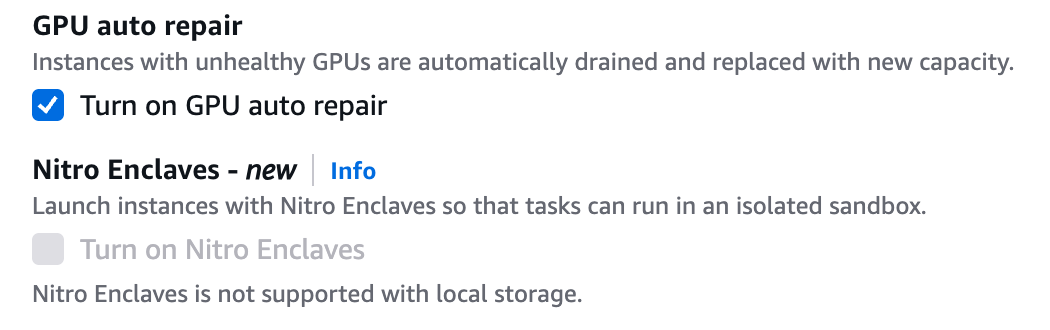
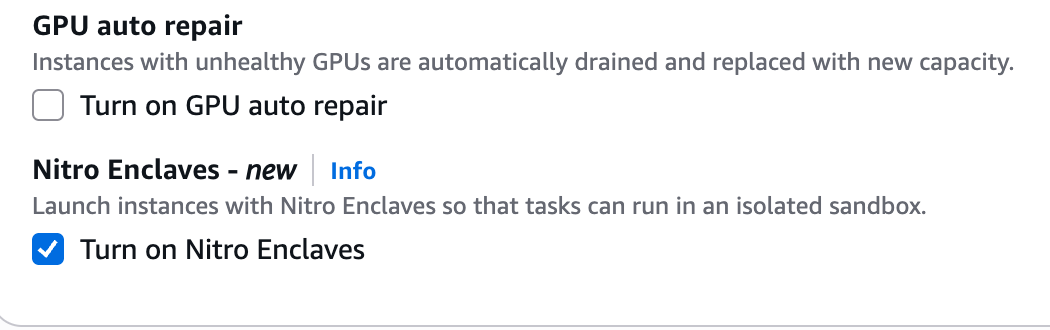
“GPU auto repair” is checked by default too (I unchecked it; m8g has no GPU), and the scale-in placeholder is 60 seconds. The CLI equivalent sets the same two things in the instance launch template:
{
  "name": "my2cents-nitro-cp",
  "cluster": "my2cents-nitro-ecs",
  "managedInstancesProvider": {
    "infrastructureRoleArn": "<INFRASTRUCTURE_ROLE_ARN>",
    "instanceLaunchTemplate": {
      "ec2InstanceProfileArn": "<INSTANCE_PROFILE_ARN>",
      "networkConfiguration": {
        "subnets": ["<PRIVATE_SUBNET_1>", "<PRIVATE_SUBNET_2>"],
        "securityGroups": ["<SECURITY_GROUP_ID>"]
      },
      "storageConfiguration": { "storageSizeGiB": 30 },
      "localStorageConfiguration": { "useLocalStorage": false },
      "instanceRequirements": {
        "vCpuCount": { "min": 4, "max": 4 },
        "memoryMiB": { "min": 16384, "max": 16384 },
        "allowedInstanceTypes": ["m8g.xlarge"]
      },
      "nitroEnclavesEnabled": true
    }
  }
}
aws ecs create-capacity-provider --cli-input-json file://build/capacity-provider.json
aws ecs describe-capacity-providers --capacity-providers my2cents-nitro-cp \
--query 'capacityProviders[0].{updateStatus: updateStatus, nitro: managedInstancesProvider.instanceLaunchTemplate.nitroEnclavesEnabled, types: managedInstancesProvider.instanceLaunchTemplate.instanceRequirements.allowedInstanceTypes, storage: managedInstancesProvider.instanceLaunchTemplate.storageConfiguration.storageSizeGiB}'{
"updateStatus": "CREATE_COMPLETE",
"nitro": true,
"types": [
"m8g.xlarge"
],
"storage": 30
}Step 5: Task definitions with an isolation mode
In Task definitions > Create new task definition, with Managed Instances as the only launch type, the form has a section the docs don’t mention: “Isolation mode - new: Choose how strongly this task is isolated from other tasks on the same instance.” Check Use task isolation and it offers three modes. The note under it reads “Isolation mode is available when Managed Instances is the only launch type.”
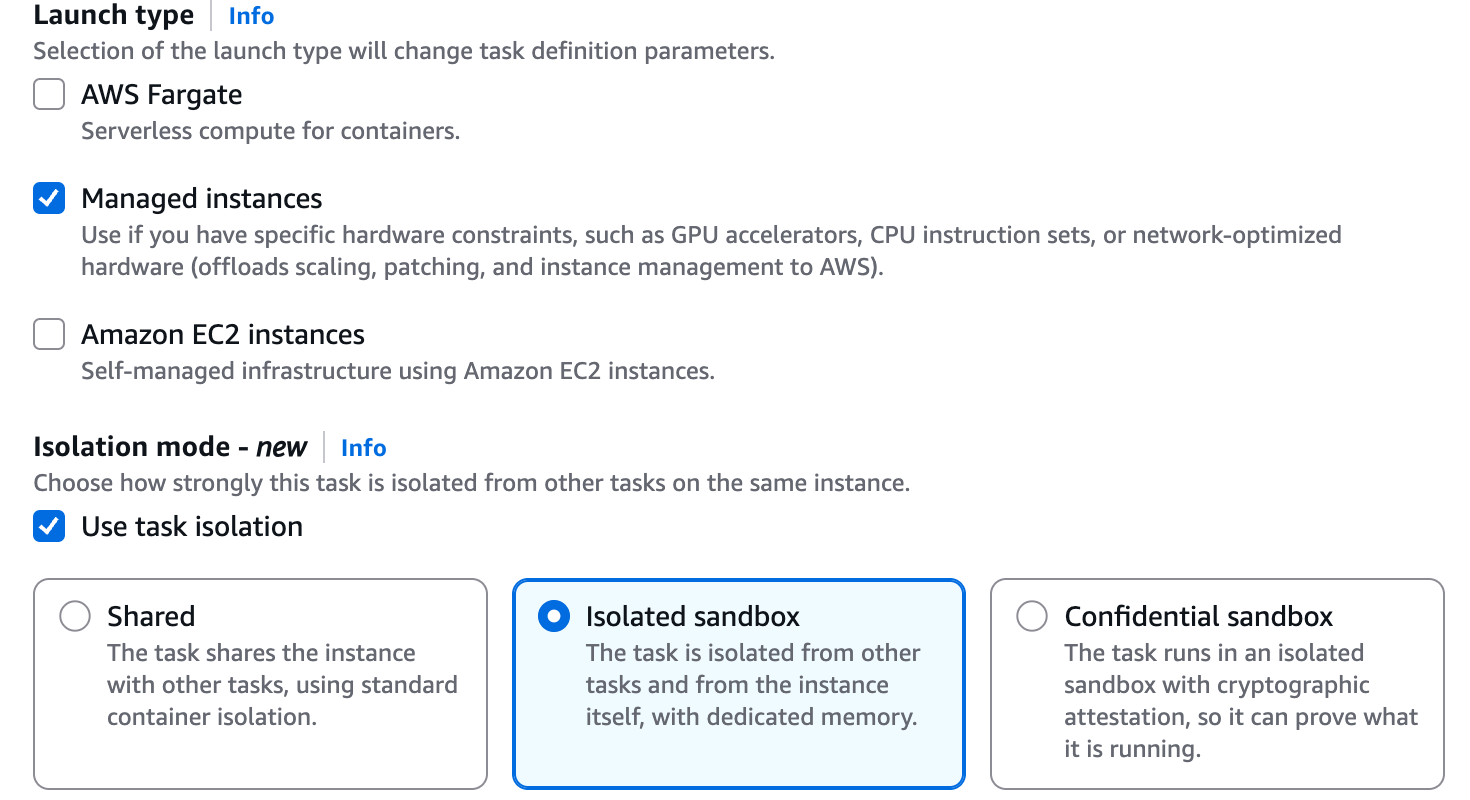
| Mode | Console description |
|---|---|
| Shared | ”The task shares the instance with other tasks, using standard container isolation.” |
| Isolated sandbox | ”The task is isolated from other tasks and from the instance itself, with dedicated memory.” |
| Confidential sandbox | ”The task runs in an isolated sandbox with cryptographic attestation, so it can prove what it is running.” |
The docs list Create new task definition with JSON as the console path, and it wasn’t clear whether its “no extraneous keys” check would accept the new field. It does: I registered my2cents-isolated:1 and my2cents-shared:1 by pasting JSON there, and in the recorded run I created both again in the console, as revision 2 of each. The isolated one, with the probe command shortened:
{
  "family": "my2cents-isolated",
  "networkMode": "awsvpc",
  "requiresCompatibilities": ["MANAGED_INSTANCES"],
  "runtimePlatform": { "cpuArchitecture": "ARM64", "operatingSystemFamily": "LINUX" },
  "cpu": "1024",
  "memory": "2048",
  "executionRoleArn": "arn:aws:iam::<ACCOUNT_ID>:role/my2cents-nitro-ecs-execution",
  "taskRoleArn": "arn:aws:iam::<ACCOUNT_ID>:role/my2cents-nitro-ecs-task",
  "containerDefinitions": [
    {
      "name": "probe",
      "image": "public.ecr.aws/amazonlinux/amazonlinux:2023",
      "essential": true,
      "command": ["bash", "-c", "echo \"kernel: $(uname -rv)\"; ... echo PROBE_DONE; sleep 3600"],
      "logConfiguration": {
        "logDriver": "awslogs",
        "options": {
          "awslogs-group": "/ecs/my2cents-nitro-sandbox",
          "awslogs-region": "us-east-1",
          "awslogs-stream-prefix": "my2cents-isolated"
        }
      }
    }
  ],
  "trustedExecutionConfiguration": { "isolationMode": "ISOLATED_SANDBOX" }
}
The shared definition is the same without the last key. Both run one probe as their command and print it to CloudWatch Logs: kernel, boot_id, uptime, CPUs, memory, disks, PCI devices, /dev/nsm, network devices, the metadata service, the task role’s credentials, the task metadata endpoint, capabilities, PID 1 and egress. From the CLI, aws ecs register-task-definition --cli-input-json file://build/td-isolated.json, or the shorthand --trusted-execution-configuration isolationMode=ISOLATED_SANDBOX.
Step 6: Run the tasks
In Run new task > Compute configuration > Capacity provider strategy, FARGATE and FARGATE_SPOT carry the note “Sandbox isolation requires a Managed Instances capacity provider.” The Nitro provider is labelled “Nitro Enclaves · Managed instances”.
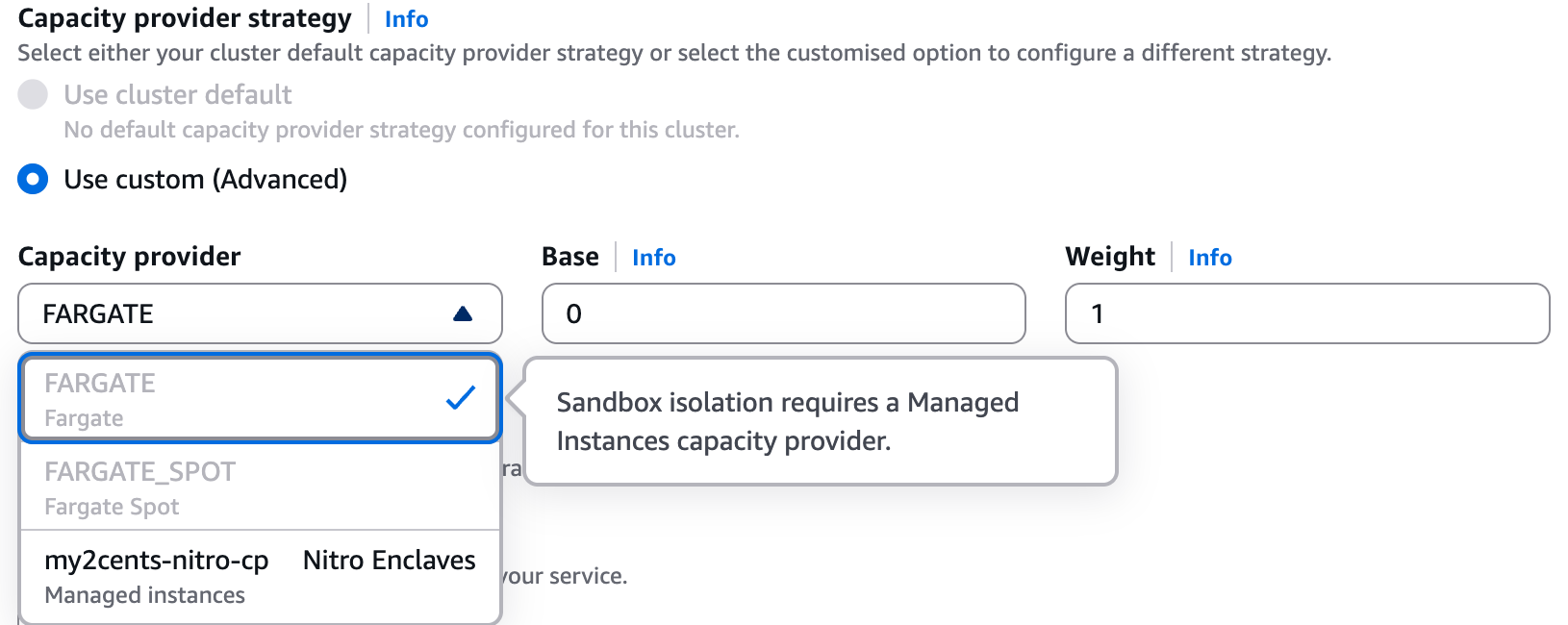
Use the private subnets and the task security group. The Troubleshooting section has the usual Turn on ECS Exec switch. I turned it on. Every probe prints to the logs, but in the recorded run I also opened ECS Exec into the isolated task, and uname -r returned 6.18.56, the guest’s kernel, so exec works in ISOLATED_SANDBOX. In a confidential task it’s a different story (Test 7).
aws ecs run-task --cluster my2cents-nitro-ecs --task-definition my2cents-isolated \
  --capacity-provider-strategy capacityProvider=my2cents-nitro-cp,weight=1 \
  --network-configuration "$NET" --enable-execute-command --query 'tasks[0].taskArn' --output text
aws logs tail /ecs/my2cents-nitro-sandbox --log-stream-names my2cents-isolated/probe/<task-id> --since 1h
aws ecs execute-command --cluster my2cents-nitro-ecs --task <task-id> --container probe \
  --interactive --command 'uname -r'   # needs the Session Manager plugin locally
Testing
Test 1: Cold start, and where the tasks land
The first isolated task had no instance to run on, so ECS launched one. The timeline, from describe-tasks:
| Event | Time (UTC) |
|---|---|
| Run task clicked in the console | 23:28:55.2 |
createdAt | 23:28:56.0 |
| Container instance record registered | 23:28:59.9 |
| PROVISIONING to PENDING | about 23:29:21 |
pullStartedAt to pullStoppedAt | 23:29:22.7 to 23:29:24.4 (1.6 s) |
startedAt | 23:29:30.1 |
That’s about 34 seconds from createdAt to RUNNING, including launching the m8g.xlarge. The recorded run, started from the console’s Run task the same way, came out the same: createdAt 01:33:59.475, startedAt 01:34:33.797, 34.3 seconds including the instance. The 5.75 seconds between the end of the pull and the container start cover the sandbox boot and the container start inside it; for scale, a bare sandbox on EC2 booted to SSH in about 2 seconds in part 2. A shared task on the warm instance, with its image cached (a 0.1-second pull), took 7.1 seconds from createdAt to startedAt. I didn’t time an isolated task on a warm instance, so I have no like-for-like warm comparison.
The instance ECS launched, i-04786d3b9f7c4f5ef, had EnclaveOptions.Enabled: true, IMDSv2 required with HttpPutResponseHopLimit: 1, and the Bottlerocket-based ECS Managed Instances AMI (ami-0d2bb695ef3bc2351). Its container instance carried the attribute ecs.capability.nitro-enclaves and registered 4,096 CPU units and 13,347 MiB of memory out of 16,384.
Shared and isolated tasks share the instance. The docs imply this but never say it. Both tasks reported the same containerInstanceArn, in both runs. You can’t force it, though: a placement constraint on the instance ID is refused.
not applicable for MANAGED_INSTANCES. Subject of expression must be one of [attribute:ecs.subnet-id, attribute:ecs.vpc-id, attribute:ecs.availability-zone, attribute:ecs.cpu-architecture, attribute:ecs.instance-type]Co-location comes from bin-packing alone. The other open question from the docs was how a shared task reports its mode: it doesn’t. The isolated task’s trustedExecutionSummary was {"isolationMode": "ISOLATED_SANDBOX"}; the shared task had no trustedExecutionSummary at all, not one saying SHARED (with --output text, the CLI prints None). A script that audits isolation should treat a missing field as shared.
Test 2: An isolated and a shared task, side by side
The Managed Instances shared responsibility page, written before the launch, still says “there is no task isolation on Amazon ECS Managed Instances. Containers can potentially access credentials, environment variables, and temporary files from other tasks on the same instance, including data left behind by previously running tasks.” For a shared task, that’s still the deal. Here is the same probe in both modes, both tasks 1 vCPU and 2 GiB, on the same instance:
ISOLATED_SANDBOX | Shared | |
|---|---|---|
| Kernel | 6.18.56 #1 SMP Tue Oct 27 17:44:05 UTC 2026 | 6.18.56 #2 SMP Fri Oct 30 22:32:43 UTC 2026 (the instance’s) |
boot_id | its own | the instance’s |
| Uptime at probe | 6.11 s | 47.40 s (the instance’s) |
nproc | 1 | 4 |
| MemTotal | 2,319,336 kB | 16,048,204 kB |
| Disks | dm-0 vda vdb vdc | dm-0 loop0-7 nvme0n1 nvme1n1 |
/ | overlay, 20G (fixed) | overlay, 30G (the instance’s 30 GiB EBS data volume) |
| PCI | Amazon bridges, 1af4:1061 (NSM), three 1af4:1042 (block), 1af4:1041 (net), 1af4:1053 (vsock) | Amazon bridges, 1d0f:e4c1, 1d0f:8061 (NVMe), 1d0f:ec20 (ENA), 1af4:1053 |
/dev/nsm | present (crw-rw-rw-) | absent |
| Network devices | lo dummy0 eth1 | lo eth0 eth1 |
CapEff | 00000000a80425fb (Docker default) | same |
| Egress through the NAT gateway | HTTP 200 | HTTP 200 |
The isolated task is a separate machine, sized to the task. Its kernel is a different build from the instance’s, it has its own boot_id and an uptime of six seconds, and it sees one CPU and a little over the 2 GiB it asked for. The shared task sees the instance: its kernel, its four CPUs, its 16 GiB and its NVMe disks, whatever its cgroup limits say. The isolated task’s root sits on virtio disks and is fixed at 20G, as the docs say: sandboxed tasks get 20 GiB of ephemeral storage whatever ephemeralStorage says. The recorded run gave the same kernels, CPU counts, MemTotal values, disks and NSM result.
Two rows don’t change. Both containers get the Docker default capabilities, and both reach the internet: a sandbox changes what a container’s privileges can reach, not the privileges themselves, and its network is still whatever the security group allows.
The NSM device is there in isolated mode. In part 2, a sandbox in EC2 direct mode had no NSM (1af4:1061) and one in confidential mode had it; the Firecracker docs and the EC2 guide say the same (“There is no NSM and no attestation” in direct mode). So ECS isolated mode appears to run on EC2’s confidential memory mode underneath. That’s my inference from the device list, not something the ECS docs state, but it fits the console’s own description (“isolated … from the instance itself, with dedicated memory”) and the ECS security model, which says the parent can’t read or write guest memory. What separates isolated from confidential on ECS is the attestation policy (Tests 6 and 7) and, per the docs, the writable layer: “For isolated tasks, the overlay is unencrypted to allow faster task startup, and the parent instance can read and write the ephemeral layer.”
Test 3: What “host” means inside a sandbox
I registered three variants of the isolated task definition:
jq '.family = "my2cents-neg-host" | .networkMode = "host"' build/td-isolated.json > build/neg-host.json
jq '.family = "my2cents-neg-fargate" | .requiresCompatibilities = ["FARGATE"]' build/td-isolated.json > build/neg-fargate.json
jq '.family = "my2cents-neg-priv" | .pidMode = "host" | .containerDefinitions[0].privileged = true' \
build/td-isolated.json > build/neg-priv.json| Variant | Result |
|---|---|
networkMode: host | Rejected at registration: “Tasks using the ISOLATED_SANDBOX isolation mode require networkMode ‘awsvpc’.” |
requiresCompatibilities: [FARGATE] | Rejected: “trustedExecutionConfiguration with isolationMode ISOLATED_SANDBOX requires the requiresCompatibilities field to contain only MANAGED_INSTANCES” |
pidMode: host plus privileged: true | Accepted, and it runs. PID 1 is systemd, 172 processes are visible (174 in the first run), CapEff is 000001ffffffffff (all capabilities), and the kernel is the guest’s 6.18.56 #1 SMP Tue Oct 27 |
The last row was undocumented for sandboxed tasks. ECS doesn’t refuse a privileged container with the host’s PID namespace; it confines it. “Host” is the sandbox VM: the systemd at PID 1 is the guest’s own init, the processes are the guest’s, and full capabilities apply to the guest kernel. The docs put it this way: “Privileged Linux capabilities apply only to the Linux operating system stack inside the Nitro Sandbox, not to the host.” I didn’t run the same variant as a shared task, where host PID mode would share the instance’s own process namespace.
The flip side is in the security model: “if an actor can run an ISOLATED_SANDBOX task in your cluster, that actor can run any container image with any capabilities inside the sandbox.” The boundary is the VM, and the task definition is trusted input. ECS says the feature “is not designed to run untrusted task definitions”, so restrict RegisterTaskDefinition, RunTask and CreateService with IAM.
Test 4: The metadata service
In part 2, a sandbox on plain EC2 reached the parent’s instance metadata service through the NAT and read its role name. On ECS, neither task reached it:
ISOLATED_SANDBOX | Shared | |
|---|---|---|
IMDS at 169.254.169.254 | Routed via eth1; the token PUT and a GET both timed out after 5 s | Blocked: Immediate connect fail ... Invalid argument (unreachable route) |
Task role credentials (169.254.170.2) | Work (RoleArn ... my2cents-nitro-ecs-task) | Work |
| Task metadata endpoint v4 | Works (AZ us-east-1a) | Works |
For credentials, that’s the right outcome: the instance role isn’t reachable from either task, and the task role works unchanged. The surprise is the isolated column. The ECS overview says a sandbox gets an IMDSv2-only surrogate that “serves only placement metadata (Region, Availability Zone, and Availability Zone ID) and service endpoint metadata (service domain and partition)”, returning 404 for everything else, and that workloads that query metadata for Region and placement “work without changes”. In my run nothing answered on 169.254.169.254 at all. Code that reads its Region or Availability Zone from IMDS would wait out its timeout; read the task metadata endpoint instead, which worked in both modes.
For contrast, in AWS Lambda MicroVMs IMDS is how the workload gets credentials, and any process in the MicroVM can read the execution role’s.
Test 5: Memory overhead per sandbox size
The docs give one number for the extra memory a sandbox reserves: “a task with 2 vCPU and 8 GiB of memory has a total memory footprint of about 8.7 GiB.” I wanted the small sizes. I ran one task at a time (1 vCPU, sleep 600) on a fresh instance with 13,347 MiB registered, and read the footprint as registered minus remaining memory on the container instance:
aws ecs describe-container-instances --cluster my2cents-nitro-ecs --container-instances $CI \
  --query 'containerInstances[0].[registeredResources[?name==`MEMORY`].integerValue | [0], remainingResources[?name==`MEMORY`].integerValue | [0]]' \
--output text| Task memory | Footprint on the instance | Overhead | Overhead % |
|---|---|---|---|
| Shared 2048 MiB | 2048 | 0 | 0% |
| Isolated 512 MiB | 774 | 262 | 51% |
| Isolated 1024 MiB | 1286 | 262 | 26% |
| Isolated 2048 MiB | 2416 | 368 | 18% |
| Isolated 4096 MiB | 4511 | 415 | 10% |
| Isolated 8192 MiB | 8701 | 509 | 6% |
The 8 GiB row came to 8,701 MiB, about 8.5 GiB, which is 509 MiB of overhead. That’s below the docs’ example, whose “about 8.7 GiB” implies roughly 717 MiB, but their task had 2 vCPUs and mine 1, so the overhead may grow with vCPUs; I didn’t test that. The new information is the bottom of the curve: there’s a floor of about 262 MiB, so the smallest sandboxes pay proportionally the most. The overhead is per sandbox, and shared tasks pay none: with a shared and an isolated 2 GiB task running together, the instance showed 4,464 MiB used, 2,048 plus 2,416. The recorded run reproduced it exactly: 13,347 MiB registered, 8,883 remaining, so 368 MiB of overhead again.
Whether that costs you a task depends on which resource binds first. By the table’s arithmetic (I didn’t run these packing tests), an m8g.xlarge with 4,096 CPU units and 13,347 MiB fits four 1 vCPU / 2 GiB tasks in either mode, because CPU runs out first (4 × 2,416 = 9,664 MiB). At 1 vCPU / 4 GiB, memory binds: three shared tasks fit (12,288 MiB), but only two isolated ones (a third would need 13,533).
Stopping a task took 55 to 65 seconds from stoppingAt to stoppedAt: the default 30-second stop timeout for sleep, plus cleanup.
Test 6: Generating a confidential task’s policy
A confidential task needs an attestationPolicy next to "isolationMode": "CONFIDENTIAL_SANDBOX". You generate it from the task definition with ecs-nitro-sandbox-genpolicy, the ECS sandbox agent enforces it, and its measurement lands in PCR17 of the task’s attestation document. A KMS key policy can then require that PCR17.
The workload. The docs have no example of application code that attests from inside an ECS task, so I wrote one. The container (amazonlinux:2023) installs openssl, awscli-2 and python3, writes the stdlib NSM client from part 2 (nsm.py) from an environment variable, makes an RSA key pair, gets an attestation document from /dev/nsm, prints the PCRs, asks KMS to decrypt a secret for that document with the task role, and opens the answer inside the sandbox. Unrolled, the command is:
openssl genrsa -out key.pem 2048 && openssl rsa -in key.pem -pubout -outform DER -out pub.der
python3 nsm.py attest pub.der att.doc && python3 nsm.py pcrs att.doc | grep -E "module_id|PCR0:|PCR8:|PCR17:"
echo "$SECRET_CT" | base64 -d > ct.bin
aws kms decrypt --region us-east-1 --ciphertext-blob fileb://ct.bin \
  --recipient "KeyEncryptionAlgorithm=RSAES_OAEP_SHA_256,AttestationDocument=$(base64 -w0 att.doc)" \
  --query CiphertextForRecipient --output text | base64 -d > cfr.der
openssl cms -decrypt -inform DER -in cfr.der -inkey key.pem
The secret came from a new KMS key whose policy, at first, had only the default account-root statement, so access went through IAM policies alone. I encrypted it on my machine and put the ciphertext in the task definition as SECRET_CT:
KEY_ID=$(aws kms create-key --description "Nitro Sandboxes on ECS demo" \
  --policy file://build/kms-ecs-initial.json --query KeyMetadata.KeyId --output text)
printf '%s' 'ecs: only a measured task can read this' > build/secret.txt
SECRET_CT=$(aws kms encrypt --key-id "$KEY_ID" --plaintext fileb://build/secret.txt --query CiphertextBlob --output text)
Generating the policy, on the cluster. AWS ships ecs-nitro-sandbox-genpolicy for Linux only (x86_64 and aarch64, glibc 2.34 or later). Rather than find a Linux machine, I ran it in a shared task: Linux arm64, on the same cluster. The task gets the confidential task definition base64-encoded in an environment variable, downloads the signed runtime release, verifies it with the public key printed in the ECS docs, and runs the tool twice.
dnf install -y -q tar gzip openssl findutils; cd /tmp
U=https://d1uvmbvklg8rt.cloudfront.net/latest/aarch64
curl -fsSLO $U/nitro-sandboxes-runtime.tar.gz && curl -fsSLO $U/SHA256SUM && curl -fsSLO $U/SHA256SUM.sig
printf '%s' "$PUBKEY" > nitro-sandboxes-runtime-v1.pub   # the release key from the ECS docs, passed in the task's environment
openssl dgst -sha384 -verify nitro-sandboxes-runtime-v1.pub -signature SHA256SUM.sig SHA256SUM
sha256sum -c SHA256SUM --ignore-missing && tar -xzf nitro-sandboxes-runtime.tar.gz
echo "$TD_B64" | base64 -d > td.json
./ecs-nitro-sandbox-genpolicy --image-architecture arm64 --task-definition td.json > policy.b64
./ecs-nitro-sandbox-genpolicy --image-architecture arm64 --task-definition td.json --output pcrs
Verified OK
nitro-sandboxes-runtime.tar.gz: OK
ecs-nitro-sandbox-genpolicy 0.1.4274.0
--- KMS Key Policy Condition ---
"Condition": {
"StringEqualsIgnoreCase": {
"kms:RecipientAttestation:PCR17": "e549c3c2d082f8e53a7514aebd748741fe23097505862b47c9095fa8e6834909a2cc0f4fbd8846aa1db484576ed3c58b",
"kms:RecipientAttestation:PCR8:ServiceName": "ecs.amazonaws.com"
}
}Two things tripped me up. The amazonlinux:2023 image has no find, which I used to locate the binary in the archive, hence findutils; it turned out to be unnecessary, because the archive expands flat, as the docs say. And the tool rejects multi-line commands:
error: process argument "..." contains an illegal control character '\n'I joined the workload’s script into one line with ; .
What the policy says. The output is gzip-compressed JSON with version, admission_policy and runtime_policy, base64-encoded: 8,852 characters in the first run (19,372 bytes uncompressed), and 8,849 in the recorded run, whose re-encrypted secret put a different ciphertext in the environment. Both policies are Cedar.
- Admission is deny by default and gates
CreateContainer,PrepareImageandMountHostImage. The one permit for containerattestrequires the image digest, the exact command, every declared environment value and the full list of variable names, the user, the capabilities, the mounts and more.MountHostImageis forbidden outright. - Runtime permits logs, stats, metrics, OOM events and the metadata surrogate, and forbids
DebugExec,WriteStdin,SetupVolume,StreamEfsCertsandGetBootTimings.
The generated Cedar policies, abridged
// ---- admission_policy ----
// Generated by ecs-nitro-sandbox-genpolicy (CONFIDENTIAL_PARTITION).
// Admission gates CreateContainer, PrepareImage, and MountHostImage (deny-by-default).

// CreateContainer: attest
permit(
    principal,
    action == Agent::Action::"CreateContainer",
    resource == Workload::Container::"attest"
)
when {
    context.image_ref == "public.ecr.aws/amazonlinux/amazonlinux@sha256:5e98730d73190367a4d29c086f2ed2911cc5867eff5aa8b2a19cbb884e9d601f" &&
    context.read_only_rootfs == false &&
    context.working_dir == "/" &&
    context.process_args == "[…the whole command, byte for byte…]" &&
    context.run_as_user == 0 &&
    context.run_as_group == 0 &&
    // … effective, bounding and permitted capabilities pinned to the Docker default set
    context.env.contains({"name": "SECRET_CT",
 "value": "…the ciphertext…"}) &&
    // … every other environment value, and the full list of variable names
    context.host_network == false &&
    context.host_pid == false &&
    context.host_ipc == false &&
    // … mounts, masked paths, seccomp, devices, hooks, SELinux labels
    context.ecs_exec_enabled == false
};

// PrepareImage: public.ecr.aws/amazonlinux/amazonlinux@sha256:5e98730d…
permit(
    principal,
    action == Agent::Action::"PrepareImage",
    resource
)
when {
    context.image_ref == "public.ecr.aws/amazonlinux/amazonlinux@sha256:5e98730d73190367a4d29c086f2ed2911cc5867eff5aa8b2a19cbb884e9d601f"
};

// Admission: MountHostImage is forbidden. Mounting a host-prepared
// image would bypass the guest-pull path the PrepareImage digest
// pin relies on, letting the parent instance substitute image
// content the pin never sees.
forbid(principal, action == Agent::Action::"MountHostImage", resource);

// ---- runtime_policy ----
// Generated by ecs-nitro-sandbox-genpolicy (CONFIDENTIAL_PARTITION).
// Runtime: deny-by-default; the image pin lives in admission.

permit(principal, action == Agent::Action::"InitGuestMetadata", resource);
permit(principal, action == Agent::Action::"UpdateGuestMetadata", resource);
permit(principal, action == Agent::Action::"WatchOomEvents", resource);
permit(principal, action == Agent::Action::"RemoveContainer", resource);
permit(principal, action == Agent::Action::"ReadLogs", resource);
permit(principal, action == Agent::Action::"ReadTerminationLog", resource);
permit(principal, action == Agent::Action::"StreamAgentLogs", resource);
permit(principal, action == Agent::Action::"Stats", resource);
permit(principal, action == Agent::Action::"GetSandboxMetrics", resource);

permit(principal, action == Agent::Action::"SetupSandbox", resource)
when {
    context.ephemeral_layer == Workload::EphemeralLayer::"integrity-memory"
    && context.sysctls.isEmpty()
    && context.fsgroup == -1
    && context.deny_all_egress == false
    && context.volume_paths.isEmpty()
};
// … two CreateTask permits: no logger, or the awslogs wrapper with a fixed flag set

// Runtime: exec has no permit: the task launched without
// enableExecuteCommand and declares no health check.

// Runtime: DebugExec is forbidden: host-operator diagnostic REPL that
// reads guest files (ls, cat); only the command name is in the Cedar
// context, not the path, so no permit can scope what it reads, and any
// read of the guest filesystem defeats confidentiality.
forbid(principal, action == Agent::Action::"DebugExec", resource);
forbid(principal, action == Agent::Action::"WriteStdin", resource);
forbid(principal, action == Agent::Action::"SetupVolume", resource);
forbid(principal, action == Agent::Action::"StreamEfsCerts", resource);
forbid(principal, action == Agent::Action::"GetBootTimings", resource);
For ECS Exec, the policy is explicit: admission requires ecs_exec_enabled == false, and the runtime policy has no permit for exec. DebugExec is something else: per the policy’s own comment, a host-operator diagnostic action that reads guest files, and the policy forbids it outright. To keep exec in a confidential task, the policy docs say to generate with --allow-exec-command, and “you cannot add the permission later without regenerating the policy and updating its PCR17 measurement”. Isolated mode has no policy of your own (the guest runs a permissive built-in one, which shows up as the isolated task’s PCR17 in Test 7), and the docs say “task exec is permitted” there. The recorded run tested both: exec worked into an isolated task (Step 6), and a confidential task with ECS Exec turned on failed to start (Test 7). One more comment in the runtime policy says SetupVolume covers “EFS, FSx, EBS task-attach”, “all of which generation rejects as not attestable”, although the docs list EFS as supported and the security model warns confidential workloads not to write plaintext secrets to an EFS volume; I didn’t test a volume.
Pinning PCR17. The key policy gives the task role kms:Decrypt only when the document’s PCR17 is the predicted one and the guest image was signed by ECS. The docs say to use PCR8:ServiceName rather than the raw PCR8 value.
{
  "Sid": "DecryptOnlyFromAttestedConfidentialTask",
  "Effect": "Allow",
  "Principal": { "AWS": "arn:aws:iam::<ACCOUNT_ID>:role/my2cents-nitro-ecs-task" },
  "Action": "kms:Decrypt",
  "Resource": "*",
  "Condition": {
    "StringEqualsIgnoreCase": {
      "kms:RecipientAttestation:PCR17": "e549c3c2d082f8e53a7514aebd748741fe23097505862b47c9095fa8e6834909a2cc0f4fbd8846aa1db484576ed3c58b",
      "kms:RecipientAttestation:PCR8:ServiceName": "ecs.amazonaws.com"
    }
  }
}
Then I spliced the policy into trustedExecutionConfiguration.attestationPolicy and registered my2cents-confidential:1 from the console’s JSON editor.
Test 7: Confidential, isolated and tampered
I ran three tasks, all of which landed on the same m8g.xlarge (i-0c0df4bdfa8711cca): the confidential task; the same container as ISOLATED_SANDBOX, with no policy of its own; and the confidential task definition with echo tampered; put in front of its command after the policy was generated, still carrying the original policy.
| Confidential, with its policy | Same container, isolated | Confidential, command changed | |
|---|---|---|---|
trustedExecutionSummary | {"isolationMode": "CONFIDENTIAL_SANDBOX", "attestationPolicyStatus": "CONFIGURED"} | {"isolationMode": "ISOLATED_SANDBOX"} | CONFIDENTIAL_SANDBOX, CONFIGURED |
/dev/nsm | present | present | n/a |
| Attestation document | 4,810 bytes | 4,808 bytes | n/a |
| PCR0 (guest image) | 2e3aa034…aad4b | same | n/a |
| PCR8 (ECS signing certificate) | 336ea928…7b3fcb | same | n/a |
| PCR17 (policy) | e549c3c2…6ed3c58b, the predicted value | 8d833c2f…aa08dc | n/a |
| KMS decrypt | SECRET: ecs: only a measured task can read this | AccessDeniedException ... not authorized to perform: kms:Decrypt | n/a |
| Task outcome | RUNNING | RUNNING | STOPPED, TaskFailedToStart |
The tampered task never got as far as asking KMS:
CannotStartContainerError: ResourceInitializationError: ... create_container: rpc status: Status { code: PERMISSION_DENIED, message: "policy denied Agent::Action::\"CreateContainer\" ...Three things in that table matter.
- PCR17 is predictable. The value the tool printed before the task existed is the value the running task reported, so the key policy can be written before the first deployment. On EC2 in part 2 I read PCR0 from inside a running guest; the EC2 guide now documents computing it in advance by building the image with
eif_build. - Isolated tasks can attest too. They have an NSM, the same guest image (PCR0) and the same signer (PCR8). Of the PCRs I printed (PCR0, PCR8, PCR17), only PCR17 differed, and that’s what KMS refused on. The isolated task’s PCR17,
8d833c2f…, came out identical for an isolated pod on EKS in part 4, so it looks like the measurement of the built-in permissive policy. I didn’t test a weaker key policy, but with identical PCR0 and PCR8, one that checked only those would have had nothing to tell the two tasks apart. The confidential guarantee comes from pinning PCR17, which only means something in confidential mode, where the same policy also locks admission and denies exec. - Tampering is stopped at the door. The agent refused to create a container whose command didn’t match the policy, so the task failed to start. A regenerated policy would carry a different PCR17, which the key policy wouldn’t accept.
The recorded run repeated all three outcomes. The confidential task’s PCR17 was a new value (the e549c3c2… shown above; the first run’s was 9591b312…), because the re-encrypted secret had changed the ciphertext in its environment, and it decrypted SECRET: ecs: only a measured task can read this again. The isolated task’s PCR17 was 8d833c2f… again, and KMS refused it with AccessDeniedException. The tampered task stopped with the same CreateContainer denial.
Turning on ECS Exec is a generation-time decision. In the recorded run I also started the confidential task with --enable-execute-command, against a policy generated without --allow-exec-command. It never ran: it stopped with TaskFailedToStart, and the reason read policy denied Agent::Action::"WriteFile" on path "/var/lib/…", with the path cut off in the output. The generated policy explains it in a comment of its own: “WriteFile has no permit: the task launched without enableExecuteCommand, so the host has no bind mounts to replicate into the guest.” Turning on ECS Exec adds those bind mounts, and the policy has no rule that lets the agent write them. You can’t switch ECS Exec on for a confidential task at run time; the policy has to be generated with --allow-exec-command, which means a new PCR17. The policy docs agree: without that permit, “the task is denied at startup”. On EKS in part 4, by contrast, the confidential pod started and only the kubectl exec call was refused.
The cost is churn. The policy pins the environment values, including the ciphertext, so re-encrypting the secret, editing the NSM client or moving to a new image digest each means a new policy, a new PCR17 and a key policy update. The docs’ advice for rolling deployments is to list both PCR17 values in one StringEqualsIgnoreCase condition while old and new tasks overlap.
As on EC2, the attestation document’s module_id starts with the parent instance’s ID: i-0c0df4bdfa8711cca-enc01a1c2be42785a8f.
Results summary
| Question | Answer from my run |
|---|---|
| Console switch | Capacity provider > Advanced configuration > Turn on Nitro Enclaves, after unchecking “Use local storage” |
| Task opt-in | The form’s Isolation mode, or trustedExecutionConfiguration in the JSON editor |
| Cold start with a new instance | About 34 s from createdAt to RUNNING, in both runs; 5.75 s from the end of the pull to container start |
| Shared and isolated on one instance | Yes, same containerInstanceArn; pinning to an instance ID is refused |
trustedExecutionSummary on a shared task | Omitted |
| What an isolated task sees | Its own kernel, 1 vCPU, 2.2 GiB, virtio disks, a 20G root and an NSM device |
| Host-level settings | host network and Fargate rejected; pidMode: host plus privileged confined to the sandbox VM |
| Metadata service | Unreachable from both tasks; the documented surrogate didn’t answer |
| Memory overhead | A floor of about 262 MiB; 51% at 512 MiB, 18% at 2 GiB, 6% at 8 GiB |
| Confidential mode | PCR17 matched the prediction; KMS released the secret only to it; a changed command was denied at start |
| ECS Exec | Works in an isolated task (uname -r returned the guest’s 6.18.56); a confidential task with ECS Exec on, and a policy generated without --allow-exec-command, failed to start |
| Policy generation | Ran in a shared task on the cluster as a demo shortcut; in production, generate it in CI or on a Linux workstation, not on the instance |
| Long-running service | Create, scale-out, stop and replace, and ECS Exec work; rolling updates of console-created services failed 5 of 5 with the default versionConsistency; with it disabled, 5 of 5 completed |
| Monitoring | Container Insights and service metrics cover sandboxed tasks; the 262 MiB overhead and the isolation mode appear in no metric or event |
Operating and Monitoring
Watch this part: the video’s operations section, from 5:45, walks through all of it in the console and the CLI.
On 2026-11-10 I ran a third pass, for the video’s operations section, on a fresh cluster and capacity provider built in the console: a long-running service of ISOLATED_SANDBOX httpd tasks (0.5 vCPU, 1 GiB) that I scaled, stopped, updated, monitored, audited and tore down.
Isolation shows only on the task and its definition. The task page’s Configuration panel says “Trusted execution: Isolated sandbox”, the task definition has a new “Trusted execution” tab, and describe-tasks returns trustedExecutionSummary. The service has no such field. The instances are easy to lose track of as well: Managed Instances didn’t appear in aws ec2 describe-instances listings filtered by VPC, instance profile, cluster tag or instance type, only when I queried them by instance ID. ecs list-container-instances and describe-container-instances find them.
| Action | What happened |
|---|---|
| Create service in the console | The console builds it through a CloudFormation stack; steady state 3 to 3.5 minutes after Create, including the instance |
| The service’s first two tasks | In the exploration, two tasks created 20 s apart shared one instance. In the recorded run, two created 9 s apart on one subnet each got their own m8g.xlarge, and Infrastructure Optimization drained one and terminated it about 7 minutes later |
| Scale out on a warm instance | 2 → 3 (and 3 → 5 in the exploration) packed onto the same instance, steady in under 30 s |
| Stop a task | The service started a replacement within 12 to 42 s |
| ECS Exec | The guest’s kernel 6.18.56, one CPU and about 1.1 GiB of MemTotal for a 1 GiB task |
| Rolling update | Failed 4 times out of 4 on 2026-11-10, with --force-new-deployment and with a new revision. The first new task started; the next ones stopped with TaskFailedToStart and failed to pre-ingest image ... into guest VM ... not found, naming the image without its 2.4 tag, and the circuit breaker rolled back after 5 to 9 minutes. On 2026-11-11, on services created with the CLI, all eight rolling updates I tried completed in about three minutes, with every setting including the default. On a service created from the console, the default failed again the same way. A task definition revision with "versionConsistency": "disabled" on the container (the console form has no field for it; use Create new revision with JSON) fixed it: 5 of 5 rolling updates completed, on console- and CLI-created services, all on one instance. Version consistency pins each task to the image digest resolved at deployment; with it off, tasks pull the plain tag. I don’t know why only console-created services hit the failure |
| Delete | The service needs Force delete while it has tasks; deleting the capacity provider while they drain gives DELETE_FAILED, and a retry works |
Nothing caps a provider at one instance, so to stay on one, start the service at one task and scale out once its instance is up, and size the tasks so a deployment’s extra copies still fit.
| Monitoring signal | What it showed |
|---|---|
Service CPUUtilization (AWS/ECS) | Works: with one of three tasks burning, an average of 33.3% and a maximum of 100% |
| Container Insights, enhanced observability | Task metrics exist for sandboxed tasks, and nothing in them names the isolation mode. A busy loop in a 0.5-vCPU task read CpuUtilized of about 512, its reservation, though the guest sees one CPU. MemoryUtilized is the guest’s own use, 12 to 35 MB for httpd |
| Memory the instance gave up | 1,286 MiB per 1 GiB task: Test 5’s 262 MiB of overhead, which no task metric shows |
EC2 CPUUtilization of the instance | Includes the sandbox’s load: 13 to 14% with one 0.5-vCPU task burning, against 0.7% idle |
| EventBridge, through event capture | None of 309 captured events carried trustedExecutionSummary, and container-instance events have no attributes, so a rule can’t match on isolation mode |
| The cluster’s Event history | Lists each TaskFailedToStart with its full reason; logs and Live Tail work as for any service |
Turning off event capture removes its EventBridge rule only. Delete its log group and the EventBridgeCloudWatchLogs resource policy yourself; the Container Insights log group also outlives the cluster.
CloudTrail records the isolation setting and the attestation. RegisterTaskDefinition logs trustedExecutionConfiguration in its request, including a confidential definition’s whole attestation policy, and CreateCapacityProvider logs nitroEnclavesEnabled: true; CreateService has no isolation field. For a confidential task like Test 6’s, the KMS Decrypt record has the task ID as its user name and a recipient block with the module ID (the parent instance’s ID plus -enc…), the image digest, PCR1 to PCR4, PCR8, attestationDocumentEnclavePCR8ServiceName: ecs.amazonaws.com and PCR17. PCR17 is in base64; decoded, it matched the generator’s prediction. The record took up to 9 minutes to reach Event history.
Pricing
ECS is explicit: “There is no additional fee for isolated and confidential tasks. You pay for the underlying Amazon EC2 instances and the standard Amazon ECS management fee.” In us-east-1 that’s $0.17952 an hour on demand for m8g.xlarge plus a Managed Instances management fee of $0.02154 an hour, $0.20106 in all, whether the instance holds zero sandboxes or four. The cost shows up as capacity:
- Memory overhead. At least 262 MiB per sandbox, which is half again on a 512 MiB task. At 1 vCPU / 4 GiB it’s the difference between three tasks per instance and two (Test 5).
- No instance cap. A Managed Instances capacity provider has no maximum size. When a fifth 1-vCPU task arrived while the first instance’s 4,096 CPU units were taken, ECS launched a second
m8g.xlarge(i-0cc8ffc57d7b4226b). Both instances scaled in once idle, but the bill follows the task count, not your plan to stay on one box. In the operations run, a new service’s first two tasks even got an instance each, until ECS consolidated them about 7 minutes later. - Per task. By Test 5’s arithmetic, four 1 vCPU / 2 GiB isolated tasks fill an
m8g.xlarge, about $0.050 an hour each with the fee. A Lambda MicroVM of the same size costs $0.1261 an hour while running, but bills compute only while it runs and can suspend with its memory intact; an instance bills every hour it’s up, busy or not.
My exploration ran from about 23:20 to 00:10 UTC, with ECS launching and scaling in instances as tasks came and went, and the recorded run from about 01:30 to 01:55 UTC on 2026-11-10. On top of the instances, the NAT gateway costs about $0.045 an hour (plus $0.045 per GB processed) until terraform destroy, and the KMS key $1 a month until you schedule its deletion.
Cleanup
Stop every task, delete the capacity provider, wait for its instances to terminate, delete the cluster, destroy the dependencies, and schedule the key for deletion:
CLUSTER=my2cents-nitro-ecs; CP=my2cents-nitro-cp
TASKS=$(aws ecs list-tasks --cluster $CLUSTER --query 'taskArns[]' --output text)
for t in $TASKS; do aws ecs stop-task --cluster $CLUSTER --task $t --query task.lastStatus --output text; done
[ -n "$TASKS" ] && aws ecs wait tasks-stopped --cluster $CLUSTER --tasks $TASKS

aws ecs delete-capacity-provider --cluster $CLUSTER --capacity-provider $CP
aws ecs describe-capacity-providers --capacity-providers $CP \
  --query 'capacityProviders[0].[status, updateStatus, updateStatusReason]' --output text
# if this shows DELETE_FAILED (tasks still stopping, for example), wait and run the delete again

# wait until this prints nothing, then delete the cluster
aws ecs list-container-instances --cluster $CLUSTER --query 'containerInstanceArns[]' --output text
aws ecs delete-cluster --cluster $CLUSTER

terraform -chdir=terraform destroy
aws kms schedule-key-deletion --key-id <key-id> --pending-window-in-days 7   # key ID, not alias
Stopping took about a minute per task in Test 5, because sleep as PID 1 ignores SIGTERM and waits out the 30-second stop timeout; a workload that handles SIGTERM stops faster. If the provider delete reports DELETE_FAILED, wait for the tasks to finish stopping and run it again. Wait on list-container-instances, not on ec2 describe-instances: in the operations run, Managed Instances didn’t show up in describe-instances listings filtered by VPC. As in part 2, schedule-key-deletion wants the key ID, not the alias. Task definitions cost nothing, but the companion README has a loop that deregisters and deletes the my2cents- families.
Verdict
What works
The opt-in is as small as promised once the capacity provider exists: one checkbox on the provider, one field or radio button on the task definition, and no change to the container. The console had all of it on November 9, ahead of the docs. An isolated task is visibly its own machine, with its own kernel, a VM sized to the task and its own disks, while a shared task on the same instance sees everything. Host-level settings that would be dangerous in a shared task are either rejected or confined to the sandbox, and in my run neither mode could reach the instance’s metadata service. The task role, the task metadata endpoint and ECS Exec work unchanged in an isolated task. Run as a long-lived service, sandboxed tasks scaled out, were replaced when stopped, and showed up in Container Insights, the service metrics and the logs like any other, and CloudTrail recorded both the isolation setting and the attested decrypt.
Confidential mode is the most complete attestation path in this series so far. The policy generator predicted PCR17 exactly, so the key policy can be written before the task runs; KMS released the secret only to the task carrying that policy, refusing the same container in isolated mode; and a changed command was stopped before it started. For this demo the whole toolchain ran on the cluster, so a Mac was enough, but in production the generator belongs in CI or on a workstation, off the instance that confidential mode treats as untrusted.
What doesn’t, yet
The docs trail the product. They show no console procedure, the new setup pages aren’t linked from the feature’s own overview page and show up only in the developer guide’s table of contents, and the Managed Instances shared responsibility page still says there is no task isolation. The Nitro setting can only be set when a capacity provider is created, and the console’s “Use local storage” default disables it. The documented metadata surrogate didn’t answer in my run.
Rolling deployments were the biggest surprise: on services created from the console, every rolling update with the default settings failed with an image pre-ingest error and rolled back, five times out of five, while scale-outs and replacements worked. Turning off version consistency on the container fixed it, five times out of five, and services created with the CLI didn’t fail even with the default. Until AWS explains it, set versionConsistency to disabled on sandboxed services and test your deployment path before you depend on it. ECS can also give a new service’s first tasks an instance each before it consolidates them, and neither the memory overhead nor the isolation mode shows up in any metric or EventBridge event.
The overhead floor of about 262 MiB makes small sandboxes expensive in memory. There’s no instance cap and no way to pin a task to an instance. Confidential mode adds a policy loop: the generator is Linux-only, should run off the instance, rejects multi-line commands, and pins environment values, so every change ripples into PCR17 and the key policy. ECS Exec has to be allowed when the policy is generated: a confidential task started with exec on, against a policy that didn’t allow it, failed to start. The documented limits still apply: awsvpc only, no Service Connect, no per-task EBS volumes, no GPUs, and ephemeral storage fixed at 20 GiB. And at launch there was no infrastructure-as-code path for the task definition field.
Who should use it
Teams already on ECS Managed Instances that bin-pack tasks from different tenants, or run container images they didn’t write. ECS positions it as “the equivalent VM-level, per-task isolation to AWS Fargate”, with the difference that “the tasks run on Amazon ECS Managed Instances in your own account”, so you keep instance choice and bin-packing. It fits best at 2 GiB and up, where the overhead is under 20%. Confidential mode is for workloads that must prove what they run before they get a key, and the expected measurement comes from a documented tool that reads the task definition, so the key policy can be ready before the first task runs.
Skip it for GPU tasks, Service Connect meshes, or fleets of tiny tasks. If you run your own orchestrator, the raw primitive on EC2 (part 2) gives you more control and more work. If you’d rather not run instances at all, AWS Lambda MicroVMs bill per second while running and suspend with memory intact, but document no attestation. Kubernetes shops should read part 4.