AWS Nitro Sandboxes on EC2: Hands-On with Firecracker and Attestation
By Fabio Douek
Human-led, AI-assisted. Research and implementation done with AI tools, led, tested and edited by me. How posts are labeled
Jump to section
- Overview
- Architecture
- Setup
- Step 1: An instance role for Session Manager
- Step 2: Launch the parent from the console
- Step 3: Reserve a memory pool (it isn’t optional)
- Step 4: Firecracker, a guest, and a network
- Testing
- Test 1: The parent’s budgets before any sandbox
- Test 2: Boot a sandbox and time it
- Test 3: Direct versus confidential, seen from the parent
- Test 4: Attestation, with an AL2023 guest and AWS KMS
- Test 5: What KMS refuses
- Test 6: How many sandboxes fit
- Test 7: A sandbox, a container, and the metadata service
- Results summary
- Operating and Monitoring
- Pricing
- Cleanup
- Verdict
- What works
- What doesn’t, yet
- Who should use it
Explain (TLDR) like I am...
Imagine your toy box can grow a smaller locked box inside it. You put a new toy in the little box, and even you, the owner of the big box, can't peek inside once the lid is shut.
There is a choice of lid. One lid is glass, so the big box can still see in. The other is solid, and the little box can show a sticker that proves which toy is inside. A grown-up only hands over the secret cookie when the sticker is right.
On plain EC2, the customer operates the parent instance and the sandbox software, so the customer carries the configuration risk. AWS supplies the isolation boundary and a signed attestation document; everything around it, including network egress and metadata access, is the operator's to control.
The control worth documenting is key release. In confidential mode an AWS KMS key policy can require a specific image measurement before decrypting, so even the operator's own instance cannot obtain the secret. In direct mode no such assurance exists, and the parent can read guest memory.
The presenting problem is untrusted code sharing a kernel with everything else on the host. The intervention is a hardware-isolated guest that boots in about two seconds on the same instance, with no nested virtualization.
Two findings matter clinically. In confidential mode the parent could not find a planted secret in guest memory, and KMS released a key only to a measured image. Side effects: you must reserve memory up front, and a guest can reach the parent's metadata service unless you block it.
There is real relief in being able to say "even I can't see inside" about a workload you run yourself. It changes the conversation with security teams from trust me to here is the measurement.
The weight shifts onto whoever runs the parent instance. They own the memory pool, the network plumbing, the image build and the attestation glue, and none of it is wrapped in a friendly API yet. Expect that person to want time, and a runbook, before anyone calls it production ready.
Think of the parent instance as a studio and each sandbox as a vocal booth built inside it. Direct mode has a window, so the engineer hears everything. Confidential mode is soundproof, and the booth can hand out a signed setlist that proves what is being played.
The booths go up fast, about two seconds each, but you have to book the floor space before the session starts, and the house only has so many doors. Plan the room before you call the band in.
The story is simple: hardware isolation for a container-sized workload, on the instance you already pay for, at no additional charge. On EC2 it is the raw primitive, aimed at teams that run their own orchestrator.
The proof point is confidential mode. A KMS key that only opens for a measured sandbox is a crisp demo for regulated buyers. Position it honestly, though: today this path needs a capable platform team, not a checkbox.
 See the source code here: aws-nitro-sandboxes
Overview
On 2026-11-09 AWS launched Nitro Sandboxes: lightweight VMs that the Nitro hypervisor carves out of an EC2 instance you already run. Each sandbox is a first-level, hardware-virtualized guest next to its parent instance, not a VM nested inside it. It’s available on most Nitro instance types, in all commercial Regions, at no additional charge.
There are three ways in. Amazon EKS and Amazon ECS wrap it in a pod or a task, and part 3 and part 4 cover those. This post, part 2 of 4, uses the raw primitive on EC2: you enable one setting on the instance, then drive the sandbox yourself with Firecracker 1.18, which shipped the same day. Part 1 explains the architecture and compares the three.
On EC2 you are the parent operator. AWS supplies the boundary and the attestation; you supply the memory pool, the network, the guest image and whatever verifies the measurements. I wanted to know how much of that the docs actually cover, so I ran it end to end on one m8g.xlarge (Graviton4, 4 vCPU, 16 GiB) in us-east-1, twice: an exploration run on 2026-11-09 and the run I recorded for the video on 2026-11-10, both with AWS CLI 2.39.7. The outputs below are from the recorded run unless I say otherwise. AWS revised the EC2 guide after my runs, adding pages on running sandboxes with Firecracker and on attestation. Where it now covers something I had to work out, I say so below.
Three results stood out:
- Confidential mode does what it says. I planted a secret in a guest’s memory and searched for it from the parent. In direct mode the parent found it 1,994 times; in confidential mode, zero times.
- Attestation works on plain EC2, with some assembly. An AWS KMS key that requires a specific image measurement released a secret only to the sandbox. A changed kernel argument, debug mode, or a tampered document were all refused.
- One documented limit didn’t hold. With CPU overcommit, the EC2 guide caps total sandbox vCPUs at five times the instance’s, but I ran 80 sandbox vCPUs on a 4-vCPU instance. The limit that applied was the guide’s other one: at most 20 sandboxes, five per vCPU.
Architecture
The feature reuses the Nitro Enclaves plumbing: the same instance setting, the same /dev/nitro_enclaves driver, the same attestation document format and the same KMS condition keys. What’s new is the guest. An enclave talks to its parent over one vsock channel and has no network or disk. A sandbox gets virtio network and block devices, boots an ordinary EFI-bootable kernel (with virtio-pci drivers, plus a small patch set for confidential mode), and runs whatever you put on its root filesystem.
Setup
Everything below runs as root on the parent, in a Session Manager shell (aws ssm start-session --target <instance-id>, then sudo -i). You need AWS CLI 2.39.7 or later on your machine; that’s the first version with the ECS fields this series uses later. Homebrew caught up on the evening of November 9; I had installed AWS’s own package before that. For Session Manager you need the session-manager-plugin.
Step 1: An instance role for Session Manager
No key pair, no inbound rules: Session Manager is the only way in.
aws iam create-role --role-name nitro-sandbox-ec2 \
  --assume-role-policy-document '{"Version":"2012-10-17","Statement":[{"Effect":"Allow","Principal":{"Service":"ec2.amazonaws.com"},"Action":"sts:AssumeRole"}]}'
aws iam attach-role-policy --role-name nitro-sandbox-ec2 \
  --policy-arn arn:aws:iam::aws:policy/AmazonSSMManagedInstanceCore
aws iam create-instance-profile --instance-profile-name nitro-sandbox-ec2
aws iam add-role-to-instance-profile --instance-profile-name nitro-sandbox-ec2 --role-name nitro-sandbox-ec2
Step 2: Launch the parent from the console
In EC2 > Launch instance, the Quick Start default on November 9 was already “Amazon Linux 2023 kernel-6.18 AMI”. Switch the architecture to 64-bit (Arm), pick m8g.xlarge, choose “Proceed without a key pair”, untick the wizard’s SSH rule, give it 20 GiB of storage, and under Advanced details set the instance profile and Nitro Enclave: Enable. That one setting is the whole feature switch.
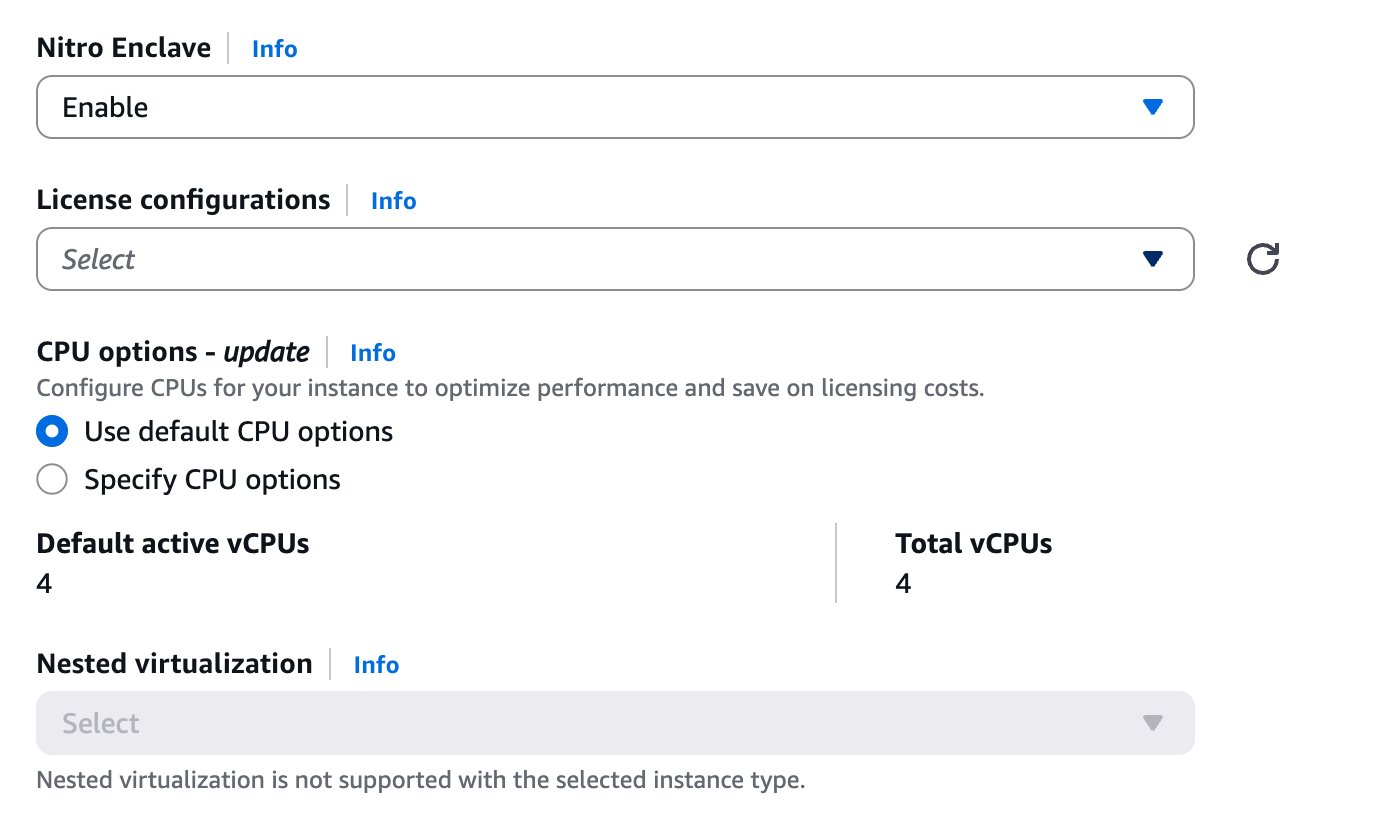
The screenshot makes a point the EC2 guide now states too: nested virtualization is only available on Intel instances, so on this one it isn’t available at all, and sandboxes still work, because they don’t use it. (The guide adds that you can’t use sandboxes on an instance with nested virtualization enabled.) The CLI equivalent:
aws ec2 run-instances \
  --image-id resolve:ssm:/aws/service/ami-amazon-linux-latest/al2023-ami-kernel-6.18-arm64 \
  --instance-type m8g.xlarge \
  --iam-instance-profile Name=nitro-sandbox-ec2 \
  --enclave-options Enabled=true \
  --block-device-mappings 'DeviceName=/dev/xvda,Ebs={VolumeSize=20,VolumeType=gp3}'
The parent needs the AL2023 kernel6.18 package 6.18.51-120.162 or later. The Quick Start AMI changed on November 9: my first run got al2023-ami-2023.12.20261102.0 with kernel 6.18.56-125.164, the recorded run al2023-ami-2023.12.20261109.0 with 6.18.56-126.188. Both worked, with nothing to install. aws ec2 describe-instance-attribute --attribute enclaveOptions returns {"Enabled": true}, and Session Manager was online about 30 seconds after launch.
Step 3: Reserve a memory pool (it isn’t optional)
My first sandbox, 2 vCPUs and 1 GiB, died 50 ms after start:
CMA allocation failed: size=1073741824 bytes gpa=0x40000000 parent_numa=0 prot=0x3: Cannot create mmap region: Out of memory (os error 12)Sandbox memory has to be physically contiguous. The Firecracker guide says that without a reservation the driver “allocates contiguous memory from general parent memory on each launch”. On this AMI that general pool is the kernel’s default contiguous memory area, and /proc/meminfo showed CmaTotal: 65536 kB: 64 MiB. The revised EC2 guide is blunter: “Without a pool, you can’t launch Nitro Sandboxes.” It also says a parent without a pool has 0 slots. That isn’t what I saw on my first boot (kernel 6.18.56-125.164): with mem_pool/total at 0, pcie_slots read 4, and the launch got as far as the CMA allocation. Two later runs on kernel 6.18.56-126.188, for the video’s operations section, read 4 as well. Either way, reserving a pool at boot fixed it:
grubby --update-kernel=ALL --args="nitro_enclaves.mempool=12G"
systemctl reboot
After the reboot CmaTotal was 12 GiB and /sys/class/misc/nitro_enclaves/mem_pool/free reported 12,284 MiB. The reservation doesn’t cost the parent that memory up front: free -m still showed about 15 GiB free, and a sandbox’s memory only leaves the parent when the sandbox starts. AWS’s own build script for sandbox-capable EKS node images does the same thing, with nitro_enclaves.mempool=95%-1G, and notes that sandboxes fail to start without it. The EC2 guide’s example is nitro_enclaves.mempool=8G@0 (8 GiB on NUMA node 0), and it checks the reservation with dmesg | grep "nitro_enclaves: CMA pool".
Step 4: Firecracker, a guest, and a network
Firecracker 1.18.0 is the first release with sandbox support, and its aarch64 tarball works on Graviton. For a quick guest, Firecracker’s CI publishes a kernel and an Ubuntu root filesystem; on aarch64 its vmlinux is already an EFI-bootable image.
dnf install -y nftables squashfs-tools
mkdir -p /opt/sandbox && cd /opt/sandbox

# Firecracker
curl -fsSL https://github.com/firecracker-microvm/firecracker/releases/download/v1.18.0/firecracker-v1.18.0-aarch64.tgz | tar -xz
mv release-v1.18.0-aarch64/firecracker-v1.18.0-aarch64 /usr/local/bin/firecracker

# Guest kernel and rootfs from Firecracker's CI (20261105 build)
S3=https://s3.amazonaws.com/spec.ccfc.min/firecracker-ci/20261105-6ea6634994fa-0/aarch64
curl -fsSLO $S3/vmlinux-6.18.56
curl -fsSL -o ubuntu-24.04.squashfs $S3/ubuntu-24.04.squashfs
unsquashfs ubuntu-24.04.squashfs
ssh-keygen -q -f id_rsa -N "" && cp id_rsa.pub squashfs-root/root/.ssh/authorized_keys
truncate -s 1G ubuntu-24.04.ext4 && mkfs.ext4 -q -d squashfs-root -F ubuntu-24.04.ext4
The network is a TAP device that the parent NATs out of its own interface. Firecracker’s network-setup guide assumes the uplink is eth0; on this AMI it’s ens34, so look it up the way its getting-started guide (and now the EC2 guide) does:
HOST_IFACE=$(ip -j route list default | jq -r '.[0].dev')   # ens34 here
ip tuntap add tap0 mode tap
ip addr add 172.16.0.1/30 dev tap0 && ip link set tap0 up
echo 1 > /proc/sys/net/ipv4/ip_forward
nft add table firecracker
nft 'add chain firecracker postrouting { type nat hook postrouting priority srcnat; policy accept; }'
nft 'add chain firecracker filter { type filter hook forward priority filter; policy accept; }'
nft add rule firecracker postrouting ip saddr 172.16.0.0/24 oifname $HOST_IFACE masquerade
nft add rule firecracker filter iifname '"tap*"' oifname $HOST_IFACE accept
You don’t need the Nitro Enclaves CLI or its allocator service. Firecracker talks to the driver directly.
Testing
Test 1: The parent’s budgets before any sandbox
The driver exposes its budgets under /sys/class/misc/nitro_enclaves/:
| File | Value on m8g.xlarge | What it means |
|---|---|---|
cpu_pool/total | 3 | Cores available for dedicated-core sandboxes; CPU 0’s core stays with the parent |
pcie_slots | 4 | Sandboxes the parent can hold right now |
pcie_slots_total | 20 | The most it can ever hold: 5 × its vCPUs |
mem_pool/free | 12,284 MiB | After the reservation in Step 3 |
Graviton has one thread per core, so every vCPU is a whole core. On Intel and AMD instances with two threads per core, dedicated-core sandboxes must take both threads of a core, and vcpu_count has to be even.
Test 2: Boot a sandbox and time it
The only addition to an ordinary Firecracker configuration is the enclave key. {} means confidential mode, the default; {"direct_mode": true} means direct mode.
{
  "boot-source": { "kernel_image_path": "/opt/sandbox/vmlinux-6.18.56" },
  "machine-config": { "vcpu_count": 2, "mem_size_mib": 1024 },
  "drives": [
    { "drive_id": "rootfs", "path_on_host": "/opt/sandbox/ubuntu-24.04.ext4",
      "is_root_device": true, "is_read_only": false }
  ],
  "network-interfaces": [
    { "iface_id": "eth0", "guest_mac": "06:00:AC:10:00:02", "host_dev_name": "tap0" }
  ],
  "enclave": { "direct_mode": true }
}
firecracker --api-sock /tmp/fc.sock --config-file direct.json &
ssh -i /opt/sandbox/id_rsa root@172.16.0.2I timed from starting Firecracker to the first successful SSH login, polling every 0.2 seconds:
| Sandbox | Time to SSH |
|---|---|
| Direct mode, CI kernel, 2 vCPU, 1 GiB | 1.70 s (1.71 s in the recorded run) |
| Direct mode with the debug console | 2.33 s |
| Confidential mode, CI kernel, 2 vCPU, 1 GiB | 1.87 s |
| Confidential mode, AL2023 kernel and a 17 MB initramfs | 3.08 to 3.24 s |
Inside, it’s a separate machine. The kernel was 6.18.56+ #1 SMP Thu Nov 5 against the parent’s 6.18.56-126.188.amzn2023 #2 SMP Tue Nov 3, it had its own boot_id, an uptime of about two seconds, one disk (vda), and dmesg showed it booting through UEFI (efi: EFI v2.7 by EDK II). On the parent, cpu_pool/in_use went to 2 and pcie_slots_in_use to 1.
One check from AWS’s EKS sandbox blueprints doesn’t carry over: /sys/class/dmi/id/product_name, which reads <family>.enclave on x86 sandboxes, doesn’t exist in an arm64 guest. Use the kernel build string, /proc/uptime and the disk names instead.
Test 3: Direct versus confidential, seen from the parent
The main difference between the modes is whether the parent can reach the guest’s memory, so I tested it directly. Inside the guest I wrote a unique marker to /dev/shm 2,000 times. On the parent I searched every mapping of /dev/nitro_enclaves in the Firecracker process for it.
# inside the guest
MARK="my2cents-secret-$(date +%s%N)"
for i in $(seq 1 2000); do echo $MARK; done > /dev/shm/secret

# on the parent, with MARK set to the same value
FCPID=$(pgrep -x firecracker)
for MAP in $(grep nitro_enclaves /proc/$FCPID/maps | awk '{print $1}'); do
  S=$((0x${MAP%-*})); E=$((0x${MAP#*-}))
  N=$(dd if=/proc/$FCPID/mem bs=1M iflag=skip_bytes,count_bytes skip=$S count=$((E-S)) 2>/dev/null | grep -a -c "$MARK")
  echo "$(( (E-S)/1048576 )) MiB: $N copies"
done
gcore won’t do this: it skips these mappings, and the core file came out at 5 MB. Reading /proc/<pid>/mem directly does. Same guest, same marker, both modes:
| Direct mode | Confidential mode | |
|---|---|---|
/dev/nitro_enclaves mappings in Firecracker | 1024 MiB (guest RAM), 2 MiB (control page) | 16 MiB and 16 MiB (device buffers), 1024 MiB, 2 MiB |
| All of them readable from the parent | yes | yes |
| Copies of the guest’s secret found | 1,994 | 0 |
NSM device (1af4:1061) in the guest | absent | present |
Device memory buffers in guest dmesg | none | virtio_blk virtio1: Enabled 16777216-byte Virtio DMB (and the same for virtio_net) |
The read succeeds in both modes; in confidential mode it just doesn’t return the guest’s data. Direct mode is the right choice when you trust the parent and want simpler I/O. Its trust model, in the EC2 guide’s words, is “equivalent to that of a nested virtual machine”. Confidential mode is the default for a reason.
Test 4: Attestation, with an AL2023 guest and AWS KMS
A confidential sandbox has a Nitro Secure Module (NSM). It signs an attestation document with measurements of the boot image (PCR0 to PCR2), the parent (PCR3 and PCR4) and, new for sandboxes, the devices at boot (PCR5) and the whole image file (PCR6). A KMS key policy can require those measurements before it decrypts anything. When I ran this, the docs described attestation but left two pieces to me. The EC2 guide’s new attestation page now covers both.
First, the guest needs the NSM driver. The Firecracker CI kernel is built without it (# CONFIG_NSM is not set). The AL2023 kernel has it as a module, and its /boot/vmlinuz is already an EFI application, so I booted the parent’s own kernel as the guest, with an initramfs that loads the drivers. That’s also the route the EC2 guide now takes:
dracut --force --no-hostonly \
  --add-drivers "virtio_pci virtio_blk virtio_net ext4" \
  --force-drivers "nsm virtio_net" \
  /opt/sandbox/initrd-al-guest.img $(uname -r)
cp /boot/vmlinuz-$(uname -r) /opt/sandbox/vmlinuz-al
{
"boot-source": {
"kernel_image_path": "/opt/sandbox/vmlinuz-al",
"initrd_path": "/opt/sandbox/initrd-al-guest.img",
"boot_args": "panic=1 initcall_blacklist=i8042_init net.ifnames=0"
},
"machine-config": { "vcpu_count": 2, "mem_size_mib": 1024 },
"drives": [ { "drive_id": "rootfs", "path_on_host": "/opt/sandbox/ubuntu-24.04.ext4", "is_root_device": true, "is_read_only": false } ],
"network-interfaces": [ { "iface_id": "eth0", "guest_mac": "06:00:AC:10:00:02", "host_dev_name": "tap0" } ],
"enclave": {}
}/dev/nsm appeared. There’s no CLI for it, so I wrote a small Python client with only the standard library (nsm.py in the companion repo). It sends the NSM an attestation request with a public key and decodes the PCRs from the signed document. The EC2 guide now has you build a small Rust program, nsm-attest, for the same job.
Second, you need to know PCR0 in advance. Firecracker builds the boot image in memory and doesn’t report its measurements. When I ran this, no doc named a tool to build the image yourself. The attestation page now does: build it with eif_build --pcie-virtio, which prints PCR0, PCR1, PCR2 and PCR6, and point kernel_image_path at the result. (Not nitro-cli: the guide says its PCR0 differs for the same files, because a sandbox’s PCR0 also covers launch settings such as CPU overcommit.) I took a shortcut instead. The measurements turned out to be deterministic: two boots of the same kernel, initramfs and command line gave the same PCR0, PCR1 and PCR2. So I read them once from inside, which is fine for a demo. In production, build the image with eif_build and take the values from its output.
module_id: i-027e…-enc01a1c30b3f0c118b digest: SHA384
PCR0: 45f505c94768f619b4d8b421087fb5d74797a3ea9ed50473ec50db443ee1794d30fe38a419b3b1ea814babbe7f1ce278
PCR1: 2f191a99923d20ff7b0de72d7b9b239dcd465ec460ba9b751eecb532c11469ff22f198fce030f5d7541ee9c81b512de0
PCR2: 21b9efbc184807662e966d34f390821309eeac6802309798826296bf3e8bec7c10edb30948c90ba67310f7b964fc500a
PCR3: 2cb637df…
PCR4: acb56851…
PCR3 and PCR4 identify the parent, as they do for Nitro Enclaves. I checked them: each is SHA-384 over 48 zero bytes followed by the parent’s IAM role ARN (PCR3) or instance ID (PCR4), the formula the attestation page now gives. I’ve shortened them here because the role ARN contains the account ID, which is easy to recover from the hash. PCR2 matches the guide’s example byte for byte: with a single initramfs, it’s the measurement of empty input. The document also carried PCR5 and PCR6, which no doc defined when I ran this.
The measurement also tracks the operating system. The AMI update between my two runs brought a new kernel, and PCR0 changed with it: ab0079bb… on the first run, 45f505c9… on the recorded one. A key policy pinned to PCR0 has to be updated whenever you change the guest kernel.
The key policy gives the parent’s role kms:Decrypt only for a recipient with that PCR0:
{
  "Sid": "DecryptOnlyFromThisSandboxImage",
  "Effect": "Allow",
  "Principal": { "AWS": "arn:aws:iam::<ACCOUNT_ID>:role/nitro-sandbox-ec2" },
  "Action": "kms:Decrypt",
  "Resource": "*",
  "Condition": {
    "StringEqualsIgnoreCase": {
      "kms:RecipientAttestation:ImageSha384": "45f505c94768f619b4d8b421087fb5d74797a3ea9ed50473ec50db443ee1794d30fe38a419b3b1ea814babbe7f1ce278"
    }
  }
}
The guest makes a key pair and asks the NSM for a document that carries the public key. The parent relays that document to KMS. KMS encrypts the answer to the guest’s public key, so the parent passes along something it can’t open:
# inside the guest, in RAM
cd /dev/shm
openssl genrsa -out key.pem 2048
openssl rsa -in key.pem -pubout -outform DER -out pub.der
python3 nsm.py attest pub.der att.doc

# on the parent, with the parent's role
aws kms decrypt --ciphertext-blob fileb://secret.enc \
  --recipient "KeyEncryptionAlgorithm=RSAES_OAEP_SHA_256,AttestationDocument=$(base64 -w0 att.doc)" \
  --query CiphertextForRecipient --output text | base64 -d > cfr.der

# inside the guest
openssl cms -decrypt -inform DER -in /dev/shm/cfr.der -inkey /dev/shm/key.pem
Keep the private key in RAM, which is why the commands use /dev/shm. In my exploration run I wrote it to /root instead, and that’s a mistake worth spelling out: /root lives on the guest’s root disk, which is an ext4 file on the parent’s disk that the parent can read. Confidential mode protects the guest’s memory, not its virtio disks, so anything a confidential workload writes to a disk it doesn’t encrypt itself is visible to the parent. The EC2 guide now says so outright, and adds that EBS encryption doesn’t protect data from the parent either.
PCR0 has a similar blind spot. The guide notes that block devices aren’t measured, and my demo ran nsm.py and openssl from the Ubuntu root disk, which the parent can change. The guide’s pattern puts the attesting code in the measured initramfs instead.
One CLI detail cost me a retry: AttestationDocument=fileb://att.doc inside the --recipient shorthand fails with Invalid base64. Pass the base64 inline. The EC2 guide uses AttestationDocument@=fileb://attestation.bin; the @= loads the file, and in my operations run it worked (AWS CLI 2.38.0 on the instance).
| Step | Result |
|---|---|
Parent calls kms:Decrypt with no attestation | AccessDeniedException ... not authorized to perform: kms:Decrypt |
| Parent relays the sandbox’s document | Plaintext: null, plus a CiphertextForRecipient |
| Parent tries to open it with its own key | Error decrypting CMS structure ... bad decrypt |
| Sandbox opens it | the launch codes are 0000 |
Test 5: What KMS refuses
| Attempt | Result |
|---|---|
Same kernel and initramfs, one extra boot argument (quiet) | New PCR0 (e973f238…), AccessDeniedException |
Same image with "debug_mode": true | PCR0 is all zeros, AccessDeniedException |
| A valid document with one byte changed | ValidationException: AWS KMS cannot parse the attestation document. |
| A valid 90-second-old document from an earlier boot | Accepted, but sealed to a public key whose private half died with that sandbox |
The last row is the design working as intended. KMS didn’t reject the replayed document, and it didn’t need to: the only party that can open the answer is the guest that made the key pair. Debug mode is the trap. It gives you a serial console, and in confidential mode it also zeroes the image measurements, so a debug sandbox can never pass a key policy pinned to PCR0. It doesn’t zero PCR3 and PCR4: my debug document still carried both, and the EC2 guide now confirms that the parent’s PCRs keep their values in debug mode. A policy that checks only PCR3 or PCR4 would therefore release the key to a debug sandbox, which is why the guide says to always include PCR0, PCR1 or ImageSha384.
Test 6: How many sandboxes fit
Each test sandbox here used the CI kernel, a shared read-only root filesystem, no network, and 256 MiB.
| Configuration | Result |
|---|---|
| Dedicated cores, 1 vCPU each | 3 start; the 4th fails with NE_ERR_NO_CPUS_AVAIL_IN_POOL (errno=272) |
cpu_overcommit, 1 vCPU each, slot budget left at 4 | 4 start; the 5th fails with No space left on device (os error 28) |
Raise the budget: echo 20 > /sys/class/misc/nitro_enclaves/pcie_slots | The parent gives up 256 MiB (two 128 MiB steps of 8 slots) until it reboots |
cpu_overcommit, 1 vCPU each, budget 20 | 20 start, in 31.7 s including a 1.5-second pause after each; the 21st fails with NE_ERR_ENCLAVE_LIMIT (errno=553): the per-instance enclave quota has been reached |
cpu_overcommit, 4 vCPUs each, budget 20 | 20 start: 80 sandbox vCPUs on a 4-vCPU instance, each logging smp: Brought up 1 node, 4 CPUs |
The memory accounting matched the Firecracker docs to the MiB: each 256 MiB sandbox took 274 MiB from the pool, which is 256 plus a 2 MiB control page and one 16 MiB device memory buffer for its disk.
The last row contradicts the EC2 guide, which says “With CPU overcommit, all Nitro Sandboxes together can have up to 5 times as many vCPUs as the parent instance”. Its own example for a 4-vCPU parent allows at most five sandboxes of 4 vCPUs each; I ran 20. On this instance, in both runs, the binding limit was the guide’s other rule, the number of sandboxes (“up to 5 Nitro Sandboxes for each vCPU”, so 20 here), not their total vCPUs. The guests were idle, so this says nothing about the performance of 80 vCPUs time-sharing four cores. Treat it as observed behaviour, not a promise.
Test 7: A sandbox, a container, and the metadata service
The point of all this is what changes against the usual way of running untrusted code on an instance: a container. I ran the same probe on the parent, in a docker run container on the parent (AL2023 needs dnf install docker first), and in a sandbox (whose guest needs a default route via 172.16.0.1 to get out).
| Parent | Container on the parent | Nitro Sandbox | |
|---|---|---|---|
| Kernel | 6.18.56-126.188.amzn2023 | same | 6.18.56+ (its own) |
boot_id | 8afba422… | same | a035669d… |
| IMDS role name | nitro-sandbox-ec2 | nitro-sandbox-ec2 | nitro-sandbox-ec2 |
The container is the parent with a different filesystem view: a kernel bug reached from inside it is a bug in the parent’s kernel. The sandbox has its own kernel, and a bug there stays in the sandbox.
The last row is the catch. Through the parent’s NAT, the sandbox reached the instance metadata service and could read the parent’s role name, which means it could fetch the parent’s credentials too. On ECS and EKS, AWS replaces IMDS inside the sandbox (part 3 and part 4 test how well). On EC2 that’s your job. One rule on the parent closes it:
nft insert rule firecracker filter iifname '"tap*"' ip daddr 169.254.169.254 counter dropAfter that the sandbox’s metadata request got no answer, and the role name came back empty.
The revised EC2 guide now documents this exposure. It says IMDSv2 and the hop limit of 2 on Amazon Linux 2023 AMIs don’t prevent it, and its NAT example uses reject instead of drop, so a metadata request fails at once instead of waiting for a timeout. If the guest uses the Amazon DNS server, keep 169.254.169.253 reachable.
Results summary
| Question | Answer from my run |
|---|---|
| Console switch | Advanced details > Nitro Enclave: Enable |
| Extra software on the parent | Firecracker 1.18; no Nitro Enclaves CLI |
| Memory pool | nitro_enclaves.mempool= at boot, or a 1 GiB sandbox fails (the default contiguous area is 64 MiB); the EC2 guide now says it’s required |
| Boot to SSH | 1.7 s direct, 1.9 s confidential, ~3.1 s with the AL2023 kernel |
| Parent reads guest memory | Direct: yes (1,994 hits). Confidential: no (0 hits) |
| Attestation on plain EC2 | Works, with the AL2023 kernel as guest and PCR0 read once from inside (the guide now computes it with eif_build) |
| Limits that bit | 3 dedicated cores, 4 slots until raised, 20 sandboxes (5 per vCPU); not the 5× vCPU cap |
| Overhead per sandbox | 2 MiB, plus 16 MiB per device in confidential mode |
| Guest reaches parent’s IMDS | Yes, until you block 169.254.169.254 on the parent |
| Operating it | No AWS API, console page or metric lists sandboxes; the instance’s CPUUtilization counts their work (next section) |
Operating and Monitoring
Watch this part: the video’s operations section, from 5:49, walks through all of it in the console and the CLI.
On 2026-11-10 I ran the whole thing a third time, for the video’s operations section: launch from the console, start, list, stop and restart sandboxes, watch them in CloudWatch, audit the key release in CloudTrail, and stop and start the parent. Same instance type, kernel 6.18.56-126.188, the guide’s nitro_enclaves.mempool=8G@0, and the CloudWatch agent installed through Systems Manager.
AWS doesn’t see the sandboxes. The instance’s Details tab has one related field, “Enclaves Support: Enabled”, and describe-instances --filters Name=enclave-options.enabled,Values=true lists parents, not sandboxes. Everything else happens on the parent: pcie_slots_in_use counts them, pgrep -a firecracker lists them, and each Firecracker API socket answers GET / with "state":"Running". nitro-cli describe-enclaves returns [].
| Action | What happened |
|---|---|
| Start | One Firecracker process per sandbox, each with its own API socket, log file and metrics file |
| Clean stop | poweroff inside the guest: Firecracker exited 0.6 s later with Enclave exited (event_set=HANG_UP) and freed the slot |
| Kill | kill, kill -9, or Fleet Manager > Processes > Terminate process in the Systems Manager console: slot freed at once, other sandboxes unaffected |
| Pause | Rejected: Operation not supported on Enclave VMs. The rejected request still froze the guest’s network and Firecracker’s metrics until a resume request, itself rejected |
| Reboot inside the guest | The guest went silent, but Firecracker kept running and held its slot: 20 s in the recorded run, over 4 minutes in the exploration, until I killed it. The guide says a sandbox “stops when it powers off or reboots” |
| Restart | Fails with Failed to open the API socket until you delete the old API socket; the guide mentions only the vsock socket. Firecracker’s logger also rewrites its log file from the start without truncating it, so delete the log too |
| Stop and start the parent | Every sandbox is gone, with the TAP device, the nft table and ip_forward. The memory pool survives, because it’s on the kernel command line. Nothing restarts the sandboxes |
| Turn Nitro Enclave off or on | modify-instance-attribute --enclave-options works on a stopped instance and fails on a running one, so the instance doesn’t need replacing |
Monitoring, while a sandbox ran busy loops on two vCPUs for ten minutes:
| Signal | What it showed |
|---|---|
EC2 CPUUtilization | About 51%, two of four vCPUs. It counts sandbox work, with dedicated cores and with cpu_overcommit alike |
top on the parent | 95% idle, steal 0 |
CloudWatch agent, procstat on firecracker | procstat_lookup_pid_count rose with each sandbox, the closest thing to a sandbox count in CloudWatch. cpu_usage stayed at 0.5% or less, and memory_rss was about 1.11 GB per 1 GiB guest |
| CloudWatch agent, Firecracker log files | One log stream per sandbox: the boot, the rejected pause and resume, the clean exit and the restart |
| Fleet Manager > Processes | Lists the Firecracker processes by PID, without command lines. While the page was open, it kept about 30% of the parent’s CPU busy |
CloudTrail records the key release. The attested Decrypt call appears in Event history with the instance ID as its user name. Its additionalEventData.recipient block carries the attestation module ID (<instance-id>-enc…), PCR0 as attestationDocumentEnclaveImageDigest, and PCR1 to PCR4 and PCR8, all in base64, with no PCR5 or PCR6. The call without attestation has no recipient block, and neither did a denied call whose PCR0 didn’t match, so CloudTrail doesn’t record which image KMS refused.
Pricing
Nitro Sandboxes have no additional charge. You pay for the instance, which was $0.17952 per hour on demand for m8g.xlarge in us-east-1, and the sandboxes share it. The cost shows up as capacity instead of dollars:
- Memory is donated whole. A 1 GiB sandbox takes 1 GiB plus overhead out of the parent for its whole life, used or not. There’s no overcommit and no ballooning.
- Small fixed costs add up. 2 MiB per sandbox, 16 MiB per device in confidential mode, and 128 MiB of parent memory for every 8 slots you add beyond the first 4.
- Cores, if you dedicate them. Dedicated-core sandboxes take whole cores away from the parent;
cpu_overcommitshares them instead.
Each of my two runs kept the instance up for about 20 minutes. The KMS key costs $1 a month while it exists.
Cleanup
aws ec2 terminate-instances --instance-ids <instance-id>
aws ec2 wait instance-terminated --instance-ids <instance-id>
aws ec2 delete-security-group --group-id <launch-wizard-sg-id>
aws kms schedule-key-deletion --key-id <key-id> --pending-window-in-days 7   # key ID, not alias
aws iam remove-role-from-instance-profile --instance-profile-name nitro-sandbox-ec2 --role-name nitro-sandbox-ec2
aws iam delete-instance-profile --instance-profile-name nitro-sandbox-ec2
aws iam detach-role-policy --role-name nitro-sandbox-ec2 --policy-arn arn:aws:iam::aws:policy/AmazonSSMManagedInstanceCore
aws iam delete-role --role-name nitro-sandbox-ec2
schedule-key-deletion doesn’t accept an alias; it wants the key ID.
Verdict
What works
The boundary is real, and you can verify it yourself. In confidential mode the parent couldn’t find a secret it could find trivially in direct mode, and KMS released a key only to a measured image, refusing a one-argument change, debug mode and a tampered document. Boots take about two seconds, on an ordinary Graviton instance, with no .metal and no nested virtualization. Firecracker’s API is unchanged apart from one enclave key, so most existing Firecracker tooling carries over; snapshots, pause and the balloon device are the exceptions.
What doesn’t, yet
The EC2 path is a primitive. When I ran it, the docs left me four things to work out: an AL2023 command for the memory pool, the real uplink name, a guest kernel with the NSM driver, and a way to know PCR0 before writing a key policy. The revised EC2 guide now covers all four, and the metadata exposure too. It doesn’t explain the vCPU cap: the documented one wasn’t the limit I hit. And a sandbox can still reach the parent’s metadata service unless you block it, which a team new to this could easily miss.
Operating it is yours too. No AWS API, console page or metric lists sandboxes, and while the instance’s CPU metric counts their work, the parent’s own tools don’t. A reboot inside the guest left the sandbox running and holding its slot, contrary to the guide, and a rejected pause froze the guest’s network until a resume request.
Who should use it
Teams that already run their own VMM or orchestrator and want a hardware boundary on instances they already have, especially if they need attestation: the ability to prove to KMS, or to a customer, exactly what is running. If you’d rather not be the parent operator, the managed paths are the better fit: ECS (part 3) and EKS (part 4) hide all of the above behind one field per task or pod, after a one-time capacity setup. AWS Lambda MicroVMs hide the instance too, and trade attestation for suspend and resume. The EC2 guide itself points people there if they want none of the machinery, “with no instances or networking to manage”.