AWS Agent Toolkit: Hands-On with Cost Skills in Claude Code
By Fabio Douek
Jump to section
Explain (TLDR) like I am...
Imagine your robot helper got a new toolbox from AWS, and inside there are little cards that teach it how to build things in the cloud without breaking them. One of the cards even tells the robot to check the price tag before it builds anything, so nobody gets surprised by a big bill.
The cards live in a backpack the robot wears, and AWS keeps the backpack tidy so the robot does not get confused. Grown-ups like that, because the robot now asks "is this okay" before it does anything expensive, and it shows the price first instead of guessing.
Treat the Agent Toolkit as a vendor-managed integration that an AI agent uses to act inside the customer's AWS account. The relevant diligence questions are scope of IAM permissions granted to the proxy, region of the managed MCP endpoint for data residency, and audit trail through CloudTrail and CloudWatch.
The cost-estimation skill is material because it is wired to the AWS Pricing API and runs before infrastructure is provisioned, which creates a documented checkpoint. Note the vendor critique that agents may default to AWS-native services without comparing alternatives, which is a recommendation pattern the organization should review on its own.
Think of this as a structured intervention for a specific symptom: AI agents writing AWS IaC that deploys cleanly but costs more than anyone expected. The treatment is a managed MCP server plus a set of skills that force the agent to query the AWS Pricing API before emitting any infrastructure code.
The mechanism is plausible and the early evidence from third-party walkthroughs is consistent: small workloads get cost estimates in the tens of cents per month, which match the AWS Pricing Calculator closely. Side effects to monitor include over-trust in the agent's architecture choices and a 2 percent context-window cost from the skills it loads.
Notice what happens when an engineer can finally ask "what will this cost" and get an answer in the same chat where they sketched the architecture. The relief is real, and the conversation about trade-offs starts from a number instead of a guess.
The new friction lands in trust: agents recommending AWS-native options without comparing alternatives, and skills that quietly consume context window. Worth naming on the team: this is a partner that talks the AWS dialect fluently, not a neutral architect, so the human still owns the multi-cloud judgement call.
Treat the toolkit as a session player who has finally read the AWS chart. It holds time on the boring rhythm parts, the API calls and pricing lookups, so the band can focus on the song. The cost skill is the metronome: it sets a tempo before anyone hits record.
The catch is feel: it locks tightly into Claude Code, Codex, and Kiro, but it plays AWS songs only. Once the ensemble is set, a five-stage workflow keeps the dynamics sane, sketch, refine, estimate, deploy, validate, instead of one long improvisation that runs over the bar lines.
The story is time-to-deployment with cost honesty baked in. Three install commands in Claude Code, a managed MCP server with IAM guardrails, and a cost estimate that runs before IaC is written. Third-party walkthroughs report monthly figures within cents of the AWS Pricing Calculator on small workloads.
Positioning: not a replacement for FinOps, a reasoning layer that makes the first cost number visible at the moment of design. The angle that travels for buyers is the five-stage workflow with a confirmation gate after every stage, especially the cost gate.
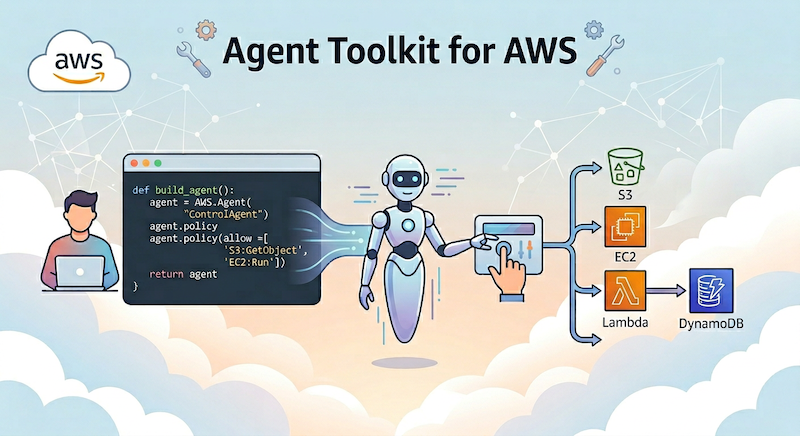
Overview
On May 6, 2026, AWS announced the Agent Toolkit for AWS, an umbrella suite that bundles three things AI coding agents need to work safely against AWS: a managed MCP server, a set of agent plugins, and 40+ pre-built agent skills. It is the official AWS-supported home for this tooling, and supersedes the earlier AWS Labs experiments. The toolkit itself is free; you pay only for the AWS resources your agents create.
The architecture has three layers:
- Agent Skills: short, prescriptive procedures that teach the agent how to do specific AWS things correctly: which API to call, which arguments to use, which gotchas to avoid.
- AWS MCP Server: a managed remote endpoint at
https://aws-mcp.us-east-1.api.aws/mcp(alsoeu-central-1) that exposes 15,000+ AWS API operations through four MCP tools, sandboxed Python execution, and IAM-based authentication translated from OAuth 2.1 by the open-sourcemcp-proxy-for-aws. - Agent Plugins: bundles that wire skills, MCP server access, hooks, and reference docs together for a workflow.
The toolkit ships three plugins at launch:
| Plugin | What it covers |
|---|---|
aws-core | The “start here” plugin. Registers the aws-mcp server and bundles skills for CDK, CloudFormation, serverless, containers, IAM, observability, the SDKs, and aws-billing-and-cost-management: the cost story this post focuses on. |
aws-data-analytics | Skills and references for analytics workloads on AWS (Glue, Athena, EMR, Redshift, Kinesis, MSK, OpenSearch) for data-engineering and pipeline-building agents. |
aws-agents | For building agents on AWS rather than acting against it. Wires Bedrock AgentCore, Strands, foundation-model selection, and the AgentCore runtime/memory/identity primitives. |
All three plugins install into Claude Code, Codex, and Kiro (install instructions), with the same skills and aws-mcp server. The walkthroughs below use Claude Code.
This post focuses on aws-core. Its .mcp.json wires the aws-mcp endpoint on install, and its aws-billing-and-cost-management skill talks to Cost Explorer, Budgets, the Price List API, and Compute Optimizer through it.
Setup
Setup in Claude Code takes about five minutes if you already have AWS credentials configured. Installing the aws-core plugin is the only step you need: it bundles the MCP server registration alongside the skills.
Prerequisites
- A current version of Claude Code (the
/pluginand remote MCP commands referenced below need a recent build). uvinstalled locally; the plugin’s.mcp.jsonrunsuvx mcp-proxy-for-aws@latestto spawn the proxy.- AWS credentials available locally (the proxy picks them up via the standard SDK chain).
- For the managed MCP server, an IAM principal with permissions for the actions your agent will perform. AWS recommends scoping with SCPs and a dedicated agent role.
Step 1: Add the marketplace and install aws-core
Inside Claude Code:
/plugin marketplace add aws/agent-toolkit-for-aws
/plugin install aws-core@agent-toolkit-for-aws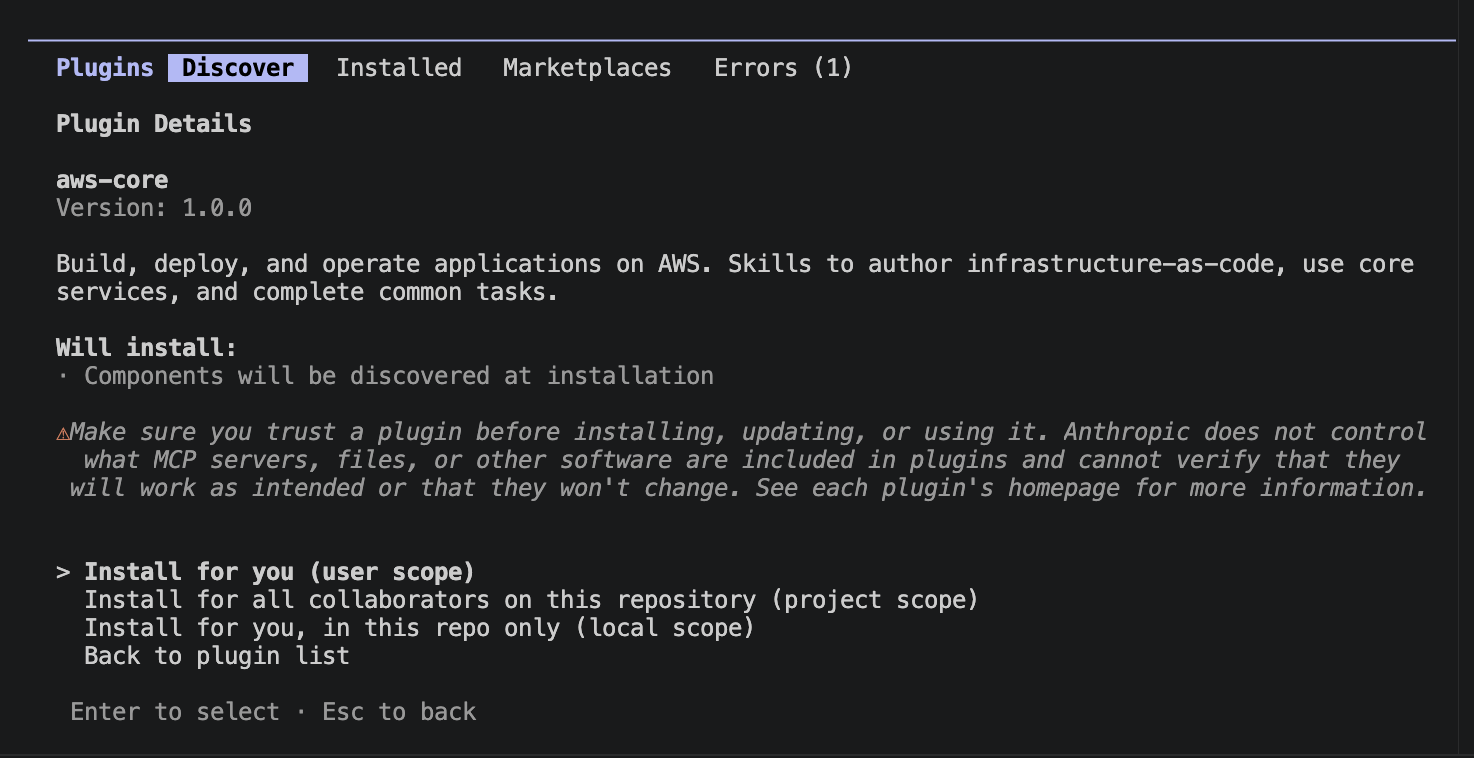
Three install scopes: user (across all your projects), project (shared via the repo), local (this project, just you). Start with user.
After the install completes, Claude Code prompts you to apply the changes:
/reload-pluginsWithout this, the bundled aws-mcp server and the aws-core skills are installed on disk but not active in the current session.
aws-core for aws-agents or aws-data-analytics to add the other two plugins from the same marketplace.
Step 2: Verify the bundled MCP server
aws-core ships its own .mcp.json that registers aws-mcp for you on install:
{
  "mcpServers": {
    "aws-mcp": {
      "command": "uvx",
      "args": [
        "mcp-proxy-for-aws@latest",
        "https://aws-mcp.us-east-1.api.aws/mcp"
      ]
    }
  }
}
The proxy package is published on PyPI and runs as a stdio server locally; the actual API calls go to the regional managed endpoint. Swap us-east-1 for eu-central-1 if you want EU residency.
Verify it connected by running /mcp inside Claude Code (not the shell claude mcp list):
/mcpYou should see plugin:aws-core:aws-mcp listed under Built-in MCPs with a green check and a tool count.

The server exposes tools including call_aws (any of the 15,000+ AWS API operations), search_documentation, read_documentation, and run_script (sandboxed Python with no network or filesystem access, used for things like cost arithmetic).
Step 3: What’s inside aws-core
aws-core registers the aws-mcp server above and a set of skills covering CDK, CloudFormation, serverless, containers, IAM, observability, the SDKs, and the one I care about for this post: aws-billing-and-cost-management. The skill’s SKILL.md encodes two rules worth lifting verbatim:
- Always check the current date. Before any Cost Explorer, Budgets, or Savings Plans call, the agent must determine the actual current date. LLMs default to dates from their training data and silently produce stale analyses.
- Deterministic calculations only. No arithmetic in the model’s response. Math runs through
run_script(or a local Python script ifaws-mcpis not configured), because LLM arithmetic is unreliable on cost data.
Those two rules are why a managed MCP server with a sandboxed Python tool matters for cost work, and why this is bundled rather than left as separate pieces.
Testing
Both tests below exercise the same skill, aws-billing-and-cost-management, but on different branches of its decision tree. Its decision guide maps natural-language questions to the right AWS API:
| Question | Tool |
|---|---|
| What am I spending? Where are costs going up? | Cost Explorer |
| How much does a service cost? | Price List API |
| Where can I save money? (start here) | Cost Optimization Hub |
| Should I buy Savings Plans? | CE SP Recommendations |
| Should I buy Reserved Instances? | CE RI Recommendations |
| Deep-dive on a specific EC2 / Lambda / EBS / RDS rec? | Compute Optimizer |
| How do I set up budget alerts? | Budgets |
| What’s causing a cost spike? | Cost Anomaly Detection |
| Am I within Free Tier? | Free Tier API |
| How do I reduce my bill? | Cost Audit workflow |
| How do I query detailed billing data? | CUR 2.0 + Athena |
| How do I optimize specific services? | Per-service patterns |
| How do I scope costs to a billing view? | Billing Views |
Test 1 hits the Cost Explorer row (look at what already happened); Test 2 hits the Price List API row (estimate something that has not been deployed yet).
Test 1: “What am I spending?” via Cost Explorer
I asked Claude Code a deliberately vague question, “What am I spending? Where are costs going up?”, to see how the plugin routed it.
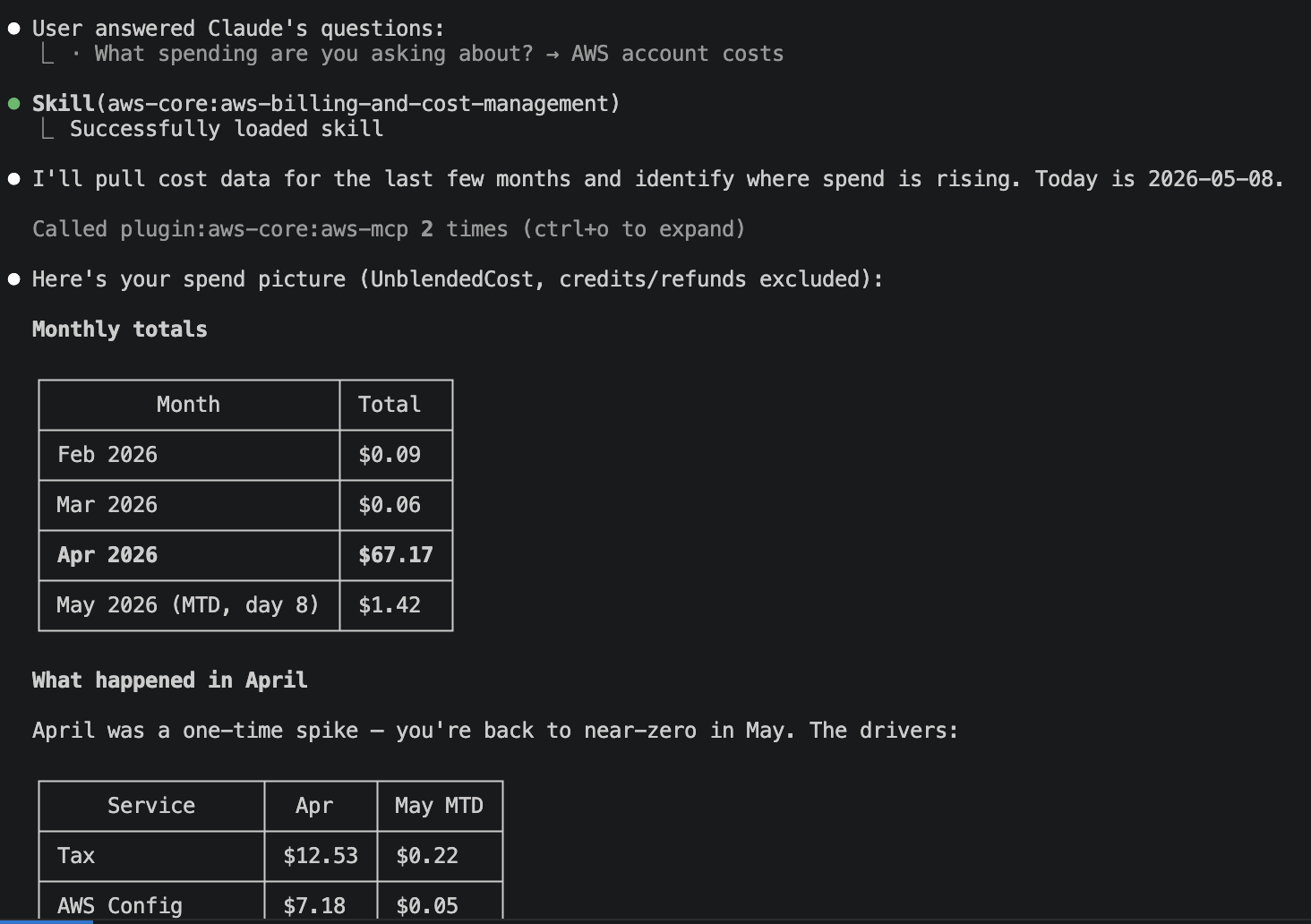
The flow on screen, in order:
- Clarify scope.
AskUserQuestionoffered AWS / Anthropic API / Cloudflare. The Cloudflare option was not a guess: I have the Cloudflare MCP servers and skills installed in this Claude Code session alongsideaws-core, so the agent inferred all three were plausible cost sources from the available tools. I picked AWS. - Load the skill.
Skill(aws-core:aws-billing-and-cost-management)loaded the decision guide and the two non-negotiable rules: check today’s date first, never do arithmetic in the response. - Pin the date. The agent stated “Today is 2026-05-08” before any API call, instead of inferring a year from training data.
- Two MCP calls.
plugin:aws-core:aws-mcpwas invoked twice. The first attempt atce.GetCostAndUsagefailed validation becauseboto3parameters were passed at the top level instead of inside aparamsdict; the agent corrected and the second call succeeded. Both calls ran inside the samerun_scriptsandbox so the totals and month-over-month deltas were computed in Python, not by the model. - Return a defensible answer. Monthly totals, top services, biggest MoM movers, and the agent flagged ~$46 of April spend it could not account for in the top 15, rather than rounding it away.
That is the loop the plugin is designed to enforce: clarify → load skill → date → typed API call → sandboxed math → answer with caveats.
Test 2: Pre-deployment estimate via the Price List API
A typical “estimate the monthly cost of a small Lambda + API Gateway + DynamoDB workload” prompt routes through the Price List branch. What the skill prescribes is the same shape every time: call_aws against the Pricing API for each service, with the right ServiceCode and usagetype filter, then run_script to sum the components. The skill’s reference files include the filter strings most models get wrong on a first attempt, which is the practical reason it exists: without that table, Claude would guess service codes and the Pricing API is unforgiving about wrong codes.
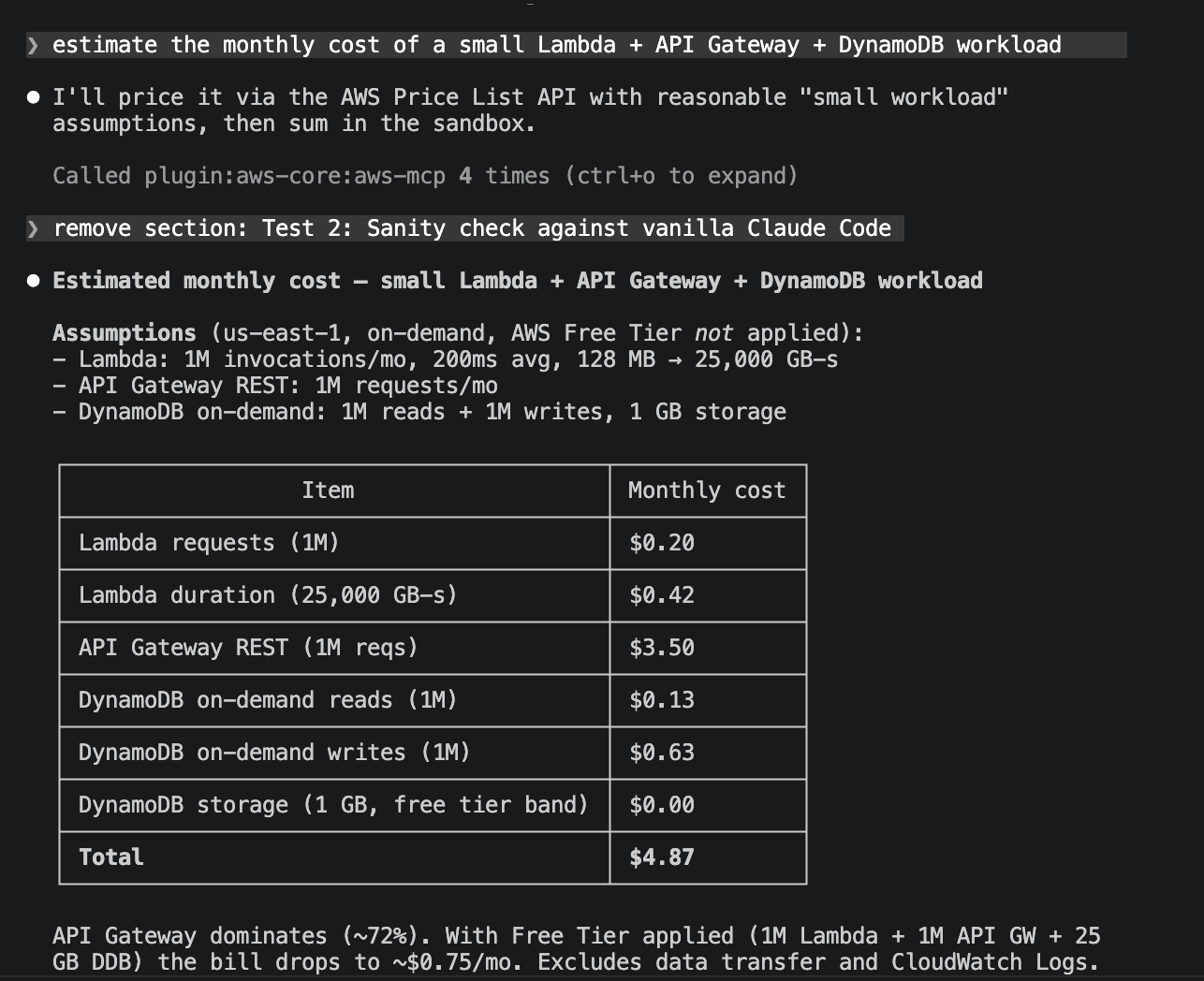
Same loop as the Cost Explorer test, different API. The agent fixed assumptions for a “small” workload (1M Lambda invocations at 128 MB / 200 ms, 1M API GW REST requests, 1M DynamoDB reads + writes, 1 GB storage), then made four aws-mcp GetProducts calls (one per service component) to pull live unit prices. The first attempt used a guessed usagetype filter and returned empty for API Gateway and DynamoDB; the agent corrected the filters and re-queried. The arithmetic ran in run_script, not in the response, and the final table totals $4.87/mo with API Gateway as the dominant line at ~72% of the bill. Free Tier was deliberately not applied so the number reflects what an account at scale would actually pay; with Free Tier the same workload lands at ~$0.75/mo.
Great power, great responsibility
Everything above showcases the skills doing the right thing. Here is the part that should make you uncomfortable: the bundled aws-mcp server is a managed proxy in front of the full AWS API. Its call_aws tool can invoke any of 15,000+ operations, and run_script executes Python with boto3. The skills add discipline on top, but the underlying tool will do whatever the calling IAM principal is allowed to do. For the cost and troubleshooting workflows this post just demonstrated, read-only credentials are almost always enough. AWS publishes managed policies (ReadOnlyAccess, AWSBillingReadOnlyAccess, AWSCostExplorerReadOnlyAccess) that cover the entire decision-guide table without granting a single mutating permission. Save broad write access for sessions where you are consciously asking the agent to build.
While writing this post I gave the agent broad credentials and a one-line “YOLO” prompt to see what would happen. Don’t do what I just did:
> create a ec2 t3.micro in us-east-1 just for testing, no ssh key. you can
  decide vpc/subnet. configure session manager

  Called plugin:aws-core:aws-mcp 3 times (ctrl+o to expand)

⏺ No default VPC exists; the only VPC is a security-training environment
  ("AWS_GOAT_VPC") I shouldn't touch. I'll build a small dedicated test VPC
  with IGW + public subnet, then create the IAM role + instance profile and
  launch the instance. Narrating as I go.

  Called plugin:aws-core:aws-mcp (ctrl+o to expand)

⏺ VPC + networking ready. Now the IAM role for SSM.

  Called plugin:aws-core:aws-mcp (ctrl+o to expand)

⏺ Role + profile created. Now launching the instance.

  Called plugin:aws-core:aws-mcp (ctrl+o to expand)

⏺ Instance launched. Done.

  Created:
    • Instance         i-0EXAMPLE1234567890 (t3.micro, AL2023, us-east-1a)
    • VPC              vpc-0EXAMPLE1234567890 (10.99.0.0/16)
    • Subnet           subnet-0EXAMPLE1234567890 (public, auto-assign IP)
    • IGW              igw-0EXAMPLE12345678
    • Route table      rtb-0EXAMPLE12345678
    • Security group   sg-0EXAMPLE12345678 (no inbound, all egress)
    • IAM role         ec2-test-ssm-role + AmazonSSMManagedInstanceCore
    • Instance profile ec2-test-ssm-profile

  All tagged purpose=ec2-test, createdBy=aws-agent-toolkit-blog.

  Connect via Session Manager
  Wait ~2 minutes for the SSM agent to register, then:

  aws ssm start-session --target i-0EXAMPLE1234567890 --region us-east-1

  Or from the console: EC2 → Instances → select → Connect → Session Manager.

  Cleanup when done
  aws ec2 terminate-instances --instance-ids i-0EXAMPLE1234567890 --region us-east-1
  …then tear down the SG, subnet, IGW (detach first), VPC, instance profile
  (remove role first), and role. Want me to run the teardown now or leave it
  running?
Three things to notice:
- The agent made a judgement call about which VPC to use. It ran
DescribeVpcs, saw the only existing VPC was namedAWS_GOAT_VPC(a known security-training environment), and chose to build fresh networking rather than reuse it. Reasonable here, but in an account where production VPCs aren’t as obviously labelled, the same reasoning could just as easily provision into the wrong place. - Eight resources from a one-line prompt, no confirmation gate. VPC, IGW, subnet, route table, security group, IAM role, instance profile, instance.
call_awsdoesn’t have a “are you sure?”: it executes whatever IAM permits, immediately. - Tagging and a teardown path were courtesies, not guarantees. The agent tagged everything
purpose=ec2-test,createdBy=aws-agent-toolkit-blogand offered a cleanup script. Nice, but nothing in the platform required either.
The fix is upstream of the agent: scope the IAM principal mcp-proxy-for-aws assumes. For this post’s read-the-bill workflows, the three managed policies above reduce blast radius to zero.
Verdict
Worth installing. Three pieces, one workflow:
- Skills turn vague prompts into prescribed API calls and enforce discipline rules.
aws-mcpremoves the per-service credential wiring and puts permissions in IAM.run_scriptsandbox runs computation next to live API data, so results are derived rather than inferred.
One thing that isn’t toolkit-specific: any coding agent with cloud credentials should run on least-privilege IAM. Use read-only for read-only work; reach for write permissions only when you’re consciously asking the agent to build.