Temporal: Hands-On with Self-Hosted Workflow Scheduling
By Fabio Douek
Jump to section
- Overview
- Architecture
- Setup
- Step 1: Install the Temporal CLI and start the dev server
- Step 2: Clone the companion repo
- Step 3: Walk through the code
- Testing
- Test 1: Interval schedule with overlap policy and jitter
- Test 2: Calendar schedule with timezone
- Test 3: Pause, trigger, backfill, list
- Test 4: Graduate to docker-compose
- Cleanup
- Verdict
Explain (TLDR) like I am...
Imagine a clock with little reminders pinned to it. When the clock ticks nine, it tells your robot helper to go check that the slide at the playground is still standing. If the slide is broken, the robot writes a note in a notebook so the grown-ups can fix it later.
The neat part is that the clock keeps the reminders, not the robot. So if the robot trips and falls, the next robot picks up the same note and finishes the chore. That is why people pick this clock over the simpler one in the kitchen: the chores never get lost, even when something goes wrong in the middle.
Treat Temporal as durable infrastructure for recurring tasks. The schedule itself is a server-side record, separate from the worker process that executes the work. Liability moves from "did the cron fire" to "did the workflow complete," because the platform tracks every attempt, retry, and outcome with an audit trail.
Due diligence on a self-hosted deployment should cover persistence choice (in-memory dev server versus Postgres), the catchup window default of one year (which can replay missed runs after long downtime), and the fact that the dev binary is explicit about being non-production. The Apache 2.0 license is permissive, but the operational footprint is meaningful and worth scoping.
Think of Temporal as a treatment for a common chronic condition: scheduled jobs that silently fail because the host crashed mid-run. The mechanism is durable execution. Every step of a scheduled workflow is recorded, so a failed worker can be replaced and the work resumes from the last completed step rather than restarting.
Side effects to watch for include operational overhead from running a server plus a database, a learning curve around determinism rules in workflow code, and a default catchup window of one year that can stampede after long outages. Good candidates are teams already operating Postgres comfortably; less suitable for a one-off cron job on a single machine.
Notice what changes when the on-call engineer stops getting paged at 3am because a cron job died halfway through. The work picks itself up, the incident table tells the story without anyone paging it together, and Monday morning starts with evidence instead of detective work.
The new friction is quieter and worth naming. A team trades the legibility of a one-line crontab for a server, a UI, and a learning curve. Some engineers feel the loss of "I can read this in five seconds." The work of adoption is partly technical and partly about giving the team time to trust the new shape of the schedule before relying on it.
Treat Temporal Schedules like a metronome that keeps time even when the band steps off stage. The interval ticks every two minutes, the calendar fires at 09:00 on weekdays, and jitter spreads the entrances so two players do not start the same bar at the same instant.
Where it earns its keep is the recovery: if a player drops out mid-phrase, the metronome remembers exactly where the part was, and the substitute picks it up on the right beat. Overlap policies are the bandleader hand signals: skip the next entry, queue one, cancel the previous, or let everyone play at once.
The story is the upgrade from "did the cron fire" to "did the work complete." Self-host on a laptop in under five minutes with a single Homebrew install, ship a recurring Python workflow with intervals, cron strings, jitter, and overlap policies, and graduate to a Postgres-backed stack when the team is ready.
Positioning lands cleanly against three audiences. Teams burned by Airflow operational weight, teams who outgrew Celery Beat's overlap-locking responsibilities, and teams running cron on a laptop and wondering why the job silently stopped last Tuesday. The before-and-after writes itself: a missed run, then a resumed-from-step-four run, with the audit trail attached.
 See the source code here: temporal-scheduling-quickstart
Overview
I have been writing cron jobs for many years and getting away with it. Most cron jobs are short, idempotent, and the host is reliable enough that “fires every five minutes, mostly works” is fine. The story falls apart the moment a job takes more than a minute or talks to a flaky external service. Once you reach for a state file and retry logic, you are inside the problem space of a workflow engine.
Temporal is one of several workflow engines worth your time, and the one I’m covering today. Others are coming in future posts. Temporal’s main pitch is durable execution: you write code, the platform records every step, and if your worker process crashes the work resumes from where it stopped instead of restarting. That is the headline use case, and most Temporal content is about workflow durability.
This post deliberately narrows the scope to scheduling. Temporal exposes a first-class Schedule object with intervals, calendar specs, cron strings, timezone, jitter, overlap policy, backfill, pause, and ad-hoc trigger, none of which you have to glue together yourself. Durable execution still applies under the hood (each scheduled run is a workflow), but the spotlight here is on the scheduling surface.
Architecture
Before any code, the topology. Temporal is not a library you import into your worker; it is a server you talk to over gRPC. The schedule lives on the server. Your code lives in a worker process that polls a task queue.
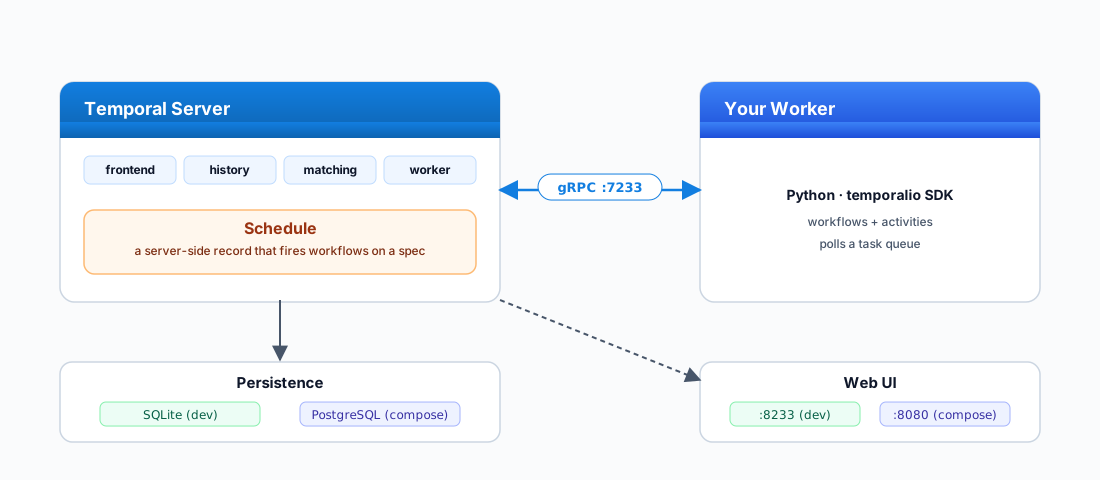
How a scheduled run flows through the diagram:
- The schedule fires server-side. It is a record on the Temporal Server, not a
while True: sleepin your code. It ticks whether or not your worker is alive. - The server starts a Workflow Execution and queues the first task on the named task queue (in this post,
health-check-queue). - Your Python worker polls that task queue over gRPC on
:7233, picks up the task, and runs the workflow and activities you defined. - Every step is recorded in persistence (SQLite for
temporal server start-dev, Postgres in the docker-compose stack). Kill the worker mid-run, start a new one, and the work resumes from the last completed step. - The Web UI reads from the server:
:8233in dev,:8080in compose. Nothing in your Python code changes between the two.
temporal server start-dev and the docker-compose stack. The two stacks are otherwise drop-in replacements but the UI URL changes. I have lost an embarrassing amount of time to this.
Setup
I am running macOS on Apple Silicon. The post is written against macOS but everything works on Linux or Windows with minor command swaps: mainly the brew install lines, which become apt/dnf/pacman on Linux or the Temporal CLI installer script on Windows. The Python code, Makefile targets, and docker-compose stack are identical across platforms.
Step 1: Install the Temporal CLI and start the dev server
The CLI is one Homebrew install. The dev server is the same binary, in a mode that boots a complete Temporal stack with the Web UI baked in:
brew install temporal
temporal server start-dev \
  --db-filename ./temporal.db \
  --ui-port 8233
After Step 2 (clone), make dev runs the same command from inside the project directory.
That is the entire local installation. --db-filename writes state to a SQLite file so it survives restarts; without it, you get an in-memory database and your schedules vanish on Ctrl-C. The frontend gRPC endpoint listens on localhost:7233, the Web UI on http://localhost:8233, and the default namespace is created for you.
Verify with the same CLI:
temporal operator namespace list
# default
temporal workflow list
# (empty)
Step 2: Clone the companion repo
The my2cents.ai companion repo holds the full project. Clone it, change into the project directory, and install dependencies:
# 1. Clone the samples repository
git clone https://github.com/fabiodouek/my2centsai-blog-samples.git

# 2. Change into the project directory
cd my2centsai-blog-samples/temporal-scheduling-quickstart

# 3. Install uv if you do not already have it
brew install uv

# 4. Install Python 3.12 and the project's pinned dependencies
uv python install 3.12
uv sync
What you will find inside the project:
temporal-scheduling-quickstart/
├── pyproject.toml          # Python 3.12, three deps, hatchling build
├── Makefile                # one-command dev / worker / schedule / clean
├── docker-compose.yml      # Postgres-backed stack for the second track
├── README.md
├── .env.example            # TEMPORAL_ADDRESS, TASK_QUEUE, DB_PATH
└── src/
    ├── config.py           # env-driven config
    ├── targets.py          # the httpbin.org targets to probe
    ├── storage.py          # SQLite schema and insert helper
    ├── activities.py       # probe_endpoint + record_incident
    ├── workflows.py        # HealthCheckWorkflow
    ├── worker.py           # registers workflow + activities
    └── schedules/
        ├── create_interval.py   # every 2 min, jitter, overlap=SKIP
        ├── create_cron.py       # weekday 09:00 America/New_York
        ├── pause_trigger.py     # pause / unpause / trigger
        ├── backfill.py          # backfill the last 30 minutes
        ├── list_describe.py     # list / describe schedules
└── delete_all.py # drop both schedulesmake dev in one terminal (starts the Temporal dev server), make worker in another (runs the Python worker), make schedule in a third (creates the every-2-minute schedule). Then open http://localhost:8233. The walkthrough below explains what each file is doing.
Step 3: Walk through the code
The workflow probes a list of HTTP targets. Each probe is an activity (so retries and timeouts are framework-level), and a failed probe records an incident row in SQLite (also via an activity, because workflow code cannot do I/O directly). The four files that matter live under src/.
Open src/targets.py, the list to probe:
from dataclasses import dataclass


@dataclass
class Target:
    name: str
    url: str
    expected_status: int
    timeout_seconds: float = 5.0


TARGETS: list[Target] = [
    Target(
        name="httpbin-ok",
        url="https://httpbin.org/status/200",
        expected_status=200,
    ),
    Target(
        name="httpbin-flaky",
        url="https://httpbin.org/status/500",
        expected_status=200,
    ),
    Target(
        name="httpbin-slow",
        url="https://httpbin.org/delay/2",
        expected_status=200,
        timeout_seconds=4.0,
    ),
]
https://httpbin.org/status/500 is the deliberately-failing target. It is the one the schedule will catch and record incidents for. httpbin-slow exists to exercise the start_to_close_timeout on activities.
Open src/activities.py, the two activities:
import time
from dataclasses import dataclass

import httpx
from temporalio import activity
from temporalio.exceptions import ApplicationError

from .storage import init_db, insert_incident
from .targets import Target


@dataclass
class ProbeResult:
    target_name: str
    target_url: str
    status_code: int
    elapsed_ms: int


@activity.defn
async def probe_endpoint(target: Target) -> ProbeResult:
    start = time.perf_counter()
    async with httpx.AsyncClient(timeout=target.timeout_seconds) as http:
        resp = await http.get(target.url)
    elapsed_ms = int((time.perf_counter() - start) * 1000)
    if resp.status_code != target.expected_status:
        raise ApplicationError(
            f"unexpected status {resp.status_code} from {target.url}",
            type="UnexpectedStatus",
        )
    return ProbeResult(target.name, target.url, resp.status_code, elapsed_ms)


@activity.defn
async def record_incident(
    target_name, target_url, status_code, error, elapsed_ms,
) -> None:
    await init_db()
    await insert_incident(
        target_name, target_url, status_code, error, elapsed_ms,
    )
Open src/workflows.py. The workflow loops the targets, retries each probe with an exponential backoff, and records incidents for terminal failures. The workflow itself never raises, so the schedule keeps firing even when a target is permanently down:
from datetime import timedelta

from temporalio import workflow
from temporalio.common import RetryPolicy

with workflow.unsafe.imports_passed_through():
    from .activities import probe_endpoint, record_incident
    from .targets import TARGETS


@workflow.defn
class HealthCheckWorkflow:
    @workflow.run
    async def run(self) -> dict[str, str]:
        retry_policy = RetryPolicy(
            initial_interval=timedelta(seconds=1),
            backoff_coefficient=2.0,
            maximum_interval=timedelta(seconds=10),
            maximum_attempts=3,
            non_retryable_error_types=["UnexpectedStatus"],
        )
        results: dict[str, str] = {}
        for target in TARGETS:
            try:
                outcome = await workflow.execute_activity(
                    probe_endpoint,
                    target,
                    start_to_close_timeout=timedelta(seconds=15),
                    retry_policy=retry_policy,
                )
                results[target.name] = f"ok status={outcome.status_code}"
            except Exception as e:
                workflow.logger.warning(f"{target.name} failed: {e}")
                await workflow.execute_activity(
                    record_incident,
                    args=[target.name, target.url, None, str(e), 0],
                    start_to_close_timeout=timedelta(seconds=10),
                )
                results[target.name] = f"incident: {e}"
        return results
A note on non_retryable_error_types=["UnexpectedStatus"]: Temporal will retry an activity until it hits maximum_attempts, unless the raised ApplicationError’s type matches a non-retryable string. We do not want to retry a 500 three times: the target is broken, record it and move on. Network errors (timeouts, DNS failures, connection resets) raise different error types and do retry.
Open src/worker.py, it is boring and you want it that way:
import asyncio
from temporalio.client import Client
from temporalio.worker import Worker

from .activities import probe_endpoint, record_incident
from .config import TASK_QUEUE, TEMPORAL_ADDRESS, TEMPORAL_NAMESPACE
from .workflows import HealthCheckWorkflow


async def main() -> None:
    client = await Client.connect(TEMPORAL_ADDRESS, namespace=TEMPORAL_NAMESPACE)
    worker = Worker(
        client,
        task_queue=TASK_QUEUE,
        workflows=[HealthCheckWorkflow],
        activities=[probe_endpoint, record_incident],
    )
    await worker.run()


if __name__ == "__main__":
    asyncio.run(main())
Start the worker in a second terminal (from inside temporal-scheduling-quickstart/):
uv run python -m src.worker
# or: make worker
You now have a Temporal server, a Python worker, and zero schedules. Time to add some.
Testing
I tested four things, in this order: an interval schedule with overlap policy and jitter; a calendar schedule with a timezone; pause / trigger / backfill / list against a live schedule; and a graduation to the Postgres-backed docker-compose stack.
Test 1: Interval schedule with overlap policy and jitter
The interval schedule is the boring, durable workhorse most teams want. Every two minutes, with ten seconds of jitter so concurrent schedules in the same cluster do not all fire on the exact same wall-clock tick. Open src/schedules/create_interval.py:
# src/schedules/create_interval.py
import asyncio
from datetime import timedelta

from temporalio.client import (
    Client,
    Schedule,
    ScheduleActionStartWorkflow,
    ScheduleIntervalSpec,
    ScheduleOverlapPolicy,
    SchedulePolicy,
    ScheduleSpec,
    ScheduleState,
)

from ..config import (
    INTERVAL_SCHEDULE_ID, TASK_QUEUE, TEMPORAL_ADDRESS,
    TEMPORAL_NAMESPACE, WORKFLOW_ID_PREFIX,
)
from ..workflows import HealthCheckWorkflow


async def main() -> None:
    client = await Client.connect(TEMPORAL_ADDRESS, namespace=TEMPORAL_NAMESPACE)
    schedule = Schedule(
        action=ScheduleActionStartWorkflow(
            HealthCheckWorkflow.run,
            id=f"{WORKFLOW_ID_PREFIX}-interval",
            task_queue=TASK_QUEUE,
        ),
        spec=ScheduleSpec(
            intervals=[ScheduleIntervalSpec(every=timedelta(minutes=2))],
            jitter=timedelta(seconds=10),
        ),
        policy=SchedulePolicy(
            overlap=ScheduleOverlapPolicy.SKIP,
            catchup_window=timedelta(minutes=10),
        ),
        state=ScheduleState(note="Health check every 2 minutes with 10s jitter."),
    )
    await client.create_schedule(INTERVAL_SCHEDULE_ID, schedule)


if __name__ == "__main__":
    asyncio.run(main())
Run it (the file already exists in the cloned repo):
uv run python -m src.schedules.create_interval
# or: make schedule
# created schedule: health-check-interval
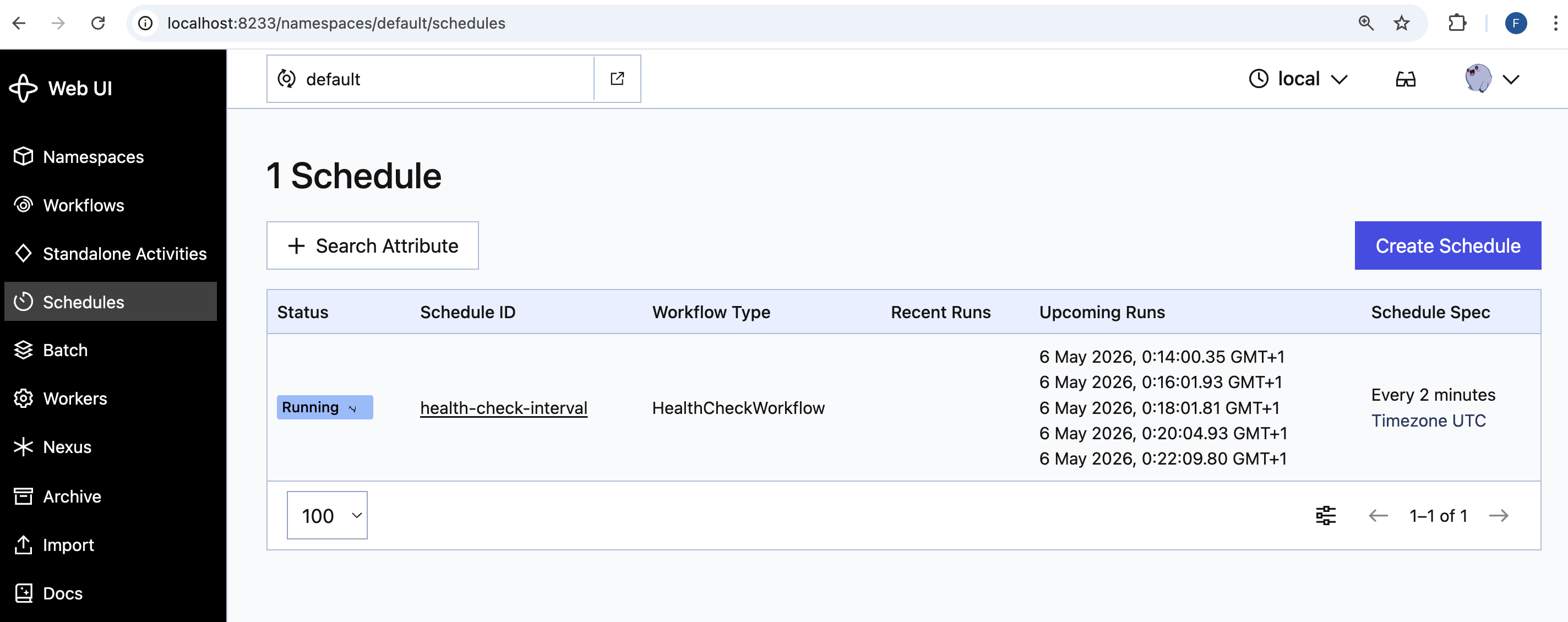
Open http://localhost:8233/namespaces/default/schedules and the schedule appears with its next execution time:
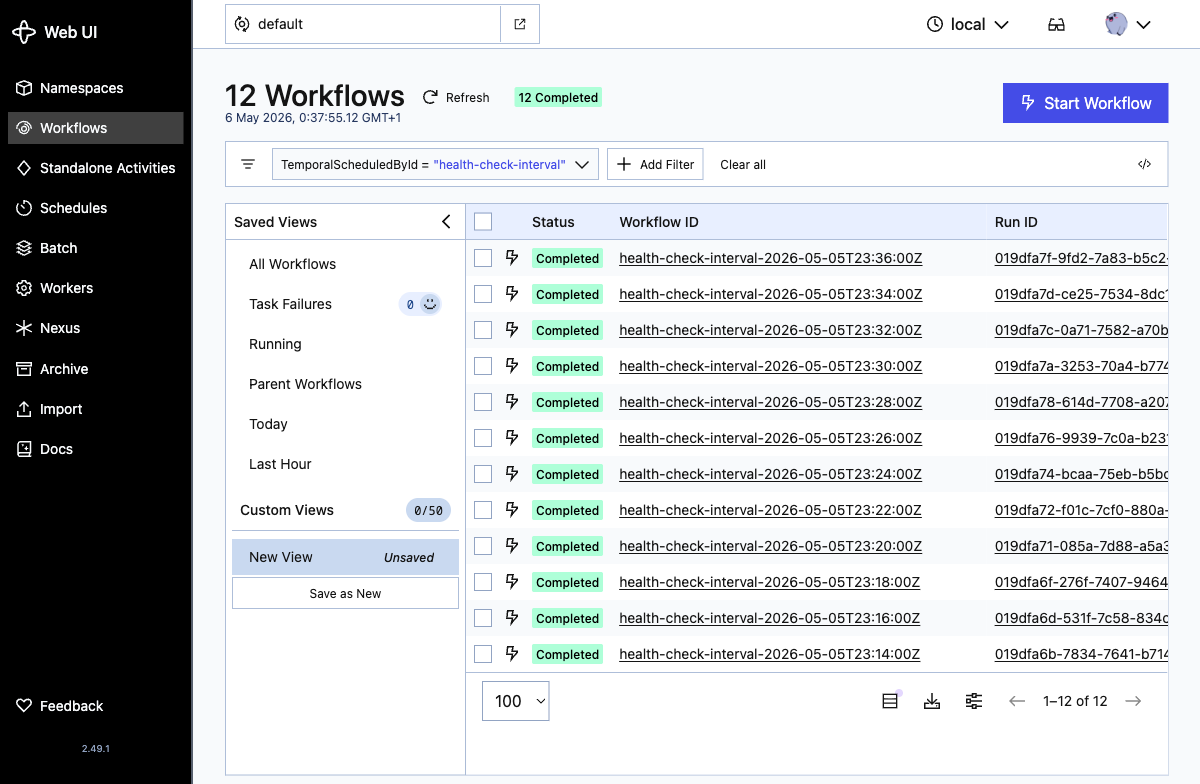
Within four minutes the first two runs land. Each run shows up as a workflow execution with the same workflow ID prefix. Click View All Runs on the schedule detail page to see the full history. The list is sorted newest-first, so the two earliest runs sit at the bottom:
Looking inside a run, the workflow result shows the per-target outcome: the two healthy targets return ok, and httpbin-flaky records an incident after Temporal exhausts the activity’s retry budget:
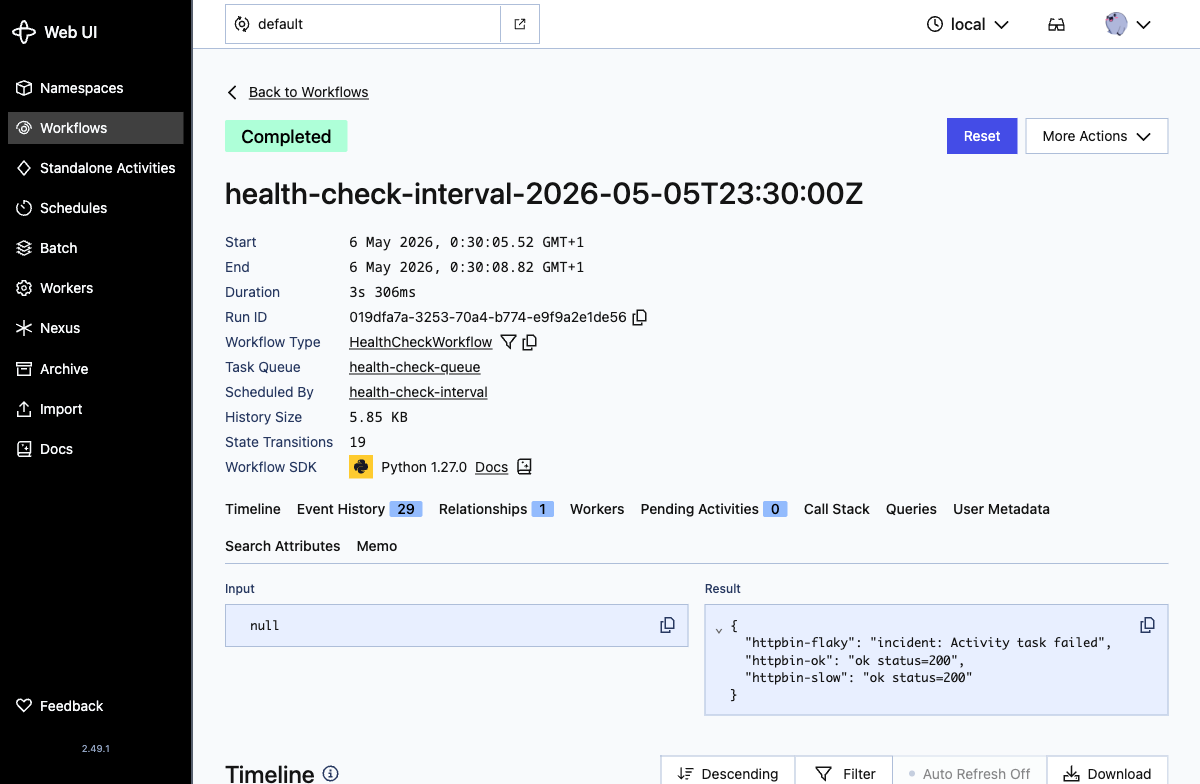
That "httpbin-flaky": "incident: Activity task failed" line corresponds to a row written to incidents.db by the record_incident activity.
The two knobs in this snippet that matter:
SchedulePolicy.overlap=ScheduleOverlapPolicy.SKIP: if the previous run is still going at the next tick, skip the next tick. Six values are available:SKIP,BUFFER_ONE,BUFFER_ALL,CANCEL_OTHER,TERMINATE_OTHER,ALLOW_ALL.SKIPis the right default for “it would be nice to run every two minutes but never two at once.”catchup_window=timedelta(minutes=10): if the server was unreachable for ten minutes and missed five runs, only fire the most recent one when it comes back. The default if you do not set this is one year, which means a long server outage can stampede thousands of replays at recovery time. Set this explicitly. Always.
Test 2: Calendar schedule with timezone
The interval schedule is right for “every two minutes.” The calendar schedule is right for “every weekday at 09:00 New York time.” Calendar specs use ScheduleRange(start, end, step) for each calendar field. Open src/schedules/create_cron.py:
# src/schedules/create_cron.py (excerpt)
from temporalio.client import (
    ScheduleCalendarSpec, ScheduleRange, ScheduleSpec, SchedulePolicy,
    ScheduleOverlapPolicy,
)

weekday_9am = ScheduleCalendarSpec(
    hour=(ScheduleRange(start=9),),
    minute=(ScheduleRange(start=0),),
    day_of_week=(ScheduleRange(start=1, end=5),),  # Mon..Fri
    comment="Weekdays 09:00 America/New_York",
)

schedule = Schedule(
    action=ScheduleActionStartWorkflow(
        HealthCheckWorkflow.run,
        id="health-check-cron",
        task_queue=TASK_QUEUE,
    ),
    spec=ScheduleSpec(
        calendars=[weekday_9am],
        time_zone_name="America/New_York",
    ),
    policy=SchedulePolicy(overlap=ScheduleOverlapPolicy.BUFFER_ONE),
    state=ScheduleState(note="Weekday morning health check."),
)
Run it the same way as Test 1:
uv run python -m src.schedules.create_cron
# or: make cron
# created schedule: health-check-cron
Open the schedule detail page for health-check-cron. The Upcoming Runs panel proves the calendar spec and the timezone are wired up: every entry is at 09:00 America/New_York, translated by the Web UI into your own local timezone, and the list jumps from Friday 8 May straight to Monday 11 May, skipping the weekend:
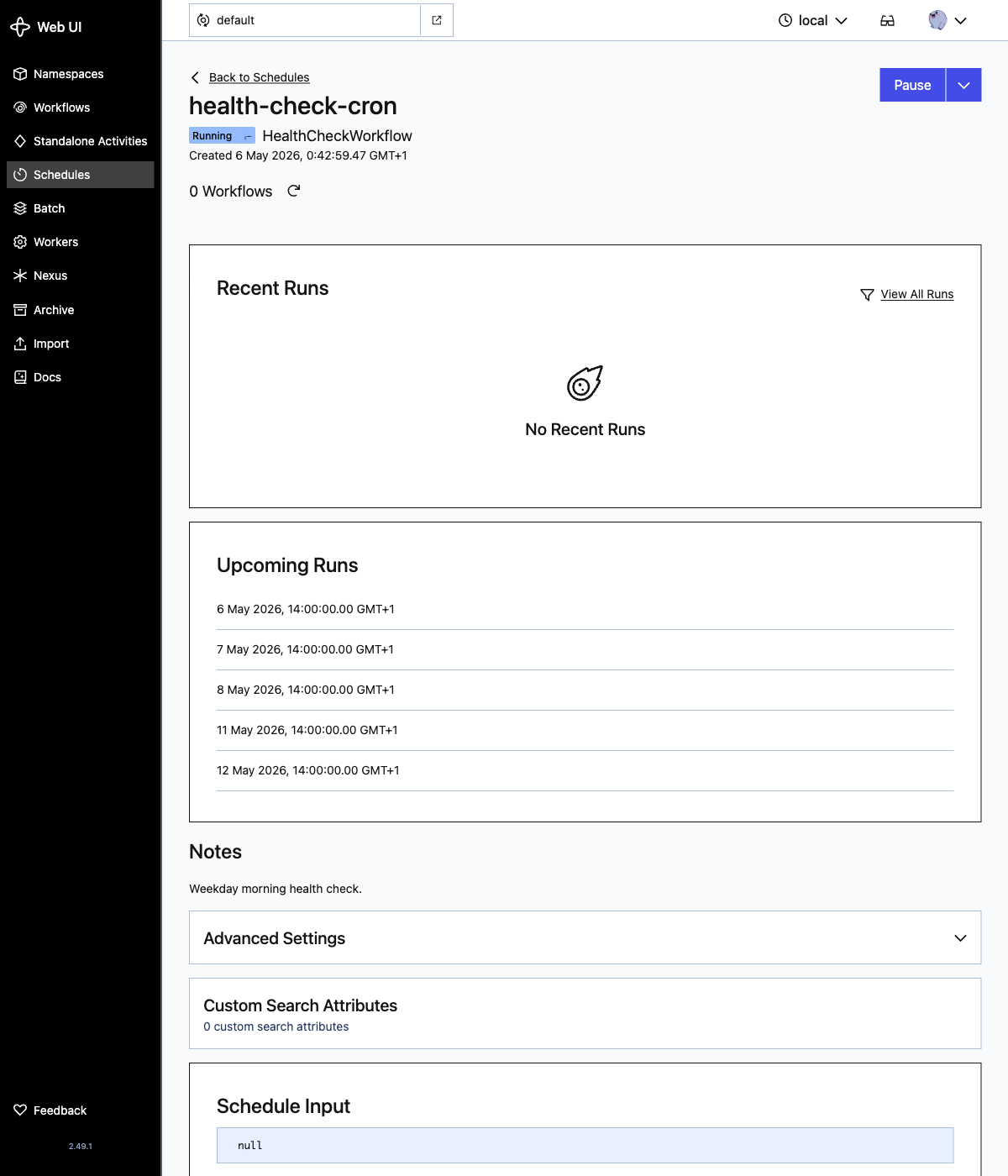
If you would rather use a familiar crontab string, swap calendars=[weekday_9am] for cron_expressions=["0 9 * * MON-FRI"]. Both work. The calendar form is more readable for non-trivial expressions and the cron form is shorter for the easy ones.
Test 3: Pause, trigger, backfill, list
This is the test that flipped me from “Temporal is interesting” to “I am replacing my cron.” None of these operations exist in cron. All of them are one Python call. Open src/schedules/pause_trigger.py:
# src/schedules/pause_trigger.py (excerpt)
handle = client.get_schedule_handle("health-check-interval")
await handle.pause(note="Maintenance window")
await handle.unpause(note="Resuming")
await handle.trigger(overlap=ScheduleOverlapPolicy.ALLOW_ALL)
Backfill is the killer feature. “The schedule was paused for an hour, please run all the runs we missed.” Open src/schedules/backfill.py:
# src/schedules/backfill.py
from datetime import datetime, timedelta, timezone
from temporalio.client import ScheduleBackfill, ScheduleOverlapPolicy

handle = client.get_schedule_handle("health-check-interval")
now = datetime.now(timezone.utc)
await handle.backfill(
    ScheduleBackfill(
        start_at=now - timedelta(minutes=30),
        end_at=now - timedelta(minutes=1),
        overlap=ScheduleOverlapPolicy.ALLOW_ALL,
    ),
)
overlap=ALLOW_ALL here means “fire all the missed runs concurrently.” Pick BUFFER_ALL if you want them sequenced.
Start by pausing the schedule and describing it:
uv run python -m src.schedules.pause_trigger pause
# or: make pause
uv run python -m src.schedules.list_describe describe
# or: make describe
# id:          health-check-interval
# note:        Paused via pause_trigger.py
# paused:      True
# num_actions:                19
# num_actions_skipped_overlap:0
# running_actions:            0
# last_action_started_at:     2026-05-05 23:50:07.151203+00:00
# last_action_scheduled_at:   2026-05-05 23:50:07.127000+00:00
# next_action_at:             2026-05-05 23:54:02.613000+00:00
The paused: True line plus the next_action_at in the future is the proof: the schedule still has an active tick clock, but it is gated by the pause. Unpausing flips the gate without resetting anything.
The Schedules list page shows the pause state too: health-check-interval carries a yellow Paused badge while health-check-cron keeps Running:
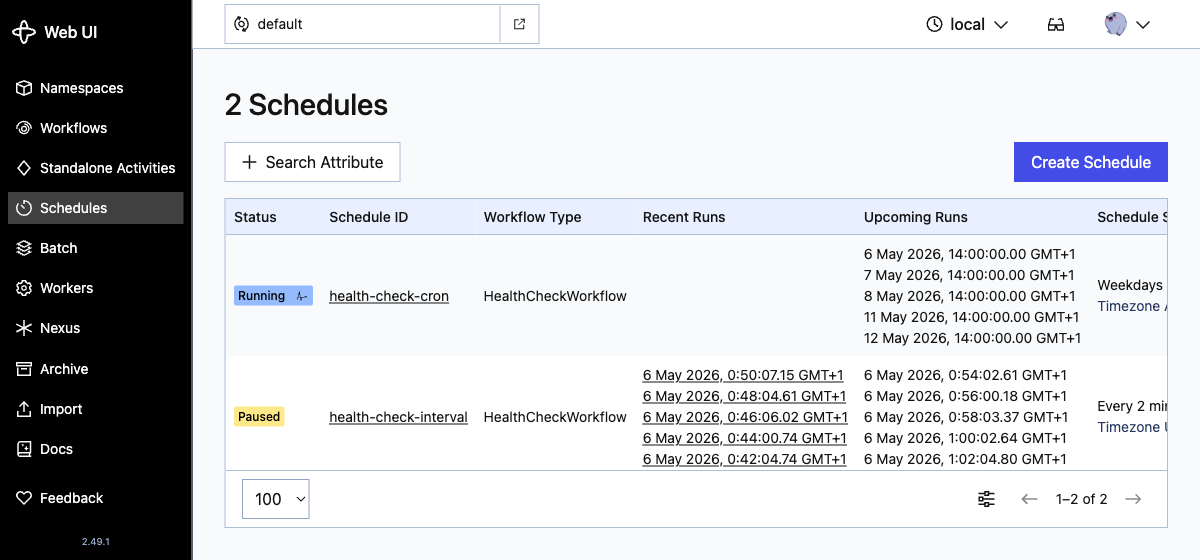
Now exercise the rest of the lifecycle. Unpause to lift the gate, backfill to fire the runs you missed, and trigger an extra ad-hoc run:
uv run python -m src.schedules.pause_trigger unpause
# or: make unpause
uv run python -m src.schedules.backfill
# or: make backfill
uv run python -m src.schedules.pause_trigger trigger
# or: make trigger
Each command takes under a second. The Web UI reflects every change in real time. Cron, by contrast, has no notion of any of this.
Test 4: Graduate to docker-compose
The dev server is fine for prototyping but it is one process and SQLite. Eventually you will want Postgres and a separately-restartable server. The path is the docker-compose stack.
The my2cents.ai companion repo includes a trimmed-down docker-compose.yml:
services:
  postgresql:
    image: postgres:16
    environment:
      POSTGRES_PASSWORD: temporal
      POSTGRES_USER: temporal
    ports: ["5432:5432"]
    volumes: ["postgres-data:/var/lib/postgresql/data"]

  temporal:
    image: temporalio/auto-setup:1.27
    depends_on: [postgresql]
    environment:
      DB: postgres12
      DB_PORT: 5432
      POSTGRES_USER: temporal
      POSTGRES_PWD: temporal
      POSTGRES_SEEDS: postgresql
    ports: ["7233:7233"]

  temporal-ui:
    image: temporalio/ui:2.40.1
    depends_on: [temporal]
    environment:
      TEMPORAL_ADDRESS: temporal:7233
    ports: ["8080:8080"]

volumes:
  postgres-data:
Stop the dev server (Ctrl-C), bring up the stack, and the same Python worker, same localhost:7233 address, connects to it without changes:
make compose-up[+] up 60/60
✔ Image postgres:16 Pulled 7.0s
✔ Image temporalio/auto-setup:1.27 Pulled 6.8s
✔ Image temporalio/ui:2.40.1 Pulled 6.0s
✔ Network temporal-scheduling-quickstart_default Created 0.0s
✔ Volume temporal-scheduling-quickstart_postgres-data Created 0.0s
✔ Container temporal-scheduling-quickstart-postgresql-1 Started 0.6s
✔ Container temporal-scheduling-quickstart-temporal-1 Started 0.3s
✔ Container temporal-scheduling-quickstart-temporal-ui-1 Started 0.3sThen point a worker at it and re-create the schedule:
make worker      # in another terminal
make schedule
open http://localhost:8080   # UI is on 8080 here, not 8233
The schedule, workflow code, activity code, and worker code are byte-for-byte identical to what ran against the dev server. That is the architectural payoff: dev and self-hosted production are the same system, just persisted differently.
Production-grade self-hosting is a bigger conversation: TLS, namespaces, advanced visibility via Elasticsearch, archival, multi-cluster replication. The self-hosted guide is the right next read. For a single-laptop demo, the three-service compose above is enough.
Cleanup
Stop the dev server with Ctrl-C in the terminal running make dev. If you started the docker-compose stack, tear it down and remove the Postgres volume so you do not leave a stale database mounted:
make delete       # drops the schedules from the cluster
make compose-down # stops compose and deletes the postgres volume
make clean        # removes incidents.db and temporal.db
Schedules are server-side records. If you do not delete them before you delete the database, they vanish with the database. If you keep the database and start a new worker, they resume firing immediately. Be deliberate about which one you want.
Verdict
A durable execution engine earns its weight on AI workloads specifically. LLM calls are slow, expensive, and rate-limited; agentic flows chain ten or twenty of them; batched-inference jobs can run for hours. A cron-style scheduler that loses an in-flight run forces the next tick to redo the spend, and ad-hoc retry logic compounds the bill every time it gets it slightly wrong. Temporal moves “did the work complete, with which steps already paid for” into the platform: every tool call, every retry, every long sleep is a checkpoint, and a crashed worker resumes from the last one instead of restarting the chain. That is a different shape of guarantee than “the cron fired at 03:00.”