Google AX on Amazon EKS: Hands-On with a Self-Hosted Install
By Fabio Douek
Jump to section
- Overview
- Architecture
- Setup
- Step 1: Tools and the companion code
- Step 2: The cluster
- Step 3: Sources, and why EKS needs a patch
- Testing
- Test 1: Does the cluster meet Substrate’s bar?
- Test 2: Install Agent Substrate with the EKS overlay
- Test 3: The WorkerPool
- Test 4: Build and deploy AX
- Test 5: The smoke test
- Test 6: A first look at suspend
- Results summary
- Pricing
- Cleanup
- Verdict
- What you sign up for
- Who should use it
Explain (TLDR) like I am...
Imagine Google built a big toy garage where robot helpers can each get their own little room to work in, but the instructions only explain how to set it up in Google's own playroom. I set it up in a different playroom instead, one run by Amazon.
It worked once I swapped a few pieces, like where the toy boxes are kept. One surprise: when a robot takes a nap and wakes up, it only remembers what it put in one special drawer. Everything else in its room is gone.
AX is an Apache 2.0 orchestrator from Google that runs AI agent tasks in isolated sandboxes on a Kubernetes cluster you operate. Google supports its own cloud and a laptop setup; running it on AWS is unsupported, and the project warns of breaking changes before a stable release.
The material exposure is access control: the AX server has no authentication of its own, an issue reported as critical and still open. Treat any deployment as an evaluation environment, keep the control plane off the network, and budget for the infrastructure that runs while idle.
The presenting question was whether Google's agent orchestrator survives transplant from Google Cloud to AWS. Diagnosis: yes, on Kubernetes 1.37, with a small overlay and a short installer patch. The evidence is one successful install, a passing smoke test and measured timings.
Side effects to monitor: suspend discards memory, running processes and anything outside the workspace folder, so it is closer to a restart than a pause. Contraindications: production use, shared clusters and any environment where the unauthenticated control plane could be reached.
There is a familiar tension in adopting something a large company open-sourced: the excitement of a capable design, and the quiet worry that it only really works in their house. Getting it running elsewhere tends to ease that worry, and this install did.
The new friction is honesty about maturity. The project moves daily, some promises in its launch coverage no longer match the code, and the team that adopts it has to own the cluster, the upgrades and the security gaps themselves.
Think of AX as a session arrangement written for one studio. The parts are good, the band is tight, but the chart assumes Google's room and Google's gear. Moving it to an AWS room meant re-patching a few cables: storage, image pulls and the installer's idea of where it was playing.
Once it was in tune, every take landed first time. The surprise was the pause between takes: the band forgets everything except the notes left on one music stand, so a resume is a fresh count-in, not a held chord.
The story is portability with a price tag. Google's agent orchestrator runs on AWS today, on a standard EKS 1.37 cluster, in under half an hour of build and install time and about sixty cents an hour of idle cost.
The positioning is for platform teams evaluating a self-hosted agent runtime, not product teams wanting sandboxes tomorrow. The honest pitch is "own the runtime and the cluster", with a cluster that bills while idle and needs upkeep as the price of that control.
 See the source code here: google-ax-eks
Overview
AX (Agent Executor) is Google’s open-source orchestrator for agent tasks, released under Apache 2.0. You describe a task in YAML, AX runs it in an isolated sandbox, and you can suspend it while it waits and resume it later. It sits on top of Agent Substrate, a second Google project that runs each sandbox as an “actor” inside gVisor on a pool of pre-warmed Kubernetes pods. One of AX’s co-creators described it on Hacker News as “closer to job orchestration” than to an agent framework, and that’s the right frame: AX doesn’t reason, it schedules and isolates whatever does.
AX itself only says it needs Kubernetes and Agent Substrate; Substrate and Google’s docs cover two places to run that: GKE and a local kind cluster. For this series I wanted to host it myself, on the cloud I already use. This post, part 1 of 4, is the install. Part 2 covers the task lifecycle, part 3 credential injection, and part 4 stress-tests the same two nodes.
I ran AX on Amazon EKS 1.37, built from the commits AX’s own install guide pins as its development baseline: AX a496fc1 (2026-10-28) with Substrate d3f2363 (v0.6.0). Everything is in Terraform and seven shell scripts. Every timing below is from my runs on 2026-10-30.
I’m not the first to try AWS. Anton Weiss ran Agent Substrate on EKS in October with IRSA, RDS and S3, and opened an aws overlay upstream as PR #2241, still unmerged. He didn’t install AX. I took a lighter route (EKS Pod Identity instead of IRSA, the bundled PostgreSQL instead of RDS) and went all the way to a running AX task.
Architecture
Two control planes share the cluster. AX (ax-system) stores tasks in its own PostgreSQL and turns each one into a Substrate actor. Substrate (ate-system) owns the actors: ate-api-server keeps their state, ate-controller manages the worker pools, the atenet router reaches into running sandboxes, and an atelet DaemonSet on each node does the actual checkpoint and restore. The gVisor workers that host the sandboxes live in a WorkerPool you create yourself, here in ax-system. There is no Helm chart and there are no published images, so everything is built from source and pushed to ECR.
What makes this EKS rather than GKE comes down to four things:
| Concern | GKE (what Google ships) | EKS (what I did) |
|---|---|---|
| Pod certificate APIs | GKE 1.37, or 1.36 with beta APIs enabled | EKS 1.37 only, because EKS can’t enable beta APIs |
| Snapshot storage | GCS, with a per-actor token exchange | S3, with the pod’s own role through EKS Pod Identity |
| Image pulls by atelet | Artifact Registry through GKE’s credential provider | ECR through AL2023’s ecr-credential-provider |
| Installer | ate-setup GKE path | ate-setup plus an 11-line patch and a kustomize overlay |
Setup
Step 1: Tools and the companion code
You need an AWS account that can create EKS, VPC, IAM, S3 and ECR resources, plus Terraform 1.9+, the AWS CLI, kubectl, jq, Docker with buildx, and Go 1.26 or newer. AX and Substrate pin Go 1.27.x; the scripts set GOTOOLCHAIN=auto so Go downloads it. I built everything on an Apple Silicon Mac; the images are linux/amd64, because Substrate only runs on amd64.
git clone https://github.com/fabiodouek/my2centsai-blog-samples.git
cd my2centsai-blog-samples/google-ax-eks| Script | What it does |
|---|---|
01_cluster.sh | terraform apply, kubeconfig, then checks the cluster meets Substrate’s requirements |
02_sources.sh | Checks out AX and Substrate at the pinned commits, applies the EKS patch and overlay |
03_substrate.sh | Builds every Substrate image with ko, pushes to ECR, installs ate-system |
04_workerpool.sh | Creates the gVisor WorkerPool AX schedules tasks on |
05_ax.sh | Builds the ax CLI and the AX images, deploys PostgreSQL and ax-server |
06_check_task.sh | The install guide’s smoke test, with timings |
07_suspend.sh | What survives ax suspend and ax resume |
99_teardown.sh | Deletes tasks, the ECR repositories, everything Terraform created and the PostgreSQL volumes |
Step 2: The cluster
The Terraform builds a VPC with one NAT gateway, an EKS 1.37 cluster with two m7i.xlarge nodes on Amazon Linux 2023, the add-ons, an S3 bucket for snapshots, two Pod Identity roles, and an ECR repository creation template. The node size mirrors Google’s GKE minimum (c3-standard-4, 4 vCPU and 16 GB).
module "eks" {
  source  = "terraform-aws-modules/eks/aws"
  version = "~> 21.0"

  name               = var.name
  kubernetes_version = "1.37" # PodCertificateRequest + ClusterTrustBundle are GA here

  addons = {
    vpc-cni = {
      before_compute       = true
      configuration_values = jsonencode({ enableNetworkPolicy = "true" })
    }
    eks-pod-identity-agent = { before_compute = true }
    kube-proxy             = {}
    coredns                = {}
    aws-ebs-csi-driver = {
      # AX's PostgreSQL needs a default StorageClass for its 10 GiB volume.
      configuration_values = jsonencode({ defaultStorageClass = { enabled = true } })
      pod_identity_association = [{ role_arn = aws_iam_role.ebs_csi.arn, service_account = "ebs-csi-controller-sa" }]
    }
  }

  eks_managed_node_groups = {
    workers = {
      ami_type       = "AL2023_x86_64_STANDARD"
      instance_types = ["m7i.xlarge"]
      min_size       = 2
      max_size       = 2
      desired_size   = 2
      disk_size      = 100
    }
  }
}
Two AWS details carry the most weight. Substrate’s snapshot sidecars run in ate-api-server and atelet, so both service accounts get an S3 role through Pod Identity. And neither project publishes images: ko pushes one repository per binary, so an ECR create-on-push template under the ax-eks prefix saves pre-creating a dozen repositories.
resource "aws_eks_pod_identity_association" "snapshots" {
  for_each        = toset(["ate-api-server", "atelet"])
  cluster_name    = module.eks.cluster_name
  namespace       = "ate-system"
  service_account = each.key
  role_arn        = aws_iam_role.snapshots.arn
}

resource "aws_ecr_repository_creation_template" "images" {
  prefix      = var.name
  applied_for = ["CREATE_ON_PUSH"]
}atunnel failed to open egress tunnel ... context deadline exceeded. The companion Terraform now adds a self-referencing all-ports rule. My recorded run predates it, so it shows 67 resources instead of 68.
node_security_group_additional_rules = {
  ingress_self_all = {
    description = "Node to node, all ports (pod-to-pod across nodes)"
    protocol    = "-1"
    from_port   = 0
    to_port     = 0
    type        = "ingress"
    self        = true
  }
}./scripts/01_cluster.shThe apply created 67 resources in 14 minutes 9 seconds; the EKS control plane alone took 11 minutes 11 seconds, the NAT gateway almost 2 and the node group 1 minute 18 seconds. The cluster came up on v1.37.1-eks-577a51e, platform version eks.7:
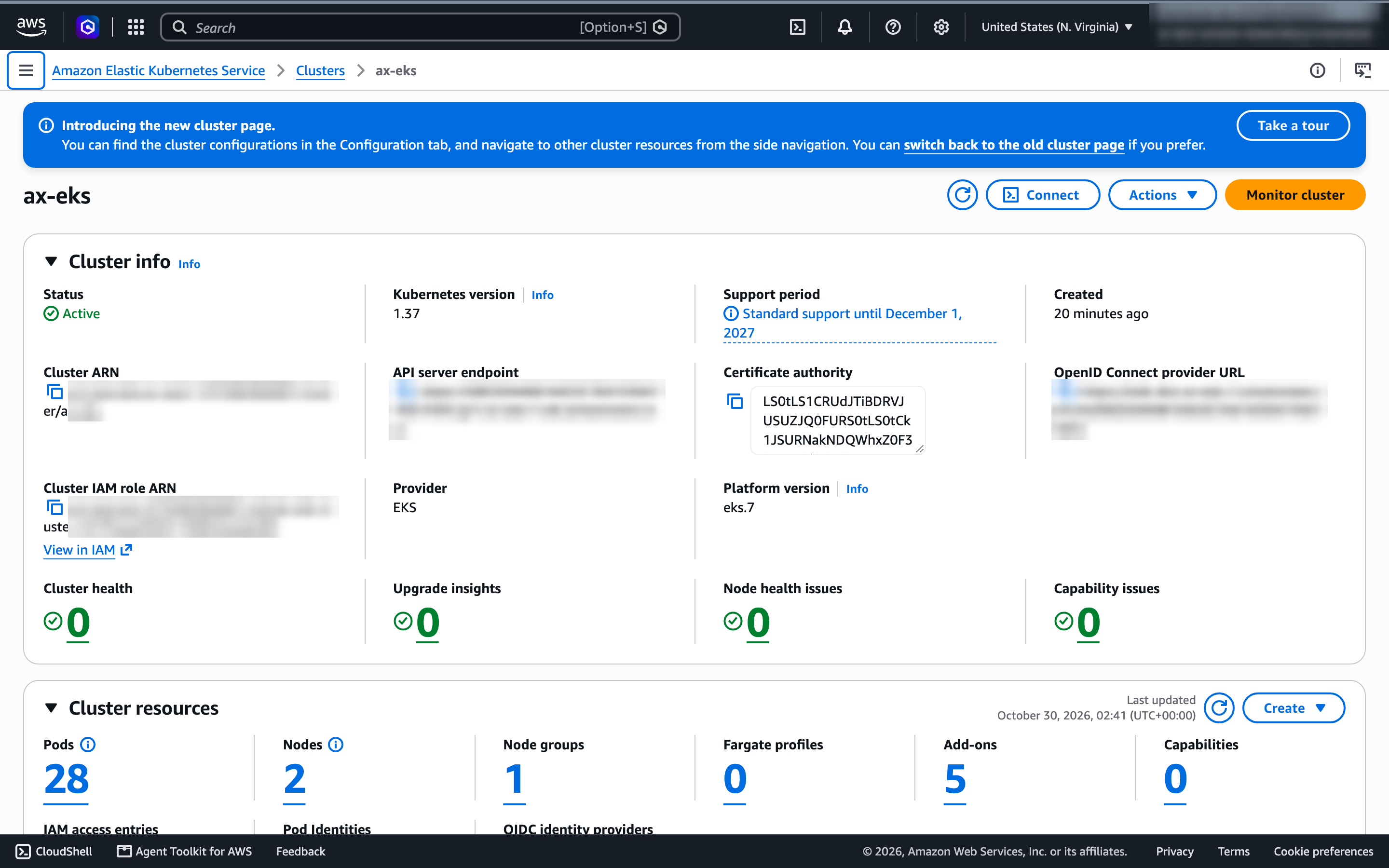
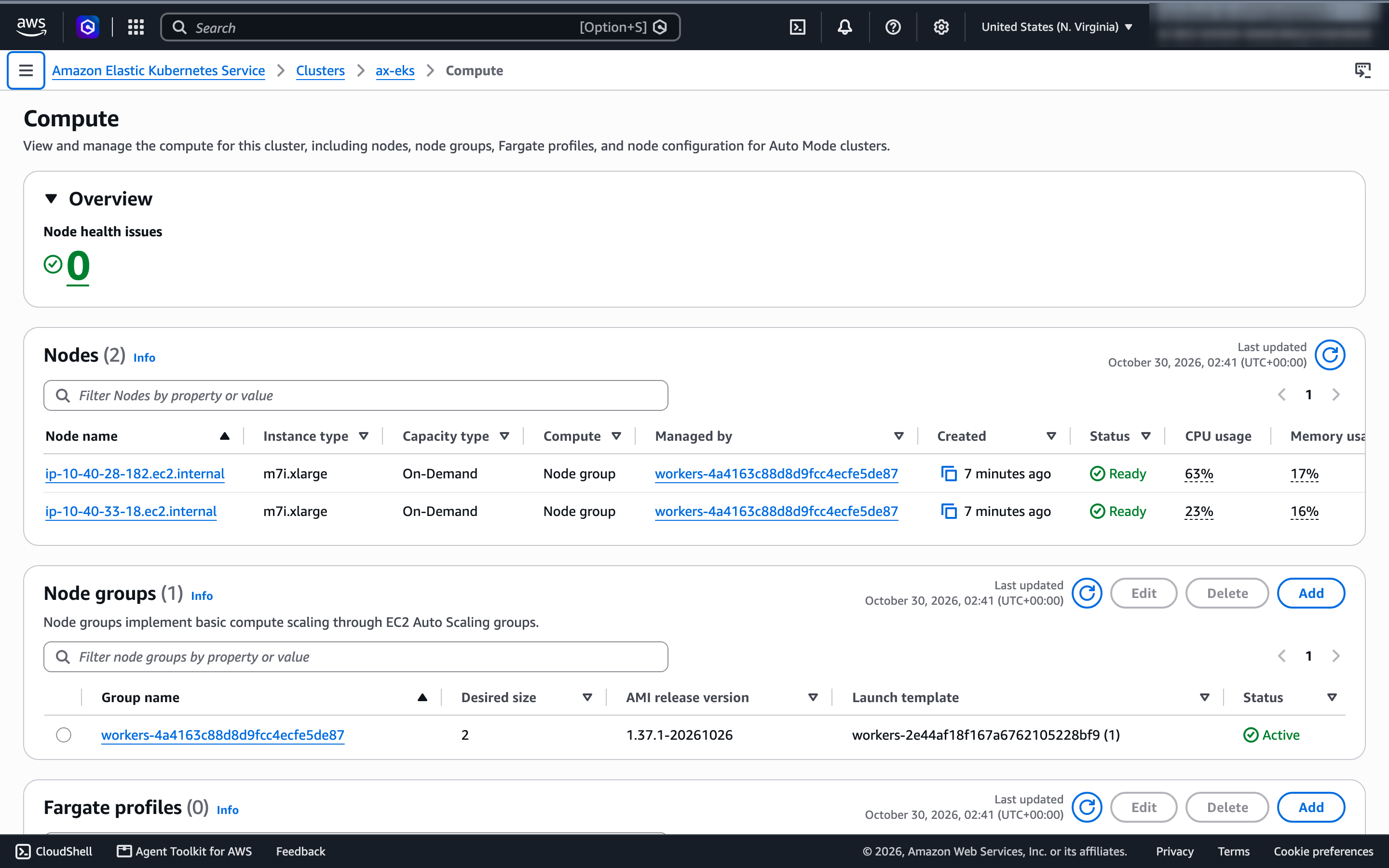
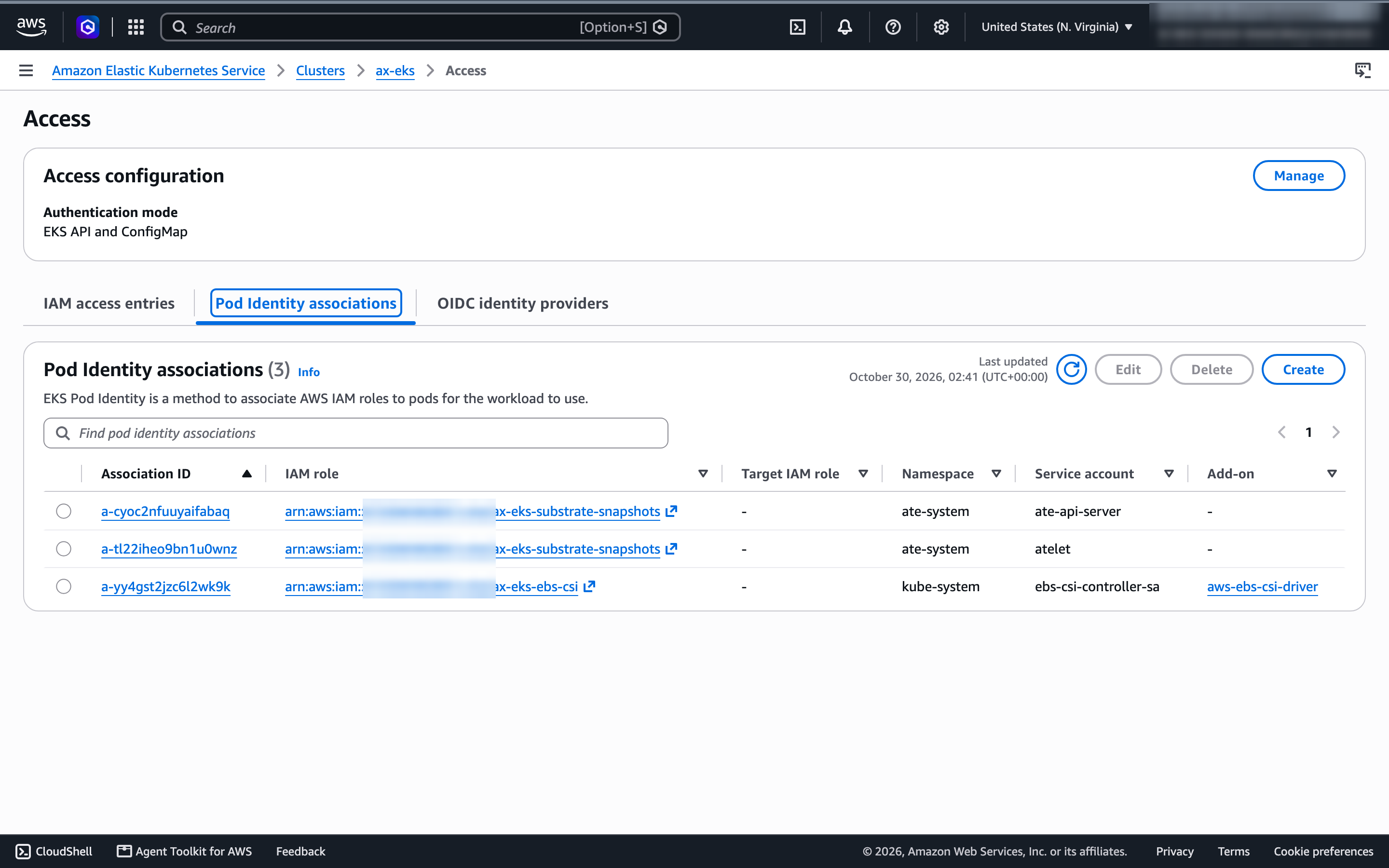
Step 3: Sources, and why EKS needs a patch
Substrate’s installer, ate-setup, knows exactly two platforms: --kind (an in-cluster S3 clone called rustfs, local registry) or GKE (GCS, plus a Google service account it refuses to start without). An EKS install fits neither, so the companion code adds an ATE_SYSTEM_OVERLAY override, points the telemetry ConfigMap at the overlay’s copy, and skips the GCS service-account check when it’s set. 11 added lines in total; the core of it:
func SystemOverlay(cfg *config.Config) string {
	// my2cents.ai EKS patch: an install outside kind and GKE names its own
	// kustomization, relative to the repository root.
	if overlay := os.Getenv("ATE_SYSTEM_OVERLAY"); overlay != "" {
		return overlay
	}
	switch {
	// ... agentgateway variants, then kind, then the GKE base bundle
The overlay is a sibling of Substrate’s own base (GKE) and kind bundles. It changes three things: snapshots go to S3 with no endpoint or static keys (Pod Identity supplies credentials), atelet mounts the AL2023 credential provider instead of GKE’s, and GKE-only objects are dropped (a PodMonitoring resource whose CRD only exists on GKE, and the managed OpenTelemetry endpoint).
patches:
  - patch: |-
      apiVersion: apps/v1
      kind: DaemonSet
      metadata: { name: atelet, namespace: ate-system }
      spec:
        template:
          spec:
            initContainers:
            - name: objectstore-plugin
              env:
              - { name: ATE_STORAGE_BACKEND, value: s3 }
              - { name: AWS_REGION, value: us-east-1 }
            volumes:
            - name: image-credential-provider-bin
              hostPath: { path: /etc/eks/image-credential-provider, type: Directory }
            - name: image-credential-provider-config
              hostPath: { path: /etc/eks/image-credential-provider/config.json, type: File }
Substrate’s code was more ready for this than its installer. The comment above atelet’s credential-provider flags says it runs the node’s own credential provider so that “the same binary authenticates to Artifact Registry on GKE and to ECR on EKS”, and the S3 backend exists in the object-store plugin. Only the install path assumes Google.
./scripts/02_sources.shThe script is a thin wrapper: check out both repositories at the pinned commits, apply the patch, and copy the overlay into Substrate’s manifest tree where ate-setup expects it.
checkout https://github.com/google/ax.git "$AX_SRC" "$AX_REF"                              # a496fc1…
checkout https://github.com/agent-substrate/substrate.git "$SUBSTRATE_SRC" "$SUBSTRATE_REF" # d3f2363…
(cd "$AX_SRC" && go list -m go.ate.dev/substrate)   # confirm AX's go.mod agrees

git -C "$SUBSTRATE_SRC" apply "$ROOT/substrate-eks/ate-setup-overlay.patch"
cp -R "$ROOT/substrate-eks/overlay" "$SUBSTRATE_SRC/manifests/ate-install/eks"
== Sources
ax at a496fc1ff1cf (2026-10-28)
substrate at d3f2363590a1 (2026-10-22)
== AX's recorded Substrate dependency
go.ate.dev/substrate v0.6.0
== EKS overlay for Substrate
M cmd/ate-setup/internal/config/config.go
M cmd/ate-setup/internal/steps/overlay.go
?? manifests/ate-install/eks/Pin both. AX’s guide warns that a go install …@latest CLI “can use a different RPC API” from a server built from main, and the AX v0.3.1 release (Redis, a separate controller) no longer resembles main (PostgreSQL, one server). Substrate shipped v1.0.0-rc.1 the day before I wrote this; AX’s guide says not to swap in a newer Substrate than its go.mod records.
Testing
Test 1: Does the cluster meet Substrate’s bar?
Substrate needs three Kubernetes features that EKS doesn’t advertise: the PodCertificateRequest and ClusterTrustBundle APIs, and the podCertificate projected volume source that delivers each pod’s mTLS identity. They’re GA and on by default from Kubernetes 1.37. Before that PodCertificateRequest is beta (1.35 and 1.36) or alpha (1.34), and EKS gives you no way to turn either on. That’s why an EKS 1.36 install silently dropped the projection, and why Weiss’s first attempt on an older cluster hung. On EKS, 1.37 is the minimum.
01_cluster.sh checks all three in about 10 seconds, right after terraform apply. The first two are plain discovery calls. The third is the one worth stealing: a server-side dry run of a pod that asks for a podCertificate volume. Nothing gets scheduled, but the pod goes through the whole admission chain, so if anything in the cluster drops the field you see an empty {} come back.
k get --raw /apis/certificates.k8s.io | jq -r '.versions[].groupVersion'
k api-resources --api-group=certificates.k8s.io -o wide

cat <<'EOF' | k create --dry-run=server -o jsonpath='{.spec.volumes[0].projected.sources}{"\n"}' -f -
apiVersion: v1
kind: Pod
metadata: { name: podcert-probe, namespace: default }
spec:
  containers: [{ name: c, image: public.ecr.aws/docker/library/busybox:1.37, command: ["true"] }]
  volumes:
  - name: id
    projected:
      sources:
      - podCertificate: { signerName: example.com/probe, keyType: ED25519, credentialBundlePath: bundle.pem }
EOF

k get nodes -o custom-columns='NODE:.metadata.name,KERNEL:.status.nodeInfo.kernelVersion,OS:.status.nodeInfo.osImage'
k is a shell function for kubectl --context ax-eks, defined in scripts/env.sh along with the pinned commits and the Terraform outputs every script reads.
certificates.k8s.io/v1

NAME                         APIVERSION               NAMESPACED   KIND
certificatesigningrequests   certificates.k8s.io/v1   false        CertificateSigningRequest
clustertrustbundles          certificates.k8s.io/v1   false        ClusterTrustBundle
podcertificaterequests       certificates.k8s.io/v1   true         PodCertificateRequest

== Pod certificate projection survives admission
[{"podCertificate":{"credentialBundlePath":"bundle.pem","keyType":"ED25519","signerName":"example.com/probe"}}]

== Worker kernel
NODE                           KERNEL                            OS
ip-10-40-28-182.ec2.internal   6.18.56-125.164.amzn2023.x86_64   Amazon Linux 2023.12.20261026
ip-10-40-33-18.ec2.internal    6.18.56-125.164.amzn2023.x86_64   Amazon Linux 2023.12.20261026
All three pass. Only v1 is served, and v1beta1 can’t be enabled on a managed control plane, but Substrate’s clients try v1 first and fall back to v1beta1, so nothing needed changing. The dry run matters because of a kagent report that EKS 1.37 stripped the podCertificate source. Its author later traced that to older mutating webhooks (aws-load-balancer-controller v3.1.0, bank-vaults v1.22.0) and a stale kubectl schema cache, not to EKS. If you run either webhook, this probe is how you’d find out before Substrate’s pods crash-loop. The kernel needs to be 6.8 or newer for the OverlayFS lowerdir+ mount option Substrate’s image cache uses; AL2023 ships 6.18.
Test 2: Install Agent Substrate with the EKS overlay
./scripts/03_substrate.shexport KO_DOCKER_REPO="$IMAGE_REPO/substrate" # 111122223333.dkr.ecr.us-east-1.amazonaws.com/ax-eks/substrate
export KO_DEFAULTPLATFORMS=linux/amd64
export SNAPSHOT_LOCATION="s3://ax-eks-snapshots-111122223333/"
export ATE_SYSTEM_OVERLAY=manifests/ate-install/eks
go run ./cmd/ate-setup --no-dev-env deploy ate-system \
--rollout-timeout=5m \
--credential-provider='{"name":"k8s.io"}' \
--ateapi-authz-bootstrap-owners="system:serviceaccount:ate-system:ate-client,system:serviceaccount:ax-system:ax-server" \
--ingress-allowed-spiffe-ids="spiffe://cluster.local/ns/ax-system/sa/ax-server"That is the heart of 03_substrate.sh. The script exports those settings, runs ate-setup through tee into .records/ate-setup.log, and filters the terminal down to its [step] and rollout lines, because ko prints a line for every layer it pushes. The last two flags come from AX’s install guide: AX’s server account has to be a Substrate owner (it creates actors) and an allowed caller of the ingress router (it reaches into sandboxes).
ate-setup compiled itself, built and pushed every Substrate image with ko, installed the CRDs, the pod certificate controller, PostgreSQL and the control plane, and waited for each rollout. The script keeps ko’s thousands of log lines in .records/ate-setup.log and prints only the steps. On my first install, with empty Go and ko build caches, it took 6 minutes 26 seconds; on the clean rebuild I recorded for the video, with warm caches but empty ECR repositories, 2 minutes 39 seconds. Both worked first try, with every component ready:
== ate-system
NAME                                      READY   UP-TO-DATE   AVAILABLE
deployment.apps/ate-api-server            2/2     2            2
deployment.apps/ate-controller            1/1     1            1
deployment.apps/ate-idp-server            2/2     2            2
deployment.apps/atenet-egress             1/1     1            1
deployment.apps/atenet-router             1/1     1            1
deployment.apps/k8s-credential-provider   1/1     1            1

NAME                    DESIRED   CURRENT   READY   UP-TO-DATE   AVAILABLE
daemonset.apps/atelet   2         2         2       2            2

NAME                        READY
statefulset.apps/postgres   1/1
The object-store sidecar confirmed the S3 backend, and the Pod Identity agent had injected credentials into it:
{"level":"INFO","msg":"Using S3 storage backend"}
{"level":"INFO","msg":"Serving credential exchange","address":"[::]:8445"}
ATE_STORAGE_BACKEND AWS_REGION POD_NAMESPACE AWS_STS_REGIONAL_ENDPOINTS
AWS_CONTAINER_CREDENTIALS_FULL_URI AWS_CONTAINER_AUTHORIZATION_TOKEN_FILEThe images landed in ECR without a single repository created by hand:
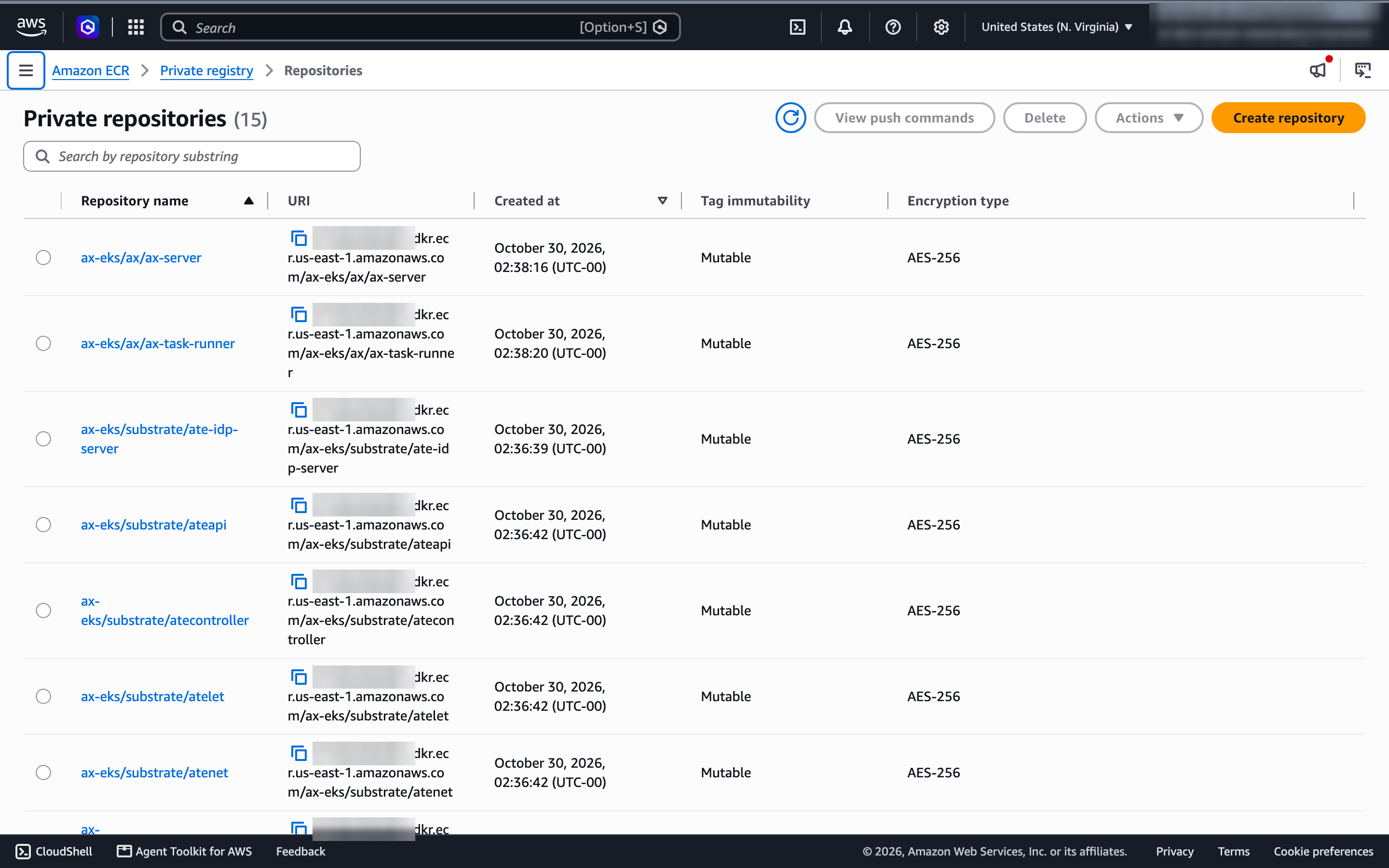
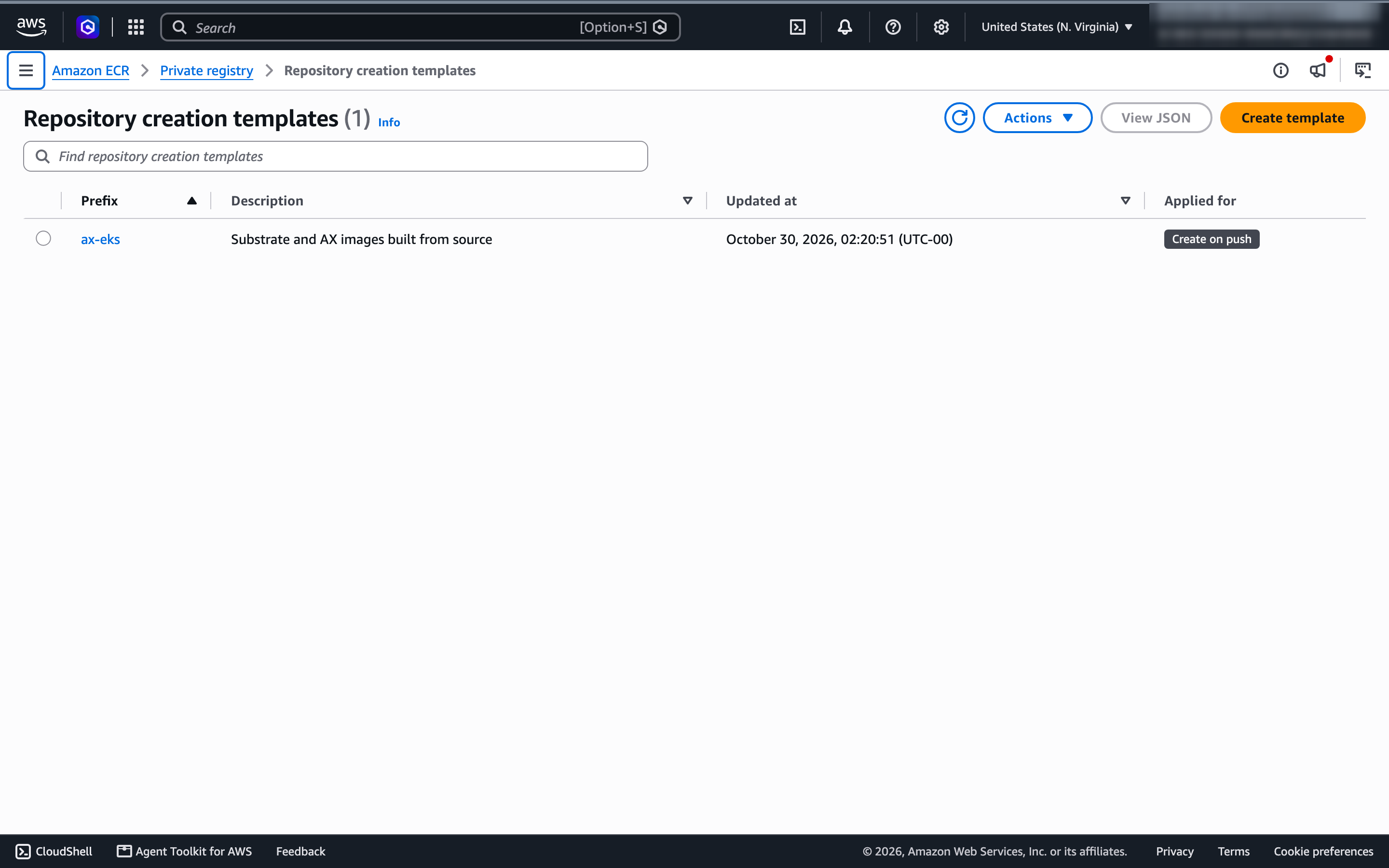
The one local snag wasn’t AWS’s. docker login to ECR failed from a script with User interaction is not allowed. (-25308): Docker Desktop stores logins in the macOS keychain, which refuses non-interactive writes. The companion code ships a 16-line Docker credential helper scoped to the ECR registry instead, which calls aws ecr get-login-password on each pull or push and stores nothing.
Test 3: The WorkerPool
Installing Substrate doesn’t create anywhere for sandboxes to run. AX’s quickstart doesn’t either (#437), so the first task fails. 04_workerpool.sh creates a pool of two gVisor workers:
apiVersion: ate.dev/v1alpha1
kind: WorkerPool
metadata:
  name: ax-workers
  namespace: ax-system
spec:
  replicas: 2
  workerImage: ko://go.ate.dev/substrate/cmd/ateworker-gvisor
  sandboxClasses:
  - name: gvisor
    configRef:
      name: gvisor-default
NAMESPACE NAME DESIRED REPLICAS READY SANDBOXCONFIG RESOLVED AGE
ax-system ax-workers 2 2 2 gvisor-default True 4sAbout 20 seconds on the recorded run, including the ko build and push. gVisor needed nothing from the node: no GKE Sandbox equivalent, no nested virtualization, no custom AMI. The runsc runtime ships inside the worker image.
Test 4: Build and deploy AX
./scripts/05_ax.shThis follows AX’s install guide to the letter: build the CLI into the checkout’s own bin/ (so an older ax on your PATH can’t be picked up), build ax-server and ax-task-runner with make images, and deploy by digest, never by tag. The core of 05_ax.sh:
(cd "$AX_SRC" && GOBIN="$AX_SRC/bin" make install)            # the ax CLI, from the same commit

make images CONTAINER_CLI=docker IMAGE_ARCH=amd64 \
  AX_IMAGE_REPO="$AX_IMAGE_REPO" IMAGE_TAG="$IMAGE_TAG" ...     # builds and pushes both images

# make images writes each pushed digest to bin/*.digest; deploy those, not tags
AX_SERVER_IMAGE="$AX_IMAGE_REPO/ax-server@$(cat "$AX_SRC/bin/ax-server.digest")"
AX_DEFAULT_TASK_IMAGE="$AX_IMAGE_REPO/ax-task-runner@$(cat "$AX_SRC/bin/ax-task-runner.digest")"
sed -e "s|\${AX_SERVER_IMAGE}|$AX_SERVER_IMAGE|g" \
    -e "s|\${AX_DEFAULT_TASK_IMAGE}|$AX_DEFAULT_TASK_IMAGE|g" \
    "$AX_SRC/deploy/ax-server.yaml" > "$RECORDS/ax-server.yaml"

# PostgreSQL reads its password only when it initializes an empty volume,
# so the secret is created once and never replaced.
k -n ax-system get secret ax-postgres >/dev/null 2>&1 \
  || k -n ax-system create secret generic ax-postgres --from-literal=password="$(openssl rand -hex 24)"
k apply -f "$AX_SRC/deploy/postgres.yaml"
k apply -f "$RECORDS/ax-server.yaml"
make images cross-compiles for amd64 on an arm64 Mac: 54 seconds the first time, 21 seconds on the rebuild. The script records exactly what it deployed:
AX_REF=a496fc1ff1cf9bea4c34924348e4119172cfea5b
SUBSTRATE_REF=d3f2363590a11b2f50489971985ba033b4c9eff7
AX_SERVER_IMAGE=111122223333.dkr.ecr.us-east-1.amazonaws.com/ax-eks/ax/ax-server@sha256:3e357269…
AX_DEFAULT_TASK_IMAGE=111122223333.dkr.ecr.us-east-1.amazonaws.com/ax-eks/ax/ax-task-runner@sha256:455beac6…
The default task image matters more than it looks. AX’s built-in default, and the image in its example manifests, is a private Google image (#424), so you need your own ax-task-runner and should point AX_DEFAULT_TASK_IMAGE at it. PostgreSQL and ax-server rolled out in about 30 seconds:
NAME                          READY   STATUS    RESTARTS   AGE
ax-postgres-0                 1/1     Running   0          31s
ax-server-6b5d69b569-lxshd    1/1     Running   0          8s
ax-workers-7d9cc594c5-hpt7j   1/1     Running   0          61s
ax-workers-7d9cc594c5-wbmtx   1/1     Running   0          62s
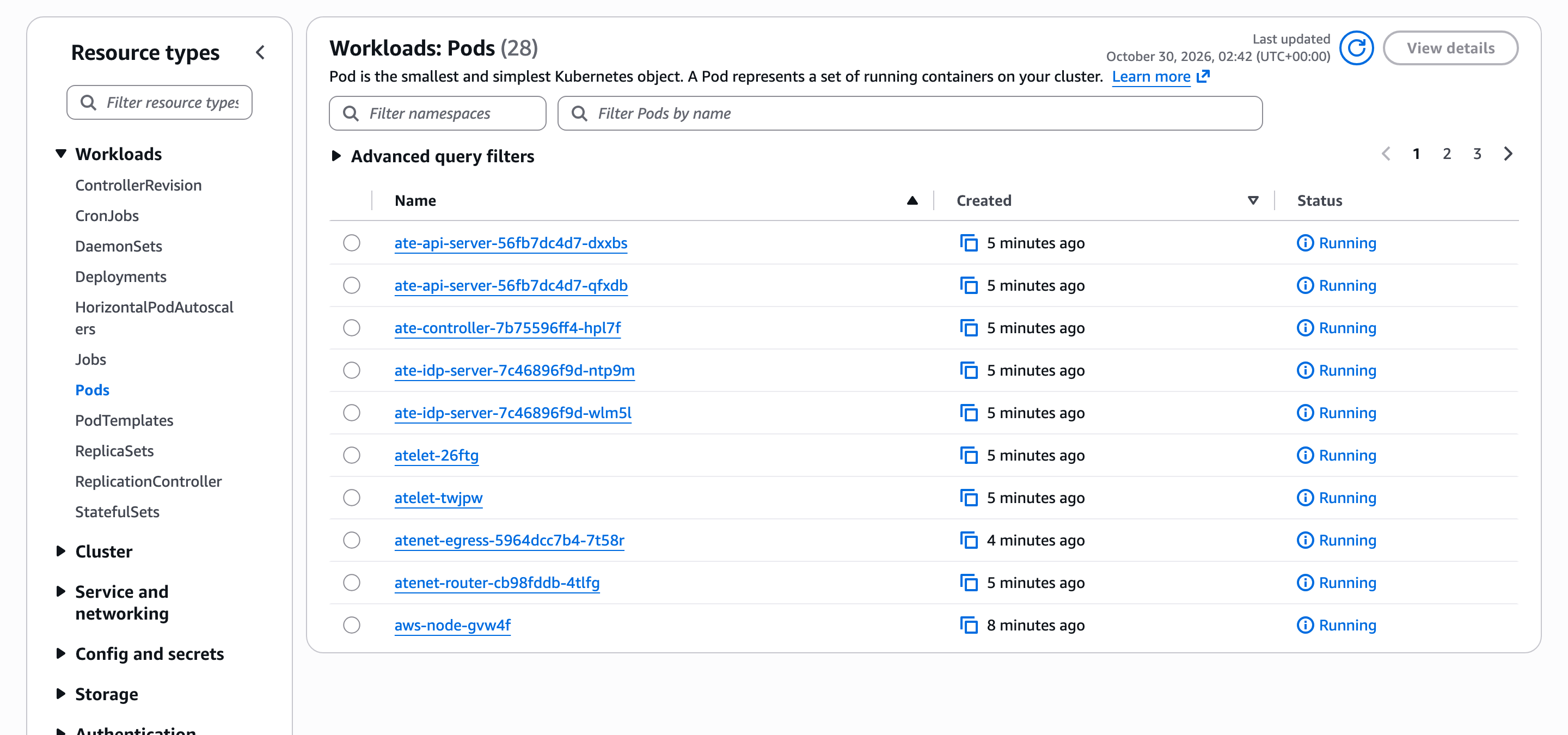
The EKS console’s view of the cluster after both installs: 28 pods, all running.
Test 5: The smoke test
AX’s guide ends with a check that needs no Workspace, no Model and no API key: a task that runs sleep infinity, resumed, then reached over ax ssh. 06_check_task.sh writes the manifest below and wraps each CLI call in a millisecond timer:
timed() { local t0; t0=$(ms); "$@"; echo "  -> $(( $(ms) - t0 )) ms"; }

timed ax apply -f "$RECORDS/task.yaml"      # create: the task lands Suspended
timed ax resume task "$TASK"                 # Substrate restores it onto a gVisor worker
timed ax ssh "$TASK" -- sh -c 'echo installation-ok; uname -a; cat /proc/version'
timed ax delete task "$TASK"
ax is a shell function for the CLI built in Test 4, pinned to the cluster’s context and the ax-system namespace.
apiVersion: ax.io/v1alpha1
kind: Task
metadata:
  name: ax-install-1793327949
  atespace: default
spec:
  debug: true          # required for ax ssh
  command: ["sleep", "infinity"]
== apply (a new task starts Suspended)
task.ax.io/ax-install-1793327949 created
-> 1985 ms
Phase: Suspended
Ready False Suspended Actor is suspended
== resume
task.ax.io/ax-install-1793327949 resumed
-> 4627 ms
Phase: Running
Worker IP: 10.40.45.158
WorkspaceReady True SetupComplete Workspace setup completed at 10.40.45.158
Ready True TaskRunning Task is running and its workspace is ready
== ssh
installation-ok
Linux actor 4.19.0-gvisor #1 SMP Sun Jan 10 15:06:54 PST 2016 x86_64 GNU/Linux
-> 7243 ms
== delete
task.ax.io/ax-install-1793327949 deleted
-> 911 msAX runs on EKS. The kernel line is the giveaway that the command ran inside gVisor: 4.19.0-gvisor is the version gVisor reports, while the node underneath runs 6.18. A new task starts Suspended rather than running, as #426 notes; the README still shows Running. The ax ssh time includes the CLI setting up its connection: the worker’s pod IP isn’t routable from my laptop, so it goes through a port-forward to Substrate’s router over mTLS.
Test 6: A first look at suspend
The full lifecycle is part 2, but I wanted to know one thing before calling the install done: where does a suspended task go? AX’s README says ax suspend will “checkpoint actor state and pause”, and Substrate advertises memory-preserving resume in under 400 ms. 07_suspend.sh writes a file to /tmp, a marker and a 50 MB file to /workspace, starts a background sleep 3000, then suspends and resumes the task and looks again:
./scripts/07_suspend.shax ssh "$TASK" -- sh -c '
echo tmp-ok > /tmp/marker
echo workspace-ok > /workspace/marker
dd if=/dev/urandom of=/workspace/blob bs=1M count=50 2>/dev/null
nohup sleep 3000 >/dev/null 2>&1 &'
timed ax suspend task "$TASK"
aws s3 ls --recursive --summarize "$SNAPSHOT_LOCATION" | tail -2 # what reached S3?
timed ax resume task "$TASK"
ax ssh "$TASK" -- sh -c '
cat /workspace/marker; ls -la /workspace/blob
cat /tmp/marker
echo "background sleep 3000 running: $(ps -eo args | grep -cx "sleep 3000")"; uptime'The ps -eo args | grep -cx match is exact on purpose: a looser grep sleep also counts the sh -c command line itself, which contains the same words.
== write state: /tmp, /workspace (50 MB) and a background process
-rw-r--r-- 1 root root        7 Oct 30 02:39 /tmp/marker
-rw-r--r-- 1 root root 52428800 Oct 30 02:39 /workspace/blob
-rw-r--r-- 1 root root       13 Oct 30 02:39 /workspace/marker
background sleep 3000 running: 1

== suspend
task.ax.io/suspend-1793327967 suspended
  -> 856 ms
Phase:        Suspended

== objects in the S3 snapshot bucket
Total Objects: 5
   Total Size: 962

== resume
task.ax.io/suspend-1793327967 resumed
  -> 845 ms

== what came back
workspace-ok
-rw-r--r-- 1 root root 52428800 Oct 30 02:39 /workspace/blob
cat: /tmp/marker: No such file or directory
background sleep 3000 running: 0
 02:39:41 up 0 min,  0 users,  load average: 0.00, 0.00, 0.00

== where the checkpoint went
"msg":"pruned local checkpoint","path":"/var/lib/ate/snapshots/8e5ddf9b-…/local-checkpoint/e13cf568-…"
Both sub-second, but what survives is only /workspace: the 50 MB file came back, the files elsewhere and the background process did not, and uptime says the sandbox just booted. That’s by design. AX asks Substrate for a volumes-only snapshot, and AX’s runner doc says a resumed task sees “the same files but a new process tree”. Substrate can snapshot memory; AX doesn’t ask it to. So an AX suspend is a restart that keeps one volume, not a pause that keeps a running process.
The other surprise was where the snapshot went. atelet logged a local-checkpoint on the worker’s own disk. While the task sat suspended, the S3 bucket held five objects totalling 962 bytes (tag manifests, no snapshot data), and Substrate deleted those with the task:
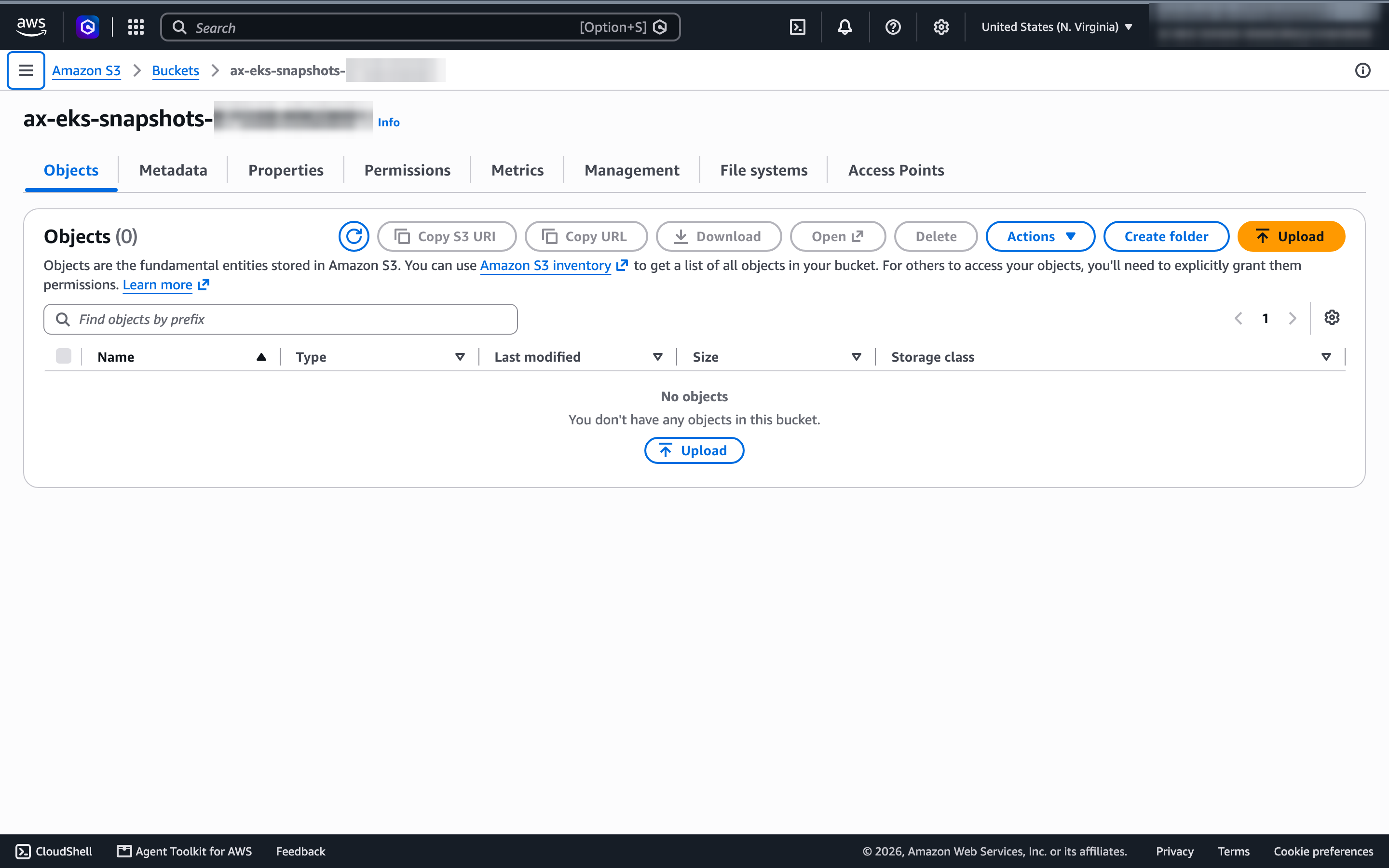
S3 is wired up; my tests just never waited for it. Substrate’s suspend is asynchronous by default: the checkpoint lands on the node first, atelet uploads it to object storage in the background five minutes later (--snapshot-upload-delay), and drops the local copy after 30 minutes (--snapshot-detach-delay). My tasks were deleted within seconds of suspending, so nothing was ever uploaded. The lifecycle post waits it out.
Results summary
| Step | Recorded rebuild | First run (cold caches) | Notes |
|---|---|---|---|
terraform apply (67 resources) | 14 min 9 s | 12 min 47 s + 22 s | EKS control plane: 11 min 11 s |
| Cluster readiness checks | ~10 s | ~10 s | certificates v1, projection intact, kernel 6.18 |
Substrate build + install (ate-setup) | 2 min 39 s | 6 min 26 s | ko builds and pushes; first try both times |
| WorkerPool (2 gVisor workers) | ~20 s | ~40 s | no node changes for gVisor |
AX images (make images) | 21 s | 54 s | amd64 from an arm64 Mac |
AX PostgreSQL + ax-server | ~30 s | ~30 s | |
| Task create / resume / ssh / delete | 2.0 / 4.6 / 7.2 / 0.9 s | 2.7 / 4.8 / 7.3 / 4.9 s | ssh includes the port-forward |
| Suspend / resume | 0.86 / 0.85 s | 0.85 / 0.81 s | only /workspace survives |
99_teardown.sh | 11 min 36 s | 12 ECR repositories, 67 resources |
From an empty AWS account to a passing smoke test: about 19 minutes on the recorded rebuild, about 22 on my first run, almost all of it waiting for EKS and builds.
Pricing
AX and Substrate are free. The bill is the cluster, and it runs whether or not any task does:
| Resource | Rate (us-east-1, on-demand) | Per hour |
|---|---|---|
| EKS control plane (standard support) | $0.10/h | $0.10 |
2 × m7i.xlarge | ~$0.20/h each | ~$0.40 |
| NAT gateway | ~$0.045/h + data | ~$0.05 |
| NAT gateway public IPv4 | $0.005/h | $0.005 |
| EBS gp3: 2 × 100 GB node disks, Substrate PostgreSQL 500 GiB, AX PostgreSQL 10 GiB | $0.08/GB-month | ~$0.08 |
| S3, ECR | cents for this test | ~0 |
| Total | ~$0.63/h, about $15/day |
The surprise line is storage. Substrate’s bundled PostgreSQL requests a 500 GiB volume, sized for its large-cluster profile, which costs more than the EKS control plane. For an evaluation you could shrink it in the overlay; I left Substrate’s default.
That’s the floor for one evaluation cluster, paid whether or not a single task runs, so the cluster only pays off once it’s busy. AX’s pitch, many mostly-idle agents packed onto a few workers, is exactly about getting there.
Cleanup
./scripts/99_teardown.shIt deletes any remaining AX tasks, then the ECR repositories under ax-eks/ (created on push, so Terraform doesn’t own them), runs terraform destroy, and finally deletes the PostgreSQL volumes:
for repo in $(aws ecr describe-repositories --region "$AWS_REGION" \
    --query "repositories[?starts_with(repositoryName, '${CLUSTER_NAME}/')].repositoryName" --output text); do
  aws ecr delete-repository --region "$AWS_REGION" --repository-name "$repo" --force >/dev/null
done
terraform -chdir="$TF_DIR" destroy -input=false -auto-approve
for vol in $(aws ec2 describe-volumes --region "$AWS_REGION" \
    --filters "Name=tag-key,Values=kubernetes.io/cluster/$CLUSTER_NAME" Name=status,Values=available \
    --query 'Volumes[].VolumeId' --output text); do
  aws ec2 delete-volume --region "$AWS_REGION" --volume-id "$vol"
done
That last loop is there because I got it wrong the first time. The two PostgreSQL volumes (500 GiB for Substrate, 10 GiB for AX) are created by the EBS CSI driver for their PersistentVolumeClaims, not by Terraform, so terraform destroy leaves them behind, detached and still billing about $41 a month. The EBS CSI driver tags them with kubernetes.io/cluster/ax-eks, which is how the loop finds them.
On my run it removed twelve repositories and 67 resources in 11 minutes 36 seconds. The snapshot bucket has force_destroy = true, so leftover objects don’t block the destroy. Check the EC2 and EKS consoles afterwards; a stuck load balancer or ENI is the usual reason a VPC refuses to delete.
Verdict
AX runs on EKS. With Kubernetes 1.37, an 11-line installer patch and a small overlay, the whole stack (Substrate’s control plane, gVisor workers, AX’s server) came up first try and passed AX’s own smoke test. Most of the credit goes to Substrate: its code already anticipated ECR and S3, and only its installer assumes Google. That’s the same conclusion Weiss reached (“the core is portable. The edges are still Google-shaped”), now with AX on top.
What I’d keep in mind before building on it:
- EKS 1.37 is a hard floor. The pod certificate APIs Substrate depends on can’t be enabled on older managed control planes. Run the 10-second check from Test 1 before anything else.
- This is evaluation software. AX is
v0.3.1with av1alpha1API,mainhas moved far past the release, and Substrate is mid-way to 1.0. Pin the exact commits AX’s guide records and rebuild everything together. - The security gaps are real.
ax-serverhas no authentication or authorization (#376, rated critical, open with no maintainer reply), so anyone who can reach it can read and delete every task. Keep it behindkubectl port-forward. On S3, Substrate’s snapshot sidecars use one role for every actor (#3095), where GCS gets a per-actor scoped token. - Suspend is a restart with your files. Only
/workspacesurvives. If you were counting on resuming an agent mid-thought, AX doesn’t do that today. - You own a cluster that costs money while idle. About $15 a day before the first task runs, a third of it Substrate’s 500 GiB PostgreSQL volume.
What you sign up for
| Concern | AX on EKS today |
|---|---|
| Who runs it | You: EKS, Substrate’s control plane, two PostgreSQL databases, the S3 bucket |
| Isolation | gVisor (runsc) inside a worker pod; Substrate also has a microVM class I didn’t use |
| What suspend keeps | /workspace files only; memory and processes are gone |
| Wake on request | Yes, through Substrate’s router; no automatic idle suspend yet |
| Idle cost | The whole cluster, about $0.63/h |
| Authentication | None on ax-server (#376) |
| License | Apache 2.0, both projects |
| Setup time (my runs) | About 20 minutes of machine time, plus reading |
Who should use it
AX on EKS makes sense for a platform team on AWS that wants to own its agent runtime: keep sandboxes, snapshots and traffic in its own account, run gVisor on its own nodes, and pack many mostly-idle agents onto a fixed pool of nodes. It’s also the cheapest way I know to read how Google thinks about agent scheduling, because all of it is open.
It doesn’t make sense yet for anyone who needs sandboxes in production next month, needs to resume an agent with its memory intact, or doesn’t want to run a cluster. Part 2 puts AX’s task lifecycle through its paces, including when those snapshots finally reach S3.