Inside Claude Code's Hidden Deterministic Workflow Tool
By Fabio Douek
Jump to section
Explain (TLDR) like I am...
Imagine your robot helper kept a secret toolbox in its backpack the whole time. The toolbox has ten little projects that each split work into a team of small robot helpers who do different jobs at once.
The robot doesn't open the toolbox unless you say a magic word, and even then a faraway grown-up has to nod yes. Right now most kids can't open it, but the toolbox is real, and we peeked inside by looking at the robot's blueprints.
Treat this as a vendor capability disclosed in shipped client code but not in the vendor's published documentation. The capability is a workflow orchestration engine, gated by a client-side environment variable and a server-side feature flag the vendor controls.
Material implications: the engine is deterministic by design and persists scripts and run journals to the session directory, which creates an audit-friendly artifact trail. However, the vendor has not committed to a release timeline and may change or retract the feature at any time. Treat any forward dependency as preview, not contract.
Think of this as a treatment shipped to the formulary but not yet approved for general dispensing. The mechanism is sound, the side-effect profile is engineered conservatively, and the evidence base is mostly in the code itself rather than in field outcomes.
The relevant cohort is small. The vendor flipped the access flag off for ordinary users and retracted the public announcement, so most patients cannot try it. Suitable for early observation and design review, not yet for prescribing.
Notice the shape of what is being held back. The engineering looks cared-for: deterministic execution, resumable runs, explicit permission gates, named workflows for the work the team already does most often. Someone put attention into making this safe.
The friction is the silence. A changelog line appeared and then disappeared. Users who set the documented flag find nothing happens. The space between "we built it" and "you can use it" is a quiet one, and the post sits in that gap honestly.
Think of this as a session rig the band rehearsed in private. The primitives are familiar: a part-leader who fans out cues, sections that play in parallel, a pipeline that streams without waiting for everyone to finish each bar. The conductor is JavaScript, not the singer.
The recording is locked in a vault for now. The rig works, the charts are written, the ten standards are arranged. You can read the score from the leaked liner notes, but you cannot play along until the label opens the doors.
The story is a quiet launch. Anthropic shipped a complete multi-agent orchestration engine inside Claude Code, gated behind a feature flag, with no announcement. The build quality is high, ten bundled workflows ship out of the box, and the API is documented enough to author against today.
For positioning, this is a leading-indicator post. Readers get a head start on a primitive that will likely matter when it ships publicly. Pair it with a "what to do today" wrap-up so the piece travels as both a heads-up and a practical guide.
Update — things move fast around here :) Since this was written, there’s a newer post that supersedes it: Claude Code Dynamic Workflows Ship in Research Preview. Head there for the current walkthrough — this page stays up for posterity.
Overview
A lot of what you ask Claude Code to do follows the same shape: gather requirements, draft a plan, write the code, run the tests, do a round of validation, open the PR. The steps don’t change much from one task to the next; the order is deterministic even when the work inside each step isn’t.
You can ask a Skill to handle that flow, but a Skill is a prompt: it can describe the steps, not enforce them. When you want strict ordering or branching, you end up gluing Skills together with hooks. It works, but it gets brittle fast.
That’s the gap a native Workflow fills. A Workflow in Claude Code is a small .js file that defines the flow itself (when to fan out agents, when to gate on a result, when to move to the next phase), while the LLM handles each agent’s job inside the steps the script decides.
This feature was silently introduced in Claude Code 2.1.147. It wasn’t advertised and isn’t documented, but it ships today with ten embedded workflows. This post walks through what those ten workflows do and how to write your own.
Enabling the Workflows Hidden Feature
I’ve tested this on Claude Code 2.1.150 and 2.1.152.
As of this post’s publication (28 May 2026), the Workflows feature is not officially released in Claude Code. It ships in the binary but stays behind a feature gate, with no announcement or documentation from Anthropic. Everything below is what works today; expect details to change once it ships properly.
To enable it, set CLAUDE_CODE_WORKFLOWS=1 in your environment and restart Claude Code. Then /workflows becomes available. There’s also a server-side feature gate (tengu_workflows_enabled) that Anthropic controls per account, so on most accounts the env var alone won’t surface the slash command yet; if that’s you, the rest of the post still applies once the flag flips on.
One extra gotcha if you have a Claude subscription: when Claude Code starts, $HOME/.claude.json may get rewritten with tengu_workflows_enabled set to false. The simplest workaround is to launch Claude Code with:
CLAUDE_CODE_WORKFLOWS=1 DISABLE_GROWTHBOOK=1 claudeThat bypasses the GrowthBook feature-flag client entirely. Claude Code falls back to the in-code defaults instead of reading flags from .claude.json, and the default for tengu_workflows_enabled is true. The flag stays on for the lifetime of that process, no file edits required.
The Workflow Tool
Workflow is the model-invocable tool that runs a workflow script. It’s gated behind explicit user opt-in (the model only calls it when you say “ultrawork”, invoke a workflow slash command, or directly ask for multi-agent orchestration) and runs in the background: the tool returns a task ID immediately, then a notification fires when the script finishes.
Input schema:
| Parameter | Description |
|---|---|
script | Self-contained workflow JS. Must begin with export const meta = { name, description, phases } (pure literal, no computed values) followed by the script body. |
name | Predefined workflow name (built-in or from .claude/workflows/). Resolves to a self-contained script. |
args | Optional input value exposed to the script as the global args. |
scriptPath | Path to a workflow script file on disk. Takes precedence over script and name. |
resumeFromRunId | Run ID of a prior invocation. Completed agent() calls with unchanged (prompt, opts) return cached results; the first edited or new call and everything after it runs live. Same session only. |
The runtime enforces determinism (Date.now, Math.random, and new Date() are blocked by both a static regex check and runtime stubs), so resumes can replay cached agent() results byte-for-byte.
The Script API
The script runs in a separate context with only these globals available:
agent
agent(prompt: string, opts?: {
  label?: string,
  phase?: string,
  schema?: object,          // JSON Schema -> forces StructuredOutput tool call
  model?: string,           // haiku | sonnet | opus | full ID
  isolation?: 'worktree',   // fresh git worktree per agent
  agentType?: string,       // 'Explore', 'code-reviewer', etc.
}): Promise<any>
Spawns a subagent. Returns text by default, a validated object when schema is set, or null if the user skips the agent mid-run.
parallel
parallel(thunks: Array<() => Promise<any>>): Promise<any[]>Runs the thunks concurrently and awaits all of them. A thunk that throws resolves to null in the result array; the call itself never rejects.
pipeline
pipeline(items, stage1, stage2, ...): Promise<any[]>Runs each item through all stages independently with no barrier between stages: item A can be in stage 3 while item B is still in stage 1. Each stage receives (prevResult, originalItem, index).
Canonical pattern:
export const meta = {
  name: 'review-changes',
  description: 'Review changed files across dimensions, verify each finding',
  phases: [{ title: 'Review' }, { title: 'Verify' }],
}

const DIMENSIONS = [{key: 'bugs', prompt: '...'}, {key: 'perf', prompt: '...'}]

const results = await pipeline(
  DIMENSIONS,
  d => agent(d.prompt, {label: `review:${d.key}`, phase: 'Review', schema: FINDINGS_SCHEMA}),
  review => parallel(review.findings.map(f => () =>
    agent(`Adversarially verify: ${f.title}`, {label: `verify:${f.file}`, phase: 'Verify', schema: VERDICT_SCHEMA})
      .then(v => ({...f, verdict: v}))
  ))
)
const confirmed = results.flat().filter(Boolean).filter(f => f.verdict?.isReal)
return { confirmed }
// Dimension 'bugs' findings verify while dimension 'perf' is still reviewing.
phase, log, workflow, args, budget
phase(title): groups subsequentagent()calls under a title in the progress display.log(message): emits a progress line above the agent tree in the/workflowsTUI.workflow(nameOrRef, args?): calls another workflow inline as a sub-step; one level of nesting only.args: the value passed asWorkflow’sargsinput.budget: hard token ceiling tied to the user’s+500k-style directive:
budget: {
  total: number | null,
  spent(): number,
  remaining(): number,
}
Loop-until-budget pattern:
const bugs = []
while (budget.total && budget.remaining() > 50_000) {
  const result = await agent("Find bugs in this codebase.", {schema: BUGS_SCHEMA})
  bugs.push(...result.bugs)
  log(`${bugs.length} found, ${Math.round(budget.remaining()/1000)}k remaining`)
}
Define Your Own Workflow
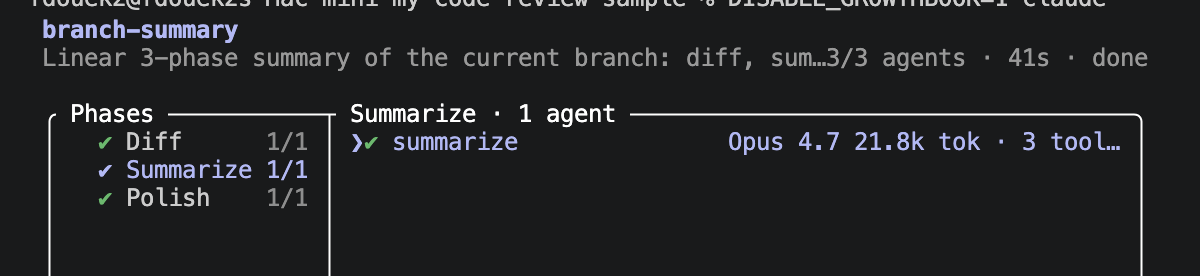
To make this concrete, here’s branch-summary, a tiny workflow that reads the current branch’s diff and produces a polished one-paragraph summary plus a PR-title-shaped headline. Three phases, a linear agent() ladder.
| Phase | Description |
|---|---|
| Diff | Find the diff base, list the changed files, capture a rough summary from commit messages |
| Summarize | Read the changed files and turn the rough summary into a focused paragraph |
| Polish | Tighten the paragraph and add a one-line headline |
Drop the file in one of these locations:
- Project-level:
.claude/workflows/branch-summary.workflow.js - User-level:
~/.claude/workflows/branch-summary.workflow.js
The scanner is a flat *.js glob, no subdirectories. Restart Claude Code; the filename minus the extension becomes the slash command, so this one registers as /branch-summary.
Workflows run in the background. To check on a run, type /workflows, which opens a TUI listing each phase. Drill into a phase to see the per-agent execution details.
Full source: branch-summary.workflow.js (88 lines)
// branch-summary — the smallest useful 3-phase workflow.
//
// Drop in `.claude/workflows/branch-summary.workflow.js` and run via
// `Workflow({ name: 'branch-summary' })`. Reads the current branch diff and
// produces a polished one-paragraph summary plus a headline.
//
// Uses only the three primitives a linear workflow needs: phase(), agent(),
// log(). No parallel, no pipeline. No external MCP or GitHub CLI — the diff
// step uses git via Bash, which the workflow-subagent already has.

export const meta = {
  name: 'branch-summary',
  description: 'Linear 3-phase summary of the current branch: diff, summarize, polish. Returns a headline and a 3-5 sentence paragraph.',
  whenToUse: 'When the user wants a quick written summary of what changed on the current branch — for PR descriptions, stand-ups, or sharing with a teammate. Produces a report, not a PR.',
  phases: [
    { title: 'Diff', detail: 'Find the diff base, list changed files, capture a rough summary from commit messages' },
    { title: 'Summarize', detail: 'Read the changed files and turn the rough summary into a focused paragraph' },
    { title: 'Polish', detail: 'Tighten the paragraph and add a one-line headline' },
  ],
}

// ═══ Schemas ═══
// Kept deliberately light. Production-shaped workflows (see bughunt, autopilot)
// validate far more — for a demo, two object shapes is enough.
const DIFF_SCHEMA = {
  type: 'object',
  required: ['diffBase', 'files', 'rawSummary'],
  properties: {
    diffBase: { type: 'string', description: 'Branch this was diffed against, e.g. origin/main' },
    files: { type: 'array', items: { type: 'string' } },
    rawSummary: { type: 'string', description: 'One paragraph drawn from commit messages and the stat output' },
  },
}

const RESULT_SCHEMA = {
  type: 'object',
  required: ['summary'],
  properties: {
    headline: { type: 'string', description: 'One short line, sentence-case, suitable as a PR title' },
    summary: { type: 'string', description: '3-5 sentence paragraph for a teammate skim-reading the PR' },
  },
}

// ═══ Phase 1: Diff ═══
phase('Diff')
const diff = await agent(
  "Discover the scope of changes on the current branch.\n\n" +
  "1. Diff base: run `git merge-base HEAD origin/main`. If origin/main does not exist, try `main`. Return whichever resolves.\n" +
  "2. Changed files: `git diff --name-only <diffBase>...HEAD`\n" +
  "3. Rough summary: skim `git log --oneline <diffBase>...HEAD` and `git diff --stat <diffBase>...HEAD`. Write one paragraph capturing the gist from the commit messages.\n" +
  "Structured output only.",
  { label: 'diff', schema: DIFF_SCHEMA }
)
if (!diff) return { error: 'Diff step skipped.' }
if (diff.files.length === 0) {
  return { summary: `No changes on this branch vs ${diff.diffBase}.`, diffBase: diff.diffBase, filesChanged: 0 }
}
log(`${diff.files.length} files changed vs ${diff.diffBase}`)

// ═══ Phase 2: Summarize ═══
phase('Summarize')
const summary = await agent(
  "Read the changed files and turn the rough summary into a focused paragraph for a teammate skim-reading the PR.\n\n" +
  `Diff base: ${diff.diffBase}\n` +
  `Files (${diff.files.length}): ${diff.files.join(', ')}\n` +
  `Rough summary: ${diff.rawSummary}\n\n` +
  "Cover: what changed, why (if clear from commits), risk areas worth a second look. 3-5 sentences. Use concrete file paths and function names — no vague language like 'updates' or 'improvements'.",
  { label: 'summarize', schema: RESULT_SCHEMA }
)
if (!summary) return { error: 'Summarize step skipped.', diff }

// ═══ Phase 3: Polish ═══
phase('Polish')
const polished = await agent(
  "Tighten this branch summary. Same content, less filler.\n\n" +
  `Summary: ${summary.summary}\n\n` +
  "Drop hedge words ('seems to', 'might'), kill obvious sentences ('This PR changes some files'), keep the file/function names. " +
  "Add a one-line headline (sentence case, no trailing period, under 70 chars) suitable as a PR title.",
  { label: 'polish', schema: RESULT_SCHEMA }
)

return {
  headline: polished?.headline ?? summary.headline ?? null,
  summary: polished?.summary ?? summary.summary,
  diffBase: diff.diffBase,
  filesChanged: diff.files.length,
}
Bundled Workflows in Claude Code
Claude Code bundles ten workflows out of the box. Five register only when CLAUDE_CODE_REMOTE is set: the ones that produce a PR at the end and need remote execution. The other five register unconditionally and produce reports, not commits.
autopilot
Description. An end-to-end task runner. Builds a plan with a 5-angle adversarial critique, adjusts the plan, implements, uses a bughunt-lite review + feature completeness check, fixes issues, then opens a PR.
When to use. When the user gives a self-contained coding task they want completed end-to-end without supervision. Best for long-running tasks that require some or large amounts of planning and verification. This workflow scopes the problem, hardens its plan using 5 critics, implements it, runs a bug hunting sweep and a feature completeness check, fixes issues, and then opens a PR.
Phases.
- Plan: Scope + draft, 5 critics (scope/simplicity/reuse/verification/correctness), harden
- Implement: Single agent executes the hardened plan
- Review: 3 rapid + 2 deep finders, 5-vote pigeonhole verify, + completeness vs task
- Fix: Address confirmed issues (skipped if clean)
- PR: Lint, typecheck, open PR, subscribe to auto-fix
Techniques. 5-angle plan critique; embeds bughunt-lite for review; skip-if-clean fix phase.
Output. PR with auto-fix subscription. Requires CLAUDE_CODE_REMOTE.
bugfix
Description. Reproduce-first bug fixer. Writes a failing repro, root-causes the fault, applies the minimal fix, converts the repro into a regression test, then opens a PR.
When to use. When the user reports a specific bug to fix. Best when the bug is concrete enough to reproduce. This workflow writes a failing repro first, traces the root cause, applies the smallest fix that makes the repro pass, locks it in as a regression test, and opens a PR.
Phases.
- Reproduce: Write a failing script or test that demonstrates the bug
- Root-cause: Trace the fault, grep callers, identify the minimal culprit
- Fix: Smallest diff that makes the repro pass
- Regress: Convert repro into a permanent test, run the touched suite
- PR: Lint, typecheck, open PR
Techniques. Failing-repro-first ordering; regression-test conversion; minimal-diff bias.
Output. PR with new regression test. Requires CLAUDE_CODE_REMOTE.
dashboard
Description. Dashboard generator. Discovers data sources and existing dashboard conventions in the repo, designs a panel layout, implements it, dry-runs queries and render-checks the result, then opens a PR.
When to use. When the user wants a dashboard, monitoring view, or metrics page built. This workflow finds the available data and existing dashboard patterns, specs out panels and layout, implements them, validates queries and rendering, and opens a PR.
Phases.
- Discover: Data sources, existing dashboard libs/patterns in repo
- Design: Panels, metrics, layout spec
- Implement: Build the dashboard
- Verify: Query dry-run, render/screenshot if possible
- PR: Open PR
Techniques. Convention discovery before design; render-check gate before PR.
Output. PR. Requires CLAUDE_CODE_REMOTE.
docs
Description. Documentation generator. Discovers the feature surface and existing doc conventions, outlines for the target audience, writes or updates the docs, verifies code examples and links, then opens a PR.
When to use. When the user wants documentation written or updated for a feature, API, or module. This workflow finds the relevant code and existing doc patterns, drafts an outline, writes the content, checks that examples run and links resolve, and opens a PR.
Phases.
- Discover: Feature surface, existing docs, location conventions
- Outline: Structure and audience
- Write: Create or update doc files
- Verify: Examples compile/run, links resolve, accuracy vs code
- PR: Open PR
Techniques. Outline-then-write; runs examples and link-checks in Verify.
Output. PR. Requires CLAUDE_CODE_REMOTE.
investigate
Description. Root-cause investigation. Gathers evidence, generates competing hypotheses in parallel, adversarially refutes each one, and produces a written root-cause report with a suggested fix.
When to use. When the user wants the root cause of an incident, error, log, trace, or puzzling behavior found, without necessarily fixing it. This workflow collects evidence, runs parallel hypothesis agents, tries to refute each hypothesis, and writes up the surviving root cause with next steps. It produces a report, not a PR.
Phases.
- Gather: Logs, traces, repro, timeline
- Hypothesize: 3 parallel hypothesis agents
- Verify: One adversarial refuter per hypothesis
- Report: Root-cause writeup, suggested fix, next steps
Techniques. Parallel hypothesis generation; per-hypothesis adversarial refuter; survivor-takes-all.
Output. Report (no PR). Requires CLAUDE_CODE_REMOTE, grouped with the PR workflows even though it never commits.
bughunt
Description. Multi-agent bug sweep of the current branch. Self-respawning finder pool (3 rapid + deep-until-dry-streak) streams into 5-vote adversarial verification with pigeonhole early-exit, then synthesis.
When to use. When the user asks to hunt for bugs, audit code quality, or run a high-precision bug sweep on the current branch.
Phases.
- Scope: Discover diff base, changed files, conventions
- Find: 3 rapid + deep-until-dry-streak(3), self-respawning pool
- Verify: 5-vote adversarial, pigeonhole early-exit (2 refute → dead, skip 3)
- Synthesize: Semantic dedup on confirmed set, final report
Techniques. Self-respawning finder pool; dry-streak termination; pigeonhole early-exit; semantic dedup on the confirmed set.
Output. Report. Registers unconditionally.
bughunt-lite
Description. Lighter bug sweep — fixed 3-rapid+2-deep finders stream into 5-vote adversarial verification (pigeonhole early-exit), then synthesis. Simpler than bughunt: no self-respawning, no dry-streak.
When to use. When the user wants a faster, bounded bug sweep of the current branch. Prefer over bughunt for small-to-medium diffs where a fixed finder pool is sufficient.
Phases.
- Scope: Discover diff base, changed files, conventions
- Find: 3 rapid + 2 deep finders — stream into verify as each completes
- Verify: 5 adversarial votes, pigeonhole early-exit (2 refute → skip 3)
- Synthesize: Semantic dedup on confirmed set, final report
Techniques. Fixed finder pool (no respawn); streaming pipeline into verify; pigeonhole early-exit.
Output. Report. Registers unconditionally.
deep-research
Description. Deep research harness — fan-out web searches, fetch sources, adversarially verify claims, synthesize a cited report.
When to use. When the user wants a deep, multi-source, fact-checked research report on any topic. BEFORE invoking, check if the question is specific enough to research directly — if underspecified (e.g., “what car to buy” without budget/use-case/region), ask 2-3 clarifying questions to narrow scope. Then pass the refined question as args, weaving the answers in.
Phases.
- Scope: Decompose question (from args) into 5 search angles
- Search: 5 parallel WebSearch agents, one per angle
- Fetch: URL-dedup, fetch top 15 sources, extract falsifiable claims
- Verify: 3-vote adversarial verification per claim (need 2/3 refutes to kill)
- Synthesize: Merge semantic dupes, rank by confidence, cite sources
Techniques. Multi-angle decomposition; URL dedup with top-N cap; claim-level adversarial verification; confidence-ranked citation.
Output. Cited research report. Registers unconditionally.
plan-hunter
Description. Exhaustive planning harness. Generates 4 independent draft plans (MVP-first, risk-first, dependency-first, user-first), scores them with 4 parallel judges, picks the winner by vote, then synthesizes a polished final plan grafting in the best ideas from runners-up.
When to use. When the user has an idea they want planned thoroughly. BEFORE invoking this workflow, ask 2-3 clarifying questions if the idea is underspecified: (1) scope/timeline, (2) hard constraints or non-goals, (3) success criteria. Then pass the clarified idea as the args string.
Phases.
- Scope: Understand the idea, extract constraints, note assumptions
- Draft: 4 parallel planners: MVP / Risk / Dependency / User lenses
- Judge: 4 parallel judges rank all 4 drafts
- Synthesize: Polish the winner, graft best ideas from runners-up
Techniques. 4-lens parallel drafting; 4-judge vote; winner-plus-graft synthesis.
Output. Polished plan (report). Registers unconditionally.
review-branch
Description. Thoroughly review the current branch for bugs, simplicity, architecture, dead code, best practices, and pattern consistency. Each finding is adversarially verified before reporting.
When to use. When the user asks to review their branch, do a code review of recent changes, or audit a PR quality before shipping.
Phases.
- Scope: Discover diff base, changed files, conventions
- Review: Six dimension reviewers in parallel
- Verify: Adversarial verification of each finding
- Report: Dedup, rank, and summarize
Techniques. Six-dimension parallel review (bugs / simplicity / architecture / dead code / best practices / consistency); per-finding adversarial verification.
Output. Report. Registers unconditionally.
The pattern repeats: fan out, verify adversarially, synthesize. The verification stages typically use 3 to 5 votes; bughunt and bughunt-lite add “pigeonhole early-exit”: if two of five voters refute a finding, the remaining three are skipped because no majority is possible. The plan-hunter workflow is the most distinctive: 4 independent planners (MVP-first, risk-first, dependency-first, user-first), 4 parallel judges ranking all 4 drafts, then a synthesizer that polishes the winner and grafts in the best ideas from the runners-up.
Conclusion
Embedding a deterministic workflow engine directly into Claude Code is an interesting move from Anthropic. It pushes the orchestration layer out of the model and into code you can read, version, and reason about, which is exactly the right place for “what fans out, what verifies, what synthesizes” to live.
I evaluated some of the bundled workflows. They do the job. The thing to watch is token consumption: the harness pattern is the whole point of workflows, but some of the current implementations are aggressive enough that they’d benefit from being tuned or giving end users a knob. A simple /deep-research run I tested burned almost 12 million tokens, most of it in the adversarial verification phase, where every extracted claim gets a 3-vote refutation pass on its own.
I’m looking forward to the official release and, more than that, to seeing what people build with it once the gate flips on for everyone. I also hope workflows end up bundle-able as part of Claude plugins, so a well-crafted harness can be distributed and installed as easily as a skill is today.