LangSmith Sandboxes: Hands-On with the Full Sandbox Lifecycle
By Fabio Douek
Jump to section
- Overview
- Architecture
- Setup
- Step 1: Account, API key and plan
- Step 2: Install the SDK and the companion code
- Step 3: A REST helper, names, labels and safety timers
- Testing
- Test 1: Create a sandbox and inspect the defaults
- Test 2: Commands, files, URLs and egress
- Test 3: Lifetime settings and resizing
- Test 4: Stop and start, with and without memory
- Test 5: Idle stop and auto-wake
- Test 6: List, filter, and reconnect from another process
- Test 7: Snapshots and “fork”
- Test 8: A custom snapshot vs installing at runtime
- Test 9: The quota and the bill
- Results summary
- Pricing
- Cleanup
- Verdict
- Who should use it
Explain (TLDR) like I am...
Imagine a toy box that falls asleep when nobody plays with it for a few minutes. The nice part is that it wakes up by itself the moment you reach in for a toy, and all of your blocks are still right where you left them.
Usually the box forgets any game that was still going when it fell asleep, so the robot starts that game again. If you ask nicely when you first get the box, it can remember the game too, and the robot carries on right where it stopped.
LangSmith Sandboxes is a hosted execution environment inside the LangSmith platform: code an agent generates runs in an isolated virtual machine on LangChain's infrastructure, billed per second in LangSmith units against the same account as tracing.
The diligence points are retention and egress. A stopped sandbox keeps its disk for fourteen days by default, and snapshots have no documented expiry. Non-Enterprise organizations get a fixed outbound allow list that a sandbox cannot widen without a support exemption. Set deletion timers and assign cleanup ownership.
The condition this treats is unsafe execution of machine-written code. The intervention is a disposable virtual machine per task. In my testing it was created in about half a second and woke from a stop in one to four seconds without an explicit start call.
The evidence is good for files, which survived every stop. Side effects: processes are lost on a default stop, command timeouts fail silently with exit code minus one, and outbound network access is limited to an allow list unless you are on Enterprise or get an exemption from support.
Notice the relief when a sandbox that went to sleep simply wakes up the next time someone touches it. Nobody has to remember to start it, and a whole class of "why is it stopped" messages goes away.
The friction moves elsewhere. A command that times out returns quietly instead of complaining, so a failed install can look like a finished one. And part of the platform lives only behind the raw API, which can leave people unsure whether they are using the tool the intended way.
Think of a LangSmith sandbox as a rehearsal room with a motion sensor. The lights go off after ten quiet minutes, and they come back on the moment anyone opens the door, with every instrument still on its stand.
By default the room forgets the song you were playing, so the band counts in again. Book the room with the memory option and the groove picks up mid-bar after the lights return. The house rules on who can visit are strict: only a fixed guest list of outside addresses gets through.
The positioning is "the sandbox that comes with your LangSmith account." Time to value is minutes: the same API key as tracing, a sandbox in about half a second, and 8 LSU of included usage.
The story is a lifecycle that runs itself: idle sandboxes stop, and any request wakes them again. The caveats buyers will ask about are a platform account to buy into, a 10-sandbox cap on the free tier, restricted egress outside Enterprise, and a Python SDK that covers only part of the API.
 See the source code here: langsmith-sandbox-lifecycle
Overview
LangSmith Sandboxes are LangChain’s hosted environments for running agent-generated code. They launched in private preview in March 2026 and went generally available on 2026-05-13. There’s no standalone signup: sandboxes are a feature of your LangSmith organization, you use the same API key as for tracing, and usage is billed in LangSmith units (LSU) next to everything else. Each sandbox is a microVM; the self-hosted architecture doc is the one page that names it (“A sandbox is a Firecracker microVM, not a Kubernetes pod”).
The lifecycle model is the interesting part. A sandbox stops itself after 10 idle minutes, and anything that touches a stopped sandbox wakes it: a command, a file read, a download link or a request to its service URL. There’s no start() you have to remember. What a stop keeps depends on a flag: by default only the disk survives and the next wake is a cold boot, but a sandbox created with preserve_memory_on_stop resumes with its processes still running. There’s no fork() call; a fork is a snapshot plus N creates.
This post, part 1 of 2, walks a sandbox through its whole life, from create_sandbox() to cleanup, with a runnable script per stage. I ran everything against langsmith[sandbox] 0.14.14 (uploaded to PyPI on 2026-10-27) from Python 3.12, against LangSmith’s GCP US region, on a non-Enterprise workspace. Every timing is from my runs. I couldn’t find anyone else who has published measurements for this product. Two things to know before you start: the Python SDK covers only part of the platform (labels, filters, resizing and everything to do with memory are REST-only), and outbound traffic is limited to a fixed allow list unless you’re on Enterprise. Part 2 covers credentials: giving an agent in the sandbox API keys without putting the keys inside it.
Architecture
The sandbox API at api.smith.langchain.com/api/v2/sandboxes handles the lifecycle (create, stop, start, snapshot, list, delete). Commands and file operations go straight to the sandbox’s dataplane, over a WebSocket for run(). Any port can be exposed as https://<sandbox-id>--<port>.smithbox.dev, protected by a token, and any file can be shared through a tokenized download link that needs no credentials.
What each state costs and how long it lasts, from the pricing page, the SDK docs and Test 9:
| State | Billed for | Counts toward the sandbox cap? | Expires? |
|---|---|---|---|
| Ready | vCPU + memory + storage, per second | Yes | Stops after 10 idle minutes by default; no wall-clock runtime cap |
| Stopped | Storage only (inferred from the cost API docs, not stated) | No (measured in Test 9) | Deleted 14 days after the stop by default (max 30 days) |
| Snapshot | Storage, as its own resource | No | No documented expiry; kept until you delete it |
| Deleted | Nothing (snapshots taken from it stay billed) | No | Gone for good |
Setup
Step 1: Account, API key and plan
You need a LangSmith account; create an API key under Settings > API Keys. The free Developer plan includes 8 LSU of sandbox usage and is limited to 10 sandboxes, which is plenty for this walkthrough. The quota endpoint tells you what your workspace actually gets. Mine, before the first test:
=== Quota before we start (GET /usage) ==========================
sandboxes 0/10 | cpu 0/200000 m | memory 0/400 GiB | snapshots 0
Check egress before you plan anything that talks to the outside world. On non-Enterprise organizations, sandboxes get a managed allow list that a sandbox’s own access_control can’t widen (overview, auth proxy docs). It’s not published, but it’s readable: GET /boxes/{name} returns it under proxy_config.access_control.allow_list. Mine had 60 host patterns covering LangSmith, npm, yarn and bun, PyPI and astral.sh, GitHub, GitLab and Bitbucket, the Ubuntu and Debian mirrors, Docker Hub and the other big container registries, Google Cloud Storage and Azure Blob, and the Anthropic, OpenAI, Gemini, Perplexity, DeepSeek, Groq, OpenRouter and Hugging Face APIs. No AWS hosts, which blocked the AWS half of my credentials post until LangChain support granted an exemption. Unrestricted egress needs Enterprise or that support ticket, and the exemption removes the list rather than adding to it: access_control disappears from GET /boxes/{name}, every host becomes reachable, and a sandbox’s own access_control starts being enforced (part 2, Test 7). The organization flag sandbox_restricted_egress still read true afterwards, so check from inside a sandbox.
Step 2: Install the SDK and the companion code
git clone https://github.com/fabiodouek/my2centsai-blog-samples.git
cd my2centsai-blog-samples/langsmith-sandbox-lifecycle
cp .env.example .env            # paste LANGSMITH_API_KEY=lsv2_pt_...
uv venv && uv pip install -e .  # installs langsmith[sandbox]==0.14.14 + httpx + python-dotenv
source .venv/bin/activate
I pinned langsmith[sandbox]==0.14.14. The sandbox API moves fast: templates were replaced by snapshots in April 2026, and code written against the old API now fails with AttributeError: ... no attribute 'get_template' (forum thread). Bump the pin deliberately.
Step 3: A REST helper, names, labels and safety timers
The Python SDK has no labels, no list filters, no resizing and none of the memory options, so common.py carries a small helper for the REST API alongside SandboxClient:
# common.py
API = os.environ.get("LANGSMITH_ENDPOINT", "https://api.smith.langchain.com").rstrip("/") + "/api/v2/sandboxes"
_http = httpx.Client(headers={"x-api-key": os.environ["LANGSMITH_API_KEY"]}, timeout=120)


def rest(method: str, path: str, **kw):
    """Call the REST API directly, for what the Python SDK doesn't expose (labels, memory, filters, usage)."""
    r = _http.request(method, f"{API}{path}", **kw)
    if r.is_error:
        raise RuntimeError(f"HTTP {r.status_code} {method} {path}: {r.text.strip()[:300]}")
    return r.json() if r.content else None
Every sandbox is named my2cents-lc-<test>-<n>, and the ones created over REST also carry the label demo=my2cents-lifecycle. The REST create sets two safety timers, so anything a crashed script leaves behind stops after 5 idle minutes and is deleted 10 minutes after that:
def create(test: str, **body) -> Sandbox:
    """Create a labelled sandbox over REST (the SDK has no labels) and wrap it in the SDK's Sandbox."""
    payload = {
        "name": name(test),
        "labels": {**DEMO_LABELS, "test": test},
        "idle_ttl_seconds": SAFETY_IDLE_TTL,
        "delete_after_stop_seconds": SAFETY_DELETE_AFTER_STOP,
        "wait_for_ready": True,
        "timeout": 120,
        **body,
    }
    return Sandbox.from_dict(rest("POST", "/boxes", json=payload), client=client, auto_delete=False)
The second timer matters more than it looks. Without it, a stopped sandbox lingers for 14 days.
Testing
Test 1: Create a sandbox and inspect the defaults
python 01_create.py # optional arg: number of timed creates (default 5)sb = client.create_sandbox(name=name("01"), idle_ttl_seconds=SAFETY_IDLE_TTL,
delete_after_stop_seconds=SAFETY_DELETE_AFTER_STOP)
raw = rest("GET", f"/boxes/{sb.name}")=== Create with defaults (SDK create_sandbox) ===================
[ 0.53s] client.create_sandbox()
name : my2cents-lc-01-40088314 (id 01a18570-3f5e-7ae0-920b-07c44116813f)
status : ready
vcpus : 1 (cpu_millicores 500, REST only)
mem / disk : 2 GiB / 16 GiB
snapshot : 8e277348-2a29-409e-84ff-63b433972773
run_config : user=root work_dir=/root
lifecycle : idle_ttl 300s | delete_after_stop 600s | preserve_memory_on_stop False | persistent True
egress : 60 allow-listed host patterns
[ 1.19s] first run()
6.1.166 # uname -r
root
1 # nproc
Mem: 1979 172 1832 0 97 1807
/dev/vda 16G 3.3G 13G 22% /
PRETTY_NAME="Ubuntu 26.04.1 LTS"
docker # systemd-detect-virt
[ 0.000000] Hypervisor detected: KVM
python3=yes pip3=yes uv=yes node=yes npm=yes git=yes gh=yes curl=yes docker=yes langsmith=yes
Python 3.14.4
=== Sandbox without options (server defaults) ===================
idle_ttl 600s | delete_after_stop 1209600s
=== 5 sequential creates (create, first run, delete) ============
#1: create 0.50s | create + first run 0.93s
#2: create 0.51s | create + first run 0.91s
#3: create 0.50s | create + first run 0.89s
#4: create 0.51s | create + first run 0.93s
#5: create 0.52s | create + first run 0.91s
create median 0.51s | min 0.50s | max 0.52s
create + first run median 0.91s | min 0.89s | max 0.93s
=== Same thing over REST with labels ============================
REST create median 0.57s(The idle_ttl 300s | delete_after_stop 600s line shows my safety timers; the server defaults are in the second block. Comments added, REST create lines trimmed.)
- Creates are fast and remarkably consistent. Five sequential creates had a median of 0.51 s (0.50 to 0.52 s; 0.59 s in a later run), and 0.91 s including the first command, measured from my laptop, with a very tight spread.
- The default size is 0.5 vCPU, 2 GiB and 16 GiB. The SDK’s
vcpusfield says 1, but the REST response sayscpu_millicores500, and the quota counted 500 millicores per sandbox in Test 9. Inside,nprocis 1 andfreereports 1,979 MiB: the guest sees its own sizes, not the host’s. - It’s a VM. Its own kernel (6.1.166), a virtual disk at
/dev/vdaandHypervisor detected: KVMindmesg.systemd-detect-virtprintingdockeris misleading. - The OS is Ubuntu 26.04.1, not 24.04. The snapshots docs still say 24.04. Code runs as
rootin/root, with Python 3.14.4, uv, Node, git, gh, Docker and thelangsmithCLI preinstalled. The image is lean on Python packages, though:pip3 listprinted 15 lines (Test 8). - Server defaults: 10 minutes idle before a stop, and 14 days (1,209,600 s) from stop to deletion.
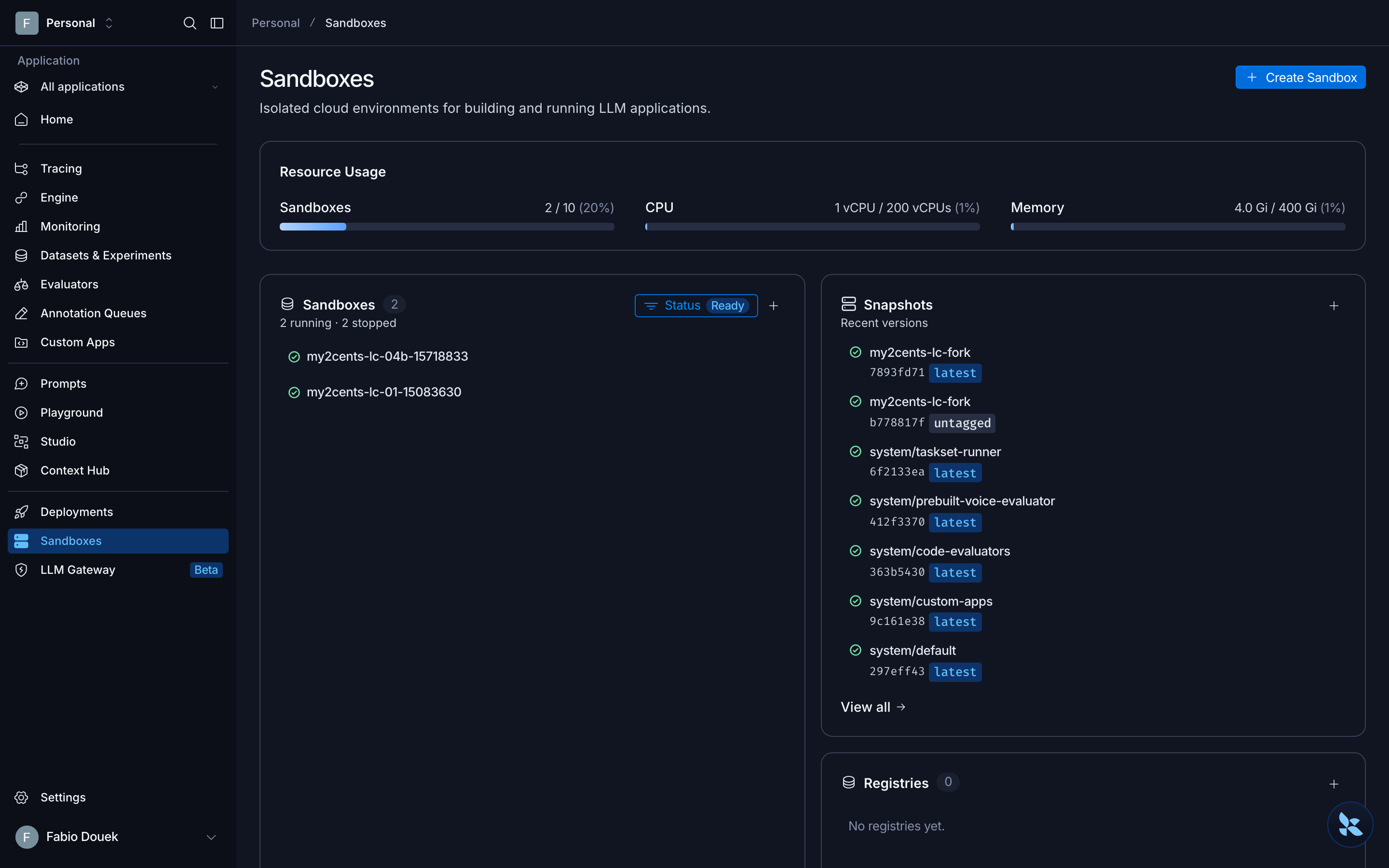
The Sandboxes page is mostly a quota view. Stopped sandboxes don’t count against it: two running and two stopped sandboxes show as 2 of 10.
Test 2: Commands, files, URLs and egress
python 02_commands_files.pyr = sb.run("echo out; echo err 1>&2; exit 3")
sb.run("for i in 1 2 3; do echo tick $i; sleep 1; done", on_stdout=lambda s: print(" stream>", s, end=""))
r = sb.run("sleep 10; echo done", timeout=2)
r = sb.run("sleep 75; echo done")sandbox: my2cents-lc-02-40212032
=== Commands ====================================================
exit=3 stdout='out\n' stderr='err\n' (no exception on non-zero exit)
stream> tick 1
stream> tick 2
stream> tick 3
no exception: exit=-1 stdout='' stderr=''
[ 2.36s] run('sleep 10', timeout=2)
no exception: exit=-1 stdout='' stderr=''
[ 60.37s] run('sleep 75') with the default timeout
send_input with default close_input: SandboxOperationError: stdin is closed for this command. Non-PTY commands close stdin by default so a command that reads it sees EOF instead of hanging; pass close_input=False to run() to stream input into it.
cat with close_input=False echoed: 'hello over stdin\n'- stdout and stderr come back separately, with the exit code, and a non-zero exit doesn’t raise.
- Timeouts don’t raise. The SDK’s docstring says a command that exceeds
timeoutraisesCommandTimeoutError. On 0.14.14 it doesn’t:run(..., timeout=2)came back after 2.36 s with exit code -1 and empty output, no exception. The script wraps both calls inexcept CommandTimeoutError, and neither branch fired. - The default timeout is 60 seconds.
run("sleep 75")with notimeout=came back after 60.37 s, again as a silent exit -1. A longpip installwithout an explicit timeout gets cut at one minute and looks like an ordinary failure. Check forexit_code == -1, and passtimeout=(ortimeout=0for none) on anything slow. - stdin is closed by default. The docs’
send_input()example fails unless you passclose_input=Falsetorun(). The error message tells you exactly that, which is more than most SDKs do.
The files API (write, read, ls, glob, grep, stat) all worked, and two kinds of URL make the sandbox reachable from outside:
dl = sb.generate_download_url("/root/notes/hello.txt", expires_in_seconds=300)
server = sb.run("python3 -m http.server 8000 --directory /root/notes", wait=False, timeout=0)
svc = sb.service(8000)
=== Download URL (no LangSmith credentials needed) ==============
url host: a-6giegpp4x7nz4wlus3xm3sdzne.smithbox.dev expires_at=2026-10-29T02:23:01Z
GET without auth: HTTP 200 'hello from my laptop'
no expires_in_seconds -> expires_at=None
=== Service URL =================================================
service_url host: 01a18572-22a5-7432-ac5f-528d30c9195c--8000.smithbox.dev
svc.get('/hello.txt'): 200 'hello from my laptop'
same URL without the token: HTTP 401
browser_url carries the token in the query: True- Download links are bearer URLs, and by default they never expire. Anyone with the link gets the file, no LangSmith credentials needed. Pass
expires_in_secondsunless you really want a permanent link. - Service URLs need a token, 401 without it. The SDK’s
svc.get()sends it for you, andbrowser_urlputs it in the query string so a browser can set a cookie.
Then egress, with curl from inside a default sandbox:
=== Egress ======================================================
60 allow-listed patterns, e.g. ['smith.langchain.com:443', '*.smith.langchain.com:443', 'api.smith.langchain.com:443'] ... ['openrouter.ai:443', 'huggingface.co:443', '*.huggingface.co:443']
  https://pypi.org/simple/                           200
  https://registry.npmjs.org/                        200
  https://github.com                                 200
  https://api.anthropic.com                          404
  https://api.openai.com                             421
  https://huggingface.co                             200
  https://registry-1.docker.io/v2/                   401
  https://example.com                                000 blocked
  https://httpbin.org/get                            000 blocked
  https://sts.amazonaws.com                          000 blocked
  https://bedrock-runtime.us-east-1.amazonaws.com    000 blocked
curl: (35) TLS connect error: error:0A000126:SSL routines::unexpected eof while reading

=== Installing packages =========================================
[  1.15s] pip3 install -q requests
  exit=1 'hint: See PEP 668 for the detailed specification.'
[  1.07s] uv pip install --system -q requests
  exit=2 'hint: Virtual environments were not considered due to the `--system` flag'
[  4.85s] python3 -m venv /root/v && /root/v/bin/pip install -q requests && echo venv-ok
  exit=0 'venv-ok'
The 404, 421 and 401 answers mean the host was reachable; 000 means the proxy dropped the TLS handshake. Anything not on the list fails as a TLS error, not a clear “blocked by policy”, which is worth knowing when you debug an agent that can’t reach an API.
That’s on restricted egress. After my organization’s exemption (2026-11-03), the same script prints no managed allow list: this organization has unrestricted egress, and every host above answers, example.com, httpbin and both AWS endpoints included.
Package installs work, but not the obvious way. Ubuntu marks the system Python as externally managed (PEP 668), so pip3 install and uv pip install --system both refuse. A venv works, in under 5 s here. If your agent’s prompts say pip install, give it a venv first, or bake the packages into a snapshot (Test 8).
Test 3: Lifetime settings and resizing
python 03_lifetimes.pyThere are two timers per sandbox, idle_ttl_seconds and delete_after_stop_seconds, and both can be changed on a running sandbox. Resizing is REST-only: the docs say update_sandbox can resize, but the Python method has no vcpus or mem_bytes.
up = client.update_sandbox(sb.name, idle_ttl_seconds=0, delete_after_stop_seconds=600)
body = rest("PATCH", f"/boxes/{sb.name}", json={"vcpus": 2, "mem_bytes": 4 * GiB})
=== TTL validation ==============================================
idle_ttl_seconds=90: ValueError (client side, nothing created): idle_ttl_seconds must be a multiple of 60 seconds, got 90
REST idle_ttl_seconds=90: HTTP 422 POST /boxes: {"detail":[{"loc":["body","idle_ttl_seconds"],"msg":"idle_ttl_seconds must be a multiple of 60 (only minute-resolution supported). Got: 90","type":"value_error"}]}
sandbox: my2cents-lc-03-40412317
=== Update TTLs on a running sandbox ============================
before: idle 120s, delete_after_stop 3600s
after update_sandbox(idle_ttl_seconds=0, ...): idle 0s, delete_after_stop 600s
delete_after_stop_seconds=2592000 (30.00 d): accepted
delete_after_stop_seconds=2592060 (30.00 d): HTTP 422 PATCH /boxes/my2cents-lc-03-40412317: {"detail":[{"loc":["body","delete_after_stop_seconds"],"msg":"delete_after_stop_seconds must be \u003c= 2592000 (30 days). Got: 2592060","type":"value_error"}]}
=== Resize: PATCH vcpus/mem_bytes (REST only) ===================
before : 1 | Mem: 1979 203 1761 0 151 1776 |
PATCH response: vcpus 2 cpu_millicores 2000 mem 4 GiB status ready
running: 1 | Mem: 1979 208 1740 0 167 1771 |
[ 2.13s] stop() + start()
restart: 4 | Mem: 3992 259 3787 0 124 3732 |
cpu.max: none
1 vCPU + 16 GiB: accepted as vcpus 1 cpu_millicores 1000 mem 16 GiB
=== delete_after_stop_seconds=60 really deletes =================
[ 0.5s] stopped
[ 0.7s] stopped
[ 104.3s] gone (ResourceNotFoundError)(The idle_ttl_seconds=30 line is trimmed.)
- Timers have minute resolution. The SDK rejects 90 seconds client-side before anything is created; the API returns a 422.
0disables either timer. delete_after_stop_secondscaps at 30 days and really deletes. At 60 seconds, the stopped sandbox was gone after 104 s in this run and 78.5 s in another. It never showed adeletingstatus in my 5-second polls.- Resizing applies on the next start. The PATCH response said 2 vCPU and 4 GiB straight away, but the running sandbox still had 1 CPU and 1,979 MiB. After a stop and start (2.13 s), it had 3,992 MiB and
nprocsaid 4 for a 2 vCPU sandbox. The docs say CPU can burst to 2x when the host has capacity, which is my best explanation for the doubling. - The memory rule isn’t enforced. The docs say memory must stay within ±50% of 4 GiB per vCPU. A PATCH to 1 vCPU and 16 GiB, four times the ratio, was accepted.
Test 4: Stop and start, with and without memory
python 04_stop_start.pyThe script writes a file to /root and to /tmp, starts a shell loop that writes a counter every second, then stops and starts the sandbox three times. The second half repeats it on a sandbox created with preserve_memory_on_stop, which is a create-time, REST-only flag:
sb.stop()
wait_status(sb.name, "stopped", poll=0.2)
sb.start()
# ...
sbm = create("04b", preserve_memory_on_stop=True)
=== Default stop: my2cents-lc-04a-46122842 ======================
/dev/vda 16G 3.3G 13G 22% /
/tmp is on the root disk
[ 0.53s] cycle 1 stop() until status=stopped
[ 1.59s] cycle 1 start()
counter at stop: 4
disk survives
tmp survives
counter 4 -> 4
process-gone
uptime 3.85s
...
Default stop: stop median 0.53s | start median 1.62s
=== Touching a stopped sandbox ==================================
exit=0 'hi'
[ 1.82s] run('echo hi') on a stopped sandbox
status after: ready
=== stop() twice ================================================
second stop(): SandboxClientError: sandbox "my2cents-lc-04a-46122842" is stopped, not ready
second start(): no error
preserve_memory_on_stop: True
=== preserve_memory_on_stop: my2cents-lc-04b-46160949 ===========
[ 3.29s] cycle 1 stop() until status=stopped
[ 0.91s] cycle 1 start()
counter at stop: 4
disk survives
tmp survives
counter 5 -> 7
process-alive
uptime 18.74s
[ 1.58s] cycle 2 stop() until status=stopped
[ 0.74s] cycle 2 start()
counter at stop: 8
counter 9 -> 11
process-alive
uptime 23.17s
...
preserve_memory_on_stop: stop median 2.33s | start median 0.91s(Cycles 2 and 3 of the default stop, and cycle 3 and repeated lines of the memory variant, trimmed.)
- A default stop is a cold boot. Files in
/rootand/tmpsurvived every cycle (/tmpis on the root disk here, not a tmpfs), but the counter process was gone and uptime was 3.9 to 7.1 s after each start. Stop took a median of 0.53 s and start 1.62 s. - A stopped sandbox wakes on the next command.
run("echo hi")against a stopped sandbox returnedhiin 1.82 s and left itready. Nostart()needed. preserve_memory_on_stopworks on my non-Enterprise plan. The counter kept counting across each stop, the process stayed alive and uptime kept growing (18.7, 23.2, 28.5 s): the VM resumed rather than rebooted. Stop is slower because it writes RAM out (median 2.33 s), and start is faster (median 0.91 s). It’s a real pause with memory, but opt-in, and you have to decide at create time.stop()isn’t idempotent;start()is. A secondstop()raisesSandboxClientError.
One earlier run (the first attempt at Test 9) hit an httpx.ReadTimeout on stop() while the workspace was busy with other tests. SandboxClient defaults to a 10-second HTTP timeout, which comes up again in Test 8.
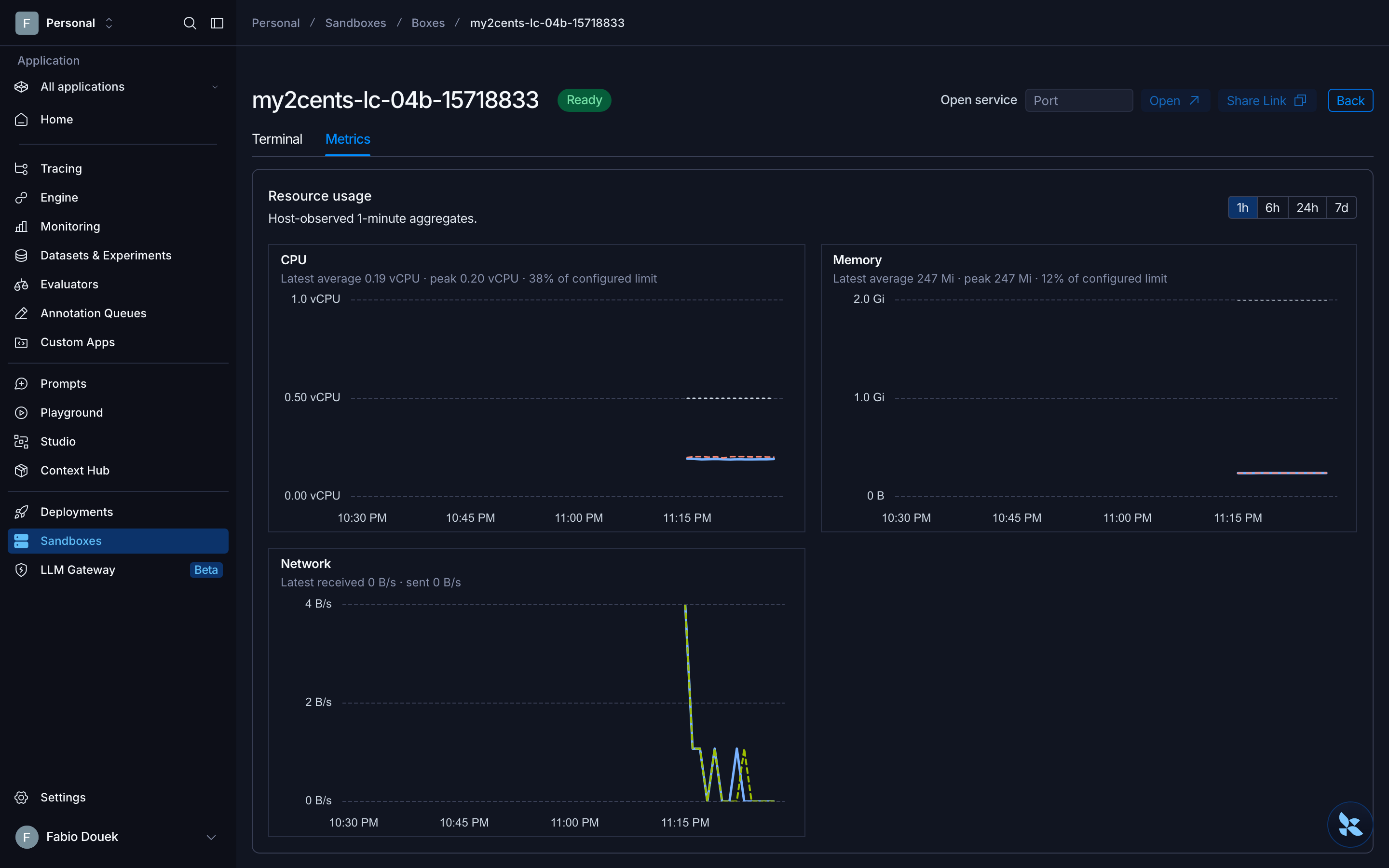
The detail page has two tabs: a browser Terminal (a root shell) and Metrics. The Metrics tab doesn’t show the preserve_memory_on_stop setting, so the API is the only place to check it.
Test 5: Idle stop and auto-wake
python 05_idle_wake.py # about 20 minutes, mostly waiting for idle stopsThe script creates a sandbox with idle_ttl_seconds=60, waits for it to stop, wakes it a different way each time and lets it stop again:
sb = create("05", idle_ttl_seconds=60)
sb.write("/root/wake.txt", "wake me\n")
url = sb.generate_download_url("/root/wake.txt")  # minted while running, fetched after the stop
idle_stop(sb, "after write()")
=== Idle stop with idle_ttl_seconds=60: my2cents-lc-05-44183274 =
[ 60.4s] after write(): idle -> stopped
=== Wake triggers ===============================================
read -> b'wake me\n'
[ 1.33s] wake via read()
status: ready
[ 60.4s] after read(): idle -> stopped
run -> 'wake me\n'
[ 4.03s] wake via run()
[ 62.6s] after run(): idle -> stopped
HTTP 200 'wake me\n'
[ 1.54s] wake via download URL (no credentials)
status: ready
[ 60.4s] after download: idle -> stopped
=== Service URL on a stopped (cold-boot) sandbox ================
HTTP 502 '{"detail":{"error":"BadGateway","message":"Could not connect to service on port 8000"}}'
[ 1.46s] GET service URL
status: ready
=== Does a running process count as activity? ===================
[ 60.4s] after the service request: idle -> stopped
[ 60.4s] detached 'nohup sleep 900 &' running: idle -> stopped
attached 'sleep 900' via run(wait=False), handle held open; watching for 4 minutes
[ 0.0s] ready
=== Service URL wake with preserve_memory_on_stop: my2cents-lc-05m-44804885
running: HTTP 200
[ 62.5s] after last request: idle -> stopped
HTTP 200 'served from memory'
[ 1.52s] wake via service URL
status: ready
=== Does service-URL traffic every 20 s keep it awake? ==========
[ 0.0s] ready
=== Traffic stops ===============================================
[ 47.8s] after last service request: idle -> stopped- The idle timer is accurate. With a 60-second TTL, the sandbox stopped 60.4 to 62.6 s after the last call (2-second polls).
- Every trigger wakes it: a file read (1.33 s), a command (4.03 s here, 1.59 s in an earlier run), a download link fetched by someone with no credentials (1.54 s), and a service URL request (1.46 s). Any activity resumes it, though a default sandbox wakes with a cold boot, not a memory resume.
- A service URL wakes the VM, not your server. On a default sandbox the server process died with the stop, so the request that woke it got a 502. On a
preserve_memory_on_stopsandbox, the same request came back 200served from memoryin 1.52 s, because the server process resumed with the VM. If you’re serving anything, this is the reason to turn the flag on. - Detached processes don’t count as activity. With
nohup sleep 900 &running, the sandbox still stopped at 60.4 s. A command started withrun(..., wait=False)whose handle stays open does count: the sandbox stayedreadyfor the whole 4-minute watch. So does service URL traffic: requests every 20 s kept it up for 4 minutes. (The 47.8 s at the end is shorter than the TTL because the last request went out about 12 s before the watch ended.)
One gotcha cost me the most time in this whole evaluation. run("cd /root && nohup python3 -m http.server 8000 >/dev/null 2>&1 &") never returns, and ignores timeout=10. It hung for over 40 seconds in a probe and over 18 minutes in my first run of this test, which also kept the sandbox awake the whole time. Redirecting stdin from /dev/null and using setsid didn’t help. Other backgrounded commands (nohup sleep, a Node server, nc -l, the shell counter loop) returned in about half a second. The workaround is in the script: start servers with run(..., wait=False) and drop the handle, so the server keeps running and the sandbox can still go idle.
server = sbm.run("python3 -m http.server 8000 --directory /root", wait=False, timeout=3600)
del server
Test 6: List, filter, and reconnect from another process
python 06_list_connect.pyThe SDK’s list_sandboxes() takes no filters and returns everything in the workspace. Filtering, paging and labels are on the REST endpoint:
items = rest("GET", "/boxes", params={"label": "user=alice"})["items"]
rest("PATCH", f"/boxes/{bob.name}", json={"labels": {**DEMO_LABELS, "test": "06", "user": "robert"}})
# ...in a second Python process, with only the sandbox name and a command id:
sb = client.get_sandbox(name)
h = sb.reconnect(cmd_id)
=== Listing =====================================================
SDK list_sandboxes() (no filters): 4 sandboxes in the workspace
GET /boxes {'label': 'demo=my2cents-lifecycle'}: ['-', 'alice', 'bob', 'carol']
GET /boxes {'label': 'user=alice'}: ['alice']
GET /boxes {'label': 'user'}: ['alice', 'bob', 'carol']
GET /boxes {'created_by': 'me', 'name_contains': 'lc-06'}: ['alice', 'bob', 'carol']
page_size=2: 2 items + next_cursor=True, page 2: 1 items, next_cursor=None
=== Does list() lag get() after a stop? =========================
[ 0.43s] get=stopped list=stopped status=stopped filter=1
=== Labels on update? ===========================================
PATCH labels -> {'demo': 'my2cents-lifecycle', 'test': '06', 'user': 'bob'}
=== Second process: wake a stopped sandbox and reattach to a command
parent: started command 01a1857b..., saw 'line 1', then disconnected
child: get_sandbox -> status ready [0.36s]
child: run() on it -> 'written by the parent' [0.38s]
child: reconnect(01a1857b...) replayed 14 chunks, first ['line 1\nline 2'] last ['line 15'] exit=0 [14.15s]
parent: stopped my2cents-lc-06-40818248; child again, with the old command id
child: get_sandbox -> status stopped [0.41s]
child: run() on it -> 'written by the parent' [2.00s]
child: status now ready
child: reconnect(01a1857b...) -> SandboxOperationError: Command not found: 01a1857b72b87649a58239d9e037f70d [CommandNotFound](Status and timing lines for the child process trimmed. The - in the first filter is a sandbox from another test carrying the demo label but no user.)
- Filter by label on REST.
label=key=valueandlabel=keyboth work, as docreated_by=me,name_containsand cursor paging. - Labels are create-only, and the API doesn’t tell you. A
PATCHwith new labels returned 200 and changed nothing:bobstayedbob. Set labels at create time, or you’ll believe you’ve retagged sandboxes you haven’t. - No list lag. Both
getandlistsaidstoppedon the first poll, and thestatus=stoppedfilter found it. - Reconnecting works across processes. A second process with only the sandbox name and a command id picked up the sandbox in 0.36 s, including its imports, and replayed the command’s output from the start while following it to the end. After a stop, the same child woke the sandbox with a
run()in 2.00 s, but the old command id was gone: commands don’t survive a cold stop.
Test 7: Snapshots and “fork”
python 07_snapshot_fork.pyThere’s no fork() in the API. The pattern is capture_snapshot() on a running sandbox, then N creates from it:
stream = src.run("for i in $(seq 1 20); do echo $i; sleep 1; done", wait=False)
snap = src.capture_snapshot(SNAP, timeout=300)
f = create(f"07f{i}", snapshot_id=snap.id)
# memory snapshot, REST only
mem = rest("POST", f"/boxes/{src.name}/snapshot", json={"name": f"{PREFIX}-warm", "include_memory": True})
mem = client.wait_for_snapshot(mem["id"], timeout=300)
m = create("07m", snapshot_id=mem.id, restore_memory=True)
=== Source: my2cents-lc-07-40987117 =============================
[ 0.99s] capture_snapshot() while a command streams
snapshot e0fa32c2-eaf0-4099-9c01-e7593dc172b7 status=ready fs_capacity 16 GiB fs_used 0.00 GiB source=01a1857d-f64e-720d-a3fd-879147912a1b tags=['latest']
stream on the source after capture: last line ['20'] exit=0
source status: ready
=== 3 sandboxes from the snapshot, one after another ============
[ 1.42s] fork 0
[ 1.34s] fork 1
[ 0.65s] fork 2
sequential median 1.34s
fork 0: 'base fork-0 cowsay 6.1\nno-stream-process'
fork 1: 'base fork-1 cowsay 6.1\nno-stream-process'
fork 2: 'base fork-2 cowsay 6.1\nno-stream-process'
source : 'base'
=== Delete the snapshot while forks use it ======================
delete_snapshot: SandboxClientError: snapshot is in use by one or more sandboxes or functions; release or delete them before deleting it
=== 3 sandboxes from the snapshot, concurrently =================
each: 0.62s, 0.58s, 0.57s | wall 0.62s
=== Memory snapshot (REST only) =================================
[ 3.13s] POST /boxes/{name}/snapshot include_memory=true
memory snapshot 7ff94545-3361-48c0-a307-cb9c30a2acf5: memory_snapshot_size_bytes=2147483648
[ 0.84s] create from memory snapshot (restore_memory=true)
restored counter 5 -> 7 two seconds later, uptime 46.37s (process resumed)- Capture is quick and doesn’t disturb the source. 0.99 s here (1.86 s in another run), while a command was streaming on the source; the stream finished normally and the source stayed
ready. (fs_usedisn’t reported; the script prints 0 for a missing value.) - Forks are filesystem copies. Three sandboxes from the snapshot each had the file and the venv with
cowsay, wrote to their own copy, and left the source alone. The streaming process didn’t carry over. Sequential creates took 0.65 to 1.42 s (0.57 to 2.15 s in the run recorded for the video); three in parallel took 0.62 s wall clock. - Memory snapshots exist, over REST. With
include_memory: true, the capture took 3.13 s and stored the full 2 GiB of RAM. A sandbox created from it withrestore_memory: truewas ready in 0.84 s with the counter process still counting and the source’s uptime (46 s): a real VM memory restore, and the closest LangSmith gets to forking live state. - You can’t delete a snapshot that sandboxes use, and the error is a generic
SandboxClientError, not theResourceInUseErrorthe SDK defines.
The trap is in naming. Re-capturing under the same snapshot name doesn’t replace the old snapshot. The new one takes the latest tag, and the old one stays, untagged, billing storage until you delete it. My repeated runs of Tests 7 and 8 had left 15 snapshots behind by the time I ran cleanup mid-session.
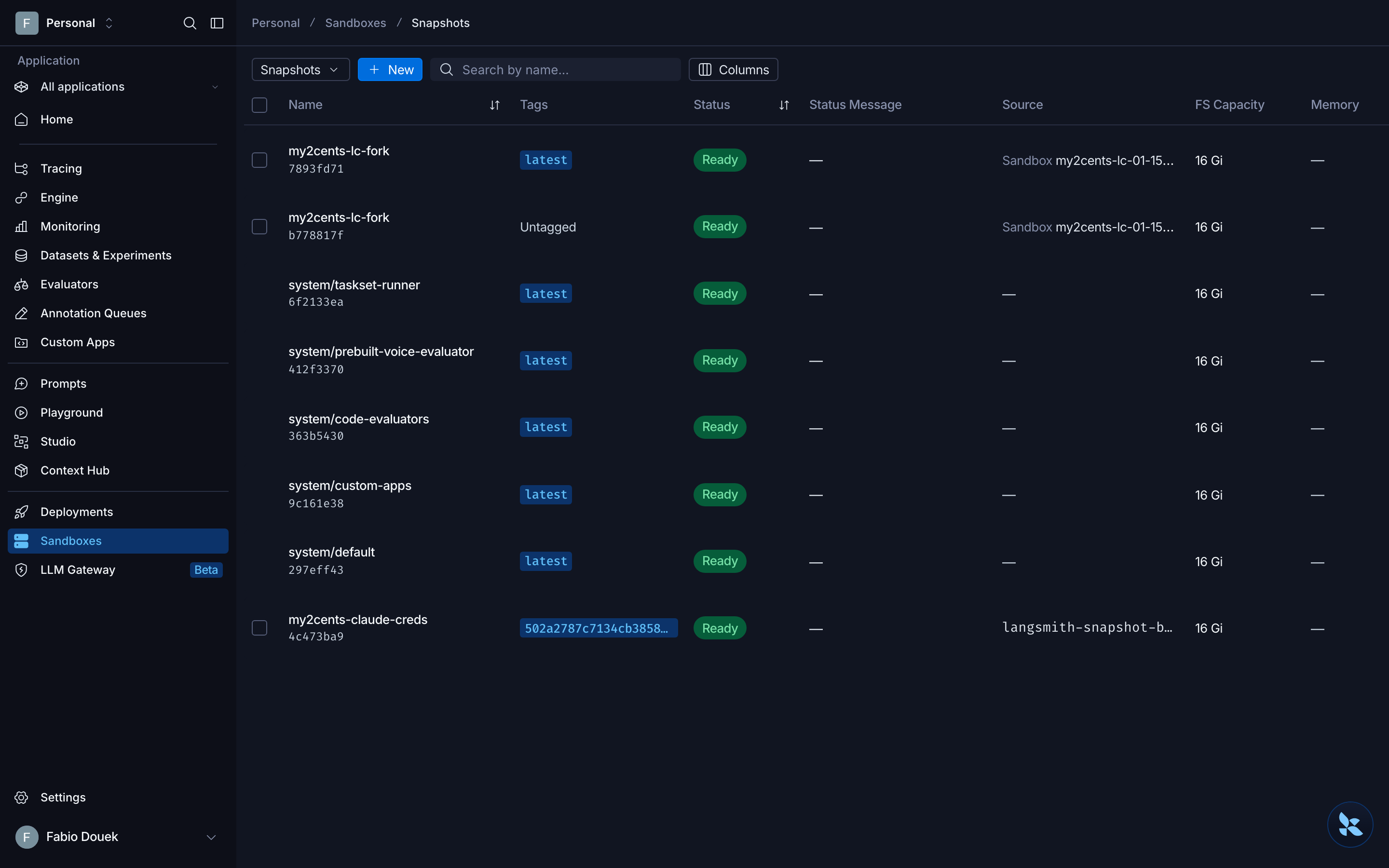
The console makes the trap visible: two rows with the same name, and only the tag column tells them apart.
Test 8: A custom snapshot vs installing at runtime
python 08_custom_snapshot.pyThe test uses pandas, numpy and matplotlib, which the default image doesn’t have. Path A installs them into a venv at runtime. Path B builds a snapshot from a two-line Dockerfile:
FROM python:3.12-slim
RUN pip install --no-cache-dir pandas numpy matplotlib
# The default 10 s HTTP timeout is too short for the export call at the end of a Dockerfile build: the
# server creates the snapshot anyway, but the SDK raises ReadTimeout and you lose the handle.
client = SandboxClient(timeout=120)
snap = client.create_snapshot_from_dockerfile(
f"{PREFIX}-datasci", "Dockerfile", context="datasci", fs_capacity_bytes=16 * GiB, vcpus=2, mem_bytes=8 * GiB,
on_build_log=log_lines.append, timeout=900)=== Default snapshot: is pandas already there? ==================
ModuleNotFoundError: No module named 'pandas'
15
=== Path A: default snapshot + install at runtime ===============
[ 21.97s] venv + pip install pandas numpy matplotlib
exit=0
import: first 0.38s, second 0.32s | create-to-import total 23.66s
=== Build a snapshot from a Dockerfile (temporary BuildKit builder sandbox)
[ 66.49s] create_snapshot_from_dockerfile(vcpus=2)
snapshot 58ffaa67-4cc2-4541-a3de-97c045913597 status=ready tags=['f425a454dcc344a6b9032baf42081601']
by bare name: ResourceNotFoundError: Snapshot 'my2cents-lc-datasci' not found
=== Build a snapshot from a public image (platform pull) ========
snapshot cec5ea04-d587-49e3-9c72-7133af0dc135 status=ready tags=['3.12-slim']
[ 33.09s] create_snapshot(docker_image='python:3.12-slim')
=== Path B: sandbox from the custom snapshot ====================
[ 2.76s] create from snapshot
import: first 3.97s, second 0.48s | create-to-import total 9.62s
'Python 3.12.16\nroot\n/'The custom snapshot wins: 9.62 s from create to first import vs 23.66 s installing at runtime (4.48 to 9.62 s vs 21.7 to 28.7 s across my runs, including 4.85 s vs 22.98 s in the last one). Path A’s clock starts after its sandbox already exists, so it leaves out a create of about half a second; Path B’s includes the create. The first import on the snapshot is the slow part, 3.97 s here against 0.48 s for the second, which looks like the disk being loaded lazily.
Getting there took some trial and error:
create_snapshot_from_dockerfile() defaults to context="." and tars everything in it into the builder sandbox, skipping only .git and ignoring .dockerignore. Run it from a project root and your .env and .venv go along. Point context= at a folder that holds only the Dockerfile, as the companion script does with datasci/.
- The snapshot isn’t tagged
latest. A Dockerfile build is tagged with the random build-image tag, socreate_sandbox(snapshot="my2cents-lc-datasci")returnedHTTP 404 ... snapshot "my2cents-lc-datasci:latest" not found, andget_snapshot()by name failed too. A bare name meansname:latest, and the docstring’s fallback only covers the newest untagged snapshot, so a build-tagged snapshot can’t be found by name at all. Use the snapshot id. (A snapshot from a public image gets the image’s tag,3.12-slimhere.) - The SDK’s 10-second HTTP timeout loses snapshots. In one run the final export call timed out after BuildKit had finished. The snapshot was created server-side and the builder sandbox deleted, but my code got an
httpx.ReadTimeoutand no handle.SandboxClient(timeout=120)fixes it. - 16 GiB is the minimum size for a Dockerfile build. With
fs_capacity_bytesat 8 GiB the SDK raisedfs_capacity_bytes (8589934592) cannot be smaller than snapshot (17179869184), because the builder boots from the 16 GiB default image. From a public image, 4 GiB was fine. - Build time depends on what you upload. 66.49 s with a context holding only the Dockerfile; 77.64 s and 81.05 s in earlier runs that uploaded the whole project. The Docker Hub pull went through the egress allow list without trouble. A snapshot straight from
python:3.12-slimtook 22.18 to 33.09 s over five runs.
Test 9: The quota and the bill
python 09_quota_bill.py=== Does a stopped sandbox count against the cap? ===============
before used 2/10 | running 2 stopped 0 | cpu 2500 m | memory 10 GiB | snapshots 15
4 running used 6/10 | running 6 stopped 0 | cpu 4500 m | memory 18 GiB | snapshots 15
2 running, 2 stopped used 4/10 | running 4 stopped 2 | cpu 3500 m | memory 14 GiB | snapshots 15
after delete used 2/10 | running 2 stopped 0 | cpu 2500 m | memory 10 GiB | snapshots 15
=== The bill: GET /usage/costs, last 24 hours ===================
totals: {'lcu': '0', 'lsu': '0', 'compute_standard_units': '0', 'storage_standard_units': '0', 'vcpu_hours': '0', 'memory_gib_hours': '0', 'storage_gib_hours': '0'}Another test run was sharing the workspace, so read the deltas, not the absolute numbers:
- Stopped sandboxes don’t count against the cap. Four new sandboxes added 4 to
sandboxes_used; stopping two of them took it back down by 2 whilestoppedwent to 2. CPU and memory reservations dropped on stop too. Each default sandbox reserved 500 millicores and 2 GiB, matching Test 1. So on a 10-sandbox plan, you can keep many more than 10 sandboxes around as long as at most 10 are awake. The changelog says waking a stopped sandbox checks the quota and returns 429 when you’re over it; I kept at most a handful alive and didn’t test that. - The cost API lags by about a day.
GET /usage/costsgave zero items and zero totals for the last 24 hours and the last 30 days, although sandboxes had been running since the previous evening. When I re-ran the script a few hours later, it returned one row: a sandbox from the previous day, at 0.000061 in the API’slcufield (0.0007 vCPU-hours; the pricing page bills in LSU). Dozens of later sandboxes were still missing. More on that in Pricing.
Results summary
| Operation | Measured (SDK 0.14.14, GCP US, from my laptop) |
|---|---|
create_sandbox() (default snapshot, sequential) |
median 0.51–0.59 s (0.50–0.62 s, two runs of n=5) |
Create + first run() |
median 0.91 s |
stop() / start(), default (cold boot) |
median 0.53 s / 1.62 s |
stop() / start(), preserve_memory_on_stop |
median 2.33 s / 0.91 s |
Idle stop at idle_ttl_seconds=60 |
60.4–62.6 s |
Auto-wake via read() / run() / download URL / service URL |
1.33 s / 1.59–4.03 s / 1.54 s / 1.46 s |
| Service URL wake, memory-preserving sandbox | 1.52 s, server still running |
get_sandbox() / wake via run() from a second process |
0.36–0.41 s incl. imports / 2.00 s |
capture_snapshot() (filesystem) |
0.99–1.86 s |
| 3 sandboxes from a snapshot, sequential / concurrent | median 1.34 s / 0.62 s wall |
Memory snapshot / create with restore_memory |
3.13 s (2 GiB) / 0.84 s |
| Dockerfile snapshot build (pandas, numpy, matplotlib) | 66.49 s |
Time to first import pandas: runtime install vs snapshot |
21.7–28.7 s vs 4.48–9.62 s |
| Default command timeout | 60 s, returns exit -1 without raising |
These are single-region measurements from a laptop on a home connection, on a workspace another test was also using. Use them as a sense of scale, not a benchmark.
Pricing
LangSmith bills sandboxes per second in LSU, where 1 LSU is $1 (pricing):
| Resource | Rate |
|---|---|
| vCPU | 0.0576 LSU / vCPU-hour |
| Memory | 0.01845 LSU / GiB-hour |
| Storage | 0.000123 LSU / GiB-hour |
| Default sandbox (0.5 vCPU, 2 GiB) | ≈ $0.066 / hour while ready, plus storage |
| 16 GiB of storage | ≈ $0.002 / hour |
| Plan | Price | Sandboxes |
|---|---|---|
| Developer | Free | Includes 8 LSU; limited to 10 sandboxes |
| Plus | $39 / seat / month | Includes 8 LSU of sandbox usage a month |
| Enterprise | Custom | Custom; unrestricted egress |
At the default size, 8 LSU is roughly 120 hours of a ready sandbox. Three things I couldn’t pin down:
- Whether the default bills at 0.5 or 1 vCPU. The REST API returns both
cpu_millicores: 500andvcpus: 1, and the SDK only exposes the 1. Everything that enforces or counts CPU uses the 500: the Metrics tab draws the configured limit at 0.50 vCPU, and the Resource Usage card counted two running sandboxes as 1 vCPU. Only the Boxes table’s CPU column shows “1 vCPU”. I’ve assumed 0.5 above, but no pricing page says which one is billed, and the cost API had no data for my sandboxes when I checked. - What a stopped sandbox costs. No page says. The cost API’s reference meters compute per sandbox and storage per sandbox and per snapshot, so a stopped sandbox should accrue storage only, and the quota stops counting its CPU and memory (Test 9). Storage is described as allocated by attributed bytes, so it may be closer to the 3.3 GB in use than the 16 GiB capacity.
- What this walkthrough cost. The cost API lagged by about a day: it first returned zeros, and hours later showed only the previous day’s single sandbox, at 0.000061 LCU. So I don’t have a complete number from my account, and I’m not going to estimate one from the rates. The usage page in the LangSmith UI is the other place to look.
What the rate card doesn’t show is that LangSmith is a platform purchase. There’s no sandbox-only account: you need a LangSmith organization, Plus seats are priced for the whole platform, and unrestricted egress is an Enterprise feature.
Cleanup
Two things linger here: stopped sandboxes (14 days by default) and snapshots (no expiry setting that I could find, including for the untagged ones from re-captures). The companion repo’s last script finds everything by label and by name prefix, batch-deletes the sandboxes, waits for the deletes to finish (a snapshot can’t be deleted while a sandbox still uses it), then deletes the snapshots:
names = ours()
if names:
    res = rest("POST", "/boxes/batch-delete", json={"names": names})
# ...wait until ours() is empty...
for s in snaps:
    if s.name.startswith(PREFIX):
        client.delete_snapshot(s.id)
=== Sandboxes labelled {'demo': 'my2cents-lifecycle'} or named my2cents-lc-*
remaining: []
=== Snapshots named my2cents-lc-* ===============================
left: []
quota now: sandboxes 1/10 (running 1, stopped 0) | snapshots 1That’s the final run; the remaining sandbox and snapshot belong to part 2. The mid-session run deleted 3 sandboxes and 15 snapshots, almost all of them untagged leftovers from re-running Tests 7 and 8. It searches by name prefix as well as label because sandboxes created with the SDK can’t carry labels.
For production, I’d set three things on every sandbox: a short delete_after_stop_seconds so stopped sandboxes don’t sit for two weeks, labels for user and job at create time (you can’t add them later), and unique snapshot names or an explicit cleanup of the old ones.
Verdict
LangSmith Sandboxes have a lifecycle that largely manages itself. Sandboxes stop when idle, wake on any request without a start(), and can keep their memory across stops if you ask at create time. Creates were fast and consistent, and the VM reports its real size. The rough edges are in the client and the docs rather than the platform.
What I’d keep in mind before building on it:
- Plan on the REST API. Labels, list filters, resizing,
preserve_memory_on_stop, memory snapshots and usage aren’t in the Python SDK. The 20-line helper in the companion repo covers them, but it’s the kind of thing you’ll maintain yourself. - Check every exit code for -1. Command timeouts return quietly instead of raising, and the default is 60 seconds. Set the SDK’s HTTP timeout above 10 s for snapshot builds, and don’t start servers with
nohup ... &. - Decide about memory at create time. A default stop is a reboot, so a server behind a service URL comes back as a 502. If processes need to survive idle stops, create the sandbox with
preserve_memory_on_stop; you can’t turn it on later. - Clean up snapshots deliberately. They have no documented expiry, and every re-capture under the same name leaves the old one billing.
- Check egress before you design. On non-Enterprise plans, the allow list covers package registries, Git hosts and the major model APIs, and blocks everything else, including all of AWS. A support exemption removes the list entirely, after which each sandbox’s own
access_controlis your only egress control.
Who should use it
LangSmith Sandboxes fit teams already on LangSmith who want their agents’ code execution on the same account, key and bill as their tracing, especially with Deep Agents, whose docs position it as the zero-setup default backend. The auto-wake lifecycle suits agent workspaces that go quiet between turns, and memory-preserving stop gives you a real pause and resume when you need it.
If you’re not on LangSmith, the case is weaker: a platform account to buy into, a restricted network outside Enterprise, and an SDK that covers only part of the API. And if forking live state is central to your product, the REST-only memory snapshot is the only route, and it’s more work than a single fork call.