AWS Lambda MicroVMs: Hands-On with the Full Sandbox Lifecycle
By Fabio Douek
Human-led, AI-assisted. Research and implementation done with AI tools, led, tested and edited by me. How posts are labeled
Jump to section
- Overview
- Architecture
- Setup
- Step 1: Tools, credentials and quotas
- Step 2: The companion code and infrastructure
- Step 3: An agent inside the VM
- Step 4: Safety nets, and finding your MicroVMs again
- Testing
- Test 1: Build an image
- Test 2: Run a MicroVM and inspect the defaults
- Test 3: Commands, files and the endpoint
- Test 4: Suspend and resume, three cycles
- Test 5: Idle auto-suspend and auto-resume
- Test 6: Maximum duration and termination
- Test 7: List, filter, and reconnect from another process
- Test 8: Many MicroVMs from one snapshot
- Test 9: The egress and identity baseline
- Test 10: Quotas and the bill
- Results summary
- Pricing
- Cleanup
- Verdict
- What works
- What doesn’t
- Who should use it
Explain (TLDR) like I am...
Imagine a toy robot you can freeze with a button. When you press it again, the robot carries on with the exact block it was holding, as if no time had passed. Each robot also lives in its own little glass box, so it can't knock over anyone else's tower.
The catch is that the robot only notices you when you knock on the glass. If you tell it to nap when nobody knocks, it naps even in the middle of a tower it was quietly building. And no robot can stay out of the toy box for more than eight hours, frozen time included.
Lambda MicroVMs are a managed AWS service that runs code you do not trust in a dedicated virtual machine, inside your own AWS account and billing, under AWS's standard terms. Access to each machine requires a token your account issues, and that token is scoped to one machine and its ports.
The diligence points are identity and egress. Code inside the machine can read the credentials of the role you attach to it, and by default it can reach the whole internet. Neither is restricted by the service itself, so attach roles sparingly and treat network controls as your responsibility.
The condition is unsafe execution of machine-written code. The intervention is a per-session virtual machine restored from a snapshot. In my testing it was running in under two seconds and resumed from a suspend in under one, with its processes and memory intact.
Side effects: the idle timer ignores work that does not arrive through the front door, so a busy agent can be frozen mid-task. Open connections die on every resume. The machine also has an eight-hour lifetime that counts frozen time, and my account started with a very small dose.
Notice how calm it feels when a sandbox simply freezes when nobody is using it and wakes, mid-thought, the moment someone returns. Nothing to reload, no state to rebuild, and the compute bill pauses while it sleeps.
The tension sits in what you still have to build yourself. There is no command or file interface for a program to call, so someone writes a small server first; there are no tags to find things by, and an idle rule can freeze an agent while it is working. Expect conversations about who owns that glue.
Think of a Lambda MicroVM as a practice room with a pause pedal. Step on it and the whole band freezes mid-bar; step again and they come back in on the same beat, under a second later, without counting in.
The room only listens to the door, though. If the band plays loudly with the door shut, the room assumes nobody is there and hits pause anyway. And the session is booked for eight hours flat, paused minutes included, so long sets need a new room.
The positioning is "Firecracker isolation inside your own AWS account." No new vendor, IAM and CloudTrail as you already know them, and a sandbox running in about two seconds from a snapshot.
The honest caveats for buyers: it is a building block, not a sandbox product. Teams bring their own command runner, egress controls and credential handling, and my account started with a quota of four default-sized machines at a time.
 See the source code here: lambda-microvm-lifecycle
Overview
AWS Lambda MicroVMs went generally available on 2026-06-22. They run user or AI-generated code in Firecracker microVMs, inside your own AWS account. You build an image from a Dockerfile, Lambda boots it (once per Graviton generation), waits for your app to say it’s ready, and snapshots the whole thing (memory, disk, running processes). Every MicroVM you run starts from that snapshot, gets its own HTTPS endpoint, and can be suspended and resumed with its memory intact for up to 8 hours.
That’s the whole product, and it’s deliberately small. There’s no exec API and no file API: the endpoint forwards HTTP to ports inside the VM, and what listens there is up to you. There’s no fork or snapshot of a running MicroVM, no tags on MicroVMs, and no egress policy or credential handling beyond “public internet” or “your VPC”. It’s a building block for a sandbox, not a finished one.
This is part 1 of a three-part series:
- Part 1 (this post) walks a MicroVM through its whole life, from
create-microvm-imageto cleanup, with a runnable script per stage. - Part 2 fills the egress and credentials gap with iron-proxy.
- Part 3 explores self-service sandboxes: a browser workspace with Claude Code on top.
I ran everything on 2026-11-03 in us-east-1 with boto3 1.43.123 and AWS CLI 2.39.3, against base image al2023-1 version 3. Every timing is from my runs, from my laptop, outside AWS.
Two things to know before you start. You need a recent CLI or SDK: lambda-microvms first shipped in AWS CLI 2.35.10 and boto3 1.43.35, and mine (2.34.29) didn’t have it until I upgraded. And check your quotas: Service Quotas lists a default of 2,048 GB of MicroVM memory and 5 RunMicrovm calls per second (the Lambda guide says 1,024 GB in us-east-1), but my account was held at 8 GB and 1 call per second, and every test here fits in that. Quotas are per account: the Lambda guide says new accounts start with reduced quotas that AWS raises automatically with usage, and raising mine by hand takes a support case (Step 1).
Architecture
Three things in that picture shape everything below:
- The snapshot is the product. Every MicroVM starts from a memory snapshot taken during the build, so whatever your app did before
/readyreturned (imports, warm caches, generated IDs) is shared by every MicroVM. That’s what makes start fast, and it’s also a trap (Test 8). - The endpoint is the only way in, and the only activity signal. Commands, files and shells all ride on HTTP to ports inside the VM. The idle timer only counts traffic through that endpoint.
- Lifecycle hooks are plain HTTP calls into your app on a port you choose. They’re how you get the per-MicroVM payload, and how you learn about suspend, resume and terminate.
Setup
Step 1: Tools, credentials and quotas
You need Python 3.11+, uv, Terraform 1.6+, and AWS credentials that can manage Lambda MicroVMs, IAM roles, S3 and CloudWatch Logs, and read Service Quotas and Cost Explorer (for Test 10). Check what your account can run before anything else:
aws service-quotas get-service-quota --service-code lambda --quota-code L-CD1C0CC4 \
  --query Quota.Value          # Max allocated ARM_64 MicroVM memory (GB)
aws service-quotas get-aws-default-service-quota --service-code lambda --quota-code L-CD1C0CC4 \
  --query Quota.Value          # the Service Quotas default
Mine said 8.0 and 2048.0. Service Quotas refuses any request at or below its default, so getting from 8 GB to anything useful takes a support case. I opened one.
Step 2: The companion code and infrastructure
The scripts are in lambda-microvm-lifecycle.
git clone https://github.com/fabiodouek/my2centsai-blog-samples.git
cd my2centsai-blog-samples/lambda-microvm-lifecycle
cp .env.example .env
uv venv && uv pip install -e . && source .venv/bin/activate
terraform -chdir=infra init && terraform -chdir=infra apply
infra/ creates an S3 bucket for build zips, a build role (read the zip, write build logs), and two execution roles: one that can only write logs, and one that can also list S3 buckets, for Test 9. There’s no VPC in this part.
Step 3: An agent inside the VM
Since there’s no exec API, the image needs something to talk to. images/sandbox/agent.py is about 230 lines of Python, standard library apart from websockets: POST /exec and an SSE POST /exec/stream on port 8080, PUT/GET /files, a few state endpoints for the tests, a WebSocket echo on 8081, and the six lifecycle hooks on 9001. The Dockerfile is ordinary:
FROM public.ecr.aws/docker/library/python:3.12-slim-bookworm
RUN apt-get update \
 && apt-get install -y --no-install-recommends curl dnsutils iproute2 procps git ca-certificates \
 && rm -rf /var/lib/apt/lists/* \
 && pip install --no-cache-dir websockets==15.0.1 boto3==1.43.123
WORKDIR /app
COPY agent.py .
CMD ["python", "-u", "agent.py"]
Everyone who integrates MicroVMs writes some version of this (Cursor’s worker, the AWS Claude samples, community projects like microvms-agentd). Anyone holding an endpoint token for port 8080 can now run anything as root in that MicroVM, which is the point of a sandbox, so treat tokens like credentials.
The console shows an image’s hooks only in its Edit form, along with their timeouts: 30 s each here, out of an allowed 1 to 60 s for run, resume, suspend and terminate.
Step 4: Safety nets, and finding your MicroVMs again
MicroVMs can’t be tagged (run-microvm has no tags parameter), so the scripts identify theirs by image name (my2cents-lc-*) and put the test name in the run hook payload. common.run() also sets maximumDurationInSeconds=3600 and an idle policy that suspends after 10 idle minutes and terminates after 10 suspended minutes. That second timer only applies after an idle suspend (Test 5), so for the scripts that suspend a MicroVM themselves, the hour is the real backstop. The one run that skips common.run(), Test 2’s look at Lambda’s defaults (an 8-hour cap and no idle policy), is terminated in a finally block. So a crashed script can’t leave anything behind for more than an hour.
Testing
Test 1: Build an image
01_image.py zips images/sandbox, uploads it, and calls create-microvm-image with the managed base al2023-1, a 2 GB baseline and all six hooks on port 9001:
=== Build images/sandbox (python:3.12-slim + agent) =============
create: states [('CREATING', 1.1), ('CREATED', 134.8)]  total 134.8s
134.8 s for the first version (124.5 s in an earlier run), and 113.7 s for a second version that only changed an environment variable. The build is more interesting than the time suggests. list-microvm-image-builds shows one snapshot build per chipset, GRAVITON generation 3 and generation 4, each with its own run of the build hooks:
{"buildId": "21ec559f-…", "buildState": "SUCCESSFUL", "architecture": "ARM_64", "chipset": "GRAVITON", "chipsetGeneration": "3"}
{"buildId": "b74e6985-…", "buildState": "SUCCESSFUL", "architecture": "ARM_64", "chipset": "GRAVITON", "chipsetGeneration": "4"}
"snapshotBuild": {"memorySnapshotSizeInBytes": 560652288, "codeInstallSizeInBytes": 574095360, "diskSnapshotSizeInBytes": 23519232}
The build logs show the agent starting, ready 50 to 90 ms later (across two builds), and validate about 21 s after that, separately in each chipset’s stream, with a different build-time UUID in each. So “every MicroVM shares the snapshot” really means “every MicroVM on the same chipset generation shares it”.
In the console, images have their own page under a new MicroVMs section of the Lambda navigation. I’ve circled three things on mine: the baseline and peak sizes (more on those in Test 2), the same one-build-per-chipset split under each version, and the snapshot size broken down into memory, code install and disk. The console’s “MB” are mebibytes: the screenshot, from an earlier build, shows 546.48 MB of code install, which the API reported as 573,030,400 bytes.
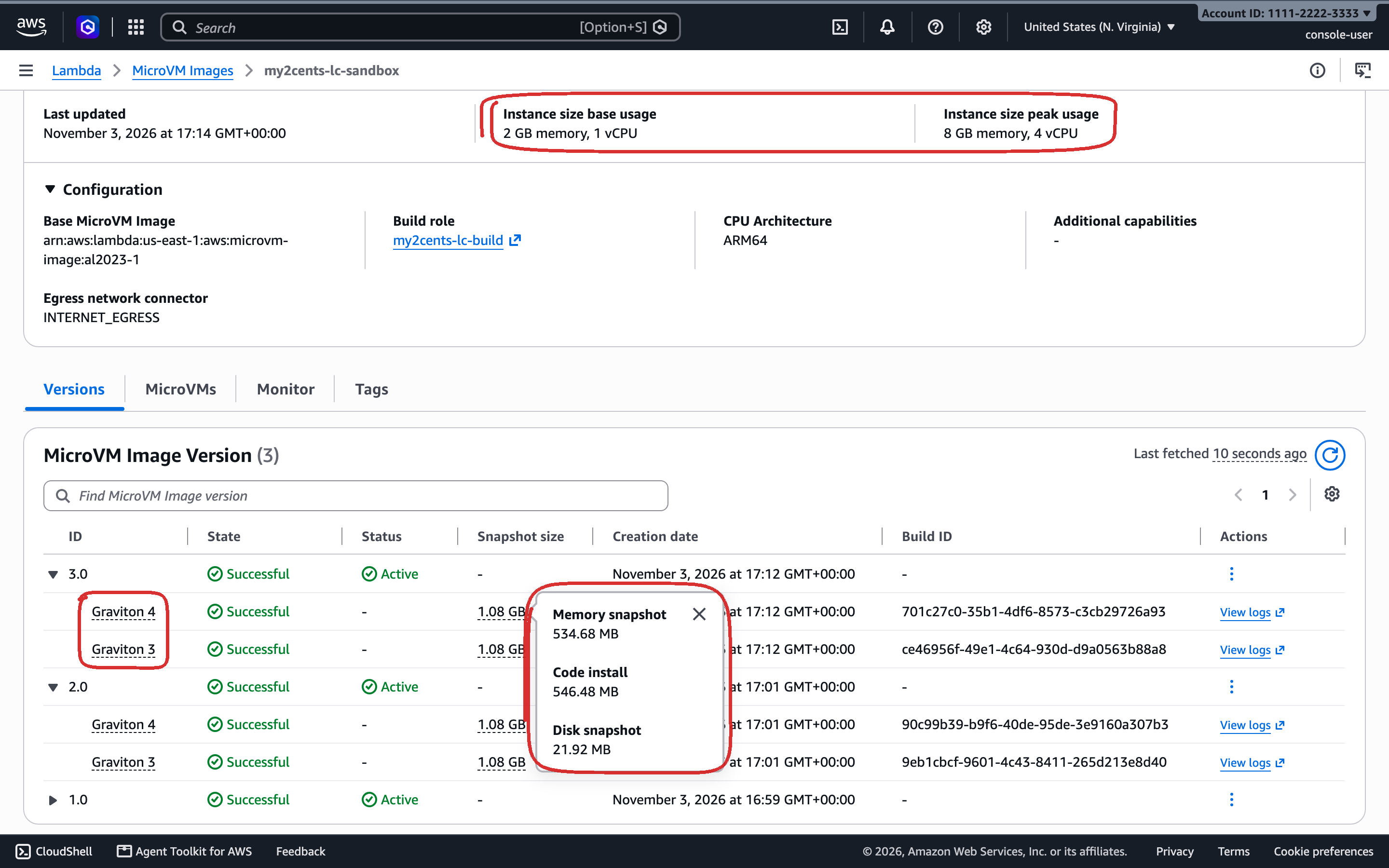
Versions behave the way you’d hope. A run with no version got 2.0 (the variable was set); a run pinned to 1.0 didn’t have it. After update-microvm-image-version --status INACTIVE on 1.0, a pinned run failed with ResourceNotFoundException: No active version found … and version 1.0, and reactivating it worked. One gotcha: get-microvm-image needs the image ARN. The getting-started guide passes a bare name, which returns Invalid ARN format, and the launching guide says run-microvm needs the ARN too.
x86 isn’t there yet: cpuConfigurations=[{"architecture": "X86_64"}] fails validation, even though Service Quotas already lists an X86_64 memory quota.
Test 2: Run a MicroVM and inspect the defaults
With only --image-identifier, run-microvm fills in an 8-hour maximum duration, HTTP_INGRESS, INTERNET_EGRESS, no idle policy (so it never suspends on its own) and no execution role. Five sequential runs from 02_run_defaults.py:
run 1: microvm-7f01aa14-…  RUNNING after 2.10s  first 200 after 2.54s
run 2: microvm-66aed7ac-…  RUNNING after 1.58s  first 200 after 2.02s
run 3: microvm-139f989c-…  RUNNING after 1.80s  first 200 after 2.24s
run 4: microvm-083bee36-…  RUNNING after 2.05s  first 200 after 2.50s
run 5: microvm-3d0831a6-…  RUNNING after 1.83s  first 200 after 2.28s
median: RUNNING 1.83s | first 200 2.28s (min 2.02, max 2.54)
About 1.8 s to RUNNING and 2.3 s to the first response through the endpoint, measured from just before the API call, so the 2.3 s includes my app answering over the public endpoint. An earlier spike with a different image took 2.35 to 3.0 s, so the image may matter.
Inside, the guest reports the peak size, not the baseline:
-- cpu      4 | Model name: Neoverse-V1      (Graviton 3)
-- memory   MemTotal: 8209056 kB
-- disk     /dev/vdc  7.8G  453M  7.0G  7% /
-- user     uid=0(root)
-- pid 1    python -u agent.py
-- kernel   Linux 6.1.166-24.303.amzn2023.aarch64
-- network  eth0 169.254.0.2/30, resolvers 127.0.0.2 and 169.254.53.53
That’s the baseline-and-burst model: you pay for 2 GB / 1 vCPU while running and per second for anything above it, up to 4x. It’s real: allocating and touching 6 GiB took 1.5 to 1.7 s, and four CPU-bound workers each ran at the same rate as one on a Graviton 4 run, and within about 5% of it on a Graviton 3 run (the chipset varies per MicroVM). Your container is PID 1 in its own namespace, as root, with Docker’s default capability set.
Test 3: Commands, files and the endpoint
03_endpoint.py starts with auth, which works as documented. With no token, a garbage token, a token for port 8080 used on 8081, or MicroVM A’s token on MicroVM B, the endpoint returns 403. With --slow, the script also tests expiry: a one-minute token was still accepted at 95 s and refused at 125 s, so tokens outlive their expiry by somewhere between 35 and 65 seconds.
The hooks are just another port, though. With a token scoped to port 9001, I could POST /aws/lambda-microvms/runtime/v1/run from my laptop, and the agent recorded a second run event. Logging the peer address didn’t help: Lambda’s real hook calls, my forged one and every normal request all arrive from 127.0.0.1.
hook events the agent saw (hook, payload bytes, peer address):
   ready None 127.0.0.1
   run 53 127.0.0.1
run 12 127.0.0.1 <- sent by me, through the endpointallPorts tokens (the docs' examples use them) if your hooks do anything that matters. Put the hooks on their own port and scope every token to the app's port, because your app can't tell Lambda's hook calls from forwarded ones.
The endpoint itself is capable. A 100 s request completed. SSE lines arrived a second apart as printed, not buffered. HTTP/2 was negotiated, and a WebSocket echo on port 8081 (token and port passed as subprotocols) answered in 92 to 94 ms from my laptop. Bandwidth was better than documented: 4 MB/s is the stated limit for a 2 GB MicroVM, and I measured 7.9 to 9.9 MiB/s up and 7.9 to 9.2 MiB/s down across three runs, sustained over 100 MiB.
Two things didn’t match the docs:
NO_INGRESSdoesn’t stop HTTP. A MicroVM launched with onlyNO_INGRESSstill issued tokens and served{"ok": true}from my agent through its endpoint, three times out of three. Only shell tokens were refused (Shell access requires SHELL_INGRESS network connector…). The docs sayNO_INGRESSdisables ingress. You still need a token, so the exposure is “whoever can callCreateMicrovmAuthToken”, but the switch doesn’t do what it says.- The shell lands in your container. With
SHELL_INGRESS,wss://<endpoint>/shellsends asession_initframe and takes keystrokes as binary frames. What you get is bash, as root, in the Debian app container, with my agent as PID 1 and noctrbinary, not the AL2023 guest the troubleshooting page’sctr task execnote implies.
Test 4: Suspend and resume, three cycles
04_suspend_resume.py writes files to disk and /tmp, starts a background counter, opens a TLS connection to example.com, then suspends for 20 s and resumes, three times:
=== Cycle 1 =====================================================
[  1.01s] suspend_microvm until SUSPENDED
[  0.76s] resume_microvm until RUNNING
agent pid 1 -> 1 | in-memory counter 6 -> 8 | file counter 4 -> 6
guest clock advanced 22.4s; guest vs laptop now: +0.03s
disk survives | tmp survives | process-alive | uptime 52.22s
held TCP connection: {'ok': False, 'error': 'SSLEOFError: EOF occurred in violation of protocol'}
new outbound request: 200
…
median: suspend 0.76s | resume 0.76s | first request after RUNNING 290 ms
Suspend and resume each in under a second: median suspend 0.76 s in this run and 0.52 s in an earlier one, resume 0.76 s in both. Everything survives: files, the background process, the agent’s in-memory state. Processes are frozen, not running: the counter moved by 2 over a 22-second suspend, while the guest clock jumped to the right time (within 0.03 s of my laptop) on resume. Open connections don’t survive: the held TLS connection failed after every resume, and new ones worked immediately. Every hook fired: suspend and resume three times each.
Two rough edges: resuming a RUNNING MicroVM and suspending one twice both return HTTP 200 instead of the documented ConflictException, and with autoResumeEnabled=false, a request to a suspended MicroVM gets a 502 in 0.1 s and leaves it suspended.
Test 5: Idle auto-suspend and auto-resume
With maxIdleDurationSeconds=60, 05_idle.py watches the state through the control plane (which doesn’t count as traffic):
=== A: no traffic at all ========================================
  SUSPENDED after 62s without endpoint traffic
  request to SUSPENDED MicroVM: HTTP 200 after 0.84s (auto-resume), state now RUNNING
=== B: CPU-bound work, no requests ==============================
  busy MicroVM SUSPENDED after 67s
=== C: outbound-only traffic (curl every 5 s), no requests ======
  outbound-only MicroVM SUSPENDED after 62s
=== D: one held-open SSE stream for 150 s, no other requests ====
  150 lines received; states seen while streaming: ['RUNNING']
=== E: autoResumeEnabled=false, then suspendedDurationSeconds=90
  SUSPENDED after 69s
  request while SUSPENDED: HTTP 502 after 0.29s, state SUSPENDED
  TERMINATED 91s after suspending | MicroVM exceeded maximum lifetime.
Auto-resume is quick: the first request after a suspend came back in 0.31 to 0.85 s across two runs, with Lambda holding it while the VM resumed. But only inbound endpoint traffic counts as activity. A MicroVM pegging a CPU and one making an outbound request every 5 s were suspended after 67 and 62 s, about the same as the idle one (62 s). A single held-open stream kept one awake for 150 s. For an agent that works on its own (an outbound-only Claude Code session, say), you have three options: no idle policy, an idle window longer than the longest task, or a driver that keeps a stream open. The termination message in case E is also misleading: it was suspendedDurationSeconds that expired, not the maximum lifetime. And that timer only applies after an idle suspend, like case E’s. When I built part 3, a MicroVM suspended with suspend-microvm and suspendedDurationSeconds=60 was still suspended 10 minutes later: a manual suspend lasts until the maximum duration.
Test 6: Maximum duration and termination
06_duration.py runs two MicroVMs with maximumDurationInSeconds=180: one stays running, the other is suspended with suspend-microvm at 31 s and left suspended (a manual suspend, so suspendedDurationSeconds doesn’t end it early):
A running:   TERMINATED 183s after run | MicroVM exceeded maximum lifetime.
B suspended: TERMINATED 183s after run | MicroVM exceeded maximum lifetime.
C: terminate -> TERMINATED in 1.34s
D: terminate (suspended) -> TERMINATED in 1.30s
Suspended time counts toward the cap, as the docs say (the community wasn’t sure). So the cap is wall-clock time from run-microvm, whatever the MicroVM does in between, and 8 hours is the most you can set. A session that needs longer has to move its state to a new MicroVM.
The agent’s stdout in CloudWatch shows which hooks ran:
A cap while running:   run, terminate
B cap while suspended: run, suspend            <- no terminate
C explicit terminate:  run, terminate
D terminate suspended: run, suspend            <- no terminate
/terminate doesn’t run for a MicroVM that’s suspended when it ends, whether it hit the cap or you terminated it. If you rely on /terminate to flush data or deregister, do that work in /suspend as well.
Test 7: List, filter, and reconnect from another process
In 07_list_reconnect.py, list-microvms returns five fields per MicroVM (microvmId, state, imageArn, imageVersion, startedAt) and filters by image and version only. There’s no name, no tags and no state filter, so “find this user’s sandbox” is your database’s job, not the API’s. The run hook payload is where per-MicroVM data goes, and its limit is 4,096 bytes: 4,097 and 16,384 both failed validation (Member must have length less than or equal to 4096), while the guide says 16 KB.
Two things work well. clientToken is idempotent (the same token twice returned the same MicroVM), which is what you want from an orchestrator that retries. And a second process holding only the MicroVM ID attached, minted a token and read a file the first one wrote in 1.45 s, interpreter start included.
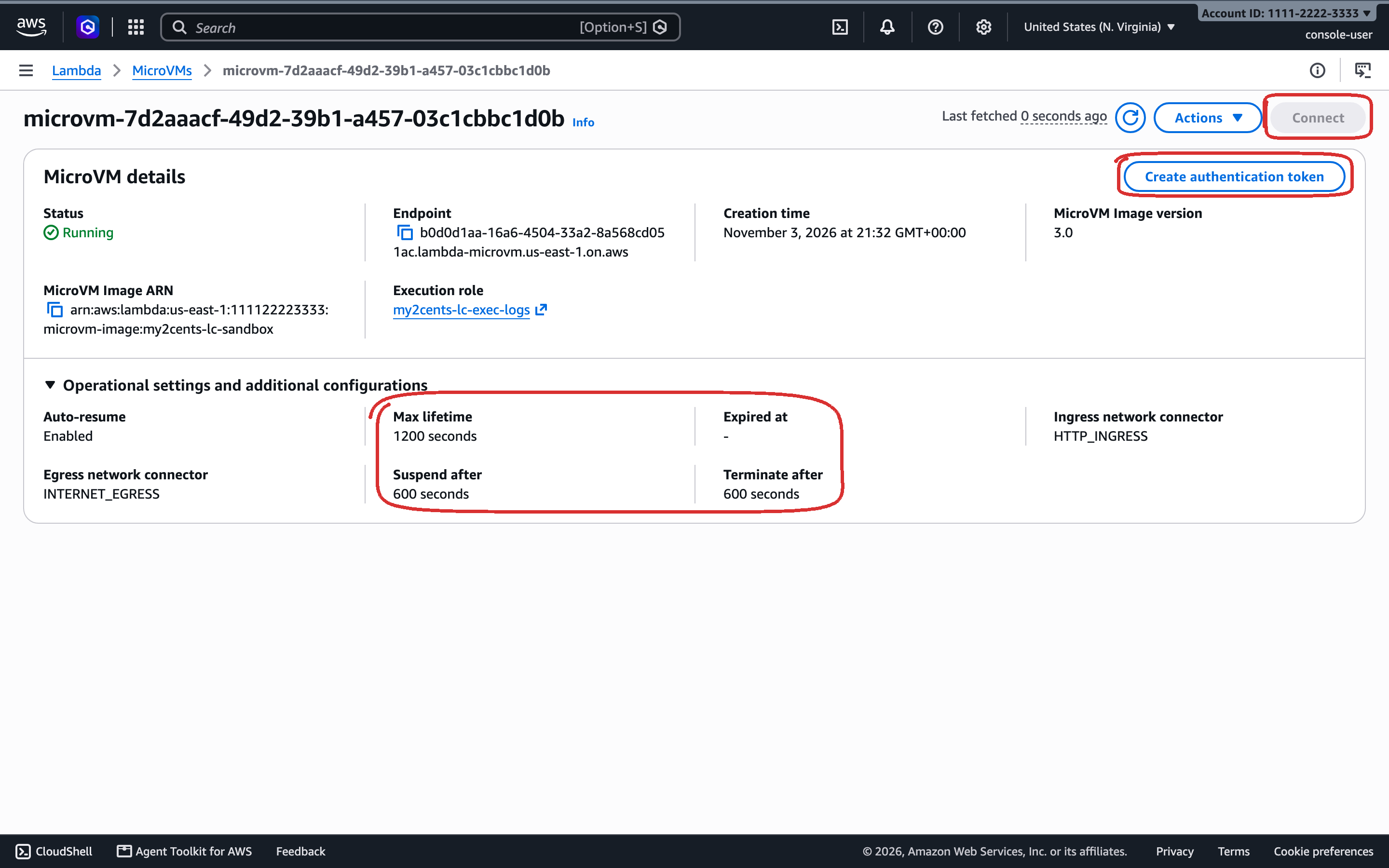
The console’s MicroVMs page lists every MicroVM in the account as a table, terminated ones included (129 in mine by the end of the day). On a MicroVM’s own page I’ve circled three things. The timers have different names from the API: “Max lifetime” is maximumDurationInSeconds, “Suspend after” is maxIdleDurationSeconds and “Terminate after” is suspendedDurationSeconds. Create authentication token mints an endpoint token without the CLI. And Connect opens a shell; it’s greyed out here, presumably because this MicroVM has no SHELL_INGRESS connector. I started this one with a 20-minute lifetime, just for the screenshot:
Test 8: Many MicroVMs from one snapshot
There’s no fork API, so the closest thing is running several MicroVMs from one image and seeing what they share. 08_many_from_one.py starts three back to back (all answering after 4.52 s on my 1-call-per-second quota) and asks each agent for values created at different moments:
field                          vm0                vm1                vm2
build_uuid (made at import)    97987eff-…         6d9bca20-…         97987eff-…
random.random() now            0.7134323853425568 0.5711589500702194 0.7134323853425568
boot_id                        949631a6-…         efff7f39-…         949631a6-…
counter (thread since build)   3                  3                  3
uuid.uuid4() now               0bbbf8ff-…         7eda5ae6-…         7508876e-…
run_uuid (made in /run)        1122fbbd-…         c9be7242-…         3ecfe54e-…
vm0 and vm2 landed on the same Graviton generation, restored the same snapshot, and are identical in everything that existed before the snapshot: the build-time UUID, the kernel’s boot_id, and the next value from Python’s random module, which was seeded at import during the build. vm1 restored the other chipset’s snapshot. uuid.uuid4() reads the kernel’s random source and was unique everywhere, as was anything made in /run. The rule from the docs holds: generate IDs, tokens and seeds in /run, from a cryptographic source, never at import time.
The same snapshot makes a custom image worth less than you’d expect, until you use the /validate hook. I built images/datasci (pandas, NumPy, scikit-learn and Matplotlib baked in, 165 s) and timed the first import in a fresh MicroVM:
| Setup | First import pandas, numpy, sklearn, matplotlib |
|---|---|
Plain image, pip install at runtime | 24.4 s install, then 2.4 s |
Stack baked into the image, /validate does nothing | 17.9 s, 16.2 s, 4.1 s |
Stack baked in, /validate imports it | 1.40 s, 1.46 s, 1.33 s |
The snapshot’s disk appears to be fetched lazily: a file nobody touched during the build seems to be read from remote storage the first time a MicroVM needs it, so a baked-in library can be slower to import than one installed a moment ago. /validate runs on a fresh MicroVM after the build, and Lambda records which parts of the snapshot that request touches and prefetches them at run time. The agent now runs a VALIDATE_CMD from the image’s environment variables during /validate; setting it to the imports took the first import from 4 to 18 s in this run (20 to 44 s in an earlier one) down to about 1.4 s. If your sandbox has a warm path (an interpreter, a language server, a model), exercise it in /validate.
Cold first imports ranged from 4.1 to 43.6 s across two recordings, so the lazy fetch also varies a lot from run to run.
Test 9: The egress and identity baseline
09_egress_identity.py runs the same probes in a MicroVM with an execution role that can list S3 buckets, and in one with no role:
=== execution role (logs + s3:ListAllMyBuckets) =================
egress IP                          184.193.104.115
raw-IP HTTPS (1.1.1.1)             301
DNS straight to 1.1.1.1:53 (UDP)   ;; communications error to 1.1.1.1#53: timed out
DNS over TCP to 1.1.1.1:53         104.20.23.154
IMDSv1 GET (no token)              401
IMDSv2 token PUT                   200
role name from IMDS                execution_role
boto3 credentials                  method=iam-role key=ASIA... token=True
sts get-caller-identity            assumed-role/my2cents-lc-exec-probe/Lambda-microvmsExecutor-microvm-5cf3e44a-…
s3 list-buckets (role allows it)   16 buckets
IMDS as a non-root user            execution_role (as nobody)
RTNETLINK answers: Operation not permitted     <- ip route add blackhole 169.254.169.254
On the default INTERNET_EGRESS, outbound TCP goes anywhere, raw IPs included, from an AWS-owned address that changes per MicroVM (five MicroVMs, five IPs). DNS to an outside resolver fails over UDP but works over TCP, so UDP looks blocked; I didn’t test other UDP traffic. Either way, it’s a convenience, not a control.
The execution role is the part to plan around. IMDS is v2-only, and any process in the MicroVM, root or nobody, can read the role’s temporary credentials and use them; the session name carries the MicroVM ID, so CloudTrail can at least tell MicroVMs apart. You can’t fence IMDS off from inside, either: adding a blackhole route fails because the container has no CAP_NET_ADMIN (you’d need additionalOsCapabilities: ["ALL"], which also hands the capability to your untrusted code). Without a role, IMDS answers but has no credentials, and nothing in the VM can call AWS.
So with the defaults, an agent in a MicroVM can reach the whole internet and use every permission you gave the execution role. The docs’ own Claude Managed Agents sample reads a Secrets Manager secret through that role, in the same VM where the agent’s tool calls run. Part 2 moves egress into a VPC and credentials into a proxy outside the VM.
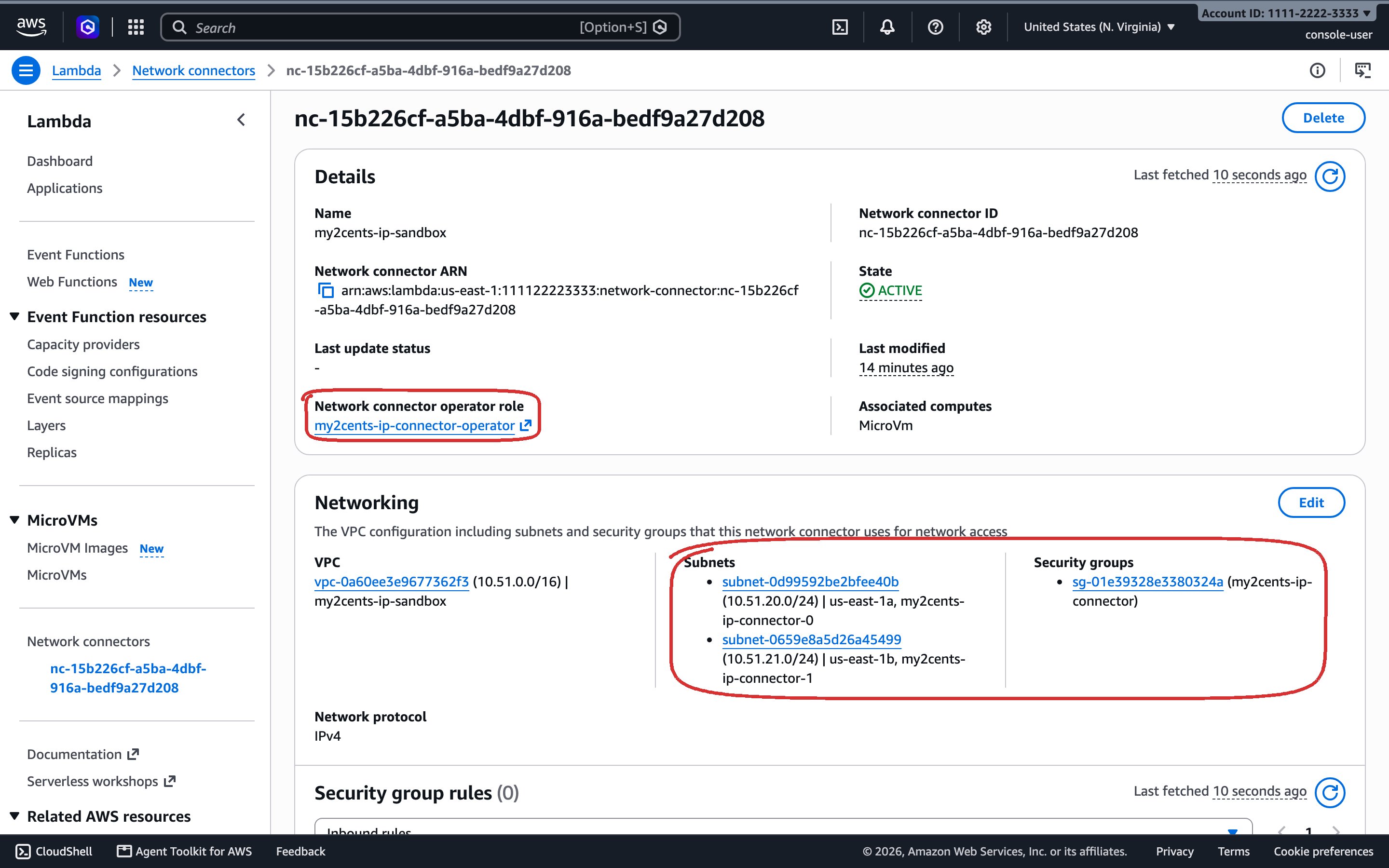
There’s no “no egress” option, either: when I built part 3, a MicroVM run with an empty egressNetworkConnectors list came up with INTERNET_EGRESS attached anyway. The only alternative to INTERNET_EGRESS is a VPC egress connector, a resource of its own under Network connectors in the console. Only connectors you create are listed there, not Lambda’s managed ones. This one is part 2’s. Circled: the operator role Lambda uses to create network interfaces in your subnets, and the subnets and security group that decide where the MicroVMs’ IPv4 traffic can go. The connector is IPv4 only; part 2 covers the IPv6 address Lambda also gives each MicroVM.
Test 10: Quotas and the bill
10_quota_bill.py compares every MicroVM quota with its AWS default. Four were lower on my account:
Max allocated ARM_64 MicroVM memory      applied     8.0  default  2048.0  <- below default
Max allocated X86_64 MicroVM memory      applied     8.0  default  2048.0  <- below default
Rate of RunMicrovm API requests          applied     1.0  default     5.0  <- below default
Burst rate of RunMicrovm API requests    applied     1.0  default     5.0  <- below default
The memory quota is enforced exactly. Four 2 GB MicroVMs started; the fifth failed with ServiceQuotaExceededException: The base maximum allocated memory limit has been reached for this account. Suspended MicroVMs count too: with all four suspended, a fifth still failed. The rate quota is looser than it reads: four concurrent run-microvm calls with client retries turned off all succeeded, in 0.2 to 0.44 s.
Raising the rate quota through Service Quotas opened two support cases automatically. Raising memory couldn’t go through Service Quotas at all, since it only accepts values above the 2,048 GB default, so I opened a support case from the console.
Results summary
| Operation | Measured (boto3 1.43.123, us-east-1, from my laptop) |
|---|---|
| Image build (first version / update) | 124.5–134.8 s / 113.7–124.6 s; one snapshot per Graviton generation |
run-microvm to RUNNING | median 1.83–1.84 s (1.58–2.10 s, two runs of 5) |
run-microvm to first HTTP 200 | median 2.28 s (2.02–2.54 s) |
| Suspend / resume (explicit) | median 0.52–0.76 s / 0.76 s; first request 290 ms after RUNNING |
Idle suspend at maxIdleDurationSeconds=60 | 62–69 s; CPU work and outbound traffic don't count |
| Auto-resume, first request | 0.31–0.85 s |
Terminate to TERMINATED | 1.29–1.34 s (running or suspended) |
| Endpoint bandwidth, 100 MiB (2 GB MicroVM) | 7.9–9.9 MiB/s up, 7.9–9.2 MiB/s down (documented: 4 MB/s) |
| Run hook payload limit | 4,096 bytes (documented: 16 KB) |
| Maximum duration | counts suspended time; 180 s cap ended at 183–185 s |
| 3 MicroVMs from one image, back to back | all answering after 4.48–4.52 s (1 call/s quota) |
| First import of a baked-in data-science stack | 4.1–43.6 s without a /validate warm-up, 1.07–1.46 s with one |
| Memory quota (8 GB on my account) | 4 × 2 GB running or suspended; the fifth is refused |
These are single-region measurements from a laptop on a home connection. Use them as a sense of scale, not a benchmark.
Pricing
MicroVMs are billed per second while running, on the baseline plus anything used above it (pricing, us-east-1, ARM):
| Resource | Rate |
|---|---|
| vCPU | $0.0000276944 per vCPU-second |
| Memory | $0.0000036667 per GB-second |
| Snapshot storage (images and suspended MicroVMs) | $0.08 per GB-month (images: one-week minimum) |
| Snapshot read / write | $0.00155 / $0.0038 per GB |
| Default MicroVM (1 vCPU, 2 GB) running | ≈ $0.126 per hour, ≈ $1.01 for the full 8 hours |
A suspended MicroVM stops paying for compute and pays snapshot storage instead, plus a snapshot write on each suspend and a read on each resume: about $0.011 per cycle for a 2 GB MicroVM, roughly five minutes of running time. Sessions that sit idle for long stretches cost far less than the running rate suggests; ones that suspend every few minutes don’t.
Cleanup
python 11_cleanup.py                 # terminate this repo's MicroVMs, delete the images
terraform -chdir=infra destroy       # bucket and roles
11_cleanup.py terminates every MicroVM started from this repo’s images and deletes the images. Images keep billing snapshot storage until you delete them, with a one-week minimum, so don’t skip it.
Verdict
Lambda MicroVMs do the hard part well. A MicroVM restored from a snapshot answered in about two seconds, suspended and came back in under a second each with its memory and processes intact, and auto-resume held a request for under a second while it woke up. The endpoint handled everything I threw at it, and it all lives in my own account, under IAM and CloudTrail.
Everything above the VM is yours to build, and the edges are sharp.
What works
- Snapshots. About 2 s to
RUNNINGplus a response, 0.5 to 0.8 s suspend, 0.8 s resume, memory and processes intact. - The endpoint. Per-MicroVM, per-port tokens; HTTP/2, WebSockets, SSE and 100-second requests; more bandwidth than documented.
/validateas a prefetch hint. A baked-in data-science stack went from 4 to 44 s on first import, across two runs, to under 1.5 s once the hook exercised it.- Your account, your controls. Image versions you can pin and deactivate, idempotent runs with
clientToken, and a session name that ties every AWS call to a MicroVM ID.
What doesn’t
- You build the sandbox. No exec, file or fork API, no tags, and a 4 KB run payload for per-MicroVM data.
- The lifecycle has traps. Idle only counts inbound endpoint traffic, so working agents get suspended. Open connections die on resume. The 8-hour cap counts suspended time, and
suspendedDurationSecondsignores manual suspends./terminatenever runs for a suspended MicroVM. Every MicroVM from one chipset’s snapshot shares Python’s random state. - The defaults aren’t a security boundary. Egress is the open internet, and the execution role is readable by everything in the VM.
- Quotas. My account got 8 GB and 1 call per second against Service Quotas defaults of 2,048 GB and 5. Quotas are per account and AWS says it raises low ones with usage, but raising memory yourself takes a support case.
Who should use it
Teams already on AWS who want VM isolation for untrusted code inside their own account, and who are ready to write the agent, the session bookkeeping and the egress and credential controls around it. If you want to call a sandbox SDK this afternoon and move on, this isn’t that. Part 2 builds the missing egress and credential layer with iron-proxy.