Lambda MicroVM: Hands-On Exploration of Self-Service Sandboxes
By Fabio Douek
Human-led, AI-assisted. Research and implementation done with AI tools, led, tested and edited by me. How posts are labeled
Jump to section
- Overview
- Architecture
- Setup
- Step 1: Part 2, with its control plane on
- Step 2: A sandbox image for people, not scripts
- Step 3: Deploy
- Testing
- Test 1: From sign-in to a terminal
- Test 2: Claude Code in the browser
- Test 3: The proxy feed and credential use
- Test 4: Tokens and cost
- Test 5: Vitals, and the cost of watching
- Test 6: Suspend, resume, and the same Claude screen
- Test 7: Close the tab, come back later
- Test 8: Several sandboxes, one quota
- Test 9: The DNS panel
- Test 10: Changing the allowlist and credentials live
- Test 11: Revoking a credential without a restart
- Test 12: AWS access: four roles and an optional session policy
- Test 13: The Secrets Manager guard
- Test 14: builder’s guardrails
- Pricing
- Cleanup
- Verdict
- What works
- What doesn’t
- Who should use it
Explain (TLDR) like I am...
Imagine a toy workshop you open from your tablet. You press a button, a little workshop appears, and a robot helper inside starts building whatever you ask for, while a window on the side shows every trip the robot makes to the shop.
When you put the tablet down, the workshop freezes, and when you come back the robot is holding the very same block. A grown-up at the shop door can change which shops are allowed while the robots work, but it is one door for every workshop, so the rule changes for all of them.
This is a hosted interface through which authenticated users run an AI coding agent in isolated machines in the organization's AWS account. Their real credentials stay in a proxy the organization runs, which logs every outbound request and signs AWS calls with a role an administrator chooses, and administrators can change or withdraw access within about 30 seconds.
The proxy is shared, so the record cannot attribute a request to one machine, and every policy change applies to all of them. The broadest AWS role can change most of what runs in the account's main Region, and read access can still reveal sensitive configuration. Treat it as a single-team tool, and grant those roles deliberately.
The intervention is a browser terminal into a disposable machine where an AI agent works, with vital signs on the side: network calls, credential use, token consumption and CPU. A suspended session came back in about a second with the agent exactly where it was.
The proxy's prescription, meaning which sites, keys and AWS permissions the agents get, can be adjusted while they run, but one prescription covers every patient. Side effects to monitor: an open terminal tab keeps a machine awake and billing.
Notice how much calmer an agent session feels when you can close the laptop without losing anything. The work is frozen, not gone, and coming back picks up mid-sentence, so stepping away stops being a decision.
The panels change the relationship too: seeing every request and every credential swap replaces vague trust with something you can look at. The open question is sharing. Everyone on the proxy sees everyone's traffic, and one admin's change reaches every sandbox, which needs a conversation about who holds that role.
Think of it as a practice room you book from a browser. The band starts playing within seconds, a sound engineer's desk shows every channel that goes out, and a pause pedal freezes the whole room mid-bar.
Come back later, release the pedal, and the band is on the same beat in about a second. The engineer can repatch channels between songs without stopping the music, but it is one desk for every room in the building, and an open line to a room keeps it lit and billing.
The pitch is "Claude Code in a browser tab, in your own AWS account, with nothing to install and nothing to lose." Sign in, click once, and an agent is working in an isolated machine, with every request and token on screen and policy you can change while it runs.
The proof points are concrete: seconds to a running sandbox, about a second to resume one, and proxy changes live within about 30 seconds. The caveats are honest: one shared proxy, a MicroVM quota that differs per account, and a reference implementation rather than a product.
 See the source code here: lambda-microvm-workspace
Overview
Part 1 measured what a Lambda MicroVM can do, and part 2 fenced its network and moved its credentials into a proxy. This post, the last of three, asks the end-user question: what does it take to put that in front of a developer as something they’d actually use? A browser tab, a sandbox per task, Claude Code in a terminal, and enough visibility to trust what the agent is doing.
Treat it as an exploration, not a product: a reference implementation of a self-service playground, not something to run in production. I wanted to see what self-service sandboxes look like when they’re built from these parts: what Lambda MicroVMs make easy, where they push back, and which ideas hold up once a real person, rather than a test script, is clicking around. So the workspace is deliberately broad and a little rough. It tries things (a live proxy feed, a policy page that changes the proxy while sandboxes run, AWS calls from a terminal that holds no AWS keys) to find out what they cost and what they reveal, and several of the most useful findings below came from features that didn’t work the first time.
So I built one, the My2cents.ai Lambda MicroVM Playground, and deployed it to AWS. You sign in with Cognito, create a sandbox of 1, 2, 4 or 8 GB, and get a terminal into it with Claude Code ready to run. The terminal lives in tmux inside the MicroVM, so closing the tab, losing the network or suspending the sandbox doesn’t lose the session. Around the terminal, five panels show what the sandbox does: every request through part 2’s iron-proxy and which credential was swapped in, how often each credential is used, Claude Code’s token usage and cost, the MicroVM’s vitals and timers, and the DNS lookups in part 2’s sandbox VPC that its resolver doesn’t answer from cache. Admins get a Proxy policy page that changes the proxy’s allowlist, credentials and AWS role while sandboxes run, and a Config tab that shows the proxy’s config as stored next to what iron-proxy applied.
Every sandbox runs on part 2’s design as it is: part 2’s sandbox VPC, its connector, and its single iron-proxy, in transparent mode, with no proxy settings in the sandbox. The policy page needs part 2’s optional control plane, which you switch on in part 2 before deploying the workspace. I wrote one spec and had four Claude Code subagents build the sandbox image, the backend, the frontend and the infrastructure in parallel, then integrated and tested the deployed result myself. The results below come from two rounds: the first version of the workspace, on 2026-11-03, and the shared-proxy design on part 2’s two VPCs, on 2026-11-04, both in us-east-1.
Architecture
Four choices shaped the rest:
- The browser never talks to a MicroVM directly. Any endpoint or shell token for a MicroVM is root in that sandbox, so handing tokens to browsers would hand out root. The API mints short-lived shell tokens itself and bridges the terminal.
- tmux, not the WebSocket, is the session. Part 1 showed that processes survive a suspend and connections don’t. So the shell attaches to a tmux session called
main, and every reconnect just reattaches. - One proxy for every sandbox. All sandboxes share part 2’s iron-proxy, its policy and its audit log. Part 2 showed that the proxy can’t tell them apart, so the Proxy, Credentials and DNS panels can’t tie a line to one sandbox, and a policy change applies to every sandbox at once. Per-sandbox identity at the proxy is future work.
- Policy lives in S3, and applies by reload. With part 2’s control plane on, iron-proxy runs with a control sidecar that watches its config in S3, assumes the AWS role the policy names, and reloads iron-proxy over loopback at its next check, within about 30 s. No restart, and no sandbox is touched.
Setup
Step 1: Part 2, with its control plane on
The workspace builds on part 2’s two VPCs, NAT gateway, ECS cluster, CA and iron-proxy, reads them from part 2’s Terraform state, and adds a second public subnet to part 2’s proxy VPC for its ALB. It needs part 2’s optional control_plane switch, which you turn on in part 2 before deploying the workspace, in terraform.tfvars so later applies keep it:
echo 'control_plane = true' >> infra/terraform.tfvars   # in part 2's directory
terraform -chdir=infra apply
It changes three things in part 2’s infra/:
- The config moves to S3. A bucket,
my2cents-ip-control-<random>, holds iron-proxy’s config (iron-proxy.yaml) and the AWS scope (aws-scope.json: the role and the optional session policy). The sidecar writesstatus.jsonnext to them, and the workspace keeps the metadata of the credentials admins add incredentials.json; their values go to Secrets Manager undermy2cents-ip/user/. - A control sidecar joins iron-proxy’s task, within the same 0.5 vCPU and 1 GB. It polls S3 every 30 s (part 2’s
control_poll_s). On a scope change it assumes the role the scope names, with the optional session policy; on any change it calls iron-proxy’s reload on loopback with a management token, and writesstatus.json, including what STS reported about the session token. So a change goes live at its next check: within about 30 s, plus a fraction of a second, since the reload follows 0.08 to 0.24 s after the sidecar fetches the new object. The sidecar also refuses any config that lists Secrets Manager inallowed_servicesor on the allowlist; that check was tested offline, against 16 configs in the sidecar’s image, not in a live run. - AWS calls are signed with a selectable role instead of the task role, in a session named
proxy-<role>-v<scope version>.
Turning it on replaces iron-proxy’s task: the apply took 20 s and the rollout about 3 minutes. Part 2’s README has the details.
The four roles, named my2cents-ip-<role>, trust only iron-proxy’s task role:
| Role | Permissions |
|---|---|
view-only (default) | AWS ViewOnlyAccess: list and describe, no data reads |
read-only | AWS ReadOnlyAccess: reads, including object and item data |
data-reader | part 2's demo bucket and the my2cents-demo-* DynamoDB tables, read-only; nothing else |
builder | AWS PowerUserAccess with guardrails: us-east-1 only, no changes to this stack or part 2's, no role assumption; it can create billable resources |
Every role also allows secretsmanager:GetSecretValue on the proxy’s own secrets (part 2’s three, and the credentials admins add under my2cents-ip/user/), because iron-proxy fetches the secrets it injects with this same session. And every role denies every other Secrets Manager action and secret, and ssm:GetParameter*, which returns SecureString values decrypted.
Step 2: A sandbox image for people, not scripts
images/sandbox/ repeats part 2’s image (Claude Code, gh, git, the AWS CLI and the proxy’s CA) and adds tmux, tini as PID 1 (part 2’s agent as PID 1 left zombie processes behind), and a Claude Code that starts straight into its prompt. That last part took experimenting: starting claude in tmux with only the placeholder key and removing one setting at a time. In Claude Code 2.1.317, four keys in ~/.claude.json and two in settings.json decide it:
| Key | Without it |
|---|---|
hasCompletedOnboarding: true | the theme picker and onboarding |
customApiKeyResponses.approved: [last 20 characters of the key] | ”Do you want to use this API key?”, defaulting to No |
projects["/root/work"].hasTrustDialogAccepted: true | the folder trust prompt |
hasSeenAutoDefaultNudge: true | an “auto mode?” prompt when the proxy is unreachable, where Enter changes your default |
permissions.defaultMode: "bypassPermissions" (settings) | manual mode, asking before every edit and command |
skipDangerousModePermissionPrompt: true (settings) | a warning screen before bypass mode starts |
Bypass mode is a deliberate choice: the MicroVM is the sandbox, its only credentials are placeholders, and every request it makes shows up in the proxy feed. A permission prompt in a terminal nobody is watching just stalls the agent. Claude Code also refuses bypass mode as root unless IS_SANDBOX=1 is set.
The image’s /validate hook warms Claude Code, node, git and the AWS CLI (part 1 showed that what /validate touches gets prefetched). One gotcha: Lambda drops each /validate request somewhere under 12 seconds in, so the first build failed until the warm-up ran in the background, answering 503 until it was done.
Step 3: Deploy
bash scripts/deploy.sh                                   # image, Terraform, backend, frontend
bash scripts/create_user.sh --admin you@example.com      # prompts for a password; --admin may edit policies
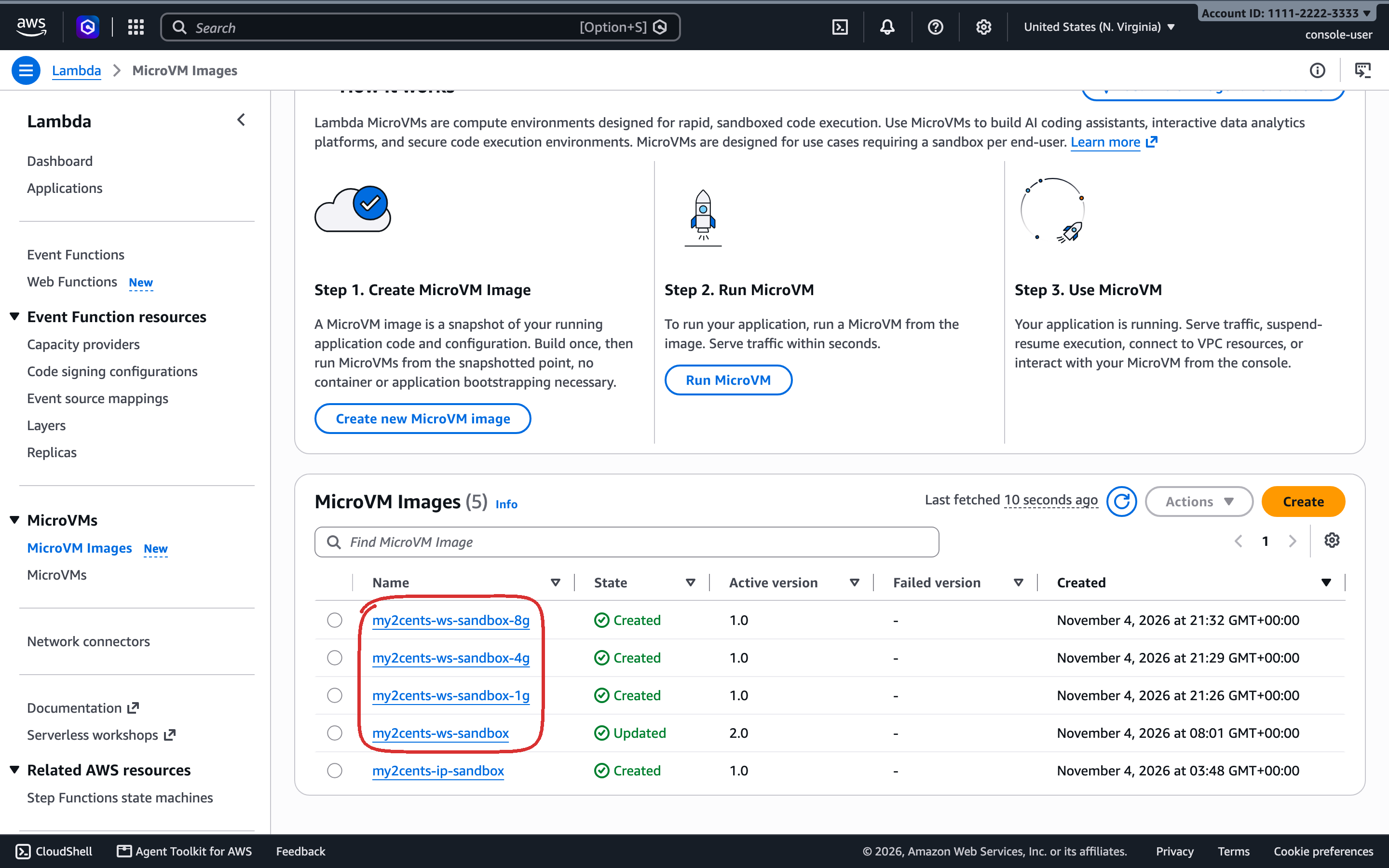
scripts/deploy.sh checks that part 2 is the two-VPC stack (and warns if its control plane is off: the workspace still works, but the Proxy policy page stays read-only and revoke restarts the proxy), builds the four sandbox images, one per size, one after another (about 3 minutes each) when they’re missing or were built for another CA, builds the API for ARM64 and pushes it to ECR, applies infra/, builds the frontend and syncs it to S3, and waits for the service. The first deploy took about 13 minutes when there was a single image; I haven’t timed one with four. The four image builds took 181 to 196 s each, about 12.6 minutes back to back, and deploy.sh runs them alongside the API, Terraform and the frontend, then waits for them, so expect at least about 13 minutes; Terraform creates 38 resources, 39 with the control plane’s IAM policy. It authenticates to ECR with a small credential helper rather than docker login, which needs the macOS keychain and fails in a non-interactive shell. The API’s task role is scoped to the four sandbox images, plus lambda:PassNetworkConnector on part 2’s connector and servicequotas:GetServiceQuota to read the MicroVM quota. Policy writes need the Cognito admins group: a change reaches every sandbox, and a role like builder reaches most of the account, so choosing it shouldn’t be every user’s call.
Each size is its own MicroVM image, because a MicroVM’s memory comes from its image: each image’s version sets minimumMemoryInMiB (1024, 2048, 4096 or 8192).
Testing
Test 1: From sign-in to a terminal
Sign-in is Cognito’s managed login; the app gets an ID token with PKCE and sends it to the API on every call, and as the first message on each WebSocket. The New sandbox form picks a size (Small 1 GB, Medium 2 GB by default, Large 4 GB or X-Large 8 GB, each its own image), the idle time before it suspends (1 minute up, 15 by default), its lifetime (up to 8 hours, suspended time included), whether to terminate it after some time suspended, whether connecting resumes it, and extra environment variables, which aren’t for secrets: they’re visible inside the sandbox and stored with its record. Creating it calls run-microvm with part 2’s connector, HTTP_INGRESS, SHELL_INGRESS and those settings. The sandbox gets the placeholders, the CA settings, its name, AWS_SDK_UA_APP_ID and AWS_REQUEST_CHECKSUM_CALCULATION (Test 12), and no proxy settings. Measured through CloudFront:
| Step | 2026-11-04, two runs | 2026-11-05 |
|---|---|---|
POST /api/sandboxes returns | 0.32 s / 0.22 s | 0.26 to 0.29 s |
| …then the in-VM agent answers | 1.38 s / 4.02 s later | 1.35 s later |
In the browser, from clicking Create to a running sandbox with its terminal attached took 2.40 s; the running state and the attached terminal arrived in the same poll. The terminal opens on a tmux session with a short welcome message, in /root/work.
There’s no offline option. An empty list of egress connectors doesn’t cut a MicroVM off: Lambda attaches its managed INTERNET_EGRESS connector instead. I ran one with [] to check: inside, api.github.com resolved to a real GitHub address and answered directly, with no allowlist, no key swap and no audit log. So the API refuses to run a sandbox without part 2’s connector, with a 503.
Test 2: Claude Code in the browser
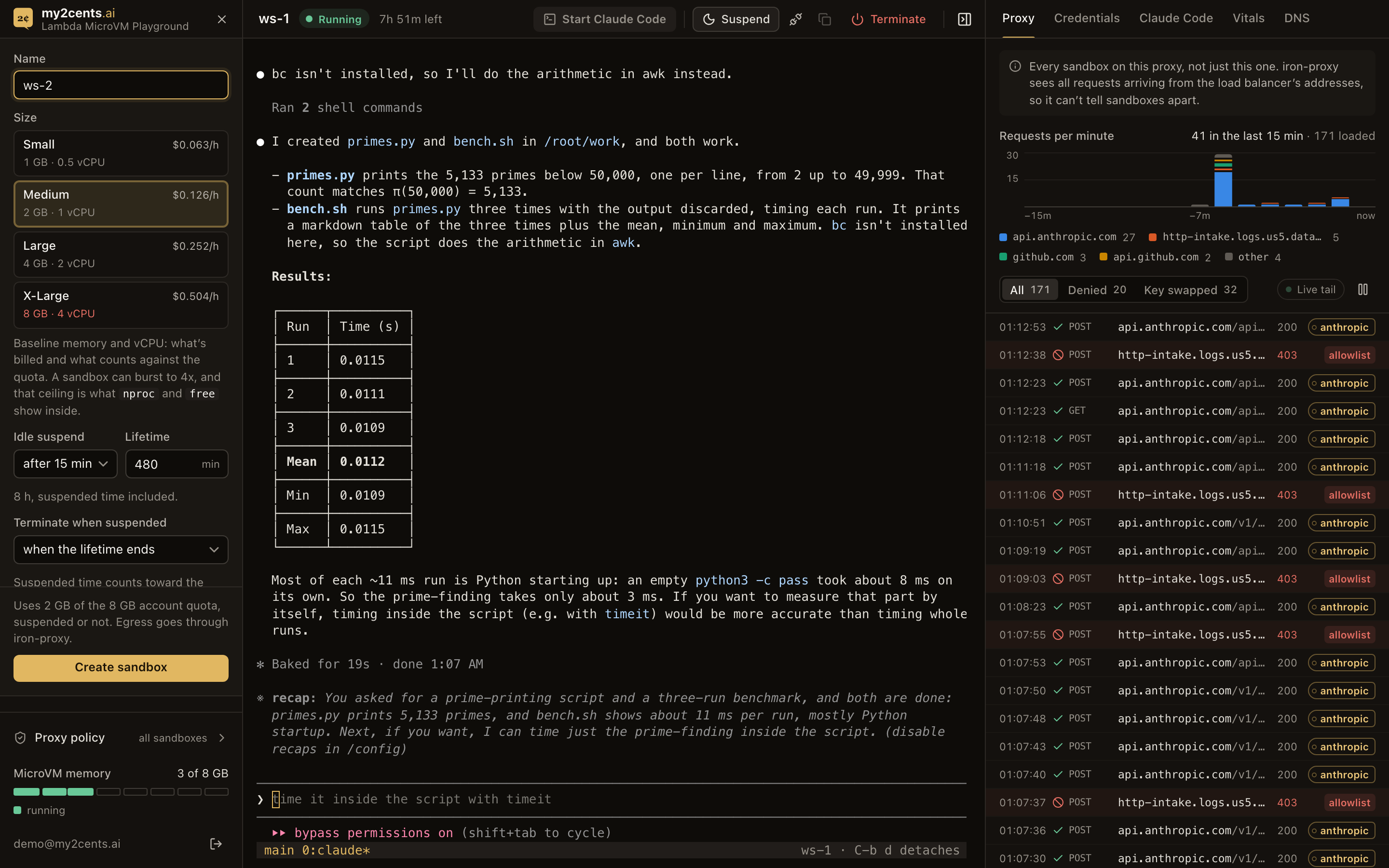
“Start Claude Code” types claude into the terminal, and Claude Code opens straight into its prompt: Opus 5.5, ~/work, bypass permissions on. On an earlier build of the image the first start took about 18 seconds; with the /validate warm-up, the first version had a ready prompt 1.3 s after the click in one fresh sandbox and 1.7 s in another. I asked it to create hello.py, print the first ten Fibonacci numbers and show me the output; it wrote the file, ran it and printed 0 1 1 2 3 5 8 13 21 34 in about five seconds of work. Small tasks like that (a notes file, a to-do list, a benchmark script it wrote and ran) came back in 7 to 8.5 seconds from pressing Enter. On the shared-proxy stack, a headless claude -p answered in 5.9 s, and in 5.1 s in a later run.
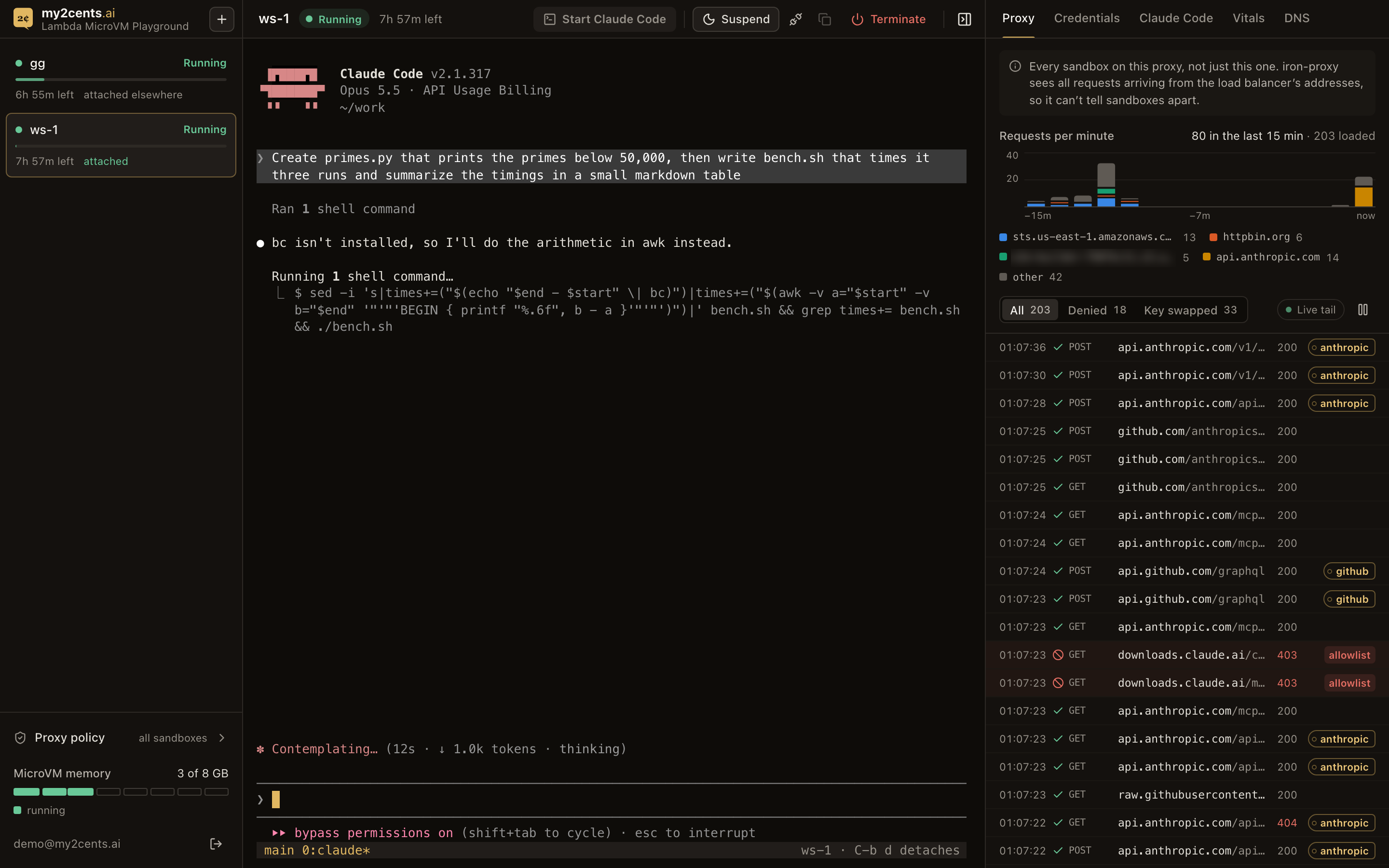
The first version left the button enabled while Claude Code was running, so a second click typed claude into Claude’s own prompt as a message. Now the live-stats poll also asks tmux what’s running in the pane, and the button greys out as soon as you click it, stays off while the pane runs Claude Code, and comes back a couple of seconds after /exit.
The proxy panel shows Claude Code’s start-up as it happens: calls to api.anthropic.com (bootstrap, settings, event logging, the MCP registry, then messages) with the Anthropic key swapped in where Claude Code sends one, and the hosts the allowlist refuses, such as downloads.claude.ai. A developer never sees any of that without the panel.
Test 3: The proxy feed and credential use
The Proxy tab streams iron-proxy’s audit log through CloudWatch Logs Live Tail: time, method, host and path, status, allowed or denied (and by which stage), a key tag for every credential swapped in, and an “aws” badge for re-signed AWS calls. The Credentials tab counts uses per credential over the last 15 minutes. On the first version, the cards read:
anthropic  39 uses · api.anthropic.com
demo        1 use  · httpbin.org
github      9 uses · api.github.com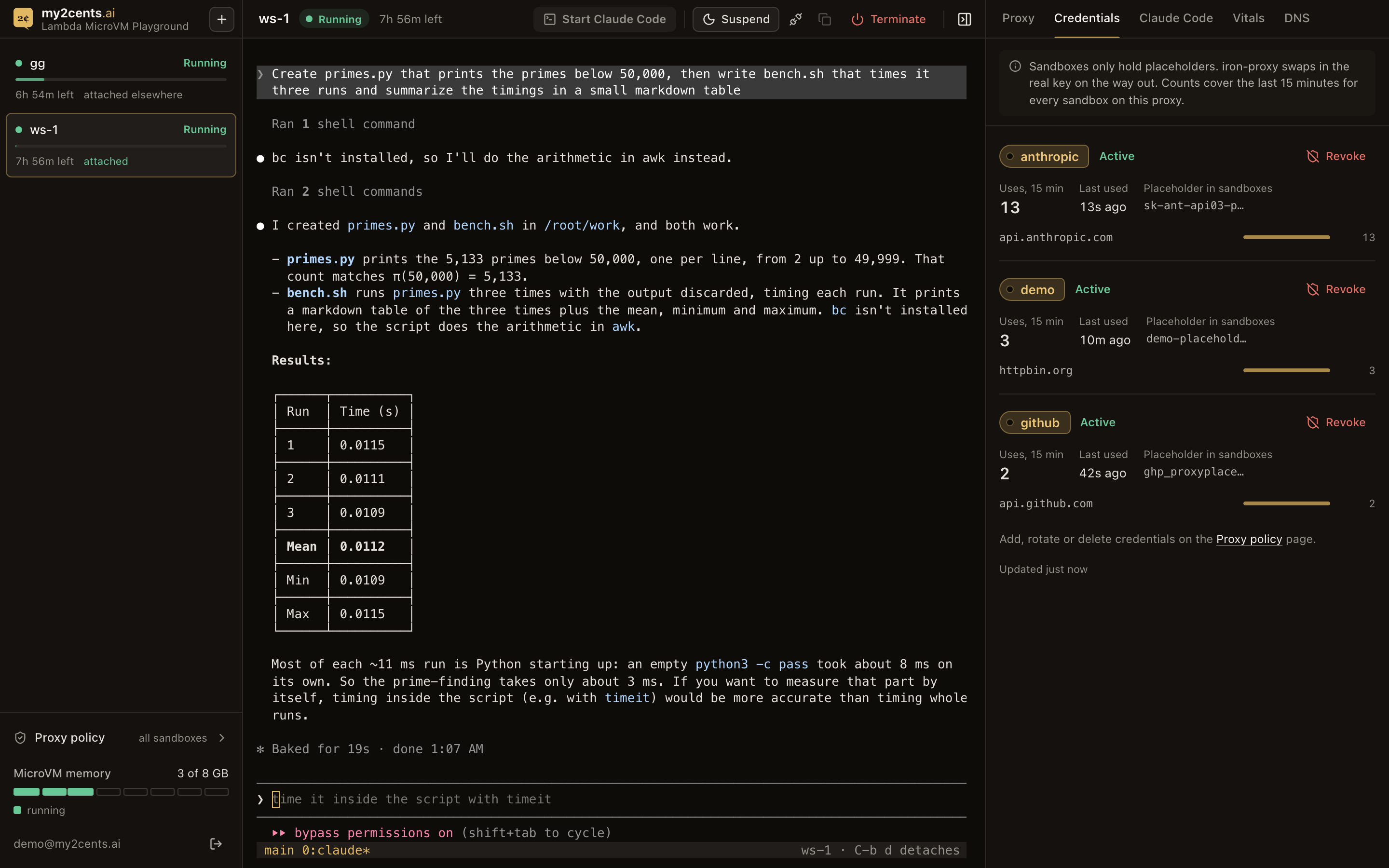
Both panels say the same thing at the top: they cover every sandbox on this proxy. iron-proxy sees every request coming from the load balancer’s addresses (part 2), so the feed can’t be filtered to one sandbox, and neither can the counters. For one developer that’s fine; for a team it means everyone sees everyone’s traffic. On the shared-proxy stack, one 50-second sample of the event stream carried two test sandboxes’ proxy and DNS lines together, 77 events, and a second user, not an admin, got the same 77.
Test 4: Tokens and cost
The Claude Code tab reads Claude Code’s own session transcripts (~/.claude/projects/**/*.jsonl) through the agent, and prices them with Anthropic’s list prices. This one is per sandbox, since it reads the sandbox itself, not the proxy. After the Fibonacci task, on the first version (the proxy doesn’t change this path):
Estimated cost $0.05 · Tokens 63.1k · Turns 1 · Sessions 1
session 1698f548…  claude-opus-5-5  input 6 · output 397 · cache read 56.6k · cache write 6.2k
Almost all of it is cache reads: Claude Code’s system prompt and tools, re-read on every call. That’s the number to watch when a sandbox runs for hours.
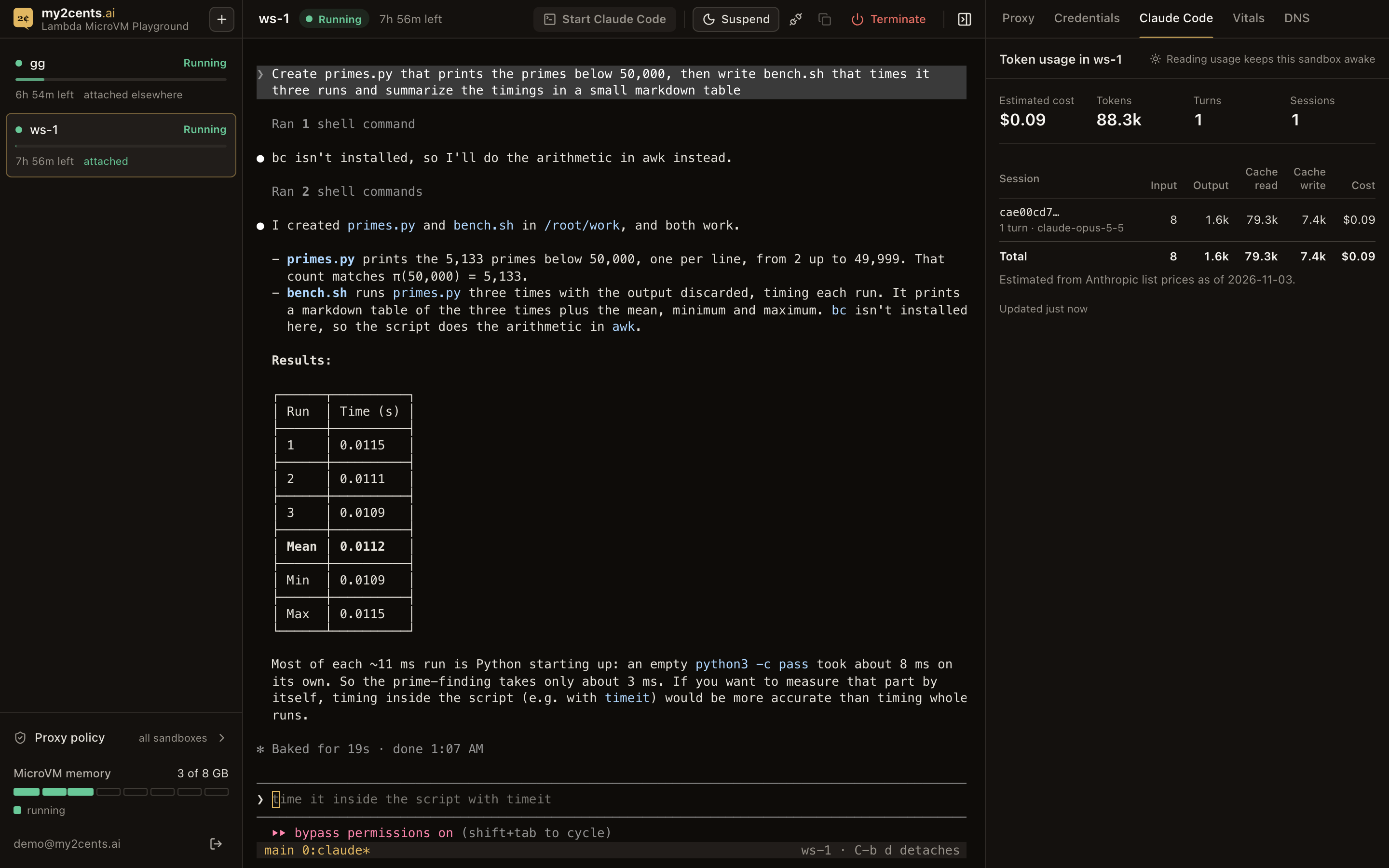
On the current version, after the primes task in the screenshot above, the tab showed one turn at 88.3k tokens, about $0.09, again mostly cache reads:
Test 5: Vitals, and the cost of watching
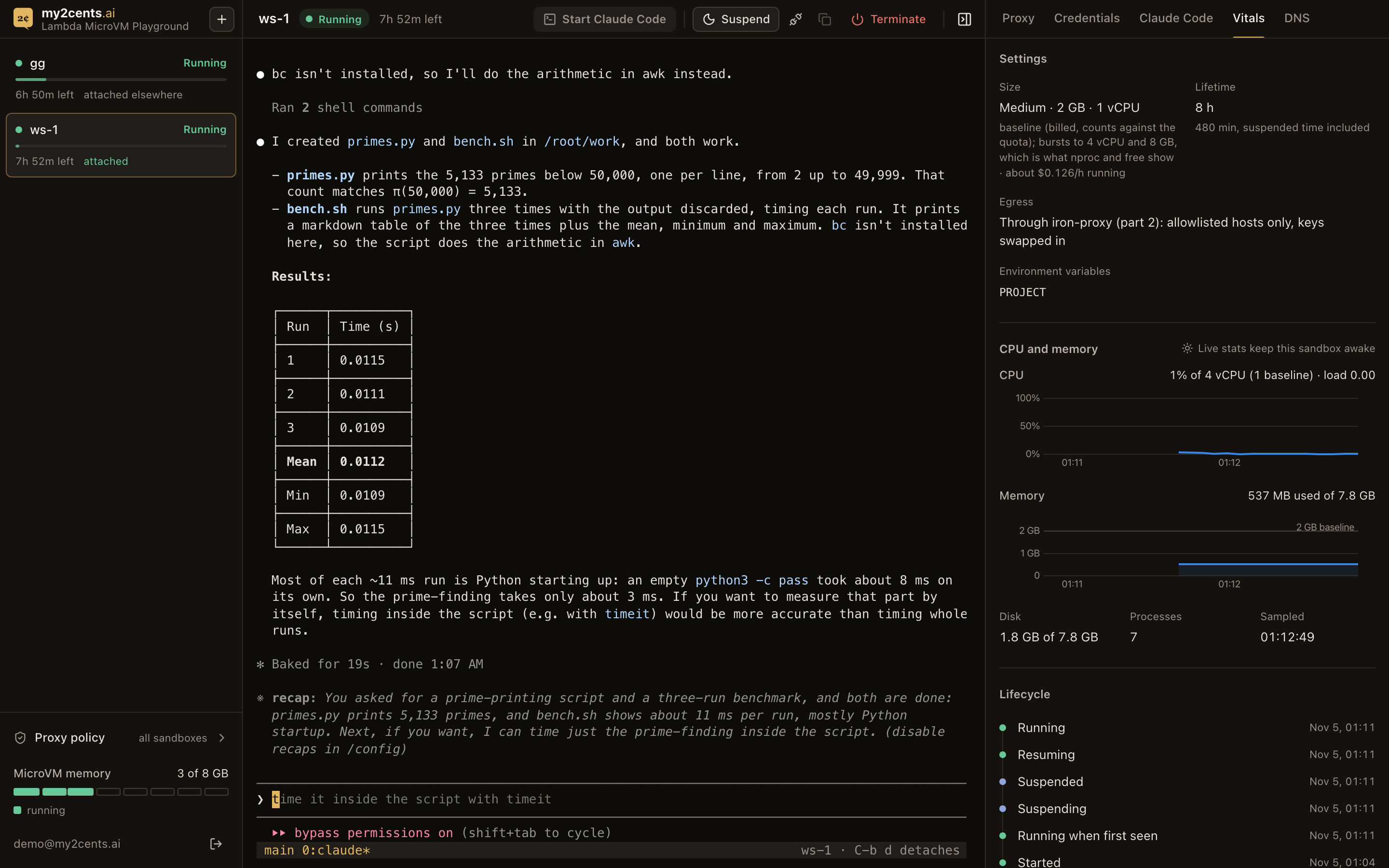
The Vitals tab shows the state, uptime, a lifetime bar (“7h 59m left of 8h · stops at 03:43, suspended time counts”), the idle policy, CPU and memory against the sandbox’s size, disk and processes, and a lifecycle timeline. The size is a baseline, what’s billed and what counts against the quota; inside, nproc and free show the burst ceiling, 4x the size (a Medium sandbox sees 4 vCPU and about 8 GB), and the panel says so. Live CPU and memory come from the agent inside the MicroVM, and asking the agent anything is inbound traffic, which keeps the sandbox awake (part 1). So the panel only samples while a terminal is attached in this browser, and says so (“Live stats keep this sandbox awake”); otherwise it shows the last samples and reads state from the control plane, which doesn’t count as activity. Ask for live stats on a suspended sandbox and the API returns an explanation instead of waking it.
Test 6: Suspend, resume, and the same Claude screen
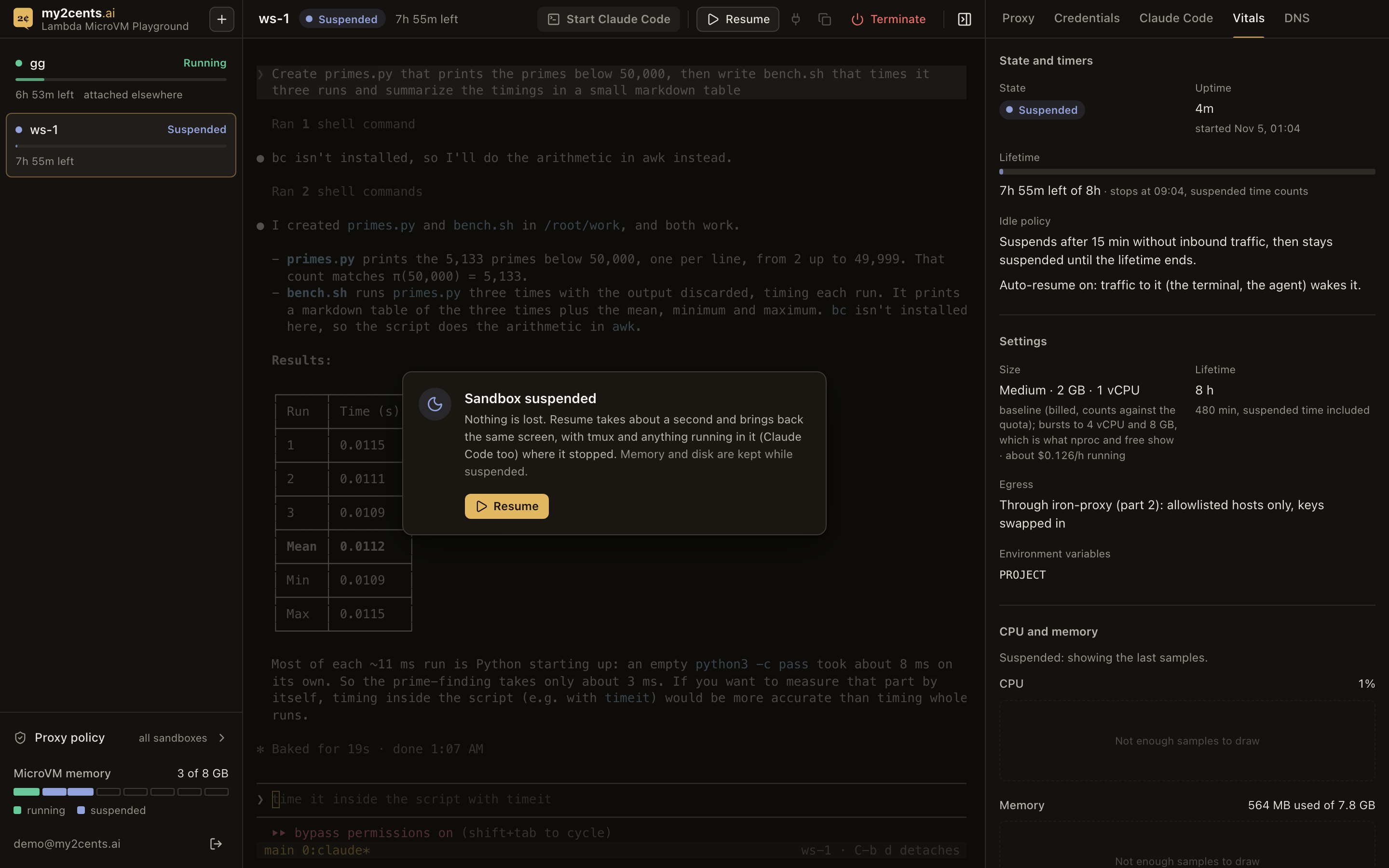
Suspend freezes the MicroVM; the terminal shows a “Sandbox suspended” overlay with a Resume button. Resume brings it back and the terminal reattaches to the same tmux session, with Claude Code’s screen exactly as it was and the same process IDs.
The first version took 10 to 30 seconds to show that, though the API calls take under a second. Two caches were to blame: the API served a cached pre-action state for 2 seconds after each call, and the UI’s 10-second list poll then put the old state back, which re-opened the suspended overlay over a live terminal. After the fix (the API polls the control plane every 0.25 s until the state settles and pushes the change to the browser at once), measured through CloudFront over three cycles by a script calling the API, on the first version (the proxy doesn’t change this path):
| From the API call | Median (range) |
|---|---|
| Suspend: state shows SUSPENDED | 0.48 s (0.48–0.83) |
| Suspend: the terminal bridge reports suspended | 0.63 s (0.61–0.70) |
| Resume: state shows RUNNING | 0.78 s (0.76–0.86) |
| Resume: the terminal bridge reports reattached | 0.66 s (0.64–0.73) |
Under a second for the state either way. In the browser, the suspended overlay appeared 0.66 to 0.84 s after clicking Suspend, and the same Claude Code screen was back 1.03 to 1.06 s after clicking Resume. After a resume, Claude Code answered a new prompt in 2.4 s. One detail matters for the UI: opening the shell on a suspended MicroVM resumes it by itself (0.84 s) when the sandbox’s Resume on connect setting is on, the default, and it can briefly report PENDING, not RUNNING, so the UI has to read PENDING after SUSPENDED as “resuming”, not “starting”. On the shared-proxy stack, the API returned SUSPENDED in 0.89 s and RUNNING in 0.47 s, with the agent answering 0.51 s after the resume and a request through the proxy working; a later run took 0.93 s and 0.77 s.
Test 7: Close the tab, come back later
The point of tmux and suspend is that you can walk away. On the first version (the proxy doesn’t change this path), I set a sandbox to the shortest idle policy the form offered then (5 minutes; it now goes down to 1, and the default is 15), gave Claude Code a task, and closed the tab once it answered:
| After closing the tab | What happened |
|---|---|
| 0.06 s | the API closes the terminal: the last inbound traffic |
| 5 min 7.6 s | SUSPENDING |
| 5 min 9.8 s | SUSPENDED |
Claude Code kept calling api.anthropic.com every 30 seconds or so the whole time, and, as in part 1, outbound traffic doesn’t count as activity. Coming back right after it suspended, the workspace opened signed in, with the sandbox selected and a “Sandbox suspended” card 0.79 s after loading. One click on Resume: Running at 0.86 s, and the same Claude Code screen, overlay gone, at 1.29 s.
The sandbox doesn’t resume on its own when you open the page. That’s on purpose: waking a sandbox is a billing decision, and you might only have opened the tab to look at a panel. Sometimes the only difference after a resume is a recap: line that Claude Code itself adds after it’s been idle.
The catch is the other direction. Any tab with the terminal attached keeps the sandbox awake indefinitely, because a terminal is inbound traffic (and an attached tab also polls live stats). During testing, a second tab I’d forgotten about kept a sandbox awake well past its 5-minute idle policy. The sidebar shows “attached elsewhere” when another browser holds the terminal, but the workspace doesn’t detach idle tabs on its own, and I left it that way: detaching a tab while Claude Code works through a long task would let the sandbox suspend mid-task, since the agent’s own calls don’t count. For the same reason, the app attaches only to the sandbox you clicked, or the one you had open last time; anything it picks on its own opens detached, with an Attach button.
Two settings in the New form shape what happens after an idle suspend. Terminate when suspended ends a sandbox after some time suspended, but Lambda counts that time only after an idle suspend: a sandbox suspended with the Suspend button stays until its lifetime ends. Resume on connect off means nothing wakes a suspended sandbox but the Resume button: opening its terminal says “Suspended: press Resume” instead.
Test 8: Several sandboxes, one quota
The “N of 8 GB” in the sidebar’s memory meter is this account’s Service Quotas limit for MicroVM memory (“Max allocated ARM_64 MicroVM memory”), and it differs per account. The app reads it from Service Quotas, caches it for an hour, and says where the number came from in the meter’s tooltip. Mine is 8 GB, against a default of 2,048 GB listed in Service Quotas. As part 1 found, raising it takes a support case, or AWS raises it as your usage grows. Every running or suspended sandbox counts at its size: four Medium sandboxes, or one X-Large, fill my 8 GB.
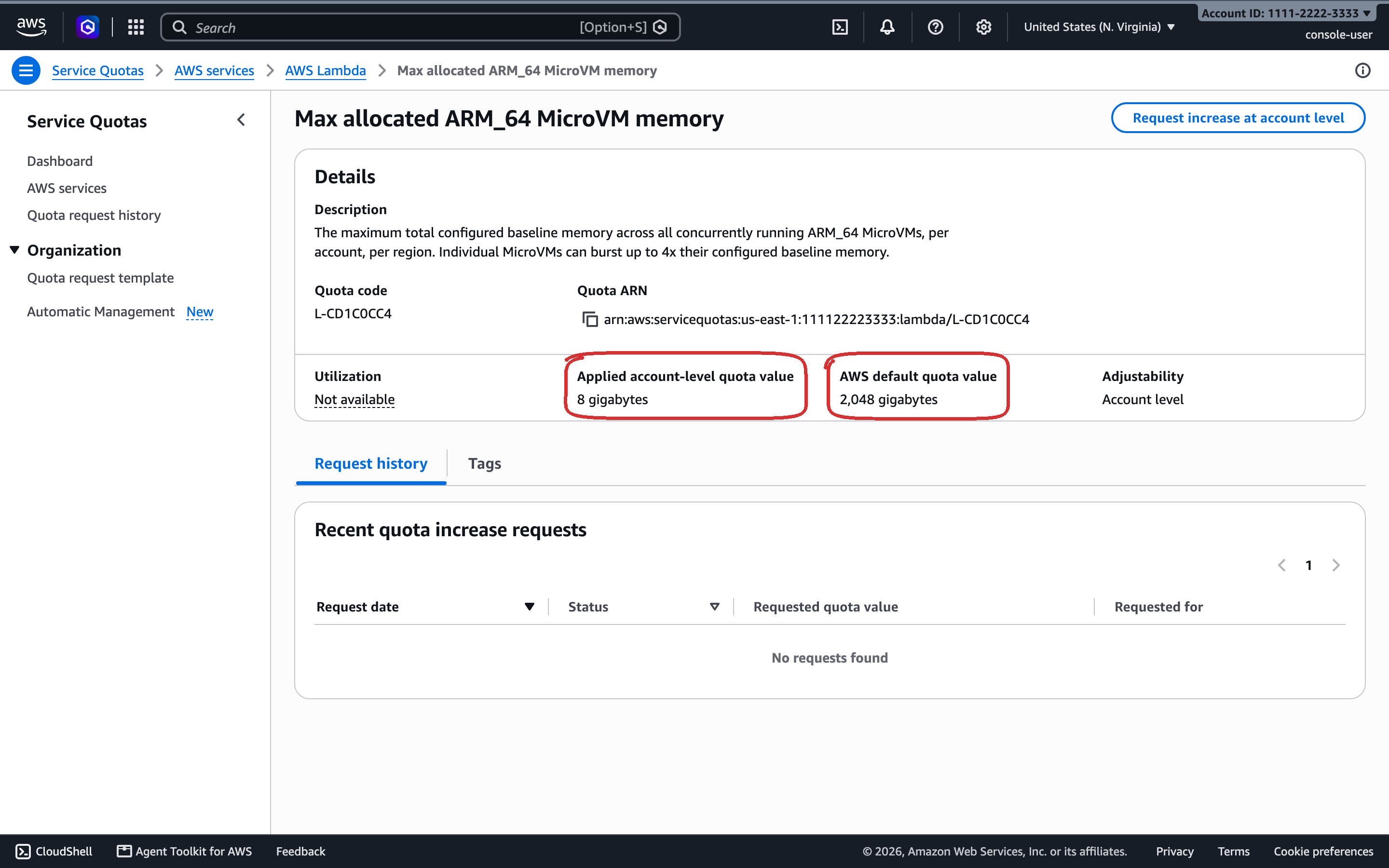
The quota’s own description also says MicroVMs “can burst up to 4x their configured baseline memory”, which matches what free showed inside a sandbox (Test 5).
On the first version, when every sandbox was 2 GB, I created four in a row:
| Step | Time |
|---|---|
| Create: the sandbox appears in the sidebar | 0.25 to 0.34 s |
| Create: terminal attached | 2.0 to 2.45 s |
| Switch to another sandbox: terminal attached | 0.37 to 0.42 s |
Each terminal kept its own tmux session: a different line typed into each was still there after switching away and back. The memory meter in the sidebar went from 2 to 8 GB and turned red.
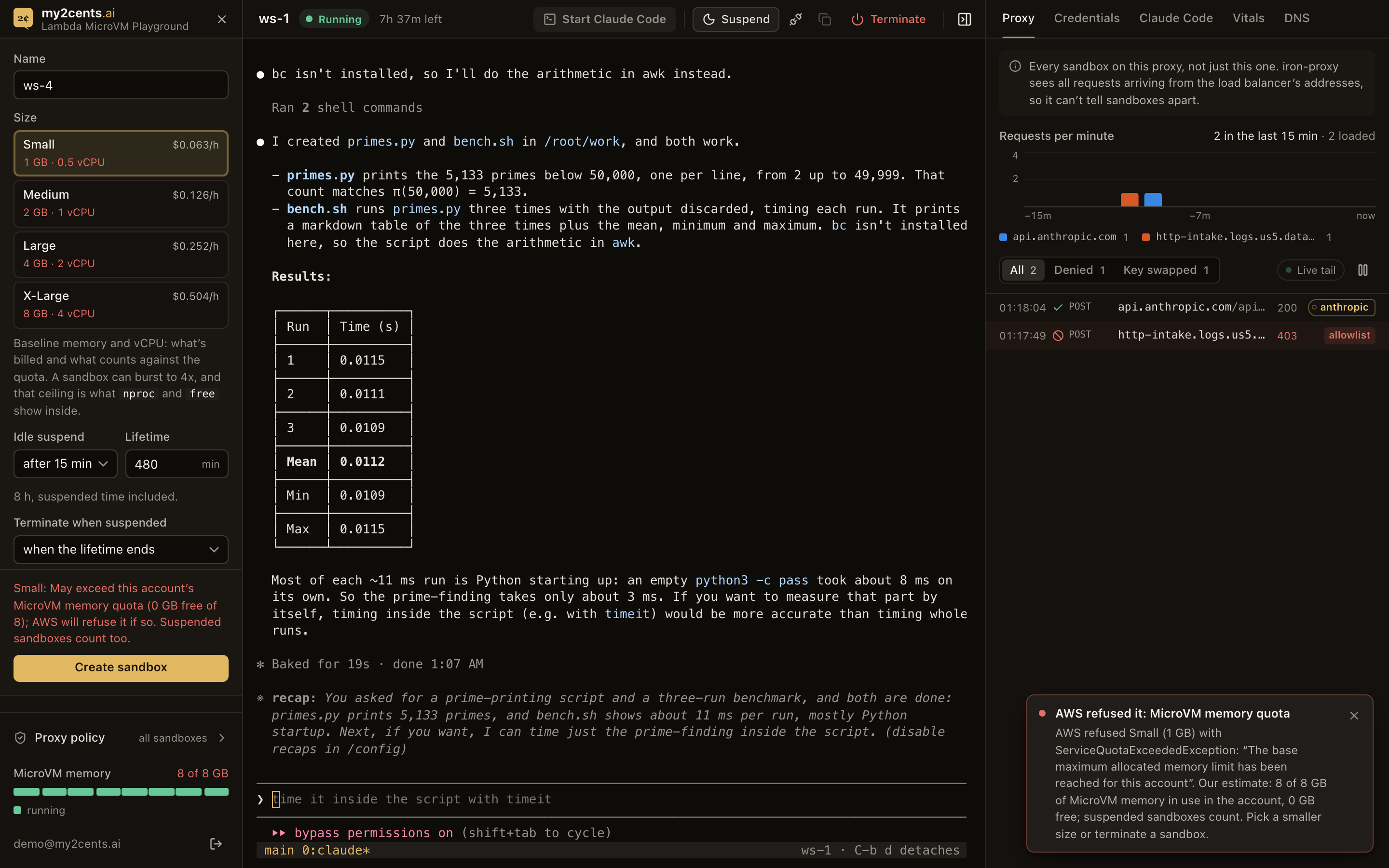
The New form shows the app’s estimate: a size that may not fit what’s left is flagged “May exceed this account’s MicroVM memory quota (0 GB free of 8); AWS will refuse it if so.” But Create stays enabled. The app never blocks a create on its own estimate; it leaves the refusal to AWS. A create that doesn’t fit goes to Lambda, which refuses it with ServiceQuotaExceededException (as in part 1), and the API passes that on as a 409 with AWS’s own words, “The base maximum allocated memory limit has been reached for this account”, followed by the app’s estimate. The quota is per account, not per user, so the meter also shows sandboxes started by other users.
Test 9: The DNS panel
The DNS tab streams the Route 53 Resolver query log of part 2’s sandbox VPC. In the first version, with HTTPS_PROXY and a single VPC, the panel saw little: sandboxes resolved few names themselves, and most of the log was the workspace API’s own lookups. In transparent mode every name a sandbox looks up goes through that resolver, and every lookup gets the override, a CNAME to the proxy, so nothing resolves past it. Names that aren’t on the proxy’s allowlist get a warning icon. The resolver logs only what it doesn’t answer from its cache, so a repeated lookup appears once.
In a sandbox, nothing resolves past the override, real or made-up:
$ dig +short api.github.com
proxy.sandbox.internal.
10.50.11.10
10.50.10.10
$ dig +short e2e-<random>.example.com           -> proxy.sandbox.internal. 10.50.10.10 10.50.11.10   (nothing recurses)
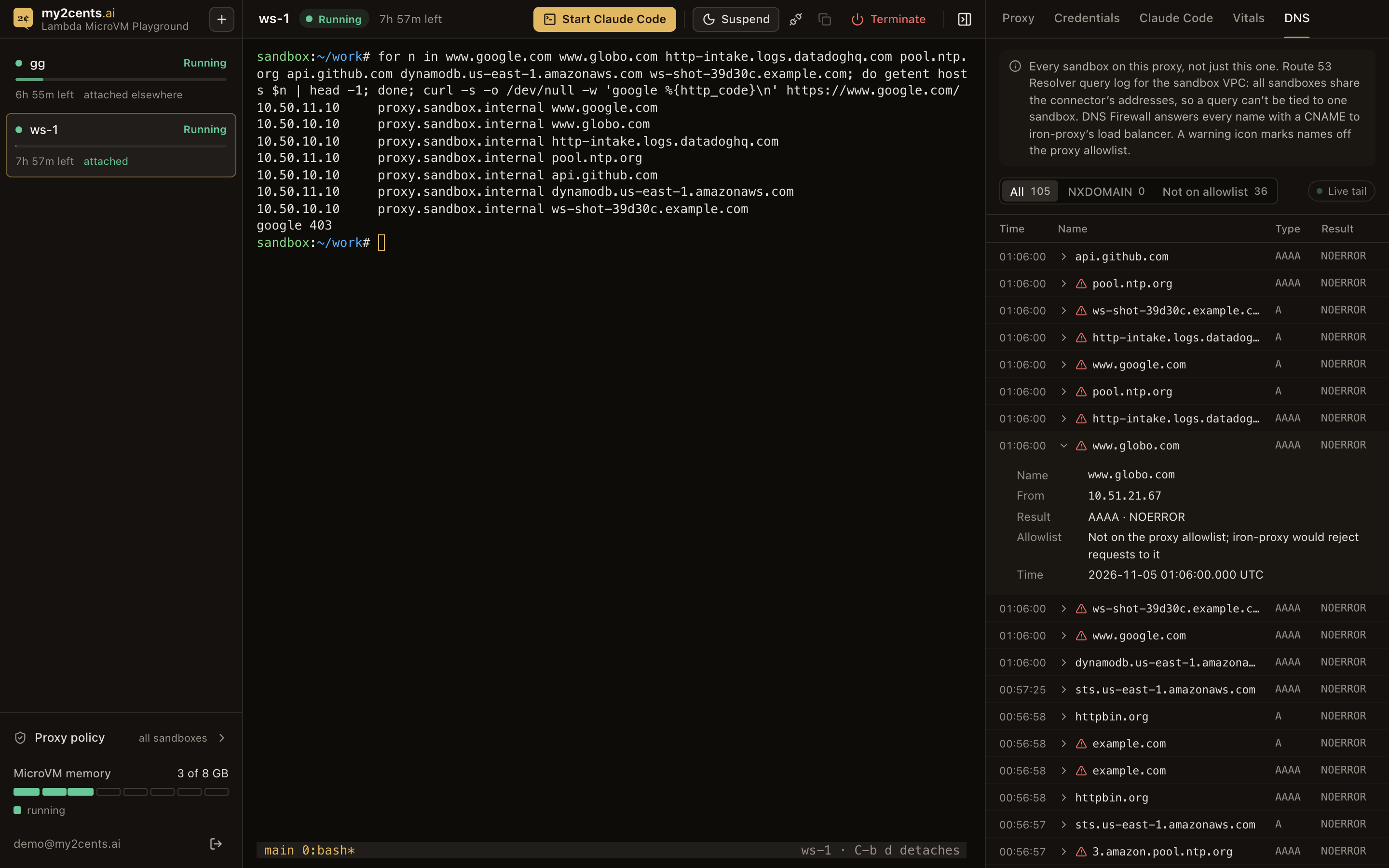
A getent loop for seven names (www.google.com, www.globo.com, a Datadog intake host, pool.ntp.org, a random example.com name, api.github.com and dynamodb.us-east-1.amazonaws.com) got the proxy’s addresses for every one, and curl https://www.google.com/ got iron-proxy’s 403. The DNS tab flagged the first five as not on the proxy’s allowlist, and not api.github.com or the DynamoDB endpoint, which the default view-only AWS scope allows. When I took the screenshot below, the tab held 105 queries from every sandbox and test since the API started: all NOERROR with the override, none NXDOMAIN, 36 off the allowlist.
The flags first came out wrong. The panel checked names against the allowlist as deployed, so it marked AWS endpoints the live AWS scope allowed (DynamoDB, EC2, SQS and others) as off the list. It now reads the live allowlist from the control plane.
The log carries a source address, but in the sandbox VPC that’s one of the connector’s two network interfaces (10.51.20.254 and 10.51.21.67 here), which every sandbox shares, so like the proxy feed it can’t be tied to one sandbox.
Test 10: Changing the allowlist and credentials live
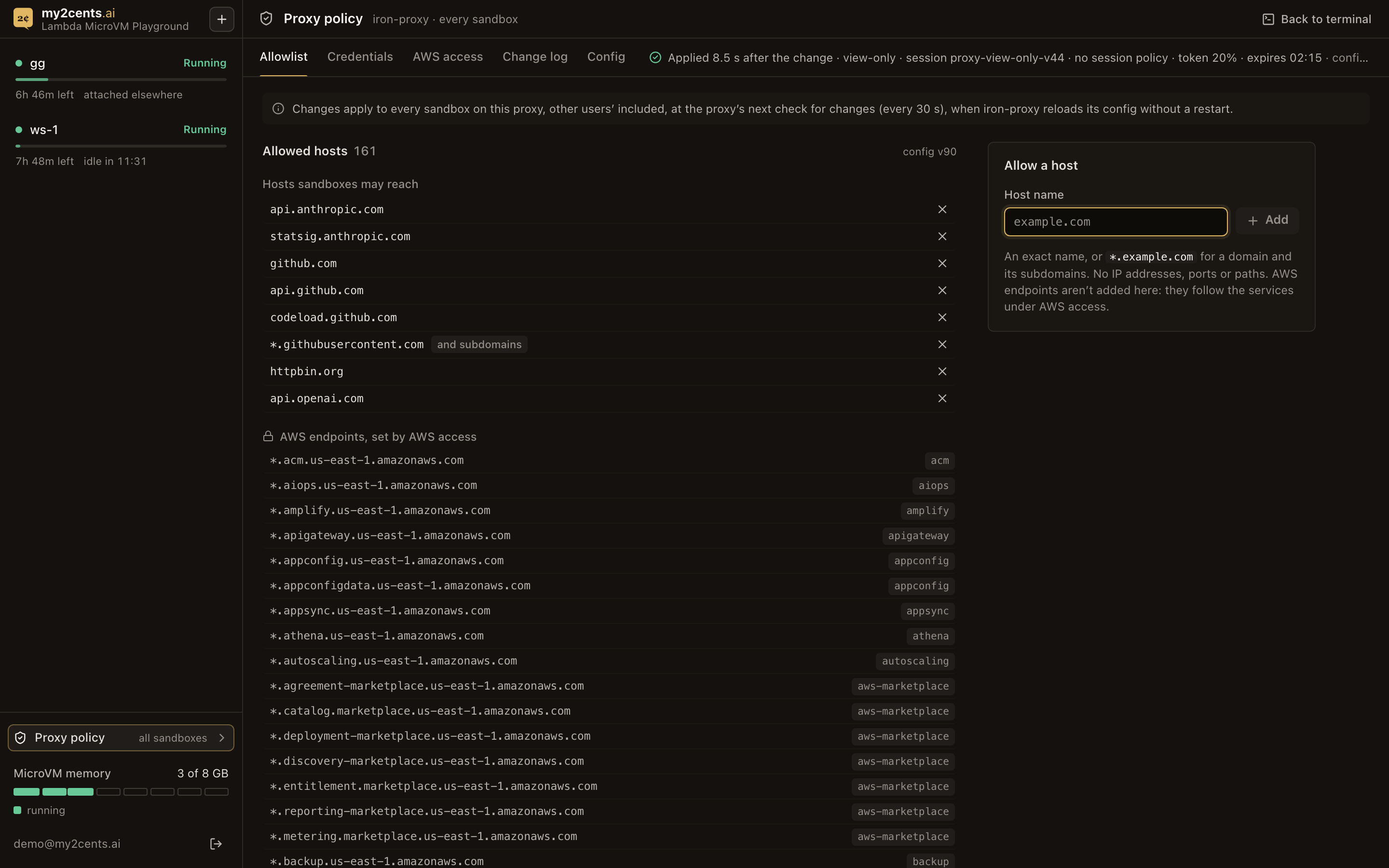
The Proxy policy page edits the proxy’s config, which every sandbox shares; the sidebar labels it “all sandboxes”. The allowlist section lists the hosts sandboxes may reach. AWS endpoints are listed separately and locked, because they follow the AWS access section. Adding a host refuses IP literals, bare wildcards, wildcards over a public suffix such as *.co.uk, anything under amazonaws.com, and any Secrets Manager endpoint. The backend changes only the allowlist in iron-proxy.yaml, keeps everything else (comments included), and writes it with If-Match, so two admins can’t overwrite each other. The status line polls until the sidecar reports the reload, at its next check of the bucket.
Measured through the API on 2026-11-05, with a sandbox probing every 0.5 s:
| Change | Change → applied | Change → visible in a sandbox | Visible as |
|---|---|---|---|
Allowlist: add example.com | 27.7 s | 28.9 s | 403 → 200 |
| Allowlist: remove it | 28.8 s | 29.5 s | 200 → 403 |
| New credential | 29.6 s | 31.5 s | httpbin receives the value |
These sit near 30 s because each test made its change right after the previous one went live, just after a poll, so it waited almost a whole interval. Across 17 changes, the S3 write to a successful reload took 3.3 to 29.5 s, median 26.3 s; the ones that happened to land just before a poll took 3.3 to 5.3 s. A change made at a random moment takes 0 to 30 s, about 15 s on average; the allowlist screenshot above caught one at 8.5 s. Every change reached every sandbox, since they share the proxy, and the status line says how long after the change iron-proxy reloaded. In an earlier run, adding api.openai.com showed in a sandbox as OpenAI’s own 401 replacing iron-proxy’s 403.
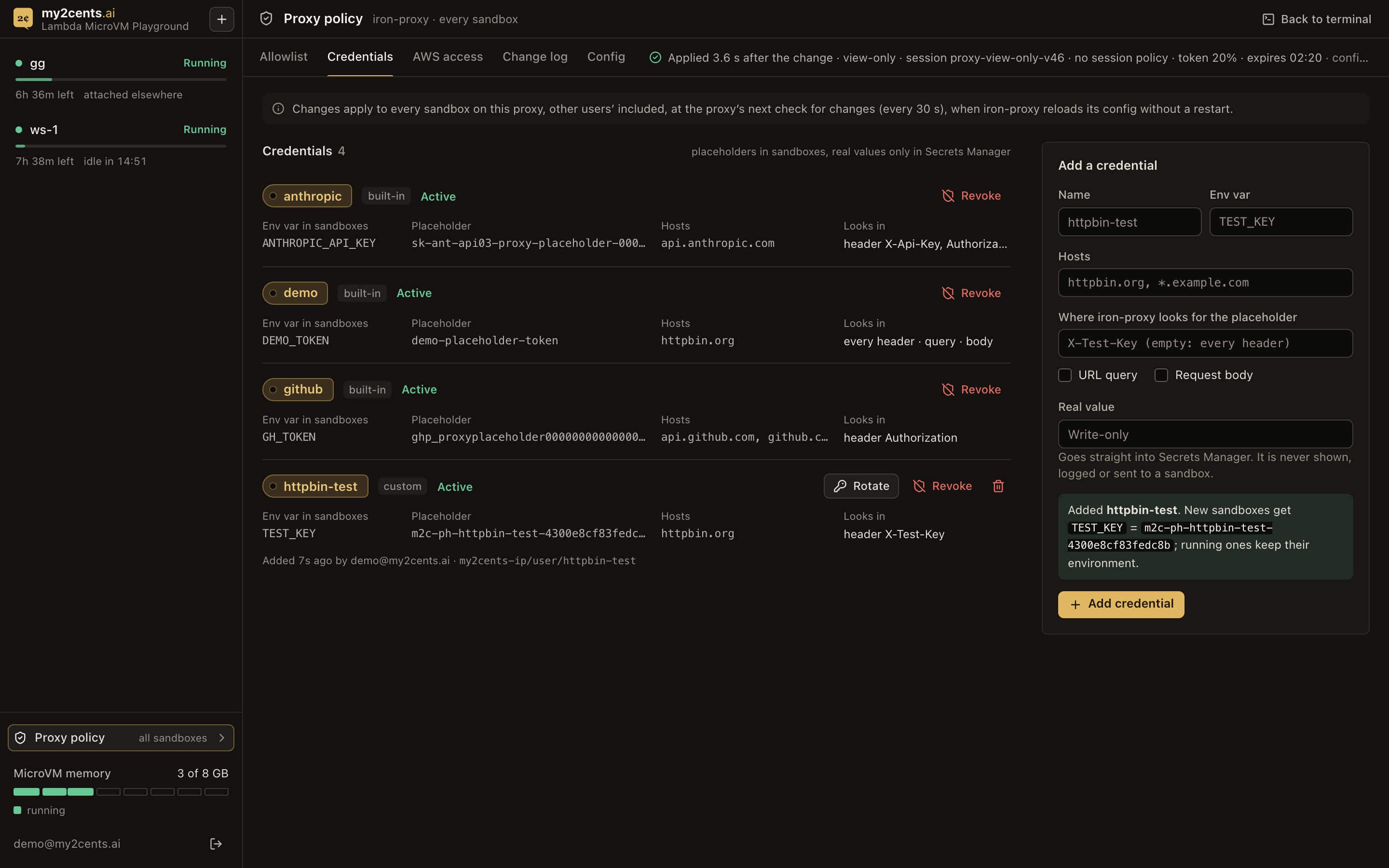
Admins can add credentials of their own. A new credential’s value goes from the form straight to Secrets Manager, never into a response, a log or the change log, and sandboxes get only a placeholder like m2c-ph-<name>-<16 hex>. The secret lives under my2cents-ip/user/, which every role’s baseline lets iron-proxy read. Every new sandbox gets every credential’s placeholder in its environment; a sandbox that was already running doesn’t have the new variable, though a placeholder typed in by hand works there too, since placeholders aren’t secrets. Rotating a credential’s value needs no reload: iron-proxy picks it up within its 30-second cache (30.8 s measured on the first version). Every change lands in a change log with who made it and the config version, and no secret value.
Admins also get a Config tab, because “Applied” is a claim worth checking. It shows the proxy’s config and AWS scope as they are in the S3 bucket (what’s desired) next to what the sidecar reports it applied, with a badge: In sync; Pending, while a newer version waits for the sidecar’s next check; Refused, when the sidecar rejected a config, with its reason; or Stale, when the sidecar hasn’t reported for over 90 s. The backend redacts anything shaped like a secret before it sends the files.
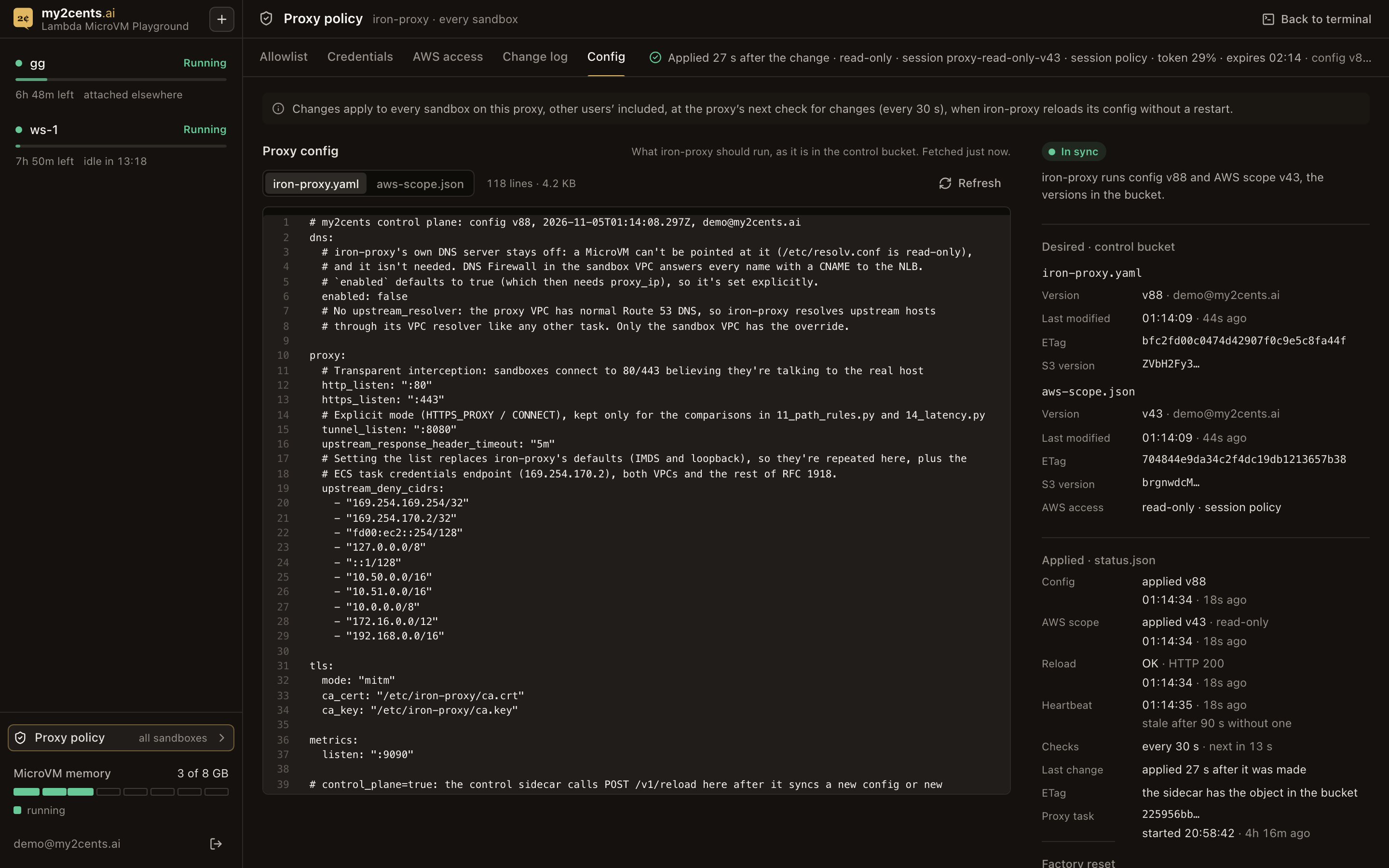
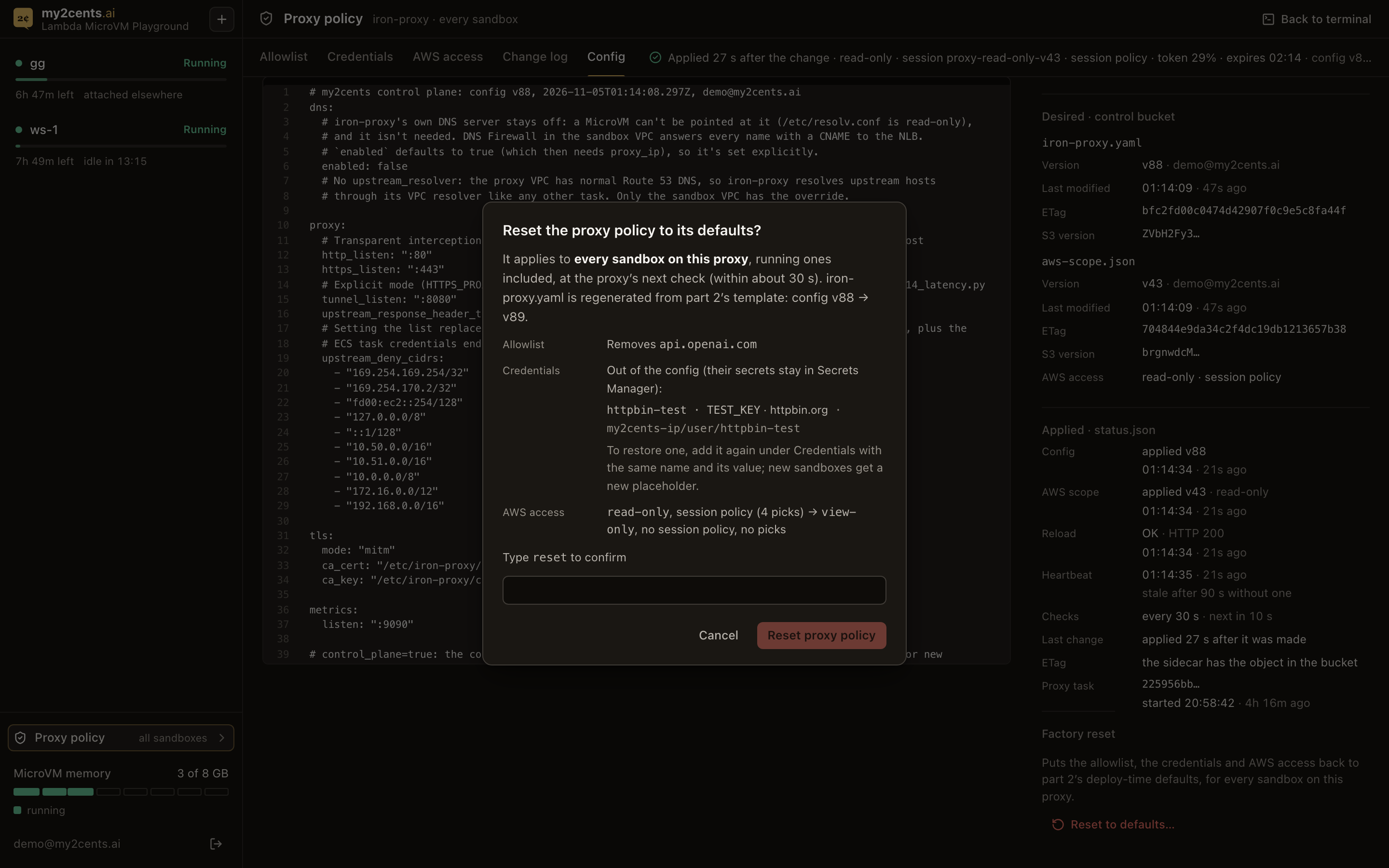
The same tab has a factory reset that puts the policy back to part 2’s deploy-time defaults: the seeded allowlist, the built-in credentials active again (the revoke denies removed), AWS access back to view-only with no session policy, and iron-proxy.yaml regenerated from part 2’s iron-proxy.default.yaml. Custom credentials leave the config, but their secrets stay in Secrets Manager, listed in the dialog: adding one back under its name takes back the kept secret, which went live in 3.6 s in one try. It shows what it will change first, takes typing reset, and goes live at the proxy’s next check. Through the API, a reset applied 27.8 s after the change, the Config tab showed In sync at 29.0 s, and a sandbox saw example.com refused, the demo key real again and the view-only role at 29.3 to 30.2 s. From the browser, the tab showed Pending 1.2 s after the click and In sync at 26.3 s.
Test 11: Revoking a credential without a restart
The first version’s Revoke denied the proxy’s role access to the secret and restarted the proxy, because part 2 had shown that a cached value otherwise keeps being injected. It took about two minutes to bite (115 s until only the placeholder went out), during which the old value kept working. With the control plane, Revoke still puts a Deny on the secret’s resource policy, now for iron-proxy’s task role and the four sandbox roles (with the control plane on, iron-proxy fetches secrets as the assumed role’s session). Then, instead of a restart, it writes a new config version. At the sidecar’s next check, the reload builds a new secrets stage, so the cached value is gone, the new fetch is denied, and the placeholder goes out unswapped: part 2’s fail-open behaviour, put to use. Tested with the demo secret and a sandbox sampling httpbin:
| Action | Change → applied | Change → seen in the sandbox | What it carried |
|---|---|---|---|
| Revoke | 27.9 s | 29.2 s | the placeholder, unswapped |
| Restore | 28.7 s | 29.3 s | the real value again |
So a revoke takes effect within one poll interval, with no restart: at most about 30 s, against 115 s for the first version’s restart. Until the sidecar’s next check, iron-proxy still swaps the revoked key in. It still applies to every sandbox at once, since they share the proxy. For a leaked key, revoke it at its source as well (the Anthropic console, GitHub): Revoke here stops the sandboxes from using it, it doesn’t make the key safe.
Test 12: AWS access: four roles and an optional session policy
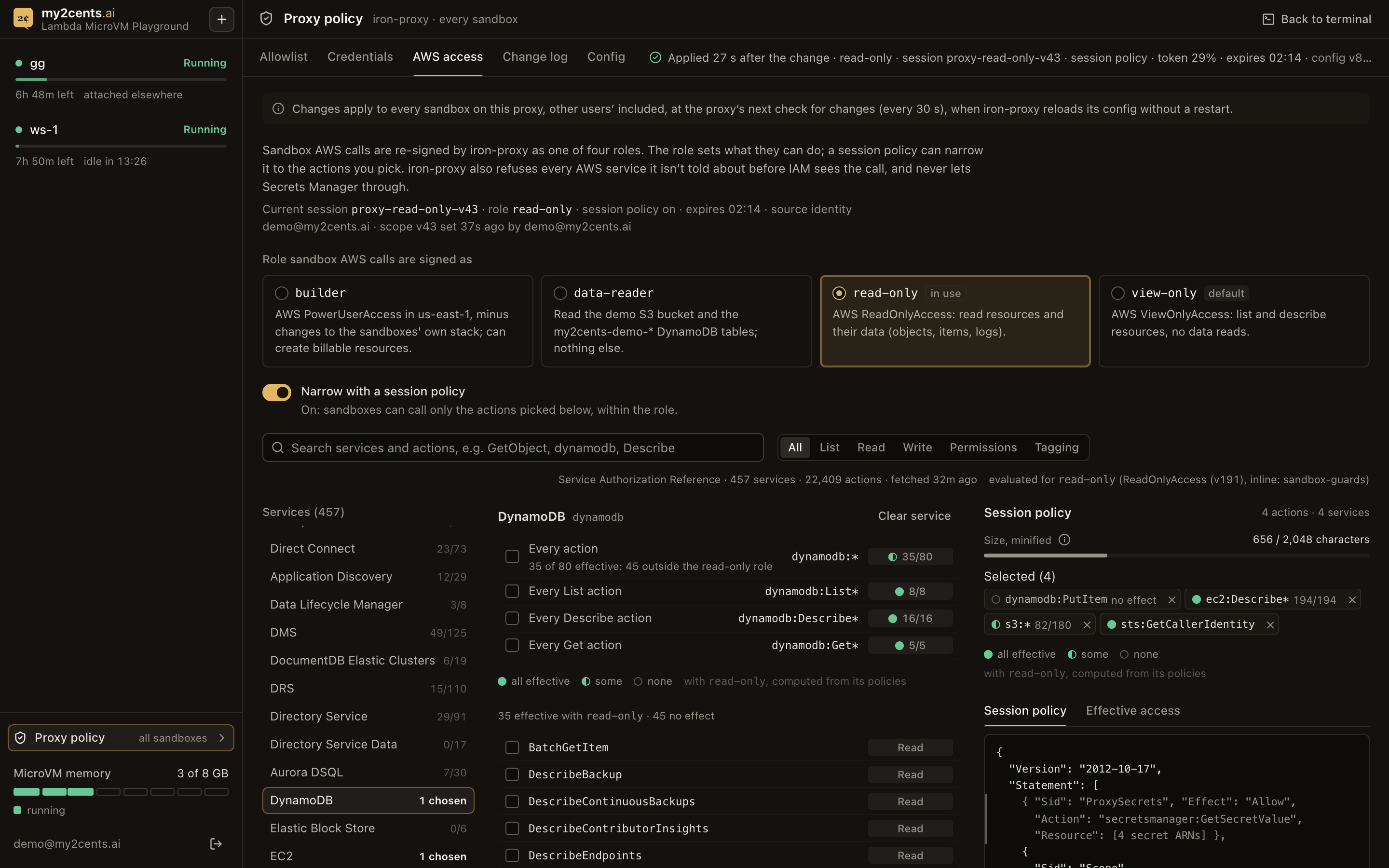
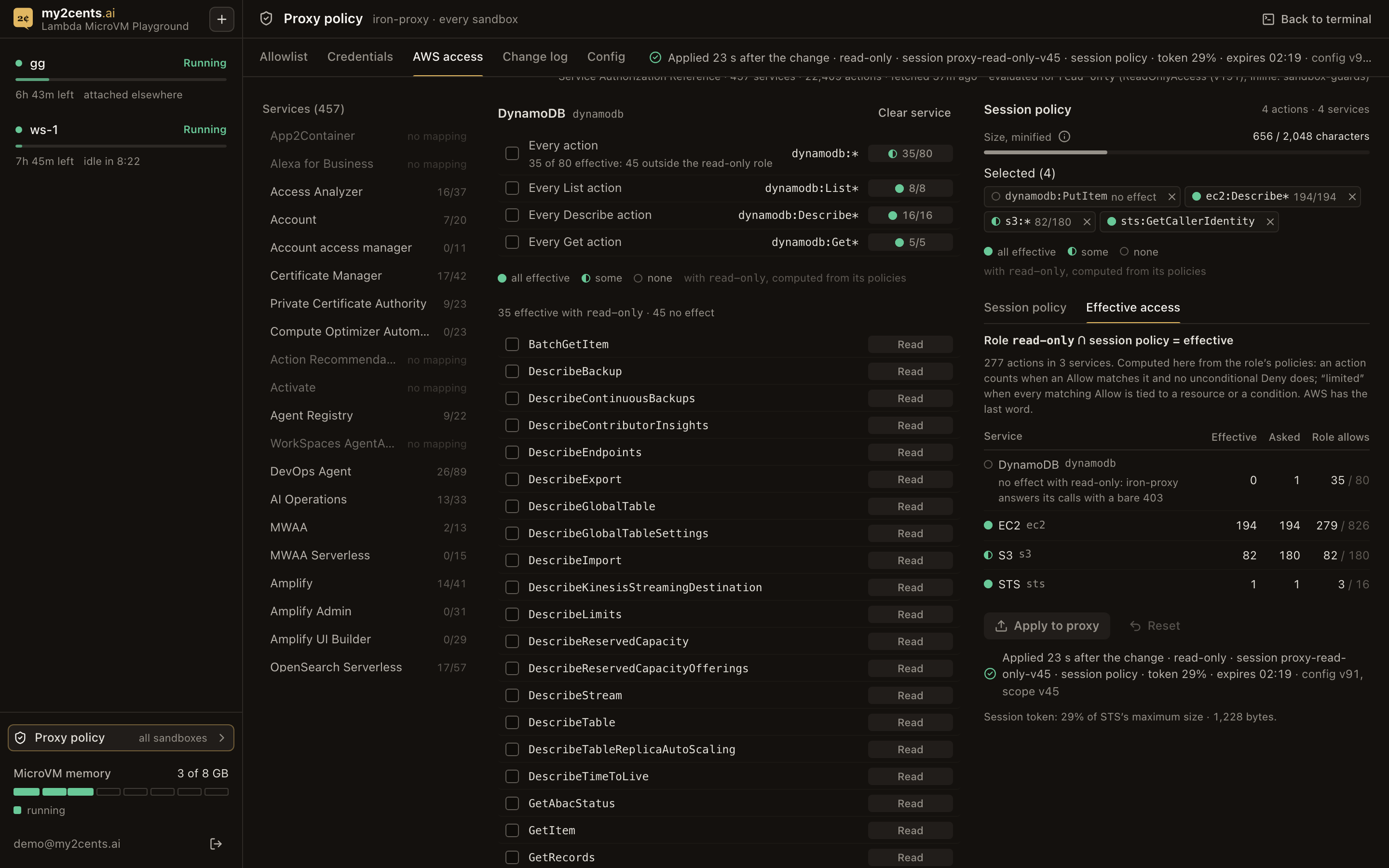
The AWS access section picks one of the four roles (view-only by default) and, optionally, a session policy that narrows it. That’s the point of the session policy: instead of creating a role for every combination of permissions an agent might need, keep a few roles and narrow one to what’s needed. It becomes more useful in a next version of the playground, where these settings are per sandbox, so each agent gets only what its task needs. With the session policy off, sandbox calls get the role’s full permissions. With it on, the sidecar sends the chosen actions, plus the proxy’s secrets statement, as the session policy when it assumes the role; when a pick covers ssm:GetParameter* (ssm:* or ssm:Get*), the policy adds an explicit Deny on it, so it never grants parameter values.
The actions come from AWS’s machine-readable Service Authorization Reference, the same data behind the IAM documentation, fetched by the API: 457 services and 22,367 actions, with server-side search and an access-level filter. It’s cached for an hour; after that the old copy is served while one background refresh runs. The API reads the role’s policies to work out what each pick is worth. A pick outside the role isn’t refused: it’s marked “no effect with” the role, so a policy can be built before switching roles, and a selection survives the switch. Wildcards (s3:*, or a service’s Get*, List* or Describe*) show “N of M effective” with a full, half or empty dot, and an Effective access tab lists, per service, what the role and the session policy allow together. Secrets Manager can’t be picked at all, and ssm:GetParameter* can’t be picked on its own. A size meter counts the session policy against STS’s 2,048-character limit before anything is sent, and after Apply the status line shows what STS reported for the new session token: for view-only with no session policy, 19 to 20% of STS’s maximum size (808 bytes in one session). The four picks in the screenshot, on read-only, come to 656 characters and a token at 29%.
From a sandbox’s terminal, the AWS CLI’s “who am I?” call shows the result:
$ aws sts get-caller-identity --query Arn --output text
arn:aws:sts::<acct>:assumed-role/my2cents-ip-view-only/proxy-view-only-v2
AWS says the caller is the sandbox role, through a session named proxy-<role>-v<scope version>: proxy-view-only-v2 on my2cents-ip-view-only here. Behind the scenes:
- The CLI signs with fake keys. It finds
AWS_ACCESS_KEY_IDandAWS_SECRET_ACCESS_KEYin the environment and signs the request (SigV4) with them, without knowing they’re placeholders. There’s no role to fall back on: the MicroVM runs without one, andAWS_EC2_METADATA_DISABLEDstops the CLI from looking. - It reaches the proxy without asking. The sandbox’s resolver answers
sts.us-east-1.amazonaws.comwith the proxy’s load balancer, like every other name, so the CLI connects to iron-proxy believing it’s STS. iron-proxy answers the TLS handshake with a certificate from part 2’s CA, which the CLI trusts throughAWS_CA_BUNDLE, and checks the host against its allowlist. - iron-proxy re-signs it. Its
aws_authstage checks the service (sts) and region (us-east-1) against what the policy allows, throws the placeholder signature away, and signs again with the credentials the sidecar left it: the sandbox role’s session. The sandbox can’t reach them. - STS answers for whoever signed. The session name says which role and policy version, and CloudTrail adds the admin who applied the policy as
SourceIdentity, and the sandbox’s name through the user agent: every sandbox getsAWS_SDK_UA_APP_ID=ws-<sandbox name>, which AWS CLIs and SDKs append to their User-Agent and iron-proxy leaves alone. That last one is a label, not an identity: anything in the sandbox can change its own User-Agent, and on a shared proxy it’s the only thing that says which sandbox made a call.
AssumeRole  proxy-read-only-v3   role my2cents-ip-read-only  caller my2cents-ip-task  sourceIdentity demo@my2cents.ai  policy none    userAgent curl/8.21.0
08:10:53Z sts GetCallerIdentity  arn:aws:sts::<acct>:assumed-role/my2cents-ip-read-only/proxy-read-only-v3  sourceIdentity demo@my2cents.ai  app/ws-e2e-a
08:12:20Z s3 ListBuckets  AccessDenied  …/my2cents-ip-data-reader/proxy-data-reader-v7  app/ws-e2e-guards
08:11:08Z secretsmanager GetSecretValue  …/my2cents-ip-read-only/proxy-read-only-v4  aws-sdk-go-v2/1.45.1   (iron-proxy itself, same session)
In the CloudTrail console, the same labels sit in one event record:
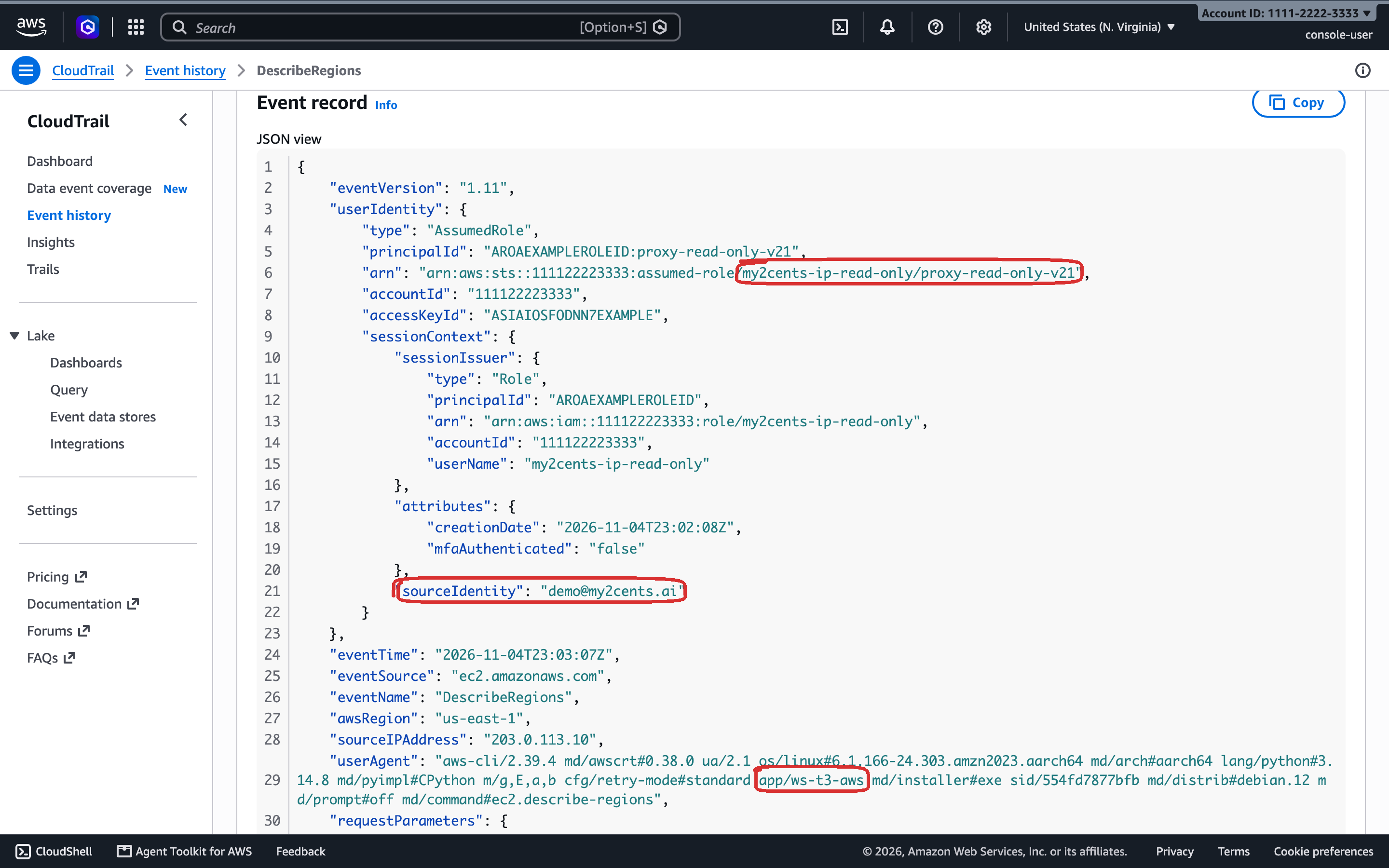
The last line of the excerpt above is iron-proxy fetching a secret it injects, under the same session as the sandbox’s calls. A role switch reached a sandbox at the sidecar’s next check: a switch to read-only was applied 29.5 s after the change and showed in get-caller-identity at 32.3 s, and three more (to read-only, data-reader and builder) were applied at 23.0 to 26.3 s and signed as the new role at 24.4 to 28.9 s. What each role allowed and refused from a sandbox:
| Role | Allowed | Refused |
|---|---|---|
view-only | s3api list-buckets (16 buckets) | reading the demo object, a DynamoDB scan (AccessDenied) |
read-only | the demo object (35 bytes), a scan of my2cents-demo-items (3 items) | an SSM SecureString parameter (AccessDenied: every role's explicit deny) |
data-reader | the demo object, the same scan | list-buckets (AccessDenied) |
builder | an SQS queue and a bucket created and deleted | the guardrails (Test 14) |
iron-proxy is told only about services with at least one effective action, so when the session policy leaves a service out, or its picks have no effect with the role, the service’s endpoints leave the allowlist and the call is refused by the proxy before it reaches AWS. When the service is allowed but the action isn’t, the request is re-signed and IAM refuses it, naming the session policy. The two look different in the CLI, and only the second shows up in CloudTrail. With the session policy on for STS and S3 listing only (636 characters), S3 listing worked 29.3 s after the change (applied at 27.5 s), and an ECS call, now outside the policy, got the first kind: a bare 403 from the proxy.
Two S3 details showed up along the way. The AWS CLI’s default upload sends an aws-chunked body with a trailing checksum, which iron-proxy’s aws_auth refuses with a 400, so the run hook payload now sets AWS_REQUEST_CHECKSUM_CALCULATION=when_required, and uploads work. And CopyObject gets a 501 NotImplemented from S3 after iron-proxy re-signs it, whatever the checksum setting.
Test 13: The Secrets Manager guard
One detail of iron-proxy shapes the whole design: the session that re-signs a sandbox’s AWS calls is the same one iron-proxy uses to fetch the secrets it injects. Version 0.55.0 has no way to give the two jobs different identities. So every role can read the proxy’s own secrets, and the only thing between a sandbox and secretsmanager:GetSecretValue on them is the proxy itself. The guard has four parts:
- The sidecar refuses any config that lists Secrets Manager in
allowed_servicesor on the allowlist, so a bad write never reaches iron-proxy, and the workspace’s status line would show the reason. That check was tested offline, 16 of 16 configs in the sidecar’s image; no live run produced a refusal. aws_auth.allowed_servicesnever containssecretsmanager, whatever the role and policy. It’s never empty either, because iron-proxy 0.55.0 reads an empty list as every service; with the session policy off, the backend writes an explicit list: the services where the role allows at least one action, minus Secrets Manager.- No Secrets Manager endpoint is ever on the allowlist: the allowlist editor refuses them, and AWS access never adds them.
- The roles deny every other Secrets Manager action and secret, and
ssm:GetParameter*.
I tried it from a sandbox, with the proxy signing as builder, the widest role: a plain aws secretsmanager get-secret-value, and forged requests. The forgery goes to secretsmanager.us-east-1.amazonaws.com but is signed with a credential scope that claims another service, such as s3. iron-proxy 0.55.0 takes the service from the client’s credential scope, so it asks whether a sandbox can talk the proxy into re-signing a Secrets Manager call as a service allowed_services permits. It shouldn’t get that far, since no Secrets Manager host is on the allowlist; and if it did, the request would be re-signed for the wrong service and AWS would reject the signature.
| Request from the sandbox | Answer | Refused by |
|---|---|---|
aws secretsmanager get-secret-value | CLI: An error occurred (403) | allowlist |
the Secrets Manager endpoint, signed for secretsmanager | 403, empty body | allowlist |
| the Secrets Manager endpoint, signed with an s3 credential scope | 403 | allowlist |
sts.us-east-1.amazonaws.com (allowed), signed for secretsmanager, target secretsmanager.GetSecretValue | 403, service_not_allowed | aws_auth |
STS, signed as sts, target secretsmanager.GetSecretValue | re-signed; STS answered 302 to aws.amazon.com, which the allowlist refused | nothing to refuse: STS doesn't serve it |
Host secretsmanager… on a TLS connection to sts… | 400 SNI and Host header mismatch | iron-proxy |
No response held a secret. Every request to the Secrets Manager endpoint stopped at the allowlist, whatever its credential scope claimed, so the forged s3 scope never reached aws_auth. A forged scope aimed at an allowed host got as far as aws_auth, which refused the service. None of them got far enough to test the IAM denies behind it.
Test 14: builder’s guardrails
builder is PowerUserAccess, which can do almost anything except manage IAM and Organizations, so the role carries explicit Denies. They keep it in us-east-1 (including S3 buckets created elsewhere through the us-east-1 endpoint, which the s3:LocationConstraint check catches), and stop it from assuming other roles. And they keep it off this stack and part 2’s: their buckets, ECS cluster and services, both VPCs, load balancers, the connector, MicroVMs, tables, images, logs, private zones, the DNS Firewall alarm, CloudFront, Cognito and Route 53 Resolver. Private zones can’t be attached to any VPC either. DNS Firewall filters private-zone names too, so a zone on the sandbox VPC wouldn’t get past the override, but a zone overlapping sandbox.internal could redirect the override’s target, and one attached to the proxy VPC could change the addresses iron-proxy connects to for an allowlisted host. I tried a few of them from a sandbox, with the proxy signing as builder:
From a sandbox as builder |
Result |
|---|---|
| create and delete an SQS queue; create a bucket in us-east-1, upload to it, delete it | allowed |
| a security group in the sandbox VPC | AccessDenied (UnauthorizedOperation) |
a record in the sandbox.internal zone; the DNS Firewall association | AccessDenied |
| delete from or upload to the control bucket | AccessDenied |
| a bucket in eu-west-1 through the us-east-1 endpoint | AccessDenied |
| part 2's NLB attributes; iron-proxy's ECS service | AccessDenied |
| the API log group's retention | AccessDenied |
sts:AssumeRole | AccessDenied |
| SQS in us-west-2 | 403 from iron-proxy's allowlist, before IAM |
IAM refused every change to the stack, and CloudTrail recorded each with its error code. Another Region never reached IAM, because the allowlist only holds us-east-1 endpoints. The guardrails protect the stack, not the rest of the account. builder can still create billable resources in us-east-1, and change most things there that aren’t this workspace or part 2; CloudFront, Cognito, Route 53 Resolver and network connectors are off-limits everywhere, since their ARNs carry no usable name. On a shared proxy, choosing it gives every running sandbox that reach at once, which is why policy writes need the admins group.
Pricing
The workspace adds a little fixed infrastructure on top of part 2’s proxy layer (us-east-1 list prices):
| Resource | Per hour |
|---|---|
| Application Load Balancer (capacity units extra) | $0.0225 |
| Two public IPv4 addresses for the ALB | $0.010 |
| API task on Fargate (ARM, 0.5 vCPU / 1 GB) | $0.0198 |
| Workspace, fixed | ≈ $0.052 |
| Part 2, fixed (NAT gateway, NLB, iron-proxy, public IPv4, secrets, private zone), with the control plane | ≈ $0.096 |
| Both, no sandbox running | ≈ $0.15 (≈ $3.60 a day) |
| Each running sandbox (part 1's rates): Small 1 GB / Medium 2 GB / Large 4 GB / X-Large 8 GB | ≈ $0.063 / $0.126 / $0.252 / $0.504 |
| Both, 8 GB of sandboxes running (any mix of sizes) | ≈ $0.65 |
The control plane accounts for about $0.95 a month of part 2’s line: the sidecar’s S3 requests (conditional GETs and a status write every 30 s) and the management token secret ($0.40). The sidecar fits in iron-proxy’s existing task, so compute doesn’t change. Usage-based on top: CloudFront, S3, DynamoDB, Cognito, ECR, log ingestion, NAT data, DNS Firewall at $0.60 per million queries, and load balancer capacity units, which come to cents for a demo.
One line item is easy to get wrong: CloudWatch Logs Live Tail is billed per minute of session ($0.01 a minute, so $0.60 an hour, after 1,800 free minutes a month). The first version of the API kept a tail open around the clock, which would have cost about $14 a day, more than everything else here combined. It now runs one session only while a browser is showing the Proxy or DNS panel on a visible page, and stops it 60 seconds after the last one closes, backfilling up to 10 minutes from the log groups when a panel reopens. A tab left on one of those panels still costs $0.60 an hour once the free minutes are used.
Cleanup
The workspace builds on part 2, so tear it down in this order:
- The workspace:
bash scripts/destroy.shfrom its directory.scripts/destroy.shterminates every MicroVM started from the workspace’s four images, force-deletes the credentials admins added under part 2’smy2cents-ip/user/prefix (so their names can be reused at once), runsterraform destroyon the workspace’s own resources (CloudFront, the ALB, the API service, Cognito, DynamoDB, ECR and the API’s log group), and deletes the four sandbox images. - Part 2’s sandboxes:
python 13_cleanup.pyfrom part 2’s directory.13_cleanup.pyterminates part 2’s own MicroVMs and deletes its sandbox image, which otherwise keeps billing snapshot storage, and its build log group. - Part 2:
scripts/destroy.sh, also from part 2’s directory. It refuses to run while any service other than iron-proxy is in the ECS cluster, which is the case until step 1 removes the workspace’s API. Then it switches off the DNS Firewall association’s mutation protection, runsterraform destroy, and, with the control plane on, force-deletes any credentials left undermy2cents-ip/user/.
What the workspace takes from part 2, and why part 2 goes last:
- the sandbox VPC and its egress connector, which every sandbox runs on;
- iron-proxy, its load balancer, the DNS Firewall override and the private zone, which every sandbox’s traffic and lookups go through;
- the control bucket and the sidecar (
control_plane=true), which the Proxy policy page edits; - the four roles that sandbox AWS calls are signed with;
- the injected secrets and the CA, which the sandbox images trust;
- the ECS cluster, which the workspace’s API runs on.
Removing only the workspace leaves part 2 running and billing: about $0.096 an hour for its NAT gateway, load balancer, iron-proxy task, public IP, secrets, private zone and control plane, plus snapshot storage for its sandbox image until step 2 deletes it.
Verdict
Lambda MicroVMs make a good substrate for this kind of workspace, and the reason is suspend. A sandbox starts in seconds, Claude Code is ready a second or two later, and a suspended sandbox comes back to the same Claude Code screen in about a second. Combined with tmux, that turns “close the tab” from a decision into a non-event. Part 2’s proxy kept every real credential out of the sandboxes, and the panels made that visible instead of something you take on faith.
The control plane changed what the proxy is for. With its config in S3 and changes applied by reload, an admin can open a host, add a credential, revoke one or switch the AWS role from a browser, and the proxy takes it within about 30 s, without the two-minute restart. None of it needed a change to iron-proxy. What it can’t do yet is tell sandboxes apart: one proxy means one policy and one log for everyone.
Most of the work was around the platform rather than on it. There’s no exec API, and a MicroVM’s tokens are root in the sandbox, so the API bridges every terminal instead of handing tokens to browsers. /validate requests are dropped somewhere under 12 seconds in, so the warm-up runs in the background. /etc/resolv.conf is read-only, which put the DNS tricks in the VPC rather than the VM. And idle detection counts inbound traffic only, which shaped live stats, terminal attachment, and what the app does when you open it.
What works
- Speed. Seconds from Create to an attached terminal, 1.3 to 1.7 s to a Claude Code prompt on the first version, and about a second back to the same screen after a resume, measured through CloudFront.
- Continuity. Suspend, idle suspend and closing the tab all came back to the same tmux session and the same Claude Code screen.
- Visibility. Every proxied request, credential swap and denied host, and the sandbox VPC’s DNS log, on screen, plus Claude Code’s tokens and estimated cost per session.
- Policy you can change while sandboxes run. Allowlist, credentials and AWS access applied by reload within about 30 s, with a change log, an “Applied” status from the proxy’s sidecar, and a Config tab that shows what’s stored against what’s applied.
- AWS access with a name on it. A few roles chosen by an admin, narrowed with an optional session policy picked from AWS’s own catalog instead of a role for every combination, and CloudTrail records that name the role, the policy version, the admin and, as a label, the sandbox.
- No prompts, no keys. Claude Code starts straight into its prompt in bypass mode, and the only keys in the VM are placeholders.
What doesn’t
- Shared proxy, shared view, shared policy. The proxy feed, the credential counters and the DNS panel cover every sandbox, and every policy change, revoke and role switch applies to all of them. Per-sandbox identity at the proxy is future work.
- Watching costs money. Attached terminals and their live stats keep a sandbox awake, and Live Tail is billed per minute while a feed panel is open.
- builder reaches the account. Its guardrails protect this stack, not everything else in us-east-1, and it can create billable resources.
- Read access isn’t harmless.
ReadOnlyAccesscan expose secrets that live in configuration (Lambda environment variables, ECS task definitions, EC2 user data); the guard covers Secrets Manager and SSM parameters, not those. - One identity for two jobs. The session that signs sandbox AWS calls can also read the injected secrets; only the proxy’s own rules keep Secrets Manager out of reach.
- Small by default. My account’s MicroVM memory quota is 8 GB, which differs per account: four Medium sandboxes, or one X-Large.
- Bypass permissions. Right for a fenced sandbox with placeholder keys; still an agent that never asks before it acts.
Who should use it
One developer or one small team that wants Claude Code in a browser, running in their own AWS account, with credentials kept out of the sandbox, a view of what the agent touches, and a policy they can change without redeploying. It’s a reference implementation of a self-service playground, not a product: a multi-tenant version needs per-sandbox identity at the proxy, so that policy, logs and AWS access can belong to one sandbox, and a larger quota. That’s also where the session policy earns its keep: settings per sandbox would let each agent get only what its task needs.