E2B Sandboxes: Hands-On with the Full Sandbox Lifecycle
By Fabio Douek
Jump to section
- Overview
- Architecture
- Setup
- Step 1: Account and API key
- Step 2: Install the SDK and the companion code
- Step 3: Tag everything
- Testing
- Test 1: Create a sandbox and inspect the defaults
- Test 2: Commands, files and the command timeout
- Test 3: Timeouts, set_timeout vs connect
- Test 4: Pause and resume, three cycles
- Test 5: Auto-pause on timeout and auto-resume on activity
- Test 6: List, filter, and connect from another process
- Test 7: Fork and snapshot
- Test 8: A custom template vs installing at runtime
- Results summary
- Pricing
- Cleanup
Explain (TLDR) like I am...
Imagine a magic toy box you can borrow for your robot. The robot can build anything inside it, make a mess, even break things, and none of it touches your real room. When playtime is over, the box can vanish, or it can freeze exactly as it is until you come back.
The freezing part is the clever trick. You can stop the box in the middle of a game, walk away for days, and when you open it again the blocks are still mid-tower. You can even make copies of the box so three robots can try three different ideas at once.
E2B is a hosted execution environment: code your application or its AI agent generates runs in an isolated virtual machine on E2B's infrastructure, billed per second, with the vendor's open source runtime available if the organization prefers to self-host.
The diligence points are lifecycle and retention. By default a sandbox is destroyed five minutes after creation, but paused sandboxes are retained indefinitely with no automatic expiry, so data persists until someone deletes it. Map who owns cleanup, set a spending cap in the console, and treat paused state as stored data under your retention policy.
The condition this treats is unsafe execution of machine-written code on infrastructure you care about. The intervention is a disposable Firecracker virtual machine per task, and in my testing it started in about a third of a second and resumed from pause in under one.
The evidence is good for the core mechanism: memory, files and running processes survived three pause cycles intact. Known side effects sit in the same area, with open bug reports and recent service incidents around pause and resume. Good candidates are agent products needing per-user state; poor candidates are GPU workloads, which it does not support.
Notice how much quiet worry disappears when the code an agent writes can only ever break a box that was built to be broken. Engineers stop hovering over every generated command, and the conversation shifts from whether to let the agent act to what it should do next.
The new tension is about forgetting. Pause is so cheap and so permanent that sandboxes pile up unseen, and the defaults quietly destroy work after five minutes unless someone chose otherwise. The healthy habit is naming who tidies up, and making that a shared, explicit agreement rather than an afterthought.
Think of E2B as a looper pedal for your agent's work. You hit record, the sandbox plays, and at any bar you can freeze the loop exactly where it is, walk away, and drop back in on the same beat later.
Forking is the overdub: one take becomes three parallel takes, each free to improvise from the same starting phrase. The tempo is quick, with sub-second starts and resumes in my sessions, but the defaults matter. Leave the timeout alone and the loop simply stops after five minutes and is gone.
The positioning is "a computer for your agent, with a pause button." Time to value is minutes: one install, one API key, and the first sandbox starts in well under a second. The free tier's one-time $100 credit covered this entire walkthrough for about a cent.
The differentiated story is state. Competitors start fast too, but few keep memory and running processes through a pause indefinitely, or clone a live sandbox into copies. That is the hook for products that need per-user workspaces their agents can return to days later.
 See the source code here: e2b-sandbox-lifecycle
Overview
E2B runs AI-generated code in cloud sandboxes. Each sandbox is a Firecracker microVM with its own kernel, filesystem and network, which you create, drive and destroy from a Python or JavaScript SDK. It is the default answer to “where does my agent run the code it writes” for a lot of teams, and the runtime is open source under Apache-2.0 if you would rather host it yourself.
An E2B sandbox can be paused with its memory, files and running processes intact, kept paused indefinitely at no compute cost, woken automatically by the next API call or HTTP request, and forked into copies that inherit the live state.
This post, part 1 of 2, walks one sandbox through its whole life, from Sandbox.create() to cleanup, with a runnable script per stage. I ran everything against SDK 2.59.0 (released 2026-10-22) on the free Hobby plan in us-west-1, using Python, and every timing below is from my runs. I first wrote this post on 2.52.1; the scripts ran unchanged on 2.59.0, and the numbers held except for the template test (see Test 8). The single most important thing to know before you start: the default timeout is 5 minutes and the default action on timeout is kill. If you don’t opt into pausing, your sandbox and everything in it is gone five minutes after creation. Part 2 covers credentials: giving an agent in the sandbox API keys without putting the keys inside it.
Architecture
There are two planes. The E2B API handles lifecycle operations (create, connect, list, pause, fork, snapshot, kill). Inside every VM, a small daemon called envd serves commands, the filesystem and process streams, and a proxy exposes any port as https://<port>-<sandbox-id>.e2b.app.
Three things in that picture matter for the rest of the post:
| State | Billed? | Counts toward concurrency? | Expires? |
|---|---|---|---|
| Running | Yes, per second (vCPU + RAM) | Yes | At its timeout (kill or pause) and at the plan's runtime cap (1 h Hobby, 24 h Pro) |
| Paused | No | No | Never. E2B does not delete paused sandboxes on its own |
| Killed | No | No | Gone for good |
There is no separate resume() call in the SDK: you resume by calling connect(). And pausing resets the continuous-runtime clock, so a sandbox that pauses and resumes can outlive the 1 h / 24 h cap indefinitely.
Setup
Step 1: Account and API key
Sign up at e2b.dev and create a key under API Keys in the console. The Hobby plan is free and comes with $100 of one-time usage credit, which is roughly 900 hours of a default sandbox. This whole walkthrough cost me about a cent (more on that in Pricing).
Step 2: Install the SDK and the companion code
git clone https://github.com/fabiodouek/my2centsai-blog-samples.git
cd my2centsai-blog-samples/e2b-sandbox-lifecycle
cp .env.example .env            # paste E2B_API_KEY=e2b_...
uv venv && uv pip install -e .  # installs e2b==2.59.0 + python-dotenv
source .venv/bin/activate
The Python SDK needs Python 3.11+ (2.56.0 dropped 3.10). I pinned e2b==2.59.0 on purpose: E2B ships SDK releases every few days (about 40 JS SDK releases between mid-June and early October 2026), and minor versions have changed defaults. For example, 2.51.0 moved create and connect to new v2 endpoints and stopped setting client-side defaults for timeout and resources. Bump the pin deliberately.
The CLI is optional but handy for inspection and cleanup: npx @e2b/cli sandbox list (or npm i -g @e2b/cli / brew install e2b).
Step 3: Tag everything
Every script tags its sandboxes with metadata, so cleanup at the end only touches what the demo created:
# common.py
DEMO_TAG = {"demo": "my2cents-lifecycle"}

def tagged(**extra: str) -> dict:
    return {**DEMO_TAG, **extra}
I’d recommend the same habit in production: tag by user, environment and job, because metadata is how you find sandboxes again later.
Testing
Test 1: Create a sandbox and inspect the defaults
python 01_create.py # optional arg: number of timed creates (default 5)from e2b import Sandbox
sbx = Sandbox.create(metadata=tagged(test="01"))
info = sbx.get_info()
print(info.cpu_count, info.memory_mb, info.end_at - info.started_at, info.lifecycle)[ 0.85s] Sandbox.create()
template : base (rki5dems9wqfm4r03t7g)
state : running
cpu / mem : 2 vCPU / 512 MiB
lifetime : 300s
lifecycle : {'on_timeout': <SandboxOnTimeout.KILL: 'kill'>, 'auto_resume': False}
envd : 0.10.0
=== 5 sequential creates ===
[ 0.79s] create #1
[ 0.83s] create #2
[ 0.33s] create #3
[ 0.23s] create #4
[ 0.33s] create #5
median 0.33s | min 0.23s | max 0.83sThat confirms the documented defaults: 2 vCPU, 512 MiB, a 300-second timeout, and kill on timeout. Five sequential creates had a median of 0.33 s, measured from my laptop, end to end including the SDK round trip.
Two other observations. free -m inside the VM reports 473 MiB total, a bit under the nominal 512. And the root filesystem showed 22 GB (22.8 GB in the console), even though the billing docs list 10 GiB of disk for Hobby. I can’t tell you whether that’s a temporary allowance or a docs lag, so don’t plan around it.
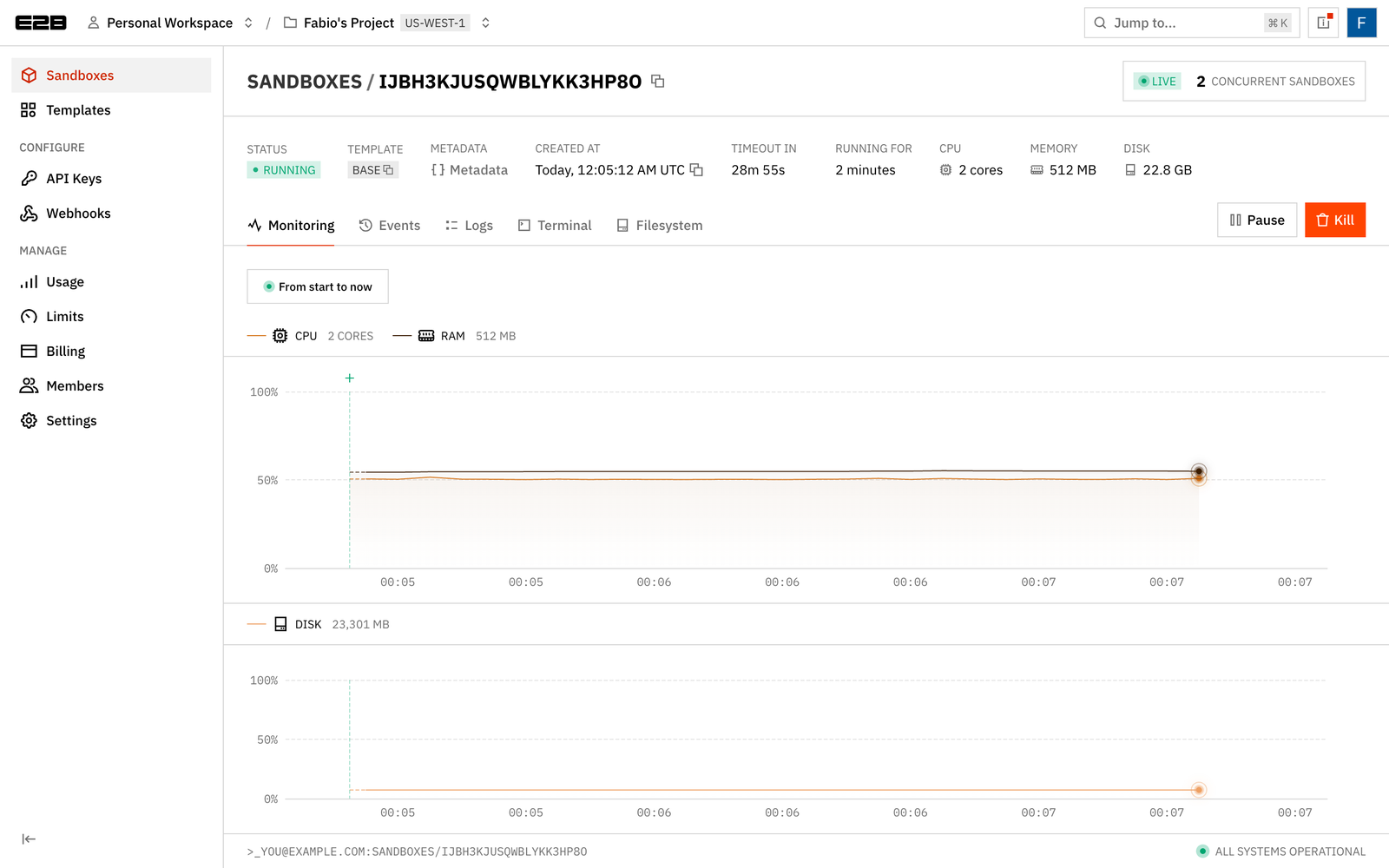
The console shows each sandbox live, with CPU, RAM and disk charts, the remaining timeout, and Pause and Kill buttons:
Test 2: Commands, files and the command timeout
python 02_commands_files.pyCommands are blocking by default, can stream stdout and stderr through callbacks, or can run in the background and hand you a handle:
sbx.commands.run(
    "for i in 1 2 3; do echo tick $i; sleep 1; done",
    on_stdout=lambda line: print(f"  stream> {line.strip()}"),
)

sbx.files.write("/home/user/notes/hello.txt", "hello from my laptop\n")
sbx.files.write_files([
    {"path": "/home/user/notes/a.txt", "data": "a"},
    {"path": "/home/user/notes/b.txt", "data": "b"},
])

server = sbx.commands.run(
    "cd /home/user/notes && python3 -m http.server 3000",
    background=True,
    timeout=0,  # without this the default 60s command timeout kills it
)
print(f"https://{sbx.get_host(3000)}/hello.txt")
exit=0
Python 3.11.6
user
/home/user
stream> tick 1
stream> tick 2
stream> tick 3
hello from my laptop
file a.txt
file b.txt
file hello.txt
server pid: 1529
running: pid=1529 cmd=/bin/bash -l -c cd /home/user/notes && python3 -m http.server 3000
preview URL: https://3000-iwmtv6w8e12wb0ceo7b5i.e2b.app/hello.txt
[ 3.00s] sleep 10 with timeout=3
TimeoutException: Request timed out: ...The gotcha is in that last line. Commands have their own timeout, 60 seconds by default, and it kills the process even when background=True. A dev server or a long-running agent process needs timeout=0. Two smaller API notes: Python uses write_files() for multiple files where JavaScript overloads write(), and code runs as user in /home/user by default. A production write-up from Codecloud adds another gotcha: a blocking commands.run() waits for child processes too, so anything that daemonizes should be started with background=True.
The console has a browser terminal for every running sandbox, which is the fastest way to poke around while debugging. Don’t expect to find the script’s sandbox there: 02_commands_files.py kills it on its last line. For this screenshot I started a separate sandbox by hand with a CPU-burning process and kept it alive (it isn’t part of the companion code):
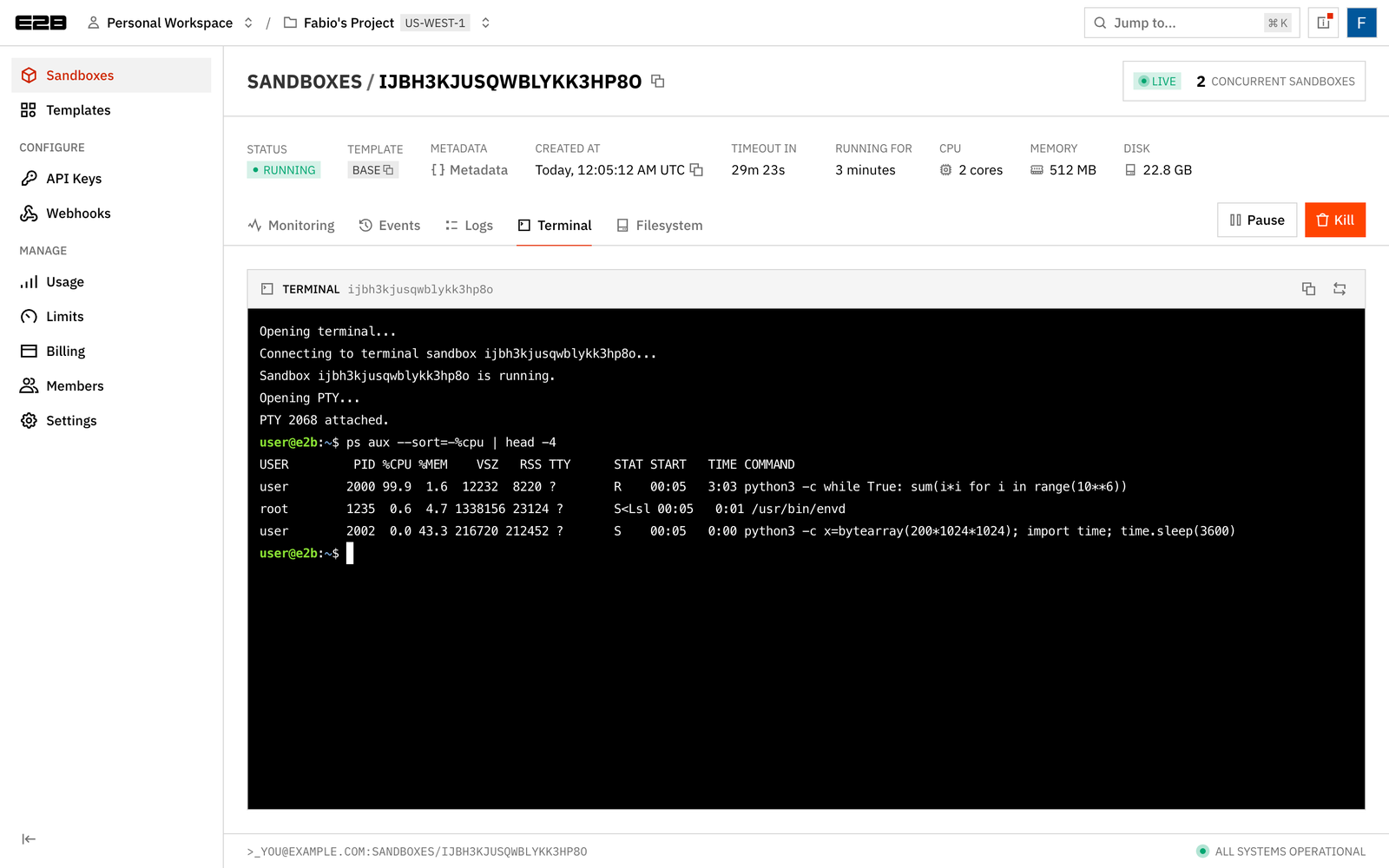
Notice the /usr/bin/envd process running as root: that’s the in-VM daemon from the architecture diagram. One side effect I noticed: opening the Terminal tab pushed that sandbox’s remaining timeout from about 24 minutes to about 30. The console’s terminal connection appears to extend the timeout the same way an SDK connect() would, so a sandbox you’re watching in the browser may live longer than your code asked for.
Test 3: Timeouts, set_timeout vs connect
python 03_timeouts.pysbx = Sandbox.create(timeout=120, metadata=tagged(test="03"))
sbx.set_timeout(20) # exact: 20 s from now, can shorten
sbx.connect(timeout=5) # only extends, never shortens
time.sleep(remaining(sbx) + 10)
Sandbox.get_info(sandbox_id)remaining: 119s (asked for 120)
set_timeout(20): exact, can shorten -> remaining: 19s
connect(timeout=5): only extends, never shortens -> remaining: 19s
gone: SandboxNotFoundException: Sandbox ikxrlwxsu5gsoiu2ba98y not found
listed: FalseThis is the behavior that bites people. set_timeout() sets the expiry to exactly now + N. connect(timeout=N) sets it to max(current expiry, now + N), so a short connect timeout is silently ignored. And when the timer runs out with the default lifecycle, the sandbox doesn’t pause: it’s deleted, files and all.
Also watch the units. Python takes seconds (timeout=60), JavaScript takes milliseconds (timeoutMs: 60_000). Porting a snippet between the two without converting gives you a sandbox that dies after about a second (the JS SDK rounds up to whole seconds), or one that asks for 16 hours and runs until your plan’s 1 h or 24 h cap.
on_timeout="Pause" was not rejected, so the sandbox fell back to the default and was killed on timeout instead of paused.
Test 4: Pause and resume, three cycles
python 04_pause_resume.py 3 # number of pause/resume cyclesThis is the feature that sets E2B apart, so I tested it harder. The script starts a Python process whose counter lives only in process memory (mirrored to a file so I can read it), writes a file each cycle, then pauses, waits 10 seconds and resumes, three times. At the end it reattaches to the process’s stdout stream.
counter = sbx.commands.run(
    "python3 -u -c \"import time\n"
    "i = 0\n"
    "while True:\n"
    "    i += 1\n"
    "    print(i)\n"
    "    open('/tmp/counter', 'w').write(str(i))\n"
    "    time.sleep(1)\"",
    background=True,
    timeout=0,
)

for cycle in range(1, 4):
    before = sbx.files.read("/tmp/counter")
    sbx.pause()
    time.sleep(10)       # wall clock moves, the sandbox doesn't
    sbx.connect()        # this is "resume"
    after = sbx.files.read("/tmp/counter")
=== Cycle 1 ===
[ 0.73s] pause()
state: paused
[ 0.24s] connect() / resume
counter before=5 after=6 (continues, not reset => memory restored)
pid 1520: alive
files: ['cycle-1.txt', 'state.txt']
=== Cycle 2 ===
[ 0.69s] pause()
[ 0.23s] connect() / resume
counter before=6 after=7
pid 1520: alive
files: ['cycle-1.txt', 'cycle-2.txt', 'state.txt']
=== Cycle 3 ===
[ 0.70s] pause()
[ 0.25s] connect() / resume
counter before=8 after=9
pid 1520: alive
files: ['cycle-1.txt', 'cycle-2.txt', 'cycle-3.txt', 'state.txt']
=== Reattach to the counter's stdout after resume ===
lines received in 6s: 6 ['13', '14', '15']
stream OKAll three cycles passed:
- Memory survives. The counter went from 5 to 6 across a 10-second pause, not from 5 to 15 and not back to 1. The process was frozen, not restarted.
- Processes survive. Same PID throughout.
- Files survive. All cycle files were present after every resume.
- Pause took 0.69–0.73 s, resume 0.23–0.25 s. The docs quote about 4 seconds per GiB of RAM for pause and about 1 s for resume. My sandboxes were only using a few tens of MiB, which is the likely reason I came in far under that. Budget for the documented figure if your sandboxes hold real memory: an 8 GiB sandbox could take around 32 seconds to pause.
- Reattaching to stdout worked. I specifically tested this because there are open high-priority reports of stdout streams stalling when you reattach after a resume (E2B#1587 among others). In my runs on 2.52.1, and again on 2.59.0, the stream delivered every line. That’s two runs, not proof the bug is fixed.
Pausing and resuming is the area with the most open issues and the most recent service incidents (the community research I did counted five pause, resume or connect incidents on the status page history between July and early October 2026, the latest on 2026-10-02). A filesystem-persistence bug across repeated resumes (E2B#884) was closed as fixed and then re-reported by a user. None of that showed up in my testing, but if paused state is your product, build in verification: checksums or a canary file you check after every resume.
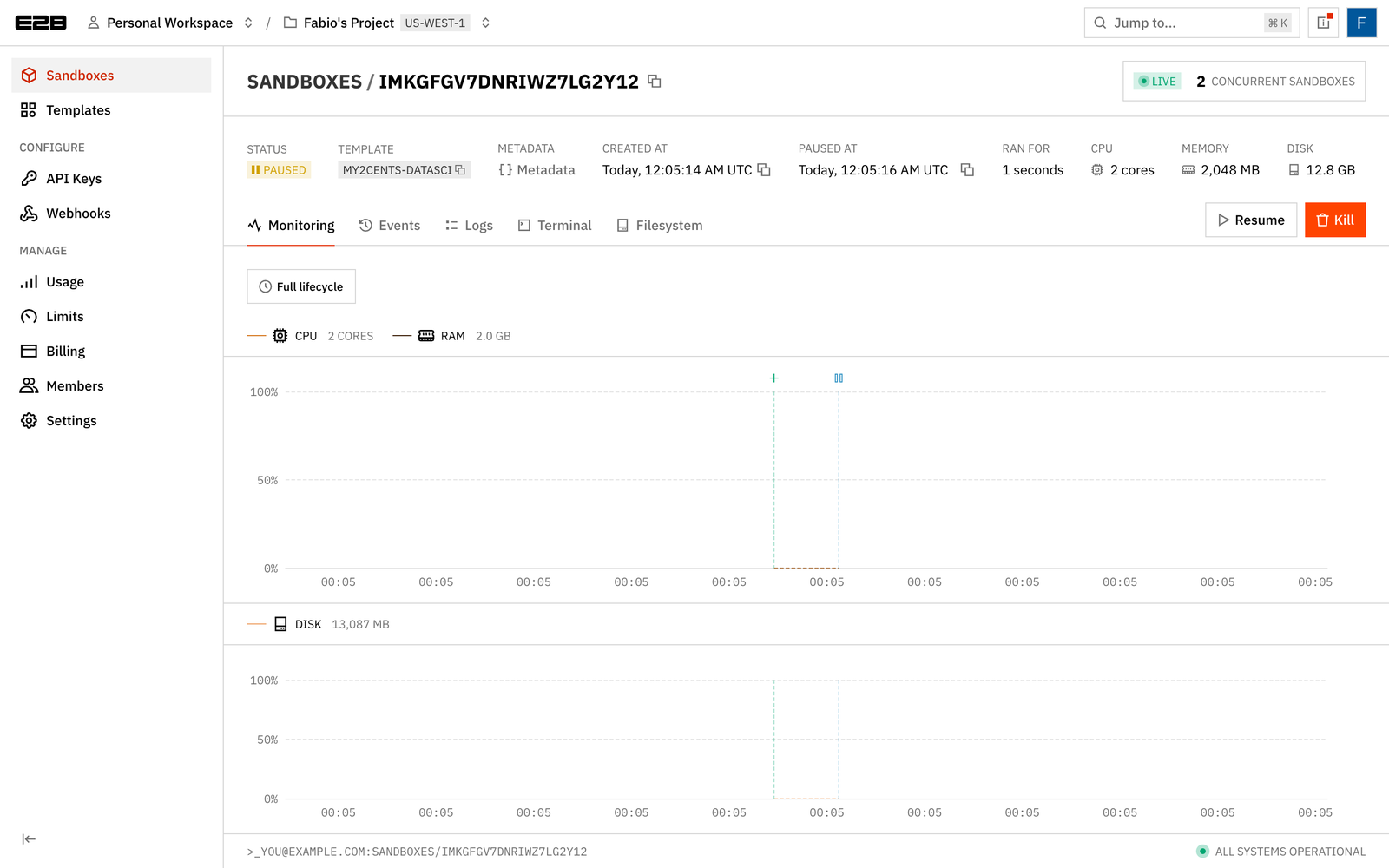
In the console, a paused sandbox shows Resume instead of Pause, plus when it was paused and how long it ran:
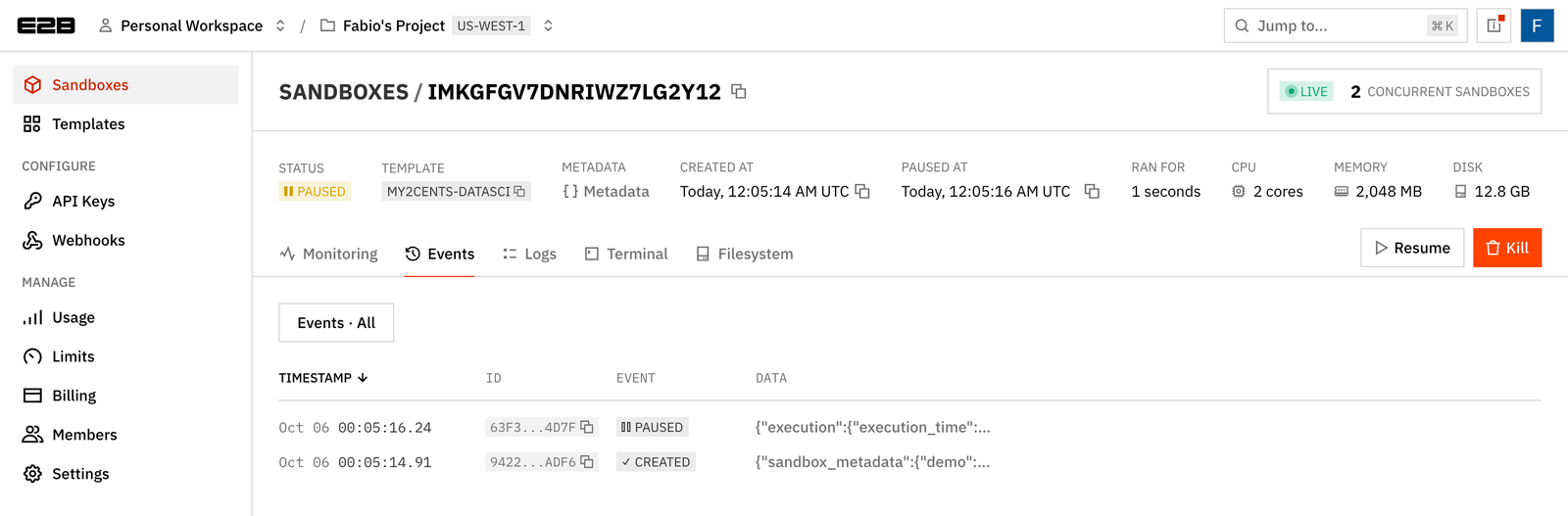
The Events tab logs every lifecycle transition. These are the same events you can subscribe to with lifecycle webhooks, which carry execution time and resources if you want to do your own cost accounting:
If you don’t need memory restored, sbx.pause(mode="filesystem") takes a filesystem-only snapshot (it replaced keep_memory=False in SDK 2.55.0): files survive, processes don’t, and the next resume is a reboot (docs).
Test 5: Auto-pause on timeout and auto-resume on activity
python 05_auto_resume.pyManual pause is fine for scripts. For a product, you want the sandbox to pause itself when idle and wake when something touches it. That’s two lifecycle flags:
sbx = Sandbox.create(
    timeout=20,
    metadata=tagged(test="05"),
    lifecycle={"on_timeout": "pause", "auto_resume": True},
)
sbx.files.write("/home/user/hello.txt", "hello from a paused sandbox\n")
sbx.commands.run("cd /home/user && python3 -m http.server 3000", background=True, timeout=0)

# ...poll Sandbox.get_info(id).state until "paused"...
content = sbx.files.read("/home/user/hello.txt")   # wakes it
lifecycle: {'on_timeout': <SandboxOnTimeout.PAUSE: 'pause'>, 'auto_resume': True}
preview URL: https://3000-in85jhl0d77kt9gq2bwtk.e2b.app/hello.txt
=== Wait for timeout -> auto-pause ===
paused after ~21s of polling
=== Wake with files.read() ===
[ 0.25s] files.read on paused sandbox
hello from a paused sandbox
state after read: running, new end_at: 2026-10-25 09:12:35+00:00
=== Pause again, wake with HTTP ===
state: paused
HTTP 200: hello from a paused sandbox
[ 0.33s] GET preview URL on paused sandbox
state after HTTP: runningBoth wake paths worked. A files.read() against the paused sandbox returned the content in 0.25 s with no explicit resume call. An HTTP GET to the public preview URL woke the sandbox, restored the still-running http.server and returned HTTP 200 in 0.33 s. That second path is the interesting one: a preview environment or an agent’s web app can sleep at zero compute cost and wake on its first request.
Two details from the run. Polling Sandbox.get_info() every 5 seconds did not wake it, so status checks are safe. After waking, the sandbox gets at least 5 minutes of runtime (or its original timeout, if longer) before it auto-pauses again, and the lifecycle setting persists across cycles. auto_resume requires memory-preserving pause; you can’t combine it with mode="filesystem".
Test 6: List, filter, and connect from another process
python 06_list_connect.pyIn a real system, the process that creates a sandbox is rarely the one that uses it later. Metadata plus Sandbox.list() is how you find it, and Sandbox.connect(id) is how you pick it up:
from e2b import Sandbox, SandboxQuery, SandboxState

paginator = Sandbox.list(
    query=SandboxQuery(metadata={"userId": "alice"},
                       state=[SandboxState.RUNNING, SandboxState.PAUSED]),
    limit=100,
)
items = paginator.next_items()
while paginator.has_next:
    items.extend(paginator.next_items())

# ...in a different Python process, with only the ID:
sbx = Sandbox.connect(sandbox_id)
Create three tagged sandboxes
i9vnw3wxcwi7wg2plqbd6 userId=alice
ib9sorwzv31movgjuqfhv userId=alice
iv0ti2xxvalw7yiw4u2s1 userId=bob
paused ib9sorwzv31movgjuqfhv
default (no query): 3
state=running: 2
state=paused: 1
userId=alice, any state: 2
ib9sorwzv31movgjuqfhv paused userId=alice
i9vnw3wxcwi7wg2plqbd6 running userId=alice
Connect from another process (resumes the paused one)
[ 0.76s] Sandbox.connect(id) from second process
[worker] read: owned by alice
back in parent, worker file: the worker was here
state now: runningFiltering by metadata and state works as documented, and the paginator caps pages at 100. A second, unrelated process connected to the paused sandbox by ID in 0.76 s, which resumed it, and wrote a file the parent then read. Two defaults differ between tools: Sandbox.list() in the SDK returns running and paused sandboxes, while e2b sandbox list in the CLI shows running only unless you pass --state running,paused. That’s an easy way to convince yourself you have no leftover sandboxes when you do.
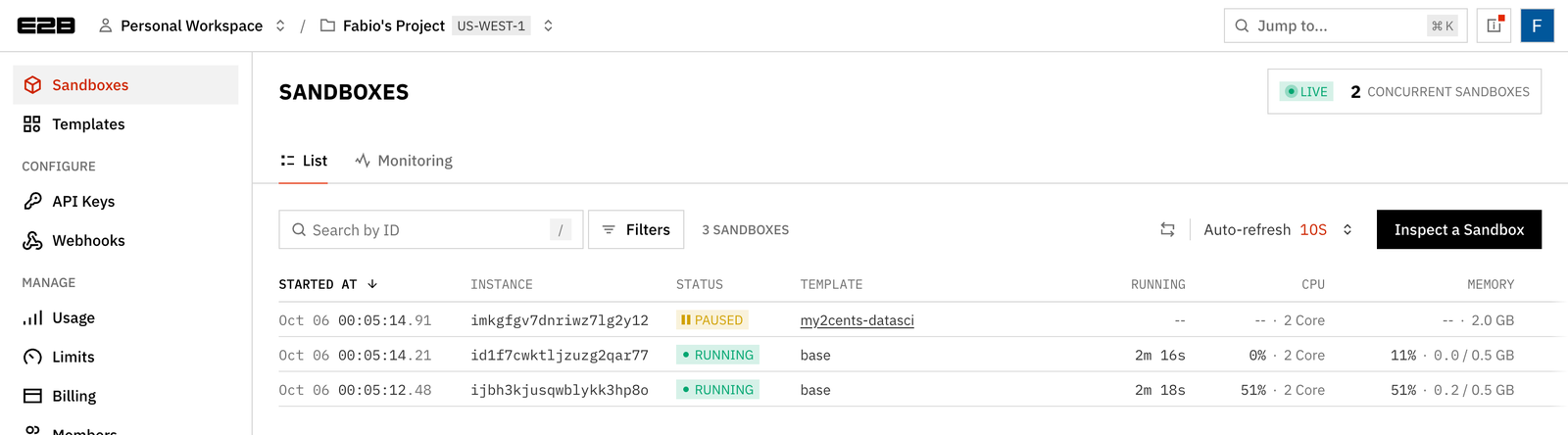
The console’s sandbox list shows the same picture. Note the counter in the top right: three sandboxes are listed, but only two count as concurrent, because paused sandboxes don’t count toward the plan’s concurrency limit (20 on Hobby):
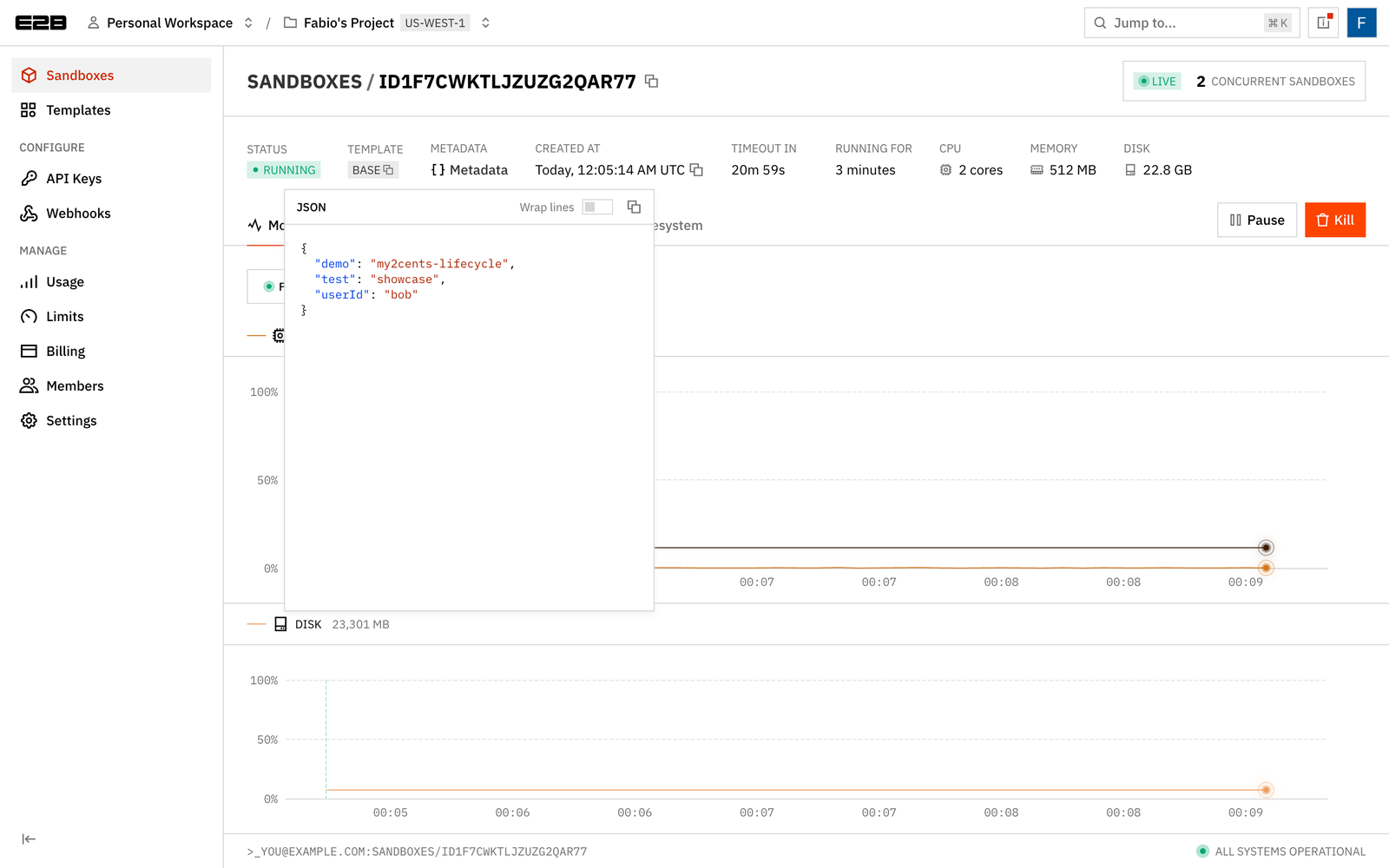
Metadata is visible per sandbox, which helps when you’re tracing a user’s sandbox from a support ticket:
Test 7: Fork and snapshot
python 07_fork_snapshot.pyForking shipped in July 2026 (SDK 2.34.0 for Python), with a CLI command following in September. A fork is a new sandbox that starts from the original’s files, processes and memory. Snapshots are the persistent version: capture once, create many sandboxes from it later.
results = sbx.fork(count=3, timeout=120)  # always pass timeout: the SDK default is 15s
forks = [r for r in results if isinstance(r, Sandbox)]
errors = [r for r in results if not isinstance(r, Sandbox)]

snap = sbx.create_snapshot(name="my2cents-lifecycle-demo")
restored = Sandbox.create(snap.snapshot_id, timeout=120)
=== Fork x3 ===
[ 0.57s] fork(count=3, timeout=120)
forks: 3, errors: 0 []
fork 1 i85nwpvq3ryakayuvdh54: state.txt='shared state' counter=6 pid 1520 alive
fork 2 iajm0ldx33wti61hts3qr: state.txt='shared state' counter=7 pid 1520 alive
fork 3 it8v5xxsvk7nfgsynbfjp: state.txt='shared state' counter=8 pid 1520 alive
original sees fork writes? no (forks diverge)
original counter still running: 8
=== Snapshot -> new sandbox ===
[ 0.44s] create_snapshot()
snapshot: <project>/my2cents-lifecycle-demo:default
[ 0.38s] Sandbox.create(snapshot_id)
restored ih2d669g297p9phu40tjb: 'shared state'
deleted snapshot: TrueThree forks in 0.57 s, each with the parent’s file and the parent’s counter process still running with the same PID. Writes in the forks didn’t leak back to the original. A snapshot took 0.44 s and a new sandbox from it 0.38 s. This is the primitive for “try three approaches in parallel from the same state” in agent workflows, or for checkpointing before a risky step.
Things to know before you rely on it:
fork()returns a list that mixesSandboxobjects and exceptions for partial failures instead of raising, so filter the results as above.- The SDK caps a fork call at 20 copies (the API allows up to 100), and the count has to fit in your concurrency limit.
- Forks default to a 15-second timeout in the SDK and API, while the CLI docs say 5 minutes. Pass
timeoutexplicitly, or your forks disappear mid-demo. - Forking briefly pauses the original to snapshot it, so its open streams drop. Plan to reconnect.
- Forking a paused sandbox currently returns HTTP 409; support for it is still an open proposal in the runtime repo. Resume first.
E2B’s snapshot docs make a useful distinction: for a setup you repeat (same packages, same files every time), a template is faster than a snapshot, because templates are captured after a clean boot with compact memory. Snapshots and forks are for capturing a live state you can’t easily recreate.
Test 8: A custom template vs installing at runtime
python template/build.py   # one-off build, about a minute
python 08_template.py
Templates are E2B’s equivalent of a Docker image, built with a code-first builder (Dockerfiles also work). Here’s a small data-science template:
# template/template.py
from e2b import Template

template = (
    Template()
    .from_base_image()
    .pip_install(["pandas", "numpy", "matplotlib"])
    .set_envs({"MPLBACKEND": "Agg"})
)

# template/build.py
Template.build(template, "my2cents-datasci", cpu_count=2, memory_mb=2048,
               on_build_logs=default_build_logger())
The build took 53 seconds. CPU and RAM are set at build time, per template; you can’t resize a sandbox in Sandbox.create(). Then I compared time-to-first-import pandas on the base template (installing at runtime) against the custom template:
=== Base template + pip install at runtime ===
[  0.42s] create
[ 11.86s] pip install pandas numpy matplotlib
[  1.29s] first import
  time to first import: 13.58s

=== my2cents-datasci (run 1) ===
[  0.79s] create
[  7.15s] first import
[  1.06s] second import
  time to first import: 7.94s

=== my2cents-datasci (run 2) ===
[  0.56s] create
[  8.50s] first import
[  0.57s] second import
  time to first import: 9.06s

speedup vs base: run 1 1.7x, run 2 1.5x
Only about a 1.6x speedup, and it all comes from skipping the 11.9 s pip install. The first import on the template ate most of the gain: 7–8.5 s, against 0.6–1.1 s for a second import in the same sandbox, and 1.3 s right after a fresh install on the base template. My guess is that the template’s filesystem is loaded on demand, so the first read of pandas’ files pays to fetch them, and the base-template run didn’t because pip had just written those files locally. Treat that as a hypothesis. If cold-path latency matters to you, a set_start_cmd that pre-imports your heavy libraries during the build should move that cost into the snapshot. The lakeFS team reported sandbox readiness dropping from about 19 s to about 1 s after baking their dependencies into a template, which is the same idea at a larger scale.
That first-import cost also isn’t stable. When I first ran this test three weeks earlier on SDK 2.52.1, the first import on the template took only 3–4 s, for a 3.7x speedup. On 2.59.0, with a freshly rebuilt template, it took 6.4–8.5 s across four runs (1.5–2.0x), while the runtime-install path barely moved. I can’t tell whether the SDK, the rebuild or E2B’s platform is responsible, which is one more reason to pre-import during the build.
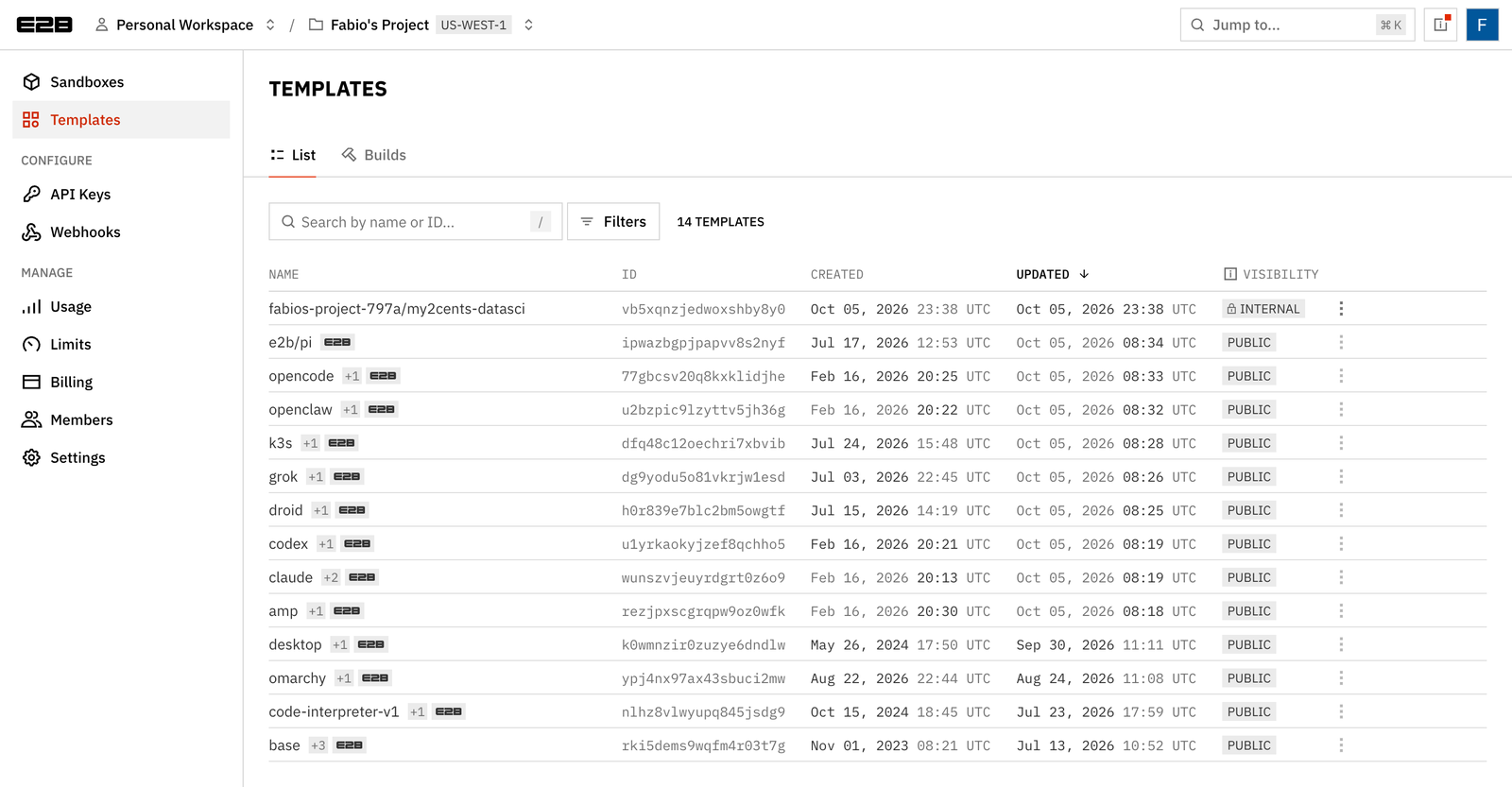
The console’s Templates page lists your private templates next to E2B’s public ones, which now include ready-made images for coding agents (claude, codex, opencode, amp and others):
Results summary
| Operation | Measured (SDK 2.59.0, Hobby, us-west-1, from my laptop) |
|---|---|
Sandbox.create() (base, sequential) | median 0.33 s (0.23–0.83 s, n=5) |
pause() (small-memory sandbox) | 0.69–0.73 s |
connect() resume | 0.23–0.25 s |
Auto-resume via files.read() | 0.25 s |
| Auto-resume via HTTP to preview URL | 0.33 s |
Sandbox.connect(id) from a second process (paused → running) | 0.76 s |
fork(count=3) | 0.57 s |
create_snapshot() / create from snapshot | 0.44 s / 0.38 s |
| Template build (pandas, numpy, matplotlib) | 53 s |
Time to first import pandas: runtime install vs template | 13.58 s vs 7.94–9.06 s |
These are single-region measurements from a laptop on a home connection, with sandboxes that used very little memory. Use them as a sense of scale, not as a benchmark.
Pricing
E2B bills per second while a sandbox is running, for the vCPU and RAM it’s allocated, not what it uses (billing docs):
| Resource | Rate | Per hour |
|---|---|---|
| vCPU | $0.000014 / vCPU-second | $0.0504 |
| RAM | $0.0000045 / GiB-second | $0.0162 |
| Default sandbox (2 vCPU, 512 MiB) | ≈ $0.109 | |
| Paused or killed sandbox | free | $0 |
| Plan | Monthly | Included | Max continuous runtime | Concurrent sandboxes |
|---|---|---|---|---|
| Hobby | $0 | $100 one-time credit | 1 hour | 20 |
| Pro | $150 + usage | No extra credit | 24 hours | 100 (600 for +$500/mo, 1,100 for +$1,000/mo) |
| Enterprise | from $3,000 | Custom | Custom | Custom |
The Pro fee buys limits, not compute: longer sessions, more concurrency, higher CPU and RAM ceilings per template (Hobby already allows up to 8 vCPU and 8 GiB), and more create calls per second (5/s vs 1/s on Hobby). Template and snapshot storage are free today, though the docs say pricing for template storage “may be introduced in the future”.
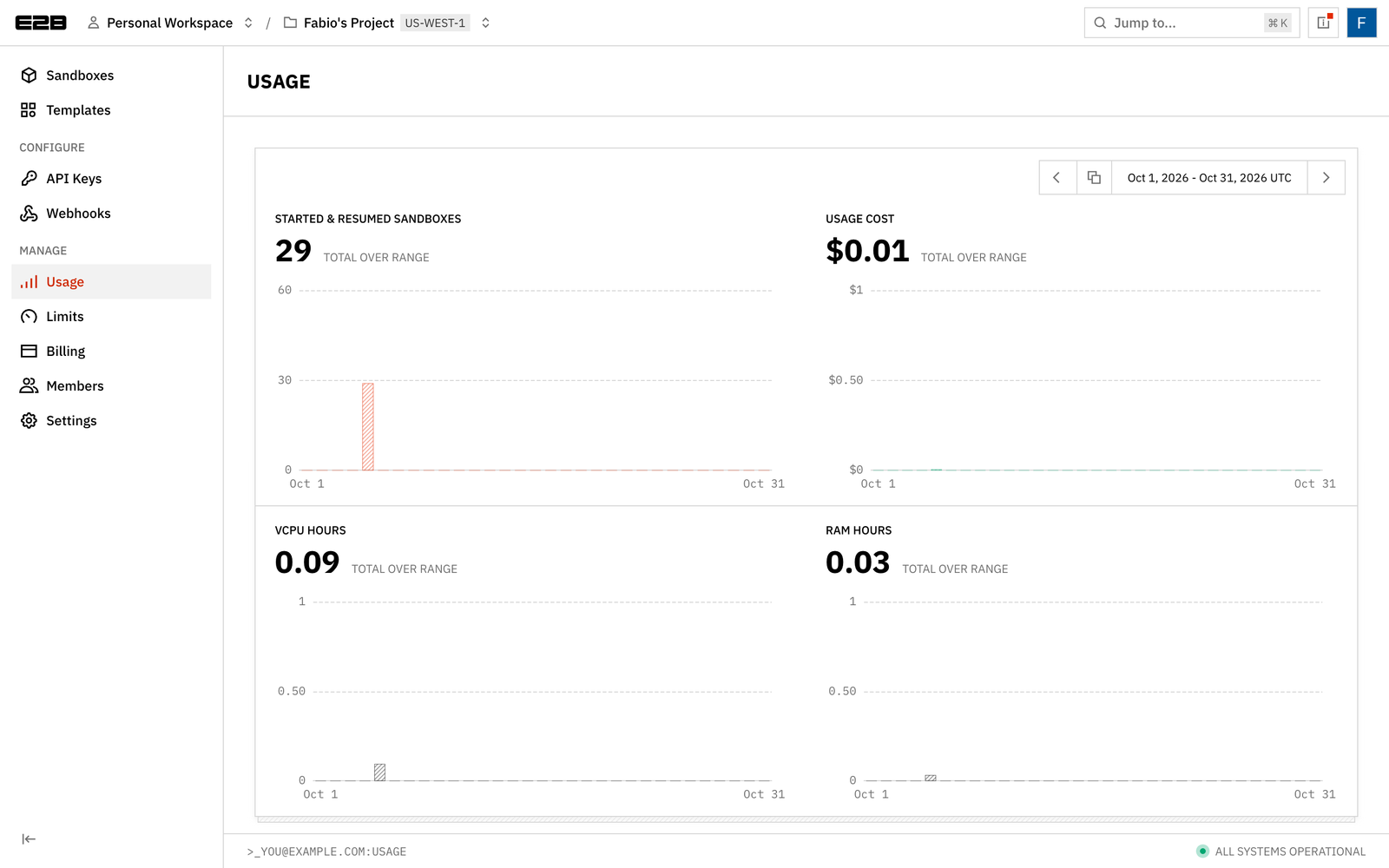
For scale: my original test run on SDK 2.52.1 (29 started or resumed sandboxes, one template build) came to $0.01, according to the console’s Usage page:
Cleanup
Paused sandboxes never expire, aren’t billed, and don’t count toward concurrency, which makes them easy to forget. The E2B cookbook even added a cleanup script on 2026-09-30 that support reportedly hands to customers asking for a paused-sandbox TTL. The companion repo’s last script kills everything carrying the demo tag:
from e2b import Sandbox, SandboxQuery, SandboxState

paginator = Sandbox.list(
    query=SandboxQuery(metadata={"demo": "my2cents-lifecycle"},
                       state=[SandboxState.RUNNING, SandboxState.PAUSED]),
    limit=100,
)
while True:
    for info in paginator.next_items():
        Sandbox.kill(info.sandbox_id)
    if not paginator.has_next:
        break

for s in Sandbox.list_snapshots(name="my2cents-lifecycle-demo").next_items():
    Sandbox.delete_snapshot(s.snapshot_id)
=== Sandboxes tagged {'demo': 'my2cents-lifecycle'} ===
kill imkgfgv7dnriwz7lg2y12 (paused): True
kill id1f7cwktljzuzg2qar77 (running): True
kill ijbh3kjusqwblykk3hp8o (running): True
killed 3
=== Snapshots named my2cents-* ===
deleted 0A follow-up Sandbox.list() across running and paused states returned zero sandboxes, and Sandbox.list_snapshots() returned zero snapshots (the demo snapshot from Test 7 had already been deleted there).
The CLI equivalent, which also needs the explicit state filter:
npx @e2b/cli sandbox kill --all --state=running,paused --metadata=demo=my2cents-lifecycleFinally, set a ceiling. The console’s Limits page has a hard usage limit, which blocks all API requests once you reach it in a billing period, plus a softer usage alert. Automatic emails go out at 50%, 80%, 90% and 100%:
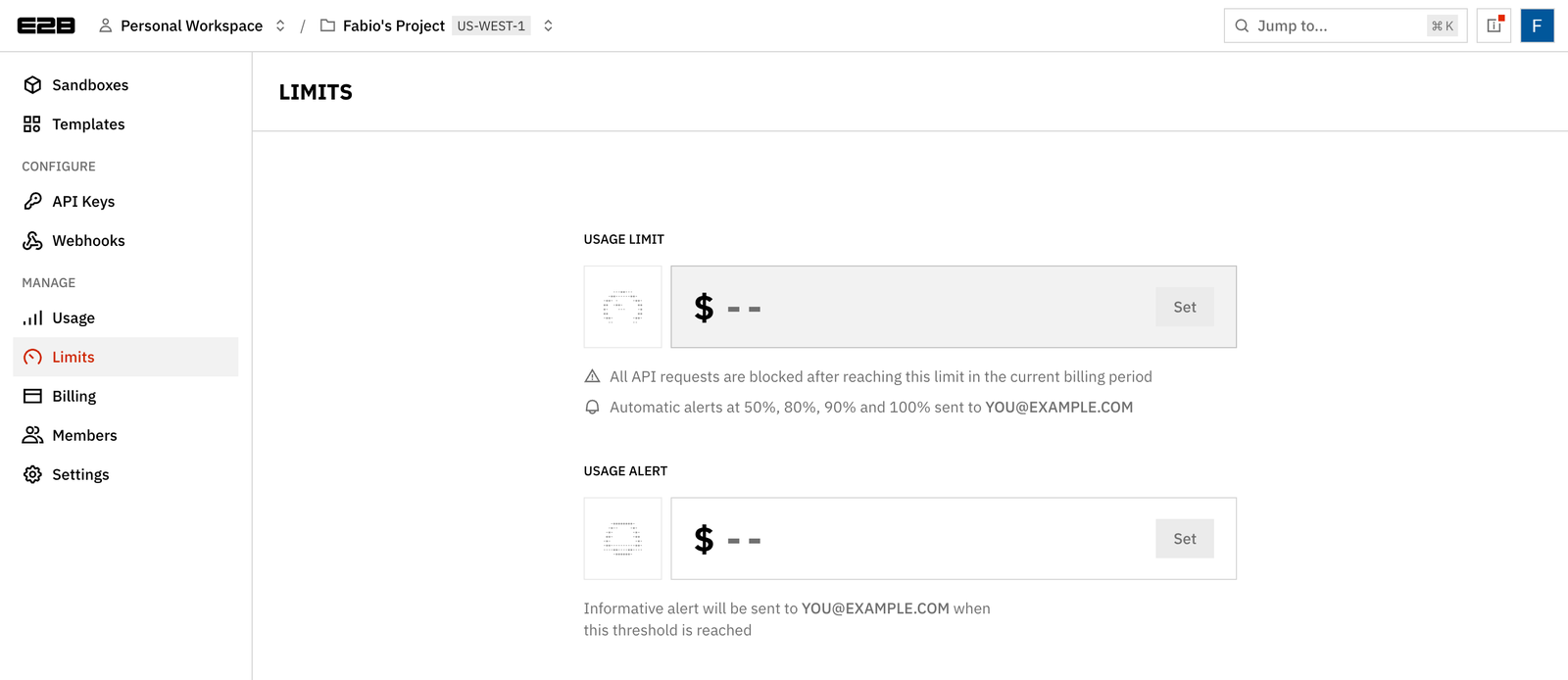
On Hobby, running out of credits blocks the account, so a usage limit is mostly about Pro. I’d set one on day one anyway.