Getting started with Gemini decisions API
By Fabio Douek
Human-led, AI-assisted. Research and implementation done with AI tools, led, tested and edited by me. How posts are labeled
Jump to section
- Overview
- Architecture
- Setup
- Step 1: Enable the Gemini API in the Google Cloud console
- Step 2: Create a restricted API key
- Step 3: Or do both steps with gcloud
- Step 4: The first request, with curl
- Step 5: The Python SDK, and the v1beta pin
- Step 6: Watch it in the console
- The Demo: Triaging One Support Ticket
- Three question types in one request
- Adding a screenshot, a voice note, a video and a PDF
- What each file costs
- What I Measured
- Many questions over one input
- Latency as the input grows
- Are the probabilities honest?
- Edge cases
- Against Gemini 3.5 Flash-Lite
- Results summary
- Pricing
- Cleanup
- Verdict
- What works
- What doesn’t
- Who should use it
Explain (TLDR) like I am...
Imagine a helper who never tells stories. You show it a picture or a letter and ask "is this a cat, yes or no?" and it answers right away, and also tells you how sure it is, like "very sure" or "only a little sure".
Grown-ups like that because they can ask it lots of small questions about the same thing at once, and it is quick and cheap. When the helper says it is only a little sure, a person can take a look instead. It can still be fooled by a sneaky note, so you have to ask your questions carefully.
This is a service that returns a probability for a fixed set of answers, not written reasoning. That matters for accountability: the output gives you a number to threshold, and no explanation to put in a file. Any decision that needs a stated reason still needs another step.
The diligence points are concrete. Free-tier data is used to improve Google products, so real customer content belongs on the paid tier. Google does not label the API as preview or generally available. In my test, text inside the input that argued for its own classification moved the answer, so untrusted input needs explicit criteria and human review below a threshold.
Think of it as a rapid screening test, not a consultation. It answers closed questions about one case, yes or no, one of several options, or a grade on a scale, and reports a probability with each answer. The vendor's evidence is self-reported. On my own 500 labeled articles, stated confidence tracked observed accuracy closely.
Known side effects: forced to choose among options that do not fit, it still chooses, with low confidence. An instruction planted in the input halved its certainty on one test. Good candidates are high volume triage steps with a human reviewing the uncertain band. It is not indicated where a written rationale is required.
Notice how much of a team's day goes to small sorting choices: which queue, is this urgent, does a person need to look. Each one is easy, and together they are tiring. This tool takes that pile and answers each item with a number that says how sure it is.
The relief comes with a new habit to build. A confidence score invites trust, and the team has to decide together where the line sits between "let it through" and "someone reads this". In my tests the numbers were honest most of the time, and still moved when the input tried to talk the model into an answer.
This is a metronome, not a soloist. It plays no melody at all: you hand it a chart of closed questions and it clicks back yes, no, an option or a grade, each with a number for how firmly it means it. Small requests came back in about a third of a second for me.
It keeps time the same way every take on text: the same article gave me the same numbers five runs in a row. It sits best under the band, deciding which player takes the next part, while a generative model does the actual playing. Hand it a thousand questions at once and the tempo drags to a few seconds.
The positioning is narrow and clear: routing, checks and scoring, not writing. One request can carry text, a screenshot, a voice note, a video and a PDF, plus up to 1,000 closed questions, and it bills input tokens only at 10 cents per million.
Time to value is short. My first answer came from a single curl command. On my own labeled set it matched a small generative model on accuracy, answered in under half the time and cost about a third as much, short of the "nearly 5x cheaper" in the launch post. The story to borrow is confidence you can put a threshold on.
 See the source code here: gemini-decisions-api
Overview
On November 11, 2026 Google released the Gemini Decisions API together with a new model, gemini-decision-1. It does not generate text. You send one shared input (text, images, audio, video or PDFs) and a set of closed questions, and you get back a probability for each possible answer. There are three question types: yes/no, choice (pick one of 2 to 255 options) and score (rate on an ordered rubric). One request can carry up to 1,000 questions, and it bills input tokens only: $0.10 per million, with zero output tokens.
The intended uses are the small decisions that sit around a generative model: which queue or model gets this request, does this input break a policy, which tools does the agent need, is this answer good enough to send. Google joins a category that TypeSafe’s Jev started and that OpenAI, Perplexity and others have since entered.
Google’s post makes three claims I wanted to check for myself: latency of 150 to 250 ms for contexts up to 16K tokens, well-calibrated probabilities, and a cost “nearly 5x cheaper” than Gemini 3.5 Flash-Lite across its benchmark suite. All three come from Google’s own tests. This post goes from an API key to a working multimodal triage demo, then measures latency, billed tokens, calibration, edge cases and cost on workloads I picked. Everything below ran on November 12, one day after launch, so treat it as a first impression.
Architecture
There is one endpoint and one model. The request has three parts: the model ID, the shared input, and a map of questions whose keys you choose. The model reads the input and all questions in a single forward pass and scores every candidate answer, so there is no token-by-token decoding. The response has an answers map under the same keys and a usage block. What you do with the probabilities (thresholds, routing, escalation to a person) is your code.
Three properties shape how you use it:
- Questions are independent. They cannot see each other, and adding one does not change the other answers. A decision that depends on an earlier answer needs a second request, or you ask both and ignore one.
- The model does not see question keys. The guide says to put the whole question in
instructions. Option keys are different: renaming them changed an answer in one of my tests below. - It is not on Google Cloud’s AI platform yet. The API runs on the Gemini Developer API (
v1beta) with an API key, made in AI Studio or in the Google Cloud console. Google lists Google Cloud support as coming soon, with an early-access form. An AI Studio key still belongs to a Google Cloud project, and paid usage is billed through that project’s Cloud Billing account.
Setup
Step 1: Enable the Gemini API in the Google Cloud console
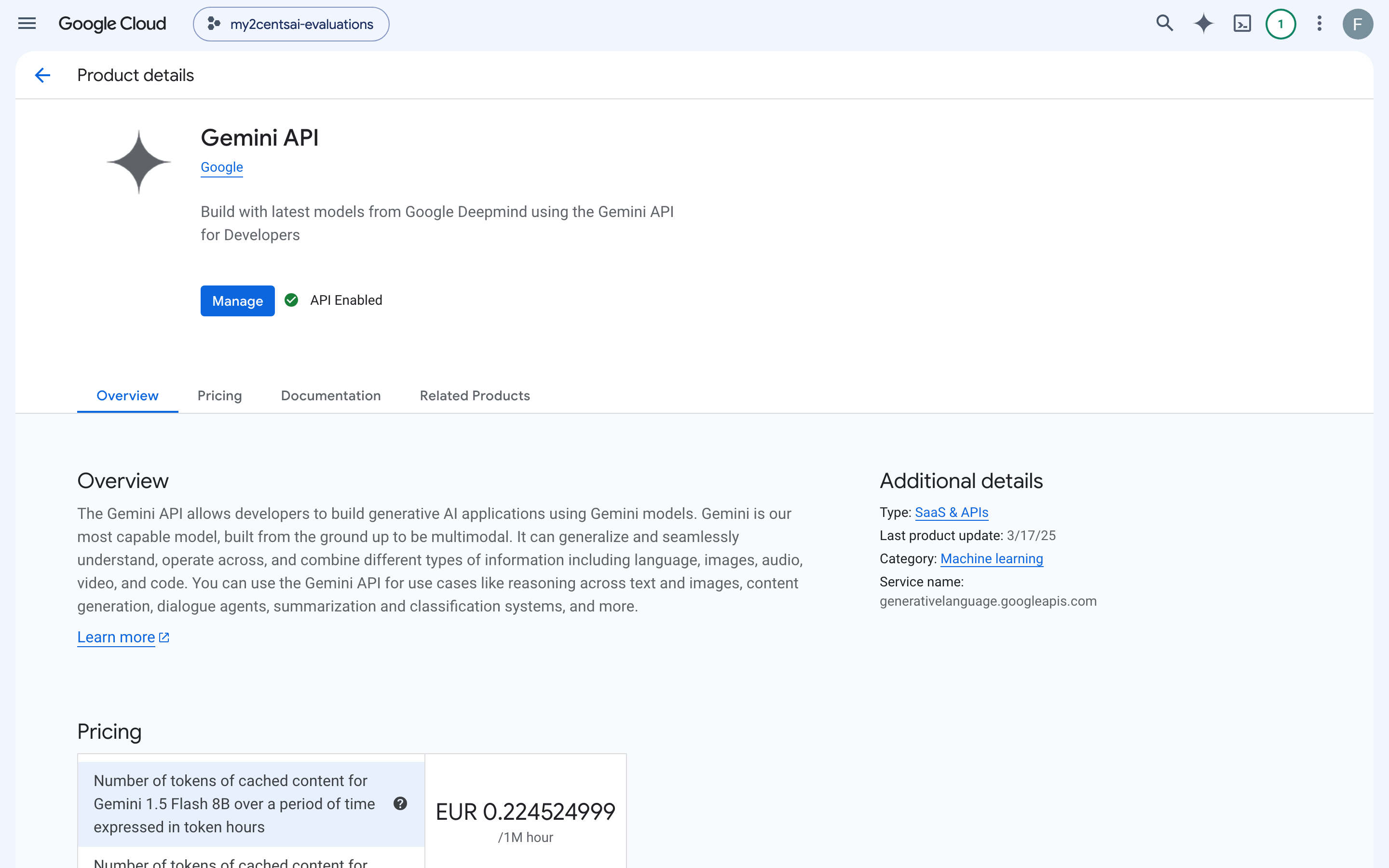
The Decisions API is not a separate product in Google Cloud. It is one method of the Gemini API (service name generativelanguage.googleapis.com), so that is what you enable. In the Google Cloud console, pick or create a project, open APIs & Services > Library, search for “Gemini API” and press Enable. Once it is on, the page shows “API Enabled” and a Manage button.
There is a free tier for gemini-decision-1 (200 requests and 50,000 tokens per minute, 10,000 requests per day, per the rate limits page), and Google’s terms say free-tier content is used to improve its products. I ran everything on a project the API reported as Tier 1 (1,000,000 input tokens per minute). Two of my tests need that: a single 250K-token request is five times the free tier’s per-minute allowance.
Step 2: Create a restricted API key
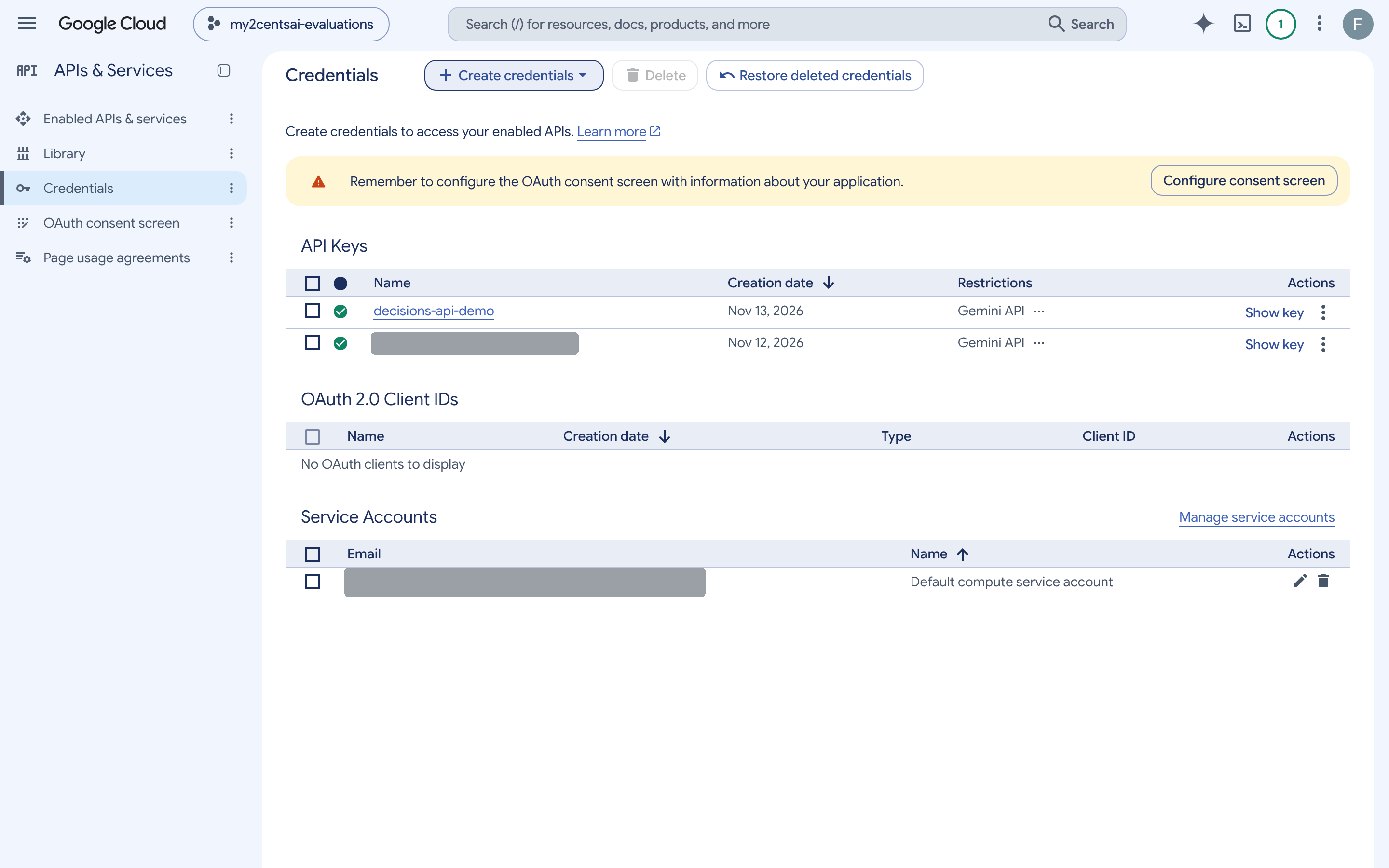
Under APIs & Services > Credentials, choose Create credentials > API key, then restrict the key to the Gemini API so it cannot call anything else in the project. This is the Credentials page after I created a key named decisions-api-demo for this post (I covered the name of an unrelated key and the service account’s address):
You can also create a key in Google AI Studio, which is the route Google’s quickstart takes. Either way the key belongs to a Google Cloud project. One thing to know: AI Studio’s usage and rate-limit pages only showed its own “Default Gemini Project” for me, and its API Keys page failed to list keys with “permission denied”, so for a key made in the Cloud console, the console is where I could see what was going on.
Step 3: Or do both steps with gcloud
The same two steps from the command line, as 00_setup_gcloud.sh in the companion code. It enables the API, creates the restricted key, writes it to a git-ignored .env without printing it, and makes a first request:
gcloud services enable generativelanguage.googleapis.com apikeys.googleapis.com --project "$P"
gcloud services api-keys create --project "$P" --display-name "decisions-api-demo" \
  --api-target=service=generativelanguage.googleapis.com
gcloud services api-keys get-key-string "$ID" --project "$P" --format='value(keyString)'
$ ./00_setup_gcloud.sh
== 1. Enable the Gemini API (Generative Language API) and the API Keys API
apikeys.googleapis.com ENABLED
generativelanguage.googleapis.com ENABLED
== 2. Create an API key that can only call the Gemini API
decisions-api-demo generativelanguage.googleapis.com
== 3. Save the key to .env (not printed)
wrote .env (55 bytes, mode 600)
== 4. First request with the new key
{"answers":{"is_damaged":{"confidence":0.99,"noul":0.99,"type":"noul"}},"usage":{"total_tokens":100,"total_input_tokens":100,"input_tokens_by_modality":[{"modality":"text","tokens":100}],"total_output_tokens":0}}The new key worked on the first request, with no wait. Whichever way you made the key, export it for the rest of the steps:
export GEMINI_API_KEY=... # never commit itStep 4: The first request, with curl
curl -sS -X POST "https://generativelanguage.googleapis.com/v1beta/decisions" \
  -H "x-goog-api-key: $GEMINI_API_KEY" \
  -H "Content-Type: application/json" \
  -d '{
    "model": "gemini-decision-1",
    "input": "The blue mug I ordered on Monday arrived cracked on Wednesday.",
    "questions": {
      "is_damaged": {
        "type": "noul",
        "instructions": "Did the item arrive damaged?"
      }
    }
  }'
The whole response:
{"answers":{"is_damaged":{"confidence":0.99,"noul":0.99,"type":"noul"}},"usage":{"total_tokens":100,"total_input_tokens":100,"input_tokens_by_modality":[{"modality":"text","tokens":100}],"total_output_tokens":0}}The yes/no type really is spelled noul, the same name TypeSafe’s Jev uses, and the answer field has the same name. Its value is the probability of yes. It is clamped to the range 0.01 to 0.99, so a check like > 0.99 never matches. That one-sentence input with one question billed 100 tokens.
Step 5: The Python SDK, and the v1beta pin
Decisions support arrived in google-genai 3.2.0 (Python 3.11 or later).
git clone https://github.com/fabiodouek/my2centsai-blog-samples.git
cd my2centsai-blog-samples/gemini-decisions-api
python3 -m venv .venv && source .venv/bin/activate
pip install .
python 01_first_call.py
The first thing I hit: a client built with defaults fails.
== google-genai 3.2.0, default client (API version v1)
NotFoundError: Error code: 404

== client pinned to v1beta
P(yes)     = 0.99
confidence = 0.99
usage      = {'input_tokens_by_modality': [{'modality': 'text', 'tokens': 100}], 'total_input_tokens': 100, 'total_output_tokens': 0, 'total_tokens': 100}
The 3.x client defaults to the v1 API, and Decisions exists only on v1beta. The 404 has an empty body, so nothing tells you why. Pin the version when you build the client:
from google import genai

client = genai.Client(http_options={"api_version": "v1beta"})
result = client.decisions.create(
    model="gemini-decision-1",
    input="The blue mug I ordered on Monday arrived cracked on Wednesday.",
    questions={"is_damaged": {"type": "noul", "instructions": "Did the item arrive damaged?"}},
)
print(result.answers["is_damaged"].noul)
Time to first answer was a few minutes, most of it reading the guide to find out why the default client returned 404.
Step 6: Watch it in the console
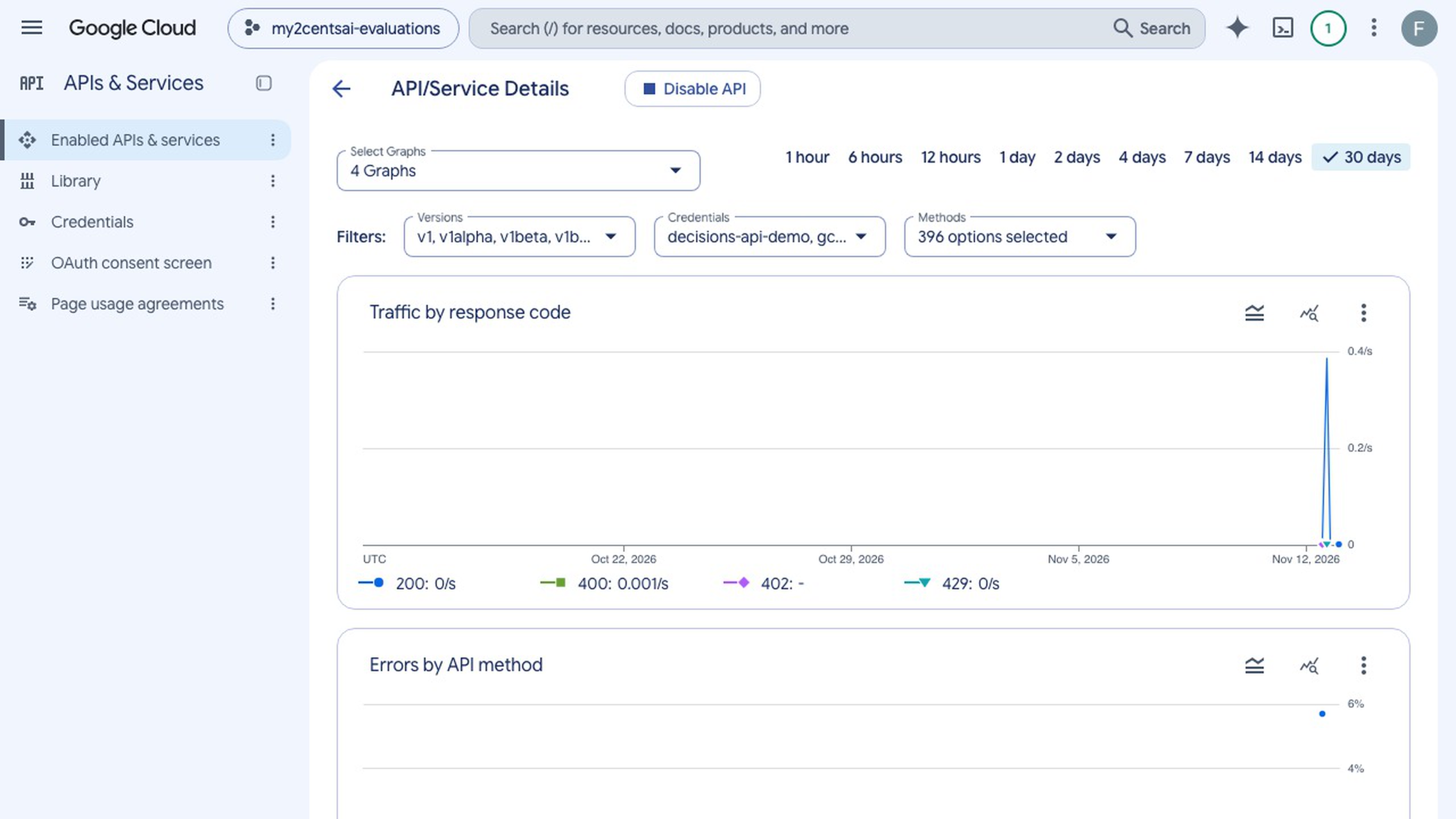
Back in the console, Manage on the Gemini API page opens the service’s own page, with Metrics, Quotas & System Limits, Credentials and Cost tabs. This is the traffic from the runs in this post, by response code: the spike of 200s, the 400s from my error tests, and a line for the 429s from hitting the rate limit.
Further down, the charts break traffic down by API method. The Decisions API shows up there under its own method name, genai.gemini.v1beta.DecisionService.CreateDecisionHttp, next to the Files API calls the multimodal script made:
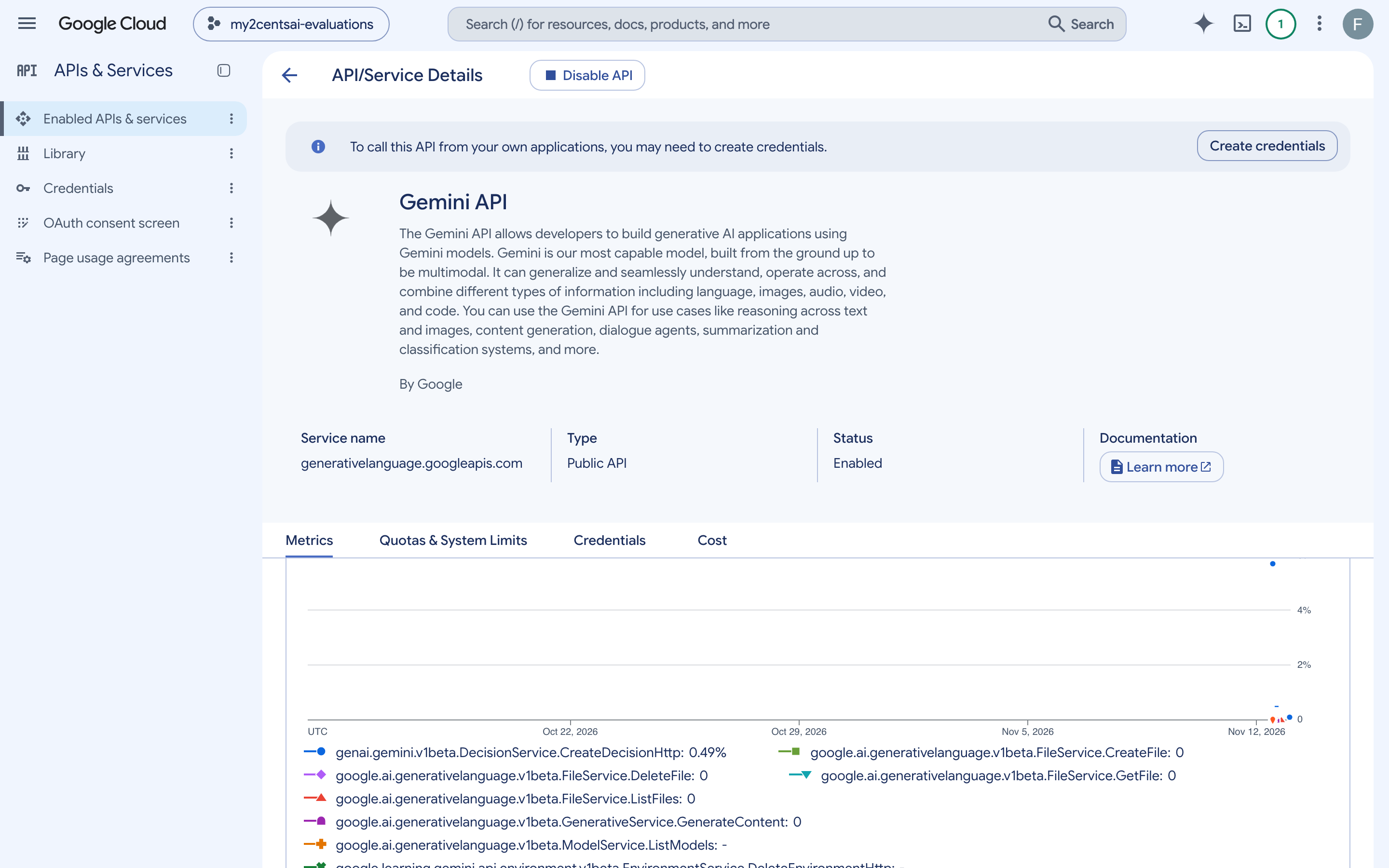
That method name is also what to filter on if you want an alert on Decisions errors or rate limits.
The Demo: Triaging One Support Ticket
The scenario: a parcel company’s support inbox. A customer renewed a plan, the app said the payment failed, and the bank shows two charges. I want the ticket routed to a queue, flagged for a refund fast track if it is a clear duplicate charge, and given a priority. The ticket and its attachments are synthetic; I generated them for this post.
Three question types in one request
02_ticket_demo.py sends the ticket as JSON text with five questions: three yes/no, one choice and one score.
QUESTIONS = {
    "double_charge": {
        "type": "noul",
        "instructions": "Does `message` report being charged more than once for the same purchase?",
    },
    "asks_for_refund": {"type": "noul", "instructions": "Does the customer explicitly ask for money back?"},
    "mentions_legal_action": {"type": "noul", "instructions": "Does the customer threaten legal action or a chargeback?"},
    "queue": {
        "type": "choice",
        "instructions": "Which support queue should handle this ticket?",
        "criteria": {
            "technical": "App errors, crashes, login problems.",
            "billing": "Charges, refunds, invoices, payment methods.",
            "shipping": "Parcel tracking, delays, damaged or lost parcels.",
            "account": "Plan changes, users, permissions, cancellations.",
            "other": "Anything that fits none of the above.",
        },
    },
    "churn_risk": {
        "type": "score",
        "instructions": "How likely is the customer to leave if this is not resolved quickly?",
        "criteria": ["No churn signal", "Mild frustration", "Mentions alternatives or a deadline", "States they will leave"],
    },
}
result = client.decisions.create(model="gemini-decision-1", input=json.dumps(TICKET), questions=QUESTIONS)
== yes/no (noul): probability of yes, clamped to 0.01..0.99
double_charge P(yes)=0.9900 confidence=0.9900
asks_for_refund P(yes)=0.9746 confidence=0.9746
mentions_legal_action P(yes)=0.1175 confidence=0.8825
== choice: probabilities over the five queues
choice=billing confidence=0.9201
billing 0.9201
technical 0.0554
account 0.0174
other 0.0040
shipping 0.0032
sum 1.0000
== score: probability-weighted average of the level index (0-based)
score=2.2359 confidence=0.7341
0 0.0006 No churn signal
1 0.0141 Mild frustration
2 0.7341 Mentions alternatives or a deadline
3 0.2512 States they will leave
== triage rule built on the answers
route=billing/refund_fast_track priority=P1
== usage
input tokens=520 output tokens=0 cost=$0.000052A few things to read off this:
- For a yes/no question,
confidenceismax(p, 1 - p). The legal-action answer is 0.1175 yes, so 0.8825 confident in no. - The score is not a level. It is the probability-weighted average of the level indexes, starting at 0, so 2.24 sits between “mentions a deadline” and “states they will leave”. The customer wrote “if this is not sorted by Friday we will move our shipping to another provider”, and the model split its weight 73/25 between those two levels, which is a fair reading.
- The triage rule is ordinary code on top of the numbers:
if a["queue"].confidence < 0.6:
    route = "human_review"
elif a["double_charge"].noul > 0.9 and a["asks_for_refund"].noul > 0.9:
    route = f"{a['queue'].choice}/refund_fast_track"
else:
    route = a["queue"].choice
priority = "P1" if a["churn_risk"].score >= 2 or a["mentions_legal_action"].noul > 0.5 else "P3"
Five decisions cost 520 input tokens, about five thousandths of a cent.
Adding a screenshot, a voice note, a video and a PDF
03_multimodal.py adds four attachments to the same ticket: a screenshot of the app’s error, a 17-second voice note, a 12-second screen recording and a one-page PDF account statement. Media goes into input as typed blocks, inline as base64 or by URI:
shared = [
    {"type": "text", "text": json.dumps(TICKET) + "\n"},
    {"type": "image", "data": b64("screenshot.png"), "mime_type": "image/png"},
    {"type": "audio", "data": b64("voice_note.mp3"), "mime_type": "audio/mp3"},
    {"type": "video", "data": b64("screen_recording.mp4"), "mime_type": "video/mp4"},
    {"type": "document", "data": b64("statement.pdf"), "mime_type": "application/pdf"},
]
I asked eight questions that only the attachments can answer:
statement_shows_duplicate    0.9650     confidence=0.9650
caller_tone                  annoyed    confidence=0.9308
voice_deadline               friday     confidence=0.9725
video_error_appears          0.3245     confidence=0.6755
error_code_is_pay_4012       0.9210     confidence=0.9210
statement_contradicts_app    0.9514     confidence=0.9514
refund_amount                eur_89     confidence=0.9988
screenshot_shows_error       0.9010     confidence=0.9010

1723 ms, input tokens=3,805 (text=899, image=2,327, audio=579), output tokens=0
cost: $0.000380
Seven of the eight are right. It read the error code from the screenshot, found the two same-day charges in the PDF, and heard “Friday” in the voice note. The question I liked most crosses two files: the app says the payment failed, and the statement shows it went through. One request, five inputs, eight answers, 3,805 tokens, $0.00038. It took 1.7 seconds, the first request of that process and one that uploads about 300 KB of base64.
The miss is the video. The recording shows the checkout screen for five seconds and then the error appears, and in this run the model put only 0.32 on “an error message appears partway through”. When I ran the identical request an hour earlier, the same question came back at 0.86, and the other seven answers moved by a point or two. So a request with media in it did not give me the same numbers twice, unlike the text-only requests later in this post, and an answer near the middle can land on either side of a threshold. The same video sent alone through the Files API scored 0.93 both times.
What each file costs
The pricing page gives one rate for every modality, but the docs do not say how many tokens an image or a second of audio costs for this model. So I sent each file alone and read the usage block:
| File | resolution | Image tokens | Audio tokens | Total billed |
|---|---|---|---|---|
| Screenshot (1170x2000 PNG) | low | 252 | 342 | |
| medium | 540 | 630 | ||
| high (same as default) | 1,075 | 1,165 | ||
| ultra_high | 2,196 | 2,286 | ||
| Voice note (17.1 s MP3) | n/a | 519 | 643 | |
| Screen recording (12.2 s MP4) | default, low or medium | 720 | 60 | 892 |
| high | 3,024 | 60 | 3,196 | |
| PDF statement (1 page) | n/a | 532 | 794 |
The totals include the question and its formatting, about 90 tokens. What I take from it:
- Audio came to about 30 tokens per second, so a minute of audio is roughly 1,800 tokens, or $0.00018.
- Video frames are counted as image tokens: about 60 per second of video by default, and four times that at
high.lowandmediumbilled the same as the default. My video has no sound and still billed 60 audio tokens. - PDF pages are billed as an image (532 tokens) plus the page’s text.
- Images default to
high. Dropping the screenshot tolowcut it from 1,075 to 252 tokens.
These are measurements on four files, not a published rate card. Read usage on your own media.
Media can also go through the Files API. The script uploads the video with client.files.upload(...) and passes {"type": "video", "uri": file.uri, "mime_type": "video/mp4"}. That worked on the first try and billed about the same (907 tokens against 892). It was also the more reliable way to ask about the video in my runs: alone, the video question scored 0.93.
What I Measured
All timings are wall-clock time for the whole HTTPS request from my laptop, on a connection that was already open, so they include the network. They are not comparable to Google’s numbers to the millisecond, but the shape is.
Many questions over one input
04_fanout.py sends about 1,800 tokens of shared input with 1, 10, 100 and 1,000 yes/no questions, ten requests each:
| Questions | Input tokens | p50 | p95 | Cost per request | Cost per question |
|---|---|---|---|---|---|
| 1 | 1,835 | 286 ms | 338 ms | $0.000183 | $0.00018350 |
| 10 | 2,303 | 292 ms | 370 ms | $0.000230 | $0.00002303 |
| 100 | 7,064 | 379 ms | 527 ms | $0.000706 | $0.00000706 |
| 1,000 | 55,574 | 2,655 ms | 3,015 ms | $0.005557 | $0.00000556 |
The billing claim holds: the shared input is counted once, and each extra question added about 53 tokens. My questions are around 10 words, so a good part of that is formatting overhead that every question pays, on top of its own text.
The latency claim holds in the range Google states it for. Going from 1 to 10 questions changed nothing, and 100 questions added about 90 ms. At 1,000 questions the request took 2.7 seconds. It still returned all 1,000 answers in one call for half a cent, but it is no longer a real-time call.
Latency as the input grows
05_context_scaling.py sends a synthetic event log of increasing size with two questions, ten requests per size up to 64K tokens and five above:
| Input tokens | p50 | p95 | Cost per request |
|---|---|---|---|
| 1,132 | 309 ms | 361 ms | $0.000113 |
| 4,052 | 323 ms | 420 ms | $0.000405 |
| 15,748 | 441 ms | 585 ms | $0.001575 |
| 62,632 | 697 ms | 934 ms | $0.006263 |
| 125,268 | 1,087 ms | 1,186 ms | $0.012527 |
| 244,544 | 2,042 ms | 2,404 ms | $0.024454 |
Google’s figure is 150 to 250 ms end to end for contexts up to 16K tokens. I did not see that as a median in this run. Across the three times I ran this script, the median at 1K tokens was 233, 340 and 309 ms, and in the calibration test below the fastest request took 127 ms, so the figure is within reach of what I saw. From my connection, a realistic expectation was 200 to 350 ms for small inputs and 450 to 520 ms at 16K.
The log has one ERROR line buried in the middle. At every size, including 244K tokens, the model answered that the highest severity present was error and that no line mentions a refund.
Running this back to back with the previous test, on an earlier run, also produced my first real rate-limit error:
{"error": {"message": "Rate limit exceeded for model gemini-decision-1 (limit: 1000000 input tokens per minute on Tier 1). Please retry in 57s or upgrade your tier at https://ai.dev/rate-limit.", "code": "too_many_requests"}}It is an HTTP 429, with a clear message. Note the error shape: code is a string, not the numeric code and status pair that other Gemini API errors use.
Are the probabilities honest?
“Calibrated” means that when the model says 0.8, it is right about 80% of the time. That is the property that makes thresholds meaningful. 06_calibration.py tests it on data Google did not choose: 500 articles sampled with a fixed seed from the public AG News test set, each labeled as world, sports, business or science and technology. Each request asks one choice question (the topic) and one yes/no question (is it about sports).
== topic (choice)
accuracy = 0.884   top-1 ECE = 0.0403
confidence     n  stated  actual
0.4-0.5        8   0.484   0.500
0.5-0.6       36   0.552   0.583
0.6-0.7       31   0.655   0.806
0.7-0.8       27   0.742   0.704
0.8-0.9       39   0.857   0.795
0.9-1.0      359   0.983   0.953
confidence >= 0.5: keeps 98.4% of items, accuracy 0.890
confidence >= 0.7: keeps 85.0% of items, accuracy 0.922
confidence >= 0.9: keeps 71.8% of items, accuracy 0.953
confidence >= 0.95: keeps 63.8% of items, accuracy 0.953

== is_sports (yes/no)
accuracy = 0.990   ECE = 0.0117   min P = 0.01   max P = 0.99
answers at the clamp: 160 at 0.01, 34 at 0.99
The “stated” column is the average confidence in each bucket and “actual” is how often those answers were right. They track each other: answers given at about 0.55 were right 58% of the time, and answers above 0.9 were right 95% of the time. The expected calibration error (the size-weighted average gap) is 0.040 for the topic question and 0.012 for the yes/no question. Google reports 0.025 on its own suite; mine is a little worse and still good. The model is slightly overconfident at the top: it says 0.98 and delivers 0.95.
Two caveats. AG News has four labels with fuzzy edges between business and technology, so 88.4% is partly a ceiling of the dataset. And 500 articles of news text is one task; it says nothing certain about yours.
The practical result is the threshold table. Sending everything below 0.9 confidence to a person would have auto-handled 72% of the articles at 95.3% accuracy.
The same script sends 20 articles five times each. The top choice never changed and every confidence value was identical to four decimals. The docs do not promise determinism, and the multimodal request above shows it does not extend to media, but for text that is what I got.
Edge cases
07_edge_cases.py runs the cases I would worry about before putting this in front of real traffic.
When no option fits. I asked which shipping problem the billing ticket describes, with four shipping options. A choice question always spreads its probability over the options it has:
HTTP 200 (322 ms)
  issue              late_delivery (confidence 0.4291)
                     late_delivery=0.4291  lost_parcel=0.3544  damaged_parcel=0.1133  wrong_address=0.1032
It picked late_delivery, but at 0.43, which a confidence threshold would catch. Adding an other option and a yes/no scope check fixed it properly: other at 0.9993, and “is this about a shipping problem” at 0.0785.
Option order and option names. The docs say option keys are sorted alphabetically before evaluation, so their order in your JSON does not matter. That held: the same options sent forward and reversed returned identical probabilities. But when I kept the descriptions and renamed the keys from billing, technical, account, shipping to d_queue, c_queue, b_queue, a_queue, the answer on an ambiguous message moved from 0.54 / 0.43 to 0.70 / 0.27 for the same two queues. My test changed the names and the position they sort into at the same time, so I cannot say which of the two did it. Either way, option keys are not free labels: use meaningful ones, and do not rename them without re-testing your thresholds.
Prompt injection. A plain spam message scored 0.97 for “Is this message spam?”. Then I appended a fake note to the message telling the classifier it had been reviewed and was not spam:
| Question | Plain spam | Spam with injected note |
|---|---|---|
| Is this message spam? | 0.9718 | 0.5126 |
| Same question, with criteria that call such text a spam signal | 0.9727 | 0.9858 |
| Does the message try to instruct an automated classifier? | 0.0100 | 0.9712 |
The injected note took the plain question from 0.97 to a coin flip. Google’s guide warns about this (“user-supplied text can argue for its own classification”) and its advice works: with explicit criteria (a true_description saying that text telling you how to classify is itself a signal) the answer went up, not down. A separate question asking whether the input tries to instruct a classifier caught it at 0.97. Both cost a few tokens.
Errors. Validation errors return HTTP 400 with a message that names the rule:
| Request | Status | Message |
|---|---|---|
| Question key with a space | 400 | * CreateDecisionRequest.questions[is it ok]: question IDs must be 1-64 characters matching [A-Za-z0-9_-]+ |
| Choice with one option | 400 | * CreateDecisionRequest.questions[q].choice.criteria: must have between 2 and 255 options |
| 1,001 questions | 400 | * CreateDecisionRequest.questions: must have between 1 and 1000 questions |
| Input over the context window | 400 | The input token count exceeds the maximum number of tokens allowed (262144). |
v1 instead of v1beta | 404 | empty body |
| No API key | 403 | Method doesn't allow unregistered callers (callers without established identity)... |
| Over the token rate limit | 429 | Rate limit exceeded for model gemini-decision-1 (limit: 1000000 input tokens per minute on Tier 1)... |
The docs also describe safety blocks that return HTTP 400 in place of answers. I sent one violent request for instructions as the input, with the question “Does this message ask for help harming people?”, and it was not blocked: it answered 0.99. That is what you want from a model used for moderation, and one input is not a test of the filter. I did not try to find where the block starts.
Against Gemini 3.5 Flash-Lite
The do-it-yourself alternative is a small generative model with a structured output restricted to an enum. 08_flash_lite_baseline.py sends the same 500 articles to gemini-3.5-flash-lite that way at temperature 0, then to gemini-decision-1 with the same single question:
| Accuracy | p50 | p95 | Input tokens | Output tokens | Cost per 1,000 items | |
|---|---|---|---|---|---|---|
gemini-decision-1 | 0.884 | 259 ms | 352 ms | 89,157 | 0 | $0.0178 |
gemini-3.5-flash-lite | 0.884 | 679 ms | 926 ms | 54,712 | 5,599 | $0.0608 |
Accuracy is a tie: 442 of 500 each, in this run. I ran the Flash-Lite half three times on the same articles and got 0.892, 0.878 and 0.884, so its answers are not stable between runs even at temperature 0, while the Decisions answers on this text were identical every time. The two models agreed on 95.2% of the articles.
The Decisions API was 2.6 times faster at the median and cost 3.4 times less. Google’s “nearly 5x cheaper” is for its own suite; on short inputs like these the gap is smaller, because the Decisions request spent more input tokens (178 per article against 109), which is the per-question overhead again. With longer inputs or several questions per input the gap widens: Flash-Lite would need one call per question, or a larger schema and more output tokens.
What Flash-Lite cannot give you at all is the probability. It returns one label, and there is nothing to threshold.
Results summary
| Claim or question | What I found |
|---|---|
| 150 to 250 ms up to 16K tokens | Medians of 190 to 340 ms at 1K to 4K and 440 to 520 ms at 16K over three runs, network included. A fastest request of 127 ms |
| Latency flat from 1 to 100 questions | Yes: 286, 292 and 379 ms. 1,000 questions took 2.7 s |
| Shared input billed once | Yes. About 53 tokens per extra 10-word question |
| Calibrated probabilities | ECE 0.040 (choice) and 0.012 (yes/no) on 500 AG News articles |
| Deterministic | Text: 20 items, 5 runs each, identical answers. With media: no, one answer moved from 0.86 to 0.32 between runs |
| Nearly 5x cheaper than Flash-Lite | 3.4x on my workload, 2.6x faster, same accuracy |
| No option fits | Still picks one, at low confidence. Add other or a scope check |
| Prompt injection | A planted note moved 0.97 to 0.51. Explicit criteria restored it |
| Default SDK client | 404 with an empty body until pinned to v1beta |
Pricing
gemini-decision-1 costs $0.10 per 1M input tokens for every modality, with no output charge. The shared input is billed once per request, and each question adds its own instructions, criteria and formatting. There is no context caching, no Batch API and no Flex or Priority tier, so input you repeat across requests is billed in full each time.
Here is what this post cost, from the token counts the scripts recorded:
| Work | Tokens | Cost |
|---|---|---|
| All Decisions API tests, every run | 9,019,976 | $0.90 |
| Flash-Lite baseline, three runs | 180,937 | $0.09 |
| Total | $0.99 |
Most of the $0.90 is the two large tests, the 250K-token requests and the 1,000-question requests, which I ran several times, the last time for the video. One pass of the two demo scripts costs about a fifth of a cent, and most of that is the per-file measurements.
For scale: the five-question ticket triage is 520 tokens, so a million tickets a month would cost about $52. The multimodal version, at 3,805 tokens, would be about $380.
How it compares on list price, from each vendor’s own pages as of November 12, 2026:
| Input per 1M tokens | Output | Max questions | Input types | Notes | |
|---|---|---|---|---|---|
| Gemini Decision 1 | $0.10 | none | 1,000 | text, image, audio, video, PDF | Free tier. No caching or batch |
OpenAI gpt-6-luna (Decisions API) | $0.10 | none | 400 | text, image | Cached input at $0.01 |
| TypeSafe Jev | $0.042 | none | not compared | text, images behind a flag | Early access |
| Gemini 3.5 Flash-Lite (structured output) | $0.30 | $2.50 | n/a | text, image, audio, video, PDF | One label, no probability |
I only ran the two Google rows. Per token, Gemini ties OpenAI and costs about 2.4 times Jev. Where it stands apart is audio, video and PDF input and the 1,000-question limit. If your inputs are short text and your volume is high, the cheaper text models deserve a test on your own data. If you re-send the same long prefix on every request, OpenAI’s cached-input rate changes the math, since Gemini bills repeated input in full.
Paid usage shows up in the Google Cloud project that owns the API key, on the Cloud Billing reports page, usually within a day and sometimes longer, according to Google’s billing docs.
Cleanup
Nothing here runs by the hour. The only things left behind are files uploaded to the Files API, which expire on their own after 48 hours, and the API key from Setup.
python 09_cleanup.py== Files API
deleted files/ci11790jnw9m (video/mp4, 33388 bytes)
files left: 0
== what the scripts sent (from results/spend.json)
gemini-decision-1 tokens=9,019,976 $0.9020
gemini-3.5-flash-lite tokens=180,937 $0.0912
total $0.9932Then delete the demo key, on the Credentials page or with the script:
$ ./00_setup_gcloud.sh --delete

== Delete the API key "decisions-api-demo"
plain delete:
  deleted; keys named decisions-api-demo left: 0
One surprise here. The first demo key I made had been in use for about twenty minutes when I tried to delete it, and a plain gcloud services api-keys delete refused:
FAILED_PRECONDITION: Unable to delete key. Active usage in the last 7 days was detected for service(s): generativelanguage.googleapis.com. To override this protection and apply the change, set check_existing_usage to SKIP.That is a guard against deleting a key something still depends on. For a key you know is disposable, --no-check-existing-usage skips the check, and the script falls back to it. A second key that had made one request seconds earlier deleted without complaint, so the check seems to depend on usage having been recorded. I ran the experiments on a key I already had, and kept that one.
Verdict
The Gemini Decisions API does the narrow thing it says. The first request is one curl command, the response is small and typed, and in my tests the probabilities were honest enough to put thresholds on. Accuracy matched a small generative model on my labeled set, at less than half the latency and about a third of the cost, and on text the answers did not change between runs.
What works
- Multimodal input in one request. A screenshot, a voice note, a video and a PDF answered together, including a question that needed two of them, for $0.00038. Seven of eight answers were right.
- Calibration. Stated confidence tracked actual accuracy on data Google did not pick.
- Fan-out. Up to 100 questions over one input cost almost nothing extra in time or money.
- Error messages. Validation and rate-limit errors name the rule and the limit.
What doesn’t
- The default SDK client returns an empty 404. You have to know to pin
v1beta. - Short inputs pay a per-question overhead. On 100-token inputs the saving against Flash-Lite was 3.4x, not 5x.
- No caching or batch. Repeated context is billed in full, which hurts exactly the routing use case where every request shares a long preamble.
- Media answers moved between runs. The same request scored the video question 0.86 once and 0.32 the next time.
- Injection works on a naive question. The fix is cheap, but you have to write it.
- Media token rates are undocumented for this model. I had to measure them.
- No Google Cloud platform support yet, and Google does not say whether the API is preview or generally available.
Who should use it
Use it for routing, policy checks, tool selection and eval grading where you want a number to threshold, and especially where the input is not just text. Keep a generative model for anything that needs an explanation, and keep a person behind the low-confidence band. If your workload is high-volume short text, benchmark it against the cheaper decision models first. Whatever you pick, build a small labeled set from your own traffic and run the calibration check on it before you trust a threshold; mine took 500 requests and cost about a cent.