Daytona Sandboxes: Hands-On with the Full Sandbox Lifecycle
By Fabio Douek
Jump to section
- Overview
- Architecture
- Setup
- Step 1: Account, API key and tier
- Step 2: Install the SDK and the companion code
- Step 3: Label everything, and set a TTL
- Testing
- Test 1: Create a sandbox and inspect the defaults
- Test 2: Commands, files, preview URLs and the exec timeout
- Test 3: Auto-stop, refresh_activity, TTL and auto-delete
- Test 4: Stop and start, three cycles
- Test 5: Pause and fork on a Linux VM
- Test 6: List, filter, and reconnect from another process
- Test 7: Snapshots, and fork on a container
- Test 8: A custom snapshot vs installing at runtime
- Results summary
- Pricing
- Cleanup
- Verdict
- Who should use it
Explain (TLDR) like I am...
Imagine a toy box you can borrow for your robot. The robot can build anything inside it and make a mess, and none of it touches your real room. When playtime is over you can close the lid, and the blocks are still there next time, but the robot has to start its game again.
The tricky part is the lid closes by itself if nobody from outside talks to the box for a while, even if the robot is still busy inside. And a closed box never opens on its own: a grown-up has to open it again before anyone can play.
Daytona is a hosted execution environment: code an application or its AI agent generates runs in an isolated container on Daytona's infrastructure, billed per second. The platform source is now closed; only the client SDKs are open source.
The diligence points are retention and egress. Stopped sandboxes keep their files, and are billed for disk, until they are archived after seven days or deleted, because automatic deletion is off by default. New accounts start on a tier with restricted internet access and tight quotas. Confirm the tier, assign cleanup ownership, and set a time-to-live on every sandbox.
The condition this treats is unsafe execution of machine-written code on infrastructure you care about. The intervention is a disposable container per task. In my testing it started in about one second and stopped and started again in one to two seconds each way.
The evidence is good for files, which survived every stop, start and archive. The known side effects are lost processes on stop, an idle timer that ignores work running inside the sandbox, and no automatic wake-up. Memory-preserving pause exists only on a virtual machine class. Once support enabled it on my account, pause and resume each took under a second and a running process carried on from where it stopped.
Notice the relief when the code an agent writes can only ever break a box built to be broken. The conversation moves from whether to let the agent act to what it should do next.
The new friction is quieter. A sandbox can stop itself in the middle of a long job because nobody outside touched it, and it will not wake up until someone notices. Naming who owns the timers, and who tidies up the stopped boxes that still cost money, keeps that from turning into blame later.
Think of a Daytona sandbox as a rehearsal room you book by the second. You can leave your gear set up between sessions, and it is still there when you return, but the band has to count the song in again because nothing that was playing keeps playing.
Watch the house rules on tempo. The room locks itself after fifteen minutes without a knock on the door, even mid-song, and nobody unlocks it until you ask. The room comes preloaded with a full rack of instruments, so most sessions start without unpacking anything.
The positioning is "a long-lived workspace for your agent." Time to value is minutes: one install, one API key, a sandbox in about a second, and a $200 free credit that is far more than this walkthrough needs.
The story is breadth. Daytona ships many lifecycle controls, a default image already loaded with agent tooling, and per-second pricing with no plan fee. The caveats buyers will ask about are the tier gating on new accounts and the lack of automatic wake-up for idle sandboxes.
 See the source code here: daytona-sandbox-lifecycle
Overview
Daytona runs AI-generated code in cloud sandboxes that you create, drive and delete from SDKs in Python, TypeScript, Go, Ruby and Java. It started as an open-source dev-environment manager and repositioned around agent sandboxes. In June 2026 the platform moved to a private codebase.
The thing to understand before anything else is that a Daytona sandbox’s lifecycle depends on its class. The default class is a container: it can stop, start, archive and snapshot its filesystem, but it can’t pause with memory, can’t fork, and nothing wakes it up automatically. The Linux VM class adds memory-preserving pause and fork. You pick the class through the snapshot you create from, not through a flag.
This post, part 1 of 2, walks a default sandbox through its whole life, from daytona.create() to cleanup, with a runnable script per stage. I ran everything against SDK 0.226.1 (released 2026-10-23) from Python, in the us region. My organization started on Tier 1 and moved to Tier 2 partway through; none of the numbers below depend on the tier. Every timing is from my runs. The Linux VM class wasn’t available to my organization at first, on either tier. After a support request, Daytona enabled a VM quota in a separate region, us-west-3, and Test 5 covers pause and fork there. Part 2 covers credentials: giving an agent in the sandbox API keys without putting the keys inside it.
Architecture
The Daytona API handles the lifecycle (create, start, stop, archive, snapshot, delete). Inside each sandbox, a toolbox daemon serves process execution, files and git. A proxy exposes any port as https://<port>-<sandbox-id>.daytonaproxy01.net, protected by a token by default.
What each state costs, from the billing docs:
| State | Billed for | Counts toward disk quota? | Expires? |
|---|---|---|---|
| Started | vCPU + RAM + disk, per second | Yes | Auto-stop after 15 idle minutes by default; no platform runtime cap |
| Stopped | Disk only | Yes | Auto-archived after 7 days by default; auto-delete is off by default |
| Archived | Nothing | No | Never, unless you set a TTL or delete it |
| Deleted | Nothing (snapshots taken from it stay billed) | No | Gone for good |
The class-dependent features, per the sandbox docs:
| Feature | Container (default) | Linux VM / Windows |
|---|---|---|
| Stop / start (files kept, processes lost) | yes | yes |
| Archive to object storage | yes | no |
| Pause / resume with memory | no | yes |
| Fork a live sandbox | no | yes |
| Filesystem snapshot | yes | yes |
| Auto-pause on idle | no | yes |
Setup
Step 1: Account, API key and tier
Sign up at app.daytona.io and create a key under API Keys. New organizations get $200 of free compute (not usable on GPUs), far more than this walkthrough needs.
Check your tier before you start, because it decides what you can test. A new organization is on Tier 1: 10 vCPU, 10 GiB of RAM and 30 GiB of disk across the whole organization, and restricted internet access that a sandbox can’t override. Adding a card and $25 of credit moves you to Tier 2 (100 vCPU / 200 GiB / 300 GiB, still restricted egress). Open internet and per-sandbox allow lists start at Tier 3, which needs a $500 top-up (limits docs).
The tier didn’t decide whether I could use Linux VMs. The endpoint that lists the sandbox classes your organization can create didn’t include linux-vm on Tier 1 or Tier 2, and building a custom VM snapshot failed with “No runners are configured in region ‘us’ for sandbox class ‘linux-vm’”. I asked Daytona support, who enabled a Linux VM quota. The same call then returned a new entry, in its own region:
curl -s -H "Authorization: Bearer $DAYTONA_API_KEY" \
https://app.daytona.io/api/organizations/$ORG_ID/available-sandbox-classes[{"regionId":"us","sandboxClass":"container","gpuAvailable":false},
{"regionId":"us","sandboxClass":"windows","gpuAvailable":false},
{"regionId":"us-west-3","sandboxClass":"linux-vm","gpuAvailable":false},
{"regionId":"us-west-4","sandboxClass":"windows","gpuAvailable":false},
{"regionId":"earth","sandboxClass":"container","gpuAvailable":true}]Linux VMs live in us-west-3, not in us where my containers run, so a VM needs a client pointed at that region (Test 5 shows how). The dashboard’s Limits page gained a Linux VM tab, with its own quota of 10 vCPU, 10 GiB of memory and 30 GiB of storage:
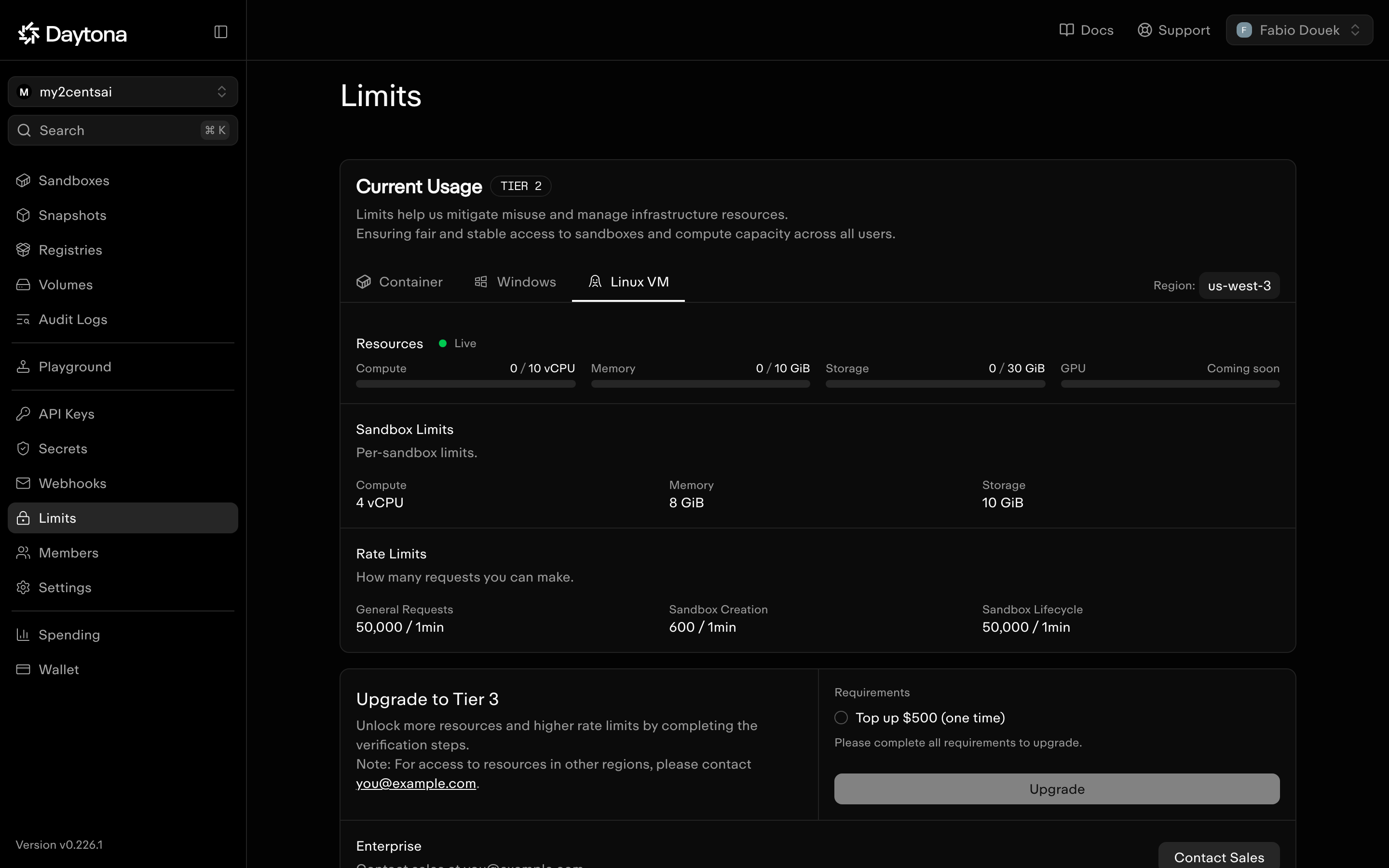
Daytona’s July announcement said VMs were “available to all Daytona organizations”, but mine needed a support request. If VMs matter to you, run that call on day one and ask support if linux-vm is missing.
Step 2: Install the SDK and the companion code
git clone https://github.com/fabiodouek/my2centsai-blog-samples.git
cd my2centsai-blog-samples/daytona-sandbox-lifecycle
cp .env.example .env            # paste DAYTONA_API_KEY=dtn_...
uv venv && uv pip install -e .  # installs daytona==0.226.1 + python-dotenv + requests
source .venv/bin/activate
I pinned daytona==0.226.1. Daytona ships SDK releases about twice a week, and the docs’ changelog lagged behind PyPI while I was writing (its newest entry was 0.225.0). Bump the pin deliberately.
Step 3: Label everything, and set a TTL
Every script labels its sandboxes and sets a one-hour TTL, so cleanup only touches what the demo created and anything a crashed script leaves behind is destroyed within the hour:
# common.py
DEMO_LABELS = {"demo": "my2cents-lifecycle"}
SAFETY_TTL = 60  # minutes; destroys the sandbox in any state

def labels(**extra: str) -> dict:
    return {**DEMO_LABELS, **extra}
The TTL matters because auto-delete is off by default, so a stopped sandbox keeps its disk, and keeps being billed for it, until something deletes it.
Testing
Test 1: Create a sandbox and inspect the defaults
python 01_create.py # optional arg: number of timed creates (default 5)from daytona import CreateSandboxFromSnapshotParams, Daytona
daytona = Daytona()
sbx = daytona.create(CreateSandboxFromSnapshotParams(labels=labels(test="01"), ttl_minutes=SAFETY_TTL))
print(sbx.snapshot, sbx.sandbox_class, sbx.cpu, sbx.memory, sbx.disk, sbx.auto_stop_interval)=== Create with defaults ========================================
[ 2.17s] daytona.create()
snapshot : daytonaio/sandbox:0.8.0 (container)
region : us
state : SandboxState.STARTED
cpu/mem/disk: 1 vCPU / 1 GiB / 3 GiB
auto-stop : 15 min | auto-archive: 10080 min | auto-delete: -1 | auto-pause: 0
6.8.0-85-generic
daytona
64 # nproc
100000 100000 # /sys/fs/cgroup/cpu.max -> 1 vCPU
Mem: 773337 124150 420041 1418 242299 649187 # free -m
1073741824 # /sys/fs/cgroup/memory.max -> 1 GiB
overlay 3.0G 24K 3.0G 1% /
=== 5 sequential creates ========================================
[ 0.74s] create #1
[ 0.88s] create #2
[ 1.23s] create #3
[ 1.94s] create #4
[ 0.87s] create #5
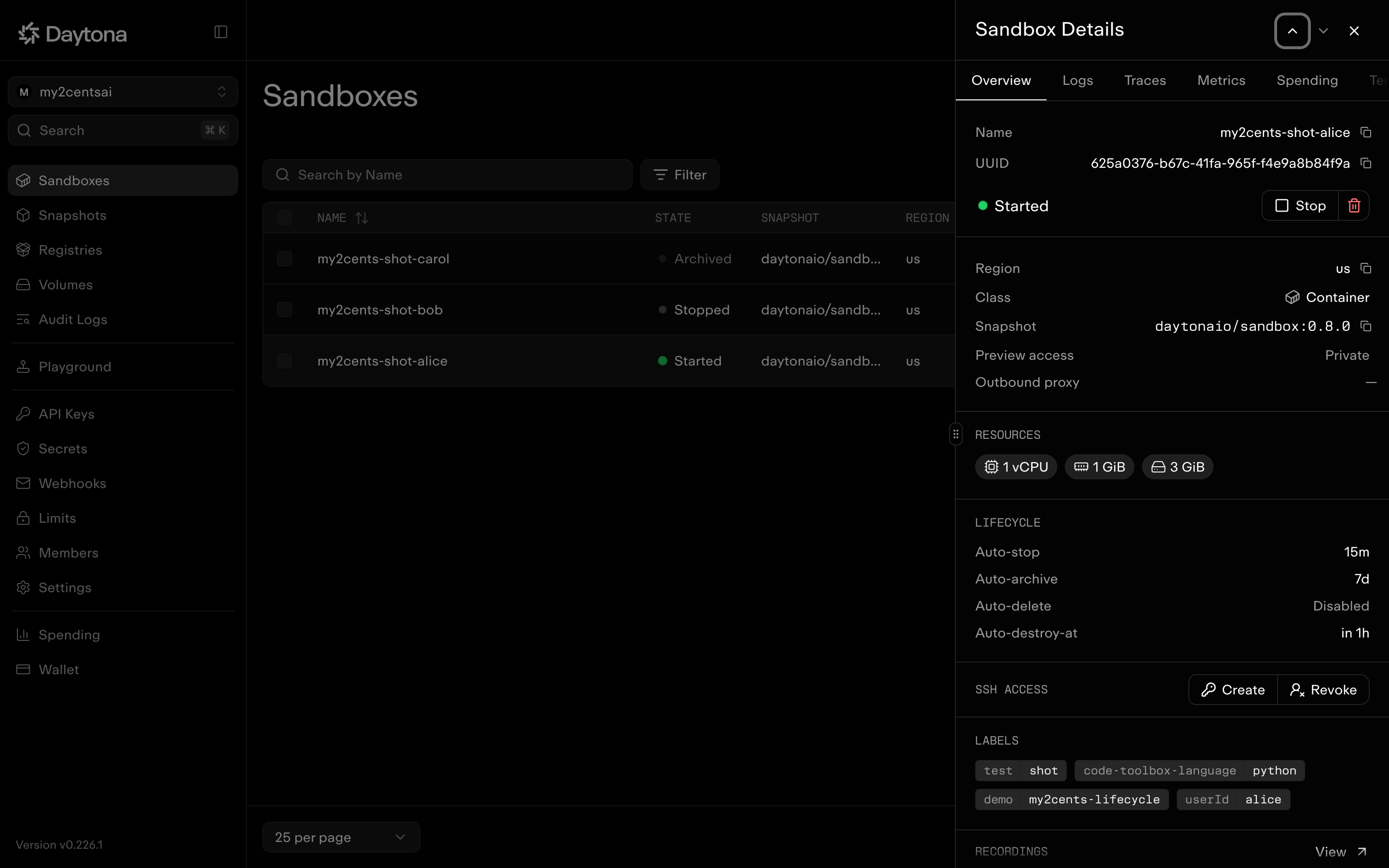
median 0.88s | min 0.74s | max 1.94sThe documented defaults hold: a container from the daytonaio/sandbox:0.8.0 image, 1 vCPU, 1 GiB, 3 GiB, auto-stop after 15 minutes, auto-archive after 7 days (10,080 minutes) and auto-delete disabled (-1). Five sequential creates had a median of 0.88 s in this run and 1.28 s in an earlier one (0.74–2.72 s across both), measured from my laptop including the API round trip. That’s a long way from the “Sub 90ms” on Daytona’s homepage, which measures something narrower than an SDK call from a laptop.
The sandbox reports the host’s size, not its own. In a 1 vCPU / 1 GiB sandbox, nproc said 64 and free -m showed about 755 GiB. The real limits are still enforced, but tools that size themselves from those numbers (a JVM, a build tool, a worker pool) will start far too much work for the sandbox.
The dashboard shows the same defaults per sandbox, including the class, the lifecycle timers and the TTL’s destroy time:
Test 2: Commands, files, preview URLs and the exec timeout
python 02_commands_files.pyThere are two ways to run things. process.exec() is a blocking call that returns an exit code and output. Sessions are long-lived shells where commands can run asynchronously, and you fetch their logs later:
r = sbx.process.exec("echo out; echo err 1>&2; exit 3")

sbx.process.create_session("srv")
sbx.process.execute_session_command(
    "srv", SessionExecuteRequest(command=f"cd {home}/notes && python3 -m http.server 3000", run_async=True)
)
link = sbx.get_preview_link(3000)
requests.get(f"{link.url}/hello.txt", headers={"x-daytona-preview-token": link.token})
=== Blocking command ============================================
exit=0
Python 3.14.4
daytona
/home/daytona
=== stdout, stderr and exit code ================================
exit=3 result='out\nerr\n'
=== Session command, streamed logs ==============================
tick 1
tick 2
tick 3
=== Files: upload, download, list ===============================
hello from my laptop
file a.txt (1 B)
file b.txt (1 B)
file hello.txt (21 B)
=== Background server + preview URL =============================
preview URL: https://3000-f1a09699-7d86-4d8c-bb81-52232269a93e.daytonaproxy01.net
no token -> HTTP 401
token header -> HTTP 200 'hello from my laptop'
token + skip -> HTTP 200 'hello from my laptop'
signed URL -> HTTP 200 'hello from my laptop'
=== Exec timeout ================================================
exit=0
[ 75.30s] exec('sleep 75') with no timeout
DaytonaProcessExecutionTimeoutError: Failed to execute command: command execution timeout
[ 3.31s] exec('sleep 10', timeout=3)Three things in that output:
- stdout and stderr come back merged. For separate streams, run the command in a session and read its logs.
- Preview URLs are private. Without a token you get a 401. Send it in the
x-daytona-preview-tokenheader, or create a short-lived signed URL withcreate_signed_preview_url(). - There’s no default exec timeout. The docs say 10 seconds, but
sleep 75ran to completion. Passtimeout=yourself on anything that can hang.
Code runs as the daytona user in /home/daytona, with passwordless sudo. The default image is Debian 13 with Python 3.14.4 and Node 25.9.0, and it’s heavy: it ships Claude Code, Codex, OpenCode, OpenClaw, Bun and 291 Python packages, including pandas, numpy, scikit-learn, matplotlib and torch. That changes Test 8.
Test 3: Auto-stop, refresh_activity, TTL and auto-delete
python 03_timeouts.py # about 4 minutesDaytona has several lifecycle timers, and they don’t all mean what their names suggest. The script creates four sandboxes and watches them:
# A: auto-stop after 1 minute, with "sleep 3600" running in a session
# B: same, but refresh_activity() every 15 seconds
a = daytona.create(CreateSandboxFromSnapshotParams(auto_stop_interval=1, labels=..., ttl_minutes=SAFETY_TTL))
# C: ttl_minutes=2, then stopped immediately
c = daytona.create(CreateSandboxFromSnapshotParams(ttl_minutes=2, labels=...)); c.stop()
# D: auto_delete_interval=0, then stopped
d = daytona.create(CreateSandboxFromSnapshotParams(auto_delete_interval=0, labels=..., ttl_minutes=SAFETY_TTL)); d.stop()
C b9294341-... auto_destroy_at=2026-10-29T03:27:33.653Z
C stopped: stopped
D after stop(): gone (DaytonaNotFoundError)
=== Poll every 15s for 3.5 min (B gets refresh_activity each tick)
t= 0s A=started B=started C=stopped
t= 47s A=started B=started C=stopped
t= 62s A=stopping B=started C=stopped
t= 78s A=stopped B=started C=stopped
t= 109s A=stopped B=started C=stopped
t= 124s A=stopped B=started C=destroying
t= 140s A=stopped B=started C=gone (DaytonaNotFoundError)
t= 201s A=stopped B=started C=gone (DaytonaNotFoundError)(Rows trimmed. Times count from the start of the polling loop, which began a few seconds after the sandboxes were set up.)
- Auto-stop ignores your processes. Sandbox A had
sleep 3600running and was stopping by the 62-second poll. The docs are explicit about this: only lifecycle changes, preview traffic, SSH and toolbox API calls count as activity. An agent running a 20-minute job inside the sandbox, with nothing calling in from outside, gets stopped at the 15-minute default, and stopping kills its processes (Test 4). refresh_activity()keeps it alive. Sandbox B, identical except for a refresh every 15 seconds, stayed up the whole time. For long agent runs, either call it from your orchestrator or create the sandbox withauto_stop_interval=0.ttl_minutesis a wall clock that destroys in any state. Sandbox C was stopped, was being destroyed at the 124-second poll and was gone by 140 seconds. That makes TTL the right safety net, and I’d set one on every sandbox.auto_delete_interval=0means “delete as soon as it stops”. D was gone within five seconds ofstop(). Not “never delete”: that’s -1, the default.
Daytona gives you auto-stop, auto-archive, auto-delete, TTL and, on VMs, auto-pause: plenty of control, and plenty of ways to get it wrong.
Test 4: Stop and start, three cycles
python 04_stop_start.pyA container can’t pause with its memory kept. The closest thing is stop and start. The script writes a file, starts a counter process and a web server, then stops and starts the sandbox three times:
for cycle in range(1, 4):
    before = sbx.process.exec("cat /tmp/n").result.strip()
    sbx.stop()
    sbx.start()
    n1 = sbx.process.exec("cat /tmp/n").result.strip(); time.sleep(2)
    n2 = sbx.process.exec("cat /tmp/n").result.strip()
=== Cycle 1 =====================================================
[ 0.80s] stop()
[ 0.71s] start()
file : written before the first stop
counter: 4 at stop, 4 -> 4 two seconds after start (process gone, /tmp kept)
preview token changed: True
=== Cycle 2 =====================================================
[ 0.83s] stop()
[ 0.70s] start()
file : written before the first stop
counter: 3 at stop, 3 -> 3 two seconds after start (process gone, /tmp kept)
preview token changed: True
=== Cycle 3 =====================================================
[ 0.82s] stop()
[ 0.86s] start()
file : written before the first stop
counter: 3 at stop, 3 -> 3 two seconds after start (process gone, /tmp kept)
preview token changed: True
=== Touching a stopped sandbox ==================================
exec on stopped: DaytonaBadRequestError: Failed to execute command: bad request: failed to resolve container IP after 3 attempts: no IP address found. Is the San
preview on stopped: HTTP 400 '{"statusCode":400,"message":"bad request: failed to resolve container IP after 3'
state after both: stopped
=== Archive and restore =========================================
[ 18.00s] archive()
state: archived
[ 2.25s] start() from archived
file after restore: written before the first stop
=== pause() on a container ======================================
DaytonaUnprocessableEntityError: Failed to pause sandboxPausing is not supported for this sandbox- Stop and start are fast: 0.80–0.83 s to stop and 0.70–0.86 s to start in this run. A later run was slower, at 0.9–1.4 s, after a first cycle that took 4.9 s to stop and 10.6 s to start.
- Files survive, processes don’t. The file was there after every cycle, including
/tmp, but the counter stopped counting: the value in/tmp/nwas whatever it had written before the stop. The web server was gone too. A stop is a container restart, not a freeze. - The preview token changes on every start, so any URL you’ve handed out stops working after a restart.
- Nothing wakes a stopped sandbox. An
exec()against it failed with a 400 (failed to resolve container IP), and so did an HTTP request to its preview URL. The state stayedstopped. Nothing resumes it until you callstart(). - Archive moves the filesystem to object storage, which stops disk billing and frees disk quota. It took 18 s here (29 s and 42 s in other runs), and starting from archived took 2.25–4.79 s with the file intact.
pause()on a container is a 422. Note the missing space in the SDK’s message.
Test 5: Pause and fork on a Linux VM
python 05_vm_pause_fork.pyThe VM snapshots live in their own region, so the script asks the snapshot where it is and points a client there:
regions = Daytona().snapshot.get("daytona-vm-small").region_ids   # ['us-west-3']
daytona = Daytona(DaytonaConfig(target=regions[0]))
vm = daytona.create(CreateSandboxFromSnapshotParams(snapshot="daytona-vm-small", ...))
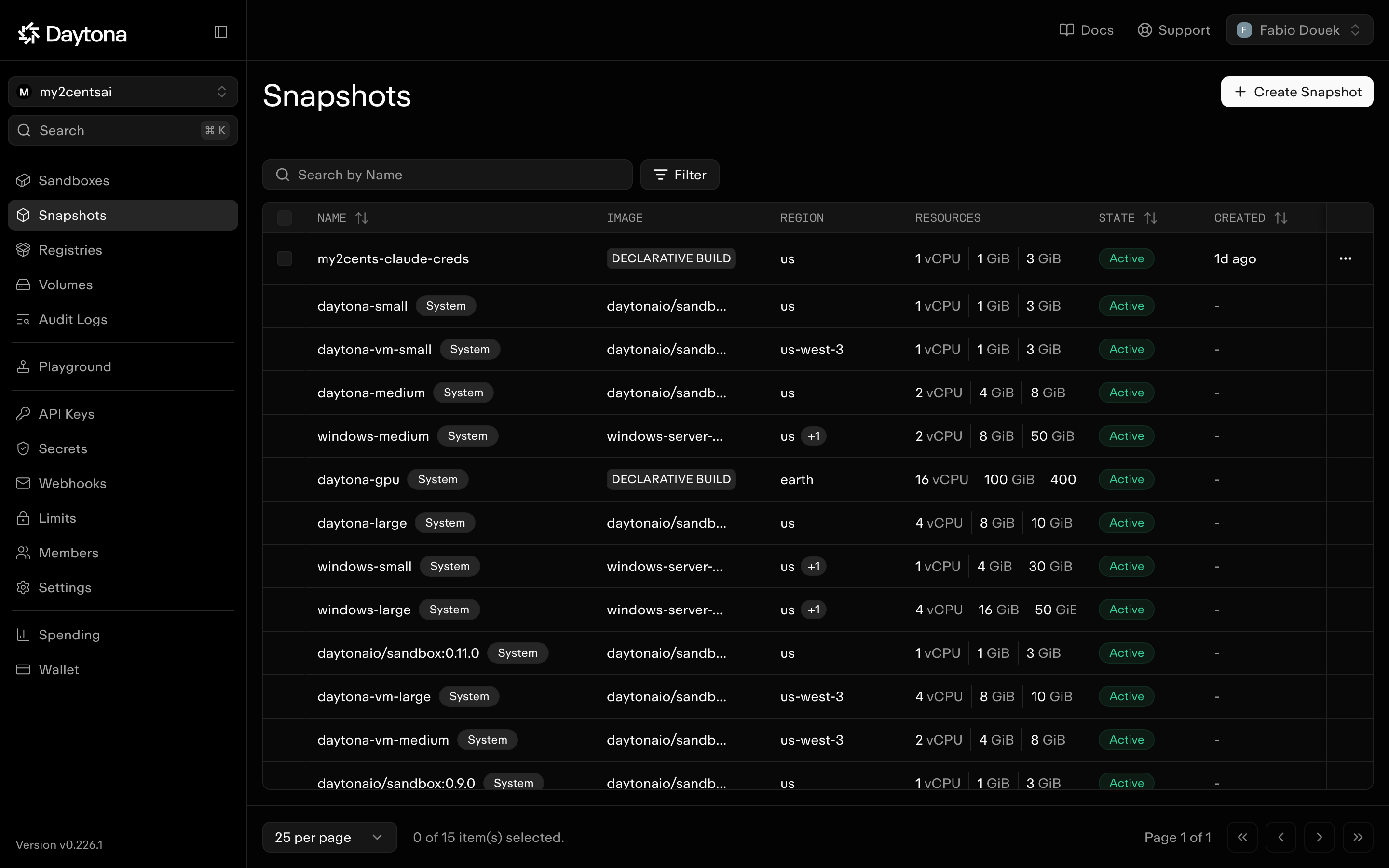
With the default us client, the same create fails with “Snapshot daytona-vm-small is not available in region us”. That’s the error I got before the quota existed, so it’s easy to misread as “no VMs”. In the dashboard, the daytona-vm-* snapshots show us-west-3 in the region column:
The script then starts an in-memory counter (a Python loop that prints a number every second and writes nothing to disk), pauses and resumes the VM three times, and forks it:
=== Create a Linux VM sandbox ===================================
daytona-vm-small: regions ['us-west-3']
[  2.10s] create(snapshot='daytona-vm-small')
vm: 71284db2-... target=us-west-3 class=linux-vm auto-pause=60 auto-stop=0
inside: 1 vCPU, 982 MiB

=== Pause cycle 1 ===============================================
[  0.79s] pause()
exec while paused: DaytonaServiceUnavailableError: Failed to execute command: sandbox is not running (state SANDBOX_STATE_SUSPENDED)
[  0.37s] start() from paused
counter: 4 before pause, 7 two seconds after resume

=== Pause cycle 2 ===============================================
[  0.69s] pause()
[  0.35s] start() from paused
counter: 8 before pause, 11 two seconds after resume

=== Pause cycle 3 ===============================================
[  0.66s] pause()
[  0.35s] start() from paused
counter: 11 before pause, 14 two seconds after resume

=== fork() with a running process ===============================
[  0.94s] fork()
fork: 7c151a85-... class=linux-vm, parent counter was 14 at fork time
parent counter: 19, fork counter: 19
parent counter: 23, fork counter: 23
the fork is 8s old; its counter process has been running for 24s

=== Delete the parent while it has a fork =======================
DaytonaBadRequestError: Failed to remove sandbox: Cannot delete sandbox which has active fork children. The forks must be deleted first.
deleted the fork, then the parent- Pause and resume are fast. Across five runs,
pause()took 0.66–0.96 s andstart()from paused 0.35–0.60 s. Creating the VM took 2.05–2.28 s. - Memory survives, and the process is frozen, not restarted. Each cycle spans about 8 s of wall time (pause, a 5 s wait, resume, a 2 s wait), but the counter only moved on by 3. It stopped counting while paused and carried on from the same value, instead of starting again at 1 as it would after a container’s stop.
- A paused VM doesn’t wake up on its own either. An
exec()against it fails with a 503 until you callstart(), the same rule as a stopped container. - Fork copies the running process. The fork’s counter carried on from the parent’s value, and
psinside the fork found a counter process older than the fork itself (24 s against 8 s).fork()took 0.72–0.94 s. That settles a gap in the docs: the sandbox docs say fork duplicates the “filesystem and memory”, while the Pythonfork()docstring only mentions a copy-on-write filesystem. The sandbox docs are right. - A parent can’t be deleted while it has forks, as documented. Delete the forks first.
- A VM reports its own size.
nprocandfreeshowed 1 vCPU and 982 MiB, the real allocation, where a container shows the host’s (Test 1). It also runs its own kernel (6.19) on Debian 13.
A separate probe covered the rest of the VM lifecycle. stop() and start() work and keep files (1.5–1.7 s to stop, 1.7–2.0 s to start), but memory is cleared, as on a container. archive() is refused with “Sandboxes in this region or class cannot be archived”; the docs say a stopped VM already offloads its filesystem. VMs default to auto-pause after 60 minutes idle, with auto-stop off. With set_auto_pause_interval(1), an idle VM paused after about 72 s and stayed paused until I called start().
Test 6: List, filter, and reconnect from another process
python 06_list_connect.pyLabels plus daytona.list() find sandboxes; daytona.get(id_or_name) picks one up. Sandboxes can also have a unique name, which means a second process doesn’t even need the ID:
from daytona import ListSandboxesQuery

for s in daytona.list(ListSandboxesQuery(labels={**DEMO_LABELS, "userId": "alice"})):
    print(s.name, s.state)

# ...in a different Python process, with only the name:
s = Daytona().get("my2cents-06-bob")
if s.state.value != "started":
    s.start()
stopped bob, get() says: stopped
=== How long until list() agrees? ===============================
list() still says stopping after 0.1s
list() says stopped after 1.2s
=== List: all demo sandboxes ====================================
my2cents-06-bob stopped bob
my2cents-06-carol started carol
my2cents-06-alice started alice
=== List: stopped only ==========================================
my2cents-06-bob stopped
=== Reconnect by name from another process ======================
get('my2cents-06-alice') -> e6f5d24e-... state=started in 0.15s
workspace of alice
[ 1.13s] child process for my2cents-06-alice
get('my2cents-06-bob') -> 8432db04-... state=stopped in 0.13s
start() in 0.60s
workspace of bob
[ 1.59s] child process for my2cents-06-bob(Output trimmed: the create, alice filter and relabel sections are left out.)
The dashboard view of three labelled sandboxes in three different states (from a separate run, so they’re named my2cents-shot-*):
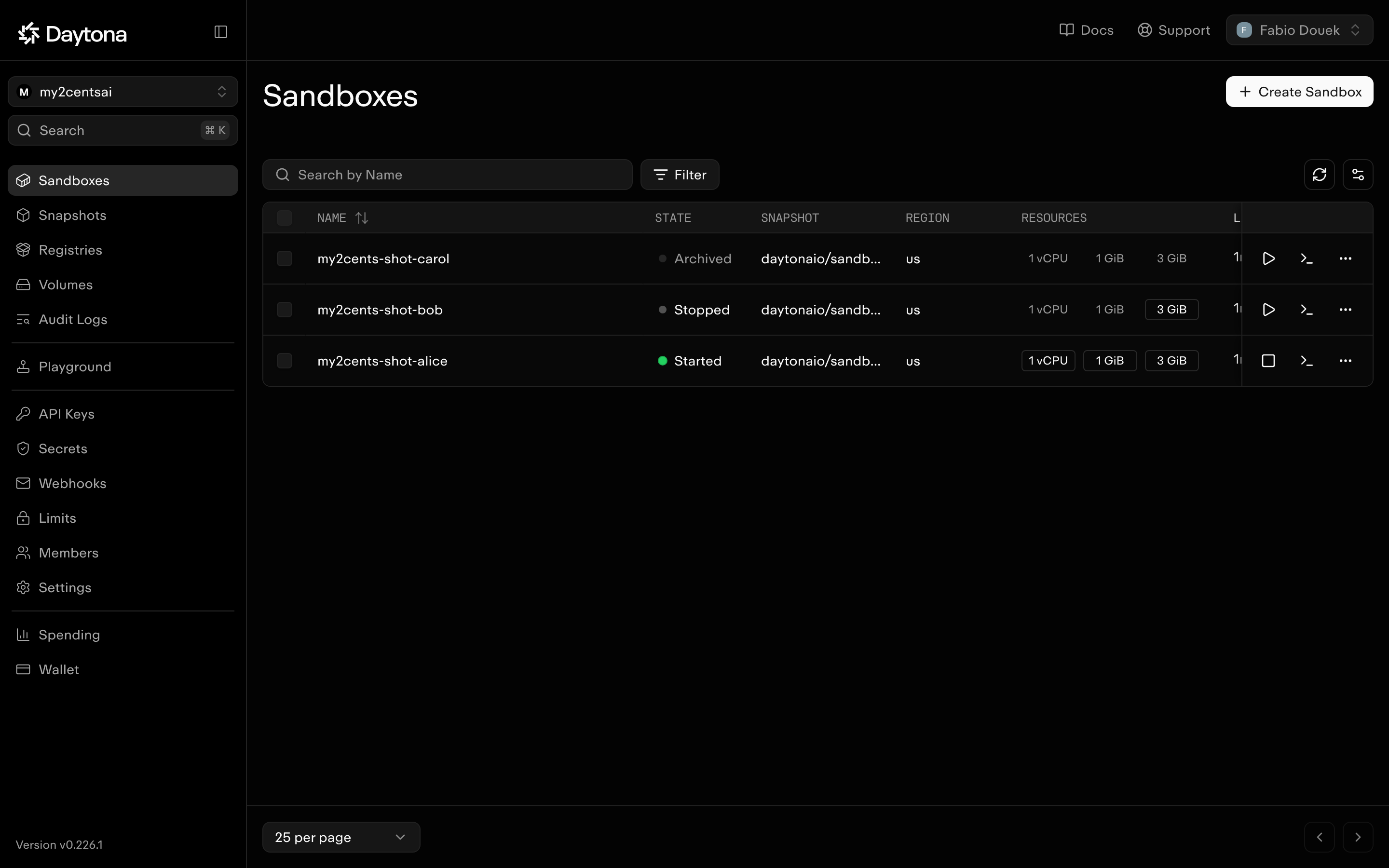
Filtering by labels and state works, and get() by name took 0.13–0.15 s. Because nothing auto-wakes, reconnecting to a stopped sandbox is always get() then start() (0.60 s here).
The thing to watch is that list() lags get(). Right after stop() returned, get() said stopped while list() still said stopping for 1.2 s (2.5 s in another run). In my first run of this script, a “stopped only” filter run immediately after the stop came back empty. If you build a reaper or a dashboard on list(), don’t treat its answer as instantaneous.
set_labels() replaces the whole label set rather than merging, so pass the existing labels along with the new ones.
Test 7: Snapshots, and fork on a container
python 07_snapshot_fork.pysbx.process.exec(f"pip install -q cowsay && echo 'state from the parent' > {home}/state.txt")
sbx.fork(name="my2cents-07-fork") # 422 on a container
sbx.create_snapshot("my2cents-lifecycle-07")
child = daytona.create(CreateSandboxFromSnapshotParams(snapshot="my2cents-lifecycle-07", labels=...))=== fork() on a container =======================================
DaytonaUnprocessableEntityError: Failed to fork sandbox: Forking is not supported for this sandbox
=== create_snapshot() while running =============================
[ 6.64s] create_snapshot (running)
snapshot my2cents-lifecycle-07: state=SnapshotState.ACTIVE size=15.265777064487338 GB
=== Three sandboxes from the snapshot ===========================
[ 1.96s] create child 1
state from the parent | cowsay 6.1
[ 1.10s] create child 2
state from the parent | cowsay 6.1
[ 1.21s] create child 3
state from the parent | cowsay 6.1
=== Children diverge ============================================
child 1: 2 line(s)
child 2: 1 line(s)
child 3: 1 line(s)
=== Delete the parent: children keep running ====================
child 1 still: started- Fork is VM-only, as documented: 422 on a container (it worked on a VM in Test 5).
- A container can be snapshotted while running. The snapshot docs contradict themselves here: the intro says “running or stopped”, while the table and API spec say a filesystem snapshot needs a stopped sandbox. Mine worked on a running one, in 6.3–18 s across three runs. It captures the filesystem only: the pip-installed package and the file came through, no processes did.
- Children started in 1.1–3.4 s with the parent’s files and packages, diverged independently, and kept running after the parent was deleted.
- The snapshot reported 15.27 GB for a sandbox with a 3 GiB disk. The size includes the base image layers. The billing docs say snapshots taken from a sandbox are billed for storage, but the pricing page lists no snapshot rate, so delete snapshots you don’t need.
On a container, then, a snapshot carries the filesystem and installed packages, but no running processes or memory.
Test 8: A custom snapshot vs installing at runtime
python 08_custom_snapshot.pyDaytona’s default image already has pandas, numpy, matplotlib and torch, so this test uses packages it doesn’t ship: polars, DuckDB and PyArrow. Daytona’s declarative Image builder generates a Dockerfile and builds it on their side:
from daytona import CreateSnapshotParams, Image

image = Image.debian_slim("3.12").pip_install(["polars==1.35.2", "duckdb==1.4.2", "pyarrow==22.0.0"]).workdir("/home/daytona")
daytona.snapshot.create(CreateSnapshotParams(name="my2cents-lifecycle-tpl", image=image), on_logs=lambda line: None, timeout=0)
=== Build the snapshot ==========================================
FROM python:3.12.10-slim-bookworm
RUN apt-get update
RUN apt-get install -y gcc gfortran build-essential
RUN pip install --upgrade pip
RUN echo 'debconf debconf/frontend select Noninteractive' | debconf-set-selections
RUN python -m pip install duckdb==1.4.2 polars==1.35.2 pyarrow==22.0.0
WORKDIR /home/daytona
[ 61.78s] snapshot.create()
=== Path A: sandbox from the custom snapshot ====================
1.35.2 1.4.2 22.0.0
[ 1.71s] create + first import
=== Path B: default sandbox + pip install =======================
1.35.2 1.4.2 22.0.0
[ 7.45s] create + pip install + first importThe build took 62 s (58 s in an earlier run). Time from create to first import was 1.71 s from the custom snapshot vs 7.45 s installing at runtime (2.29 s vs 7.97 s and 3.07 s vs 7.33 s in other runs), a 2.4x to 4.4x speedup, with no expensive first import on the custom image. Note what debian_slim puts in the image: a compiler toolchain and gfortran, which you may not want in a production image. Image.base("your/registry/image") or Image.from_dockerfile() give you full control.
Snapshots built this way are always containers. VM snapshots can’t be built from a Dockerfile or the Image builder; they need a registry image or a snapshot taken from an existing VM sandbox.
Results summary
| Operation | Measured (SDK 0.226.1, us, container, from my laptop) |
|---|---|
daytona.create() (default snapshot, sequential) |
median 0.88 s (0.74–1.94 s, n=5); 1.28 s median in an earlier run |
stop() / start() |
0.80–1.42 s / 0.70–1.33 s (one first cycle: 4.9 s / 10.6 s) |
archive() / start() from archived |
18–42 s / 2.25–4.79 s |
| Auto-stop with a process running | fired at ~62 s (interval 1 min) |
ttl_minutes=2 on a stopped sandbox |
destroyed at ~124 s |
get(name) / start() from a second process |
0.13–0.15 s / 0.60 s |
list() lag after stop() |
1.2–2.5 s |
create_snapshot() on a running container |
6.3–18 s (15.27 GB reported) |
| Create from snapshot | 1.1–3.4 s |
| Custom snapshot build (polars, duckdb, pyarrow) | 62 s |
| Time to first import: runtime install vs custom snapshot | 7.33–7.97 s vs 1.71–3.07 s |
| Pause, fork (container) | 422, not supported |
Linux VM: create / pause() / start() from paused |
2.05–2.28 s / 0.66–0.96 s / 0.35–0.60 s, memory kept |
Linux VM: fork() with a running process |
0.72–0.94 s, process carried over |
These are single-region measurements from a laptop on a home connection. Use them as a sense of scale, not a benchmark.
Pricing
Daytona bills per second for the resources a sandbox is allocated (pricing):
| Resource | Rate | Per hour |
|---|---|---|
| vCPU | $0.000014 / vCPU-second | $0.0504 |
| RAM | $0.0000045 / GiB-second | $0.0162 |
| Disk | after the first 5 GiB free | $0.000108 / GiB-hour |
| Default sandbox (1 vCPU, 1 GiB, 3 GiB) | ≈ $0.067 while started | |
| Stopped sandbox | disk only | ≈ $0.0003 for a default 3 GiB disk, or $0 if it falls within the free 5 GiB |
| Archived or deleted | free | $0 |
Windows sandboxes are $0.0858 per vCPU-hour. No separate Linux VM rate is published, and the billing docs list VMs under the same billing states. A paused VM is billed for disk only: “The preserved memory state is not billed.” No snapshot storage rate is published.
Two things stand out. There’s no monthly plan fee: limits come from the tier, which you unlock with top-ups rather than a subscription. And a stopped container still costs disk and holds disk quota until it’s archived. With the defaults, a stopped sandbox is archived after 7 days, but never deleted.
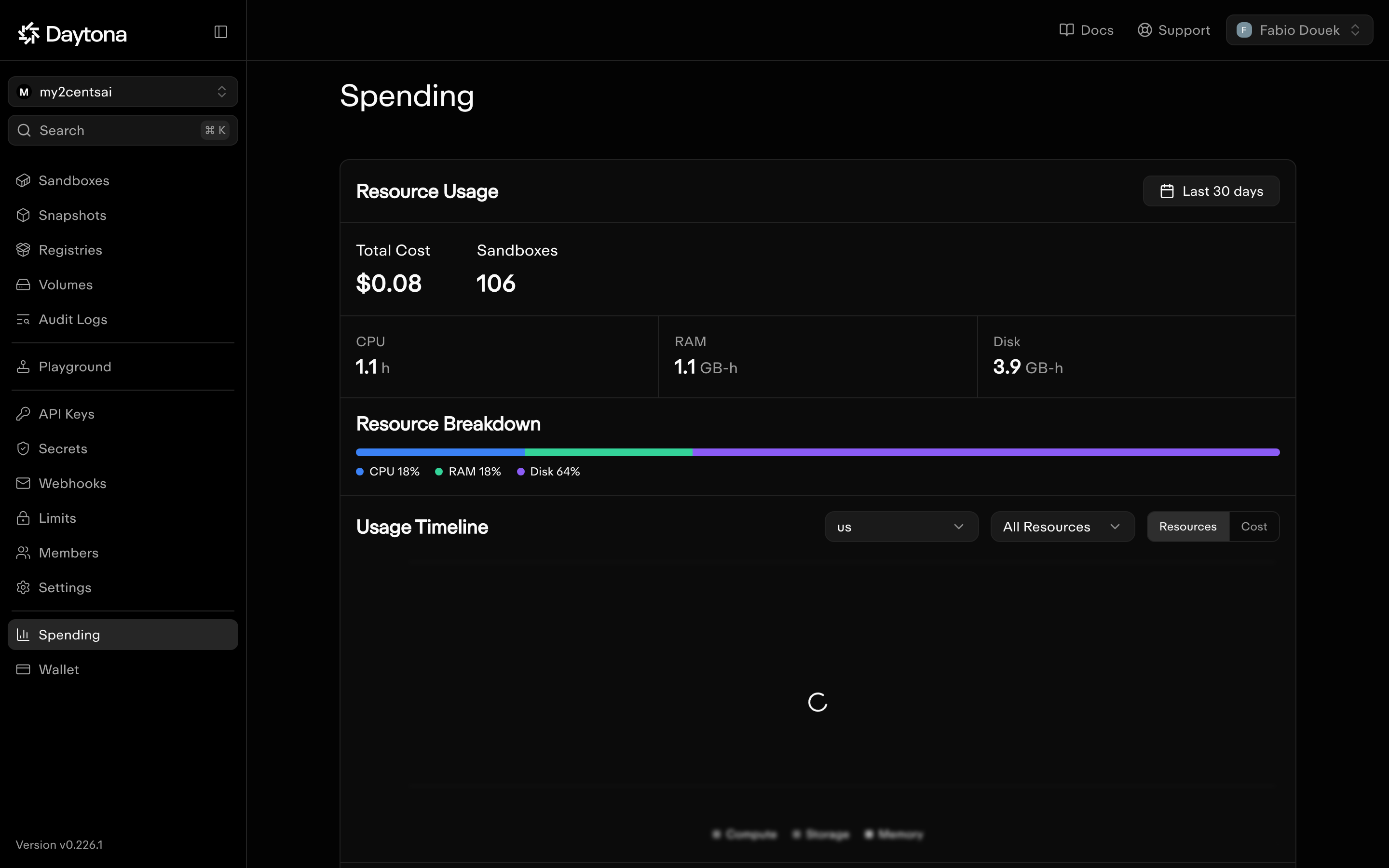
For scale: the organization I created for these tests had run 106 sandboxes (this post’s scripts, part 2’s, and my probes) when I checked the Spending page, for a total of $0.08. Daytona says charges can lag by up to 48 hours, so treat that as a floor. Disk was 64% of the cost, more than CPU and RAM combined, which is the stopped-sandbox effect from above in miniature:
Cleanup
Stopped sandboxes are archived after a week but never deleted, because auto-delete is off by default. That makes them the easiest thing to forget on Daytona. The companion repo’s last script deletes everything carrying the demo label, plus the demo snapshots:
from daytona import Daytona, ListSandboxesQuery

daytona = Daytona()
for s in daytona.list(ListSandboxesQuery(labels={"demo": "my2cents-lifecycle"})):
    s.delete(wait=True)   # retried on 409 "Sandbox state change in progress"

for snap in daytona.snapshot.list().items:
    if snap.name.startswith("my2cents-lifecycle"):
        daytona.snapshot.delete(snap)
=== Sandboxes labelled {'demo': 'my2cents-lifecycle'} ===========
processed 0
=== Snapshots named my2cents-lifecycle* =========================
deleted my2cents-lifecycle-tpl
deleted 1Zero sandboxes is the expected result here: every test deletes its own sandboxes, and the cleanup script is the safety net. One gotcha I hit on an earlier run: deleting a sandbox that’s still in the middle of a state change (because another delete is in flight) returns 409 “Sandbox state change in progress”, so retry rather than fail.
For production, I’d set three things on every sandbox: a ttl_minutes as a hard ceiling, an auto_delete_interval so stopped sandboxes don’t linger, and labels for user and job so a cleanup like this can find them.
Verdict
Daytona’s container sandboxes are quick to start, quick to stop and start, cheap, and come with a default image that already has most of what an agent needs. The lifecycle has plenty of knobs, and most of the ones I could test behaved as documented. The exceptions: the exec timeout and running-container snapshots were more permissive than the docs, and Linux VMs took a support request and a different region. Once I had them, pause and fork did what the docs promise, in under a second.
What I’d keep in mind before building on it:
- The default class is a container, and it behaves like one. Stop is a restart: files survive, processes and memory don’t. The host’s CPU count and memory show through to anything that reads
nprocor/proc/meminfo. - Nothing wakes up on its own. On a stopped sandbox, commands and preview requests fail with a 400 until you call
start(); only lifecycle calls likeget()still work. Combined with an auto-stop timer that ignores processes running inside, an agent doing a long job can be stopped mid-task and stay stopped. Setauto_stop_interval=0or callrefresh_activity()for anything long-running. - Clean up deliberately. Auto-delete is off by default, so stopped sandboxes keep their disk until they’re archived after a week, and snapshots carry their own storage. A
ttl_minuteson every sandbox is the simplest safety net. - Check what your organization can actually create. Memory-preserving pause and fork need the Linux VM class. Mine only got it through support, in
us-west-3rather thanus, so VMs need their own client and their own quota.
Who should use it
Daytona fits long-lived agent workspaces where files matter more than in-memory state: coding agents that clone a repo, work on it for an hour and come back tomorrow. The lack of a runtime cap, the cheap stopped state and the batteries-included image all help there. With the Linux VM class, agents that need to keep a running process or warm memory between requests are covered too, through pause and fork. It also offers Windows sandboxes and GPUs.
If your product depends on freezing a running process, the Linux VM class does it well: a paused VM costs only disk and resumes with its processes in under a second. Check that your organization has it, and in which region, and remember that a paused VM still waits for an explicit start(). And if you want the platform itself to be inspectable, note that since June the server side is closed source.