EC2 Capacity Blocks for ML: First Impressions of the Multi-Region Search
By Fabio Douek
Human-led, AI-assisted. Research and implementation done with AI tools, led, tested and edited by me. How posts are labeled
EventAWS re:Invent 2026: times, streams and recordings →Nov 30 to Dec 4, 2026
Jump to section
- Overview
- The Demo: One GPU Node, Sixteen Regions
- Before you can search: the quota wall
- Step 1: The old way, one call per cell
- Step 2: The console, one search across Regions
- Step 3: The API, one call per Region
- Step 4: Five capacity needs, both ways
- The API’s edges
- How It Compares
- Verdict
- What works
- What doesn’t
- Who should use it
Explain (TLDR) like I am...
Imagine you want to borrow the big bouncy castle for your birthday, and there are lots of shops in lots of towns. Before, you had to phone every shop in every town and ask about every castle, one call at a time.
Now you can ask one shop about all its castles at once, and the big shop can even ask the other towns for you. The catch is that some shops will not talk to you at all until a grown-up says you are allowed to rent castles, and that permission took days to arrive.
The new search lets a buyer compare reserved GPU capacity across several instance types, and in the console across several Regions, before committing funds. That matters because a purchase is paid up front and cannot be cancelled, moved or split.
The due diligence point is visibility. The search only shows what the account's limits allow, so an account without approved quotas cannot even see the market. Prices matched the published list rates exactly in the four Regions tested, which simplifies cost review, but the terms still bind on purchase.
The condition being treated is a slow, error-prone diagnostic routine: checking every instance type in every Region, one test at a time, to find a free GPU block. The new search consolidates those tests, so one query per Region replaced 71 separate ones in my run.
Contraindications remain. A single instance family the account is not cleared for makes the whole query fail, the API still needs one query per Region, and an account with no approved quotas gets no result at all. The evidence here comes from one account over one morning.
Notice the low-grade dread of hunting for GPUs: tab after tab, Region after Region, never sure whether "nothing found" means sold out or not allowed. The new search takes much of that busywork away, and seeing several Regions answer at once feels calmer.
The frustration does not vanish, it moves. Waiting days for quota approvals, then learning that one unapproved family blocks the whole search, is its own kind of helplessness. Teams do better when someone owns the quotas before the deadline, not during it.
The old way was like tuning an orchestra one string at a time, in sixteen different rooms. The new search lets you play a chord: every instance type in a Region sounds at once, and the console even hears other rooms in the same take.
The catch is that one string you are not allowed to touch silences the whole chord. Get the quotas in tune first, then the search keeps tempo: four calls instead of seventy-one, and the same answer every time.
The story is time-to-answer. Finding a GPU block used to mean scripting a loop over every instance type in every Region; now one search per Region, or one console search, returns the earliest offers side by side.
The positioning is flexibility: buyers who can take an H100, an H200 or a B300, in London or Seoul, now see that choice directly. The caveat for any launch message is access, because the search only works after quota approvals that took up to just over two days for me.
Overview
EC2 Capacity Blocks for ML let you reserve GPU and Trainium instances for a fixed window, from one day up to six months, starting up to eight weeks out. You pay the whole price up front and cannot cancel. For many teams it’s the practical way to get P5, P5en or P6 capacity at all.
Finding a block used to be the tedious part. DescribeCapacityBlockOfferings took one InstanceType and answered for one Region, and the docs table lists 11 instance types across 20 Regions and Local Zones. If you could live with an H100 or an H200, in Oregon or Stockholm, you checked each cell of that grid yourself. An AWS employee even published a script that fans the call out over every Region and writes a CSV.
On November 23, 2026, AWS announced that one search now covers several instance types and Regions. The API gained InstanceTypePreferences, up to 10 types in one call. The console’s Find Capacity Block page gained an “Alternative Regions” picker. The API still answers for one Region per call; only the console crosses Regions (purchase guide).
I wanted to see how much of the grid this removes. I searched the same need the old way and the new way, in the console and through the API, and ran five capacity scenarios. I never bought a block: everything here is the search call, and only a purchase is charged.
The Demo: One GPU Node, Sixteen Regions
Before you can search: the quota wall
My first search failed in every enabled Region with CapacityBlockDescribeLimitExceeded: “Your existing service limits for this AWS account are not sufficient to use EC2 Capacity Blocks.” Every Concurrent <family> Capacity Blocks per account quota in Service Quotas read 0, so the account could not even look. I asked for an increase to 1 for every family in each of the 12 enabled Regions the docs list. Service Quotas accepted 27 requests and turned each into a Support case, and refused the other 24 because the account hit its cap on open quota requests. Over the next two days six cases closed, and four Regions opened up: London, Tokyo, Seoul and São Paulo.
What opened did not map cleanly onto what was approved. Every Capacity Block quota in those four Regions now shows a value in the thousands (6,144 for P5 in London; the docs count this quota in vCPUs, so 32 p5.48xlarge on paper), yet London still refused p5e.48xlarge (the family whose case had closed there) while it answered for P5 and P6-B300. And any search for two 8-GPU nodes returned VcpuLimitExceeded: “no offerings available for purchase within the current AWS Organization’s EC2 limits”. The search only shows what your limits let you buy. Everything below is what an account with these approvals sees.
Step 1: The old way, one call per cell
The need: one accelerator node (an 8-GPU P node, a single-GPU p5.4xlarge, or a Trainium instance), one day, any start in the next eight weeks. My script makes one old-style call (InstanceType set to a single type) for every pair the docs table lists in the 16 commercial Regions:
                    use1  use2  usw1  usw2  eun1  euw2  euw3  eus2 apne1 apne2  aps1  aps2 apse2 apse3 apse4  sae1
p6-b300.48xlarge       x     .     .     x     .     ●     .     .     .     ●     .   off     .   off     .     .
p6-b200.48xlarge       x     x     .     x     x     .     x     .     .     .     x   off     .     .     .     .
p5.48xlarge            x     x     x     x     x     ●     .     .     ●     .     x     .     x   off     .     x
p5e.48xlarge           x     x     x     x     x     x     .     .     ○     .     x     .     x   off     .     ●
p5en.48xlarge          x     x     x     x     x     x     .   off     x     ●     x     .   n/a   off     .     .
p5.4xlarge             x     x     .     x     .     ●     .     .     ●     .     x     .     x     .     .     x
p4d.24xlarge           x     x     .     x     .     .     .     .     .     .     .     .     .     .     .     .
p4de.24xlarge          x     .     .     x     .     .     .     .     .     .     .     .     .     .     .     .
trn1.32xlarge          x     x     .     x     x     .     .     .     .     .     x     .     x     .   off     .
trn2.48xlarge          .     x     .     .     .     .     .     .     .     .     .   off     .     .     .     .
trn2.3xlarge           .     .     .     .     .     .     .     .     .     .     .     .     .     .   off     x

● offer  ○ searched, none  x refused: account limits  off Region not enabled   . not in the docs  n/a docs list it, API says not supported

71 calls in 37 s:  9 answered, 51 refused by limits, 10 in Regions not enabled, 1 not supported
8 offers found, earliest first:
  ap-northeast-2  p6-b300.48xlarge  Nov 26 11:30 UTC  $ 3,100.03
  sa-east-1       p5e.48xlarge      Nov 27 11:30 UTC  $ 1,318.18
  eu-west-2       p6-b300.48xlarge  Nov 29 11:30 UTC  $ 3,100.03
  eu-west-2       p5.4xlarge        Dec 02 11:30 UTC  $   143.28
  ap-northeast-2  p5en.48xlarge     Dec 04 11:30 UTC  $ 1,515.79
  ap-northeast-1  p5.4xlarge        Dec 10 11:30 UTC  $   143.28
  ap-northeast-1  p5.48xlarge       Dec 13 11:30 UTC  $ 1,146.17
  eu-west-2       p5.48xlarge       Dec 21 11:30 UTC  $ 1,146.17
Seventy-one calls, 37 seconds, and only nine cells answered. Three things stood out beyond the quota refusals:
- The docs table is not the API. It lists
p5en.48xlargein Sydney, but the API says “The instance type ‘p5en.48xlarge’ is not supported for Capacity Blocks in ‘ap-southeast-2’”. The pricing page agrees with the API. - “No offer” and “not allowed” look nothing alike. Tokyo answered for
p5e.48xlargewith an empty list: no block in the next eight weeks. A refusal is an error. A naive loop that swallows errors would report both as “nothing available”. - Price did not depend on the Region.
p5.48xlargecost $1,146.17 for the day in both Tokyo and London, andp6-b300.48xlarge$3,100.03 in both Seoul and London. EachUpfrontFeewas exactly the published hourly rate times 24 ($47.757 and $129.168). The choice between offers is about the start date, not the price.
Step 2: The console, one search across Regions
The console makes the grid disappear, at least visually. On the Find Capacity Block page in London I kept the default p5.48xlarge, added p6-b300.48xlarge, and picked Tokyo, Seoul and São Paulo under “Alternative Regions”. One click on Find Capacity Block returned the current Region’s offers as cards (the B300 on November 29, the H100 on December 21) and a table of “Available Capacity Block offerings in other Region”: Tokyo with one offering starting December 13, Seoul with one starting November 26. Clicking an offering count opens a popover with the instance type and start; buying it takes a “Switch Region”.
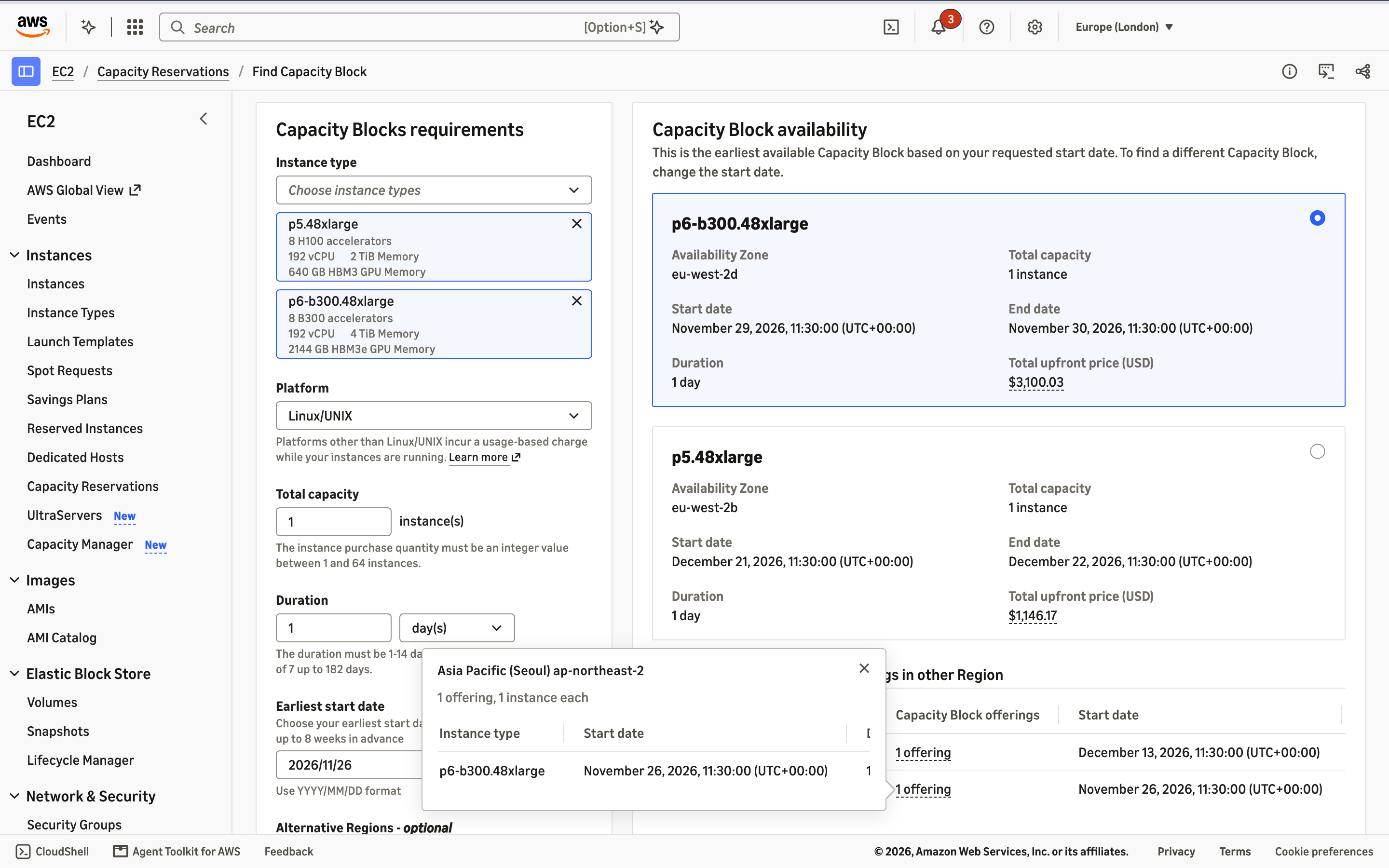
Those are the same offers the 71-call grid found for those two types, from one search. The console was also forgiving in ways the API is not. Tokyo doesn’t offer p6-b300.48xlarge and São Paulo refuses p5.48xlarge for this account, and neither produced an error: Tokyo answered for the type it has, and São Paulo was simply left out of the table.
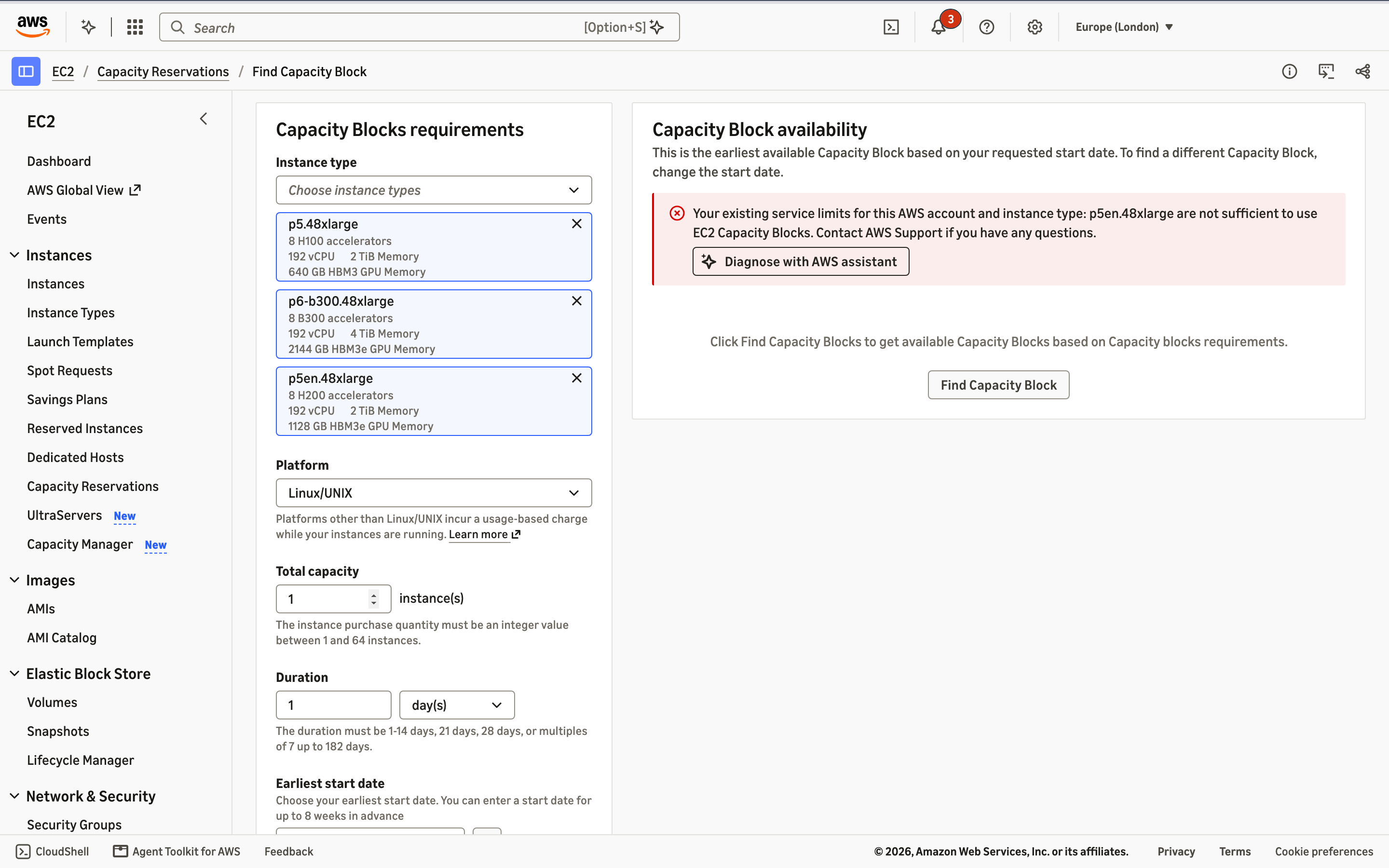
The forgiveness stops at the current Region. When I added p5en.48xlarge, which London refuses for this account, the whole search failed with the limit message, and no other Region’s offers were shown:
Two other console limits: the instance type picker lists only the types offered in the current Region (London showed five: p5, p5e, p5en, p6-b300 and p5.4xlarge), so a Trainium or P6-B200 search means switching the console to a Region that has them first. And the other Regions get a summary row, not the full offer card.
Step 3: The API, one call per Region
Through the API, the new search is one parameter. I used boto3 1.44.10 (the changelogs put the field in boto3 1.44.5 and AWS CLI 2.41.0, where the flag is --instance-type-preferences):
ec2 = boto3.client("ec2", region_name=region)
resp = ec2.describe_capacity_block_offerings(
    CapacityDurationHours=24,
    InstanceCount=1,
    AllAvailabilityZones=True,
    StartDateRange=start,
    EndDateRange=start + timedelta(weeks=8),
    InstanceTypePreferences=[{"InstanceType": t} for t in types],  # up to 10 types
)
My first run passed every type the docs list for each Region, one call per Region. It found two offers. Fifteen of 16 calls failed: ten because the account’s limits refused at least one type in the list (in seven of them, every type; the error names the refused instance type), four because the Region isn’t enabled (reported as a confusing AuthFailure, “not able to validate the provided access credentials”), and Sydney because of the unsupported p5en.48xlarge. One bad type fails the whole call. Only Seoul, where both documented types were allowed, answered.
The second run kept only the types the grid had answered for in each Region:
Again, only the types this account may search:
  eu-west-2        3 types  3 offers  p6-b300.48xlarge Nov 29, p5.4xlarge Dec 02, p5.48xlarge Dec 21
  ap-northeast-1   3 types  2 offers  p5.4xlarge Dec 10, p5.48xlarge Dec 13
  ap-northeast-2   2 types  2 offers  p6-b300.48xlarge Nov 26, p5en.48xlarge Dec 04
  sa-east-1        1 types  1 offers  p5e.48xlarge Nov 27
  4 calls in 4 s, 8 offers
Four calls, the same eight offers as the 71-call grid. The catch is that I needed the grid run to know which types to leave out.
The response shape changed too. With InstanceTypePreferences, the offers in my responses no longer had top-level InstanceType, AvailabilityZone, StartDate or EndDate: they sit inside a new CapacityBlockOfferingSegments list (one segment in every offer I saw), and only CapacityBlockOfferingId, UpfrontFee, CurrencyCode and Tenancy stay at the top. My first multi-type call crashed on KeyError: 'AvailabilityZone'. With the old InstanceType parameter the fields are still top-level, so code that reads both needs a small shim:
def flat(o, region):
    """New-style offers keep type, zone and dates in segments; old-style ones are flat."""
    seg = (o.get("CapacityBlockOfferingSegments") or [o])[0]
    return {"region": region, "type": seg["InstanceType"], "az": seg["AvailabilityZone"],
            "start": seg["StartDate"], "end": seg["EndDate"], "fee": float(o["UpfrontFee"])}
Step 4: Five capacity needs, both ways
I wanted a few real capacity needs, not just one. I ran five in the four open Regions. “Old way” is one call per type per Region for every pair the docs list; “new way” is one call per Region with the types the account may search there.
| Need | Old way | New way | Earliest offer (both ways) |
|---|---|---|---|
| A. One 8-GPU Hopper node (H100 or H200), 1 day | 9 calls | 4 calls | p5e.48xlarge, São Paulo, Nov 27 11:30 UTC, $1,318.18 |
| B. One B300 node for a week | 2 calls | 2 calls | p6-b300.48xlarge, Seoul, Nov 26 11:30 UTC, $21,700.22 |
| C. Any 8-GPU node, starting within 24 hours | 11 calls | 4 calls | p6-b300.48xlarge, Seoul, Nov 26 11:30 UTC, $3,100.03 |
D. Four single-H100 p5.4xlarge for two weeks | 3 calls | 2 calls | Tokyo, Dec 13 to Dec 27, $8,023.68 |
| E. Two H100 nodes for a day | 3 calls | 2 calls | nothing: VcpuLimitExceeded |
Both ways returned the same earliest offer in all five, so the new parameter changes the call count, not the answer. The savings scale with how flexible you are: a single-type need (B) costs the same two calls either way, while “any Hopper node” (A) and “anything soon” (C) shrink to one call per Region. Across all 16 Regions, need A would be 34 old-style calls against 13, one per Region that has any of the three types.
A few things the scenarios showed:
- Flexibility pays in dates. For one Hopper node, the earliest H100 was December 13 in Tokyo, but an H200 (
p5e) in São Paulo started on November 27, the day after my search. For fourp5.4xlargeover two weeks, Tokyo (December 13) beat London (January 4) by three weeks. - Every block I saw started and ended at 11:30 UTC. The user guide fixes the end at 11:30 UTC, and says an offering can start as soon as 30 minutes out. The Seoul B300 for scenario C started about six hours after my search.
- Bigger asks were invisible, not unavailable. I couldn’t test the 16- and 64-instance scenarios I had planned: with this account’s limits, any search for two or more 8-GPU nodes returned
VcpuLimitExceeded, so I can’t say whether that capacity exists.
The API’s edges
| Request | Result |
|---|---|
11 types in InstanceTypePreferences | InstanceTypePreferences may contain at most 10 instance types; 11 were provided. |
InstanceType and InstanceTypePreferences together | Invalid inputs, specify either InstanceTypePreferences, or InstanceType, or UltraserverType and UltraserverCount, not a combination |
| The same type twice | InstanceTypePreferences contains a duplicate instance type: p5.4xlarge. |
| Types in reverse order | Same three offers, same order: results sort by start date, so “preferences” is a set, not a ranking |
MaxResults=1 with three types | Three offers and no NextToken |
| One offer per type | Every call returned at most one offer per instance type, the earliest |
The docs say the API returns at most six offerings and the console ten. I never got close: with one offer per type and at most three allowed types per Region, my largest answer was three.
How It Compares
| EC2 Capacity Blocks, now | EC2 Capacity Blocks, before | SageMaker training plans | Google Cloud calendar mode | |
|---|---|---|---|---|
| Instance types per search | Up to 10 | 1 | 1 (SearchTrainingPlanOfferings) | 1 machine type (availability advice) |
| Regions per search | Console: several; API: 1 | 1 | 1 | 1 |
| Cancel after purchase | No | No | No | Only under conditions |
Within AWS, SageMaker training plans search the same kind of capacity but still one instance type per call. Among the options in my research, the console’s Alternative Regions picker is the only one that answers for several types and Regions in a single search.
Verdict
The new search does what the announcement says, and it fixes the part of finding GPU capacity that was pure busywork. In my run, four API calls returned exactly what 71 had, and one console search showed London, Tokyo and Seoul side by side. Results were consistent: both ways agreed on the earliest offer in all five scenarios, and every price matched the published hourly rate to the cent.
What works
- One call per Region instead of one per type per Region. The saving grows with flexibility: 9 calls became 4 for “any Hopper node” in four Regions.
- The console’s Alternative Regions picker is the real multi-Region search, and it handled unsupported types in other Regions gracefully.
- Honest answers. An empty list meant no capacity; refusals were explicit errors, usually naming the refused instance type.
What doesn’t
- The API still loops over Regions. Multi-Region search is console-only.
- One refused or unsupported type fails the whole call, in the API and for the console’s current Region. You need to know your per-family limits before you can use the flexibility.
- The response shape changed under the new parameter. Code that read
InstanceTypeat the top of an offer breaks. - The quota wall comes first. A new account sees nothing, the approvals took me up to just over two days, and Service Quotas values didn’t predict what I could search.
- The docs table drifts from the API (Sydney
p5en.48xlarge), so trust a live call over the table.
Who should use it
Anyone who can take more than one GPU type or Region should switch to InstanceTypePreferences now, and fix their response parsing while they’re at it. If you script the search, keep a map of which families each Region allows for your account, and treat a refusal differently from an empty answer. If you buy blocks by hand, start in the console with every Region you could live with, and file quota requests long before the deadline.
The my2cents.ai email
AI and cloud tools, tested for real. In your inbox once a week.
The week's hands-on tests and the launches that matter, in one email.