Claude Code Skills invoking Bedrock AgentCore Code Interpreter
By Fabio Douek
 See the source code here: bedrock-agentcore-code-interpreter-cli | aws-bedrock-agentcore-codeinterpreter plugin
Overview
I wanted a troubleshooting tool that lets Claude Code query AWS logs without giving it direct access to my AWS accounts, and also provide least privilege. The use case: investigating CloudTrail events stored in CloudWatch Logs Insights from an auditing account that records activity across the entire AWS organisation. The code runs somewhere else, in a locked-down environment with its own IAM role and no way to phone home.
Amazon Bedrock AgentCore Code Interpreter provides exactly this. It spins up Firecracker microVMs with Python, JavaScript, and TypeScript runtimes, manages session lifecycle, and streams results back. Sessions get 2 vCPU, 8 GB RAM, and 10 GB disk. You pay per second of actual CPU usage, and I/O wait time is free.
While the above scenario is straightforward and relatively low risk for the purpose of this post, the same approach can be used for scenarios where write permissions are involved, in order to mutate resources in AWS, and cross-account permissions can be given to allow you to reach all AWS accounts in an AWS Organization.
The plan: build a Go binary that wraps the AgentCore Code Interpreter API, package it as a Claude Code plugin with a skill that knows how to use it, and publish it to a plugin marketplace. The Go binary handles session lifecycle, code execution, and streaming output. The skill tells Claude when and how to invoke it. The result is a /code-interpreter-execute command that lets Claude run code in a secure sandbox with a single invocation.
Architecture
The flow:
- Claude Code receives a user request (e.g.
/code-interpreter-execute query CloudTrail for role creation events). - The Skill (
/code-interpreter-execute) tells Claude how to use the tool and restricts it to only invoke the sandbox binary. - The Go Binary (
agentcore-sandbox) manages the session lifecycle (start, execute, stop) and streams results back to Claude via the AgentCore API. - AgentCore Code Interpreter spins up a Firecracker microVM, runs the Python code using its scoped IAM execution role.
- The execution role allows the sandbox to call CloudWatch Logs APIs to query CloudTrail events, and nothing else.
The skill and the Go binary are both packaged inside the plugin. Claude Code adds the plugin’s bin/ directory to PATH automatically, so the skill can invoke the binary as a bare command.
Setup
Prerequisites
- Claude Code 2.1.91+: plugin marketplace support requires this version or later. Check with
claude --versionand update withclaude updateif needed. For more details on how Claude Code plugins deliver platform-specific binaries, see Claude Code Plugin Binaries. - CloudTrail → CloudWatch Logs: this walkthrough assumes CloudTrail is configured in a centralised auditing account, recording events for the entire AWS organisation and delivering logs to CloudWatch Logs. I’m using the Control Tower default log group
aws-controltower/CloudTrailLogsineu-west-1. This pattern can be adapted to any CloudWatch Logs use case. Replace the log group name and IAM permissions to match your setup.
IAM Role
Both Public and VPC mode require an execution role. The role needs two things: a trust policy letting AgentCore assume it, and permissions for whatever the sandbox code needs to access. For this walkthrough I’m using the AWS managed ReadOnlyAccess policy, which covers CloudWatch Logs and every other read API. In production you’d scope this down to only the services the sandbox actually needs.
Trust policy (trust-policy.json):
{
  "Version": "2012-10-17",
  "Statement": [
    {
      "Effect": "Allow",
      "Principal": {
        "Service": "bedrock-agentcore.amazonaws.com"
      },
      "Action": "sts:AssumeRole"
    }
  ]
}
Option A: Create via AWS CLI
# Create the role with the trust policy
aws iam create-role \
  --role-name AgentCoreTroubleshootingRole \
  --assume-role-policy-document file://trust-policy.json

# Attach the AWS managed ReadOnlyAccess policy
aws iam attach-role-policy \
  --role-name AgentCoreTroubleshootingRole \
  --policy-arn arn:aws:iam::aws:policy/ReadOnlyAccess
Option B: Create via AWS Console
- Open the IAM Console and navigate to Roles → Create role.
- Under Trusted entity type, select Custom trust policy and paste the trust policy JSON above.
- Click Next. On the Add permissions page, search for
ReadOnlyAccessand select the AWS managed policy. - Name the role
AgentCoreTroubleshootingRoleand click Create role.
The security model here is important: even with ReadOnlyAccess, the sandbox cannot modify any resources. It can read logs, describe infrastructure, and list resources, but it cannot create, update, or delete anything. For tighter control in production, replace ReadOnlyAccess with a custom policy scoped to only the specific APIs and resources you need (e.g. logs:StartQuery, logs:GetQueryResults, logs:DescribeLogGroups on your CloudTrail log group).
IAM User to use the Skill from Claude Code
The Go binary packaged in the Claude Code Plugin needs AWS credentials to call the AgentCore Code Interpreter API (starting sessions, executing code, stopping sessions). Create a dedicated IAM user with only the permissions it needs.
- Open the IAM Console and navigate to Users → Create user.
- Enter
code-interpreter-useras the user name. Do not enable console access. Click Next. - Select Attach policies directly. Click Create policy (this opens in a new tab).
- Switch to the JSON tab and paste the following policy (make sure to replace AWS_REGION, AWS_ACCOUNT_ID and CODE_INTERPRETER_ID with the ones related to the Code Interpreter you created in the previous step):
{
    "Version": "2012-10-17",
    "Statement": [
        {
            "Effect": "Allow",
            "Action": [
                "bedrock-agentcore:StartCodeInterpreterSession",
                "bedrock-agentcore:InvokeCodeInterpreter",
                "bedrock-agentcore:StopCodeInterpreterSession"
            ],
            "Resource": "arn:aws:bedrock-agentcore:<AWS_REGION>:<AWS_ACCOUNT_ID>:code-interpreter-custom/<CODE_INTERPRETER_ID>"
        }
    ]
}- Click Next. Name the policy
AgentCoreCodeInterpreterAccessand click Create policy. - Return to the Create user tab. Click the refresh button next to the policy list, search for
AgentCoreCodeInterpreterAccess, select it, and click Next. - Review and click Create user.
- Select the newly created user, go to the Security credentials tab, and click Create access key.
- Select Command Line Interface (CLI) as the use case, confirm the acknowledgement, and click Next → Create access key.
- Copy the Access key ID and Secret access key. You won’t be able to see the secret again.
Now configure a named AWS profile on your machine:
aws configure --profile code-interpreterEnter the access key ID and secret access key when prompted. Set the default region to the region you have deployed Code Interpreter and the output format to json (or leave blank).
To use this profile with the Go binary, set the environment variable:
export CUSTOM_AGENTCORE_AWS_PROFILE=code-interpreterDon’t worry about setting this now. I’ll cover it later in this post when I put it all together.
Quick-Start: Creating the Code Interpreter in Public Mode (Experimentation Only)
Warning: Public mode gives Code Interpreter full internet access with no network isolation. Do not use this for production workloads or with sensitive data. For production, use VPC mode as described in the next section.
If you don’t have a VPC with private subnets and want to experiment quickly, you can create a Code Interpreter in Public mode.
Via CLI
export AWS_REGION=eu-west-1

AWS_ACCOUNT_ID=$(aws sts get-caller-identity --query Account --output text)

aws bedrock-agentcore-control create-code-interpreter \
  --name "aws_troubleshooting" \
  --execution-role-arn "arn:aws:iam::${AWS_ACCOUNT_ID}:role/AgentCoreTroubleshootingRole" \
  --network-configuration '{"networkMode": "PUBLIC"}'
Via AWS Console
- Open the Amazon Bedrock AgentCore console and navigate to Code Interpreters → Create code interpreter.
- Enter
aws_troubleshootingas the name. - Under Execution role, select Use an existing role and choose
AgentCoreTroubleshootingRole. - Under Network configuration, select Public.
- Click Create code interpreter.
This requires no subnets, security groups, or VPC endpoints. The sandbox can reach the internet and AWS APIs directly. Skip ahead to The Go Binary if you’re using Public mode.
Creating the Code Interpreter in VPC Mode (Recommended for Production)
First, I created a Code Interpreter resource configured for VPC mode. This requires private subnets in at least two availability zones and a security group.
Make sure you replace the subnet IDs and security group ID with your own resource IDs.
Via CLI
export AWS_REGION=eu-west-1

AWS_ACCOUNT_ID=$(aws sts get-caller-identity --query Account --output text)

aws bedrock-agentcore-control create-code-interpreter \
  --name "aws_troubleshooting" \
  --execution-role-arn "arn:aws:iam::${AWS_ACCOUNT_ID}:role/AgentCoreTroubleshootingRole" \
  --network-configuration '{
    "networkMode": "VPC",
    "networkModeConfig": {
      "subnets": ["subnet-0a1b2c3d4e5f6a7b8", "subnet-9a8b7c6d5e4f3a2b1"],
      "securityGroups": ["sg-0123456789abcdef0"]
    }
  }'
Via AWS Console
- Open the Amazon Bedrock AgentCore console and navigate to Code Interpreters → Create code interpreter.
- Enter
aws_troubleshootingas the name. - Under Execution role, select Use an existing role and choose
AgentCoreTroubleshootingRole. - Under Network configuration, select VPC.
- Select at least two subnets in different availability zones (these must be private subnets).
- Select a security group that allows outbound traffic to the VPC endpoints you’ll create in the next step.
- Click Create code interpreter.
The response (or the detail page in the console) includes a codeInterpreterIdentifier that I’ll use in all subsequent API calls.
The Go Binary
The agentcore-sandbox CLI wraps the AgentCore Code Interpreter API into a single binary that manages session lifecycle, code execution across multiple runtimes, and streaming output. The full source code and build instructions are at bedrock-agentcore-code-interpreter-cli.
Configuration
Set the following environment variables:
| Variable | Required | Description |
|---|---|---|
CUSTOM_AGENTCORE_INTERPRETER_ID | Yes | Code interpreter identifier |
CUSTOM_AGENTCORE_AWS_PROFILE | No | AWS shared config profile |
CUSTOM_AGENTCORE_AWS_REGION | No | AWS region override |
Usage
agentcore-sandbox <command> [flags] [args...]Commands:
| Command | Description |
|---|---|
start | Start a new session, prints session ID |
stop <session-id> | Stop an existing session |
exec <session-id> [flags] <code> | Execute code or a command in an existing session |
run [flags] <code> | One-shot: start a session, execute, then stop |
Flags:
| Flag | Values | Default | Applies to |
|---|---|---|---|
--lang | python, javascript/js, typescript/ts | python | exec, run |
--cmd | exec, run | ||
--runtime | nodejs, deno, python | auto | exec, run |
--clear-context | exec, run | ||
--json | start, exec, run | ||
--timeout | seconds | 900 | start, run |
--lang and --cmd are mutually exclusive. Use --cmd for shell commands, --lang for code execution. When --runtime is omitted, it defaults to python for Python and deno for JavaScript/TypeScript.
One-shot execution (auto-manages session lifecycle):
# Python (default language)
agentcore-sandbox run 'print("hello")'

# JavaScript
agentcore-sandbox run --lang js 'console.log("hello")'

# Shell command
agentcore-sandbox run --cmd 'ls -la'

# JSON output for programmatic consumption
agentcore-sandbox run --json --lang python 'print(42)'
Session-based workflow (session persists between calls):
# Start a session with a 30-minute timeout
SESSION=$(agentcore-sandbox start --timeout 1800)

# Execute multiple commands in the same session (context is preserved)
agentcore-sandbox exec $SESSION --lang ts 'const x = 1'
agentcore-sandbox exec $SESSION --lang ts 'console.log(x)'

# Clear context and start fresh within the same session
agentcore-sandbox exec $SESSION --clear-context --lang ts 'console.log("fresh start")'

# Stop the session when done
agentcore-sandbox stop $SESSION
When --json is passed, output is a single JSON object on stdout:
{
  "stdout": "hello\n",
  "stderr": "",
  "exitCode": 0,
  "executionTime": 123.4,
  "isError": false
}
The Claude Code Plugin
The plugin packages the Go binary and a skill definition into a structure that Claude Code can discover and use. The plugin’s bin/ directory contains the pre-compiled binary, which Claude Code automatically adds to the Bash tool’s PATH when the plugin is enabled, so no full paths are needed. Alongside it, a skill file (SKILL.md) teaches Claude when and how to invoke the binary: it describes the session lifecycle (start, execute, stop), documents the available environment (boto3, pandas, numpy pre-installed), and restricts the skill to only run agentcore-sandbox commands via the allowed-tools directive. This means Claude cannot run arbitrary Bash commands while the skill is active. It can only call the sandbox binary.
The result is a /code-interpreter-execute slash command that users can invoke naturally (e.g. /code-interpreter-execute query CloudTrail for role creation events). Claude reads the skill, writes the appropriate Python code, manages the session, and streams results back. The full plugin source, including the skill definition, plugin manifest, and platform detection logic, is available at aws-bedrock-agentcore-codeinterpreter.
Testing
Plugin Distribution
I published the plugin to a marketplace repo at my2centsai-blog-samples-marketplace. Anyone can install it with these commands:
claude plugin marketplace add fabiodouek/my2centsai-blog-samples-marketplace
claude plugin install aws-bedrock-agentcore-codeinterpreter@my2centsai-blog-samples
After installation, the agentcore-sandbox binary is on PATH and the /code-interpreter-execute skill is available. Users need their own AWS credentials and a Code Interpreter resource configured in their account.
Setting Environment Variables and Starting Claude Code
Before starting Claude Code, set the following environment variables. The code-interpreter profile was created earlier using an IAM user. If you are running your workload in AWS (e.g. on an EC2 instance), you can use an IAM role instead.
# AWS profile for the Code Interpreter IAM user
export CUSTOM_AGENTCORE_AWS_PROFILE=code-interpreter

# Region where you deployed Code Interpreter
export CUSTOM_AGENTCORE_AWS_REGION=eu-west-1

# Your Code Interpreter ID (replace the suffix with your own)
export CUSTOM_AGENTCORE_INTERPRETER_ID=aws_troubleshooting-nnffwDidWx
With these set, start Claude Code normally.
Querying CloudTrail Logs from the Sandbox
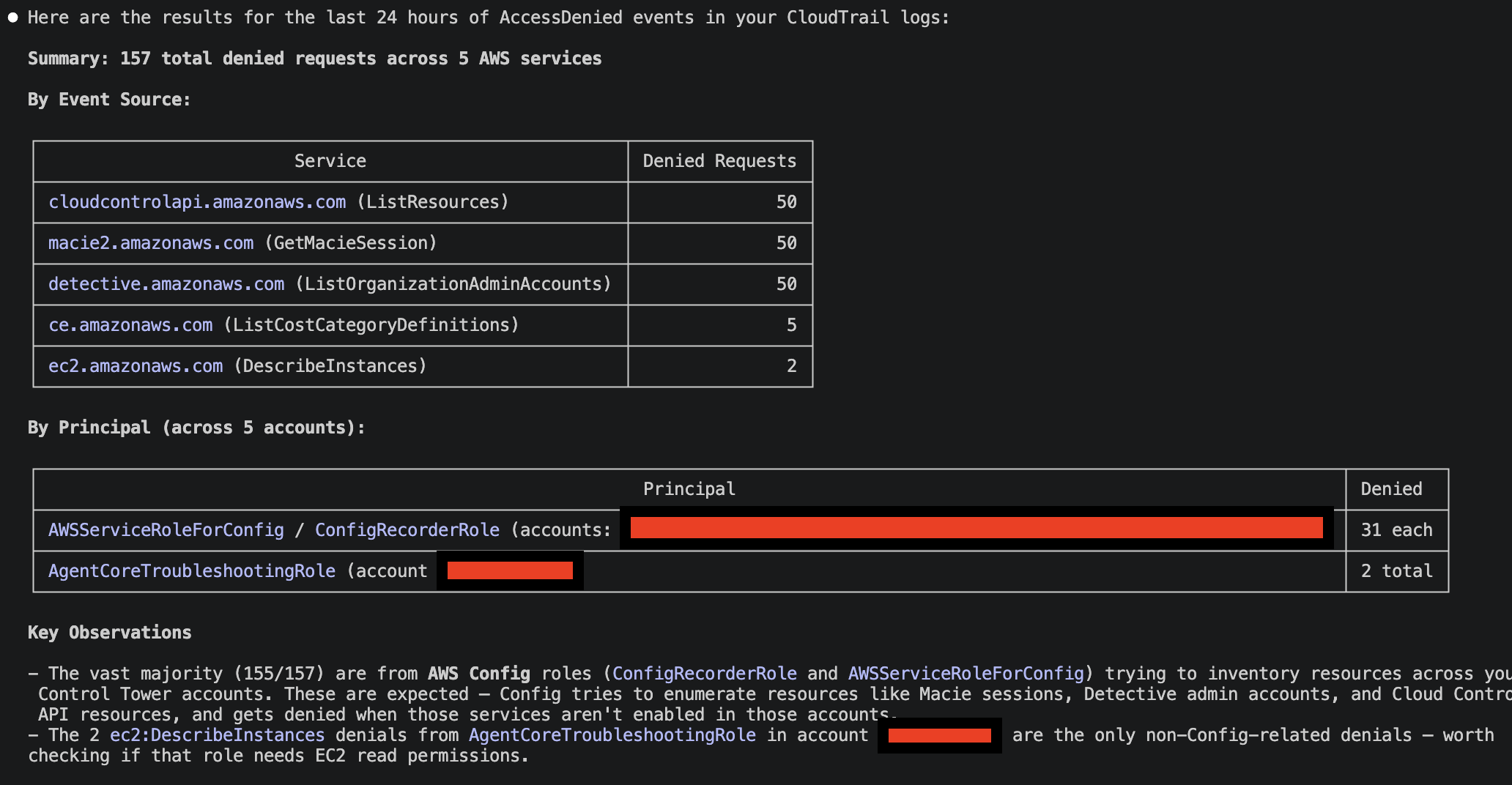
The real test: can Claude use this plugin to query CloudTrail logs stored in CloudWatch Logs Insights? I invoked the skill:
/code-interpreter-execute query the last 24 hours of CloudTrail logs, i want to have an aggregated view of access denied. My CloudTrail Logs are in the CloudWatch Log Group: aws-controltower/CloudTrailLogsBehind the scenes, Claude Code generated Python code to query CloudWatch Logs, which was executed by Bedrock AgentCore Code Interpreter. Depending on the request, it could also invoke the AWS CLI directly from Code Interpreter. Here are the results:
Verdict
AgentCore Code Interpreter in VPC mode delivers on the promise of secure, isolated code execution. The per-second billing with no idle charges makes it practical for interactive use through Claude Code. A 45-second query costs under a cent.
The Go binary bundled in the Claude Code plugin makes it easier to invoke the Bedrock AgentCore Code Interpreter APIs. No dependency on specific versions of AWS CLI in client machines, nor library dependencies. It also allow more advanced control, offloading the logic in the Skill.
The Claude Code plugin model is well-suited for this pattern. The bin/ directory for bundling executables and allowed-tools for restricting what the skill can do are exactly the right abstractions. The marketplace distribution means anyone on the team can install the plugin and start running sandboxed code without understanding the AgentCore setup underneath.
The skill delivered in the plugin is generic, and for this reason you have to specify for example how to retrieve CloudTrail data via a specific CloudWatch Log Group. However, you can tweak the Skill to match your use case, or even define multiple Skills, for different AWS Services/use cases.
While the example here is straightforward, there is a huge benefit in isolating the AWS API calls in a sandbox environment: restricted permissions and network egress (in VPC mode).
The Go binary source is at bedrock-agentcore-code-interpreter-cli and the Claude Code plugin is at aws-bedrock-agentcore-codeinterpreter.