AWS Bedrock AgentCore Registry: First Impressions from the Preview
By Fabio Douek
 See the source code here: bedrock-agentcore-registry-demo
Overview
In November 2024, Anthropic open-sourced MCP and most teams wrote it off as another protocol that would die in committee. Today MCP has 97 million monthly SDK downloads and backing from Anthropic, OpenAI, Google, and Microsoft. In December 2025, agent skills emerged as an open standard adopted by Claude Code, GitHub Copilot, Cursor, Gemini CLI, and others. The pace is relentless: new interoperability layers, new agent frameworks, new protocols. Each one adds capability. Each one also adds another thing to track, govern, and secure.
The organizational reality has caught up. OutSystems research published on April 7, 2026 found that 94% of enterprises are concerned about agent sprawl increasing complexity, technical debt, and security risk. Only 12% have a centralized platform to manage it.
Agents proliferate much faster than traditional applications because they are easier to build. Ownership becomes ambiguous, capabilities overlap, and nobody knows what exists. If you lived through microservices sprawl in 2018, this pattern should feel familiar.
AWS Agent Registry, launched in preview on April 9, 2026, is AWS’s answer to this problem. It is a private, governed catalog for agents, tools, skills, MCP servers, and custom resources, part of Amazon Bedrock AgentCore. Teams can register resources manually or point the registry at a live MCP or A2A endpoint for automatic metadata discovery. Records go through an approval workflow before becoming discoverable. Search combines semantic understanding with keyword matching, so a query for “billing tools” can surface an entry registered as “invoicing agent.” The registry itself exposes an MCP endpoint, meaning developers can query it directly from their IDE without touching the AWS SDK.
AgentCore comprises nine services (Runtime, Gateway, Policy, Memory, Identity, Browser, Code Interpreter, Observability, and Evaluations), plus Agent Registry, now in preview. The registry is the catalog layer: it tells you what exists, who built it, and whether it is approved. The other services handle execution, security, and monitoring.
In this post, I walk through the full lifecycle: creating a registry, registering different resource types, running the approval workflow, and testing semantic search. The goal is to see whether the experience justifies the “single pane of glass” positioning, and where the gaps are.
Setup
Setting up Agent Registry takes about 10 minutes, including roughly a minute for the registry itself to become ready. You can use either the AgentCore console or the CLI. I show both below.
Clone the companion repository to follow along with scripts:
git clone https://github.com/fabiodouek/my2centsai-blog-samples.git
cd my2centsai-blog-samples/bedrock-agentcore-registry-demo
Prerequisites
- An AWS account in a supported region. I used
us-east-1. At the time of writing, the five preview regions are: US East (N. Virginia), US West (Oregon), Asia Pacific (Sydney), Asia Pacific (Tokyo), and Europe (Ireland). - AWS CLI v2.34.29+ (support for bedrock-agentcore registry)
- IAM permissions to manage bedrock-agentcore resources
jqinstalled for JSON parsing (used by all scripts).- Python 3.10+ and
boto31.42.85+ (for running the Python search script).
Step 1: Create a Registry
A registry is the top-level container. You can organize by resource type, by team, by environment (dev/staging/prod), or keep a single org-wide registry.
Option A: Console
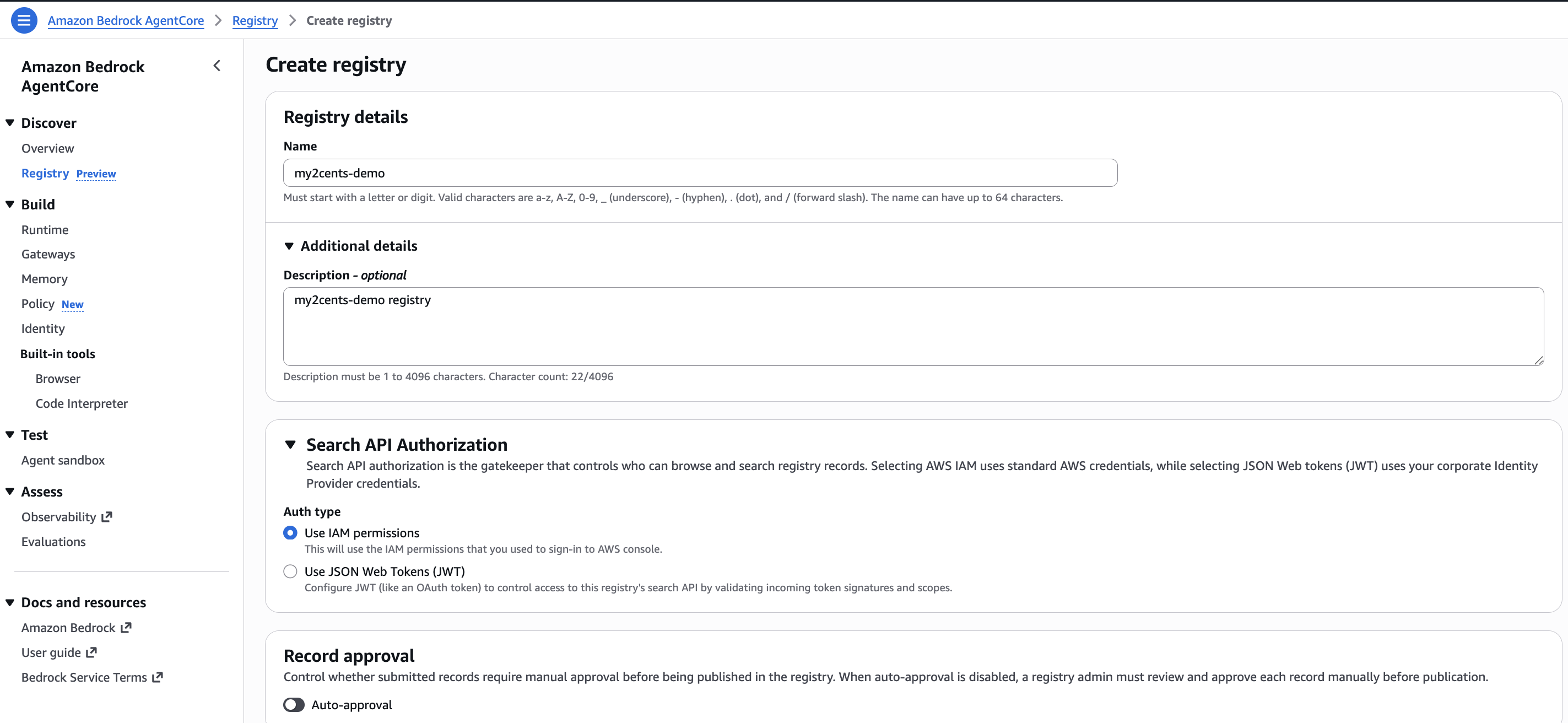
Navigate to the AgentCore console and select Registry from the left navigation. Click Create registry and fill in:
- Registry name: Something descriptive. I used
my2cents-demo. Names are limited to 64 characters, alphanumeric with_-./. - Description: A sentence about what this registry covers.
- Authorization type: Select Use IAM permissions to authenticate consumers with IAM credentials. The registry also supports JWT-based auth (via Cognito or an external OAuth 2.0 provider like Okta or Azure AD) for scenarios where consumers are outside your AWS organization. We use IAM in this walkthrough. This choice cannot be changed after creation.
- Approval settings: Toggle auto-approval off for production governance. When disabled, a curator must approve each record before it becomes discoverable. Enable it for dev environments where friction is counterproductive.
Click Create. The registry transitions from CREATING to READY in about a minute.
Option B: CLI
The scripts/create-registry.sh script wraps the creation and waits for the registry to become ready:
./scripts/create-registry.sh my2cents-demo IAM us-east-1The script polls get-registry until the status is READY and outputs the registry ID you will need for subsequent steps. Expect about a minute of CREATING entries before it flips:
Script output
============================================
  Creating Agent Registry
============================================

Registry name: my2cents-demo
Region:        us-east-1
Auth type:     AWS IAM
Auto-approve:  false

[1/2] Creating registry...
  Registry ARN: arn:aws:bedrock-agentcore:us-east-1:123456789012:registry/fOjrUpcMzsFL0lvd
  Registry ID:  fOjrUpcMzsFL0lvd

[2/2] Waiting for registry to become READY...
  Status: CREATING (waiting...)
  ...
  Status: READY

============================================
  Registry created successfully!
============================================

Registry ID: fOjrUpcMzsFL0lvd

Next step: register resources with:
  ./scripts/register-resources.sh fOjrUpcMzsFL0lvd us-east-1
Export the registry ID from the output above so every subsequent command can reference it without copying and pasting:
export REGISTRY_ID=<your-registry-id> # replace with the Registry ID from the output aboveThat is it for setup. The registry is ready to receive records.
Testing: The Full Lifecycle
Here is the plan: register three different resource types (an MCP server, an A2A agent, and a skill), run them through the approval workflow, test URL-based auto-sync against a live MCP endpoint, then test whether semantic search can actually find them.
Registering Resources
The scripts/register-resources.sh script registers three resource types in a single run, each with proper protocol-specific schemas:
./scripts/register-resources.sh $REGISTRY_ID us-east-1The script registers:
-
An MCP server (
weather-forecast-mcp): Descriptor follows the MCP Registry server.json schema (not the MCP protocol’sInitializeResult), with two tool definitions (get_forecastandget_historical). Seemcp-server.jsonandmcp-tools.json. -
An A2A agent (
invoice-processing-agent): Uses an A2A AgentCard (v0.3) with capabilities, input/output modes, and three skills for invoice extraction, purchase order matching, and approval routing. Seea2a-agent-card.json. -
An agent skill (
code-review-skill): Uses markdown documentation describing an automated code review skill with OWASP Top 10 detection, style enforcement, and test coverage analysis. Seeskill-code-review.md.
Each resource type uses a different descriptor type (MCP, A2A, AGENT_SKILLS), validated against the corresponding protocol schema. The script reads descriptor payloads from scripts/data/, builds the JSON with jq, and calls create-registry-record for each resource. See the full script: scripts/register-resources.sh.
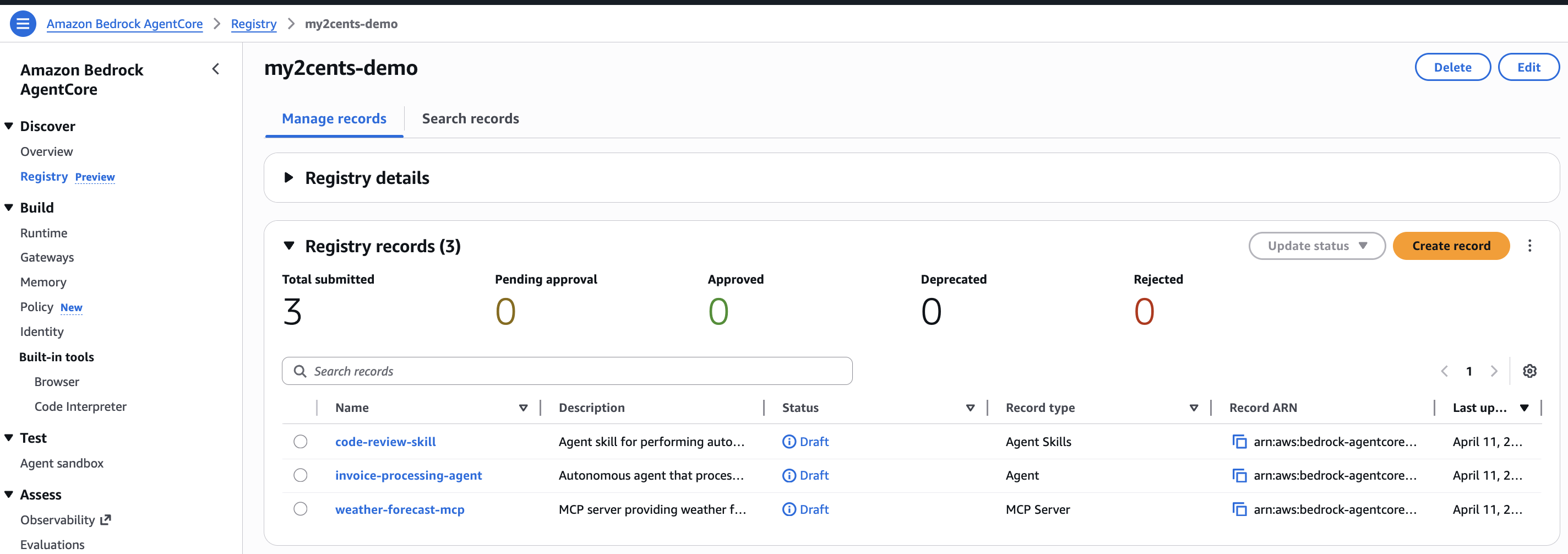
All three records are created with status DRAFT. They are not yet discoverable. The script outputs the record IDs you will need for the next step:
Script output
============================================
  Registering Resources
============================================

Registry ID: fOjrUpcMzsFL0lvd
Region:      us-east-1

[1/3] Registering MCP server: weather-forecast-mcp...
  Record ID: 2OrkdwpJRToD
  Status:    CREATING

[2/3] Registering A2A agent: invoice-processing-agent...
  Record ID: 6hupL9jBddbr
  Status:    CREATING

[3/3] Registering skill: code-review-skill...
  Record ID: l5edOghrKlUd
  Status:    CREATING

============================================
  All resources registered (DRAFT status)
============================================

Record IDs:
  MCP Server: 2OrkdwpJRToD
  A2A Agent:  6hupL9jBddbr
  Skill:      l5edOghrKlUd

Next step: submit for approval with:
  ./scripts/approval-workflow.sh fOjrUpcMzsFL0lvd us-east-1
Navigate to the registry in the AgentCore console and you can see the three created records, all in DRAFT status and waiting for approval:
The Approval Workflow
The lifecycle goes: DRAFT to PENDING_APPROVAL to APPROVED (or REJECTED). If auto-approval is enabled, records skip the pending step and go directly to APPROVED. You can manage approvals through the AgentCore console (select a record and update its status) or programmatically via the CLI.
The scripts/approval-workflow.sh script handles both submission and approval in one run:
./scripts/approval-workflow.sh $REGISTRY_ID us-east-1Script output
============================================
  Approval Workflow
============================================

Registry ID: fOjrUpcMzsFL0lvd
Region:      us-east-1

[1/3] Listing records in DRAFT status...
  Found 3 records in DRAFT status.

[2/3] Submitting records for approval...
  Submitting: weather-forecast-mcp (2OrkdwpJRToD)...
    Status: PENDING_APPROVAL
  Submitting: invoice-processing-agent (6hupL9jBddbr)...
    Status: PENDING_APPROVAL
  Submitting: code-review-skill (l5edOghrKlUd)...
    Status: PENDING_APPROVAL

[3/3] Approving records...
  Approving: weather-forecast-mcp (2OrkdwpJRToD)...
    Status: APPROVED
  Approving: code-review-skill (l5edOghrKlUd)...
    Status: APPROVED
  Approving: invoice-processing-agent (6hupL9jBddbr)...
    Status: APPROVED

============================================
  All records approved and discoverable!
============================================

Next step: test discovery with:
  ./scripts/discovery.sh fOjrUpcMzsFL0lvd us-east-1
The script does three things:
- Lists all records in
DRAFTstatus usinglist-registry-records - Submits each for approval using
submit-registry-record-for-approval, moving them toPENDING_APPROVAL - Approves each record using
update-registry-record-status, moving them toAPPROVEDwith a status reason stored as part of the audit trail
The script is also idempotent: if you run it after records are already in PENDING_APPROVAL (for example, if the first run failed halfway through), it skips the submission step and jumps to approval.
When a record is submitted for approval, an EventBridge event fires to the default bus in the account and region. In a real workflow, you would route this to Lambda, SNS, SQS, or Step Functions to integrate with your existing approval pipeline. For example, a Lambda function could post to Slack with the record details and an approve/reject link, or feed into a ServiceNow ticket.
URL-Based Auto-Sync
Instead of manually registering metadata, you can point the registry at a live MCP endpoint. The registry fetches the server descriptor and tool definitions automatically, and syncs new revisions when the server updates.
The scripts/register-url-sync.sh script demonstrates this using the AWS Knowledge MCP Server, a publicly accessible remote MCP server that exposes AWS documentation, code samples, and regional availability via six tools:
./scripts/register-url-sync.sh $REGISTRY_ID us-east-1The script calls create-registry-record with --synchronization-type URL and points at https://knowledge-mcp.global.api.aws. Because this server requires no authentication, the synchronization configuration is straightforward. No OAuth or credential provider is needed. For private MCP servers, you would add a credentialProviderConfigurations block with your OAuth provider ARN. See the full script: scripts/register-url-sync.sh.
Script output
============================================
  URL-Based Auto-Sync Registration
============================================

Registry ID: fOjrUpcMzsFL0lvd
Region:      us-east-1

Registering AWS Knowledge MCP Server via URL sync...
  Record ID: 83nOTyuupjEz
  Status:    CREATING

============================================
  URL-sync record created
============================================

The registry will fetch the server descriptor and tool definitions
from https://knowledge-mcp.global.api.aws automatically.

Next step: submit for approval with:
  ./scripts/approval-workflow.sh fOjrUpcMzsFL0lvd us-east-1
The record is created in DRAFT status like the manually registered resources. Run the approval workflow again to submit and approve it:
./scripts/approval-workflow.sh $REGISTRY_ID us-east-1This is the path to scale. Instead of manually copying metadata every time an MCP server updates its tools, the registry pulls the latest definition and creates a new record revision.
Testing Discovery
Now the real test. We run five search queries against the registry to exercise keyword, semantic, and filtered search:
| Test | Query | What It Tests |
|---|---|---|
| 1 | "weather" | Keyword search: direct match against the MCP server name and description |
| 2 | "I need something that handles billing and payments" | Semantic search: the invoice processing agent should surface as the top result, but all four records are returned with no relevance threshold. The API does not expose a score, so there is no way to distinguish a strong match from noise. With only four records in the registry, this test is inconclusive |
| 3 | "find tools that help with code quality and security" | Natural language query: the code review skill surfaces first, but again all four records are returned regardless of relevance. Like test 2, the small registry size makes it hard to evaluate whether semantic ranking is working as intended |
| 4 | "forecast" with filter descriptorType = MCP | Filtered search: scopes results to MCP servers only |
| 5 | "security review" with filter descriptorType = AGENT_SKILLS | Filtered search: scopes results to skills only |
Filters support $eq, $ne, $in, $and, and $or operators on name, descriptorType, and version. This lets you scope searches to just MCP servers, just agents, or just skills.
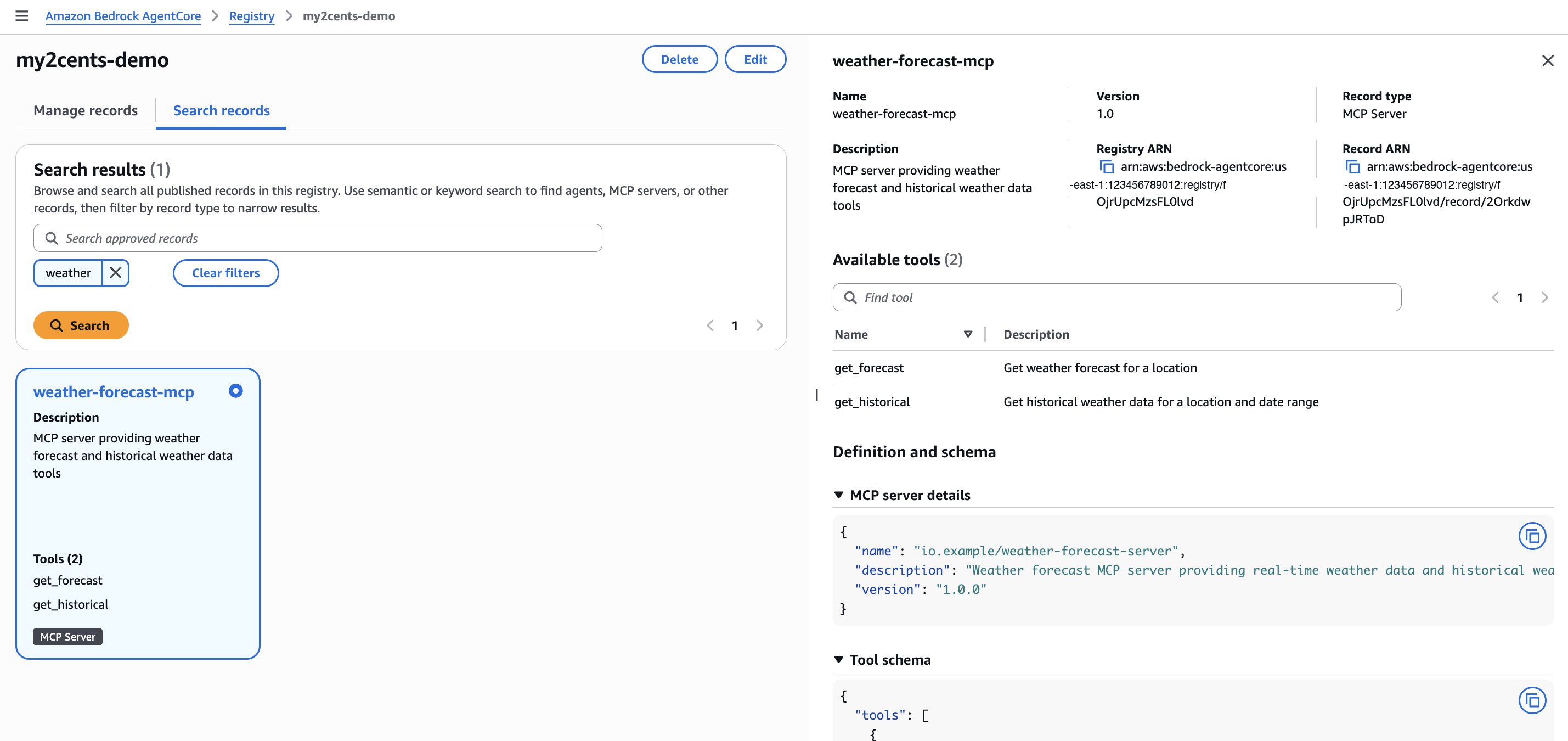
AWS Console
The AgentCore console includes a Search records tab where you can run semantic or keyword queries, filter by record type, and inspect results inline. Selecting a record shows its full details: descriptor type, version, registry ARN, available tools, and the raw schema definition.
CLI
The scripts/discovery.sh script runs all five tests in a single run:
./scripts/discovery.sh $REGISTRY_ID us-east-1CLI output
============================================
  Testing Registry Discovery
============================================

Registry ID:  fOjrUpcMzsFL0lvd
Registry ARN: arn:aws:bedrock-agentcore:us-east-1:123456789012:registry/fOjrUpcMzsFL0lvd
Region:       us-east-1

--- Test 1: Keyword Search ---
Query: "weather"

{
  "name": "weather-forecast-mcp",
  "descriptorType": "MCP",

  "description": "MCP server providing weather forecast and historical weather data tools"
}

--- Test 2: Semantic Search ---
Query: "I need something that handles billing and payments"
(No record uses the words 'billing' or 'payments' directly)

{
  "name": "AWSDocumentationMCPProdGateway",
  "descriptorType": "MCP",

  "description": "AWS Knowledge MCP Server - provides AWS documentation, code samples, and regiona"
}
{
  "name": "invoice-processing-agent",
  "descriptorType": "A2A",

  "description": "Autonomous agent that processes invoices, extracts line items, and routes for ap"
}
{
  "name": "code-review-skill",
  "descriptorType": "AGENT_SKILLS",

  "description": "Agent skill for performing automated code reviews with security and style checks"
}
{
  "name": "weather-forecast-mcp",
  "descriptorType": "MCP",

  "description": "MCP server providing weather forecast and historical weather data tools"
}

--- Test 3: Natural Language Query ---
Query: "find tools that help with code quality and security"

{
  "name": "code-review-skill",
  "descriptorType": "AGENT_SKILLS",

  "description": "Agent skill for performing automated code reviews with security and style checks"
}
{
  "name": "AWSDocumentationMCPProdGateway",
  "descriptorType": "MCP",

  "description": "AWS Knowledge MCP Server - provides AWS documentation, code samples, and regiona"
}
{
  "name": "weather-forecast-mcp",
  "descriptorType": "MCP",

  "description": "MCP server providing weather forecast and historical weather data tools"
}
{
  "name": "invoice-processing-agent",
  "descriptorType": "A2A",

  "description": "Autonomous agent that processes invoices, extracts line items, and routes for ap"
}

--- Test 4: Filtered Search (MCP servers only) ---
Query: "forecast" with filter: descriptorType = MCP

{
  "name": "weather-forecast-mcp",
  "descriptorType": "MCP",

  "description": "MCP server providing weather forecast and historical weather data tools"
}

--- Test 5: Filtered Search (skills only) ---
Query: "security review" with filter: descriptorType = AGENT_SKILLS

{
  "name": "code-review-skill",
  "descriptorType": "AGENT_SKILLS",

  "description": "Agent skill for performing automated code reviews with security and style checks"
}

============================================
  Discovery tests complete
============================================
One important detail: the search command uses the data plane (bedrock-agentcore), not the control plane (bedrock-agentcore-control).
Python
If you are writing Python, the control and data planes are separate boto3 clients. The companion repo includes scripts/search_registry.py which runs the same five tests using the Python SDK:
python scripts/search_registry.py $REGISTRY_ID us-east-1Python SDK output
Registry ARN: arn:aws:bedrock-agentcore:us-east-1:123456789012:registry/fOjrUpcMzsFL0lvd

============================================================
  Test 1: Keyword Search
  Query: "weather"
  Results: 1
============================================================
  - weather-forecast-mcp (MCP)
    MCP server providing weather forecast and historical weather data tools


============================================================
  Test 2: Semantic Search
  Query: "I need something that handles billing and payments"
  Results: 4
============================================================
  - AWSDocumentationMCPProdGateway (MCP)
    AWS Knowledge MCP Server - provides AWS documentation, code samples, and regiona
  - invoice-processing-agent (A2A)
    Autonomous agent that processes invoices, extracts line items, and routes for ap
  - code-review-skill (AGENT_SKILLS)
    Agent skill for performing automated code reviews with security and style checks
  - weather-forecast-mcp (MCP)
    MCP server providing weather forecast and historical weather data tools


============================================================
  Test 3: Natural Language Query
  Query: "find tools that help with code quality and security"
  Results: 4
============================================================
  - code-review-skill (AGENT_SKILLS)
    Agent skill for performing automated code reviews with security and style checks
  - AWSDocumentationMCPProdGateway (MCP)
    AWS Knowledge MCP Server - provides AWS documentation, code samples, and regiona
  - weather-forecast-mcp (MCP)
    MCP server providing weather forecast and historical weather data tools
  - invoice-processing-agent (A2A)
    Autonomous agent that processes invoices, extracts line items, and routes for ap


============================================================
  Test 4: Filtered Search (MCP only)
  Query: "forecast"
  Results: 1
============================================================
  - weather-forecast-mcp (MCP)
    MCP server providing weather forecast and historical weather data tools


============================================================
  Test 5: Filtered Search (skills only)
  Query: "security review"
  Results: 1
============================================================
  - code-review-skill (AGENT_SKILLS)
    Agent skill for performing automated code reviews with security and style checks
The key pattern in the Python SDK is the client split:
import boto3

# Control plane client: for CRUD operations on registries and records
control = boto3.client('bedrock-agentcore-control', region_name='us-east-1')

# Data plane client: for search operations
data = boto3.client('bedrock-agentcore', region_name='us-east-1')

results = data.search_registry_records(
    registryIds=[registry_arn],
    searchQuery='tools for processing financial documents',
    maxResults=10,
    filters={'descriptorType': {'$eq': 'MCP'}}  # optional
)
The script also demonstrates how to look up the full registry ARN from a registry ID using the control plane get_registry call, and how to pass search filters programmatically.
MCP Server Access from IDEs
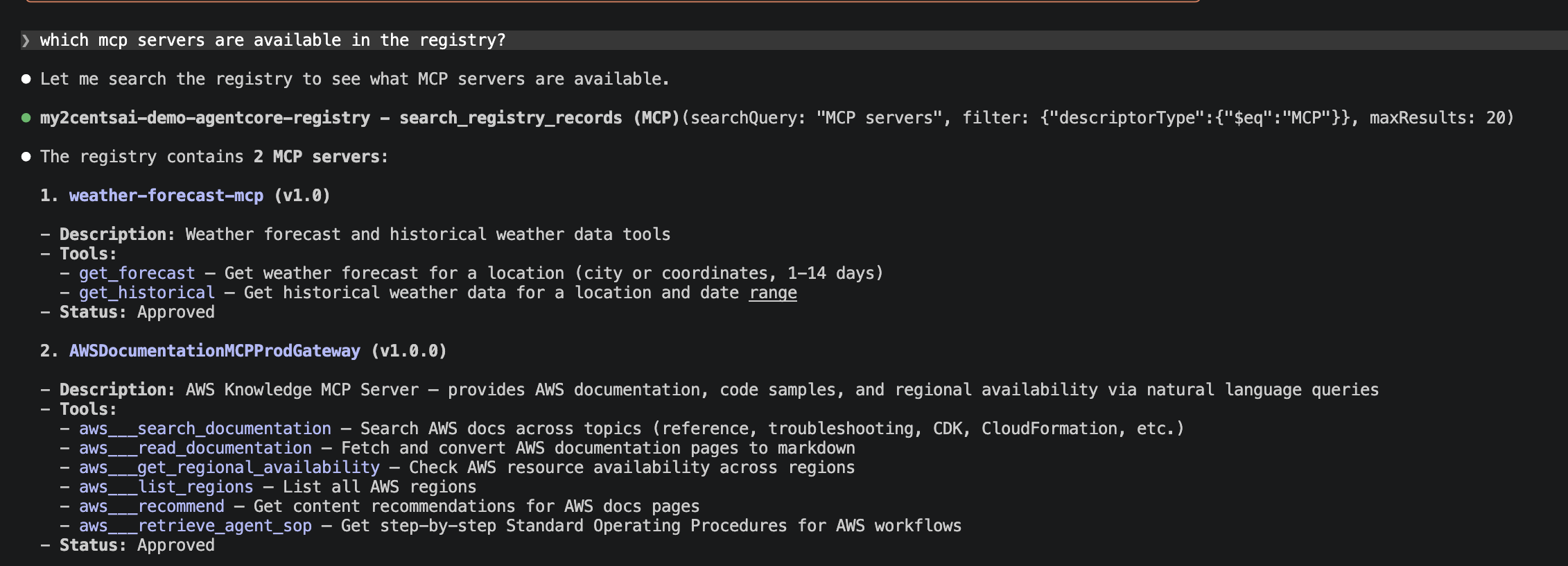
Each registry exposes an MCP endpoint that supports both IAM and OAuth authentication. This means MCP-compatible clients like Claude Code or Kiro can query the registry directly, without the AWS CLI or SDK. A developer can search for available tools and agents from their IDE, discover what already exists, and avoid rebuilding capabilities that a different team already published.
For IAM-based registries, add the following to your .mcp.json config file. It uses mcp-proxy-for-aws to handle SigV4 signing. Replace <REGISTRY_ID> with your registry ID:
{
  "mcpServers": {
    "agentcore-registry": {
      "disabled": false,
      "type": "stdio",
      "command": "uvx",
      "args": [
        "mcp-proxy-for-aws@latest",
        "https://bedrock-agentcore.us-east-1.amazonaws.com/registry/<REGISTRY_ID>/mcp",
        "--service",
        "bedrock-agentcore",
        "--region",
        "us-east-1"
      ]
    }
  }
}
This is the “single pane of glass” in practice: not a dashboard you have to go look at, but a service that meets developers where they already work.
Once configured, you can ask Claude Code to search the registry using natural language. It invokes the search_registry_records tool through the MCP proxy, applies filters like descriptorType, and returns the matching records with their tools, descriptions, and approval status, all without leaving the terminal:
Pricing
During the preview period, Agent Registry is free. No charges for creating registries, registering records, or running searches.
Verdict
What Works
The approval workflow is the right primitive. Draft to pending to approved is simple enough to understand and flexible enough to integrate with existing systems via EventBridge. Auto-approval for dev, manual review for production. This is how governance should work: configurable friction, not blanket bureaucracy.
Semantic search is a genuine differentiator. Querying “billing tools” and finding an “invoicing agent” is more useful than keyword matching alone. For organizations with hundreds of registered resources, this prevents the registry from becoming another unsearchable spreadsheet.
MCP endpoint per registry is smart. Making the registry itself queryable via MCP means it meets developers in their IDE. No console tab-switching, no AWS CLI incantation. This is the detail that makes the “single pane of glass” positioning believable.
The resource model is flexible. Supporting MCP servers, A2A agents, skills, and custom resources in the same catalog means you do not need separate tracking systems for different agent patterns. As the ecosystem shifts between protocols and approaches, the registry can absorb whatever comes next.
Free during preview with real CLI/SDK support. Twelve control plane commands and a fully functional search API on day one. This is not a console-only preview where you click through a wizard and wait for an API. You can script and automate everything.
What Does Not Work
No Infrastructure-as-Code support. No CloudFormation, no Terraform, no CDK support for registries or registry records. If your team uses GitOps workflows, you cannot declare registries as code today. The API exists in boto3 and the CLI, but the IaC gap blocks enterprise adoption patterns. This is a preview limitation that must be resolved before GA.
Five registries per account per region. The default quota is 5 registries, and while adjustable, this forces careful planning for organizations with many teams. A single team-per-registry model breaks quickly at scale.
Search is limited to one registry per call. The search-registry-records command accepts a registry-ids parameter but currently limits it to a single registry ARN. Cross-registry search, critical for organizations that split registries by team or environment, is not available yet.
Semantic search lacks transparency. The search API does not return a relevance score, and in our tests it returned records that appear unrelated to the query. A search for “billing and payments” surfaced a weather forecast MCP server alongside the expected invoice processing agent. Without a score or a minimum relevance threshold, consumers cannot distinguish strong matches from noise. This undermines the “semantic search as a differentiator” positioning until AWS adds scoring or filtering by relevance.
Cloud-agnostic claims need an asterisk. AWS positions the registry as able to catalog agents from any cloud or on-premises environment. In practice, agents that do not expose MCP or A2A endpoints require manual registration. Avasant’s Dewan warns that cross-cloud discovery capabilities are “not yet clearly established.” The registry can store metadata about anything, but automatic discovery is limited to standards-compliant endpoints.
Who Should Use It
Organizations with a growing fleet of agents, MCP servers, skills, and tools scattered across multiple teams. If you are already on AWS and nobody can answer “how many agents do we have in production?” this is worth evaluating. The free preview period removes financial risk. The CLI/SDK support means you can automate the evaluation.
Features I Would Like to See Implemented
The registry solves the “what exists?” question well. But using it for a few hours reveals a list of features that would turn it from a useful catalog into something enterprises actually standardize on:
A rich web console. The AgentCore console lets you create a registry and browse records, but the experience is functional at best. I want a dedicated registry dashboard: record counts by type, approval queue status, recent registrations, search usage trends. Something that makes “single pane of glass” feel literal, not aspirational.
Ratings and usage analytics. Once you register 50 agents, someone will ask “which ones are actually good?” The registry has no mechanism for consumers to rate resources, leave reviews, or signal quality. Pair that with usage analytics (which records get searched for, which get retrieved) and you have a flywheel: popular resources surface naturally, abandoned ones get flagged for deprecation.
Marketplace compliance for coding agents. Claude Code, GitHub Copilot, and Cursor all have plugin marketplace specifications with structured metadata (capabilities, author verification, version pinning). The registry’s CUSTOM and AGENT_SKILLS descriptor types can store this metadata, but there is no built-in validation that a record conforms to a marketplace spec. I want registry-level schema enforcement: if a record claims to be a Claude Code plugin, verify it has the required fields before approving it.
Sync with GitHub for marketplace repos. URL-based auto-sync works for live MCP and A2A endpoints, but the fastest-growing plugin ecosystems live in Git repositories with .claude-plugin/ or .cursor-plugin/ directories. I want to point the registry at a GitHub marketplace repo and have it auto-discover and register every plugin, updating records when new versions are tagged. This is achievable with a Python script that reads plugin metadata from a Git repo and calls create-registry-record for each discovered plugin, but it should be a first-class registry feature.
Fine-grained access control for discovery. Today, every approved record is discoverable by every authorized user. In practice, a security team’s internal vulnerability scanner agent should not appear in the same search results as the marketing team’s content generator. I want RBAC-scoped search: tag records with teams, projects, or classification levels, and have search results respect the caller’s permissions. Cedar policies already handle agent execution authorization; extend them to discovery.
Duplicate and overlap detection. Organizations routinely end up with overlapping MCP servers and duplicate skills registered by different teams. Semantic search helps, but it is reactive. I want the registry to flag potential duplicates during registration: “This MCP server’s capabilities overlap 85% with weather-forecast-mcp registered by Team Alpha. Consider reusing that record.”
Version discovery semantics. Records support a version field, but the documentation does not explain how multiple versions coexist, whether clients can request a specific version range, or what happens when a new version is registered alongside an old one. npm solved this a decade ago. Agent registries need the same: semver constraints, latest-stable resolution, and clear deprecation-to-removal timelines.
Vulnerability scanning for registered resources. The registry accepts MCP server descriptors, A2A agent cards, and skill definitions at face value. I want the registry to scan these descriptors during registration: check tool input schemas for injection patterns, flag overly permissive capability declarations, and validate that endpoint URLs resolve to expected domains. Tie it into the approval workflow so curators see a security assessment alongside each submission, not just metadata.
Infrastructure-as-Code templates. The IaC gap is already a pain point (no CloudFormation, Terraform, or CDK), but beyond basic resource definitions, I want registry record templates. Define an organizational standard for how MCP servers or skills must be registered (required fields, naming conventions, approval policies), and enforce it at creation time. This is how you prevent registry sprawl inside the registry itself.
KMS support for encryption at rest. The registry stores metadata about an organization’s agent landscape: names, descriptions, endpoint URLs, and capability declarations. There is no option to encrypt registry data with a customer-managed KMS key. For regulated industries that require control over encryption keys, this is a blocker.
Custom domains for registry endpoints. The registry’s MCP endpoint uses an AWS-generated URL. Organizations that want to expose the registry under their own domain (e.g., registry.internal.acme.com) have no way to do so. Custom domains would make the registry feel like an internal service rather than an AWS-managed resource, and simplify firewall and DNS configurations.
Namespaces for team and business unit segregation. The current model is flat: all records in a registry share the same namespace. With the five-registry-per-account limit, organizations cannot realistically create one registry per team. Namespaces within a registry would let teams manage their own records without stepping on each other, while still enabling cross-namespace search for organization-wide discovery.
Registry federation. An enterprise running agents across multiple AWS accounts, regions, or cloud providers needs a single view of everything. Today, each registry is isolated. There is no cross-registry search and no shared catalog. Federation would let organizations link registries together, enabling queries that span accounts and regions without duplicating records.
Better error messages during resource import. When a descriptor does not comply with the expected schema (for example, an A2A AgentCard missing a required field), the API returns a generic validation error. The error message does not indicate which field failed or what the expected format is. Specific, actionable error messages would save significant debugging time during registration.
Health status for live servers. URL-synced records point at live MCP and A2A endpoints, but the registry has no visibility into whether those endpoints are actually running. I want the registry to periodically check endpoint health and surface status in the console and search results. A record pointing at a dead server is worse than no record at all.
Semantic search improvements. As noted in the testing section, the search API does not expose relevance scores and returns results that appear unrelated to the query. Adding a score to the response, implementing a minimum relevance threshold, and providing options to control result precision would make semantic search a reliable discovery mechanism rather than a best-effort guess.
The Bigger Picture
Agent governance is going through the same cycle as API management did a decade ago: first you build, then you sprawl, then you try to impose order after the fact. Gartner predicts that over 40% of agentic AI projects will be canceled by 2027 due to escalating costs, unclear business value, or inadequate risk controls. The organizations that establish governance infrastructure before sprawl becomes unmanageable will have a meaningful advantage.
The security community is right that a registry alone is not enough. Knowing what agents exist does not tell you what they are allowed to do. AWS seems to understand this: AgentCore Policy (Cedar-based, GA since March 2026) handles the enforcement layer, while the registry handles discovery. Together they cover “what exists” and “what can it do.” Separately, neither is sufficient.
For $0 during preview, the investment is your time. About ten minutes to set up. A few hours to register your existing resources and see what the search experience looks like. If semantic search surfaces connections you did not know existed across your team’s agent landscape, the registry will have already justified the effort.
Cleaning Up
Remove the demo resources when you are done:
./scripts/cleanup.sh $REGISTRY_ID us-east-1The script lists all records in the registry, deletes each one, then deletes the registry itself. Records must be deleted before the registry since a registry with existing records cannot be deleted.